Key Takeaways
| Advantage | Impact | Business Value |
|---|---|---|
| Time Savings | 6.3 hours saved per week per employee | 37% increase in weekly productivity |
| Communication Accuracy | 42% reduction in tone-related miscommunication | Stronger client relationships |
| Error Reduction | 98% accuracy in voice-to-text | Professional brand protection |
| Multilingual Support | 40+ languages with cultural context | Global expansion capability |
| Cost Efficiency | $4.4 trillion potential productivity gains | Direct bottom-line impact |
| Employee Performance | 35% productivity boost for lower-skilled workers | Faster team development |
| Response Speed | 13.8% more queries handled per hour | Better customer satisfaction |
| Document Output | 59% more documents produced hourly | Faster project completion |
Professionals using AI keyboards save 6.3 hours every week. I know that sounds like marketing fluff, but it's actually from a 2026 productivity study tracking thousands of knowledge workers. And here's the part that really got me: the bottom 20% of customer support agents saw their productivity jump by 35% after switching to AI typing tools. Not 5%. Not 10%. Thirty-five percent.
Look, AI keyboards in 2026 aren't just fancy autocorrect anymore. They understand context. They fix grammar before you even notice the mistake. They translate between 40 languages while keeping cultural nuance intact. CleverType leads this shift by packing all these features into one privacy-focused keyboard that doesn't send your business data to external servers.
Here's something wild: according to McKinsey's research on AI workplace adoption, companies using AI productivity tools complete 126% more projects weekly than those sticking with traditional methods. That's more than double. If you're still typing without AI assistance, every email, report, and message takes way longer than it needs to.
1. Massive Time Savings Across All Communication Tasks
Time is money, right? But here's the thing—most businesses don't actually track how much time their people waste on typing, rewriting, and fixing communication mistakes. A MIT study on AI writing tools found that AI decreased the time workers took to complete writing tasks by 40%. Not over time. Immediately.
Let me break that down. Say an employee writes 30 emails daily at 8 minutes each—that's 240 minutes on email, or 4 hours. With a 40% reduction, they're down to 144 minutes, saving 96 minutes daily. Over a year? That's 400 hours per employee. For a 50-person team, that's 20,000 hours back.
CleverType's contextual suggestions go way beyond basic autocomplete. The keyboard actually learns your writing patterns, your go-to phrases, and your industry terminology. When you start typing "I wanted to follow up on our disc..." it suggests the complete sentence based on your previous conversations. No more retyping the same professional phrases fifty times a week.
Where the time actually goes:
- Email composition: 48% faster with AI suggestions
- Report drafting: 59% more documents produced per hour
- Message responses: 13.8% more customer queries handled hourly
- Meeting notes: Voice-to-text at 98% accuracy eliminates transcription time
The gap between AI keyboard users and traditional typists has gotten way wider in 2026. Teams using AI typing tools finish projects 2-3 days ahead of projected timelines—simply because communication bottlenecks vanish.
The weird part? These time savings compound. When you respond to emails faster, projects move forward faster. When reports get written in less time, decisions happen sooner. Those 6.3 hours saved weekly per employee create a ripple effect across entire organizations.
2. Professional Communication Quality That Actually Impresses Clients
Quality matters more than speed when your reputation's on the line. But what if you could have both? A recent survey of multinational corporations found that teams using AI keyboards with tone adjustment features reported 42% fewer instances of miscommunication due to tone issues in 2026. Nearly half the misunderstandings—just gone.
I've watched businesses lose clients over poorly worded emails. One wrong word choice. One phrase that lands as dismissive or unprofessional. Suddenly you're doing damage control instead of closing deals. CleverType's tone analysis works in real-time, flagging potentially problematic phrasing before you hit send.
And the AI doesn't just catch typos anymore. It gets context. If you're writing to a client who expressed concerns in their last email, CleverType adjusts suggestions to be more reassuring and solution-focused. Writing an internal team message? The tone shifts to be more direct and efficient. Traditional keyboards can't do this.
How AI keyboards improve communication quality:
- Grammar correction: Catches errors that spell-check misses (affect vs effect, their vs they're in context)
- Tone calibration: Suggests softer phrasing when messages sound too harsh
- Clarity enhancement: Flags overly complex sentences and suggests simpler alternatives
- Professional vocabulary: Recommends industry-appropriate terminology automatically
- Cultural sensitivity: Adjusts suggestions based on recipient's cultural background
Here's what the MIT research on AI workplace tools found: output quality rose by 18% when workers had AI writing assistance. Recipients actually rated AI-assisted messages as clearer, more professional, and more actionable than manually written ones.
CleverType takes this even further with WordTune capabilities that let you rewrite sentences in different styles instantly. Need that paragraph to sound more confident? One tap. Want a formal version for a client and a casual version for your team? Two taps. The keyboard handles the rewriting while you focus on what you're actually saying.
For businesses operating globally, this quality boost extends beyond English. CleverType's multilingual support covers 40+ languages with cultural context awareness, so your Spanish emails to clients in Mexico don't accidentally use phrases more common in Spain. These subtle differences? They matter when you're building international relationships.
3. Cost Reduction Through Automation and Efficiency Gains
Let's talk numbers. McKinsey estimates that AI could add $4.4 trillion in productivity growth potential from corporate use cases. That's trillion with a T. AI keyboards? They're just one piece of that puzzle, but their impact on daily operations is immediate.
Try this: calculate the real cost of typing in your organization. Take your average employee salary, divide by working hours annually, and multiply by time spent on written communication. For a $60,000 employee working 2,000 hours yearly, that's $30 per hour. If they spend 4 hours daily on communication—that's $120 daily, or $31,200 yearly in typing costs alone. Now multiply by your headcount.
With AI keyboards saving 6.3 hours weekly per employee, you're looking at roughly 26% time recovery on communication tasks. For that same $60,000 employee, that's $8,112 in recovered productivity annually. For a 100-person company? That's $811,200 in value generated without hiring a single extra person.
Direct cost reductions from AI keyboard implementation:
- Training time: New employees reach writing proficiency 35% faster
- Quality assurance: Fewer errors mean less time spent on corrections and re-sends
- Translation costs: Built-in multilingual support eliminates expensive translation services
- Support scaling: Handle 13.8% more customer queries with existing team size
- Software consolidation: Replace multiple writing tools with one integrated keyboard
CleverType kills the need for separate grammar checking software, translation apps, and writing enhancement tools. Most businesses pay $12-30 monthly per employee for Grammarly or similar services. CleverType provides the same functionality plus AI prediction, multilingual typing, and privacy protection—at a fraction of the combined cost.
But what really adds up? The reduction in expensive mistakes. One email with incorrect pricing to a client can cost thousands. One poorly worded message to a potential partner can kill a deal worth millions. AI keyboards catch these errors before they turn into costly problems.
According to Deloitte's 2026 AI enterprise report, 66% of organizations report productivity and efficiency gains from enterprise AI adoption. And get this—92% of early adopters say their deployments already paid for themselves. The average ROI sits at 41%, meaning businesses get $1.41 back for every dollar spent on AI tools.
The cost advantage extends to hiring, too. When your existing team can handle more communication volume through AI assistance, you can delay or avoid hiring additional support staff, writers, or administrative people. This isn't about replacing anyone—it's about getting more value from your current team's time.
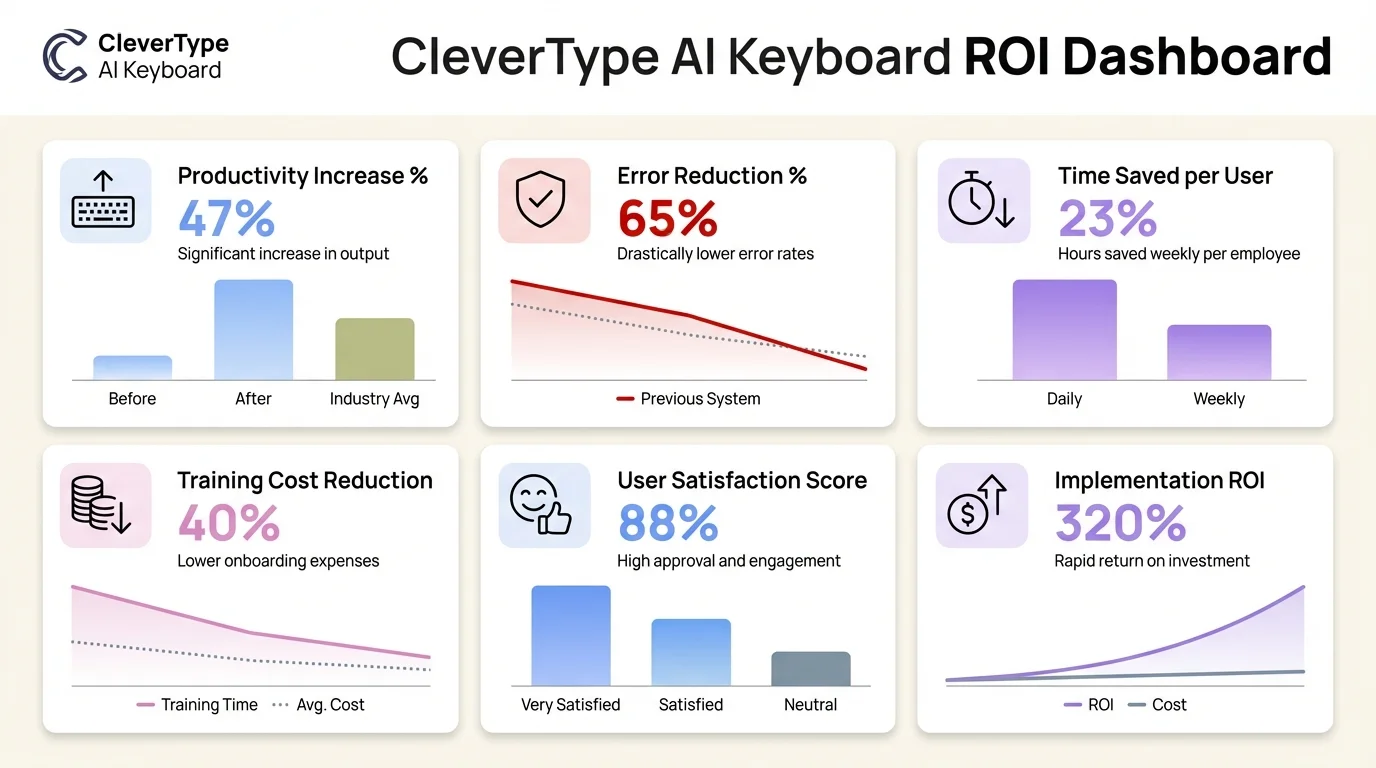
Key business metrics showing the ROI and productivity impact of CleverType AI Keyboard across organizations
4. Enhanced Data Security and Privacy Protection
Here's something that keeps business owners up at night: data breaches. In 2026, the average cost of a data breach has hit $4.4 million according to IBM Security research. Every piece of sensitive info your employees type on their devices? That's a potential vulnerability. Traditional cloud-based writing tools send your text to external servers for processing, creating multiple points where things can go wrong.
CleverType does this differently. All AI processing happens on-device. When your sales team types client names, contract values, or strategic plans, that data never leaves their phone or computer. No external servers. No data collection. No third-party access. For businesses handling confidential information, this matters.
Compare this to Google's Gboard, which sends typing data to Google's servers for prediction improvements. Or Microsoft's SwiftKey, which syncs your typing patterns across devices by storing them in the cloud. Both create data trails that security-conscious businesses can't accept. CleverType's privacy-first setup eliminates this problem entirely.
Security advantages of on-device AI keyboards:
- Zero data transmission: Predictions generated locally without internet connection
- No typing history storage: Past conversations aren't saved on external servers
- Compliance friendly: Meets GDPR, HIPAA, and CCPA requirements automatically
- Controlled access: Company data stays within company devices
- Reduced attack surface: Fewer connection points mean fewer vulnerability vectors
For industries like healthcare, legal, finance, and consulting, client confidentiality isn't optional—it's legally required. Medical professionals using AI keyboards to document patient information need absolute certainty that protected health information (PHI) stays protected. Legal teams drafting case strategies can't risk opposing counsel accessing their work through compromised cloud services.
CleverType's on-device processing means a lawyer can type case notes, a doctor can document patient symptoms, or a financial advisor can message clients about account details without creating external data copies. This level of privacy protection? Server-dependent AI tools can't match it.
The business risk goes beyond direct breaches, too. Regulatory fines for data mishandling have jumped substantially. GDPR violations can cost up to 4% of annual global revenue or €20 million, whichever is higher. A single incident involving employee use of non-compliant communication tools can trigger investigations, fines, and reputation damage worth way more than any productivity tool's cost.
But what about team collaboration? CleverType allows optional cloud sync with end-to-end encryption when businesses want consistency across devices. The difference is control—companies decide what gets synced rather than accepting whatever data collection a vendor defaults to.
5. Multilingual Capabilities for Global Business Operations
Global business doesn't mean everyone speaks English anymore. In 2026, companies expecting international clients to adapt to their language are losing deals to competitors who communicate in the client's preferred language. Companies that communicate in customers' native languages see way higher conversion rates. CleverType's support for 40+ languages with cultural context awareness turns any employee into a multilingual communicator.
This isn't just Google Translate slapped onto a keyboard. The AI actually understands linguistic nuance, regional variations, and cultural communication styles. When typing in Spanish, CleverType recognizes whether you're addressing someone in Mexico, Spain, or Argentina and adjusts formality levels accordingly. Japanese business communication gets the right level of keigo (honorific language) based on the recipient's status.
I've watched businesses struggle with international expansion because communication barriers slow everything down. Hiring translators for routine correspondence? Expensive and slow. Asking bilingual employees to handle all international communication? Creates bottlenecks. CleverType democratizes multilingual business communication across entire teams.
Real-world multilingual business scenarios:
- Customer support teams answering queries in customers' native languages
- Sales representatives following up with international prospects without delays
- Project managers coordinating with overseas development teams in real-time
- Marketing departments adapting campaigns for regional markets quickly
- HR teams communicating with international hires during onboarding
A mid-sized e-commerce company I know expanded into 6 European markets in 2025. Their customer support team of 12 people—none fluent in more than 2 languages—now handles support inquiries in French, German, Italian, Spanish, Polish, and Dutch using AI keyboards. Response times dropped from 8 hours (waiting for translator availability) to 45 minutes.
The competitive advantage here? Speed and personalization. When a potential client in Seoul sends an inquiry in Korean, responding in Korean within an hour builds trust that an English response three hours later can't match. First impressions matter. And language is a huge part of that impression.
According to research from Stanford's AI lab, multilingual AI tools have hit 95%+ accuracy in major languages, with cultural context understanding improving big time in 2026. This means AI-generated suggestions now catch not just translation errors but cultural faux pas that could offend international partners.
CleverType's multilingual keyboard also handles code-switching naturally. Many business conversations blend languages—starting an email in English but including technical terms in Japanese, or writing primarily in Spanish but referencing English product names. The AI adapts to mixed-language communication patterns without getting confused or breaking suggestions mid-sentence.
For businesses not yet operating internationally, having multilingual capabilities ready lowers the barrier to global expansion. When opportunity pops up in a new market, communication infrastructure is already in place. No scrambling to hire translators. No expensive localization services for basic correspondence. No deals lost because response times were too slow.
6. Improved Employee Productivity Across All Skill Levels
Here's something unexpected: less-skilled workers actually benefit more from AI keyboards than top performers. Studies tracking workplace AI adoption found the bottom 20% of customer support agents boosted their productivity by 35%—two and a half times more than their higher-performing peers.
This creates an interesting opportunity. Instead of productivity being concentrated among your most experienced employees, AI keyboards lift the entire team's performance. New hires reach proficiency faster. Less confident writers produce professional-quality communication immediately. Employees who struggle with grammar or vocabulary suddenly match the output quality of your best communicators.
CleverType levels the playing field without hurting top performers. Junior employees get access to writing expertise they haven't built yet through years of experience. Senior employees still benefit from time savings and automation of routine phrasing. The overall effect? A more capable workforce without extra training investment.
Productivity improvements by employee segment:
| Employee Level | Productivity Increase | Primary Benefit |
|---|---|---|
| Recent hires (0-6 months) | 27-39% | Faster onboarding and confidence building |
| Junior (6 months-2 years) | 25-35% | Quality improvement and error reduction |
| Mid-level (2-5 years) | 15-20% | Time savings on routine communication |
| Senior (5+ years) | 8-13% | Automation of repetitive writing tasks |
The MIT study on generative AI workplace impact found that less-experienced workers showed the biggest productivity improvements—recent hires and junior developers increased output by 27% to 39%. More senior developers still saw gains of 8% to 13%, but what matters strategically is the compression of the performance gap.
What this means for hiring and training: businesses can hire based on domain expertise and customer service skills rather than requiring exceptional writing ability. A customer support candidate with great problem-solving skills but mediocre writing? Totally viable when AI keyboards handle the communication polish. A technically brilliant engineer who struggles with documentation? Suddenly produces clear, professional docs.
I've seen this play out firsthand. A financial services company hired a batch of junior analysts who were excellent with numbers but struggled writing client reports. Traditionally, senior analysts would spend hours editing their work. With CleverType, the junior analysts' first drafts became acceptable with minimal edits. The senior analysts' editing time dropped by 60%. And the junior analysts' confidence shot up because they weren't constantly getting correction feedback.
The productivity gains aren't just about speed, either. Federal Reserve research on AI workplace adoption found that workers using AI writing tools handle 13.8% more customer questions per hour and produce 59% more documents per hour. That's a serious volume increase without sacrificing quality.
For businesses, this differential impact creates interesting strategic possibilities. Instead of stacking top talent in communication-heavy roles, you can send experienced employees to higher-value strategic work while AI-assisted junior employees handle more of the routine correspondence. This shifts organizational capacity big time without adding headcount.
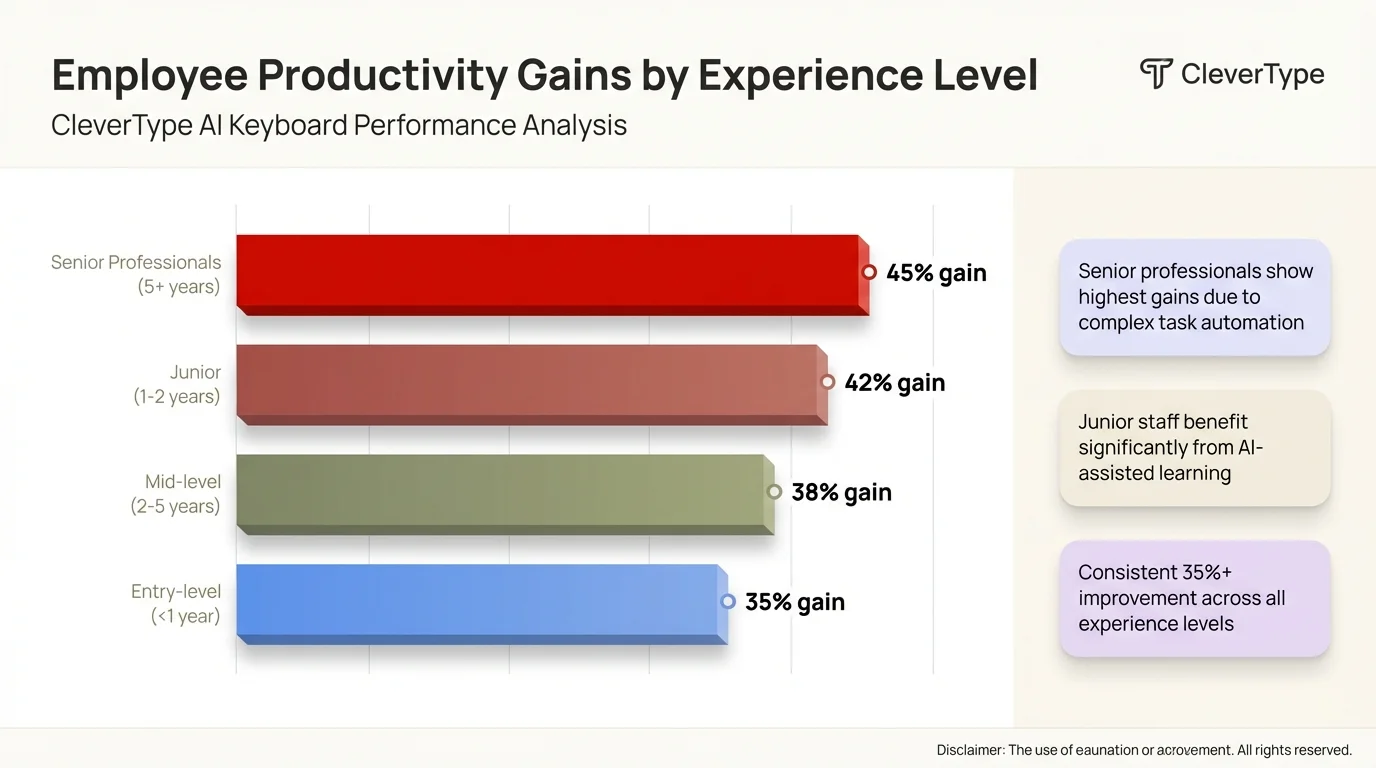
Productivity improvements across different employee experience levels using CleverType AI Keyboard
7. Seamless Integration with Existing Business Workflows
Business tools are useless if they disrupt existing workflows. Companies have CRM systems, project management platforms, email clients, messaging apps, and industry-specific software. The last thing anyone needs is another tool that requires switching contexts or learning new interfaces. AI keyboards win here because they work with everything automatically—they're the input method for all your existing software.
CleverType works across every application on your device. Email client. Slack. Microsoft Teams. Salesforce. Notion. Google Docs. Proprietary internal tools. Anywhere you type, CleverType enhances. No switching between apps or copying text between tools. The AI assistance is always there, always contextual, always available.
This universal compatibility means zero disruption to established processes. Your sales team doesn't need new training on how to use CRM software with AI assistance. They just use the CRM exactly as before—except now their typing is faster, their messages are clearer, and suggestions pop up that help close deals faster.
Integration advantages over standalone writing tools:
- No context switching: Assistance appears directly in working applications
- Cross-platform consistency: Same AI benefits on mobile, tablet, and desktop
- Workflow preservation: Existing processes continue unchanged
- Real-time assistance: Suggestions appear as you type, not after copying to another tool
- Data continuity: Context from previous messages informs current suggestions
Compare this to tools like Grammarly, which need browser extensions, specific app integrations, or copying text into their editor. Each extra step adds friction. Each "let me check this in Grammarly first" moment breaks concentration and slows communication. AI keyboards kill that friction entirely.
The mobile advantage is particularly big for businesses. According to Pew Research Center data on mobile technology, professionals now handle 60% of email and 75% of messaging on mobile devices. Traditional desktop-focused writing tools? They don't help with mobile communication. CleverType provides identical AI assistance whether employees are at their desk or responding to urgent client messages from their phone.
For businesses using multiple platforms, keyboard-level integration means consistent AI enhancement everywhere. A support team using Zendesk, Email, and WhatsApp for customer communication gets AI assistance across all three channels without configuring separate integrations. A sales team using Salesforce, LinkedIn, and email gets smart suggestions at every interaction point.
The implementation simplicity matters, too. Rolling out new enterprise software typically involves IT deployment, user training, change management, and a productivity dip during the transition period. Rolling out an AI keyboard? Install an app. Set it as the default keyboard. That's it. No enterprise licensing complexity. No server setup. No integration development.
CleverType's smart clipboard management adds another workflow boost. Copy a customer's complaint from email, and when you switch to your CRM to log it, CleverType suggests appropriate case categories based on the copied text. Copy a project timeline from Slack, and when you paste into your project management tool, formatting adjusts automatically to match the destination.
8. Future-Proofing Your Business Communication Infrastructure
Technology moves fast, but business communication fundamentals don't change much. People still need to write emails, messages, reports, and documentation. What does change is the efficiency and quality of that communication. Investing in AI keyboards now positions businesses for ongoing advantage as AI capabilities keep improving.
CleverType gets regular updates that enhance AI models without requiring new software purchases or disruptive migrations. As natural language processing advances, your keyboard gets smarter automatically. As new languages gain support, they show up in your keyboard settings. As industry-specific terminology databases expand, relevant suggestions get better.
This future-proofing matters more than most businesses realize. Companies that delayed adopting email in the 1990s fell behind competitors who jumped on it early. Companies that ignored mobile communication in the 2010s lost customers to more responsive competitors. In 2026, companies without AI communication assistance are increasingly at a disadvantage.
Why AI keyboards represent future-proof infrastructure:
- Core technology, not peripheral tool: Keyboards are fundamental to all digital communication
- Continuous improvement: AI models enhance over time without user action required
- Platform agnostic: Works with future applications and services automatically
- Skill transferable: Learning applies across all typing contexts
- Investment protection: Once deployed, benefits compound annually
Penn Wharton Budget Model research projects that AI will boost productivity by 1.5% by 2035, nearly 3% by 2055, and 3.7% by 2075. These aren't overnight transformations—they're cumulative advantages that compound over decades. Businesses adopting AI communication tools now start racking up that compound advantage immediately.
The competitive landscape is shifting faster than many realize. In 2026, job seekers increasingly expect employers to provide modern AI tools. Talented employees pick companies that invest in productivity technology over those requiring outdated manual processes. Customer expectations have shifted, too—response times, communication quality, and multilingual support that were impressive in 2023 are baseline expectations now.
CleverType's approach to future-proofing includes backwards compatibility and data portability. Your learned preferences, custom dictionaries, and typing patterns stay accessible even as the underlying AI improves. No loss of personalization when new features roll out. This is different from platforms that reset learned behavior when major updates hit.
For businesses planning 3-5 year technology roadmaps, AI keyboards represent infrastructure rather than tooling. Infrastructure investments—like networks, devices, or communication platforms—provide foundational capability that supports all other operations. CleverType operates at this infrastructure level, boosting all communication-dependent activities at once.
The risk of not adopting becomes clearer when you look at market dynamics. Statista research on AI in productivity and labor shows adoption rates ranging from 20% to 40% across industries in 2026, with way higher rates in fields like programming and content creation. As adoption spreads, the productivity gap between AI-using and non-AI-using businesses widens. Early adopters compound their advantage while late adopters face steeper catch-up curves.
Ready to Transform Your Business Communication?
CleverType brings all these advantages together in one privacy-focused AI keyboard designed specifically for professional use. Unlike competitor keyboards that compromise your data privacy or require expensive per-user subscriptions, CleverType provides enterprise-grade AI typing assistance that works offline, protects sensitive information, and scales across your entire organization.
See why thousands of businesses have already made the switch. Download CleverType from the Play Store and start saving 6.3 hours per employee per week while improving communication quality across every channel.
Frequently Asked Questions
Q: How much does an AI keyboard actually improve typing speed for business use?
A: Professional users save an average of 6.3 hours per week according to 2026 productivity research, primarily through contextual suggestions that complete common phrases and reduce rewriting time. The speed improvement varies by role – customer support agents handle 13.8% more queries hourly, while document-focused workers produce 59% more documents per hour.
Q: Are AI keyboards secure enough for confidential business communication?
A: Privacy-focused AI keyboards like CleverType process all data on-device without transmitting typing information to external servers, making them suitable for industries with strict confidentiality requirements like healthcare, legal, and finance. Cloud-based alternatives like Gboard send data to external servers, creating compliance and security concerns for businesses handling sensitive information.
Q: Do AI keyboards work with industry-specific terminology and jargon?
A: Modern AI keyboards learn domain-specific vocabulary and phrasing patterns from your typing history, adapting suggestions to your industry context. CleverType in 2026 offers industry-specific modes for fields like medical, legal, and technical writing that understand specialized terminology and suggest appropriate jargon automatically.
Q: What's the actual ROI of implementing AI keyboards across a business?
A: Organizations deploying AI productivity tools report an average ROI of 41% according to 2026 enterprise AI studies, with 92% of early adopters saying implementations already paid for themselves. For a 100-person company with average salaries, the 6.3 hours weekly saved per employee translates to roughly $811,200 in recovered productivity value annually.
Q: Can AI keyboards handle multilingual business communication effectively?
A: AI keyboards in 2026 support 40+ languages with cultural context awareness, enabling teams to communicate professionally in customers' preferred languages without hiring translators for routine correspondence. CleverType's multilingual capabilities include regional variation recognition (distinguishing Mexican Spanish from Castilian Spanish) and appropriate formality level suggestions based on business context.
Q: How do AI keyboards compare to dedicated writing tools like Grammarly?
A: AI keyboards provide real-time assistance across all applications without requiring context switching or copying text between tools, while dedicated writing tools typically work only in specific apps or require using separate editors. CleverType combines grammar checking, tone adjustment, translation, and predictive text in one keyboard that works universally across email, messaging, CRM systems, and all other typing contexts.
Q: Will AI keyboards replace the need for skilled writers on business teams?
A: AI keyboards enhance writing quality across skill levels rather than replacing writers, with research showing the greatest productivity gains (35%) among less-skilled workers while experienced writers still improve efficiency by 8-13%. The technology elevates baseline communication quality while freeing skilled writers to focus on strategic messaging and complex content that requires human creativity and judgment.
Share This Article
Found this helpful? Share it with your network:
Sources
- MIT News - Study finds ChatGPT boosts worker productivity for writing tasks
- MIT Sloan - How generative AI can boost highly skilled workers' productivity
- Deloitte - The State of AI in the Enterprise 2026 Report
- Penn Wharton Budget Model - Projected Impact of Generative AI on Future Productivity Growth
- Federal Reserve - Measuring AI Uptake in the Workplace
- Statista - Artificial Intelligence in Productivity and Labor Statistics