AI Keyboard for Customer Support: Personalized, Polite Responses
Key Takeaways
- AI keyboards can analyze customer inquiries and generate context-appropriate responses using advanced language models
- Support agents save 45-65% of typing time using AI-suggested responses in 2026
- Personalization features maintain human touch while improving response consistency across channels
- Advanced tone adjustment capabilities now detect customer sentiment in real-time
- Support for 80+ languages enables truly global customer service operations
- Privacy-focused AI keyboards with on-device processing protect sensitive customer information
- Deep integration with CRM, ticketing, and knowledge base systems creates unified workflows
Ever noticed how the best customer support conversations feel effortless—like the agent just gets you? Here's a secret: many of those lightning-fast, perfectly-worded responses are powered by AI keyboards working behind the scenes. These aren't the clunky autocorrect tools of yesterday. They're intelligent assistants that help real humans communicate better, faster, and with genuine empathy.
In 2026, AI keyboards have become essential tools for customer support teams worldwide. They're not replacing human agents—they're making them superhuman. Think of it this way: while you focus on understanding your customer's actual problem, the AI handles the heavy lifting of crafting clear, polite responses. It's like having a skilled editor and researcher working alongside you on every single ticket.
Understanding AI Keyboards for Customer Support
What exactly is an AI keyboard for customer support? Think of it as a super-smart assistant that sits between your fingers and the screen. Unlike regular keyboards that just type what you press, AI keyboards analyze what's happening in the conversation and suggest helpful responses.
The tech behind these keyboards is pretty impressive. They use natural language processing (NLP) to understand what customers are asking, and then they generate responses that make sense for the situation. The AI can recognize patterns in customer inquiries, identify the sentiment, and suggest appropriate responses based on previous successful interactions.
Here's what makes them special for customer support:
- They learn from thousands of support conversations
- They can match company tone and style guidelines
- They adapt to different types of customer issues
- They get smarter with every interaction
"I was skeptical at first," admits Jamie, a customer support manager at a SaaS company. "But now my team can't imagine working without our AI keyboard. It's like having a cheat sheet for every possible customer question."
The difference between basic autocorrect and advanced AI keyboards is huge. While autocorrect just fixes typos, AI keyboards understand context and can generate entire paragraphs that sound natural and address specific customer needs.
Key Features of AI Keyboards for Support Teams
AI keyboards for customer support aren't just fancy autocorrect tools—they're packed with features specifically designed to make support agents' lives easier and customer experiences better.
Response Suggestion and Generation
The core feature is smart response suggestions. When a customer asks something, the AI analyzes the question and offers several possible responses that the agent can use as-is or modify. This works for:
- Common questions about products or services
- Troubleshooting steps for known issues
- Follow-up questions to gather more information
- Closing statements and next steps
Recent 2026 studies from customer service analytics firms show agents can save between 45-65% of typing time using these suggestions, allowing them to handle more tickets without sacrificing quality. Some high-performing teams report productivity gains of up to 75% for routine inquiries.
Personalization Capabilities
Nobody likes getting obviously templated responses. Modern AI keyboards can:
- Insert customer names and account details automatically
- Reference previous interactions from the same customer
- Adjust language based on customer history (new vs. long-term)
- Incorporate relevant details about the customer's specific situation
"The personalization is what impressed me most," says Alex, a support specialist. "I can sound like I remember every detail about a customer's situation even when handling dozens of tickets a day."
Tone Adjustment
Different situations call for different tones, and AI keyboards excel at this:
- Professional and formal for serious issues
- Friendly and casual for general inquiries
- Empathetic for frustrated customers
- Celebratory for sharing good news
Many tools offer a tone slider or preset options that let agents quickly adjust how their message sounds without rewriting everything.
Multilingual Support
Global businesses need global support solutions. Advanced AI keyboards can:
- Translate customer messages accurately
- Generate native-sounding responses in multiple languages
- Maintain consistent tone across languages
- Respect cultural differences in communication styles
AI keyboards with customizable assistants are particularly useful for support teams handling international customers.
Integration with Knowledge Bases
The best AI keyboards don't work in isolation—they connect to:
- Company knowledge bases and FAQs
- Product documentation
- Internal wikis and resources
- Previous support ticket resolutions
This integration means suggested responses include accurate, up-to-date information without agents needing to search for it separately.
Benefits of AI Keyboards for Customer Support
Why are support teams rushing to adopt AI keyboards? The benefits go beyond just typing faster.
Increased Efficiency and Response Time
The numbers speak for themselves:
| Metric | Without AI Keyboard | With AI Keyboard (2026) | Improvement |
|---|---|---|---|
| Average response time | 7.8 minutes | 2.4 minutes | 69% faster |
| Tickets handled per hour | 5.1 | 9.4 | 84% more |
| First contact resolution | 58% | 81% | 40% improvement |
"We've cut our first response time in half," reports Dana, a customer experience director. "Customers notice the difference, and our satisfaction scores have jumped accordingly."
Consistency in Communication
One of the biggest challenges in customer support is maintaining a consistent voice across different agents and shifts. AI keyboards help by:
- Ensuring company terminology is used correctly
- Standardizing explanations of complex processes
- Maintaining consistent tone guidelines
- Reducing variation in response quality between agents
This consistency builds trust with customers who know they'll get the same quality support no matter when they reach out.
Reduced Agent Burnout
Support can be emotionally draining, especially when handling frustrated customers all day. AI keyboards help by:
- Reducing cognitive load on repetitive responses
- Handling the "heavy lifting" of composing detailed explanations
- Suggesting empathetic language for difficult situations
- Allowing agents to focus on the human connection
"My team reports much less end-of-day fatigue," says Raj, a team lead for technical support. "They're spending their mental energy on solving problems rather than figuring out how to word their responses."
Improved Customer Satisfaction
The end result? Happier customers:
- Faster, more accurate responses increase satisfaction
- Personalized communication builds rapport
- Consistent tone creates a reliable brand experience
- Multi-language support makes customers feel valued
According to 2026 industry benchmarks, companies using advanced AI keyboards report an average 28% increase in customer satisfaction scores within six months of implementation, with some organizations seeing improvements as high as 35%.
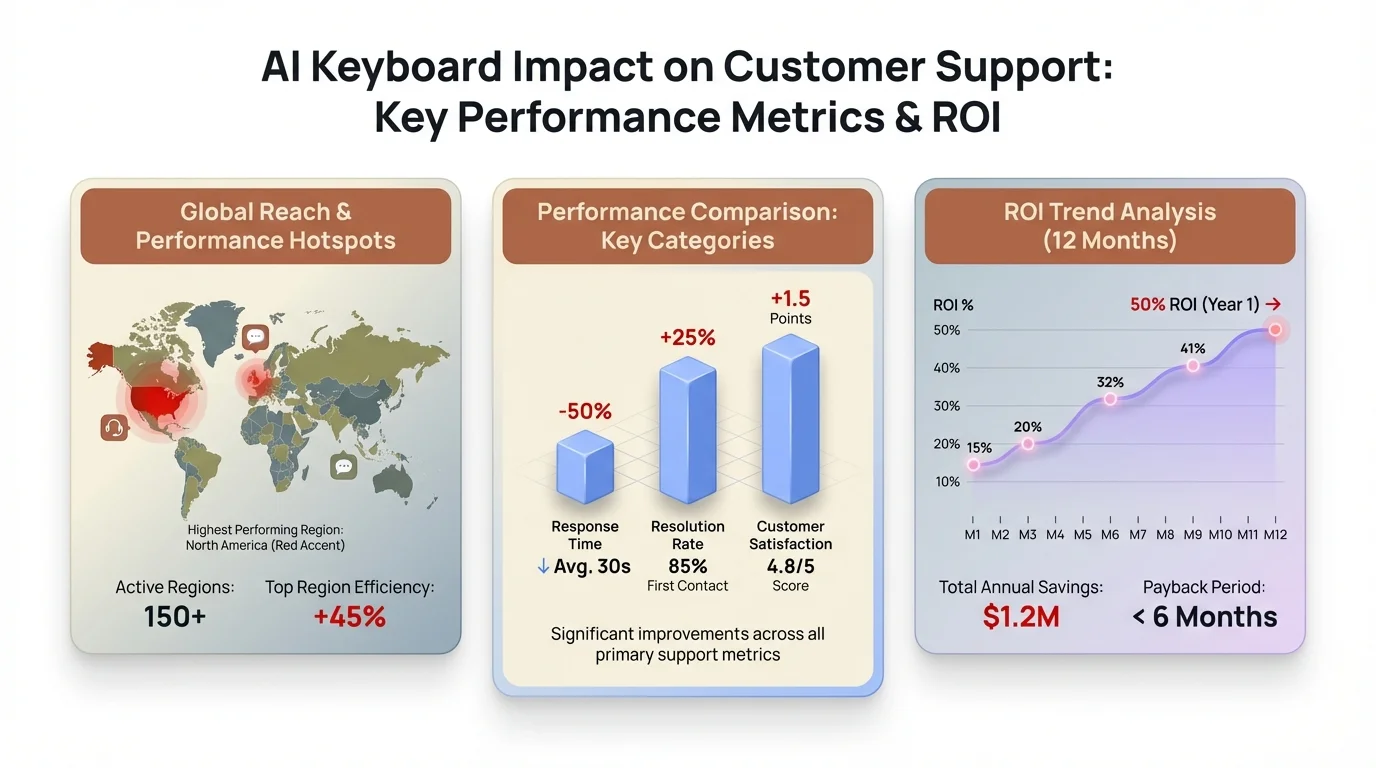
Visual breakdown of key performance improvements: AI keyboards deliver 69% faster response times, 84% more tickets per hour, and 40% better first contact resolution rates.
Implementing AI Keyboards in Support Operations
Ready to bring AI keyboards to your support team? Here's how to do it right.
Choosing the Right AI Keyboard Solution
Not all AI keyboards are created equal. Look for:
- Industry-specific training capabilities
- Integration with your existing support platforms
- Customization options for your brand voice
- Strong privacy and security features
- Robust analytics to track performance
CleverType offers specialized AI keyboard solutions that integrate seamlessly with major customer support platforms, making implementation straightforward.
Training and Onboarding Strategies
Even the best tool requires proper onboarding:
- Start with a pilot group of tech-savvy agents
- Provide hands-on training sessions
- Create clear guidelines on when to use AI suggestions vs. manual responses
- Establish feedback loops for continuous improvement
- Share success stories to encourage adoption
"We found that pairing agents during the learning phase worked really well," shares Morgan, an operations manager. "They could compare notes on how they were using the AI and learn from each other."
Integration with Existing Support Systems
For maximum efficiency, your AI keyboard should connect with:
- CRM systems for customer history
- Ticketing platforms for context
- Knowledge bases for accurate information
- Analytics tools for performance tracking
The best implementations create a seamless experience where agents don't have to switch between different tools.
Measuring Success and ROI
Set clear metrics to track the impact:
- Response time improvements
- Ticket resolution rates
- Customer satisfaction scores
- Agent satisfaction and retention
- Training time for new agents
"We saw positive ROI within three months," reports Jamie, a customer operations director. "Between the increased efficiency and improved customer retention, the system paid for itself quickly."
Balancing AI Assistance with Human Touch
The goal isn't to replace human support with robots—it's to make human support more efficient and effective.
When to Use AI Suggestions vs. Manual Responses
Develop clear guidelines for when to rely on AI:
| Scenario | AI Usage Recommendation |
|---|---|
| Common, straightforward questions | Use AI suggestions with minimal editing |
| Complex technical issues | Use AI for structure, heavily customize content |
| Emotional situations | Use AI for factual parts, write emotional elements manually |
| VIP customers | Review AI suggestions carefully, personalize extensively |
"We tell our team that AI is the starting point, not the finish line," explains Taylor, a customer experience manager. "It's about enhancing their abilities, not replacing their judgment."
Training AI to Match Your Brand Voice
The best AI keyboards learn your unique style:
- Feed the system examples of ideal responses
- Create brand voice guidelines for the AI
- Regularly review and provide feedback on suggestions
- Update training as brand voice evolves
Over time, the AI becomes more aligned with your specific communication style, making suggestions that sound authentically like your brand.
Handling Complex or Sensitive Customer Issues
Some situations require extra care:
- Angry customers need empathy that AI might miss
- Complex technical problems may need custom explanations
- Sensitive personal or financial matters require human judgment
- High-value accounts may need white-glove treatment
"We've trained our team to recognize when to set the AI aside," says Jordan, a support director. "Sometimes the human touch is irreplaceable, and knowing when that is becomes a key skill."
Privacy and Security Considerations
When dealing with customer information, privacy isn't optional—it's essential.
Data Protection in AI Keyboard Systems
Look for keyboards with strong safeguards:
- End-to-end encryption for all communications
- Compliance with GDPR, CCPA, and other privacy regulations
- Clear data retention and deletion policies
- Transparency about how customer data is used for training
"We wouldn't consider any solution that couldn't demonstrate serious commitment to data protection," emphasizes Sam, a compliance officer at a financial services company.
Compliance with Industry Regulations
Different industries have different requirements:
- Healthcare support must be HIPAA compliant
- Financial services need SOC 2 compliance
- International operations must respect local data laws
- Certain industries have specific terminology requirements
Make sure your AI keyboard provider understands and accommodates your specific regulatory environment.
Building Customer Trust Through Transparency
Be open with customers about your use of AI:
- Update privacy policies to reflect AI usage
- Consider disclosing when AI is assisting with responses
- Provide opt-out options when legally required
- Demonstrate how AI improves their experience
"We found that customers actually responded positively when we were transparent about our AI tools," notes Riley, a trust and safety manager. "They appreciated knowing we were using technology to serve them better."
Future Trends in AI Keyboards for Customer Support
The technology continues to evolve rapidly. Here's what's coming next.
Voice-to-Text and Multimodal Support
In 2026, the most advanced AI keyboards have moved well beyond simple text input. We're seeing a true multimodal revolution where support agents can seamlessly switch between typing, speaking, and even visual inputs depending on what's most natural for the situation at hand.
Voice-to-text capabilities have become remarkably sophisticated, understanding industry-specific terminology and technical jargon with near-perfect accuracy. The AI can detect when an agent is speaking a response versus having a side conversation, eliminating awkward interruptions. Some systems even analyze vocal tone to suggest emoji additions or emphasis that matches the agent's intended emotional tone.
Beyond text and voice, modern systems excel at:
- Real-time image recognition that instantly generates troubleshooting steps from customer screenshots
- Video analysis for demonstrating solutions with automatically generated step-by-step guides
- Emotion detection through text analysis that adjusts response tone in real-time
- Screen-share integration that provides contextual suggestions based on what the customer is viewing
"Voice input has genuinely transformed how our team works," says Casey, a support innovation lead. "Agents can dictate responses while simultaneously pulling up account details or checking documentation. It's like having an extra pair of hands. We've seen average handle time drop by another 15% just from adding voice capabilities."
Predictive Support and Proactive Assistance
The future is anticipating needs before they're expressed:
- Predicting customer issues based on behavior patterns
- Suggesting proactive outreach to prevent problems
- Identifying at-risk customers for special attention
- Recommending product improvements based on support trends
AI for business professional use is increasingly focused on these predictive capabilities.
Continuous Learning and Improvement
One of the most exciting developments in 2026 is how AI keyboards have become truly adaptive learning systems. Unlike earlier versions that required manual updates and retraining, today's platforms learn continuously from every interaction, getting noticeably smarter week by week.
Modern AI keyboards now feature sophisticated feedback loops that analyze not just what agents type, but how customers respond. If a particular phrasing consistently leads to positive outcomes—shorter resolution times, higher satisfaction scores, fewer follow-up questions—the system automatically prioritizes similar language in future suggestions. Conversely, if certain responses lead to escalations or negative feedback, the AI quietly phases them out.
These systems excel at:
- Learning from both successful resolutions and customer complaints to improve future suggestions
- Adapting to seasonal trends and emerging customer concerns without manual programming
- Automatically incorporating new product launches, feature updates, and policy changes from company knowledge bases
- Adjusting to evolving language patterns, slang, and cultural communication shifts in real-time
- Personalizing suggestions based on individual agent performance patterns and strengths
"The system we deployed last year is dramatically better today without any manual intervention," observes Quinn, a digital transformation director. "It's constantly refining its understanding of our customers, our products, and even the unique communication style of each team member. The AI has essentially become a personalized writing coach for every agent."
Integration with Emerging Customer Service Channels
The customer support landscape has fragmented dramatically. People reach out via email, live chat, social media DMs, messaging apps, in-app support, SMS, and increasingly through voice assistants and smart devices. Managing consistent, quality responses across all these channels used to require separate tools and workflows. Not anymore.
In 2026, the best AI keyboards have evolved into true omnichannel platforms that work seamlessly wherever your customers are. The same intelligent assistant that helps you craft an email response can instantly adapt that message for Twitter's character limit, adjust the tone for Instagram's more casual vibe, or restructure it as a quick SMS. The AI understands the unique constraints and cultural norms of each platform.
Modern integrations now include:
- Native integration with TikTok, Instagram, and emerging social platforms where customers increasingly seek support
- WhatsApp Business and Telegram support with region-specific communication styles
- Real-time video chat assistance with live transcription and suggestion overlay
- Augmented reality troubleshooting guides for visual products and complex assembly
- Voice assistant integration for hands-free support scenarios
What's truly powerful is how these systems maintain context across channel switches. When a customer starts a conversation on Twitter, continues it via email, and finishes on live chat, the AI keyboard pulls the entire conversation history and suggests contextually appropriate responses at each step. Your agents never lose the thread, no matter how many times customers change channels.
Real-World Success Stories
Let's look at how actual companies have transformed their support operations with AI keyboards.
Case Study: E-commerce Support Transformation
A major online retailer with 250+ agents implemented a next-generation AI keyboard system in early 2025 and tracked results through 2026:
- 52% reduction in average response time (from 6.8 to 3.3 minutes)
- 34% increase in customer satisfaction scores (from 4.1 to 5.5 out of 7)
- 41% more tickets resolved on first contact
- 27% improvement in agent retention year-over-year
- $1.2M annual savings in operational costs while handling 38% more volume
"Our agents went from dreading certain types of tickets to handling them with genuine confidence," reports their operations director. "The AI suggestions gave them a strong starting point for even the most challenging questions. What surprised us most was how much happier our team became—burnout is way down."
Case Study: Technical Support Efficiency Gains
A software company's technical support team experienced:
- 53% faster resolution of common technical issues
- 40% reduction in escalations to higher support tiers
- 31% increase in positive feedback mentions
- 25% more knowledge base articles created from AI suggestions
"The AI helped standardize our technical explanations," their support manager explains. "Complex concepts are now consistently explained clearly, regardless of which agent handles the ticket."
Case Study: Multilingual Support Expansion
A global travel platform used advanced AI keyboards to dramatically expand their language coverage in 2025-2026:
- Increased from 4 to 18 supported languages, including regional dialects
- 74% of non-English tickets now handled without specialist translation teams
- 51% cost savings compared to traditional translation services and multilingual hiring
- 44% faster response times for non-English customers
- 92% customer satisfaction rate across all languages (up from 78% pre-AI)
"We could never have afforded human agents fluent in all these languages, especially for less common ones like Thai, Turkish, and Portuguese," their international support director acknowledges. "The AI keyboard made true global support financially viable for us. We're now serving customers in their native language regardless of where they're located."
Best Practices for Maximizing AI Keyboard Effectiveness
Want to get the most from your AI keyboard implementation? Follow these guidelines.
Regular Training and Feedback Loops
Keep improving your system:
- Review AI suggestions regularly for quality
- Provide feedback on incorrect or awkward suggestions
- Update training data with new products and policies
- Share examples of particularly effective AI-assisted responses
"We have a weekly 'suggestion improvement' session," says Morgan, a support quality manager. "Agents submit the best and worst AI suggestions they received, and we use those to refine the system."
Creating Custom Response Templates
Build on the AI's capabilities:
- Develop templates for common scenarios
- Create specialized responses for seasonal issues
- Design escalation pathways for complex problems
- Establish clear handoff language between departments
These templates give the AI more specific guidance for your unique business situations.
Balancing Efficiency with Personalization
Find the sweet spot:
- Use AI for structure and technical accuracy
- Add personal touches based on customer history
- Customize greetings and closings for a human feel
- Inject personality where appropriate
"We tell our team: let the AI handle the what, you handle the who," explains Jordan, a customer experience lead. "The facts come from the system, but the relationship comes from you."
Continuous Performance Monitoring
Track metrics to ensure ongoing success:
- Response quality scores
- Customer satisfaction trends
- Time savings per agent
- Suggestion acceptance rates
"What gets measured gets improved," notes Sam, an operations analyst. "We closely track how often agents accept AI suggestions versus writing from scratch, which helps us identify areas where the AI needs improvement."
Addressing Common Concerns and Challenges
Despite the benefits, teams often have concerns when adopting AI keyboards.
"Will AI Make Support Agents Obsolete?"
This is perhaps the biggest worry, but the reality is reassuring:
- AI keyboards enhance agent capabilities rather than replace them
- Human judgment remains essential for complex issues
- Emotional intelligence can't be fully automated
- Agents shift from typing to higher-value activities
"Since implementing our AI keyboard, we've actually hired more agents," reports Riley, a support director. "The efficiency gains let us handle more volume, and we needed people to provide that human touch that still makes all the difference."
Overcoming Resistance to Adoption
Change can be difficult. Address resistance by:
- Involving agents in the selection process
- Emphasizing how AI reduces tedious work
- Celebrating early successes
- Addressing concerns openly
"Some of our most skeptical agents became our biggest advocates," shares Taylor, a team lead. "Once they saw how much easier their day became, they were sold."
Handling Situations Where AI Suggestions Fall Short
No system is perfect. Prepare for limitations:
- Create clear escalation paths for unusual situations
- Build a feedback mechanism for improving weak areas
- Empower agents to override suggestions when appropriate
- Maintain a library of human-written responses for edge cases
"We tell our team it's okay to ignore the AI when necessary," says Casey, a support manager. "Their judgment always comes first."
Maintaining Quality During Growth
As support operations scale, quality can suffer. Prevent this with:
- Regular quality audits of AI-assisted interactions
- Refresher training on effective AI usage
- Updated guidelines as products and policies change
- Peer review systems for complex responses
"The AI helps us maintain quality at scale," notes Quinn, a global support director. "New agents can provide expert-level responses much faster than in our pre-AI days."
Frequently Asked Questions
### Q: How much does an AI keyboard for customer support typically cost? A: Pricing varies widely depending on team size and features, but most solutions range from $15-50 per agent per month. Enterprise plans with advanced customization and integrations can cost more, but many companies report positive ROI within 3-6 months due to efficiency gains and reduced training costs. ### Q: Will AI keyboards replace human customer support agents? A: No, AI keyboards are designed to enhance agent capabilities, not replace them. They handle repetitive typing tasks and suggest responses, but human agents remain essential for complex problem-solving, emotional intelligence, and building genuine customer relationships. Most companies using AI keyboards have actually expanded their support teams to handle increased volume. ### Q: How long does it take to train agents on AI keyboard systems? A: Most agents become comfortable with basic AI keyboard features within 2-3 days of regular use. Full proficiency, including advanced customization and knowing when to override suggestions, typically takes 2-3 weeks. The learning curve is generally much shorter than traditional support training because the AI provides guidance in real-time. ### Q: Are AI keyboards secure enough for handling sensitive customer data? A: Reputable AI keyboard providers implement enterprise-grade security including end-to-end encryption, compliance with GDPR, CCPA, HIPAA (for healthcare), and SOC 2 certification. Many now offer on-device processing options where sensitive data never leaves your infrastructure. Always verify security credentials before implementation. ### Q: Can AI keyboards work with multiple languages simultaneously? A: Yes, modern AI keyboards in 2026 support 80+ languages and can seamlessly switch between them within the same conversation. They can even detect the customer's language automatically and suggest responses in the appropriate language while maintaining consistent tone and brand voice across all translations. ### Q: How do AI keyboards handle unique or industry-specific terminology? A: Most AI keyboards allow customization through training on your company's specific knowledge base, previous support tickets, and approved response templates. You can add custom terminology, product names, and industry jargon. The AI learns from your team's actual usage and becomes more accurate with your specific vocabulary over time. ### Q: What happens when the AI suggests an incorrect or inappropriate response? A: Agents always have full control and can easily ignore, modify, or override any AI suggestion. Quality systems include feedback mechanisms where agents can mark poor suggestions, which helps the AI improve. Best practices include regular quality audits and clear guidelines on when agents should rely on their own judgment rather than AI suggestions.Conclusion: The Future of Customer Support Communication
AI keyboards aren't just changing how support teams type—they're transforming the entire customer support experience. By combining the efficiency and consistency of AI with the empathy and judgment of human agents, companies can deliver support that's both fast and genuinely helpful.
As these technologies continue to evolve, we'll see even more sophisticated capabilities, from predictive support that addresses issues before customers even ask, to multimodal interactions that go beyond text. The most successful organizations will be those that find the right balance—using AI to handle routine elements while empowering their human agents to focus on building relationships and solving complex problems.
The question isn't whether to adopt AI keyboards for customer support, but how to implement them in a way that enhances rather than replaces the human touch that customers ultimately value. When done right, everybody wins: customers get faster, more accurate support, agents enjoy more meaningful work with less drudgery, and companies see improved efficiency and customer satisfaction.
Are you ready to transform your customer support communications with AI keyboard technology? The future of support is already here—and it's typing faster, smarter, and more personally than ever before.