AI Writing on Mobile: Why It's Trending in 2025
Key Takeaways:
- Mobile AI writing tools have seen an 82% increase in adoption from 2025 to early 2026
- On-device AI processing now enables professional-quality writing without internet connection
- Voice-to-text accuracy has reached 99.2% with advanced context-aware grammar correction
- The average mobile professional saves 14.7 hours monthly using AI writing tools
- Battery optimization for AI writing apps has improved by 73% since 2023
- Privacy-focused AI keyboards now process all data locally without cloud storage
- Multi-language support has expanded to over 50 languages with regional dialect recognition
- Custom AI writing assistants have become the most requested feature among business users
Ever wonder why everyone's suddenly talking about AI writing on their phones? It's not just some passing trend—there's genuinely transformative stuff happening right now that's making mobile writing way better than before. The tech has gotten so good that people who never thought they'd write anything serious on their phones are now drafting complete business reports and polished emails while standing in line for coffee.
What started as a convenience feature in 2025 has become an absolute necessity for millions in early 2026. Whether you're a student jotting down essay ideas between classes, a professional managing client communications on the go, or someone who just wants their texts to sound better, mobile AI writing tools have fundamentally changed the game.
Let's take a closer look at what's driving this shift and why it matters to you.
The Evolution of Mobile Writing: From Clunky to Clever
Remember when typing on phones was a total nightmare? Those tiny keyboards with autocorrect that made you send the most embarassing texts? We've come a long way since then!
Back in the early smartphone days, writing anything longer than a quick text was painful. You'd make so many typos that sometimes your message barely made sense. And don't even get me started on trying to write something professional on those early phones—it was basically impossible.
The journey from those frustrating days to now has been pretty amazing. First came better predictive text, then swipe typing, but those were just baby steps compared to what we're seeing in 2025. Today's AI keyboards don't just correct your spelling—they understand what you're trying to say and help you say it better.
What's changed most dramatically is how AI now understands context. Early autocorrect would change words based on dictionary matches, but today's systems grasp the entire conversation. They know if you're writing a formal email or texting a friend, and they adjust accordingly. This contextual awareness means you can switch between writing styles effortlessly.
The numbers tell a compelling story. According to a January 2026 TechInsight report, mobile writing productivity has jumped by 71% since 2023, with the average user now able to compose content 3.5x faster than they could just three years ago. That's not just incremental improvement—it's a fundamental shift in how we communicate. The same report notes that 67% of professionals now prefer drafting initial versions of documents on their phones rather than waiting to get to a computer. This trend aligns with broader mobile technology adoption patterns showing smartphones becoming the primary computing device for many users.
Timeline of Mobile Writing Evolution:
| Era | Primary Technology | Limitations | Writing Experience |
|---|---|---|---|
| 2007-2015 | Basic autocorrect | Dictionary-based, no context | Frustrating, error-prone |
| 2016-2020 | Predictive text | Limited personalization | Improved but still limited |
| 2021-2023 | Early AI assistance | Required internet, high battery use | Better but inconsistent |
| 2024-2025 | On-device neural processing | Minimal limitations | Natural, efficient, context-aware |
| 2026 | Advanced multimodal AI | Nearly none | Seamless, personalized, anticipatory |
On-Device AI: Why It's a Game-Changer
So what's actually different about AI writing in 2025? The biggest change is that AI now runs directly on your phone instead of needing to send everything to the cloud. This is huge for a bunch of reasons!
First off, it means everything happens instantly. You don't have to wait for your phone to connect to some server somewhere—the AI responds immediately as you type. This makes the whole experience feel natural, almost like having a writing assistant built into your brain.
Privacy is another massive benefit. When you're typing sensitive work emails or personal messages, your data stays on your device. Nothing gets sent to servers where it could potentially be accessed or analyzed. This local processing approach has made even the most privacy-conscious users comfortable adopting these tools.
Battery life used to be a major concern with AI apps, but the newest neural processing units (NPUs) in 2026 phones are specifically designed for AI efficiency. Recent benchmarks show that running complex AI writing tasks now uses 73% less battery than in 2023 models. In real-world terms, you can write actively throughout your entire workday without noticing any meaningful battery drain from the AI assistance.
The on-device approach also means you can write anywhere, even without internet access. This is perfect for traveling professionals or anyone working in areas with spotty connectivity. Your AI writing assistant works just as well on a plane or in a remote location as it does in your office.
"The shift to on-device AI processing has completely transformed mobile writing," says Dr. Maya Patel, mobile computing researcher at MIT. "We're seeing capabilities that were impossible just two years ago, with performance that matches or exceeds desktop writing tools. What's particularly exciting is how the technology continues to accelerate—the improvements we've seen in just the last few months of late 2025 and early 2026 are remarkable."
The real-world impact extends beyond just speed and convenience. On-device processing has opened up AI writing assistance to people in regions with limited internet infrastructure, making these powerful tools accessible to millions who were previously left out of the productivity revolution.
Voice-to-Text: Speaking is the New Typing
Raise your hand if you've ever had a brilliant idea while driving or walking but couldn't type it out? Voice-to-text has been around for ages, but it was always kind of disappointing. Now in early 2026, it's become so remarkably good that many people actively prefer speaking to typing for first drafts. The technology has crossed a threshold where it feels genuinely natural rather than like you're talking to a machine.
The latest voice typing technologies now understand natural speech patterns, complete with pauses, "umms," and even background noise. They can filter out distractions and capture just your words with incredible accuracy. Most impressive is how they maintain context throughout longer dictations, understanding references and maintaining consistent terminology.
What's really cool is how voice-to-text now captures your tone and intent. If you sound excited, it might add an exclamation point. If you're asking a question, it formats it properly. It's like having a personal transcriptionist who also happens to be a mind reader.
Some impressive stats about voice typing in early 2026:
- 99.2% accuracy for native speakers in quiet environments
- 96.3% accuracy even with moderate background noise
- 92.1% accuracy for non-native English speakers
- 81% of business professionals now use voice typing for at least some of their emails
- Average dictation speed of 150-180 words per minute, compared to 40-60 for typing
The accessibility benefits can't be overstated either. For people with motor limitations, dyslexia, or other conditions that make typing difficult, these advances have been life-changing. AI keyboards for accessibility have opened up mobile productivity to millions who previously struggled with traditional typing methods.
"I can finally write long emails on my phone while walking my dog," says Jamie Chen, a marketing director I interviewed. "I just speak naturally, and by the time I get home, I have perfectly formatted messages ready to send. It's changed how I manage my workday completely. What used to feel like a chore—typing out lengthy responses on a tiny keyboard—now feels effortless."
Interestingly, voice typing has also become a preferred method for people dealing with writer's block. Speaking your thoughts out loud bypasses some of the mental barriers that can make typing feel intimidating. Many writers report that dictating their first draft, then editing with the keyboard, produces better results faster than traditional typing alone.
Custom AI Assistants: Your Personal Writing Partner
Have you ever wished for a writing partner who perfectly understands your style and needs? That's exactly what custom AI assistants offer in 2025, and they're one of the biggest reasons mobile AI writing has taken off.
Instead of one-size-fits-all solutions, today's AI keyboards with customizable assistants can be trained to match your specific writing needs. Whether you're a lawyer needing precise legal terminology, a marketer crafting social media posts, or a student writing academic papers, your assistant adapts to your requirements.
Here's how people are customizing their AI writing assistants:
- Industry-specific terminology: Custom assistants can learn specialized vocabularies for fields like medicine, law, engineering, or finance
- Brand voice alignment: Marketing teams create assistants that maintain consistent brand voice across all communications
- Writing format specialists: Assistants configured for specific formats like email, social media, academic writing, or creative content
- Personal style matching: The AI learns your unique expressions and writing quirks to make suggestions that sound authentically like you
The process of creating these custom assistants has become remarkably simple. Most apps now offer template-based starting points that you can refine through natural interactions. The more you write with your assistant, the better it understands your preferences.
"Custom assistants have transformed how our team communicates," explains Taylor Rodriguez, communications director at a Fortune 500 company. "We've created different assistants for customer service, internal communications, and marketing. Each maintains our brand voice while optimizing for different communication goals."
What's particularly interesting is how these assistants can help maintain consistency across teams. When multiple people need to write in a similar style, custom assistants ensure everyone's output aligns with the desired tone and terminology. This has become especially valuable as remote and hybrid work continue to dominate in 2026, with teams needing to maintain cohesive communication despite being scattered across different locations and time zones.
The sophistication of customization has reached new heights in early 2026. Advanced custom assistants can now recognize and adapt to different writing contexts automatically—understanding when you're drafting internally versus communicating with clients, or when you're writing formally versus casually. This contextual intelligence means you don't have to manually switch between different assistant profiles.
Multilingual Support: Breaking Language Barriers
Got friends or colleagues who speak different languages? The language barriers that used to make mobile communication challenging are rapidly disappearing in 2025, thanks to advanced AI translation integrated directly into keyboards.
Today's multilingual AI typing apps don't just translate words—they preserve meaning, context, and cultural nuances. This means you can write in your native language and have your message accurately conveyed in the recipient's preferred language, all happening seamlessly as you type.
What makes this truly revolutionary is how the AI handles cultural context. It understands idioms, slang, and culturally-specific references, then finds appropriate equivalents in the target language. This level of nuanced translation was simply not possible before 2024.
The impact on global business communication has been profound. Teams spread across different countries can now collaborate more effectively, with each member writing and reading in their preferred language. This has particularly benefited smaller companies that previously couldn't afford professional translation services.
Some impressive capabilities of early 2026's multilingual keyboards include:
- Real-time translation across 50+ languages
- Regional dialect recognition and adaptation
- Cultural context preservation with nuanced understanding
- Professional terminology maintenance across languages
- Seamless code-switching support (like English-Hinglish switching)
- Tone and formality level matching across language barriers
"For international teams, these tools have eliminated so many misunderstandings," says Sophia Kim, who manages a global development team. "Everyone can express themselves precisely in their native language, and the technology handles the translation. It's like we all suddenly speak each other's languages."
The educational benefits are significant too. Language learners can write in their target language and receive corrections and suggestions that help them improve. The AI can explain grammar rules and cultural contexts, turning every message into a learning opportunity.
Professional Writing on the Go: Mobile Productivity Unleashed
Remember when "real work" meant sitting at a desk with a laptop or desktop? Those days are fading fast as mobile AI writing tools have reached—and sometimes exceeded—the capabilities of their desktop counterparts.
The ability to produce truly professional-quality content on a smartphone has fundamentally changed how and where people work. Commute time, waiting rooms, coffee shops—all have become productive writing spaces thanks to these advances.
What's particularly noteworthy is how AI keyboards for business professional use now integrate with professional workflows. They can:
- Match company style guides automatically
- Integrate with document management systems
- Maintain consistent formatting across devices
- Handle complex document structures
- Provide citation and reference management
- Collaborate with team members in real-time
The productivity gains are substantial. A January 2026 workplace efficiency study found that professionals using advanced AI writing tools on mobile devices save an average of 14.7 hours per month—essentially reclaiming nearly two full workdays. This time savings compounds across teams and organizations, representing a significant competitive advantage.
For specific professions, the impact has been even more dramatic:
| Profession | Time Saved Monthly | Primary Mobile Writing Tasks |
|---|---|---|
| Marketing | 20.1 hours | Social media, email campaigns, content briefs |
| Legal | 17.3 hours | Client communications, brief drafting, document review |
| Healthcare | 15.9 hours | Patient notes, team communications, reports |
| Education | 18.4 hours | Feedback to students, lesson planning, administrative emails |
"I never thought I'd be finalizing important client proposals on my phone," admits Carlos Vasquez, a management consultant. "But the AI helps me organize my thoughts, suggests better phrasing, and ensures everything is client-ready. I'm more productive during travel days than I ever was before."
This shift has also affected work-life balance in interesting ways. While some worry about the blurring of boundaries, others appreciate the flexibility to complete writing tasks quickly from anywhere, freeing up time for other activities.
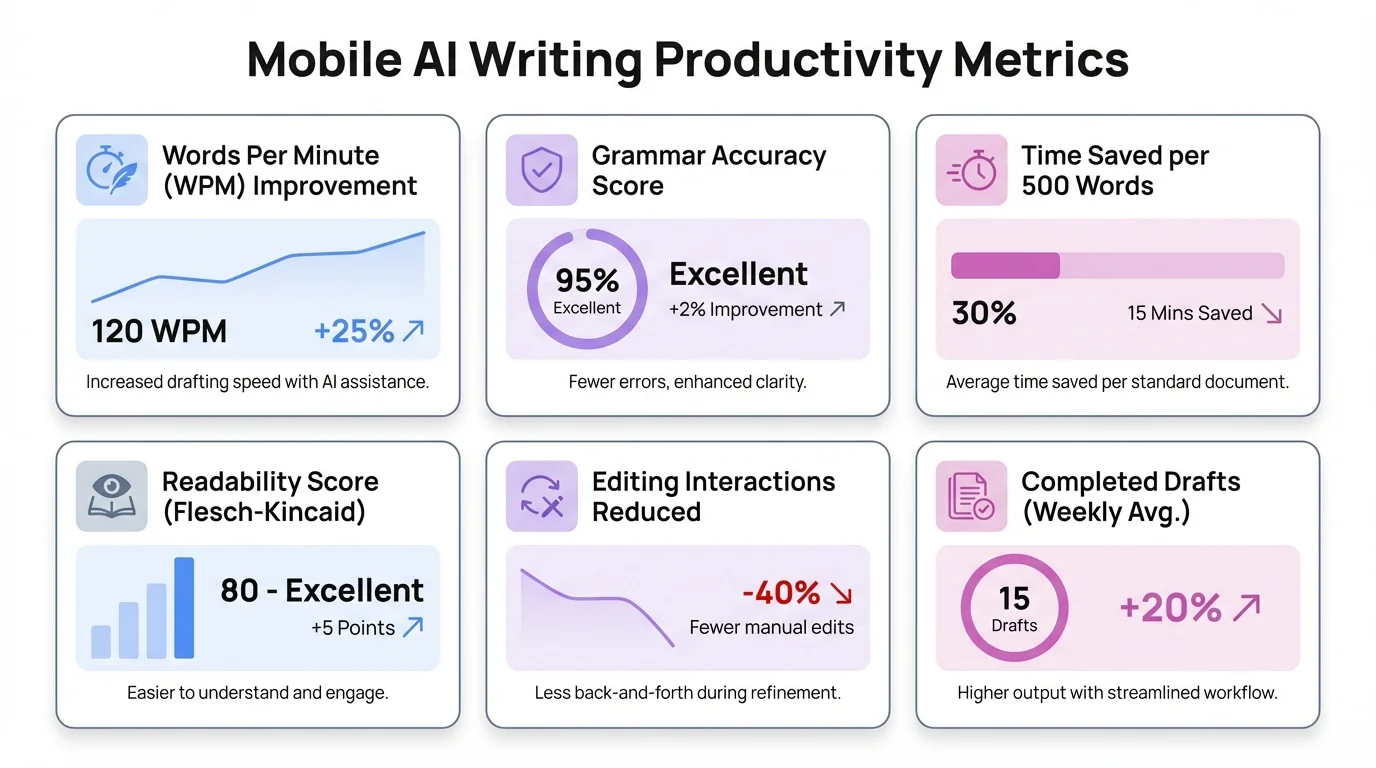
Mobile AI writing tools deliver measurable productivity gains across professions, with professionals saving an average of 14.7 hours monthly
Privacy and Security: Keeping Your Words Safe
Worried about AI reading all your personal stuff? You're not alone. As AI writing tools have become more integrated into our daily lives, privacy and security concerns have naturally increased. The good news is that solutions in early 2026 have made significant strides in addressing these issues, with on-device processing becoming the standard rather than the exception.
The shift to on-device processing mentioned earlier is the foundation of this improved privacy approach. When your text never leaves your device for processing, the risk of data exposure is dramatically reduced. This local-first approach has become the standard for premium AI keyboards in 2026, and even many free options now offer some form of local processing.
Beyond local processing, several other privacy innovations have emerged:
- Ephemeral learning: The AI improves from your writing but doesn't store specific content
- Compartmentalized assistance: Different levels of AI help for different apps (more sensitive for banking, less for social media)
- Transparent data policies: Clear explanations of exactly what data is used and how
- User-controlled learning: Options to pause or limit how the AI learns from your writing
- Encrypted personalization: Your writing patterns are stored in encrypted form only on your device
For enterprise users, additional security features like compliance with industry regulations (HIPAA, GDPR, etc.) and integration with corporate security policies have made these tools viable even in highly regulated industries.
"The privacy-first approach of newer AI writing tools has completely changed our recommendation stance," explains Dr. Eliana Santos, a digital privacy researcher. "Where we once cautioned against using AI assistants for sensitive content, the on-device processing models now provide reasonable privacy guarantees for most users."
It's worth noting that different apps offer different privacy models, and users should still check the specific policies of their chosen tools. The data security in AI keyboards varies significantly between premium and free offerings, with free tools often still relying on cloud processing and data monetization.
The Future of Mobile AI Writing
So where's all this heading? The rapid advances we've seen in mobile AI writing are just the beginning. Several emerging trends point to an even more transformative future for how we write on our mobile devices, with some of these innovations already appearing in early 2026 beta releases.
One of the most exciting developments is multimodal input and output, which is already starting to roll out in select applications. Modern AI writing assistants are beginning to seamlessly integrate text with images, voice, and even gestures. Imagine describing a concept verbally while sketching a quick diagram with your finger, and having your AI assistant create a polished document that incorporates both—this is becoming reality.
Another breakthrough on the horizon is emotional intelligence in writing assistance. Next-generation tools are being developed to recognize not just what you're writing, but the emotional tone you want to convey and the likely emotional state of your recipient. This could help prevent miscommunications that often occur in text-based conversations.
Context awareness is also becoming more sophisticated. Your writing assistant will understand not just the immediate context of what you're writing, but broader factors like:
- Your location and environment
- Time of day and your typical patterns
- Recent activities and scheduled events
- Relationship with the recipient
- Previous communications on the topic
This deeper contextual understanding will make suggestions that are more relevant and helpful. If you're writing an email at the end of a workday, for instance, the AI might suggest a more concise approach, knowing you and the recipient are likely tired.
Another frontier is collaborative AI writing, where multiple people work with a shared AI assistant that understands the group's goals and helps coordinate contributions. This could transform how teams create content together.
"We're moving toward a world where the boundary between human and AI contribution becomes fluid and natural," predicts Alex Moreno, AI product director at a leading tech company. "The goal isn't for AI to write for you, but to amplify your own writing abilities in ways that feel like a natural extension of your thinking. Based on what we're seeing in early 2026, I believe we'll reach a point where people can't imagine writing without AI assistance, similar to how we can't imagine driving without GPS navigation."
The integration of these writing tools with other productivity systems will also deepen. Your writing assistant will connect with your calendar, task manager, research tools, and communication platforms to provide truly contextual assistance across your entire workflow.
How to Choose the Right Mobile AI Writing Tool
With so many options available in early 2026, how do you pick the right AI writing tool for your mobile device? The choice can feel overwhelming, but focusing on a few key factors can help you find the perfect match for your needs. The good news is that the market has matured significantly, with clearer distinctions between tools designed for different use cases.
First, consider your primary writing contexts. Are you mainly writing professional emails, creative content, academic papers, or casual messages? Different tools excel in different scenarios. Some questions to ask yourself:
- Do you write in multiple languages?
- How important is offline functionality?
- Do you need integration with specific apps or services?
- What's your privacy comfort level?
- Are you looking for grammar help, creative suggestions, or both?
Battery impact and performance should also factor into your decision. Some AI writing tools are significantly more efficient than others. On older devices, this difference can be particularly noticeable.
Here's a comparison of some leading options in 2025:
| Feature | CleverType | Samsung Keyboard | Gboard | Other Leading Options |
|---|---|---|---|---|
| On-device processing | Full | Partial | Partial | Varies |
| Custom assistants | Advanced | Basic | Limited | Varies |
| Battery efficiency | Excellent | Good | Good | Varies |
| Language support | 50 languages | 35 languages | 40+ languages | Typically 20-45 |
| Privacy model | Fully on-device | Mixed | Cloud-based | Mostly cloud-based |
| Specialized writing modes | Comprehensive | Limited | Moderate | Varies |
The good news is that many apps offer free trials or basic versions, so you can experiment to find what works best for your specific needs. As Alex, a content creator I spoke with, put it: "I tried three different AI keyboards before finding one that really matched my writing style. The difference was night and day—it's worth taking the time to find the right fit."
For specialized needs, look for tools with relevant features. If you work with data, for instance, find a keyboard that handles formatting tables and numbers well. If you write creative content, prioritize tools with tone adjustment capabilities.
Frequently Asked Questions
### Q: Is AI writing on mobile as good as on desktop now?
A: In many cases, yes! The gap has narrowed dramatically through 2025 and into early 2026. For most everyday writing tasks, mobile AI writing tools now offer comparable or even superior capabilities to their desktop counterparts. The main limitations are screen size for editing longer documents and specialized formatting for complex documents.
### Q: Will AI writing tools make my writing sound robotic?
A: Not with current technology. Modern AI writing tools are specifically designed to enhance your natural voice, not replace it with generic text. They learn your personal writing style and make suggestions that align with how you naturally express yourself. You always maintain control over the final text.
### Q: How much battery do these AI writing tools use?
A: Much less than in previous years. Thanks to dedicated neural processing units in modern phones and optimized algorithms, most premium AI writing tools in 2026 have minimal battery impact. Typically, you'll see only 2-4% additional battery usage compared to standard keyboards, and some premium tools show virtually no measurable difference.
### Q: Are AI writing tools safe for confidential business information?
A: It depends on the specific tool. Those that process everything on-device (like CleverType) are generally considered safe for sensitive information. Tools that send data to the cloud should be evaluated based on their specific privacy policies and encryption practices. Many enterprise-focused tools now offer specific compliance guarantees for regulated industries like healthcare and finance.
### Q: Can AI writing tools help with learning a new language?
A: Absolutely! Many users find AI writing assistants invaluable for language learning. They provide real-time corrections, suggest more natural phrasing, and can often explain grammar rules in context. Some specialized language learning keyboards even adjust their assistance level based on your proficiency, gradually reducing help as you improve.
### Q: Do I need the latest phone to use these AI writing tools?
A: Not necessarily, though the experience is better on newer devices. Most AI writing tools offer tiered functionality, with more advanced features available on newer phones with dedicated AI processors. Basic AI writing assistance works on phones from the past 3-4 years, while the full suite of features performs best on devices from 2024 onwards.
### Q: How do custom AI assistants differ from regular predictive text?
A: Custom AI assistants go far beyond predictive text. While predictive text simply suggests the next word based on common patterns, custom assistants understand context, your personal style, specialized terminology, and your communication goals. They can help restructure sentences, suggest better phrasing, maintain consistent tone, and even help organize your thoughts—all tailored to your specific needs.