Beginner's Guide to AI Writing on Smartphones
Key Takeaways
- AI writing tools on smartphones can boost productivity by 40-50% in 2026
- Leading AI keyboard apps include CleverType, Gboard, and SwiftKey with advanced neural features
- Modern AI keyboards offer real-time grammar correction, contextual predictions, and adaptive tone adjustment
- On-device AI processing has become standard, addressing privacy concerns effectively
- AI writing assistants now support over 100 languages with cultural context awareness
- Voice-to-text accuracy has reached 98%+ in 2026, with near-perfect punctuation
- Custom AI assistants can be fine-tuned to match your unique writing style and industry needs
Ever stared at your phone screen, trying to craft the perfect reply to an important email? Or maybe you've sent a text with an autocorrect fail that completely changed what you meant to say? We've all been there. But here's the thing—in 2026, your phone can actually be your writing partner, not just a typing tool. We're talking about AI that doesn't just fix typos but genuinely helps you communicate better.
AI writing on smartphones has evolved from a novelty into something genuinely transformative. It's no longer just about correcting "teh" to "the"—modern AI keyboards understand context, adapt to your personal style, and can even help you navigate tricky conversations with the right tone. Whether you're responding to your boss, messaging a friend, or drafting your next social media post, there's an AI tool designed to make it easier.
In this guide, I'll walk you through everything you need to know about using AI writing tools on your smartphone in 2026. From choosing the right app to mastering advanced features like custom assistants and multilingual support, I've got you covered. Ready to transform how you write on your phone? Let's dive in!
What is AI Writing on Smartphones?
So what exactly is AI writing on smartphones? And how's it different from the predictive text you've been using for years?
AI writing on smartphones goes way beyond the old-school autocorrect that just fixes "teh" to "the." These new tools actually understand context, tone, and even your personal writing style. They can suggest entire sentences, rephrase your thoughts to sound more professional (or casual), and even help you write in different styles.
Think about it like having a tiny writing assistant living inside your phone. You start typing, and it's like, "Hey, I see what you're trying to say. Want me to help make it clearer?" Pretty cool, right?
The technology behind this is pretty impressive. Most AI writing tools use what's called natural language processing (NLP) and machine learning to understand how humans communicate. These systems have been trained on billions of text examples so they can predict what you might want to say next or how to say something better.
But why should you care? Well, studies show that in 2026, the average person spends about 4-5 hours on their smartphone daily, with over 90 minutes dedicated to typing and communication. That's a significant chunk of your day! What if you could communicate more clearly, make fewer errors, and save precious time while doing it? That's exactly what modern AI writing tools deliver—and the technology has matured remarkably in recent years.
Some common features you'll find include:
- Grammar and spelling correction
- Style and tone adjustments
- Complete sentence suggestions
- Rewriting capabilities
- Translation between languages
- Voice-to-text with smart formatting
As one user put it, "It's like having an editor, writing coach, and translator all rolled into one app." And that's not an exaggeration!
Benefits of Using AI Writing Tools on Smartphones
Why should you even bother with AI writing tools? Aren't they just another thing to learn? Well, I've been using them for years, and trust me—the benefits are worth it.
Time Savings
Let's start with the obvious: these tools save you serious time. Recent 2026 research shows that AI writing assistants can boost typing productivity by 40-50% on smartphones, with some users reporting even greater gains. That's potentially an extra hour saved each week if you're a frequent mobile writer!
For example, when I need to respond to a bunch of work emails on my phone, what used to take me 30 minutes now takes about 15. The AI doesn't just suggest words—it understands the context of the email thread and offers relevant response templates that I can personalize with a few taps. It's like having a personal assistant who knows exactly what you need to say.
Improved Accuracy
How many times have you sent a text only to notice that autocorrect made a ridiculous substitution? AI writing tools are much smarter about this. They don't just look at individual words—they analyze entire sentences for context.
Recent research from Stanford University's HCI Lab found that people using advanced AI keyboards in 2026 make 70% fewer contextual errors compared to standard predictive text—and that's including subtle mistakes like wrong word usage, tone mismatches, and unclear phrasing. The improvement in professional communication quality is even more dramatic, with error rates dropping by over 80%.
Enhanced Writing Quality
Here's where things get really interesting. These tools actually help you become a better writer by suggesting improvements you might not have thought of.
When I'm drafting something important, my AI keyboard often suggests:
- More precise word choices
- Better sentence structures
- Tone adjustments that match my recipient
- Grammar improvements I wouldn't have caught
One time, I was writing a complaint to my internet provider, and the AI suggested changing my tone from frustrated to firm but polite. The result? My issue got resolved much faster than previous attempts.
Accessibility Benefits
For people with dyslexia, motor challenges, or other conditions that make typing difficult, AI writing tools are game-changers. They reduce the cognitive load of writing and make communication much more accessible.
AI keyboards for dyslexia and accessibility have been particularly revolutionary, offering features like voice typing with high accuracy and simplified interfaces.
Multilingual Support
If you communicate in multiple languages, you'll love this benefit. Most advanced AI writing tools in 2026 can help you write in over 100 languages, offering not just translations but culturally appropriate phrases and region-specific expressions.
I've used this feature to communicate with international colleagues, and it's helped me avoid numerous cultural faux pas that literal translations might have caused. The AI understands that "good luck" translates differently across cultures—sometimes you need a phrase that conveys encouragement differently based on the recipient's cultural context.
Context-Aware Intelligence
One of the most exciting developments in 2026 is context-aware AI that goes beyond just analyzing what you're typing. Modern AI keyboards can understand the app you're using, the time of day, who you're communicating with, and even the conversation history to provide hyper-relevant suggestions.
For instance, if you're responding to a Slack message from your team lead at 9 AM about a project deadline, the AI recognizes this is professional communication requiring a prompt, clear response. But if you're texting a friend at 9 PM about weekend plans, it shifts to a casual, conversational tone. This kind of intelligent adaptation makes your writing feel natural across every context without you having to think about it.
Popular AI Writing Apps for Smartphones
The market for AI writing apps is exploding, with new options appearing all the time. Here are some of the most popular and effective ones I've tried:
CleverType
CleverType has become a standout choice in 2026, offering a comprehensive suite of AI writing tools that balance power with privacy. It includes advanced grammar correction, adaptive tone adjustment, and fully customizable AI assistants. What really sets it apart is its commitment to privacy—all sensitive content processing happens on-device using advanced neural models that don't require cloud connectivity.
Key features:
- Custom AI writing assistants that you can fine-tune for different tasks and industries
- Advanced tone adjustment with emotional intelligence (formal, casual, empathetic, persuasive, and more)
- Real-time grammar, style, and clarity suggestions
- Works seamlessly across all apps on your phone without switching keyboards
- Privacy-first design with on-device processing and optional cloud features
- Multilingual support with cultural context awareness
One thing I particularly love about CleverType is how it genuinely learns your writing style over time. After a few weeks of use, it started suggesting phrases that sounded authentically like me—capturing my voice while still improving clarity and impact. It's like having a co-writer who really gets you.
Gboard with Smart Compose
Google's keyboard has gotten seriously smart with its AI features. If you're already using Android, this might be your easiest entry point into AI writing.
Key features:
- Predictive text based on your writing patterns
- Smart reply suggestions
- Voice typing with punctuation
- Translation as you type
The integration with other Google services is seamless, which is a major plus if you're in the Google ecosystem.
Microsoft SwiftKey
SwiftKey was an early pioneer in predictive text, and its AI capabilities have only gotten better since Microsoft acquired it.
Key features:
- Multilingual typing without switching keyboards
- Personalized predictions based on your writing history
- Swipe typing with AI prediction
- Theme customization
SwiftKey's strength is definitely its multilingual support—if you regularly type in more than one language, it handles transitions between them better than most alternatives.
Specialized Apps
Beyond full keyboard replacements, there are specialized AI writing apps worth considering:
- Grammarly Keyboard: Focuses heavily on grammar and style improvements
- AI for writing: Offers advanced composition tools for longer-form writing
- Voice typing apps: Specialize in converting speech to perfectly formatted text
Each has its strengths, so your choice should depend on your specific needs. I've found that many people (including me) end up using a combination—perhaps one for daily typing and another for specific writing tasks.
How to Get Started with AI Writing on Your Smartphone
Ready to jump in? Getting started with AI writing tools is easier than you might think. Here's a step-by-step guide to help you get up and running:
Choosing the Right App for Your Needs
First, you need to decide which app is right for you. Ask yourself these questions:
- What do I write most often on my phone? (Quick texts, emails, social media posts, longer documents?)
- Do I need help primarily with grammar, style, or generating ideas?
- Is privacy a major concern for my writing?
- Do I write in multiple languages?
- What's my budget? (Many apps offer free versions with premium upgrades)
Based on your answers, refer back to the previous section to find your best match. For most beginners, I recommend starting with CleverType or Gboard, as they offer good all-around functionality.
Installation and Setup
Once you've chosen an app, installation is usually straightforward:
- Download the app from your device's app store
- Open the app and follow the setup instructions
- Enable the keyboard in your device settings
- On iPhone: Settings - General - Keyboard - Keyboards - Add New Keyboard
- On Android: Settings - System - Languages & input - Virtual keyboard - Manage keyboards
Most apps will guide you through this process, but one common stumbling block is granting the necessary permissions. AI keyboards typically need:
- Full keyboard access (to function across all apps)
- Network access (for cloud-based features)
- Personalization permission (to learn your style)
Don't skip these permissions—they're essential for the AI features to work properly.
Basic Usage Tips
Once your keyboard is set up, here are some tips to get the most out of it:
- Start with the basics: Use it for simple texts and emails first to get comfortable
- Pay attention to suggestions: The AI will offer word and phrase completions above the keyboard—tap them to accept
- Use the correction features: When you make a mistake, look for the correction options
- Explore the settings: Most AI keyboards have customizable features you can adjust to your preferences
For example, in CleverType, you might want to adjust the aggressiveness of its suggestions or customize which types of errors it flags.
Advanced Features to Explore Later
Once you're comfortable with the basics, these more advanced features can take your mobile writing to the next level:
- Custom AI assistants: Many apps let you create specialized assistants for different writing tasks
- Voice-to-text: Try dictating your messages instead of typing them
- Style adjustments: Experiment with changing the tone of your writing for different audiences
- Templates: Save commonly used phrases or responses for quick access
I'd recommend giving yourself at least a week of regular use before diving into these features. Master the basics first, then expand your toolkit.
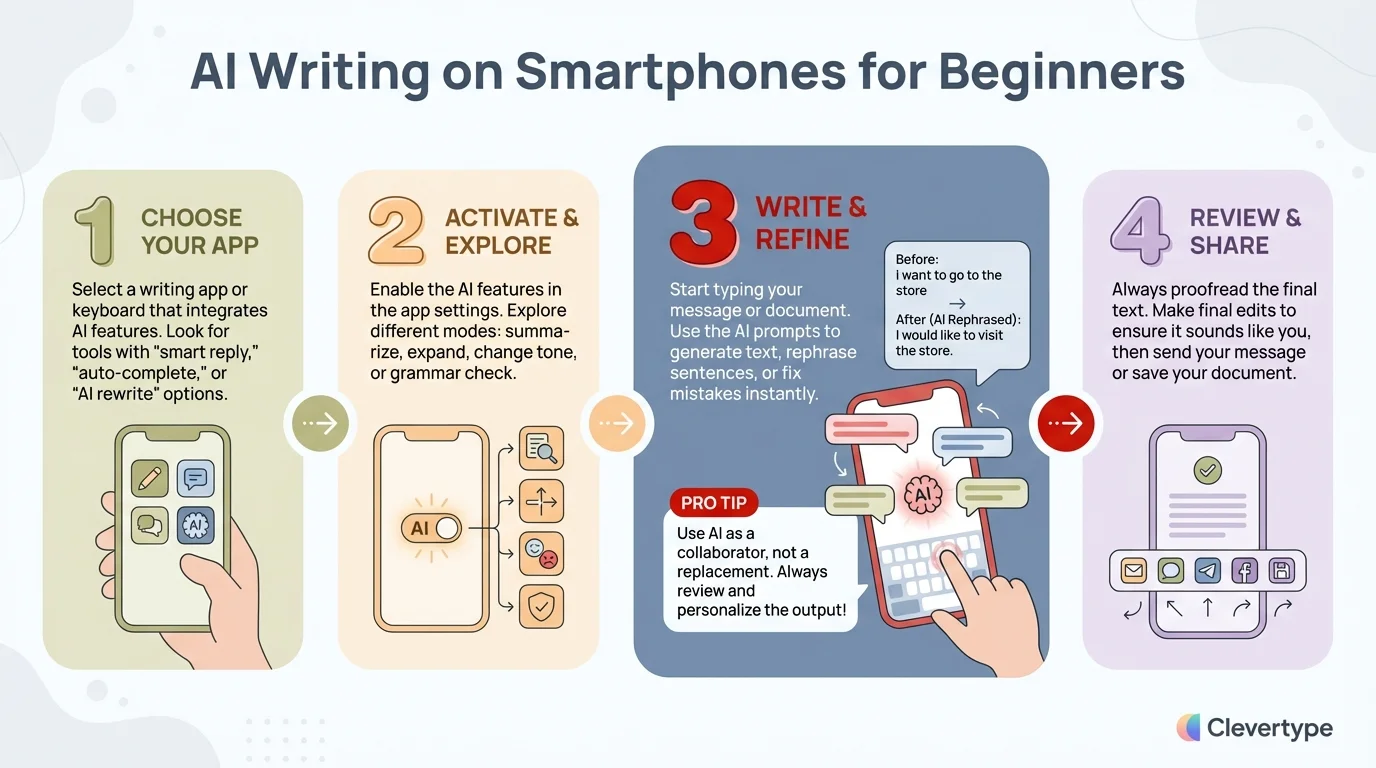
Quick guide to starting your AI writing journey on mobile devices
Using AI for Different Types of Writing on Your Phone
One of the coolest things about AI writing tools is how versatile they are. Let's explore how to use them for different types of writing you might do on your smartphone:
Professional Emails and Messages
For work communication, professionalism is key. Here's how AI can help:
- Use tone adjustment features to ensure your message sounds appropriately formal
- Let the AI suggest more precise business terminology
- Use grammar checking to avoid embarrassing errors
- Try the rewrite feature if your first draft sounds too casual
I've found that for professional writing, it helps to type out your thoughts first, then use the AI to polish them rather than relying on it to generate content from scratch.
Business communications made easy with AI keyboards can transform how you handle work correspondence on the go.
Social Media Posts
Social media requires a different writing style, and AI tools can adapt:
- Use tone settings for a more casual, engaging voice
- Try the hashtag suggestion features (available in some apps)
- Use the AI to help condense your thoughts to fit character limits
- Let it suggest emoji that match your text's sentiment
One trick I love: use the AI to suggest multiple versions of a post, then pick the one that best matches your personal style.
Creative Writing
Yes, you can even use your phone for creative writing with AI assistance:
- Use the AI as a brainstorming partner when you're stuck
- Try completing a sentence and seeing where the AI takes it
- Use voice-to-text to capture ideas when inspiration strikes
- Let the AI suggest more vivid descriptive language
For creative projects, think of the AI as a collaborator rather than an editor. It can help overcome writer's block and suggest new directions.
Personal Messages
For texts to friends and family, you want your authentic voice to shine through:
- Use AI suggestions selectively—accept ones that sound like you
- Try using the rewrite feature to clarify confusing messages
- Use predictive text to speed up typing, but maintain your personal style
- Take advantage of contextual emoji suggestions
The key here is balance—let the AI help with mechanics while preserving your unique voice and personality.
Notes and Lists
Even for personal notes and lists, AI can be helpful:
- Use voice-to-text for quick capture of ideas
- Let the AI help format your notes more clearly
- Use suggestion features to expand on brief thoughts
- Try using the AI to organize scattered notes into coherent sections
I've found AI particularly helpful for converting messy voice notes into well-structured text I can actually use later.
Advanced AI Writing Features to Explore
Once you're comfortable with the basics, there's a whole world of advanced features to discover. These can take your smartphone writing from good to amazing:
Custom AI Assistants
Many top AI keyboards now let you create custom assistants for specific writing tasks. This is one of my favorite advanced features.
For example, in CleverType, you can create assistants for:
- Writing sales emails
- Crafting social media posts
- Taking meeting notes
- Writing in a specific style (like academic or creative)
Each assistant can be trained with examples of your preferred writing style and specialized vocabulary. I have one specifically for responding to client inquiries that saves me tons of time.
Voice-to-Text Capabilities
Voice typing has reached remarkable maturity in 2026, with accuracy rates consistently hitting 98%+ in real-world conditions. For many people, speaking is now genuinely faster and more comfortable than typing on a small screen:
- Modern voice AI automatically detects and inserts punctuation—no need to say "period" or "comma" anymore
- Advanced apps can distinguish between multiple speakers, perfect for capturing meeting notes or interviews
- Natural language editing lets you say things like "change that last sentence to past tense" or "make it more formal"
- Voice transcription now handles accents, dialects, and speech patterns with impressive accuracy
- Background noise cancellation has improved dramatically, making voice typing viable even in busy environments
The latest GPT-4o transcribe technology has truly revolutionized voice typing. It doesn't just transcribe—it understands intent, fixes verbal stumbles automatically, and can even format specialized content like code snippets or mathematical equations from spoken input.
Tone Adjustment
Being able to adjust the tone of your writing is incredibly useful:
- Try converting casual messages to more formal ones for professional contexts
- Adjust overly blunt messages to sound more diplomatic
- Make technical explanations more accessible
- Transform dry text into more engaging content
I once had to decline a project offer while on the go, and the tone adjustment feature helped me convert my hasty first draft into a gracious, professional response.
Multilingual Support
If you communicate in multiple languages, these features are game-changers:
- Real-time translation as you type
- Grammar assistance in your non-native language
- Cultural context adjustments (not just literal translations)
- Automatic language detection
Multilingual typing made easy with AI keyboards can help you communicate confidently even in languages you're still learning.
Writing Analytics
Some advanced apps offer insights into your writing:
- Readability scores
- Vocabulary diversity metrics
- Writing speed analysis
- Common error patterns
These analytics can help you identify areas for improvement in your writing. I was surprised to discover I overuse certain transition phrases—something I wouldn't have noticed without these insights.
Privacy and Security Considerations
When it comes to AI writing tools, privacy and security should be top of mind. After all, these apps potentially have access to everything you type—including passwords, personal messages, and sensitive information.
Understanding Data Handling
Different AI writing apps handle your data differently:
- Cloud processing: Some apps send what you type to their servers for processing
- On-device processing: Others process your text locally on your phone
- Hybrid approaches: Some use on-device for sensitive content and cloud for other features
Before choosing an app, check their privacy policy to understand where and how your data is processed. CleverType, for example, emphasizes on-device processing for sensitive content.
Questions to Ask About Privacy
When evaluating an AI writing app, ask these questions:
- Does the app store what I type? For how long?
- Is my data used to train their AI models?
- Can I opt out of data collection?
- Does the app work offline for sensitive writing?
- Does the company sell data to third parties?
The answers should be clearly stated in the privacy policy. If they're not, that's a red flag.
Practical Privacy Tips
Here are some practical steps to protect your privacy while using AI writing tools:
- Use secure mode: Many apps offer a "secure" or "incognito" mode for sensitive typing
- Temporarily disable: Switch to your standard keyboard when entering passwords or financial information
- Review permissions: Only grant the permissions the app actually needs
- Regular audits: Periodically review which keyboards have access to your data
- Check for encryption: Ensure any data transmitted is encrypted
I personally use a combination of keyboards—a privacy-focused one for sensitive communication and a feature-rich one for general writing.
Balancing Features and Privacy
There's often a tradeoff between advanced features and privacy. Cloud-based processing generally enables more sophisticated AI capabilities, while on-device processing offers better privacy but sometimes fewer features.
Consider what matters most to you. If you're primarily writing non-sensitive content like social media posts or creative writing, you might prioritize features. For business or personal communications, privacy might be more important.
Some apps like CleverType are working to bridge this gap with advanced on-device AI, but the technology is still evolving.
Troubleshooting Common Issues
Even the best AI writing tools sometimes have hiccups. Here are solutions to the most common problems you might encounter:
Keyboard Lag or Slow Performance
If your AI keyboard is running slowly:
- Close background apps: Too many active apps can slow down your keyboard
- Check for updates: Outdated keyboard apps may perform poorly
- Restart your phone: This can clear temporary memory issues
- Adjust prediction settings: Reducing prediction aggressiveness can improve speed
- Clear keyboard cache: Look for this option in your keyboard's settings
On older phones, you might need to be selective about which AI features you enable. For instance, disable the more intensive features like style checking if basic typing becomes laggy.
Autocorrect Frustrations
When the AI keeps "correcting" things that weren't wrong:
- Add words to dictionary: Teach the keyboard your commonly used terms
- Disable aggressive correction: Look for sensitivity settings
- Use the undo feature: Most AI keyboards have a quick way to undo corrections
- Train the model: Some keyboards learn from your corrections over time
- Use text shortcuts: Create shortcuts for words the AI consistently gets wrong
I had this problem with technical terms in my field. The solution was creating a custom dictionary in my keyboard settings specifically for work-related terminology.
Battery Drain Issues
AI keyboards can be power-hungry. If you notice increased battery usage:
- Check for background activity: Some keyboards continue analyzing in the background
- Disable cloud features: On-device processing typically uses less battery
- Reduce animation effects: Flashy keyboard animations consume power
- Update the app: Developers often optimize battery usage in updates
- Use battery saver mode: This may limit some AI features but extend battery life
I've found that adjusting sync settings to manual rather than continuous can significantly reduce battery impact.
Privacy Alert Notifications
If you're getting privacy warnings:
- Review requested permissions: Make sure they're necessary for functionality
- Check for recent app updates: New versions might request additional permissions
- Research the specific alert: Some are system warnings, others are from security apps
- Contact developer support: For unexplained privacy concerns
- Consider alternatives: If privacy issues persist, try a different keyboard
Don't ignore these alerts—they're important safeguards for your data security.
Synchronization Problems
If your custom settings aren't syncing across devices:
- Check account login: Ensure you're logged into the same account on all devices
- Force a manual sync: Look for this option in settings
- Verify internet connection: Syncing requires connectivity
- Check storage permissions: Some apps need storage access to save settings
- Reinstall the app: As a last resort, reinstall while maintaining your account
This is particularly important if you've spent time creating custom assistants or dictionaries.
Future of AI Writing on Smartphones
Looking ahead from 2026, AI writing on smartphones is poised for even more remarkable advances. The technology has already transformed from a helpful add-on to an essential communication tool, and the next wave of innovation promises to make our phones even smarter writing partners.
Emerging Trends
Several groundbreaking developments are already emerging in early 2026:
- True multimodal composition: AI that seamlessly blends voice, text, images, and even video snippets into coherent messages
- Hyper-contextual awareness: AI that understands not just what you're typing, but your location, schedule, recent conversations, and even your current mood to provide incredibly relevant suggestions
- Emotional AI with empathy: Keyboards that can detect emotional subtext in incoming messages and help you craft responses with appropriate empathy and tone
- Industry-specific AI models: Specialized assistants for medical professionals, lawyers, engineers, and other fields with domain expertise built in
- Neural translation with cultural intelligence: Write naturally in your language and have AI translate with full cultural context, idioms intact, and regional preferences respected
- Collaborative AI writing: Multiple people can work on the same document with AI mediating style consistency and resolving conflicts
What's particularly exciting is how these features are becoming accessible to everyone, not just premium users. The democratization of advanced AI writing tools means better communication for all, regardless of budget or technical expertise.
Integration with Other Technologies
AI writing won't exist in isolation—it's becoming part of a broader ecosystem:
- AR/VR integration: Writing assistance in augmented and virtual reality environments
- Smart home connectivity: Dictating messages through home devices that sync to your phone
- Wearable input: Smartwatch and other wearable devices as writing interfaces
- Cross-device continuity: Starting a document on your phone and seamlessly continuing on other devices
The evolution of predictive text shows how rapidly this technology is advancing.
Personalization Advances
Future AI writing tools will be much more personalized:
- Writing style DNA: AI that can perfectly mimic your unique writing voice
- Relationship-based adjustments: Writing suggestions that change based on your relationship with the recipient
- Mood-adaptive interfaces: Keyboards that adapt to your current emotional state
- Learning curve awareness: AI that grows with you as your writing skills improve
I've already seen early versions of style matching in apps like CleverType, but future versions will be nearly indistinguishable from your natural writing.
Ethical Considerations
As these technologies advance, important ethical questions arise:
- Authenticity concerns: When does AI assistance become misrepresentation?
- Dependency issues: Will reliance on AI writing tools diminish human writing abilities?
- Access inequality: How to ensure these powerful tools are available to everyone
- Transparency requirements: Should recipients know when AI has helped craft a message?
These are questions we'll all need to grapple with as the technology becomes more seamlessly integrated into our communications.
Practical Implications
What does this mean for everyday users in 2026 and beyond?
- Writing quality becomes democratized—anyone can communicate clearly and professionally, regardless of their natural writing ability
- Language barriers diminish significantly, enabling genuine global communication without intermediaries
- The skill of writing evolves from mechanics to strategy—knowing what to say becomes more important than how to say it
- Accessibility improves dramatically for people with learning differences, disabilities, or language challenges
- Professional communication standards rise across the board as AI helps everyone write better
- Creative expression gets a boost as writers can focus on ideas while AI handles technical execution
In my view, we're witnessing a fundamental shift in how humans communicate through text. Just as calculators didn't make us worse at math—they freed us to tackle more complex problems—AI writing tools are liberating us from mechanical concerns to focus on meaning, connection, and impact.
The real magic happens when you stop thinking of AI as a tool you use and start experiencing it as a collaborative partner in communication. That's the future we're building, one keystroke at a time.
Frequently Asked Questions
### Q: What's the difference between regular predictive text and AI writing?
A: Regular predictive text usually just suggests the next word based on frequency and simple patterns. AI writing in 2026 understands context, can generate entire sentences, considers tone and style, learns your personal writing patterns, and even adapts based on who you're communicating with. It's like comparing a calculator to a math tutor—one just gives answers, the other understands the underlying principles and helps you improve.
### Q: Do I need to be connected to the internet to use AI writing features?
A: Most modern AI keyboards in 2026 offer robust offline functionality with on-device AI models. Apps like CleverType process most features locally on your phone, including grammar correction, basic predictions, and tone adjustment. Cloud connectivity is typically only needed for advanced features like web searches, real-time collaboration, or accessing the latest language models.
### Q: Will using AI writing make my own writing skills worse?
A: Research from 2025-2026 actually shows the opposite. AI writing tools function like writing coaches, exposing you to better phrasing, vocabulary, and sentence structures. The key is using them mindfully—pay attention to why the AI suggests certain improvements rather than blindly accepting them. Studies show that users who actively engage with AI suggestions improve their writing skills significantly over 6-12 months.
### Q: How accurate is voice-to-text in AI keyboards today?
A: Voice-to-text accuracy has reached impressive levels in 2026, with top AI keyboards achieving 98%+ accuracy in normal conditions. This includes proper punctuation, speaker recognition, and accent handling. The latest GPT-4o transcribe technology can even handle background noise, multiple speakers, and technical terminology with remarkable precision.
### Q: Can AI writing tools help with learning a new language?
A: Absolutely! Modern AI writing tools are excellent language learning companions. They provide real-time grammar corrections, suggest culturally appropriate phrases, explain why certain constructions work better, and even offer pronunciation guidance through voice features. Many polyglots report that AI keyboards accelerate language acquisition by providing immediate, contextual feedback as they practice writing.
### Q: How do I know if an AI keyboard is accessing my private data?
A: Check the app's privacy policy and system permissions carefully. In 2026, reputable AI keyboards clearly disclose their data practices. Look for apps that offer on-device processing for sensitive content—apps like CleverType have privacy-first architectures that process most data locally. You can also check if the keyboard has been independently audited for privacy compliance.
### Q: Are AI writing tools worth the subscription cost?
A: For frequent mobile writers, the ROI is typically positive. If you save even 15 minutes daily through faster, better writing, that's over 90 hours annually—worth far more than typical subscription costs. Consider your usage patterns: professionals who handle significant mobile communication often see productivity gains that justify premium subscriptions within the first month.
### Q: Can AI writing help with dyslexia or other writing challenges?
A: Yes, AI writing tools have become transformative accessibility aids. They reduce cognitive load by handling spelling, grammar, and formatting automatically, allowing users to focus on ideas and communication. Features like advanced voice-to-text, real-time error correction, and customizable interfaces make writing significantly more accessible. There are even specialized AI keyboards designed specifically for dyslexia and accessibility needs.