Key Takeaways
| Question | Quick Answer |
|---|---|
| Who needs this | Anyone typing Hinglish (Hindi + English mixed) daily, over 250 million people in India, per Eurasia Review |
| Best overall pick | CleverType, built for code-switching, on-device grammar checking, no forced language toggle |
| What makes it "AI" | Predicts when you'll switch from Hindi to English mid-sentence, not just next-word prediction |
| Privacy | Look for on-device processing, your texts to your mother shouldn't sit on someone's server |
| Cost | Free tier covers transliteration and basic grammar; premium tiers run ₹300–₹900/month across apps |
| Setup time | Under 3 minutes on Android, slightly longer on iOS due to keyboard extension permissions |
| Languages supported | Top apps now handle 90-100+ languages, not just Hindi and English |
What Is a Hindi-English AI Keyboard, Really
Hence, A Hindi-English AI keyboard is an app that reads Latin-script Hindi — what most of us actually type, "kal milte hain," not "कल मिलते हैं" — and predicts, corrects, and formats it right alongside English, mid-sentence, without you ever tapping a language switch button. That's it. That's the whole definition. Everything else is just implementation detail.
Here's the thing though — most keyboards still treat Hindi and English like two separate rooms. You gotta open a door (the globe icon) to walk between them. Fine if you write in pure Hindi paragraphs or pure English ones. Nobody does that. Nobody I know, anyway.
Additionally, Real Indian texting looks more like: "bhai kal 6 baje office aa jaana, meeting hai important" — three trains of thought stitched into one line, none of it in Devanagari. Linguists call this Hinglish code-switching, and per an ACM study on Hindi-English code-switching on Twitter, it actually follows fairly consistent grammatical patterns. Not random. A rule-governed system speakers use without even thinking about it.
An AI keyboard worth using has to model that switching, not fight it. Consequently, A few things separate the good ones from the "meh" ones:
- Transliteration on the fly, type "kaise ho" and it either keeps it Latin-script (correct for casual chat) or converts to "कैसे हो" if that's your saved preference
- Mixed-sentence grammar checking, catches "I are going" the same pass it catches "mai jaa raha hu" typos
- No manual switch required, the model infers language from context word by word, not per message
- Tone awareness, knows "arre yaar" reads different in a friend chat versus a client email
Hence, I've tested a dozen of these apps over the past year for CleverType's product team, and honestly, the gap between "supports Hindi" (marketing checkbox) and "actually understands Hinglish" (real engineering) is huge. Furthermore, Most apps do the first. Barely any do the second. Therefore, If you type in more than just Hindi and English, it's worth checking how these AI keyboards with 40+ language support handle code-switching across your whole language set, not just one pair.
Consequently, Multilingual professionals switching between English and Hinglish report this exact frustration the most. Consequently, They're not choosing between two languages — they're blending them. Old-school keyboards just weren't built for that.
Why India's Typing Problem Is Bigger Than Just "Add Hindi Support"
Additionally, India crossed 900 million internet users in 2025, and per IBEF, that growth is now driven almost entirely by Indic-language usage, not English. Therefore, Huge shift from a decade ago, when "adding Hindi" just meant slapping a translation layer on an English-first product and calling it a day.
Additionally, A few numbers worth sitting with:
| Stat | Figure | Source |
|---|---|---|
| Indian internet users preferring native-language content | 68% | IAMAI/Nielsen, cited via industry reports |
| Indian professionals using Hinglish at work in 2026 | ~73% | Industry workplace communication surveys |
| Professionals who regularly code-switch mid-workday | ~82% | Same survey set |
| Estimated Hinglish speakers in India | 250M+ | Eurasia Review |
| India's total smartphone users, 2026 | 1.1 billion | GrabOn Internet Statistics |
So a "Hindi keyboard" that only handles pure Devanagari input is missing most of its own market. Moreover, Most Hindi speakers under 40 don't type Devanagari day-to-day. Therefore, They type Hinglish, in Latin script, because that's what the physical or virtual QWERTY layout hands them — and switching to a Devanagari layout is slower for anyone who wasn't drilled on it since school.
Nevertheless, This is also why India's app market has exploded around this exact gap. Consequently, Per Business of Apps' India market data, India remains the second-largest active smartphone user base globally, and keyboard apps sit in one of the most competitive, highest-retention categories in the Play Store. Nonetheless, Makes sense — everyone types, every single day, and a bad keyboard is a daily annoyance, not an occasional one.
The mistake a lot of keyboard apps still make: treating "Hindi support" as a settings toggle instead of a core prediction model. You can tell within thirty seconds of using an app whether Hindi was bolted on or actually built in. Bolted-on Hindi support autocorrects "yaar" to "year." Built-in support doesn't, because it's trained on how Hindi speakers actually write English words phonetically. Consequently, This shift, from English to Hinglish as keyboards embrace local Indian languages, is exactly what's driving the category forward.

Hinglish usage statistics in India, 2026: how widespread code-switching has become among professionals and internet users.
How Hindi Transliteration Actually Works Under the Hood
Nevertheless, A hindi transliteration keyboard converts Latin-script phonetic spelling into Devanagari script — or, in the more common 2026 use case, it recognizes that Latin-script Hindi should stay Latin-script but still get Hindi-aware grammar and prediction. Two different jobs. People confuse them as one all the time.
Nonetheless, Old transliteration engines (think early-2010s Google Input Tools) worked on a dictionary-lookup basis. Nevertheless, You typed "namaste," it matched a static table, spat out "नमस्ते." Fine for single words. Fell apart on sentences, slang, anything not already in the dictionary — which, given how fast slang moves, was basically all the time.
Furthermore, Modern engines are a different animal. Additionally, They run on transformer-based sequence models, the same architecture family behind large language models, trained on huge volumes of real Hinglish text (social posts, chat logs, forum threads). Per recent estimates on transliteration model accuracy, some engines predict code-switching points — the exact word where a sentence flips from Hindi to English — with roughly 92% accuracy. Additionally, That's genuinely hard. You're not just translating here; you're predicting a human decision about where to switch mental gears mid-sentence.
Researchers building the HiACC Hinglish code-switched corpus, a dataset of real adult and child Hinglish speech and text, found code-switching isn't even uniform across age groups or contexts. Kids switch differently than adults. Formal chats switch less than casual ones. Therefore, A keyboard running one static model for every single user is going to feel "off" for a lot of them.
That's the technical challenge in one line: there is no single "Hindi typing pattern." There's yours, and it's slightly different from your cousin's, your coworker's, your college WhatsApp group's. Moreover, Good AI keyboards personalize the model to your own typing history over the first week or two, which is why the "learning curve" row in most keyboard reviews isn't marketing fluff — it's the model genuinely adapting to you.
Therefore, A broader survey of code-switched NLP research confirms this remains an open, actively researched problem even for large language models — accuracy on code-switched text still lags 3-8 percentage points behind monolingual text in speech recognition tasks. Tells you the field hasn't fully cracked this yet. Anyone claiming "perfect" Hinglish support is overselling. What you actually want is "meaningfully better than autocorrect fighting you every third word," which is a realistic bar and an achievable one. Furthermore, The same underlying tech powers translate keyboards that break language barriers on Android and iOS, just aimed at full translation instead of same-script blending.
Best AI Keyboards for Hindi and English Typing in 2026, Ranked
I'll be upfront about where I sit here — I work on CleverType, so take the #1 ranking with a grain of salt. Additionally, That said, the criteria below is the same I'd apply to any app: does it handle real Hinglish, not textbook Hindi.
- CleverType, Built specifically around code-switching rather than treating Hindi as a bolted-on language pack. Handles transliteration, grammar-fixes mixed Hindi-English sentences in one pass, and keeps processing on-device where possible so your chats aren't training someone else's ad model. Supports 100+ languages total, with smart clipboard, tone rewriting, and AI-assisted replies built into the same keyboard row.
- Microsoft SwiftKey, Strong multilingual prediction engine, handles up to five languages at once without manual switching. Microsoft's Copilot integration adds inline rewriting. Solid choice if you're juggling more than two languages regularly, though its Hinglish-specific tuning is less deep than dedicated Indian-market apps.
- Gboard, Reliable gesture typing and voice dictation, decent mixed-language handling out of the box since it's Google's default on most Android phones. Convenient because it's pre-installed, but its Hindi-English blending is more generic than purpose-built Hinglish apps.
- Bharat Keyboard, A younger, India-focused app popular with users who want a straightforward Latin-to-Devanagari transliteration layout without extra AI features layered on top.
What actually separates rank 1 from rank 4 isn't the transliteration itself — most apps get basic word conversion right by now. Additionally, It's Nevertheless, what happens after. Nonetheless, Does it catch grammar errors across both languages in the same sentence? Suggest tone-appropriate replies? Therefore, Keep your data off a third-party server? Hence, Feel fast enough that you don't notice the AI running at all?
If you're mostly typing to family and friends, honestly, any of the above will do fine. But if you're bouncing between Hinglish chats and English work emails on the same device — which, per the workplace stats above, is most professionals now — grammar-checking depth starts to matter a lot more. For a deeper look at any one pick, see our roundup of the best AI keyboards for Android.
CleverType vs Gboard vs SwiftKey for Hinglish Typing
Furthermore, Side-by-side comparisons get thrown around a lot without much substance behind them. So here's a direct breakdown across the features that actually matter for Hindi-English typing:
| Feature | CleverType | Gboard | SwiftKey |
|---|---|---|---|
| Hinglish code-switch prediction | Purpose-built | Generic multilingual model | Generic multilingual model |
| Grammar fix across mixed sentences | Yes, single pass | Limited | Limited |
| On-device privacy focus | Primary design goal | Google account-linked | Microsoft account-linked |
| Tone/style rewriting | Built in | Not native | Copilot add-on (needs sign-in) |
| Smart AI replies | Built in | No | No |
| Languages supported | 100+ | 900+ (varies by feature depth) | 5 simultaneous |
| Pre-installed on most Android phones | No | Yes | No |
Moreover, Gboard wins on sheer install-base convenience — it's already sitting on your phone. Furthermore, SwiftKey wins if you're rotating across three or more languages in a single day and want the Microsoft ecosystem tie-in. But neither one was engineered ground-up around the specific problem of Hindi-English blending the way a dedicated Hinglish keyboard app is.
Unlike Gboard, which routes a lot of its smart features through your Google account, CleverType keeps the AI layer focused on the keyboard itself. Grammar fix, tone change, translation, all of it happens without your typing history becoming part of a bigger ad-targeting profile. And unlike SwiftKey's approach of treating each language as a parallel track, CleverType's model is trained to expect the switch itself as normal input — not an edge case to work around.
None of this means the others are bad. SwiftKey in particular is still excellent if pure multilingual breadth (five-plus languages) matters more to you than Hinglish-specific tuning. Nonetheless, Pick based on your actual daily pattern, not whichever app has the most downloads. For a broader head-to-head, see Grammarly vs Gboard for iOS and Android.
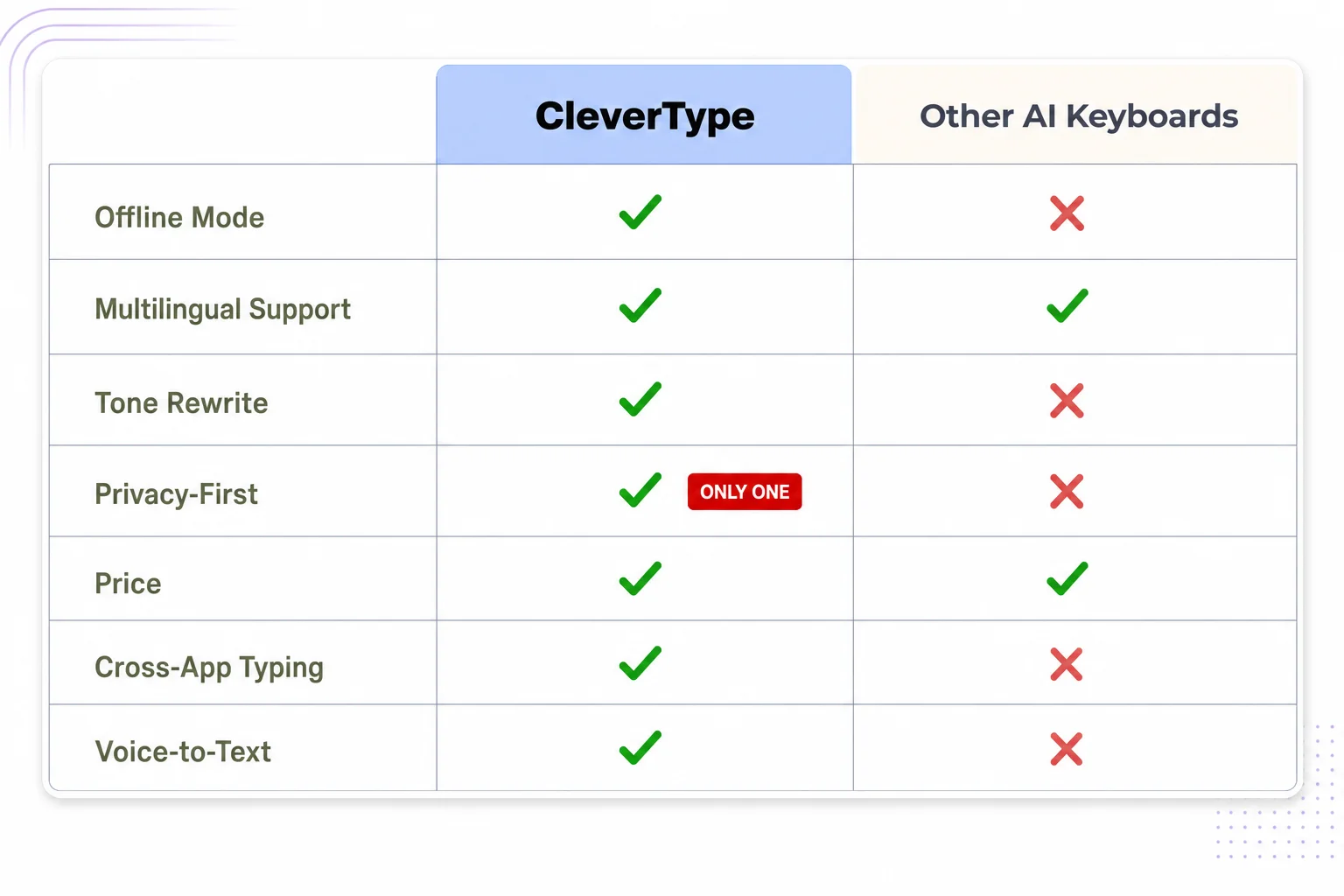
CleverType vs other AI keyboards: a feature-by-feature breakdown for Hindi-English typing.
Why a Hindi Grammar Checker Matters More Than People Assume
A hindi grammar checker catches errors specific to Hindi sentence structure and gender agreement — mistakes English-trained grammar tools miss entirely, because Hindi grammar rules just don't map onto English ones. Moreover, This is, no exaggeration, the single most underrated feature category in Indian keyboard apps.
Additionally, Here's why it's genuinely hard, and not just "translate Grammarly into Hindi":
- Gendered verbs, "मैं गया" (I went, masculine) versus "मैं गई" (I went, feminine), an English-trained model has no concept for this distinction at all
- Postposition agreement, Hindi uses postpositions (ने, को, से) where English uses word order; getting them wrong changes meaning, not just style
- Formality register, तुम versus आप versus तू carry completely different social weight, and picking wrong can read as rude or overly stiff
- Hinglish-specific errors, typos that only happen because you're phonetically spelling Hindi in Latin script, like dropping the aspirated consonant distinction between "kaam" (work) and "khaam" (nonsense)
Standard English grammar checkers, even the good ones, have zero training on any of this. Run a Hinglish sentence through an English-only tool and it either ignores the Hindi words entirely or "corrects" them into nonsense because it's pattern-matching against English vocabulary that was never going to match.
This is exactly the gap CleverType's grammar engine targets — it processes the sentence as one linguistic unit instead of splitting it into "English part" and "Hindi part" and running two separate checkers. That matters in practice. A work message like "sir, kal ka meeting reschedule ho sakta hai kya" needs grammar checking that understands the English scheduling vocabulary and the Hindi question structure in the same breath, not two disconnected passes bolted together.
Additionally, For professional communication specifically, this closes a real gap. Nevertheless, A grammatically awkward Hindi-English email doesn't just look sloppy — per workplace communication research, professionals who send unpolished mixed-language messages report it undermining how seriously colleagues take their input, especially across generational or seniority lines where formality expectations differ sharply.
If you're evaluating keyboard apps and this feature doesn't show up anywhere in their marketing, that's a decent signal they haven't built it — it's exactly the kind of thing companies shout about when they have it. Same reason a dedicated AI grammar keyboard for non-native speakers outperforms a generic one. It's built around the errors a specific group actually makes.
How to Set Up an AI Keyboard for Hindi and English Typing
Moreover, Setup takes under five minutes on either platform, but a couple of settings decide whether the AI actually helps you or just sits there doing nothing. Therefore, Want a fuller walkthrough first? Furthermore, Our guide to using an AI keyboard on Android covers the same ground step by step.
On Android:
- Download the keyboard app from the Play Store, for CleverType, use the official app link
- Go to Settings > System > Languages & Input > On-screen Keyboard, and enable the new keyboard
- Set it as your default input method
- Inside the app, add Hindi as a secondary language, don't skip this even if you plan to type Hinglish in Latin script, since it primes the prediction model
- Turn on grammar-fix and tone suggestions if the app has them as separate toggles, some ship these off by default to save battery
On iOS:
- Download from the App Store, same link as above
- Go to Settings > General > Keyboard > Keyboards > Add New Keyboard, select the app
- Enable "Allow Full Access", this sounds alarming but it's what lets AI features (grammar fix, tone rewrite) actually process your text; without it, you get a barebones keyboard with no AI layer at all
- Switch keyboards mid-typing using the globe icon, or set the new one as default
Consequently, A few settings worth checking regardless of app:
- Data processing location, look for an explicit on-device or privacy-first setting; if the app doesn't mention where your typing data goes, assume it's leaving your phone
- Personalization/learning, most apps improve noticeably after 5-7 days of regular use as they adapt to your specific slang and contacts
- Clipboard access, smart clipboard features need this permission; declining it is fine, you just lose that one feature
- Autocorrect aggressiveness, Hinglish users often want this dialed down slightly since aggressive autocorrect fights transliterated words more than pure English ones
Consequently, One thing I'd flag from watching dozens of new users set these apps up: give it a full week before you judge it. Furthermore, Day one, day two, predictions feel generic because the model hasn't seen your specific patterns yet. By day five or six, most people notice the keyboard just "gets" their particular mix of Hindi and English. That's the personalization layer catching up — not some bug quietly getting fixed.
Privacy: What Actually Happens to Your Hindi Typing Data
This is the part most keyboard apps bury in a privacy policy nobody reads. Therefore, It deserves way more attention than it gets — a keyboard sees literally everything you type, including passwords, OTPs, private messages, all of it.
Consequently, What to actually check before installing any keyboard app:
- Does it process text on-device or send it to a server for every prediction? On-device is meaningfully more private, though it can mean slightly less powerful predictions since it's not running a massive cloud model
- Does the privacy policy explicitly exclude sensitive fields (password inputs, payment forms) from data collection? Most legitimate apps do this by design at the OS level, but it's worth confirming
- Is there a togglable "cloud sync" feature, and is it opt-in or opt-out by default? Opt-out by default means your data is leaving the device unless you actively find and disable it
- Does the app request permissions beyond what a keyboard needs, camera, contacts, location? A keyboard has no functional need for your location
CleverType's approach keeps core typing prediction on-device specifically because keyboard data is uniquely sensitive. Moreover, Unlike a browser history or a single app's usage data, your keyboard sees the full text of everything: banking OTPs, private health conversations, work credentials typed straight into forms. Nevertheless, A privacy-first default here isn't some nice-to-have. It's Consequently, the baseline a keyboard app should meet, full stop.
Nevertheless, Compare that to Gboard's model, which is tightly integrated with your Google account and syncs typing data for personalization across the Google ecosystem. Consequently, Convenient if you're deep in Google's other products, sure, but it also means your typing patterns become part of a much bigger data profile. SwiftKey, similarly, ties into Microsoft's account system.
Hence, Neither is necessarily doing something wrong — both are upfront about it in their policies. Nevertheless, But "convenient ecosystem sync" and "privacy-first by default" are different design philosophies, and it's worth picking whichever one matches how comfortable you are with where your typing data actually lives. Nonetheless, For anyone typing sensitive Hindi-English conversations, family health updates, financial discussions, private work matters, the on-device-first option is just the lower-risk default. For more on what to look for, see how modern AI keyboards protect your data on mobile.
Frequently Asked Questions
What is the best AI keyboard for Hindi and English typing in 2026?
CleverType leads for dedicated Hinglish support, with purpose-built code-switch prediction, mixed-sentence grammar checking, and on-device privacy. SwiftKey and Gboard are strong general-purpose multilingual alternatives if you need broader language coverage over deep Hindi-English tuning.
What's the difference between a Hindi keyboard and a Hindi transliteration keyboard?
A standard Hindi keyboard uses a Devanagari layout where each key types a Hindi character directly. A transliteration keyboard lets you type phonetically in Latin script ("namaste") and converts it, or intelligently keeps mixed Hinglish sentences in Latin script with proper grammar support, which is how most Hindi speakers under 40 actually type day to day.
Can an AI keyboard fix Hindi grammar mistakes automatically?
Yes, a proper hindi grammar checker catches gender agreement errors, postposition mistakes, and formality-register issues specific to Hindi, in addition to standard spelling fixes. It needs to be trained specifically on Hindi grammar rules, not just repurposed English grammar-checking logic.
Is it safe to use AI keyboards for typing in Hindi and English?
It depends on the app's data handling. Look for on-device processing, a privacy policy that excludes sensitive fields like passwords, and no unnecessary permissions like location access. Apps built with privacy-first defaults, like CleverType, keep prediction processing local rather than routing every keystroke to a server.
Do I need to switch keyboards manually when typing Hinglish?
With a proper Hindi-English AI keyboard, no. The model predicts language shifts word by word based on context, so you can type "kal office aana hai" without touching a language toggle. Older or generic keyboards often still require manual switching, which is the main frustration this category of app solves.
How many Indians actually type in Hinglish instead of pure Hindi or English?
Estimates put Hinglish speakers at over 250 million people in India, with roughly 73% of professionals using it regularly in workplace communication as of 2026. It's less a niche dialect and more the default way a huge share of urban and semi-urban India actually writes.
Does CleverType support languages other than Hindi and English?
Yes, CleverType supports 100+ languages total, with the same on-device grammar checking, tone adjustment, and smart reply features extending beyond Hindi-English pairs to other multilingual typing patterns.
Ready to Type Smarter?
Moreover, Upgrade your typing with CleverType AI Keyboard. Fix grammar instantly, change your tone, receive smart AI replies, and type confidently while keeping your privacy.
Download CleverType FreeConsequently, Available on Android • 100+ Languages • Privacy-First
Sources
- India's internet users to exceed 900 million in 2025, driven by Indic languages — IBEF
- Identifying and Analyzing Different Aspects of English-Hindi Code-Switching in Twitter — ACM
- HiACC: Hinglish adult & children code-switched corpus — NCBI/PMC
- Beyond Monolingual Assumptions: A Survey of Code-Switched NLP — arXiv
- The Sociolinguistics of 'Hinglish': Code-Switching and Language Practices in Urban India — Eurasia Review
- Internet Statistics in India: Usage and Penetration Rate — GrabOn
- India App Market Statistics 2026 — Business of Apps