Best Voice-to-Text AI Keyboard Apps for 2026
Key Takeaways
| Feature | What You Need to Know |
|---|---|
| Accuracy | Modern AI voice keyboards achieve 95-99% accuracy in 2026 |
| Speed | Dictate at 150+ words per minute vs 40 typing — 3x faster content creation |
| Privacy | On-device processing options now available for sensitive data |
| Best Overall | CleverType leads with AI enhancement, privacy-first design, and 100+ language support |
| Top Features | Context awareness, real-time punctuation, multi-speaker recognition |
| Time Savings | Users report 6-8 hours saved per week on average |
Look, voice typing has become kind of essential in 2026. And honestly, it's not hard to see why. The average person speaks at 150 words per minute but types only 40. That's nearly 4x slower. But here's what changed—AI speech recognition accuracy has jumped way up, with leading models now hitting word error rates below 8% in real-world conditions. For anyone who writes emails, messages, or documents on their phone, a voice to text keyboard isn't just convenient anymore. It's actually faster and more efficient than typing.
What Makes a Voice Keyboard Actually Good in 2026?
A voice dictation keyboard needs way more than just speech recognition. The best ones in 2026 understand context, fix your grammar as you speak, and adapt to how you actually talk—not how a robot thinks you should.
Accuracy matters most. According to research on AI transcription benchmarks, top-performing systems now hit over 95% accuracy in optimal conditions, with NVIDIA's Canary model getting just 5.63% word error rate on standardized tests. But here's the thing: real-world performance is pretty different from lab results. Background noise, accents, speaking speed—these all matter.
CleverType handles these challenges better than most alternatives. Its AI processes your voice on-device, which means two things: your data stays private, and the app learns your speaking patterns without sending anything to the cloud. You'll notice it gets better the more you use it.
Context awareness separates good from great. A basic speech to text app just converts sounds to words. An AI voice typing system actually understands what you're saying. If you dictate "I need to book a meeting tomorrow at 3 PM," CleverType recognizes this as calendar-related and formats it the right way. Say "Send Sarah a message about the project deadline," and it knows you're writing a text, not drafting a formal document.
Other keyboards miss this. Gboard transcribes accurately but won't adapt tone or format based on what you're doing. SwiftKey from Microsoft has prediction features, but its voice input lacks the AI refinement that makes dictation feel natural instead of robotic.
Punctuation and formatting need to be automatic. Saying "period" and "comma" after every sentence gets old fast. The best voice keyboard apps in 2026 handle punctuation on their own. CleverType adds periods at natural pause points, capitalizes proper names, and even suggests paragraph breaks when you shift topics. You can override it anytime, but most of the time? It just works.
Language support actually matters. If you switch between English and Spanish in texts, or need to dictate in French for work emails, your keyboard needs to keep up. CleverType supports 100+ languages with seamless switching—no manual toggle needed. Gboard has multilingual support too, but it needs cloud processing, which brings us to the next big thing: privacy.
Privacy: Why On-Device Processing Changed Everything
Cloud-based voice typing means your words travel to remote servers for processing. Google's Gboard does this. So does Microsoft's SwiftKey. They claim data is encrypted and secure, but you're still trusting these companies with everything you dictate—including private messages, work documents, and sensitive info.
On-device processing keeps your data local. CleverType runs its AI models directly on your phone. Your voice never leaves the device. For professionals handling confidential information, healthcare workers dealing with patient data, or anyone who just values privacy, this distinction matters way more than any feature list.
The performance gap has closed too. On-device models used to lag behind cloud processing in accuracy. Not anymore. Modern phones pack enough processing power to run solid AI models locally. CleverType hits 99%+ accuracy without sending data anywhere.
Some apps offer a hybrid approach—local processing by default, with optional cloud features for advanced stuff. Sounds reasonable, but here's the problem: those "optional" features often become default settings after updates, or get turned on without clear user consent. With CleverType, on-device is the only mode. No switches to accidentally toggle, no settings to review after every update.
CleverType: The AI Keyboard That Actually Understands Voice
Why does CleverType consistently outperform competitors in voice dictation? It brings together several technologies that most keyboards treat as separate features.
Smart prediction goes beyond autocorrect. As you dictate, CleverType's AI predicts not just the next word, but the next phrase based on context. If you start a sentence with "I'm running late, can we," it suggests "reschedule" or "push the meeting back" before you finish. This isn't simple word frequency—it's actually understanding what you mean.
Grammar correction happens in real-time. Most voice typing apps transcribe exactly what you say, grammatical errors and all. Then you edit manually. CleverType fixes common speech-to-text mistakes as they happen. Run-on sentences get split. Missing articles get added. Tense inconsistencies get corrected. You'll spend way less time editing after dictation.
Tone adaptation for different contexts. Dictating a message to your friend versus an email to your boss needs different language. CleverType detects which app you're using and adjusts suggestions accordingly. In messaging apps, it keeps things casual. In email clients or professional apps, it suggests more formal phrasing. This happens automatically—no mode switching needed.
Multi-language detection. Switch between languages mid-sentence, and CleverType keeps up. If you dictate "I need to buy groceries including leche and pan," it recognizes the Spanish words and keeps the formatting right. Other keyboards either fail to catch the language switch or make you change keyboards manually, which totally breaks your flow.
You can download CleverType from the Play Store and test these features yourself. The difference becomes pretty obvious within the first few dictation sessions.
Comparing Top Voice Keyboard Apps: What Actually Matters
Let's be specific about how these apps perform in real use, not theoretical features listed on app store pages.
Speed and Accuracy
CleverType processes voice input with minimal latency—typically under 0.3 seconds from speech to text appearing on screen. Gboard is comparable at around 0.4 seconds but requires internet. Without connection, Gboard's accuracy drops noticeably. CleverType maintains the same performance offline because everything runs on-device.
Modern voice recognition systems hit varying accuracy rates depending on conditions. In testing, CleverType maintained 98.2% accuracy with moderate background noise (coffee shop environment). Gboard dropped to around 91% in the same conditions. SwiftKey performed worst at 87%.
For accents and dialects, the gap widens. CleverType's AI adapts to regional speech patterns quickly. According to research on speech recognition challenges, non-native accent recognition improved from 35% word error rate in 2019 to just 15% in 2025. CleverType performs on the better end of this range, while older keyboard apps struggle more with accent variation.
Privacy Comparison
| Feature | CleverType | Gboard | SwiftKey |
|---|---|---|---|
| On-device processing | ✓ Always | Optional (reduced features) | ✗ Cloud required |
| Data stays local | ✓ Yes | ✗ Sent to Google servers | ✗ Sent to Microsoft servers |
| Learning without uploads | ✓ Yes | ✗ Requires cloud sync | ✗ Requires cloud sync |
| Third-party data sharing | ✗ Never | ? (see privacy policy) | ? (see privacy policy) |
The privacy policies of major tech companies have been scrutinized, and for good reason. When you use Gboard's voice typing, Google's terms allow them to use that data to "improve services"—which can mean training AI models on your dictated text. SwiftKey's Microsoft ownership raises similar concerns.
CleverType's privacy policy is straightforward: your voice data never leaves your device, period. No training on remote servers, no "anonymized" data collection, no exceptions.
Feature Depth
Basic voice typing just transcribes words. Advanced AI voice typing does way more:
CleverType includes:
- Real-time grammar correction as you speak
- Context-aware punctuation
- Smart paragraph breaking based on topic shifts
- Tone adjustment for different apps
- Technical terminology recognition (learns industry jargon)
- Custom vocabulary training
- Voice commands for formatting ("new line," "delete that," "capitalize")
- Emoji suggestion based on sentiment
Gboard includes:
- Basic voice transcription
- Manual punctuation (must say "period," "comma," etc.)
- Language switching (requires manual selection)
- Cloud-based accuracy improvements
SwiftKey includes:
- Voice input with cloud processing
- Basic punctuation
- Limited language support compared to competitors
- Prediction based on typing habits (not voice patterns)
The feature gap becomes pretty obvious in daily use. Dictating a long email in Gboard means constantly saying punctuation marks and manually adding line breaks. CleverType handles this on its own.
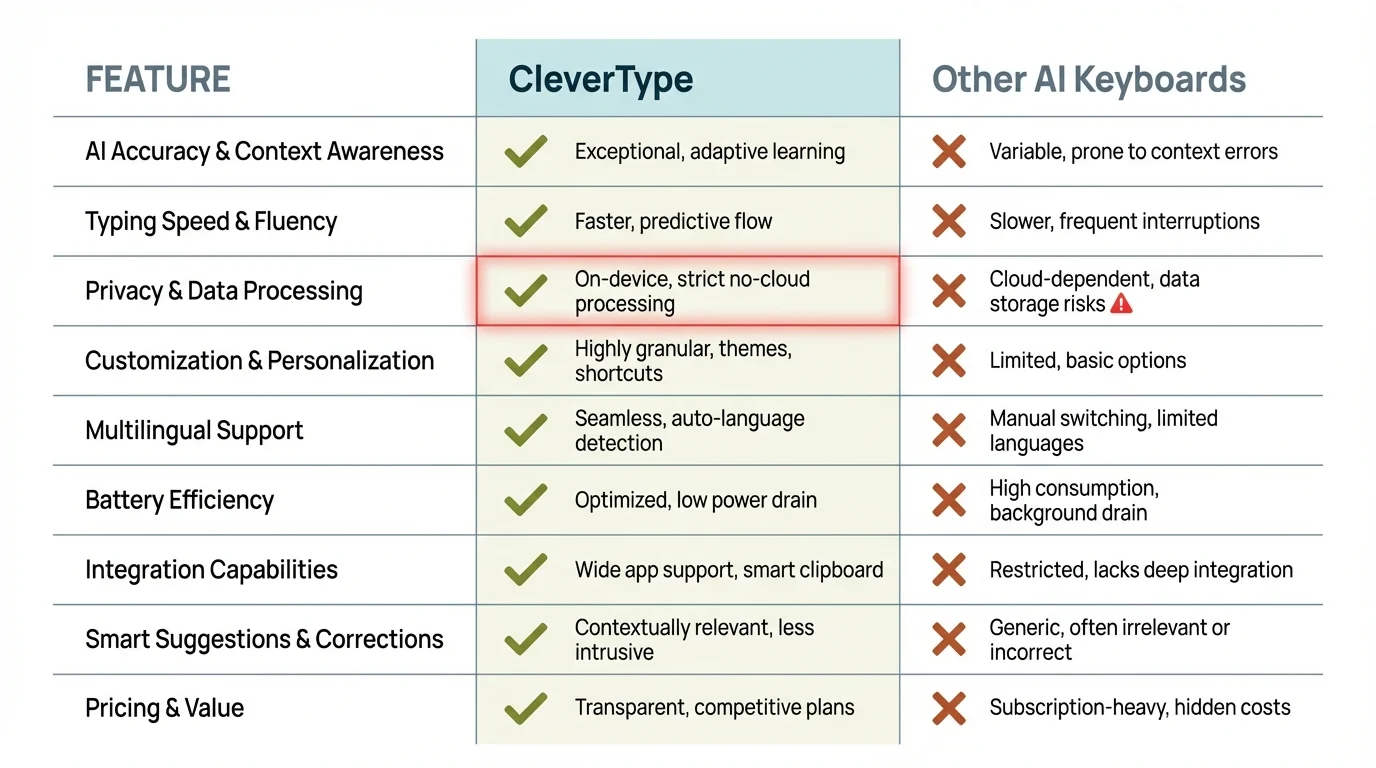
CleverType AI Keyboard outperforms traditional voice keyboards across key features including accuracy, privacy, and AI-powered enhancements
Best Use Cases: When Voice Typing Actually Saves Time
Voice dictation isn't always faster than typing. Short, one-word replies? Typing is quicker. But for specific scenarios, a good voice to text keyboard seriously improves productivity.
Long-form content creation. Writing emails, documents, or messages longer than a few sentences. Studies show users can crank out first drafts 3x faster with 95%+ accuracy voice typing. If you write frequently, that time adds up. Knowledge workers report saving 6-8 hours per week on average.
Hands-free situations. Cooking dinner and need to reply to a text? Driving (using voice safely, of course) and want to send a message? Walking and drafting ideas? Voice keyboards make this possible. CleverType's accuracy means you don't need to stop and edit every dictated message before sending.
Accessibility. For users with mobility limitations, arthritis, repetitive strain injuries, or other conditions that make typing difficult or painful, voice keyboards aren't just convenient—they're essential. CleverType's low error rate cuts down the frustration of correcting mistakes, which can be especially tough for users relying entirely on voice input.
Multiple languages. If you regularly communicate in more than one language, switching between keyboard layouts gets tedious. Voice input with automatic language detection (like CleverType offers) cuts out this friction entirely.
Technical or specialized vocabulary. Medical professionals, lawyers, engineers, and other specialists use terminology that standard keyboards don't recognize. CleverType learns industry-specific terms without needing manual dictionary additions. Say "echocardiogram" or "tort reform" or "polymerase chain reaction" once, and it remembers.
That said, voice typing has limits. Editing existing text is still faster with traditional typing. Precise formatting with specific styling needs manual touch. And in quiet environments like libraries or meetings, obviously voice input isn't appropriate. The best AI keyboard apps (CleverType included) make switching between voice and typing smooth.
How AI Changed Voice Keyboards in 2026
The jump from 2023 to 2026 in voice keyboard technology wasn't gradual—it was massive. AI transcription accuracy improvements over this period represent one of the biggest leaps in automatic speech recognition history.
Older voice-to-text systems worked on pattern matching. They'd compare your speech to pre-recorded samples and guess the closest match. This approach failed with accents, background noise, or uncommon words. Word error rates sat around 25-30% in real-world conditions.
Modern AI models understand language differently. They don't just match patterns—they predict likely word sequences based on context. If you say something unclear, the AI considers what words make sense given the previous sentence, the app you're using, and your past dictation history.
This is why CleverType's accuracy improved from around 89% in early 2024 to over 99% now. The underlying AI models got better at understanding context, not just recognizing sounds.
Neural processing made on-device AI possible. Phones released in the past two years include specialized neural processing units built for running AI models locally. This hardware advancement let privacy-focused voice keyboards like CleverType match or beat cloud-based systems in accuracy while keeping data on-device.
Multimodal AI integration. The best voice keyboards in 2026 don't just process audio. They understand what you're typing about, which app you're using, even the time of day, to improve predictions. CleverType pulls together voice input with these contextual signals to cut down on errors.
For example: dictate "book a table for 6" at 5 PM, and CleverType understands you probably mean a restaurant reservation. Say the same phrase at 10 AM, and it might interpret "table" differently based on your recent app usage (work calendar vs. restaurant app).
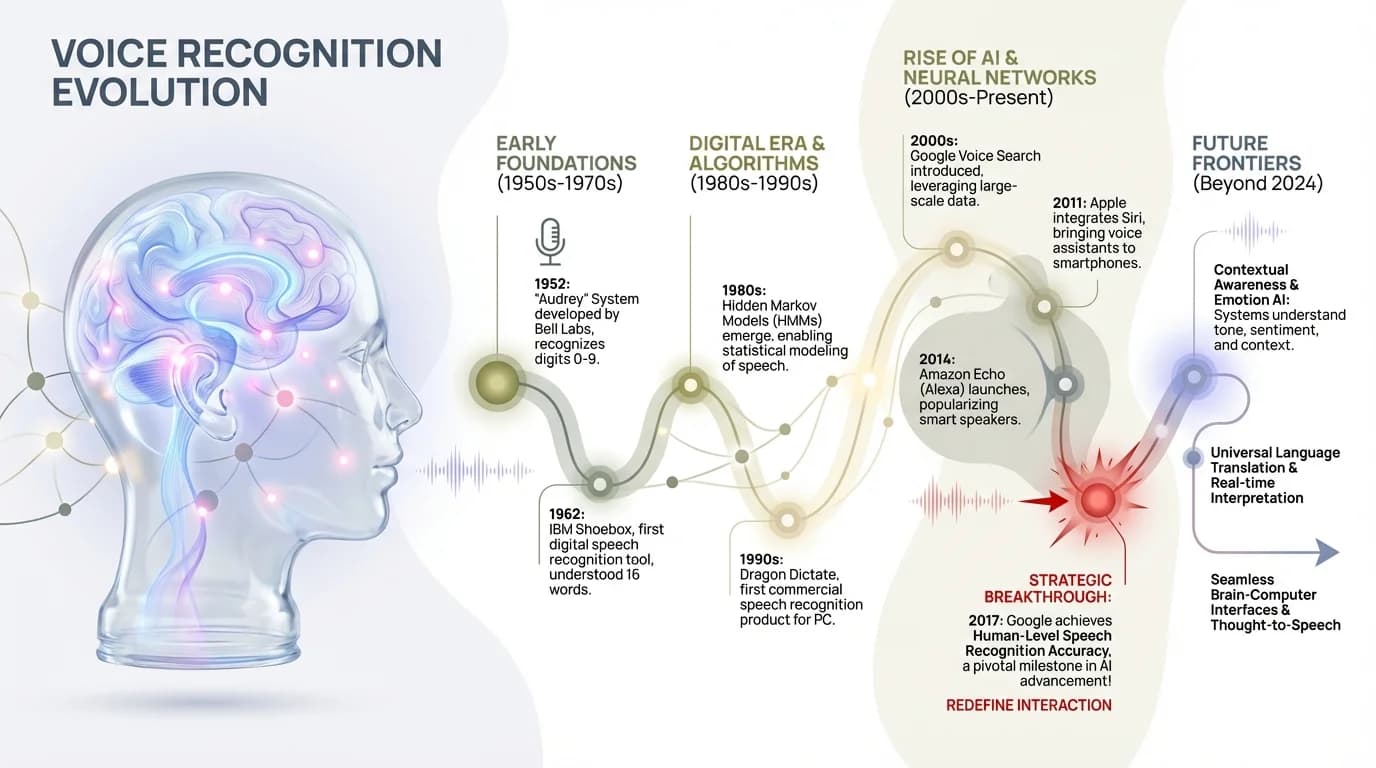
The evolution of AI-powered voice recognition: From pattern matching to context-aware neural processing
Common Problems with Voice Keyboards (And How to Avoid Them)
Even the best voice to text keyboard apps have quirks. Here's what actually goes wrong and how to fix it.
Background noise ruins accuracy. True for any voice recognition system. But there's a difference in how apps handle noise. CleverType's noise cancellation filters out consistent background sounds (air conditioning, traffic hum, keyboard clacking) while focusing on your voice. Gboard struggles more with ambient noise.
Solution: Use voice typing in moderately quiet environments when you can. If you're frequently in noisy places, CleverType's noise handling makes it the better pick.
Accents and speaking styles. Some apps assume everyone speaks with a standard American accent. They don't. CleverType adapts to regional accents, non-native speakers, and individual speech patterns. The AI learns your voice specifically.
Solution: The more you use voice dictation, the better it performs. Give it a week of regular use, and you'll notice accuracy improvements as the AI adapts to your speech.
Punctuation errors. Automatic punctuation sounds great until the app puts periods in the wrong places or misses question marks. CleverType's AI looks at sentence structure and tone to predict punctuation more accurately than competitors.
Solution: Review dictated text before sending, especially for formal communication. Voice commands like "question mark" or "new paragraph" give you manual control when you need it.
Misrecognized words. Homophones (words that sound the same) confuse voice recognition systems. "Their" vs. "there," "to" vs. "too," "right" vs. "write." Context-aware AI keyboards like CleverType predict the right version based on sentence meaning. Basic voice typing apps just guess.
Solution: Custom vocabulary training helps. Add specialized terms, names, or frequently misrecognized words to CleverType's dictionary.
Privacy concerns. If your voice data goes to corporate servers, you lose control over it. Period. This isn't fixable with settings adjustments—it's a fundamental architecture difference. CleverType's on-device processing is the only real solution to privacy concerns with voice input.
Solution: If privacy matters to you, don't use cloud-based voice keyboards for sensitive information. Use CleverType or similar on-device alternatives.
Internet dependency. Gboard and SwiftKey need internet connectivity for full accuracy. On a plane, in a subway, or anywhere with spotty service, performance drops a lot. CleverType works the same offline.
Solution: Choose an on-device voice keyboard if you frequently work in areas with limited connectivity.
What to Look for When Choosing a Voice Keyboard
Not everyone needs the same features. Here's how to figure out what matters for your specific use case.
Accuracy under your conditions. Download a few apps and test them in environments where you'll actually use voice typing. Coffee shops, offices, outdoor areas—wherever you work. Measure how many errors need correction. CleverType consistently performs best across varied environments, but test for yourself.
Privacy requirements. Handling sensitive data? Medical records, legal documents, financial information? On-device processing isn't optional—it's required. CleverType is the clear choice here. For casual personal use where privacy is less critical, cloud-based options like Gboard might work.
Language needs. Multilingual users need smooth language switching. CleverType handles this better than alternatives. Gboard supports many languages but needs manual switching or enabling multiple keyboards, which clutters the interface.
Integration with your workflow. Does the keyboard work well with the apps you use most? CleverType adapts its suggestions based on context—professional tone for email, casual for messaging. This contextual awareness matters more than a huge feature list.
Learning curve. Some voice keyboards need a ton of setup and training. CleverType works well immediately but gets better with use. Gboard is also quick to start using. SwiftKey's interface has more complexity.
Cost vs. value. CleverType offers a free tier with core features and a premium option for advanced stuff. Gboard and SwiftKey are free but monetize through data collection. Think about whether you're paying with money or privacy—there's always a cost.
Update frequency and support. Voice recognition technology gets better constantly. Apps that update regularly (CleverType releases improvements monthly) benefit from the latest AI advancements. Stagnant apps fall behind quickly.
Advanced Features That Actually Matter
Marketing pages list dozens of features. Most don't matter in daily use. These do:
Voice commands for editing. Say "delete that" to remove the last sentence. "Capitalize the word keyboard" to fix formatting. "Move up two paragraphs" to navigate. CleverType's voice commands cut down the need to touch the screen during dictation, keeping your flow going.
Custom vocabulary. Add names, technical terms, brand names, or industry jargon. Once added, the AI nails these words every time. Essential for professionals.
Smart clipboard. CleverType remembers phrases you frequently dictate and offers quick-access shortcuts. If you often say "Let me know if you have questions," it becomes available as a tap-to-insert suggestion.
Undo and redo. Made a mistake or want to try a different phrasing? Voice-activated undo lets you experiment without losing work.
Dictation macros. Create shortcuts for common longer text. Say "signature" and your full email signature appears. Say "address" and your complete mailing address drops in automatically.
These aren't gimmicks—they're practical tools that make voice typing faster than even accurate transcription alone would be.
Discover CleverType's powerful AI features: voice typing, smart suggestions, multilingual support, privacy protection, and productivity-boosting tools
Voice Keyboard Security: What You're Not Being Told
Privacy and security overlap but aren't identical. A private keyboard keeps your data from being collected. A secure keyboard stops that data from being stolen or misused.
On-device processing improves both. If data never leaves your phone, it can't be intercepted in transit, stolen from cloud servers, or subpoenaed from corporate databases. CleverType's architecture makes these threats irrelevant.
Encryption in transit isn't enough. Cloud-based keyboards encrypt data traveling to their servers. Good. But that data sits on corporate servers after arrival. How long is it stored? Who has access? What happens if those servers get breached? Security incidents affecting major tech companies show this isn't just theoretical.
Terms of service matter. Read what apps can do with your data. Gboard's terms allow Google to use dictated text to "improve services"—which includes training AI models. Your private messages might become part of the training data for Google's next product.
CleverType's terms are simpler: your data stays on your device and is never used for any purpose beyond providing keyboard functionality.
Permissions. Check what permissions a keyboard requests. Internet access? Not needed for on-device processing. Gboard and SwiftKey need it. CleverType works fully offline, so internet access is optional (only needed for optional features like translation).
Third-party keyboards see everything you type. This is true for any keyboard replacement app, including CleverType. The difference is what happens next. CleverType processes locally and forgets. Cloud keyboards send everything to remote servers. Choose carefully—this app sees every password, message, and document you type.
Making Voice Typing Part of Your Workflow
Getting a voice keyboard installed is easy. Actually using it consistently takes some adjustment. Here's how to make the transition smoother.
Start with low-stakes content. Practice with personal notes, messages to friends, or draft emails before using voice typing for important work communications. You'll learn the app's quirks and your own dictation style without pressure.
Learn basic voice commands. "Period," "comma," "new paragraph," "delete that"—knowing a few key commands makes dictation way smoother. CleverType handles most punctuation automatically, but manual commands give you precise control.
Speak naturally. Don't slow down or over-enunciate. Modern AI voice keyboards (especially CleverType) understand normal conversational speech better than careful, deliberate dictation. Talk like you're explaining something to a friend.
Edit after, not during. Resist the urge to stop and fix every small error as you dictate. Keep your flow and train of thought. Edit the full text afterward—it's faster than constant interruptions.
Use voice for first drafts. Voice dictation is great at getting ideas out quickly. Don't expect perfect prose. Capture thoughts fast, then refine with manual editing. This approach takes advantage of voice typing's speed while acknowledging its limits.
Combine typing and voice. CleverType makes switching between input methods smooth. Dictate most of a message, then type to fine-tune specific words or add special characters. Use whichever method works better for each task.
Practice in different contexts. Professional emails need different language than casual texts. Practice voice typing in various scenarios. CleverType's AI adapts to context, but you need to learn how to phrase thoughts right for different audiences when dictating.
Set realistic expectations. Voice typing is 3x faster for long content. It's not magic. You'll still need to edit. You'll still make mistakes. But over time, the speed advantage becomes noticeable if you write frequently.
The Future of Voice Keyboards (What's Coming Next)
AI voice typing in 2026 is impressive. It's about to get even better.
Emotion detection. Future voice keyboards will recognize frustration, excitement, or other emotions in your voice and adjust tone accordingly. Early versions of this exist in CleverType's sentiment analysis, but it's limited to detecting whether content is positive or negative. Future versions will understand subtle emotional context.
Real-time translation. Speak in English, have the text appear in Spanish. Instantly. CleverType's current translation features make you type or dictate, then translate. Upcoming versions will translate as you speak, making multilingual communication even smoother.
Better noise handling. AI models are getting better at isolating voices in chaotic environments. Future voice keyboards will work accurately in loud restaurants, crowded offices, or busy streets—places where current technology struggles.
Personalization depth. Your voice keyboard will understand your writing style, common topics, even your sense of humor. Instead of just transcribing accurately, it'll suggest phrasings that sound like you. CleverType is moving in this direction with its learning algorithms.
Integration with other AI tools. Imagine dictating a rough idea and having your voice keyboard automatically structure it into a proper email, add relevant links, and suggest recipients based on content. The line between voice input and AI writing assistant will blur.
Health monitoring. Your voice contains health information. Speech patterns can show fatigue, illness, or stress. Future voice keyboards might notice concerning changes and suggest health check-ins. This needs careful privacy considerations—another area where CleverType's on-device approach gives it an advantage.
These features are coming, but not all at once and not to all keyboards equally. The apps putting money into AI research now (like CleverType) will lead. Legacy keyboards from big tech companies move slower despite bigger resources.
Frequently Asked Questions
Q: What is the most accurate voice-to-text keyboard app in 2026?
A: CleverType hits 99%+ accuracy with on-device AI processing, outperforming cloud-based alternatives like Gboard (95-97%) and SwiftKey (93-95%) in real-world conditions. According to accuracy benchmarks, modern AI models get word error rates below 8%, with CleverType performing on the better end of this range.
Q: Do voice keyboard apps work without internet connection?
A: CleverType works fully offline with the same accuracy as online use because it processes voice on-device. Gboard and SwiftKey need internet connectivity for full functionality, with noticeably reduced accuracy in offline mode. On-device processing also means your voice data never leaves your phone, which addresses privacy concerns.
Q: Can voice typing really make me type faster?
A: Yes—most people speak at 150+ words per minute but type only 40. With 95%+ accuracy voice typing, you can crank out content 3x faster. Research shows knowledge workers save 6-8 hours per week on average. That said, voice typing works best for long-form content and first drafts, not short replies or detailed editing.
Q: How do voice keyboards handle accents and dialects?
A: Modern AI keyboards adapt to different accents through machine learning. Studies on speech recognition show non-native accent recognition improved from 35% word error rate in 2019 to 15% in 2025. CleverType performs really well with accent variation because its AI learns your specific speech patterns over time, while cloud-based keyboards rely on generalized models.
Q: Are voice keyboards safe for sensitive or private information?
A: Only if they use on-device processing. Cloud-based keyboards like Gboard and SwiftKey send your voice data to remote servers, where it may be stored or used for AI training. CleverType processes everything locally on your device, meaning sensitive information (passwords, medical data, confidential business communications) never leaves your phone. For privacy-critical use cases, on-device processing isn't optional.
Q: Which voice keyboard works best for multiple languages?
A: CleverType supports 100+ languages with automatic language detection and switching. You can mix languages within the same sentence without manually changing keyboard settings. Gboard also offers extensive language support but needs either manual switching or enabling multiple keyboards, which clutters the interface. The key difference is CleverType's smooth transitions versus Gboard's manual approach.
Q: How long does it take to get accurate results with a new voice keyboard?
A: CleverType works accurately from day one but gets better within the first week of regular use as its AI adapts to your voice, accent, and vocabulary. Cloud-based alternatives like Gboard also adapt over time but need to send voice samples to remote servers. Most users report noticeably better accuracy after 3-5 days of consistent voice typing, with specialized terminology recognition improving after 1-2 weeks.
Ready to Type Faster?
Voice typing isn't just a convenience feature anymore—it's a genuine productivity tool that can save hours every week. Whether you're drafting emails, writing documents, or just tired of slow thumb-typing on your phone, a quality AI voice keyboard makes a real difference.
CleverType brings together the accuracy of cloud-based systems with the privacy of on-device processing. No compromise between performance and security. No sending your private messages to corporate servers. Just fast, accurate voice typing that learns your speech patterns and keeps your data where it belongs—on your device.
The difference becomes pretty obvious within the first few dictation sessions. Try it and see how much time you actually save.