
Key Takeaways
- AI writing apps can increase workplace productivity by up to 40% by automating routine writing tasks
- The best AI writing tools offer features like grammar correction, tone adjustment, and content generation
- CleverType and similar mobile AI keyboards provide on-the-go writing assistance across all apps
- AI writing tools help reduce writing time while improving quality and consistency
- Most professional AI writing apps offer free trials or basic plans to test functionality
- Privacy-focused AI writing tools ensure sensitive business data remains secure
Ever wondered how much time you waste staring at a blank screen or endlessly editing emails? Yeah, me too. It's kinda crazy when you think about it—professionals spend about 30% of their workday just writing stuff. What if there was a way to cut that down? Well, there is! AI writing apps have evolved dramatically in 2026, and they're no longer just fancy tools for early adopters—they're becoming essential workplace utilities.
I've been using these tools for over four years now, and honestly? They've completely transformed how I approach work. The difference between 2022 and 2026 is night and day—today's AI writing assistants understand context better, respect your voice, and seamlessly integrate into your workflow. Let's talk about how these smart helpers can boost your productivity without making you sound like a robot.
How AI Writing Apps Transform Workplace Efficiency
AI writing apps aren't just another tech fad—they're actually solving real problems that waste our time at work. Think about it: how many minutes (or hours!) do you spend fixing typos, rewriting awkward sentences, or trying to sound "professional" in emails?
Recent workplace research shows that professionals spend nearly 28% of their workweek managing email alone—and that doesn't even include Slack messages, documentation, or reports. That's more than 11 hours a week! AI writing tools can realistically cut that time by 30-40%, giving you back precious hours for strategic work that actually matters.
Here's what these tools can do for your daily workflow:
- Automate repetitive writing tasks like responding to common inquiries
- Fix grammar and spelling without you having to proofread everything twice
- Suggest better word choices when you're stuck or repeating yourself
- Generate first drafts that you can then personalize
- Maintain consistent tone across all company communications
A marketing manager I spoke with recently shared, "Before using AI writing tools, our team spent at least 2 hours daily on email correspondence. Now it's down to about 45 minutes." That's a huge time savings that can be redirected to creative strategy and client relationships—the stuff that actually drives business growth.
But do these tools actually make financial sense? Recent industry analysis shows that companies using AI writing tools report an average 40-45% increase in content production efficiency in 2026—up from 37% just a year ago. For a mid-sized business, that translates to thousands of dollars saved monthly in labor costs. Even better, employees report higher job satisfaction when they spend less time on tedious writing tasks and more time on meaningful work.
What's New in AI Writing Tools for 2026
The AI writing landscape has matured significantly in 2026. Unlike the early days when AI-generated text was obviously generic, today's tools have become remarkably sophisticated. They now understand context from previous conversations, adapt to your writing style automatically, and even suggest when NOT to use AI—which honestly shows how far we've come.
One of the biggest shifts I've noticed is the move toward "ambient AI writing assistance." Instead of consciously deciding to use an AI tool, it's just... there when you need it. Think autocomplete on steroids—it suggests completions, catches errors, and adjusts tone in real-time without interrupting your flow. It feels less like using software and more like having a really good editor looking over your shoulder.
Privacy has also become a major differentiator. After several high-profile incidents in 2025, most professional AI writing tools now offer on-device processing for sensitive content, meaning your confidential business communications never leave your device. This has been huge for industries like healthcare, legal, and finance.
Top AI Writing Apps for Professional Use
Not all AI writing apps are created equal, and what works for a creative writer might be useless for a business professional. I've tested dozens of these tools throughout 2025 and early 2026, and these are the ones that consistently deliver for workplace productivity:
Mobile-First AI Writing Solutions
For professionals constantly on the move, mobile AI keyboards have become essential productivity tools. Unlike desktop-only solutions, these integrate directly with your smartphone's typing system.
| App | Best For | Standout Feature |
|---|---|---|
| CleverType | All-around business writing | Custom AI assistants for different writing tasks |
| Grammarly Keyboard | Grammar correction | Real-time error detection across all apps |
| Microsoft SwiftKey | Multilingual professionals | Seamless language switching with AI suggestions |
What makes these mobile solutions particularly valuable in 2026 is their ability to work across all applications seamlessly. Whether you're writing an email, updating a project management tool, or messaging colleagues, the AI assistance follows you everywhere. The latest versions even maintain context across different apps—so if you're discussing a project in Slack and then composing an email about it, the AI remembers what you were talking about.
"I don't have to switch between apps to get writing help anymore," says Jamie, a project manager I interviewed. "Having AI suggestions right in my keyboard has probably saved me an hour a day of editing time. And now that it remembers context, I don't have to keep re-explaining what I'm working on."
Desktop AI Writing Powerhouses
For more intensive writing tasks, these desktop solutions offer deeper capabilities:
- Jasper AI: Excels at generating longer-form content like reports and presentations
- Grammarly Business: Provides team-wide style guides and brand voice consistency
- Copy.ai: Specializes in marketing copy that converts
The key difference with desktop solutions is their ability to handle more complex writing projects and team collaboration features. Many offer templates specifically designed for business use cases like proposal writing, customer service responses, and internal documentation.
Implementing AI Writing Tools in Your Workflow
So you've decided to try AI writing tools—great! But how do you actually fit them into your daily routine without causing disruption? I've helped several teams implement these tools, and there's definitely a right way to do it.
First, start small. Don't try to revolutionize your entire writing process overnight. Pick one specific writing task that takes up too much time:
- Morning emails: Use AI to draft responses to routine messages
- Meeting notes: Let AI clean up and organize your rough notes
- Weekly reports: Generate the first draft with AI, then personalize
Anna, a sales director I worked with, told me: "I started just using AI for customer follow-up emails. Once I saw how much time it saved, I gradually expanded to using it for sales proposals and meeting summaries."
A common mistake is treating AI writing tools as complete replacements for human writing. They're not—they're assistants. The most effective approach combines AI efficiency with human creativity and judgment:
Human strengths: Strategy, emotion, nuance, ethical considerations
When implementing across a team, consider creating shared templates and guidelines. This ensures everyone uses the AI tools consistently and in alignment with your brand voice. Many business-focused AI writing platforms like CleverType allow for custom AI assistants that can be programmed with your company's style guide.
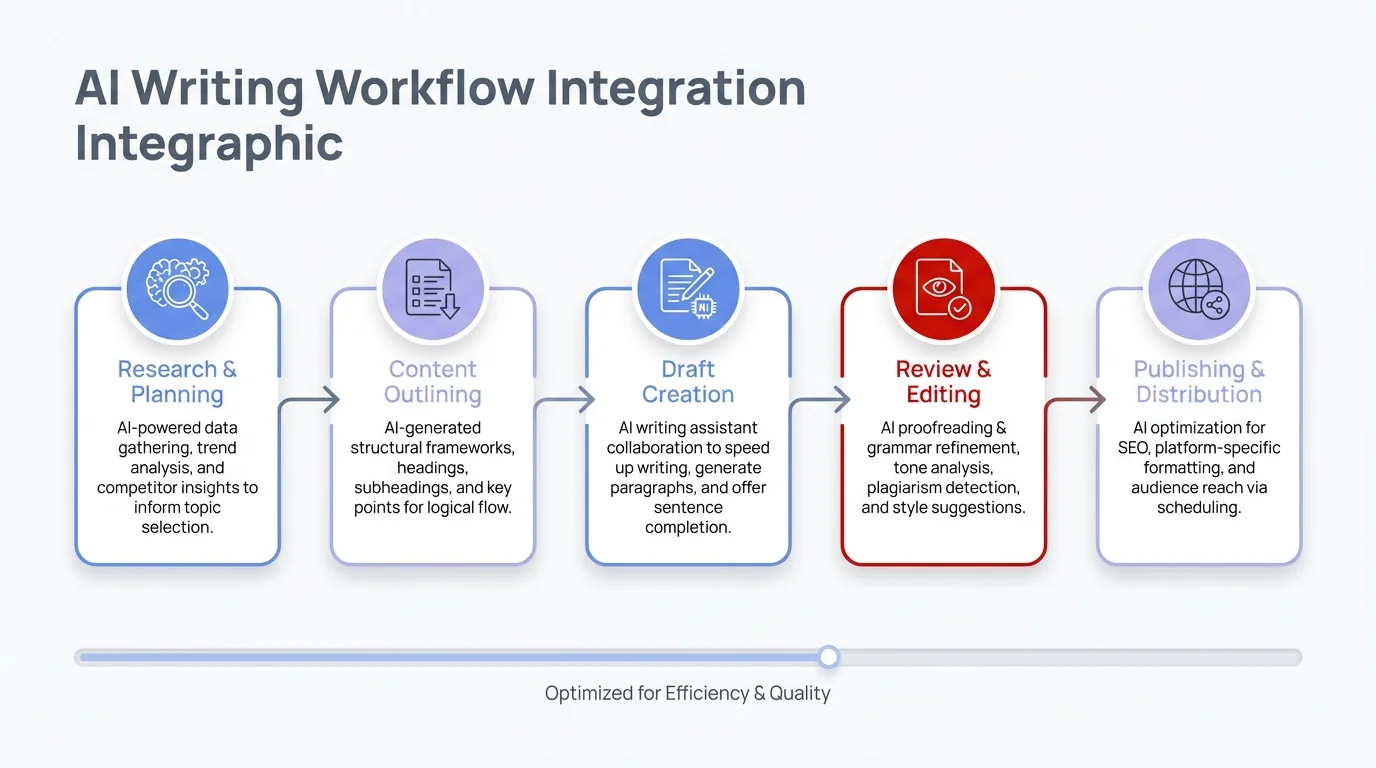
A streamlined workflow showing how AI writing tools integrate into your daily productivity routine
Writing Tasks Best Suited for AI Assistance
I've found that certain writing tasks benefit more from AI assistance than others. Based on my experience and conversations with other professionals, here are the writing tasks where AI tools deliver the biggest productivity gains:
Communication Streamlining
- Email management: AI can draft responses to common inquiries, saving hours weekly
- Meeting follow-ups: Generate summaries and action item lists automatically
- Client communications: Ensure consistent tone and professionalism across all touchpoints
"Email used to be this black hole in my day," admits Taylor, a consultant who now uses AI writing tools. "Now I can process my inbox in half the time while actually writing better responses."
Documentation and Knowledge Management
AI writing tools excel at transforming rough notes into structured documentation:
- Converting bullet points into proper paragraphs
- Organizing information logically
- Standardizing terminology across documents
- Generating summaries of longer documents
For technical teams, this has been a game-changer. "Our documentation was always outdated because nobody wanted to write it," says Dev, an IT manager. "With AI helping draft the first version, we've seen a 70% increase in documentation completion."
Content Development
While creative content still benefits from a human touch, AI can accelerate the process:
- Blog posts: Generate outlines and first drafts
- Social media updates: Create variations of the same message for different platforms
- Internal newsletters: Summarize company news into digestible formats
The key is knowing where AI shines and where human creativity should take over. For instance, AI is great at structuring information but may struggle with original insights or emotional appeal.
Overcoming Common Challenges with AI Writing Tools
Despite their benefits, AI writing tools come with challenges. Here's how to address the most common ones I've encountered:
The Accuracy Problem (Much Improved in 2026)
AI used to get facts wrong or make confident-sounding but incorrect statements. This was particularly problematic in professional settings where accuracy matters. Good news: this has improved dramatically in 2026. The latest AI writing tools now cite sources for factual claims and flag when they're uncertain about information.
Solution: Always fact-check AI-generated content before sharing it externally, but the verification process is now much faster thanks to built-in citation features. Some teams implement a "human in the loop" policy where AI drafts but a person reviews before finalizing.
"We treat AI as the first draft, never the final draft," explains Morgan, a marketing director. "It saves us time, and now with automatic citations, the verification step is way quicker than it used to be."
The Personality Problem
Early AI writing often sounded generic or overly formal. While this has improved, maintaining your authentic voice can still be challenging.
Solution: Most advanced AI writing tools now have tone adjustment features. CleverType, for example, lets you specify whether you want to sound professional, friendly, confident, or other tones.
You can also "train" some AI tools by feeding them examples of your preferred writing style. The more you use them, the better they adapt to your voice.
The Privacy Concern
Many professionals worry about sensitive business information being processed by AI tools.
Solution: Look for AI writing tools with strong privacy policies. Some options:
- Tools that don't store your content after processing
- Enterprise solutions with dedicated security features
- Self-hosted AI writing solutions for maximum control
For particularly sensitive content, consider using AI only for structure and style suggestions rather than content generation.
Measuring Productivity Gains from AI Writing Tools
How do you know if these tools are actually making you more productive? Based on my work with various teams, here are practical ways to measure the impact:
Time Tracking
The most direct measurement is time saved. Before implementing AI writing tools, track how long certain writing tasks take. After implementation, measure again:
Post-AI time spent on writing tasks: Y hours/week
Time saved: X - Y hours/week
One marketing team I worked with in early 2026 saved an average of 8.5 hours per person weekly on writing tasks after implementing the latest AI tools—that's up from 7 hours when they first started using older AI writing assistants in 2024.
Quality Metrics
Productivity isn't just about speed—it's also about quality. Consider tracking:
- Readability scores of documents
- Error rates (grammar, spelling, factual)
- Consistency of messaging across team members
- Audience engagement with written content
A customer service department I consulted with found that AI-assisted responses in 2026 received 28% higher satisfaction ratings than their previous templated responses—customers can actually tell the difference between genuinely helpful, personalized responses and robotic templates.
ROI Calculation
For a business case, calculate the return on investment:
- Cost of AI writing tools per year
- Value of time saved (hours saved × average hourly rate)
- Value of quality improvements (harder to quantify but might include reduced revision cycles)
"We initially questioned the subscription cost," admits a finance director I spoke with. "But when we calculated that we were saving about $4,000 per month in staff time for a $400 monthly subscription, the decision became obvious."
The Future of AI Writing in the Workplace
AI writing technology continues to evolve at a rapid pace in 2026. Based on current trends and conversations with developers in this space, here's what we can expect in the coming year:
More Specialized Business Applications
We're seeing a clear shift from general-purpose AI writers to tools designed for specific business functions. In 2026, these specialized tools are already emerging:
- Sales-focused AI writers that understand conversion psychology and can A/B test messaging automatically
- Legal AI assistants that draft contracts with appropriate language and flag compliance issues
- Technical writing AI that can explain complex concepts at different reading levels for various audiences
- Healthcare documentation AI that understands medical terminology and HIPAA compliance requirements
These specialized tools offer deeper knowledge of industry-specific terminology, regulatory requirements, and best practices that generic AI writers simply can't match.
Voice-to-Document Workflows
The integration of voice recognition with AI writing is creating seamless workflows where professionals can:
- Dictate rough thoughts via voice
- Have AI automatically structure and polish the content
- Review and approve the final document
This "speak-edit-publish" workflow could dramatically change how we create content. Voice typing AI keyboards are already making this possible on mobile devices.
Collaborative AI Writing
Future AI writing tools will become active participants in team writing projects:
- Suggesting improvements based on real-time collaboration
- Harmonizing different writing styles across team members
- Managing version control and change tracking
"The next generation of these tools won't just help you write—they'll help teams write together more effectively," predicts a software developer working in this space.
Getting Started with AI Writing Tools Today
Ready to boost your productivity with AI writing tools? Here's a practical step-by-step approach based on what's worked for me and other professionals:
1. Identify Your Writing Pain Points
Start by asking yourself:
- Which writing tasks take up most of my time?
- Where do I struggle most with writing quality?
- What type of writing would I like to delegate if possible?
This helps you choose tools that address your specific needs rather than getting distracted by fancy features you'll never use.
2. Start with a Free Trial
Most professional AI writing tools offer free trials or freemium models. Take advantage of these to test different options:
- CleverType offers a free version of their AI keyboard
- Grammarly provides basic grammar checking for free
- Many desktop AI writers offer 7-14 day trial periods
"I tested three different tools before finding the one that matched my writing style," says Pat, a business analyst. "The free trials were essential for making the right choice."
3. Integrate with Your Existing Tools
The most successful implementations are those that fit seamlessly into your current workflow:
- Browser extensions that work with your email client
- Mobile keyboards that work across all your apps
- Integrations with your team's collaboration tools
For example, if your team uses Microsoft Office extensively, prioritize AI writing tools with strong Office integration.
4. Create Templates for Repeated Tasks
Once you've chosen a tool, create templates for your most common writing tasks:
- Customer response templates
- Meeting recap formats
- Project update structures
This compounds your productivity gains by combining AI assistance with reusable content.
5. Refine Based on Results
After using AI writing tools for a few weeks, evaluate what's working and what isn't:
- Which features are you actually using?
- Where are you still spending too much time?
- Is the quality meeting your standards?
Use these insights to either adjust your approach or try different tools.
Frequently Asked Questions
### Q: Are AI writing apps worth the investment for small businesses?
A: Absolutely. Small businesses often see the biggest ROI because every hour saved has a direct impact on the bottom line. Most AI writing tools offer free trials, so you can test them risk-free. Even a basic subscription that saves your team 5-10 hours weekly typically pays for itself within the first month.
### Q: Will AI writing tools make my content sound robotic or generic?
A: Not anymore—2026's AI writing tools have evolved significantly. They now adapt to your writing style and offer tone controls that let you sound professional, casual, or anything in between. The key is using them as assistants rather than replacements, adding your own insights and personality to AI-generated drafts.
### Q: How secure are AI writing apps with sensitive business information?
A: Security varies by provider, so always check the privacy policy before using AI tools with confidential information. Many professional-grade AI writing apps now offer on-device processing for sensitive content, meaning your data never leaves your device. Look for tools with SOC 2 compliance, encryption, and clear data retention policies.
### Q: Can AI writing tools work with languages other than English?
A: Yes! Most modern AI writing tools support multiple languages, with varying levels of proficiency. English, Spanish, French, German, and Chinese typically have the best support. Some tools like Microsoft SwiftKey even allow seamless language switching within the same conversation, which is great for multilingual teams.
### Q: How much time can I realistically save using AI writing tools?
A: Most professionals save 30-40% of their writing time, which translates to 5-10 hours per week for knowledge workers. The exact savings depend on how much writing you do and which tasks you automate. Email management and documentation see the biggest time savings, often reducing writing time by half.
### Q: Do I need technical skills to use AI writing apps effectively?
A: Not at all. Most AI writing tools are designed for non-technical users and work just like regular apps. Mobile AI keyboards like CleverType integrate directly with your phone's keyboard, so you're already familiar with the interface. The learning curve is minimal—most people are productive within their first day of use.
### Q: What's the difference between mobile AI keyboards and desktop AI writing tools?
A: Mobile AI keyboards work across all apps on your phone and are great for on-the-go communication like emails and messages. Desktop AI writing tools typically offer more advanced features for longer-form content like reports and presentations. Many professionals use both—mobile for quick daily tasks and desktop for deeper writing projects.
Conclusion: Finding the Right Balance
AI writing tools aren't about replacing human creativity or judgment—they're about eliminating the tedious parts of writing so you can focus on what matters. The professionals who benefit most from these tools find the right balance between automation and personal touch.
As someone who's been using these tools for years, my advice is simple: let AI handle the structure, grammar, and routine aspects of writing, but keep your unique insights, strategic thinking, and relationship building firmly in human hands.
The future of productive work isn't AI or humans—it's AI and humans working together, each doing what they do best. By thoughtfully incorporating AI writing tools into your workflow, you can reclaim hours of your workweek while actually improving the quality of your written communication.
Ready to transform your productivity? Start small, measure the results, and gradually expand your use of AI writing tools as you see what works for your specific needs.