Key Takeaways
| Question | Short Answer |
|---|---|
| Are free AI keyboards good enough? | For casual typing, yes — basic grammar help and predictions are solid |
| What does premium actually unlock? | Unlimited AI requests, advanced tone control, translation, smart replies |
| Is the subscription worth the money? | Depends on how much you type — professionals save 47 mins/day on average |
| Best free AI keyboard? | CleverType offers the most generous free tier with real AI features |
| Average premium keyboard cost? | $3.99–$19.99/month, with some like Grammarly going up to $29.99 |
| Biggest risk with free keyboards? | Some collect and sell your typing data — read the privacy policy |
Additionally, Most people just download whatever keyboard app shows up first on the Play Store and stick with it for years. But here's something worth knowing: the keyboard you use right now is probably leaving a lot of productivity on the table — and it might be collecting your data too.
The free vs premium keyboard debate has gotten a lot more interesting in 2025. The virtual keyboard market is now worth $3.19 billion and is projected to hit $7.23 billion by 2035. That kind of money is driving some genuinely impressive AI features — but not all of them are available for free.
So is upgrading to a paid keyboard actually worth it? And what are you missing if you stay on the free version? I've tested both extensively, and honestly, the answer isn't as clean-cut as most comparison posts make it out to be.
What's the Real Difference Between Free and Premium AI Keyboards?
Furthermore, The honest answer is: it depends entirely on the app.
Some "premium" keyboards charge you for stuff that other apps just give away. And some free keyboards are so bare-bones they barely count as AI-powered at all. Additionally, So before getting into price comparisons, it's worth figuring out what "AI" actually means in this context.
Consequently, Free AI keyboard features typically include:
- Basic autocorrect and word predictions
- Limited AI suggestions (usually capped at 50–100 per month)
- Standard emoji and GIF suggestions
- Simple grammar correction
Moreover, Premium AI keyboard features usually unlock:
- Unlimited AI text generation and suggestions
- Advanced grammar and tone adjustment
- Real-time translation across 40+ languages
- Smart reply generation based on conversation context
- Custom AI writing assistants
- Priority processing and faster response times
Moreover, The gap between free and premium is widest when it comes to AI request limits. Free plans almost always cap how many times the AI will assist you per day or month. Additionally, For a light user, this is fine. For someone who texts, emails, and messages all day, you'll hit the wall fast.
Here's something that gets missed in a lot of these comparisons: what "premium" even means has shifted a lot. Therefore, Back in 2023, basic autocorrect was a paid feature. Nonetheless, Now it's table stakes. Therefore, What you're actually paying for in 2025 is context-aware suggestions — the kind that understand what you're talking about, not just what word statistically comes next.
Consequently, Worth calling out: CleverType's free tier is genuinely different from most competitors. Therefore, While others lock nearly everything behind a paywall, CleverType gives you actual grammar correction and AI assistance before asking for a credit card. Hence, That's a much fairer way to figure out whether this stuff is even useful for you.
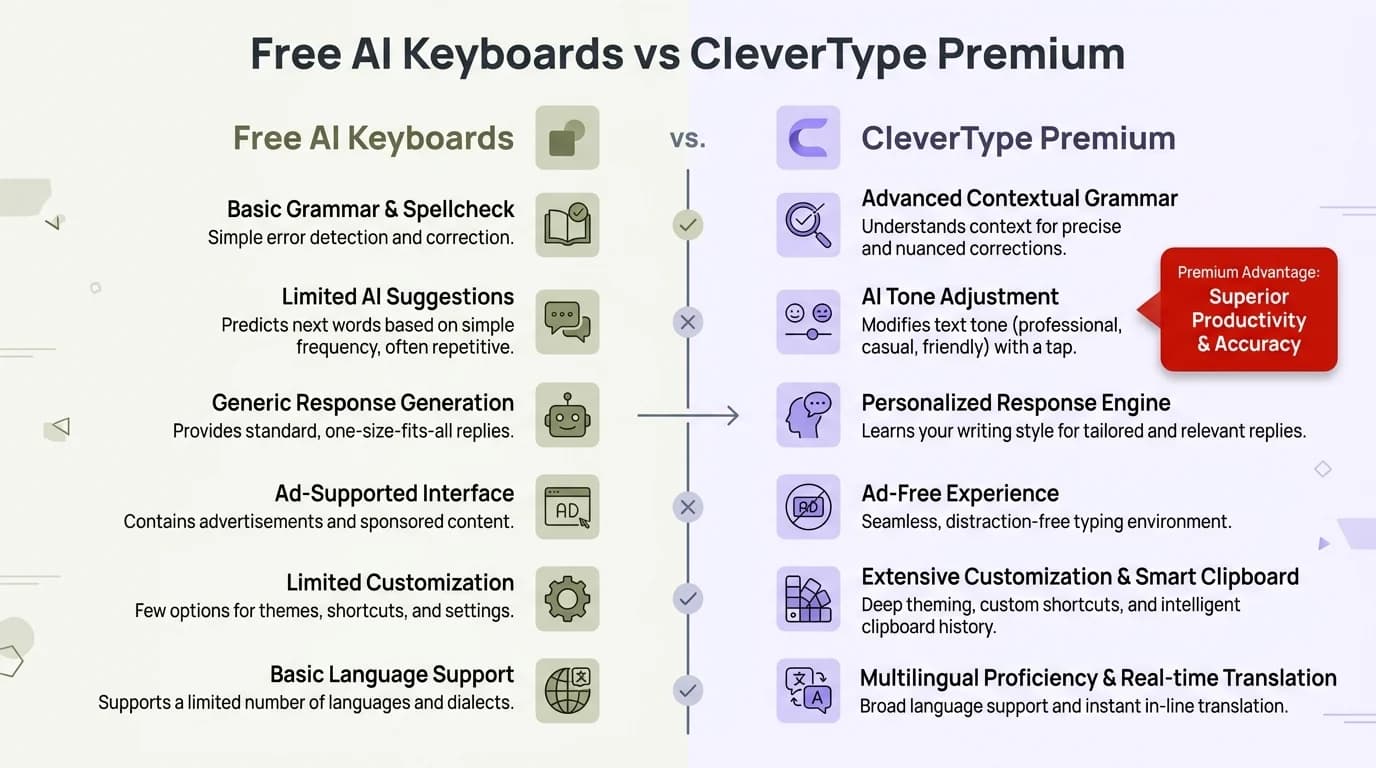
Free AI Keyboards vs CleverType Premium — a side-by-side breakdown of what each tier actually delivers
What Do Free AI Keyboards Actually Give You?
Furthermore, Free keyboards have gotten genuinely good. Not "good for free" — just good. Consequently, If you haven't seriously used a free keyboard in the last two or three years, you'd probably be surprised at where things stand now.
Therefore, According to Statista's keyboard market data, the keyboard market generated $4.98 billion worldwide in 2025. All that competition has pushed even the free tiers to add real AI features.
Nonetheless, What you typically get for free:
- Autocorrect and word prediction — standard everywhere now, and actually quite accurate on modern apps
- Basic grammar checking — catches simple errors like missing punctuation, wrong homophones, duplicate words
- Emoji suggestions — pretty useful in casual messaging
- Limited AI rewrites — usually 30–100 per month depending on the app
- Swipe/gesture typing — widely available and works well
Gboard hits 78% prediction accuracy after it learns your patterns a bit. Additionally, Not bad. Additionally, CleverType's free tier actually pushes that to 91% — still no subscription needed — because the model runs on your context rather than just cycling through your typing history.
Consequently, The main frustration with free keyboards is the artificial limits. Additionally, You're not limited because of technical reasons — the AI can handle more. Consequently, The caps exist to push you toward upgrading. Furthermore, Which is fair, it's a business model. Nonetheless, But it does mean you'll feel the ceiling.
Hence, For someone who sends 20–30 messages a day, the free tier is probably fine. For anyone who uses their phone for work, handles emails from mobile, or does serious writing on the go, the free tier will feel like a bottleneck within a week.
One thing free keyboards almost never give you: priority processing. When server load is high, free users wait longer for AI suggestions. It's not dramatic, but in fast-paced conversations, a 2–3 second lag on every suggestion adds up.
What Do You Get With a Premium AI Keyboard Subscription?
This is where it actually gets interesting. Paying for a keyboard isn't just getting "more of the same" — the stuff premium unlocks is genuinely different in kind, not just in quantity.
The core premium unlocks:
| Feature | What It Does | Free Tier |
|---|---|---|
| Unlimited AI requests | No monthly cap on suggestions | Limited (30–100/month) |
| Advanced tone control | Formal, casual, professional, friendly | Basic or none |
| Full translation | 40–100+ languages in real-time | Usually 2–3 or none |
| Smart reply generation | Context-aware response suggestions | Absent or very limited |
| Custom AI personas | Different writing styles for different contexts | Not available |
| Priority AI processing | Faster response times | Slower |
| Offline AI features | Works without internet | Rarely included |
The productivity numbers here are hard to ignore. Nevertheless, A 2025 study published in Springer's AI in Education journal found that AI writing assistance reduced writing time by 56.7% on average. Additionally, Even if you apply half that figure to mobile messaging, you're looking at hours saved every week.
For anyone working from their phone, the math is simple. Nonetheless, If your time is worth $25/hour and premium saves you 30 minutes a day, that's $375/month in recovered time. Moreover, Most premium subscriptions run $5–$20/month. You do the math.
Nevertheless, CleverType's premium unlocks the full AI keyboard experience — unlimited grammar fixes, complete tone adjustment, real-time translation across 100+ languages, smart AI replies, and the ChatGPT integration that lets you ask questions and generate full paragraphs without leaving whatever app you're in. That's a lot packed into a $4.99/month subscription.
Is a Paid Keyboard Worth It? The Honest Breakdown
Hence, Let me just say what most reviews won't: for some people, paying for a keyboard is absolutely worth it. For others, it's completely unnecessary.
The key variable is how much you type and what you type.
Furthermore, Pay for premium if you:
- Use your phone for work emails and professional communication
- Type more than 2 hours per day across all apps
- Write in multiple languages or to international contacts
- Want AI-generated replies and tone adjustments baked into every app
- Care a lot about grammar and professional presentation
- Use your phone to draft content, reports, or long-form messages
Stick with free if you:
- Mainly send short casual texts to friends and family
- Use your phone less than an hour a day for messaging
- Already have desktop tools for serious writing
- Just want basic autocorrect and nothing else
The Penn Wharton Budget Model ran a 2025 analysis on generative AI productivity and found AI tools could add 0.5–1.5% to overall productivity per year. Moreover, Sounds tiny, right? But at the individual level — especially if your job is basically just communication — those daily gains stack up fast.
Here's a practical test: try the free version of any AI keyboard for two weeks and track how often you hit the request limit. If you never hit it, you don't need premium. Consequently, If you're hitting it in the first few days, premium will genuinely make your life easier.
Pricing varies a lot. Nevertheless, Typeless starts at $1.99/month. Grammarly Premium goes up to $29.99/month. CleverType sits in the sweet spot at $4.99/month or $39.99/year — which is one of the best ai keyboard subscription values in the market right now given what it includes.
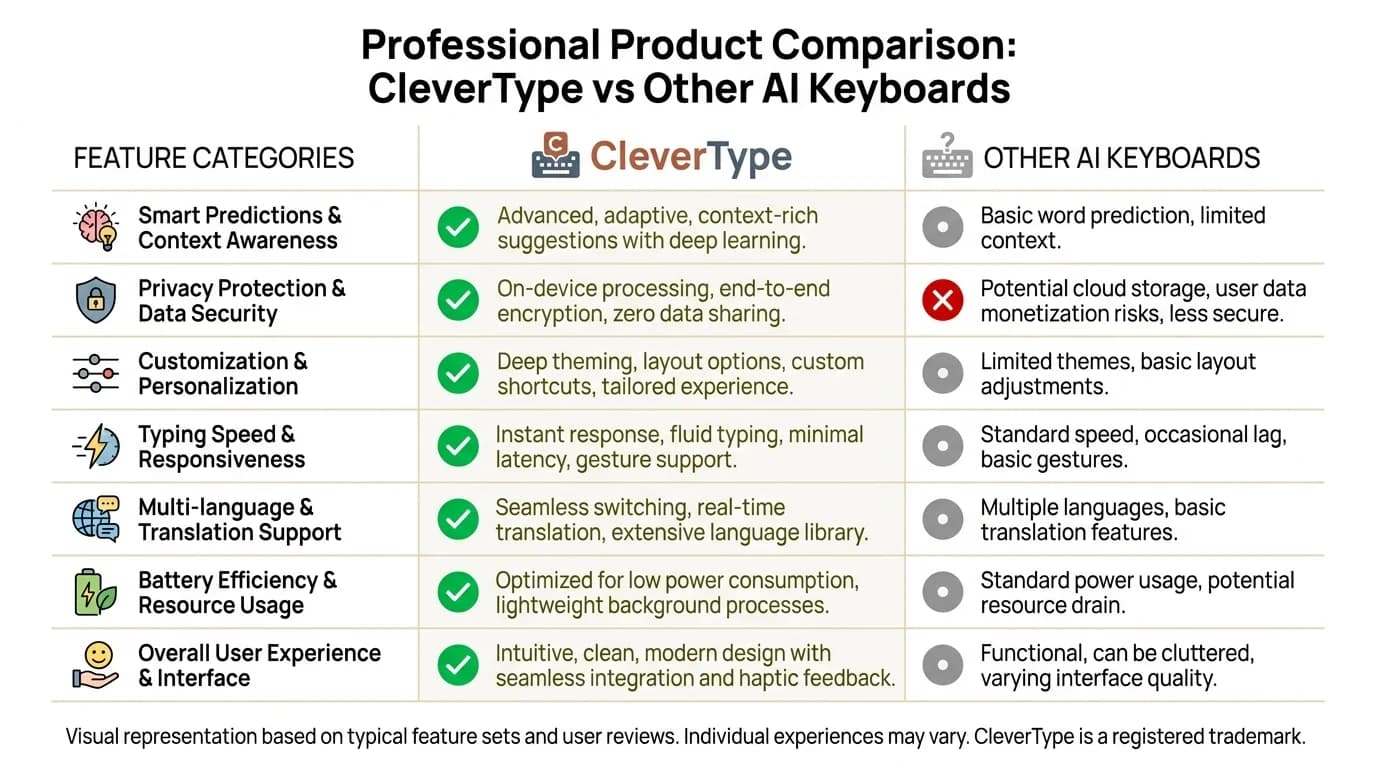
CleverType vs other AI keyboards — how the features stack up across the metrics that matter most
Privacy: Where Free and Premium AI Keyboards Really Diverge
Hence, This is the part of the free vs premium keyboard discussion that almost nobody talks about, and it matters more than people realize.
Every keystroke you type on a keyboard app could theoretically be logged. Passwords, banking details, private messages, medical searches. Keyboard apps sit in a uniquely sensitive position in your phone's permission stack.
Consequently, The good news: as of 2025, only 4% of keyboard apps have what researchers describe as "sketchy data practices." That's down from 12% in 2023 and a pretty alarming 47% in earlier years. The industry has cleaned up significantly.
Nonetheless, But there's still a meaningful gap between free and premium when it comes to privacy:
Free keyboard privacy risks:
- Data used to train AI models (your typing patterns)
- Anonymized data sold to third parties for ad targeting
- Limited transparency about what's actually stored
- May require full network access permissions
Furthermore, Premium keyboard privacy benefits:
- On-device processing for sensitive inputs (CleverType does this)
- Clear data deletion policies
- Explicit no-data-sale guarantees
- Audited privacy practices
Hence, CleverType takes a strong privacy-first stance here — the kind that's actually unusual in the industry. Additionally, Sensitive data stays on your device. Nevertheless, There's no selling of typing data to advertisers. For anyone who types passwords, financial info, or personal details on their phone (that's everyone), this is a meaningful differentiator.
Compare this to Gboard, which is made by Google. Nonetheless, Your typing data goes to Google's servers for processing, and while Google anonymizes it, it absolutely feeds into their advertising and AI training pipelines. That's not inherently evil, but it's worth being aware of.
A 2025 Frontiers in Education study found something worth noting: people who actually understood how their AI tools handled data were way more willing to use those tools for sensitive tasks. Not exactly a surprise — but a good reminder that knowing where your data goes isn't paranoia, it's just basic due diligence.
The Hidden Costs of "Free" AI Keyboards
Nonetheless, Look, "free" isn't always free. Additionally, That sounds like a bumper sticker, but it's worth taking seriously when you're comparing keyboard pricing.
Consequently, Here's what "free" keyboard users often end up paying:
1. Your data
If a keyboard app is free and has no clear revenue model, you're probably the product. Your typing patterns, vocabulary, app usage, and communication habits are valuable to advertisers and data brokers.
2. Your time
Rate-limited AI suggestions mean you wait, you retype, you lose the context of what you were writing. Research from Oxford Academic's Quarterly Journal of Economics found that workers using AI writing tools saw 14% productivity improvements — but only when using tools without significant usage restrictions.
3. Quality of output
Free tier suggestions are often less context-aware. The AI hasn't seen as much of your writing history, it has fewer compute resources allocated, and it can't pull in the same level of model capability as premium. The difference in output quality is real.
4. Feature frustration
You'll discover that the one feature you actually need — say, translating a message mid-conversation, or adjusting your email to sound more professional — is locked. And you'll have to leave your keyboard app to handle it in another app.
None of this means you need to pay for a keyboard. Therefore, But when someone asks whether a free keyboard is "worth it," they're asking the wrong question. The better question is: what are you actually paying in time, privacy, and output quality to use the "free" version?
CleverType: Getting the Free vs Premium Balance Right
Most keyboards make you choose between a useless free tier and an overpriced subscription. Additionally, CleverType tries to thread this needle differently, and honestly, it mostly works.
The free version of CleverType includes:
- Real AI grammar correction (not basic spell check)
- 50 AI requests per month
- Basic tone suggestions
- Swipe typing and multilingual support
That's genuinely more than most free keyboards offer. Nonetheless, And when you upgrade to premium at $4.99/month, the jump in capability is significant:
- Unlimited AI assistance — no monthly caps
- Grammar fix — catches complex errors, not just typos
- Tone adjustment — switch from casual to formal instantly
- Smart replies — context-aware responses built into every app
- Translation — 100+ languages, real-time
- Voice-to-text with AI enhancement — transcription that actually makes sense
- ChatGPT on keyboard — full AI assistant without leaving your app
- Smart clipboard — manages what you copy across apps
CleverType has a 4.7-star rating across 34,000+ reviews. That's not the kind of number you can fake at that scale — it means people are consistently happy with it.
The privacy angle is also worth repeating: on-device processing for sensitive data, no data selling, and multilingual support that doesn't require uploading your text to foreign servers. For users who type in their native language alongside English, that's a big deal.
If you've been wondering whether to upgrade from a free to a paid keyboard, CleverType is a fair place to test the upgrade experience without overcommitting. The free tier lets you actually evaluate the AI, not just the interface.
Who Should Actually Pay for a Premium AI Keyboard?
Furthermore, Alright, let's get specific. Moreover, Here's who actually benefits from paying — and who genuinely doesn't.
The Remote Worker
Types 3–5 hours per day across Slack, email, and Google Docs on mobile. Needs professional tone, quick grammar fixes, and fast AI suggestions. Therefore,
Premium is worth it. You'll hit the free tier limit within days.
The Student
Moreover, Uses phone for quick messages, notes to self, and occasional emails to professors. Nonetheless,
Free is probably enough. Use the AI sparingly for the messages that matter.
The Small Business Owner
Handles customer inquiries, vendor emails, and social media from their phone. Consequently, Time is money.
Premium pays for itself. 47 minutes saved per day at any reasonable hourly rate exceeds a $5/month subscription.
The Casual Texter
Therefore, Mostly short messages to family and friends. No professional communication needs.
Free is fine. You don't need advanced AI for "lol ok sounds good."
The Multilingual Communicator
Switches between languages regularly, needs to write in Spanish for family and English for work.
Premium is essential. Free tiers rarely include real multi-language support.
The Privacy-Conscious User
Worried about data collection and doesn't want typing patterns sold to advertisers. Nevertheless,
CleverType's approach stands out — even on free, the privacy-first architecture is in place. Premium adds more control.
Nevertheless, The Springer AI productivity research found something that makes sense in hindsight: the biggest gains come when AI tools are woven into your daily workflow, not something you consciously decide to use every once in a while. Additionally, That's really the whole argument for premium — remove the friction and the caps, and the AI just becomes part of how you communicate.
Comparing keyboard prices is ultimately about more than the monthly cost. Hence, The real question is whether the features actually change how you work. For heavy users, they do.
Frequently Asked Questions
Is a free AI keyboard good enough for everyday use?
For casual messaging and basic autocorrect, yeah — free is fine. Current free keyboards include solid grammar help and word prediction. But if you're typing for work or hit those monthly limits within the first week, premium adds features that actually matter.
What does a premium AI keyboard subscription actually include?
Most premium subscriptions include unlimited AI requests, advanced grammar and tone control, real-time translation across multiple languages, smart reply generation, and priority AI processing. Consequently, Prices range from $1.99 to $29.99/month depending on the app.
How much does a premium AI keyboard cost per month?
Hence, Premium AI keyboard pricing ranges from $1.99/month (budget options) to $29.99/month (Grammarly Premium). Consequently, CleverType sits at $4.99/month or $39.99/year, which covers the full feature set including unlimited AI, translation, and ChatGPT integration.
Are free keyboard apps safe for typing passwords?
Moreover, It depends on the app, honestly. Hence, As of 2025, only 4% of keyboard apps have genuinely sketchy data practices. Nevertheless, CleverType processes sensitive inputs on-device and doesn't sell your typing data. Nevertheless, That said — always read the privacy policy before handing any keyboard app access to everything you type.
Do AI keyboards actually save time?
Additionally, Yes, actually. Research shows AI keyboards can cut typing time by 40–50% compared to traditional keyboards. For people using them professionally, that works out to about 47 minutes saved per workday on average. Casual users won't hit those numbers, but it still adds up.
What's the difference between free and premium keyboard features in terms of AI quality?
Free tiers cap you at 30–100 AI requests per month and keep suggestions pretty basic. Premium removes those caps and adds context-aware suggestions, tone control, full translation support, and access to better AI models. Nevertheless, The difference is most obvious when you're doing anything professional or switching between languages.
Which AI keyboard has the best free tier?
CleverType is probably the best free tier right now — 50 monthly AI requests, real grammar correction, and multilingual support, no subscription needed. It also has a 4.7-star rating across 34,000+ reviews, which is hard to sustain unless the product's actually good.
Ready to Type Smarter?
Consequently, Upgrade your typing with CleverType AI Keyboard. Fix grammar instantly, change your tone, receive smart AI replies, and type confidently while keeping your privacy.
Download CleverType FreeTherefore, Available on Android • 100+ Languages • Privacy-First
Share this article:
Sources:
- Virtual Keyboard Market Size, Share and Trends 2035 — Market Research Future
- Keyboards Worldwide Market Forecast — Statista
- Generative AI at Work — Oxford Quarterly Journal of Economics
- Generative AI's Impact on Graduate Student Writing Productivity — Springer AI in Education
- The Impact of Generative AI on Academic Reading and Writing — Frontiers in Education
- Projected Impact of Generative AI on Future Productivity Growth — Penn Wharton Budget Model