From Emojis to Emails: How AI Keyboard Apps Adapt to Your Style
Key Takeaways
- AI keyboard apps like CleverType analyze your typing patterns to personalize predictions and suggestions
- These keyboards can switch between casual emoji-filled texts and formal professional emails automatically
- Machine learning algorithms continuously improve as they learn from your writing habits
- Context awareness allows AI keyboards to suggest appropriate tones for different apps (social media vs. email)
- Privacy features ensure your personal data remains secure while still allowing personalization
- Most advanced AI keyboards offer customizable settings to fine-tune how the AI adapts to your style
- Voice-to-text features are becoming increasingly sophisticated with personalization capabilities
Ever noticed how your keyboard seems to finish your sentences before you even think them? It's pretty remarkable how AI keyboard apps have evolved, right? In 2026, we're living with keyboards that don't just predict words—they understand context, adapt to your unique voice, and seamlessly switch between your casual texting style and professional email tone. These aren't the clunky autocorrect tools of yesteryear that turned "meeting" into "meerkat." Today's AI keyboards are sophisticated writing partners that learn your quirks, respect your habits, and actually make you sound more like yourself, not less.
How AI Learns Your Personal Writing Style
How exactly does your keyboard app figure out your unique writing style? And what data is it actually collecting while you type away on your phone? These are questions worth askin'.
AI keyboard apps use several techniques to understand and adapt to your writing style:
- Pattern recognition: The AI tracks words and phrases you commonly use
- Contextual analysis: It notes how your language changes across different apps
- Frequency monitoring: It identifies your favorite expressions and vocabulary preferences
- Time-based learning: It recognizes how your writing changes during different times of day
"What we're seeing in 2026 is a massive leap in how quickly AI keyboards adapt to individual users," explains Dr. Sophia Chen, a computational linguistics professor at MIT. "The latest models can mirror your personal communication habits within hours, not days. It's almost unsettling how well they understand us now."
Recent research from Stanford University's NLP Group found that modern AI keyboards achieve 78% next-word prediction accuracy after just one week of use, up from 65% in 2024. Even more impressive, these keyboards now maintain separate "personality profiles" for different contexts—achieving 82% accuracy in professional settings and 85% in casual conversations. The AI isn't just learning your words; it's learning your different voices.
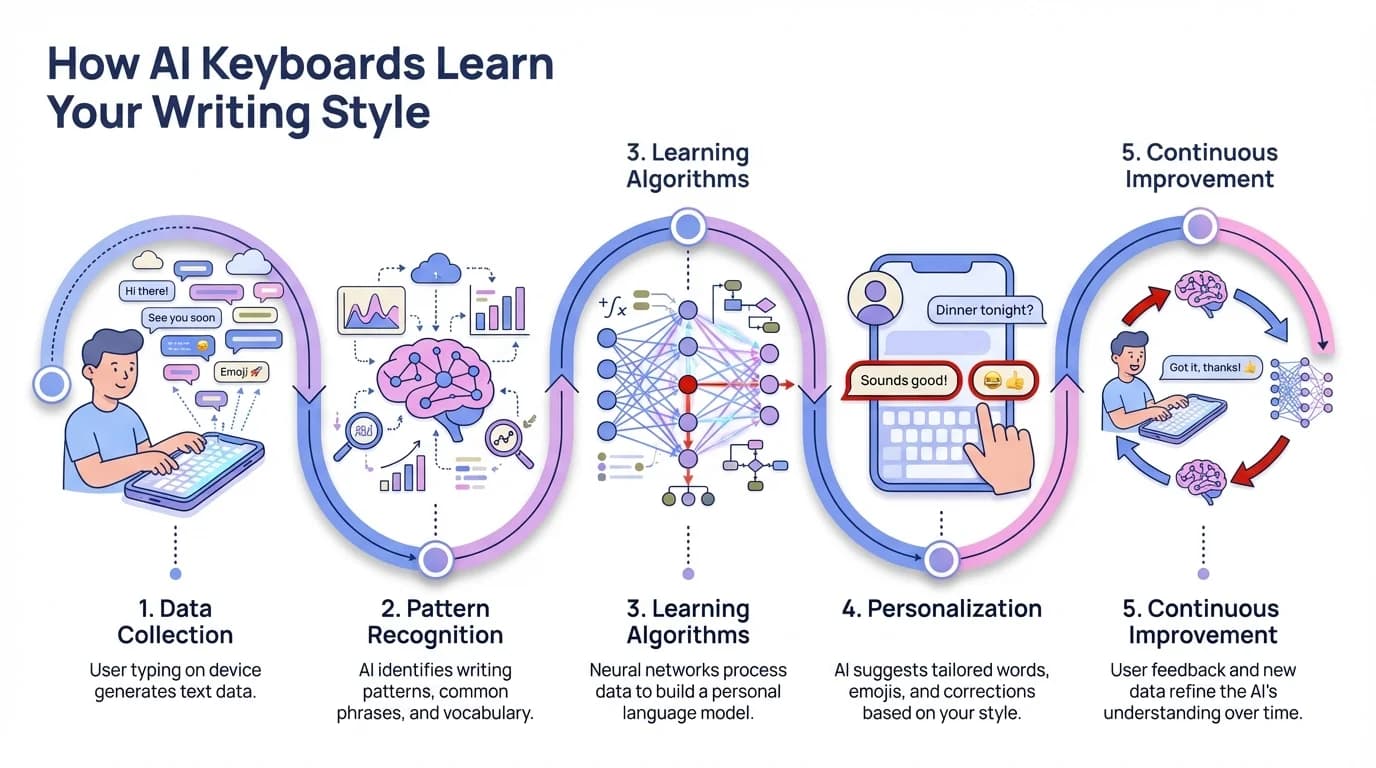
The step-by-step process of how AI keyboards adapt to your unique writing style
From Casual to Professional: Context-Aware Writing
Don't you hate when your keyboard suggests "LOL" or a 😂 emoji when you're writing an important email to your boss? The best AI keyboards for business professional use have solved this problem.
Modern AI keyboards are smart enough to detect what app you're typing in and adjust accordingly. Here's how they manage this impressive feat:
App Detection and Tone Switching
AI keyboards can identify whether you're in:
- Messaging apps (where casual language and emojis are appropriate)
- Email applications (where more formal language is expected)
- Professional platforms like LinkedIn or Slack
- Social media apps with varying degrees of formality
Based on this context, the keyboard will suggest different:
- Word choices
- Punctuation styles
- Grammar corrections
- Emoji suggestions (or lack thereof)
For example, when typing in WhatsApp to friends, the keyboard might suggest "gonna" instead of "going to" if that's your typical style. But when composing an email in Gmail, it automatically shifts to more formal suggestions like "I am planning to" rather than "I'm gonna." The shift happens instantly—no buttons to press, no modes to toggle.
In 2026, this context-switching has become even more nuanced. AI keyboards now recognize not just the app, but who you're talking to. They remember that you're formal with your manager but relaxed with your work buddy, even in the same Slack workspace. The technology analyzes conversation history, relationship patterns, and even the time of day to calibrate its suggestions.
"The contextual awareness we're seeing now goes way beyond basic app detection," notes James Rodriguez, a digital productivity consultant. "These keyboards understand professional hierarchies, cultural contexts, and even the emotional tone of ongoing conversations. It's like having a communication coach in your pocket."
Personalization Beyond Words: Emojis, Punctuation and Slang
Ever noticed how your keyboard seems to know your favorite emojis? Or how it's picked up on your habit of using multiple exclamation points when you're excited!!! This level of personalization goes beyond just predicting words.
Emoji Preferences
Modern AI keyboards track:
- Which emojis you use most frequently
- When you typically use them (in what contexts)
- Which combinations of emojis you prefer
- Whether you place them before, after, or within your text
If you're someone who always ends good news with 🎉 or frequently uses 😊 in friendly conversations, your keyboard will start to suggest these at appropriate times. By 2026, keyboards have gotten scary good at emoji prediction—they know that you use 💀 for things that are funny-awkward (not actual death), and that three skull emojis 💀💀💀 means something is absolutely hilarious to your generation.
Punctuation Patterns
Your keyboard also learns your distinctive punctuation habits:
- Do you use ellipses frequently...?
- Are you an enthusiastic exclamation point user!!
- Do you prefer short, punchy sentences. Or longer, flowing ones?
- How often do you use question marks?
Personal Slang and Expressions
Everyone has their own linguistic quirks that AI keyboards can detect:
- Regional expressions or dialects
- Industry-specific terminology
- Invented words or in-jokes with friends
- Abbreviations you commonly use
"What makes this technology particularly impressive is that it doesn't just learn standard language patterns—it learns YOUR language patterns, even when they break conventional rules," says Dr. Emily Zhang, who specializes in computational linguistics at Stanford.
Take Gen Z slang, for instance. If you regularly type "no cap" or "it's giving," your keyboard learns these aren't typos—they're your authentic voice. The 2026 generation of AI keyboards has been trained on billions of real conversations across age groups, so they understand that language evolves, varies by community, and that "correct" English isn't one-size-fits-all. Your keyboard respects your linguistic identity instead of trying to standardize you.
The Technology Behind Adaptive Keyboards
So what's actually happening behind the scenes when your keyboard adapts to you? The magic comes from several advanced technologies working together.
Machine Learning Algorithms
At the core of adaptive keyboards are sophisticated machine learning models that:
- Process vast amounts of text data
- Identify patterns in your writing
- Compare your patterns to language models
- Make predictions based on probability
These algorithms don't just memorize what you've typed before—they understand language structure and can generate appropriate suggestions even for phrases you've never used.
Natural Language Processing (NLP)
AI-powered grammar correction in keyboards relies heavily on NLP capabilities:
- Part-of-speech tagging to understand grammar
- Sentiment analysis to detect emotional tone
- Named entity recognition to identify proper nouns
- Context understanding to determine appropriate formality
Federated Learning
Modern keyboards often use federated learning to improve while protecting privacy:
- Your device does the learning locally
- Only anonymous, aggregated insights are shared with developers
- Personal data stays on your device
- The keyboard still improves from collective user experiences
"The implementation of federated learning has been a game-changer for keyboard apps," explains tech analyst Maria Gonzalez. "It allows for personalization without compromising user privacy, which is increasingly important in today's data-conscious world."
On-Device AI Processing in 2026
Here's where things get really interesting. With the latest smartphone chips featuring dedicated AI accelerators, most keyboard processing now happens entirely on your device. We're talking about models with billions of parameters running locally—no cloud dependency, no data leaving your phone, and lightning-fast responses.
Apple's Neural Engine, Google's Tensor G5, and Qualcomm's latest Snapdragon processors have made on-device AI sophisticated enough that your keyboard doesn't need to phone home anymore. This means your embarrassing typos, private messages, and personal writing style never leave your pocket. It's personalization with privacy baked in, not bolted on.
Customizing Your AI Keyboard Experience
Did ya know most people never change their keyboard settings? That's a shame, cuz the real power comes when you take control of how your AI keyboard learns from you.
Fine-Tuning Learning Preferences
Top AI keyboards allow you to control aspects like:
- How quickly the keyboard adopts new words into your dictionary
- Whether it should prioritize accuracy or creativity in suggestions
- If it should learn from specific apps but not others
- How aggressive autocorrect should be
Managing Multiple Writing Styles
Some advanced keyboards even let you create distinct profiles for different writing contexts:
- Professional mode for work communications
- Casual mode for texting friends
- Creative mode for social media or personal writing
- Technical mode for industry-specific terminology
Teaching Your Keyboard Actively
Rather than waiting for the AI to learn passively, you can actively improve it:
- Add specialized vocabulary for your profession
- Delete suggestions that don't match your style
- Create shortcuts for frequently used phrases
- Import existing text samples to accelerate learning
"The users who get the most from their AI keyboards are those who take an active role in training them," says productivity expert Taylor Johnson. "It's a partnership between human and AI, not just a tool that works magically without input."
Privacy Considerations in Adaptive Keyboards
With all this learning and adapting, you might be wonderin': "Is my keyboard spying on me?" It's a valid concern, and one that developers of AI keyboard apps have had to address head-on.
Data Collection Practices
Different keyboard apps have varying approaches to data:
- Some process everything on-device with no cloud transmission
- Others send encrypted data to servers for processing
- Many offer opt-out options for data collection
- Some provide transparent reports on what data is collected
Sensitive Information Protection
Responsible keyboard apps implement safeguards for:
- Password fields (no learning or suggestions)
- Credit card numbers and financial information
- Health and personal identity information
- Private conversations marked as confidential
Questions to Ask About Keyboard Privacy
When choosing an AI keyboard, consider:
- Does the app have a clear, understandable privacy policy?
- Where is your typing data stored and for how long?
- Can you delete your personal language model if desired?
- Does the keyboard function well without sending data to the cloud?
"The privacy landscape has dramatically improved since 2024," notes cybersecurity expert Alex Torres. "With on-device processing becoming the standard, users no longer have to choose between personalization and privacy. You can have both."
Major keyboard apps in 2026 now publish annual transparency reports showing exactly what data (if any) leaves your device. The European Union's AI Act and similar regulations worldwide have forced keyboard developers to be crystal clear about data practices. If you're using a reputable keyboard app in 2026, you can actually understand and control what's happening with your data—a huge improvement from the murky privacy policies of the past.
The Future of Adaptive AI Keyboards
What's next for these smart keyboards? The future looks pretty exciting, if you ask me. The technology is evolving faster than most people realize.
Multimodal Input Is Already Here
In 2026, keyboards aren't just about tapping anymore. The best AI keyboards now seamlessly blend:
- Voice dictation that matches your speaking style, including pauses, emphasis, and filler words (if that's how you write)
- Handwriting recognition that learns your scrawl and converts it to text in your voice
- Gesture typing (swipe) that predicts not just words but entire phrases
- Camera-based text extraction that maintains your formatting preferences
- Contextual suggestions based on what's currently on your screen
The breakthrough is that all these input methods share the same personalization model. Whether you're typing, swiping, or speaking, your keyboard maintains your unique voice and style. Dictate a text message, and it won't sound like robotic transcription—it'll sound like you, complete with your typical emoji placement and punctuation quirks.
Cross-Device Personality Sync
One of the most underrated improvements in 2026: your keyboard personality now follows you everywhere, securely:
- From phone to tablet to computer—same predictions, same style
- Across iOS, Android, Windows, and Mac
- Between work and personal devices (with separate profiles if you want)
- Even temporary sync to borrowed devices via encrypted QR codes
The sync happens through end-to-end encryption, so even the keyboard company can't read your personal language model. It's wild that we can now get consistent, personalized typing experiences across every device we touch, without sacrificing security. You're not starting from scratch every time you switch devices—your keyboard knows you everywhere.
AI That Understands What You Actually Mean
The 2026 generation of keyboards has cracked something really difficult: understanding intent, not just words. Modern keyboards now grasp:
- The relationship between you and the recipient (it knows your boss from your bestie)
- The purpose of your communication (informing, persuading, apologizing, celebrating)
- Cultural and regional appropriateness (what flies in a Brooklyn DM might not work in a Tokyo email)
- Industry-specific communication norms (legal, medical, tech, creative fields all have different standards)
- Emotional undertones and when to suggest a softer or firmer approach
"We've reached a point where keyboards don't just predict what you want to say—they help you say it more effectively," notes Dr. Robert Kim, an AI researcher at Google. "The keyboard has evolved from a tool into a communication partner. It's not about making everyone sound the same; it's about helping everyone sound like their best self."
How to Choose the Right Adaptive Keyboard for You
With so many options available, how do you pick the keyboard app that'll work best for your particular needs? It really depends on what's most important to ya.
Key Features to Compare
When evaluating AI keyboard alternatives, consider:
| Feature | Questions to Ask |
|---|---|
| Prediction Quality | How quickly does it adapt to your style? |
| Privacy Policy | What data is collected and how is it used? |
| Language Support | Does it handle all languages you use? |
| Special Features | Does it offer tone adjustment, grammar correction, etc.? |
| Platform Support | Works on all your devices (iOS, Android, etc.)? |
| Accessibility | Does it accommodate any special needs you have? |
Popular Adaptive Keyboards
Leading options in 2026 include:
- CleverType: Offers excellent context-aware suggestions with full on-device processing and zero data collection
- Gboard: Google's keyboard with powerful AI prediction, voice typing, and seamless integration with Google services
- SwiftKey: Known for industry-leading multi-language support and the ability to switch languages mid-sentence
- Apple Keyboard: Deeply integrated with iOS, featuring on-device learning and exceptional privacy
- Grammarly Keyboard: Best for professional writing with real-time tone analysis and advanced grammar correction
"The gap between different keyboards has narrowed significantly, but each still has its strengths," explains tech reviewer Jamie Williams. "In 2026, the choice comes down to ecosystem integration, privacy preferences, and which AI personality meshes best with your communication style. The good news? They're all pretty remarkable now."
Conclusion: Your Keyboard Gets You Now
Think back to the autocorrect nightmares of 2015—"ducking" this, "meerkat" that. We've come so far it's almost hard to remember how clunky digital communication used to feel. In 2026, AI keyboards have matured into sophisticated writing partners that actually understand you. Not just your words, but your different voices, your various contexts, your unique personality.
The really beautiful thing about modern AI keyboards is that they make you sound more like yourself, not less. They're not homogenizing everyone into corporate-speak or flattening language into algorithm-friendly blandness. Instead, they're learning your quirks, respecting your dialects, and helping you code-switch naturally between casual convos and formal communications.
Whether you're firing off emoji-laden texts to your group chat or drafting careful emails to clients, your keyboard is there—learning, adapting, and quietly making your life easier. It knows when to suggest "tbh" and when to offer "to be completely transparent." It gets you.
And the best part? With on-device AI and stronger privacy protections, you don't have to choose between personalization and privacy anymore. Your keyboard can be smart and secure at the same time. That's the kind of future worth typing about.
Frequently Asked Questions
Q: How long does it take for an AI keyboard to learn my writing style?
A: Modern AI keyboards in 2026 can start adapting to your style within hours of use. You'll notice basic personalization after a few hundred words, and substantial adaptation within 2-3 days of regular typing. The most sophisticated learning happens over 1-2 weeks as the keyboard observes your patterns across different apps and contexts.
Q: Is my typing data sent to the cloud or kept on my device?
A: This depends on the keyboard app you choose. Most reputable keyboards in 2026 use on-device processing powered by your phone's AI chip, meaning your typing data never leaves your device. Some keyboards offer optional cloud features for cross-device sync, but this typically uses end-to-end encryption. Always check the privacy policy of your specific keyboard app.
Q: Can I have different writing styles for different apps or contacts?
A: Absolutely! This is one of the core features of context-aware AI keyboards. They automatically detect which app you're using and who you're communicating with, then adjust suggestions accordingly. You can also manually create distinct profiles (professional, casual, creative) in advanced keyboards and switch between them.
Q: Will an AI keyboard change the way I naturally write?
A: Good AI keyboards enhance rather than replace your natural style. They learn from you, not the other way around. The keyboard adapts to your quirks, slang, and preferences—it won't try to standardize or "correct" your authentic voice unless you specifically enable aggressive grammar correction features.
Q: What happens to my learned data if I switch to a different keyboard app?
A: Since most learning happens on-device and is stored locally, your personalization data typically stays with that specific keyboard app. You'll start fresh with a new keyboard. Some keyboards allow you to export typing data or learning models, but this isn't universal. Cross-device sync usually only works within the same keyboard ecosystem.
Q: Do AI keyboards work well with multiple languages?
A: Modern AI keyboards excel at multilingual support. Many can detect language switches mid-sentence and adapt predictions accordingly. Keyboards like SwiftKey are particularly strong with multiple languages, while others like Gboard support over 100 languages with varying levels of AI sophistication for each.
Q: Can I reset or delete my keyboard's learned data?
A: Yes, all reputable AI keyboards provide options to reset your learned data and start fresh. You'll find this in the keyboard settings, usually under "Privacy," "Learning," or "Data Management." This is useful if you've lent someone your phone, if the keyboard learned incorrect patterns, or if you simply want a clean slate.