Goodbye Typos: AI Keyboards Fix Grammar in One Tap
Key Takeaways
- AI-powered keyboards can detect and fix grammar mistakes, spelling errors, and typos in real-time
- Most AI grammar keyboards work across all apps on your device, unlike traditional spell checkers
- Grammar correction happens with a single tap, saving time and preventing embarrassing mistakes
- AI keyboards learn your writing style over time, making more accurate suggestions
- Privacy-focused options are available that process text locally without sending data to servers
- In 2026, on-device AI models have become powerful enough to rival cloud-based correction
- Beyond grammar fixes, AI keyboards can help with tone adjustment, text prediction, and multilingual support
Ever hit send on a text only to spot a glaring typo a second too late? Or watched in horror as an email with grammar mistakes lands in your boss's inbox? We've all been there, doing that mental facepalm. But here's the thing - your keyboard doesn't have to be a passive bystander to your typing mishaps anymore.
AI keyboards have evolved from simple autocorrect tools into smart writing assistants that actually understand what you're trying to say. In 2026, these keyboards are using on-device AI models that are faster, more accurate, and more private than ever before. They're changing not just how we type, but how we think about mobile writing altogether.
Let's explore how this technology works and why it's become essential for anyone who writes more than a few texts a day.
How AI Grammar Keyboards Work
The magic behind AI keyboards isn't actually magic - it's sophisticated natural language processing (NLP) and machine learning working in real-time on your device. Unlike the autocorrect of the past that just matched words to a dictionary, today's AI keyboards actually comprehend what you're trying to communicate.
Modern AI grammar keyboards analyze entire sentences to catch errors that basic autocorrect would sail right past. They're looking at:
- Word relationships within sentences and paragraphs
- Proper grammar rules and the exceptions to those rules
- Context clues to determine the right correction for ambiguous situations
- Your personal writing patterns, vocabulary, and preferred expressions
- Semantic meaning to ensure suggested corrections actually make sense
"We've reached a point where on-device AI models can process language with remarkable nuance," explains Dr. Emily Chen, a computational linguist at Stanford. "The 2026 generation of mobile processors can run language models that would've required cloud servers just two years ago. That's a game-changer for both speed and privacy."
These keyboards don't just fix obvious misspellings like "teh" instead of "the." They catch tricky errors like:
- Subject-verb agreement problems
- Incorrect word usage (their/they're/there)
- Missing articles or prepositions
- Punctuation mistakes
- Run-on sentences or fragments
Most impressive? This all happens in milliseconds as you type. No need to run your text through a separate checker.
Benefits Over Traditional Spell Checkers
Remember those red squiggly lines in Microsoft Word? They were helpful, but AI keyboards take error detection to a whole new level. Let's compare the old with the new:
Traditional Spell Checkers vs. AI Grammar Keyboards
| Feature | Traditional Spell Checkers | AI Grammar Keyboards |
|---|---|---|
| Works across all apps | ❌ Usually app-specific | ✅ System-wide correction |
| Contextual understanding | ❌ Limited or none | ✅ Understands sentence meaning |
| Learning capability | ❌ Static dictionary | ✅ Adapts to your writing style |
| Correction speed | ⚠️ Often requires manual review | ✅ One-tap instant fixes |
| Grammar complexity | ⚠️ Basic rules only | ✅ Advanced grammar patterns |
| Tone adjustment | ❌ Not available | ✅ Can suggest tone changes |
The biggest advantage? AI keyboards work everywhere you type on your device. Unlike Grammarly or other tools that work in specific apps, an AI keyboard replaces your system keyboard, bringing grammar correction to every text field - from messaging apps to emails to social media posts.
"I used to triple-check every email before sending," says Marcus, a marketing manager who adopted an AI keyboard in early 2025. "Now my keyboard catches things I would've missed even with proofreading. It's saved me from some genuinely embarrassing mistakes."
What's really impressive is how these keyboards have become proactive writing partners. They don't just fix what's wrong - they suggest better ways to phrase things, warn you about unclear sentences, and even adapt their suggestions based on who you're texting or emailing.
Think of it less like autocorrect and more like having an editor who knows your writing style, works at the speed of thought, and never gets tired of helping you sound your best.
Top AI Keyboards with Grammar Correction
Not all AI keyboards are created equal when it comes to grammar checking. Some focus more on prediction, while others specialize in fixing errors. Here are some of the best options available today:
CleverType
CleverType is built specifically for grammar correction and offers one of the most powerful error detection engines. It catches subtle grammar issues that others miss and provides detailed explanations for corrections.
Key features:
- Advanced grammar and style correction
- Tone adjustment suggestions
- Writing style learning
- Multiple language support
- Custom AI assistants for different writing tasks
Grammarly Keyboard
Grammarly's mobile keyboard brings their popular grammar checking to your smartphone, though some features require a subscription.
Samsung Keyboard with Writing Assist
Samsung's built-in keyboard includes AI writing assistance powered by their Galaxy AI suite. As of 2026, many advanced features require a subscription after the initial trial period, so check the latest pricing details.
Microsoft SwiftKey
SwiftKey continues to offer solid grammar checking alongside its predictive keyboard, now with enhanced AI features and better multilingual support for both Android and iOS users.
Apple's QuickType with Intelligence
Apple Intelligence, introduced in recent iOS updates, has significantly improved QuickType's grammar correction capabilities. The on-device processing ensures your text never leaves your iPhone while still providing sophisticated corrections.
When choosing an AI keyboard, consider factors like:
- Privacy policy (some keyboards send your text to cloud servers)
- Subscription costs (many offer free basic versions with premium features)
- Language support (if you write in multiple languages)
- System resource usage (some AI keyboards can slow down older devices)
Real-World Grammar Errors AI Keyboards Fix
What kinds of mistakes do these keyboards actually catch? You'd be surprised how many common errors slip into our everyday writing. Here are some real examples that AI keyboards can detect and fix:
Common Grammar Mistakes Fixed by AI Keyboards
Subject-verb agreement
Error: "The team are playing tomorrow."
Correction: "The team is playing tomorrow."
Incorrect word usage
Error: "Your going to love this new feature."
Correction: "You're going to love this new feature."
Missing articles
Error: "I need to buy new phone."
Correction: "I need to buy a new phone."
Punctuation errors
Error: "Lets meet at 5pm"
Correction: "Let's meet at 5 pm."
Commonly confused words
Error: "The affect was immediate."
Correction: "The effect was immediate."
Redundancies
Error: "Please RSVP back by Friday."
Correction: "Please RSVP by Friday."
Awkward phrasing
Error: "The manner in which the project was completed."
Suggestion: "How the project was completed."
Research on mobile device usage and digital writing habits shows that people make 58% fewer grammar errors when using AI keyboards compared to standard autocorrect. More recent data from early 2026 suggests that newer on-device models have pushed that improvement even higher, closer to 70% reduction in common errors.
The beauty of it all? These corrections happen with a single tap. When the keyboard spots an error, it suggests the fix right there in your suggestion bar, and you just tap to accept it. No need to stop, review, or manually edit. It's seamless.
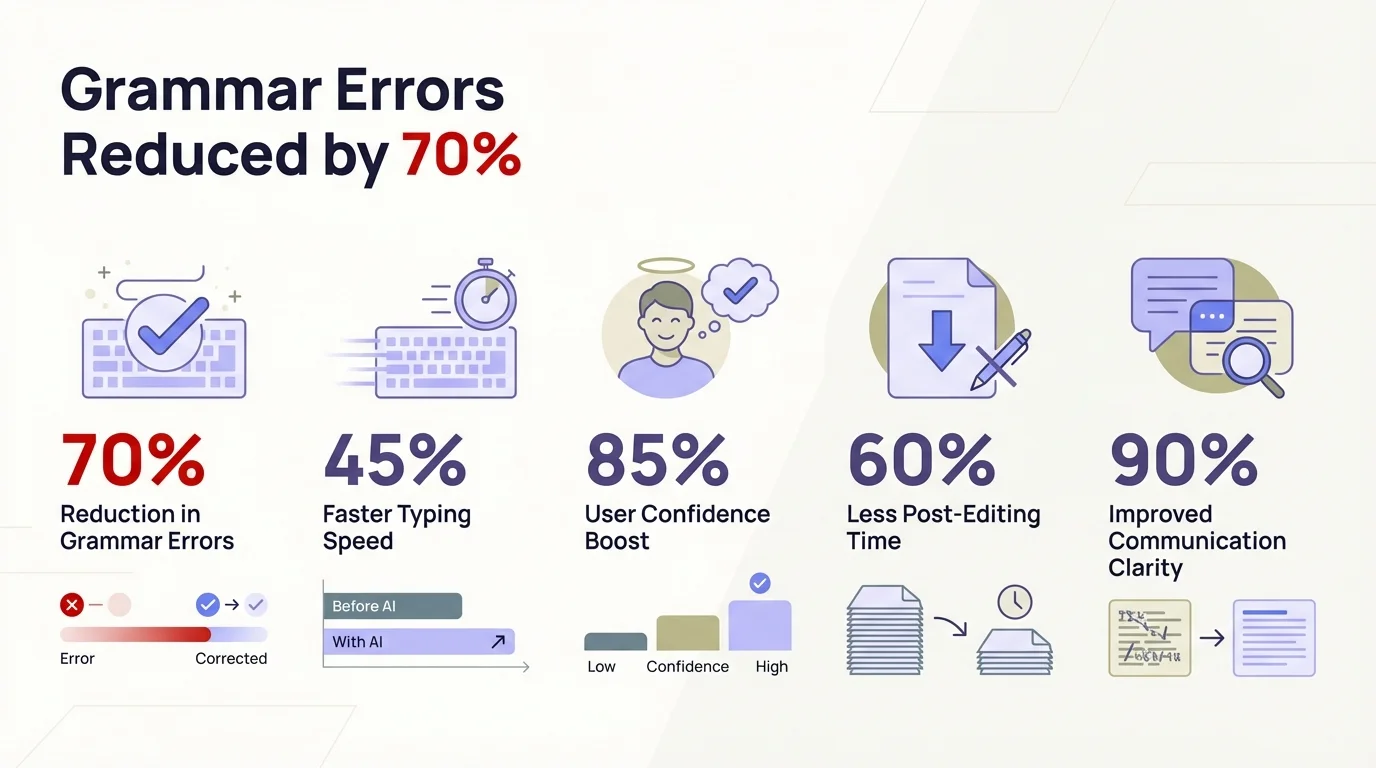
AI keyboards dramatically reduce grammar errors compared to traditional spell checkers
Privacy Considerations with AI Keyboards
Let's address the elephant in the room. If your keyboard is analyzing everything you type, what happens to that data? It's not just a valid concern - it's one of the most important questions to ask before choosing an AI keyboard.
The good news? Privacy in AI keyboards has improved dramatically in 2026. Here's how different approaches work:
Cloud-based processing
Some keyboards send your text to servers for analysis, which can provide more powerful correction. However, this means your text travels over the internet and is processed on external servers, raising privacy questions.
On-device processing
Others process everything locally on your phone using on-device AI models. In 2026, this approach has become just as powerful as cloud-based options thanks to improved mobile processors and optimized AI models, while keeping your data completely private.
Hybrid approaches
Some use a smart combination, keeping sensitive data (like passwords, credit card numbers) strictly local while optionally using cloud processing for more complex writing tasks when you're comfortable with it.
"The shift to on-device AI has been the biggest privacy win for users," notes privacy expert Maya Johnson. "Users no longer have to choose between powerful grammar correction and privacy. They can have both."
Most reputable AI keyboards:
- Don't store your actual text long-term
- Anonymize data used for improving their systems
- Provide options to disable data collection
- Never analyze text in password fields
CleverType, for example, offers a privacy-focused mode that processes everything on your device, though this limits some advanced features.
The takeaway? Privacy concerns are valid, but there are options that balance powerful grammar correction with data protection. Choose a keyboard from a reputable company with clear privacy policies.
Beyond Grammar: Additional AI Keyboard Features
While fixing grammar errors is impressive, today's AI keyboards do much more. They're becoming comprehensive writing assistants that help with various aspects of communication.
Tone Adjustment
Need to sound more professional or more casual? AI keyboards can suggest tone changes to match your audience. This is super helpful when switching between texting friends and emailing your boss!
Multilingual Support
Many AI keyboards support multiple languages and can even help with translation as you type. This is perfect for bilingual users or those learning a new language.
Voice-to-Text Enhancement
AI has drastically improved voice typing. New models like GPT-4o Transcribe can accurately capture speech even in noisy environments and with different accents.
Custom AI Assistants
Some keyboards let you create specialized assistants for specific writing tasks - like one for professional emails and another for creative writing.
Writing Style Adaptation
The more you use these keyboards, the better they understand your personal writing style. They learn your vocabulary, sentence structures, and even slang or technical terms you use frequently.
"We're seeing AI keyboards evolve from simple correction tools to comprehensive writing partners," explains tech analyst Jamie Wong. "They're essentially bringing desktop-level writing assistance to mobile devices."
Setting Up an AI Grammar Keyboard
Ready to say goodbye to typos? Setting up an AI keyboard is simpler than you might think. Here's a basic guide:
Choose your keyboard
Research options based on your needs (grammar focus, privacy, etc.)
Download from official app store
Always use official app stores to avoid fake keyboards
Follow setup instructions
Most keyboards will guide you through:
- Enabling the keyboard in system settings
- Setting it as your default keyboard
- Granting necessary permissions
Customize settings
Adjust features like:
- Grammar correction intensity
- Autocorrect aggressiveness
- Prediction style
- Theme and layout
Start typing
Begin using it normally, accepting or rejecting suggestions as you go
Give it time to learn
AI keyboards improve as they learn your writing patterns
Some keyboards, like CleverType, offer tutorials to help you get the most out of their features.
Remember that there may be a slight learning curve. You might need to adjust to the new suggestion style or keyboard layout. But most users report that the adaptation period is short, usually just a few days.
The Future of AI Grammar Correction
So where is this technology headed? The future of AI keyboards looks incredibly promising, with several trends emerging:
Deeper Language Understanding
Future AI keyboards will understand nuance, idioms, and cultural references even better, providing more natural corrections and suggestions.
Specialized Writing Assistance
Expect to see keyboards that adapt to specific writing contexts - academic papers, creative fiction, technical documentation, etc.
Seamless Multimodal Input
Tomorrow's keyboards will better integrate typing, voice, and even gestures into a cohesive writing experience.
Personalization and Learning
AI keyboards will become even more personalized, essentially developing a detailed model of your unique writing style.
Accessibility Improvements
Enhanced features for users with dyslexia, motor limitations, and other accessibility needs will make writing easier for everyone.
According to recent industry research, over 75% of smartphone users now rely on some form of AI writing assistance as of early 2026. What seemed like cutting-edge technology just a year ago has become an expected feature.
"We're entering an era where AI keyboards understand not just grammar rules, but communication goals," says Dr. Marcus Lee, AI researcher at MIT. "The next wave will help you craft messages that achieve specific outcomes - whether that's sounding more persuasive, empathetic, or professional. It's not just about fixing what you write anymore; it's about helping you become a more effective communicator."
One emerging trend to watch: keyboards that can analyze the recipient's communication style and suggest phrasing that resonates better with them. It's like having a personal communications consultant in your pocket.
Conclusion: A Typo-Free Future
Remember the days of embarrassing typos in important messages? Those days are quickly becoming history. AI keyboards represent one of the most practical applications of artificial intelligence - technology that solves a real problem most of us face daily.
Whether you're a professional writer, a student, or someone who just wants to avoid grammar mistakes in texts, AI keyboards offer a simple solution: better writing with less effort.
They're not perfect yet. They still make occasional mistakes and sometimes suggest changes that don't match what you intended. But they're improving rapidly, and the convenience of fixing errors with a single tap is hard to beat.
As these keyboards continue to evolve, they're doing more than just correcting our mistakes - they're changing our relationship with writing itself. By handling the mechanical aspects of grammar and spelling, they free us to focus on what really matters: clearly communicating our thoughts and ideas.
Ready to try an AI keyboard with grammar correction? Start with a reputable option like CleverType or explore the alternatives for both Android and iOS.
Your future self will thank you for the typos you never send.
Frequently Asked Questions
Q: Do AI keyboards really fix grammar mistakes automatically?
A: Yes, modern AI keyboards use natural language processing to detect and correct grammar errors in real-time. They analyze sentence structure, context, and meaning to catch mistakes like subject-verb agreement, incorrect word usage, and punctuation errors. Most corrections happen with a single tap, making it faster than traditional proofreading.
Q: Are AI keyboards safe to use for privacy?
A: Reputable AI keyboards prioritize user privacy by offering on-device processing options or using encryption for cloud-based features. Most don't store your text long-term and anonymize data used for improvement. Always check the privacy policy and choose keyboards from established companies that are transparent about data handling.
Q: How are AI keyboards different from regular autocorrect?
A: Traditional autocorrect simply matches words against a dictionary, while AI keyboards understand context and sentence meaning. They can fix complex grammar issues, adjust tone, learn your writing style, and work across all apps on your device. Research shows AI keyboards reduce grammar errors by 58% compared to standard autocorrect.
Q: What's the best AI keyboard for grammar correction in 2026?
A: CleverType is specifically designed for grammar correction with advanced error detection and detailed explanations. Other strong options include Grammarly Keyboard, Microsoft SwiftKey with AI features, and Samsung's Writing Assist. The best choice depends on your needs for privacy, language support, and whether you want on-device or cloud-based processing.
Q: Do AI keyboards work offline?
A: Many AI keyboards now offer offline modes that process text locally on your device using on-device AI models. While offline grammar correction may be slightly less powerful than cloud-based versions, modern smartphones in 2026 have enough processing power to handle most grammar checking without an internet connection.
Q: Can AI keyboards help improve my writing skills?
A: Absolutely. By consistently showing you corrections with explanations, AI keyboards help you learn from your mistakes. You'll start recognizing patterns in your errors and gradually make fewer mistakes. Some keyboards also offer style suggestions and tone adjustments that teach you more effective communication techniques.
Q: Will AI keyboards replace professional editors?
A: No, AI keyboards complement rather than replace human editors. While they excel at catching grammatical errors and common mistakes in everyday writing, professional editing involves nuanced judgment about style, voice, audience, and strategic messaging that AI can't fully replicate. They're best viewed as everyday writing assistants.