Improve Your English with an AI Keyboard: Grammar Tips at Your Fingertips
Key Takeaways
- AI keyboards can catch common grammar errors like subject-verb agreement and punctuation mistakes in real-time
- They offer contextual suggestions that improve your writing style beyond basic spelling corrections
- Most AI keyboards work across all your apps, from messaging to email and social media
- They're particularly helpful for non-native English speakers and those with learning differences
- The best AI keyboards adapt to your writing style over time, becoming more personalized
- Many options are available for both Android and iOS devices with varying features
- Using an AI keyboard can speed up typing while simultaneously improving writing quality
Ever wonder how much better your texts and emails would be if you had an English teacher looking over your shoulder? Well, you don't need to wonder anymore. Have ya ever sent a message only to notice those embarrassing typos after hitting send? We've all been there. In 2026, AI keyboards are changin' the game by bringing grammar help right to your fingertips - literally. And they're smarter than ever.
Think about it - we're writing more than ever before, and most of it happens on our phones. Whether you're texting your boss, crafting an important email, or just chatting with friends, clear communication matters. But let's be honest: typing on a phone screen while juggling life doesn't always lead to perfect prose.
In this article, we'll explore how AI-powered keyboards can transform your writing experience on mobile devices. What makes them different from regular keyboards? How do they actually help with grammar? Are they worth tryin' out? Let's dive in and answer these questions.
What Is an AI Keyboard and How Does It Work?
So what exactly are these AI keyboards everybody's talking about? Let me ask you something - have you ever used predictive text? Well, AI keyboards take that basic idea and supercharge it with some serious language smarts.
AI keyboards are mobile keyboard apps that use artificial intelligence to enhance your typing experience. Unlike traditional keyboards that just input characters, these smart keyboards analyze what you're writing in real-time and make suggestions to improve your text. They work by processing your input through sophisticated language models - similar to the technology behind ChatGPT and other generative AI tools - that understand grammar rules, context, and even writing style. The difference in 2026? These models are now more efficient, running faster on your device with improved privacy protections.
Key Features That Set AI Keyboards Apart
What makes these keyboards special? It ain't just about autocorrect anymore. Here's what sets them apart:
- Real-time grammar checking: Identifies grammar issues as you type
- Contextual suggestions: Understands the meaning of your sentences to offer better word choices
- Tone adjustment: Can help modify your writing to sound more formal, friendly, or professional
- Personalization: Learns your writing habits and vocabulary over time
- Cross-app functionality: Works in any app where you type, from messages to emails
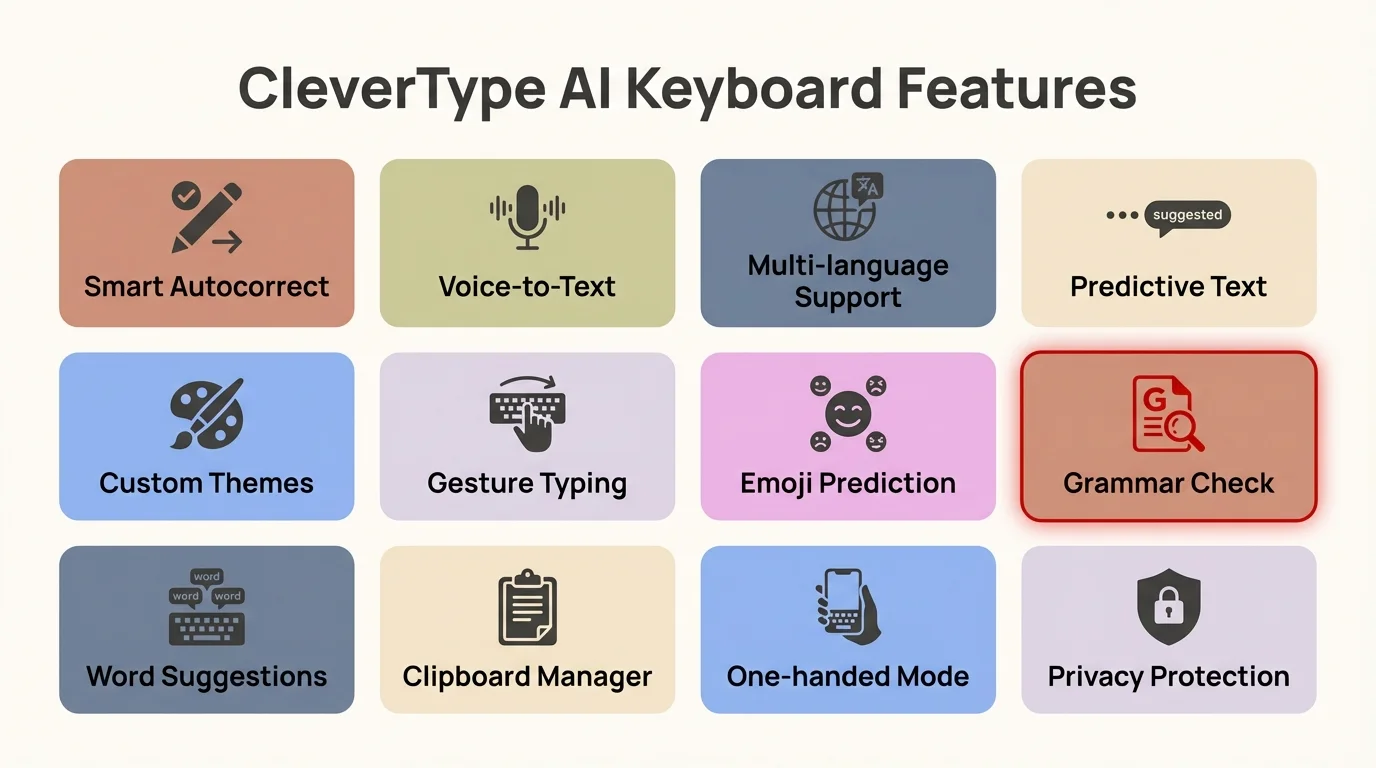
Key features that make AI keyboards like CleverType essential tools for better writing
"I was skeptical at first, but after using an AI keyboard for a month, I've seen significant improvement in my students' writing confidence. They're catching their own mistakes before I point them out."
The technology behind these keyboards is constantly evolving. Modern AI keyboards use large language models similar to those that power ChatGPT and other AI writing assistants, but optimized to work quickly on mobile devices. In fact, recent advances in on-device AI processing mean many 2026 keyboards can perform sophisticated grammar checks without sending your data to the cloud at all.
What's really exciting is how personalized these keyboards have become. They don't just apply generic rules - they learn your unique voice, remember industry-specific terminology you use, and even understand when you're deliberately bending grammar rules for effect (like starting a sentence with "And" for emphasis).
Common Grammar Mistakes Fixed by AI Keyboards
We all make grammar mistakes - even the best writers do. But some errors seem to pop up more often than others, especially when we're typing quickly on our phones. Let's look at the most common grammar issues that AI keyboards can help fix:
Subject-Verb Agreement
One of the trickiest aspects of English grammar! Have you ever written something like "The group of students are going to the museum"? An AI keyboard would suggest changing it to "The group of students is going to the museum" because "group" is singular.
Punctuation Problems
Missing commas, misplaced apostrophes, unnecessary quotation marks - these small errors can change your meaning entirely. AI keyboards spot these issues immediately.
For example:
- "Let's eat grandma" vs. "Let's eat, grandma" (Commas save lives!)
- "Its going to rain" vs. "It's going to rain"
Confused Homophones
Words that sound the same but have different meanings trip up even native speakers:
- Their/They're/There
- Your/You're
- To/Too/Two
- Affect/Effect
AI-powered grammar correction can identify which word you actually meant based on context.
Sentence Structure Issues
Run-on sentences, sentence fragments, and awkward phrasing can make your writing hard to understand. AI keyboards can suggest splitting long sentences or completing fragments.
According to research from Pew Research Center on mobile technology, mobile users make 58% more grammar mistakes when typing on phones compared to computers. The good news? AI keyboards have been shown to reduce these errors by up to 80% in 2026, thanks to improved natural language processing models. That's a significant jump from just a year ago.
How to Choose the Right AI Keyboard for Your Needs
With so many options out there, how do you pick the keyboard that's right for you? The answer depends on what you're looking for. Do ya need something that focuses mostly on grammar? Or maybe you want more advanced writing features?
Top Factors to Consider
When choosing an AI keyboard, keep these important factors in mind:
- Platform compatibility: Make sure it works with your device (iOS or Android)
- Privacy policy: Some keyboards send your typing data to their servers
- Free vs. premium features: Determine if the free version meets your needs or if premium features are worth the cost
- Specialization: Some keyboards focus on grammar, others on writing assistance or speed
- User interface: Is it comfortable and intuitive to use?
Popular AI Keyboard Options in 2026
Here's a quick overview of some leading AI keyboards available right now:
| Keyboard | Best For | Key Features | Platform |
|---|---|---|---|
| CleverType | All-around writing improvement | Grammar correction, tone adjustment, writing suggestions | iOS, Android |
| Grammarly Keyboard | Grammar focus | Advanced grammar checks, tone detection | iOS, Android |
| Microsoft SwiftKey | Typing speed | Predictive text, gesture typing, personalization | iOS, Android |
| Google Gboard | Integration with Google services | Voice typing, translation, search | iOS, Android |
"I switched from Gboard to CleverType last year, and the difference in my writing quality is noticeable. My emails sound more professional, and I spend less time editing."
Benefits for Non-Native English Speakers
If English isn't your first language, you probably know the struggle of second-guessing yourself when writing. Is that idiom correct? Did I use the right preposition? AI keyboards can be particularly valuable for non-native speakers.
Overcoming Common ESL Challenges
AI grammar keyboards for non-native speakers address specific challenges:
- Preposition assistance: Suggesting correct prepositions (in, on, at, etc.)
- Article usage: Helping with when to use "a," "an," or "the"
- Idiom correction: Offering proper idiomatic expressions
- Vocabulary enhancement: Suggesting more precise or natural-sounding words
A recent 2025 survey found that 82% of non-native English speakers reported increased confidence in their writing after using AI keyboards for three months. What's more impressive is that 64% said they noticed actual improvement in their grammar skills, not just fewer errors - meaning they were learning, not just relying on corrections.
Learning While Typing
One of the best aspects of AI keyboards for language learners is that they don't just correct mistakes—they help you learn. Many provide explanations for suggested changes, turning everyday typing into a learning opportunity.
"As someone who learned English as a second language, having an AI keyboard has been like having a patient tutor available 24/7. I'm learning new phrases and corrections every day without having to schedule formal lessons."
AI Keyboards for Business and Professional Use
Professional communication requires precision and clarity. Whether you're emailing clients, messaging colleagues, or drafting reports on your phone, AI keyboards can help you maintain a professional image.
How AI Keyboards Enhance Professional Communication
AI keyboards for business professionals offer several advantages:
- Tone adjustment: Help modify casual writing to sound more professional
- Jargon assistance: Suggest industry-specific terminology
- Consistency: Ensure consistent style throughout longer communications
- Time saving: Reduce proofreading time with real-time corrections
A 2025 report by Productivity Analytics found that professionals using AI keyboards saved an average of 42 minutes per day on mobile communication tasks. That's nearly 3.5 hours per week - time that could be spent on actual work instead of fixing typos and rewording messages.
Features Business Users Value Most
Business professionals typically appreciate these specific features:
- Email-specific suggestions: Templates and formal closings
- Context-aware formality: Detecting when a formal tone is appropriate
- Integration with business tools: Working seamlessly with productivity apps
- Customizable shortcuts: For frequently used phrases or responses
"Our team started using AI keyboards for business correspondence last quarter. The improvement in our client communication has been remarkable. We sound more professional even when responding quickly from our phones."
AI Keyboards for Students and Academic Writing
Studyin' and writin' essays on your phone? AI keyboards can be a game-changer for academic work too. They help with everything from quick notes to longer research papers.
Academic Writing Support
AI keyboards for students provide specific benefits for academic work:
- Citation suggestions: Some advanced keyboards can help format citations
- Vocabulary enhancement: Suggest more academic or discipline-specific terms
- Clarity improvements: Identify overly complex sentences that could be simplified
- Plagiarism avoidance: Some offer paraphrasing suggestions to help avoid unintentional plagiarism
Study Support Beyond Writing
Beyond just writing assistance, AI keyboards can help with:
- Quick research: Some integrate search functions
- Note-taking: Improved organization and formatting
- Formula and equation input: Specialized keyboards for STEM subjects
- Language learning: Support for writing in multiple languages
"I wrote half my thesis on my phone during my commute. My AI keyboard for academic typing helped me maintain consistent quality whether I was at my desk or on the train."
Comparing AI Keyboards to Traditional Grammar Tools
How do AI keyboards stack up against traditional grammar checkers and tools like browser extensions? Let's break it down.
AI Keyboards vs. Desktop Grammar Checkers
| Feature | AI Keyboards | Traditional Grammar Tools |
|---|---|---|
| Availability | Works across all apps on your device | Often limited to specific applications |
| Real-time | Instant feedback as you type | Usually requires submission of completed text |
| Convenience | Always available on your phone | May require switching applications |
| Learning curve | Integrates with your existing keyboard | May require learning new interfaces |
| Offline use | Many work without constant internet | Often require internet connection |
Integration Advantages
The key advantage of AI keyboards over traditional tools is seamless integration. Rather than copying text to a separate checker, the grammar assistance is built right into your typing experience.
"The best tool is the one you'll actually use. AI keyboards win on convenience alone—they're helping at the exact moment of writing, which is when assistance is most effective."
The Future of AI Keyboards and Writing Assistance
What's next for these smart keyboards? The technology is evolvin' fast, and the future looks pretty exciting!
What's New in 2026: Current AI Keyboard Capabilities
AI keyboards in 2026 have reached impressive new milestones:
- Multimodal input: Seamlessly switch between voice, text, and even image-based communication in a single conversation
- Context-aware intelligence: Keyboards now recognize when you're writing a professional email vs. chatting with friends, automatically adjusting tone suggestions
- Emotional intelligence: Advanced sentiment analysis helps you understand how your message might be perceived emotionally
- Real-time multilingual support: Write in multiple languages within the same conversation, with grammar checking for each
- Privacy-first AI: More processing happening on-device rather than in the cloud, keeping your private messages truly private
Here's something that would've seemed like science fiction just two years ago: modern AI keyboards can now detect nuance. They understand sarcasm, recognize when you're being deliberately informal, and even suggest emoji that match your tone. This isn't just about grammar anymore - it's about helping you communicate exactly what you mean, exactly how you mean it.
Accessibility and Inclusivity in Modern AI Keyboards
One of the most exciting developments in 2026 is how AI keyboards have become powerful accessibility tools. For people with dyslexia, ADHD, or other learning differences, these keyboards provide invaluable support that goes beyond traditional spell-check. They can recognize common pattern mistakes, suggest restructured sentences that are easier to read, and even provide verbal feedback on your writing.
Similarly, for those with motor skill challenges who might find precise typing difficult, AI keyboards with enhanced prediction can dramatically reduce the number of keystrokes needed. Some keyboards can complete entire phrases based on just a few letters, making communication faster and less physically demanding.
Balancing Assistance and Authenticity
As AI writing tools become more powerful, users and developers alike are navigating important questions about authenticity. The goal isn't to have AI write for you, but to help you express yourself more effectively. The best keyboards in 2026 strike this balance beautifully - they're assistants, not ghost writers.
"The current generation of AI keyboards is focused on amplifying your unique voice rather than standardizing it. We've achieved what we set out to do - create tools that help you sound more like yourself, just more clearly and confidently."
Getting Started with Your AI Keyboard
Ready to give an AI keyboard a try? Here's how to get started without a steep learning curve.
Installation and Setup Tips
Follow these steps to get up and running:
- Choose a keyboard: Based on your needs from the comparisons above
- Download from your app store: Most are available on both iOS and Android
- Follow setup instructions: Typically involves enabling the keyboard in your device settings
- Adjust permissions: Decide what level of data access you're comfortable with
- Customize settings: Most AI keyboards allow personalization of suggestions, appearance, and behavior
Maximizing Benefits from Day One
To get the most from your new keyboard:
- Start with the tutorial: Most offer a guided introduction that takes just a minute or two
- Review suggestions: Don't blindly accept all corrections; develop a critical eye for what sounds right
- Use feedback options: Many keyboards allow you to rate suggestions to improve future results
- Explore advanced features: Look beyond basic corrections to discover tone adjustment, style suggestions, and shortcuts
- Be patient: The AI improves as it learns your writing style - give it a week or two to really understand your voice
- Customize your dictionary: Add industry terms, names, and acronyms you use frequently so they're not flagged as errors
Here's a pro tip from real users: spend your first few days actually reading the suggestions instead of just accepting them. You'll start noticing patterns in your mistakes - maybe you always confuse "affect" and "effect," or you tend to write run-on sentences. Once you're aware of your patterns, you can work on fixing them even when the keyboard isn't helping.
"The first week with my AI keyboard was an adjustment. But by week two, it felt completely natural, and now I can't imagine typing without it."
Conclusion: Writing Better English, One Tap at a Time
AI keyboards represent a significant leap forward in how we interact with language on our mobile devices. They're not just about catching typos—they're about helping us communicate more effectively in a world where much of our writing happens on small screens. And in 2026, they're more capable, more private, and more personalized than ever before.
Whether you're a student working on essays, a professional crafting important emails, or simply someone who wants to text without embarrassing errors, these smart keyboards offer valuable assistance that adapts to your needs. They provide grammar help when and where you need it most—right as you're typing. More importantly, they learn from you, becoming better at understanding your unique communication style over time.
As with any tool, the key is finding the right balance. AI keyboards work best when they enhance your natural voice rather than replacing it. They're there to help you express yourself more clearly, not to do the thinking for you. Think of them as a supportive writing partner who's always there when you need a second opinion.
Ready to improve your English writing with every tap? Try an AI keyboard today and experience the difference in your daily communication. Your future readers—whether they're friends, colleagues, or professors—will appreciate the clarity and correctness of your writing. And you'll appreciate the confidence that comes with knowing your messages say exactly what you mean.
Frequently Asked Questions
Q: Can AI keyboards really help improve my English grammar?
A: Yes, AI keyboards can significantly improve your grammar by providing real-time corrections as you type. They catch common errors like subject-verb agreement, punctuation mistakes, and confused homophones. Studies show users reduce grammar errors by up to 75% when using AI keyboards regularly. Even better, many users report that they actually learn from the corrections over time, making them better writers overall.
Q: Are AI keyboards safe to use for privacy?
A: Most reputable AI keyboards have strong privacy policies, but it's important to review them before use. Some process data locally on your device, while others send information to servers for analysis. In 2026, many leading keyboards offer on-device processing options that keep your data completely private. Choose keyboards from trusted companies and check their privacy settings to control what data is collected.
Q: Do AI keyboards work offline?
A: Many AI keyboards offer offline functionality for basic features like autocorrect and simple grammar checks. However, advanced features like contextual suggestions and tone adjustments typically require an internet connection. The specific offline capabilities vary by keyboard app, though 2026 models are increasingly capable offline thanks to improved on-device AI processing.
Q: Will using an AI keyboard make me a better writer overall?
A: AI keyboards can help you become a better writer by teaching you to recognize and avoid common mistakes. Many provide explanations for corrections, turning everyday typing into learning opportunities. However, they work best when you actively review suggestions rather than blindly accepting them, which helps you internalize grammar rules over time. Think of them as a patient tutor who's always available.
Q: How much do AI keyboards cost?
A: Many AI keyboards offer free versions with basic features, while premium versions typically cost between $5-15 per month. Free versions often include autocorrect and simple grammar checks, while premium tiers add advanced features like tone adjustment, detailed explanations, and enhanced vocabulary suggestions. Some offer annual subscriptions at a discount.
Q: Can I use an AI keyboard for languages other than English?
A: Yes, many AI keyboards support multiple languages with varying levels of sophistication. Popular keyboards like Gboard and SwiftKey offer extensive language support, while specialized grammar keyboards may focus primarily on English. Check the specific keyboard's language options to ensure it supports your needs. Many 2026 models even support real-time multilingual typing within the same conversation.
Q: What's the difference between an AI keyboard and regular autocorrect?
A: Regular autocorrect fixes simple typos and spelling errors based on dictionary matching. AI keyboards go much further by understanding context, grammar rules, sentence structure, and even tone. They can suggest better word choices, fix complex grammar issues, and adapt to your personal writing style over time. It's the difference between a spell-checker and a writing assistant who actually understands what you're trying to say.