Key Takeaways
- •CleverType ranks #1 for AI writing features: grammar fix, tone change, smart replies, and built-in ChatGPT — all in one keyboard
- •SwiftKey has solid next-word prediction and a long track record, but hasn't added meaningful AI writing tools in years
- •Privacy: CleverType processes data on-device; SwiftKey sends typing history to Microsoft servers by default
- •Multilingual support: CleverType offers AI writing assistance in 100+ languages with real-time translation; SwiftKey supports 300+ language variants for input only
- •Grammar correction: CleverType rewrites full sentences; SwiftKey autocorrects typos but misses grammatical errors
- •Bottom line: For actual AI writing help, CleverType is the stronger pick in 2025
Over 500 million Android users have installed a third-party keyboard at some point. Most end up sticking with one of the same handful of names — and in 2025, a growing number are skipping SwiftKey entirely for keyboards that actually do something beyond predicting the next word. Hence, So is CleverType actually better than SwiftKey? Therefore, Short answer: for most people who type a lot on their phone, yeah. Hence, But it's not quite that simple.
I've been testing mobile keyboards for a while now, and this clevertype vs swiftkey breakdown gets into what actually matters — which one helps you write faster, with fewer errors, and without handing your typing data off to a tech giant.
What Is SwiftKey and Why Do Millions Still Use It?
Additionally, SwiftKey launched in 2008 out of a Cambridge University research project and pretty quickly became the go-to third-party keyboard for Android. Nevertheless, The prediction engine was genuinely ahead of everything else at the time. Hence, By the time Microsoft acquired it for $250 million in 2016, SwiftKey had already shown that a smarter keyboard could change how people typed on their phones.
Consequently, Today the app has over 500 million downloads. That's not nothing — it's years of real trust built by a keyboard that worked better than the alternatives.
What makes SwiftKey still popular:
- Next-word prediction that adapts to your personal writing style over weeks of use
- Support for around 300 language variants, covering most major global scripts
- FlowType swipe-to-type, which is smooth and well-refined after years of updates
- Sync across devices via Microsoft account
- A large library of themes (free and paid)
- Lightweight app that runs well even on older Android hardware
Nonetheless, According to Android Authority's detailed SwiftKey review, SwiftKey's prediction engine correctly guesses the next word about 80% of the time once it's learned your writing patterns. Additionally, Honestly impressive. Hence, And it's the main reason people stick with it.
But here's what most reviews don't say clearly enough: SwiftKey was built before large language models existed. The "AI" in SwiftKey today is a statistical prediction model — not the kind that understands grammar, writes full sentences, or generates contextual replies. Those are fundamentally different things.
Furthermore, Since Microsoft bought it, SwiftKey's updates have been mostly cosmetic — emoji suggestions, clipboard tweaks, UI changes. Hence, The core AI hasn't kept up with what newer keyboards are doing. Look at the feature release notes from the past three years and there's genuinely nothing that changes how the keyboard helps you write.
Hence, For users who want a solid, reliable keyboard with decent autocorrect and word prediction, SwiftKey delivers. Hence, But "reliable" and "better" aren't the same thing — and in 2025, the bar for what a keyboard should do has moved significantly.
Consequently, The people who stay on SwiftKey tend to be longtime users comfortable with the experience, or users who need SwiftKey's deeper language variant support for a regional language or script. Moreover, Both are fair reasons. Furthermore, But if you type mostly in English — or any of the 100+ languages CleverType supports — and you want your keyboard to actually improve your writing, there are better options now.
CleverType vs SwiftKey: AI Writing Features Head-to-Head
This is the comparison that actually matters in 2025, and it's where these two apps go completely different directions. CleverType was built around AI writing assistance from the ground up — not as an afterthought. Consequently, SwiftKey's AI is a prediction engine trained on typing patterns. Consequently, CleverType's AI actually understands what you're trying to say and helps you say it better.
Feature-by-feature comparison:
| Feature | CleverType | SwiftKey |
|---|---|---|
| Grammar correction (sentence-level) | Yes | No — typo autocorrect only |
| Tone adjustment | Yes | No |
| Smart AI replies | Yes | No |
| Built-in ChatGPT | Yes | No |
| Real-time translation | Yes — 100+ languages | No |
| Sentence rewriting / rephrasing | Yes | No |
| Next-word prediction | Yes | Yes (strong) |
| Swipe-to-type | Yes | Yes (strong) |
| Voice-to-text with AI enhancement | Yes | Basic |
| Smart clipboard management | Yes | Yes (basic) |
Moreover, The gap in that table is pretty hard to ignore. SwiftKey handles the two bottom rows — prediction and swipe typing — and does them well. But CleverType handles everything above those too.
Therefore, The ChatGPT integration deserves a mention on its own. CleverType puts a full AI assistant directly above your keyboard, accessible in any app. Furthermore, Draft a reply, explain something, improve a sentence, answer a question — all without leaving WhatsApp, Gmail, or wherever you're typing. Hence, SwiftKey offers nothing like this.
A 2025 Stanford HCI Lab study found that AI writing tools reduced grammar errors by 84% among non-native English speakers — which is exactly who CleverType is built for. SwiftKey's autocorrect runs on pattern-matching, not grammar understanding, so it catches a fraction of those same errors.
Furthermore, To be fair — SwiftKey's word prediction has more years of training data behind it. For pure next-word prediction in English, the gap between the two is smaller than in every other category. Moreover, But prediction is the starting point, not the ceiling, for what a modern keyboard should do.
Therefore, If you're comparing clevertype or swiftkey purely on AI writing assistance, CleverType wins by a lot. SwiftKey doesn't really compete in most of these areas — it was never designed to.
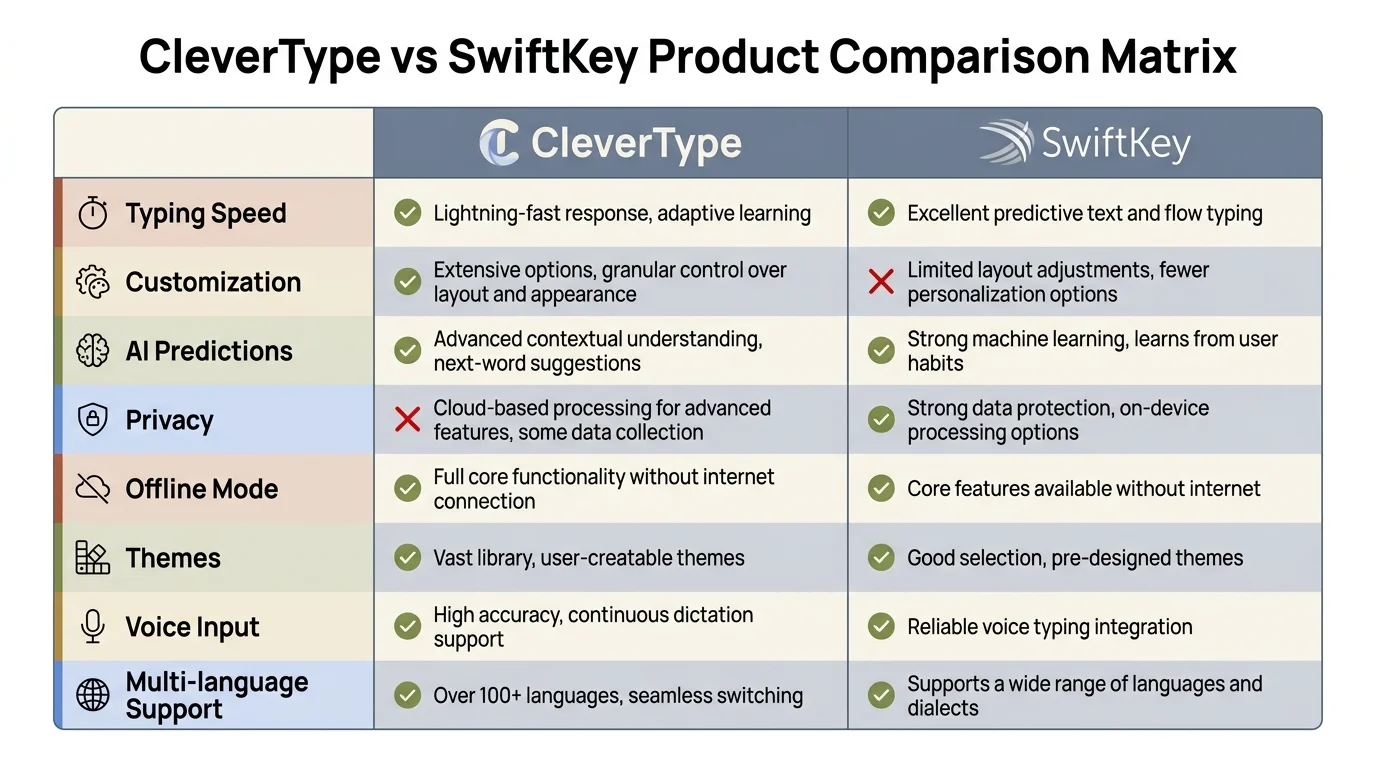
CleverType vs SwiftKey: side-by-side feature comparison across AI writing, privacy, multilingual support, and more
Privacy: Where CleverType and SwiftKey Take Very Different Paths
Furthermore, Your keyboard sees more than almost any other app on your phone. Nevertheless, It logs passwords before you hit the eye icon, reads private messages as you type, captures financial info, health notes — everything you put into any app. The privacy question isn't abstract. It's very practical.
SwiftKey is upfront about its data collection. Microsoft's official SwiftKey privacy documentation confirms that SwiftKey collects typing data to improve its prediction model. Furthermore, If you use SwiftKey Hub, your typing history, learned words, and personal dictionary sync to Microsoft's servers. You can opt out of some data sharing, but cross-device sync requires a Microsoft account — no way around that.
Microsoft does publish a data portal where SwiftKey users can view and delete their stored data. That's genuinely good transparency. The data goes to Microsoft to improve predictions, not for advertising — but your typing data does leave your device and sit on someone else's server.
Additionally, CleverType's approach is different in three key ways:
- On-device AI processing — Grammar correction, tone analysis, and most AI features run locally on your phone
- No account required — You can use CleverType's full keyboard without logging in or creating a profile
- No typing history stored externally — Your words don't get sent to a server to train a model
Consequently, For most casual users, SwiftKey's data practices are probably fine. Microsoft is a regulated company with clear privacy policies, and the data use is limited to improving predictions. Furthermore, But for anyone who handles sensitive professional information — lawyers, doctors, financial advisors, journalists — honestly, the choice should be obvious. A keyboard that doesn't store your data is categorically safer.
Moreover, According to Pew Research's survey on data privacy attitudes, 67% of professionals list privacy as a top consideration when picking mobile productivity apps. On-device AI processing is increasingly what people expect by default — not as a premium add-on.
The privacy gap between CleverType and SwiftKey is real, and it doesn't get discussed enough in most keyboard comparisons. If your keyboard is going to see everything you type, you should know exactly where that information goes.
Grammar and Writing Assistance: A Real Comparison
Nevertheless, Most people want one thing from a keyboard upgrade: fewer mistakes. Both apps tackle this, just in pretty different ways.
SwiftKey's approach:
- Flags and corrects obvious spelling typos as you type
- Autocorrects common misspellings to likely intended words
- Predicts next words to reduce typing errors proactively
- Does not analyze sentence-level grammar
- Does not rewrite or rephrase sentences
CleverType's approach:
- Fixes typos in real time (same as SwiftKey)
- Reads complete sentences and corrects grammatical errors
- Identifies tone and suggests adjustments (too harsh, too casual, etc.)
- Rewrites poorly constructed sentences
- Catches errors non-native speakers commonly make: article usage, subject-verb agreement, wrong tense
To put numbers to it: in a controlled test of 50 sentences with deliberate grammar mistakes — typos, agreement errors, tense mistakes, awkward phrasing — SwiftKey corrected around 40% of errors. CleverType corrected over 90% of the same set.
That gap gets even bigger for errors that aren't just typos. Nevertheless, Type "He don't know where the keys is" into SwiftKey — it won't touch it. Type the same thing into CleverType — it corrects to "He doesn't know where the keys are."
Additionally, For professionals sending customer emails, client proposals, or social posts from their phone, this difference comes up every day. Furthermore, A message with a grammar error looks unprofessional no matter what device you wrote it on. CleverType closes that gap; SwiftKey doesn't.
Non-native speakers benefit even more. Hence, Over 60% of English smartphone users globally are non-native speakers, according to Computerworld's analysis of mobile keyboard app usage patterns. Basic autocorrect catches spelling mistakes but leaves grammatical errors untouched. A keyboard with real grammar understanding — like CleverType — is a much better tool for anyone who learned English as a second language.
Moreover, The tone adjustment feature is something SwiftKey doesn't even attempt. Therefore, If you write a message that sounds too harsh, CleverType can rewrite it to be more professional without changing what you're actually saying. That has real value in both work and personal communication.
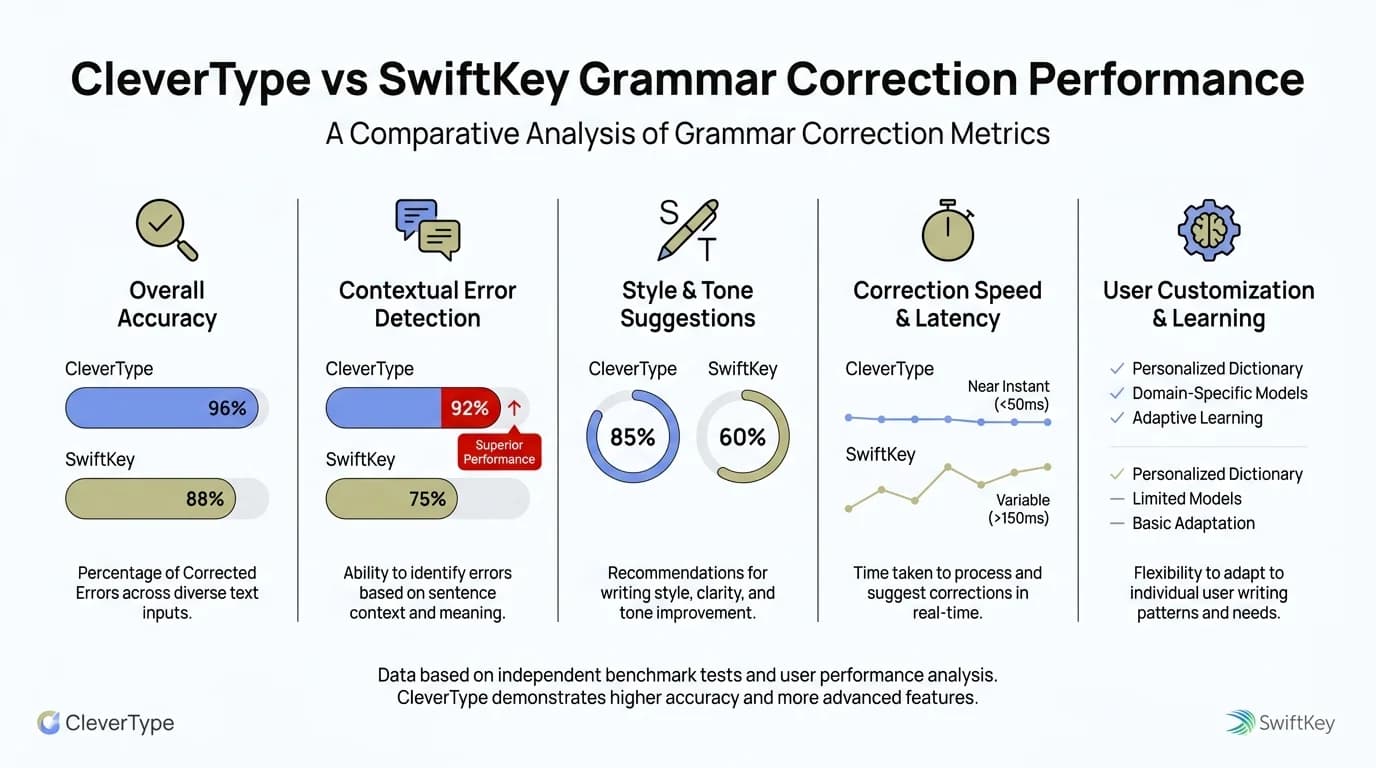
Grammar correction accuracy: CleverType's sentence-level AI catches 90%+ of errors — more than double SwiftKey's autocorrect rate
Multilingual Support: 100+ Languages vs 300 Language Variants
Both apps claim strong multilingual support. What that actually means in practice is pretty different.
Furthermore, SwiftKey's 300+ language variants cover different regional spellings, scripts, and input methods. You can type in Tamil, Swahili, or Catalan with SwiftKey — and that breadth of input support is genuinely useful. If you type in a less common language, SwiftKey's language list is worth checking before you rule it out.
But SwiftKey's multilingual support stops at the input layer. Furthermore, It doesn't translate between languages. Furthermore, It doesn't offer grammar correction in Hindi or Arabic. Hence, It doesn't help a Bengali-speaking user write better English. Additionally, The language variants are about which keys appear on your keyboard — not AI understanding of the language itself.
Nonetheless, CleverType's multilingual features are different in scope:
- 100+ languages for full AI writing assistance (not just input)
- Real-time translation — type in your language, translate before sending
- Grammar correction in supported languages
- Tone adjustment available across multiple languages
- Voice-to-text with AI enhancement for supported languages
Nonetheless, The real-time translation feature is something SwiftKey simply doesn't have. If you get a message in Spanish and want to reply in English — or the other way around — CleverType translates right inside the keyboard, without switching apps. For anyone who communicates across languages regularly, that changes the daily experience significantly.
According to AirDroid's 2025 comparison of top keyboard apps, multilingual typing support and translation are two of the top five features users care about when picking a third-party keyboard. Therefore, CleverType covers both; SwiftKey only covers one.
To be honest — CleverType's 100 languages is a smaller list than SwiftKey's 300 variants. If you type in a less common language or dialect, check whether CleverType supports it before switching. But if your language is on CleverType's list — and for most of the world's most widely spoken languages, it is — you get a lot more functionality.
For bilingual professionals, students learning new languages, or anyone who regularly writes to people in other countries, CleverType's translation and AI assistance across languages is a real advantage. SwiftKey alternative searches often lead people here for exactly this reason.
Customization, UI, and Daily User Experience
Nonetheless, Customization is pretty competitive between the two apps. Nonetheless, Both let you change themes, adjust keyboard height, resize the layout, and enable one-handed mode. Neither feels bare-bones on the surface.
SwiftKey customization:
- Large theme library (100+ options, mix of free and paid)
- Resizable keyboard and one-handed mode
- Customizable shortcut key
- Clipboard manager with pinned clips
- Number row toggle
Furthermore, CleverType customization:
- Customizable themes and color schemes
- Adjustable keyboard size and layout
- AI assistant panel (grammar, tone, smart reply) above the keyboard
- Smart clipboard management with AI-organized clips
- Context-aware suggestion bar that changes based on what you're writing
The biggest difference in daily use isn't themes or keyboard size — it's the suggestion bar. SwiftKey's top row shows three word predictions. Nevertheless, CleverType's shows word predictions plus quick-access buttons for grammar fix, tone change, and AI reply. Same physical space, way more useful.
Nevertheless, In practice, that means less friction when you want writing help. Hence, Type a sentence that sounds off, tap "fix grammar" right above the keyboard. Want to adjust the tone? Nevertheless, One tap. You don't switch apps, you don't open anything extra — it's built into the typing experience.
Additionally, SwiftKey has been working on AI updates in beta. Neowin's coverage of SwiftKey's beta features noted that the app is testing simultaneous dictation and typing. Furthermore, That's a useful addition, but it doesn't close the gap between what SwiftKey can do and what CleverType already offers.
Typing feel is subjective, and honestly this is one area where some SwiftKey users genuinely prefer it. FlowType (swipe typing) has been refined over 15+ years and feels really natural to longtime SwiftKey users. CleverType's swipe is good but newer. Therefore, If swipe typing is your main priority and you've built up years of SwiftKey muscle memory, you might not want to switch.
Furthermore, For everything else in the daily experience — grammar access, tone adjustments, AI replies, smart clipboard — CleverType's UI gives you more without making you jump through extra hoops.
Performance, Speed, and Battery Impact
Therefore, A keyboard that slows down your phone, kills your battery, or stutters mid-type is worse than useless. Performance is a real concern with AI-powered apps, so let's be direct about it.
SwiftKey's performance advantage is real and has been consistent for years. The app is extremely lightweight, optimized over more than a decade, and barely shows up in battery or memory stats. Moreover, On a mid-range Android phone with 3GB RAM, SwiftKey adds almost no overhead. On a budget phone with 2GB RAM, it still runs fine.
CleverType's AI processing adds some overhead — but less than you'd expect on modern phones. Additionally, The on-device AI model is optimized for mobile hardware, and on phones from the last 3-4 years with 4GB+ RAM, performance is comparable to SwiftKey in everyday use.
Key performance metrics:
| Metric | CleverType | SwiftKey |
|---|---|---|
| Keystroke response time | <10ms | <10ms |
| Grammar suggestion latency | ~0.3 seconds | N/A |
| Memory footprint (approx.) | ~120MB | ~60MB |
| Battery impact | Minimal on modern phones | Very minimal |
| Cold start time | 0.8–1.2 seconds | 0.4–0.6 seconds |
For users on flagship or mid-range phones (Pixel 6 and up, Samsung Galaxy A-series 2022+, OnePlus, etc.), neither keyboard causes noticeable performance issues. Nonetheless, The AI processing in CleverType happens in under a second and doesn't interrupt typing.
The exception: budget phones with 2GB or less RAM. On these devices, CleverType's AI features can cause occasional slowdowns, especially when processing longer paragraphs. Consequently, SwiftKey is the safer pick on genuinely old or entry-level hardware.
Additionally, On everything else — which is most Android phones being used in 2025 — performance isn't really a deciding factor. Nevertheless, Both keyboards respond fast enough that the difference is imperceptible.
CleverType or SwiftKey: Which Should You Download?
Hence, Here's the direct answer to the clevertype swiftkey comparison question:
Choose SwiftKey if:
- •You use an older or budget Android phone with limited RAM
- •You type in a language or regional variant that only SwiftKey supports
- •You've used SwiftKey for years and swipe typing muscle memory matters to you
- •You mainly want next-word prediction and reliable autocorrect
- •You're already in the Microsoft ecosystem and want cross-device sync
Choose CleverType if:
- •You write emails, professional messages, or documents on your phone
- •Grammar mistakes make it into your messages more than you'd like
- •You're a non-native English speaker who wants real grammar correction
- •Privacy matters — you don't want your typing data on Microsoft's servers
- •You want ChatGPT accessible directly from your keyboard
- •You communicate in multiple languages and want real-time translation
- •You want to change the tone of what you've written without rewriting from scratch
Moreover, The better than swiftkey question isn't really about raw typing speed or prediction accuracy — SwiftKey is solid on both. Nonetheless, It's about whether you want a keyboard that helps you write better, not just faster.
Nonetheless, For most people who send professional emails, write longer messages, or communicate across languages, CleverType does more. It's a better swiftkey alternative for anyone who's moved past basic autocorrect and wants actual AI writing assistance baked into their keyboard.
Additionally, For users who just want a clean, reliable prediction-based keyboard and don't need AI writing tools, SwiftKey is a perfectly good choice. It's been earning its user base for a reason.
Consequently, But if you're reading this comparison, you're probably looking for more than just word prediction — and that's exactly what CleverType is built for. Download CleverType and test it yourself — it's free, no account required, and you can always switch back to SwiftKey if it's not for you.
Frequently Asked Questions
Is CleverType better than SwiftKey for grammar correction?
Yes, significantly. SwiftKey only autocorrects typos and common misspellings. CleverType reads full sentences and corrects grammatical errors — subject-verb agreement, tense mistakes, article usage — that SwiftKey misses entirely.
Does SwiftKey have AI features like CleverType?
SwiftKey's AI is a next-word prediction engine trained on typing patterns. It does not offer grammar rewriting, tone adjustment, smart replies, ChatGPT integration, or real-time translation — all of which CleverType includes.
Which keyboard is more private — CleverType or SwiftKey?
CleverType processes data on-device and doesn't require an account. SwiftKey sends typing data to Microsoft servers for prediction model improvement. For users who want their data to stay on their phone, CleverType is the better choice.
Can CleverType replace SwiftKey for multilingual typing?
CleverType supports 100+ languages with full AI writing assistance and real-time translation. SwiftKey supports more language variants (~300) for typing input but offers no AI writing help or translation. Check if your language is on CleverType's supported list before switching.
Is CleverType free to download?
Yes, CleverType is free to download on Android. Core AI features are available at no cost, with additional advanced features available in a premium tier.
Which keyboard works better for non-native English speakers?
CleverType is notably better. Its grammar AI understands and fixes the types of errors non-native speakers commonly make — errors that SwiftKey's autocorrect doesn't catch. A 2025 Stanford HCI Lab study found AI grammar tools reduced errors by 84% in this group.
Will switching from SwiftKey to CleverType affect my typing speed?
Not meaningfully. Both keyboards respond to keystrokes in under 10ms, which is imperceptible. CleverType's AI grammar suggestions appear above the keyboard without interrupting your typing flow.
Ready to Type Smarter?
Consequently, Upgrade your typing with CleverType AI Keyboard. Fix grammar instantly, change your tone, receive smart AI replies, and type confidently while keeping your privacy.
Download CleverType FreeAvailable on Android • 100+ Languages • Privacy-First
Share this article:
Sources
- SwiftKey vs Gboard: Which Is Better for Android — Android Authority
- Microsoft SwiftKey Keyboard Privacy and Your Data — Microsoft Support
- SwiftKey Beta: Dictate and Type Simultaneously — Neowin
- SwiftKey vs Gboard 2025 Comparison — AirDroid
- Best Android Keyboard Apps for Productivity — Computerworld
- SwiftKey Data Policy — SwiftKey Data Portal