Key Takeaways
| Aspect | Key Point | Impact |
|---|---|---|
| Adoption Rate | 75% of enterprises will use generative AI by 2026 | Systematic prompt management becomes non-negotiable |
| Productivity Gains | AI writing assistants boost productivity by 66% | Complex tasks see bigger improvements |
| Task Completion | 40% reduction in time with ChatGPT for business documents | Quality ratings jump from 3.8 to 4.5 |
| Team Usage | 92% of Fortune 500 companies have employees using ChatGPT | Up from 80% in late 2023 |
| Content Production | Marketers create 3-5x more content with AI repurposing | Production time drops 50-70% |
Why do some teams effortlessly churn out high-quality content while others struggle with scattered prompts and inconsistent outputs? Here's the thing—it's all about how they manage their ai prompts team workflows. With over 800 million weekly active users of ChatGPT globally, the need for structured collaborative ai prompts has never been clearer. Professionals are increasingly turning to AI writing assistants to improve team productivity and streamline their content creation processes.
Managing shared ai prompts isn't about collecting a bunch of text snippets. It's about building a living system that gets smarter with each team member's contribution—something that separates high-performing teams from those constantly reinventing the wheel.
Why AI Prompt Management Matters for Teams in 2026
Does your team spend hours recreating prompts that someone else already perfected last week? According to Nielsen Norman Group research, AI tools boost employee productivity by 66% on average—but only when teams actually use them systematically instead of just winging it. Research shows that structured approaches work way better than ad-hoc usage.
The gap between AI adopters and AI-powered teams has widened dramatically. 58% of employees now use AI regularly at work, yet most organizations lack basic prompt management infrastructure. This creates massive inefficiencies. Marketing drafts one version of a product description prompt while sales unknowingly creates another for the exact same use case. Sound familiar?
Think about what happens when your best copywriter leaves. Without documented team writing prompts, their expertise just walks out the door. Research found that AI assistance cut task completion time by 40% and bumped up output quality by 18%—but these gains disappear when prompts aren't shared systematically across teams.
CleverType tackles this head-on by baking ai prompt management right into your typing workflow. Instead of switching between chat interfaces and document editors, your team grabs refined prompts exactly where they're writing—whether drafting emails, creating reports, or collaborating on documents. The keyboard remembers your best prompts and makes them instantly available across every app you use. Learn more about writing custom prompts for AI keyboard productivity to maximize your team's efficiency.
The real cost of poor prompt management includes:
- Teams recreating solved problems instead of innovating
- Inconsistent brand voice across customer touchpoints
- Junior members struggling without access to proven prompts
- Hours wasted tweaking prompts that experts already optimized
- Security risks from unvetted prompts accessing sensitive data
Companies with extensive AI implementation report 72% high productivity rates compared to just 55% for those with limited AI use. The difference? Taking a systematic approach to prompt creation, testing, and sharing instead of everyone experimenting on their own. Discover how AI writing tools improve team communication and drive better collaboration across departments.
Setting Up Your Team's Prompt Library
What separates a random collection of prompts from an actual library? Structure, discoverability, and continuous improvement. Three things that definitely don't happen by accident.
Your prompt library needs to live somewhere everyone can access without friction. A shared Google Doc might work for three people, but it falls apart once your team grows past that. Leading prompt management platforms offer version control, tagging, search functionality, and permission settings that keep things from turning into chaos as your library grows to hundreds of prompts.
Start by organizing prompts based on what they do, not which department uses them. Categories like "email drafting," "content summarization," "technical documentation," and "creative brainstorming" make way more sense than organizing by teams—multiple departments often need the same capabilities anyway. Tag each prompt with relevant metadata: which AI model it works best with, typical use cases, what input it needs, and what kind of output it'll give you.
Essential metadata for each prompt:
- Primary purpose (what problem does this solve)
- Input variables required (what information must users provide)
- Output format (bullet points, paragraphs, structured data)
- Recommended AI models (GPT-4, Claude, Gemini)
- Success metrics (how to evaluate if it worked well)
- Last tested date and performance notes
Version control matters way more than you'd think. When someone tweaks a prompt, you want to know what changed and why. Tools like PromptDrive and Team-GPT offer built-in version tracking so teams can compare different iterations and roll back if a "fix" actually makes things worse. Save every change with timestamps and author names—this keeps well-meaning edits from accidentally breaking prompts that were working just fine.
CleverType simplifies this whole process by letting you save your go-to prompts right in your keyboard. No switching apps, no digging through folders—just quick access to your team's best prompts while you type. The AI keyboard learns which prompts you use most and suggests them based on what you're writing. If you're wondering what an AI keyboard app is and why you should try one, this seamless integration is exactly why professionals are making the switch.
Here's what surprised me most when setting up prompt libraries: the best prompts come from iteration, not inspiration. Your initial prompt might work okay, but after five team members refine it based on real usage, it becomes something actually powerful. That evolution only happens when you make prompts visible and editable by everyone.
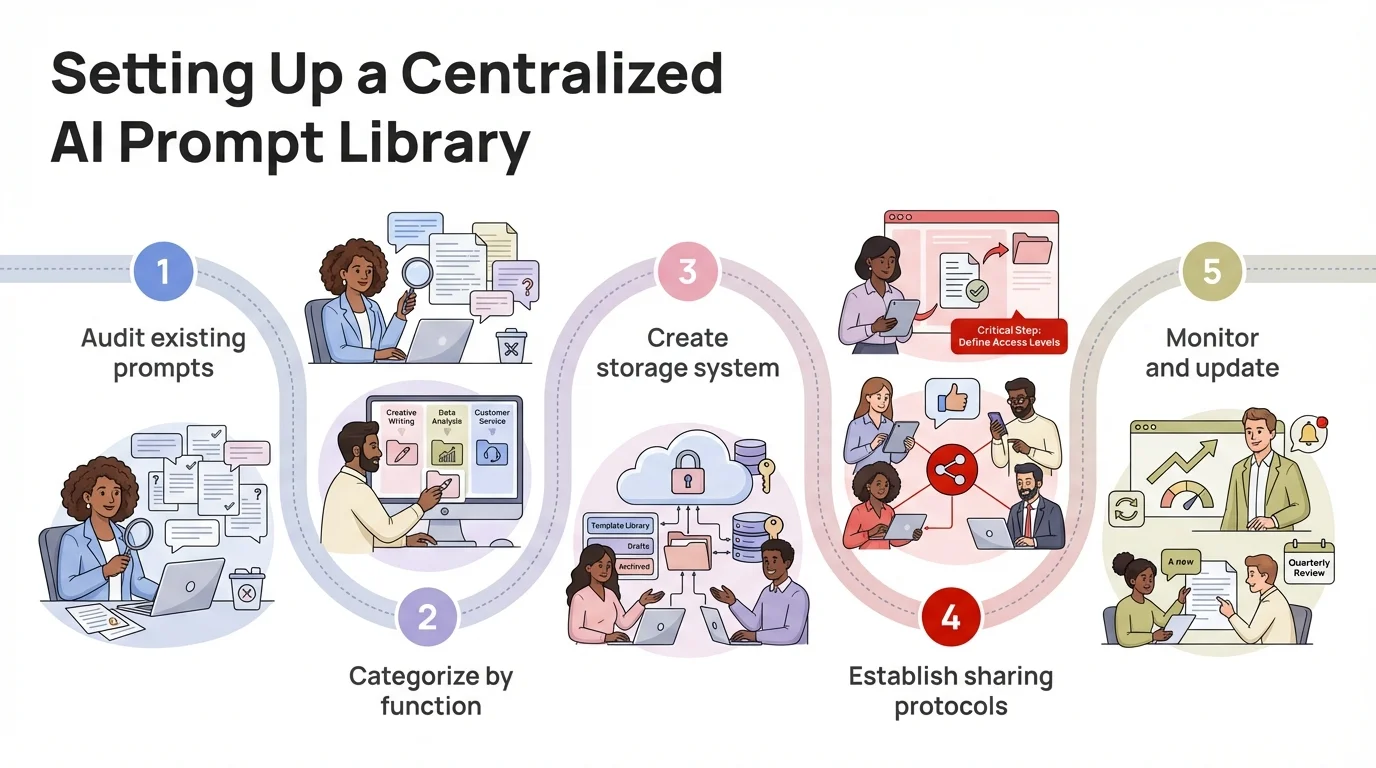
A systematic approach to building and organizing your team's AI prompt library
Standardizing Prompt Formats Across Your Organization
Ever notice how recipes follow similar formats no matter who writes them? Ingredients, steps, cooking time—this structure makes them universally understandable. Your team's collaborative ai prompts need the same kind of consistency.
Standardization doesn't mean cookie-cutter prompts. It means setting up conventions that help teammates quickly understand and use each other's work. When someone opens a prompt from another department, they should immediately get what it does, what inputs it needs, and what output it'll produce.
A standard prompt format should include:
- Clear objective statement - One sentence explaining what this prompt accomplishes
- Input placeholders - Bracketed fields like [PRODUCT_NAME] or [TARGET_AUDIENCE]
- Explicit instructions - What the AI should do, step by step if needed
- Output specifications - Format, length, tone, and style requirements
- Context parameters - Background information the AI needs to know
- Constraints or guardrails - What the AI should avoid or limitations to respect
Research shows that employees use AI mainly for efficiency (67%), information access (61%), and generating new ideas (59%). Standardized prompts make all three way more effective by cutting out the mental overhead of figuring out how to ask the AI properly.
Think about tone markers in your standard format. A prompt for external customer communications needs different guardrails than one for internal brainstorming. Make these distinctions explicit—"[TONE: professional but friendly]" or "[AUDIENCE: technical stakeholders]"—so the AI knows how to calibrate.
CleverType takes this even further by suggesting prompts based on where you're typing. The same prompt template automatically adjusts its tone when you're writing in Slack versus drafting a formal email in Outlook. Your team's standardization efforts really pay off when the tools themselves understand context. Learn effective strategies for choosing the right tone for business communications to make sure your messages always land right.
Length specs matter a lot, but teams often skip them. "Write a product description" gives you wildly different outputs every time, while "Write a 50-word product description for e-commerce listing pages" produces consistent, usable results. Build word count or paragraph specs right into your standard format.
One manufacturing company I worked with cut their prompt refinement time by 60% just by requiring all shared prompts to include example outputs. When someone's browsing the library and sees what good output looks like, they immediately know if that prompt solves their problem. Bad examples work too—showing what to avoid really clarifies expectations.
Version Control and Prompt Evolution
When does a prompt stop being the same prompt? After five edits? Ten? When it starts producing totally different outputs?
Teams that treat prompts like static documents set themselves up for confusion. Prompts evolve as AI models improve, business needs change, and people discover better phrasings. Without version control, this evolution turns into chaos—someone references "the product description prompt" but three different versions exist scattered across various shared drives.
MIT research on AI collaboration found that highly skilled workers get the most value from AI when they can keep refining their approach based on what worked before. Version control lets you do exactly that while keeping track of what actually works.
Effective version control includes:
- Unique identifiers for each prompt version (v1.0, v1.1, v2.0)
- Changelog documenting what changed and why
- Performance metrics comparing versions when possible
- Author attribution and timestamp for accountability
- Ability to revert to previous versions without data loss
- Branching for experimental variations
Semantic versioning helps teams grasp the importance of changes. Small edits (fixing typos, tweaking phrasing a bit) get incremental bumps like v1.2 to v1.3. Major overhauls that change the whole prompt structure or purpose jump to v2.0. This immediately tells people whether they need to review the changes carefully.
Git-based systems work great for technical teams already comfortable with version control. Tools like Braintrust offer prompt-specific version management that's easier for non-technical folks while still giving you the core benefits of tracking changes over time.
CleverType automatically saves your prompt variations as you use them, building a personal history of what worked best in different situations. When you tweak a prompt on the fly while typing, that improvement gets saved and can be shared with your team's library if it turns out to be valuable. Understanding how AI keyboards are transforming professional communication helps teams make smart decisions about trying out these tools.
Here's what catches teams off-guard: successful prompts often get worse before they get better. Someone tries to make a prompt more flexible and accidentally makes it way too vague. Version control lets you roll back that change and try something different without losing what you had. Think of it like insurance for your team's built-up prompt knowledge.
Performance tracking turns version control from simple documentation into actual optimization. When you can see that v2.3 boosted output quality scores by 12% compared to v2.2, you're not just tracking changes—you're steering evolution toward results you can actually measure.
Collaborative Editing and Feedback Loops
Who should be allowed to edit your company's most important prompts? Everyone? No one? Something in between?
The sweet spot is making prompts easy to access while keeping quality control in place. Research from Harvard and BCG shows consultants finish tasks 25% faster with ChatGPT—but only when they're using well-crafted prompts. Crowdsourcing prompt improvements taps into collective intelligence, while structured feedback keeps things from degrading.
Think about Wikipedia's editing model—anyone can suggest changes, but experienced editors review them before they go live. Your ai prompt management system needs similar guardrails. Junior team members bring valuable perspective from actually using the prompts, while senior folks make sure edits keep quality high and stay aligned with what the org needs.
Implementing effective collaborative editing:
- Suggestion mode for proposed changes requiring approval
- Comment threads for discussing improvements without editing directly
- Clear ownership assignment (who's responsible for maintaining this prompt)
- Review cycles for high-use prompts (quarterly audits)
- Usage analytics showing which prompts need attention
- Easy forking so people can experiment without affecting the main version
Real-time collaboration tools like Team-GPT let multiple people work on prompts at once, just like Google Docs. Product managers draft initial requirements, engineers add technical constraints, and subject matter experts throw in domain expertise—all in one collaborative interface with changes tracked by who made them and when.
Feedback loops speed up improvement. When someone uses a prompt and gets mediocre results, there needs to be an easy way to flag that and suggest fixes. CleverType handles this by letting people mark problematic outputs right in their workflow. That feedback goes back to whoever maintains the prompt, and they can spot patterns—if multiple people are struggling with the same prompt in similar situations, that's a clear signal it needs work.
Testing before rolling out changes keeps one person's preference from messing up everyone else's experience. Run new prompt versions against sample inputs and compare them to previous versions. Does the new phrasing consistently give you better results, or does it just work well for that one person's specific situation? Blind testing—where people don't know which version they're judging—cuts down on bias.
Cross-functional review catches blind spots. Engineers might write technically accurate prompts that sound robotic to customers. Marketing might create engaging prompts that aren't precise enough. Getting both perspectives in the feedback loop produces prompts that balance multiple needs instead of just optimizing for one thing.
Measuring Prompt Performance and ROI
How do you know if a prompt actually works? Gut feeling? Because someone uses it a lot? More careful measurement separates teams getting real value from AI versus those just going through the motions.
Accenture reports that AI can bump up productivity by as much as 30% based on real workplace tests. But "productivity" means different things depending on the context—faster output, better quality, fewer revision cycles, less errors to fix. Your measurement system needs to match what you're actually trying to achieve.
Start with the basics: how often people use a prompt tells you which ones solve real problems versus which ones just sit there collecting dust. If nobody touches a prompt in three months, either archive it or figure out why—maybe it's poorly documented, or maybe that problem just isn't that common.
Key metrics for prompt performance:
- Usage frequency (how often teams use this prompt)
- Time saved versus manual approach (measured in actual work hours)
- Output quality scores (rated by end users or automated assessment)
- Iteration count (how many revisions needed before output is acceptable)
- Adoption rate (percentage of team members using shared prompts)
- Consistency metrics (variance in output quality across different users)
Measuring output quality gets tricky. For objective tasks like data extraction or format conversion, automated testing works great—either the prompt gives you correct structured output or it doesn't. For creative stuff like marketing copy, you need actual people to evaluate it. Set up simple rating scales (1-5 stars for relevance, accuracy, tone) and have whoever's using the output rate it.
Time tracking gives you clear ROI. Before you start using ai prompt management, measure how long typical tasks take. After teams start using prompts systematically, measure again. Research shows task completion time drops 12-16% with AI support, but your actual results depend on how good your prompts are and whether your team's actually using them.
CleverType's built-in analytics show which keyboard prompts you use most, how much time they're saving you, and where you're still typing everything from scratch. These insights help teams figure out which processes to optimize next—maybe you've got email drafting down but still struggle with report generation, so that's where to focus your prompt work. Explore 10 ways an AI keyboard saves time in your workday to unlock even more productivity gains.
A/B testing works for prompts just like it does for web pages. Run two versions at the same time with different users, see which one gives better results, then go with the winner. This data-driven approach beats arguing about which phrasing might work better. Let the data decide.
Cost tracking matters if you're using paid API access. If a prompt needs 2000 tokens but a refined version gets the same output with just 800 tokens, that efficiency really adds up across thousands of uses. Multiply the token savings by your per-token cost and you'll see that prompt optimization delivers actual financial returns, not just quality improvements.
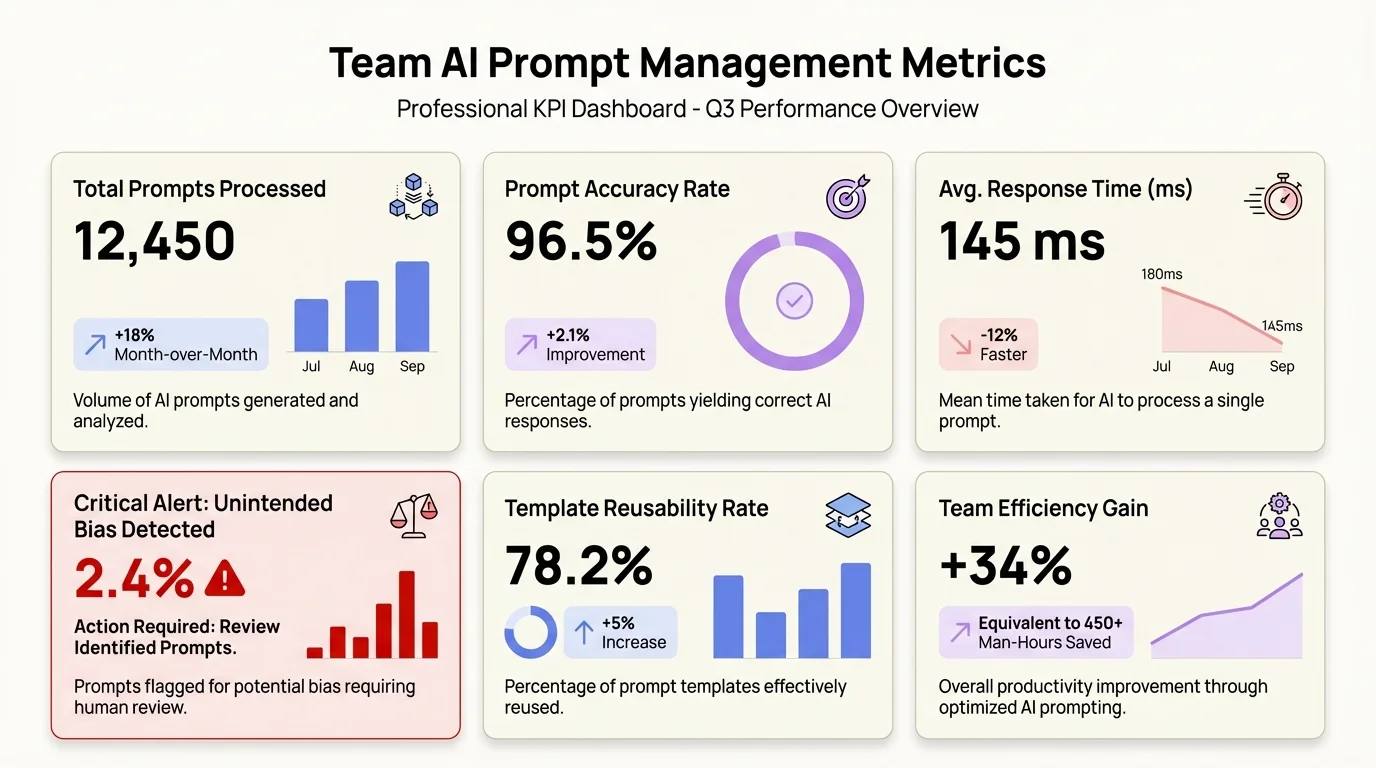
Essential KPIs for measuring prompt performance and demonstrating ROI to leadership
Security and Privacy Considerations
What happens when someone accidentally pastes customer data into a shared prompt template? Or when a prompt with proprietary strategy gets saved to a public AI service?
Security gaps in shared ai prompts can turn into compliance nightmares. 92% of Fortune 500 companies have employees using ChatGPT, but a lot of them don't have clear policies about what information can go through these tools. Your ai prompt management system needs security baked in from the start, not tacked on later.
Start with data classification. Some prompts only handle public information—minimal risk there. Others deal with customer data, financial projections, or strategic plans. Tag prompts based on how sensitive the data they typically handle is, then put the right controls in place.
Essential security measures:
- Role-based access control (limiting who can view/edit sensitive prompts)
- Data sanitization templates (removing PII before AI processing)
- Audit logs tracking who used which prompts with what data
- Compliance guardrails preventing prohibited data types
- Local processing options for highly sensitive use cases
- Regular security reviews of high-use prompts
API key management becomes critical when teams share prompts that connect to different AI services. Don't hard-code credentials into the prompts themselves. Use environment variables or secure credential systems so API keys stay protected even when prompts get shared around.
CleverType takes privacy seriously by offering on-device AI processing for sensitive stuff. When you're drafting confidential information, the keyboard can run prompts locally without sending anything to external servers. This setup gives teams the benefits of standardized prompts without the security tradeoffs of cloud-only processing. For more details, read about how modern AI keyboards protect your data on mobile and why privacy-first design matters for business users.
Think about prompt injection attacks—malicious inputs designed to override your prompt instructions and make the AI do weird things. If your prompts process external user inputs (customer support tickets, form submissions), clean that data before sending it to AI models. Treat user inputs as untrusted, just like web apps guard against SQL injection.
Geographic data residency matters for global teams. European regulations around AI and data protection are different from what's required in the US and Asia. The European Union's AI Act sets comprehensive requirements for AI deployment that orgs need to understand when setting up prompt management. Your infrastructure should support data localization—European employee data stays in European AI processing regions, meeting regulatory requirements while still letting people collaborate.
Retention policies keep you from piling up sensitive prompt histories forever. Maybe you need detailed logs for 90 days for debugging and tweaking, but after that, anonymize or delete records with potentially sensitive info. It's about finding the right balance between keeping organizational knowledge and reducing security risks.
Training Team Members on Prompt Best Practices
Why do some people get amazing results from AI while others struggle with the exact same tool? The skill gap is huge, but most organizations give zero training on how to actually prompt effectively.
67% of workers use AI for efficiency gains, but being efficient requires knowing what you're doing. Teams need proper onboarding that covers both general prompting basics and your organization's specific conventions for collaborative ai prompts.
Start with the anatomy of a prompt. Break down what makes good prompts work—clear instructions, relevant context, specific constraints, examples where they help. Show side-by-side comparisons of vague versus specific prompts and their wildly different outputs. This builds intuition about how tiny wording changes can create huge differences in results.
Core training components:
- Fundamentals of how language models interpret instructions
- Your organization's prompt format standards and why they exist
- How to use your prompt library (searching, forking, contributing)
- When to create new prompts versus adapting existing ones
- Testing and evaluating prompt outputs objectively
- Security and privacy guidelines for different data types
Hands-on practice beats sitting through presentations. Give people sample tasks and have them write prompts to solve those problems, then compare results and talk about what worked. This kind of experimentation in a safe space builds confidence before they're dealing with real projects and deadlines.
CleverType cuts down the learning curve by suggesting contextually appropriate prompts as people type. New users see how experienced team members phrase instructions for common tasks—learning by example in real work situations instead of fake training scenarios. The keyboard basically becomes a continuous learning platform.
Role-specific training recognizes that marketers need different prompting skills than developers. Customized sessions focused on each department's actual use cases make training immediately useful. Developers learn prompts for code documentation and debugging, while sales teams practice prompts for proposals and customer communication.
Certification programs work well for bigger organizations. Employees finish training modules, show they know their stuff with assessment tasks, then earn credentials proving they get prompt best practices. This creates internal experts who can help their coworkers and add quality prompts to shared libraries.
Common mistakes deserve direct coverage. People often give too little context (assuming the AI "just knows" background info), provide contradictory instructions, or forget to specify output format. Calling out these patterns with real examples helps people spot and avoid the same mistakes.
Integration with Existing Workflows
Where does ai prompt management fit in your current tech stack? Nowhere—if you're making people add yet another tool to their already-crowded workflows.
Successful prompt management works smoothly with tools teams already use every day. If your org lives in Slack, your prompt library needs Slack integration. If everyone drafts docs in Google Workspace, prompts should be right there. The best AI collaboration tools work across platforms instead of making you constantly switch between apps.
API integrations let you embed prompt functionality right into existing apps. Your CRM could include customer communication prompts directly in the email window. Your project management tool might show relevant prompts when people create task descriptions. Meeting your team where they actually work drives way more adoption than asking them to go to a separate portal.
Key integration points:
- Communication platforms (Slack, Teams, Discord)
- Document editors (Google Docs, Microsoft Word, Notion)
- Email clients (Gmail, Outlook)
- Development environments (VS Code, GitHub)
- Customer support tools (Zendesk, Intercom)
- Content management systems (WordPress, Contentful)
Browser extensions give you integration flexibility. A well-designed extension puts your prompt library one click away no matter what web app you're using. Hit a keyboard shortcut, search your prompts, pick one, and it fills in the current text field—that's the kind of friction reduction that actually gets people to use shared prompts.
CleverType's approach goes even deeper—it works at the input layer itself. Since you use your keyboard in every app, having prompt access built into the keyboard means it just works everywhere automatically. Write emails, chat messages, documents, code comments, or social media posts, and your team's best prompts are always there without switching apps or installing separate integrations for each one.
Mobile access matters more than teams first realize. 58% of workers use AI regularly, and more of that's happening on phones and tablets now, not just desktops. Your prompt management needs to work on mobile devices where typing is harder and AI help is even more valuable.
Workflow automation ties prompts into bigger processes. When a support ticket comes in, automatically suggest relevant prompts based on the category. When someone kicks off a project retrospective, pull up the retrospective prompt template. Slack's AI features show this in action—the tool anticipates what you need based on context instead of waiting for you to ask.
Single sign-on (SSO) integration removes login friction. Teams shouldn't need separate credentials for their prompt management platform. Use existing identity providers so accessing shared prompts is as easy as getting into any other internal tool.
Frequently Asked Questions
Q: How many prompts should our team library include when starting out?
A: Start with 10-15 high-impact prompts covering your most frequent use cases rather than trying to document everything at once. Focus on prompts that get used multiple times per week—email drafts, meeting summaries, content outlines. Build from there based on actual usage patterns, adding prompts as teams encounter repetitive tasks that would benefit from standardization.
Q: What's the best way to encourage team members to actually use shared prompts instead of creating their own each time?
A: Make shared prompts easier to access than creating new ones from scratch. This means integration with existing tools, searchable libraries with clear descriptions, and visible success metrics showing time saved. CleverType achieves this by embedding prompts directly in the keyboard, reducing access friction to zero. Also celebrate wins—when someone uses a shared prompt to complete a project faster, share that success story.
Q: Should we create separate prompt libraries for different departments or maintain one central repository?
A: Start with one central library organized by function rather than department, since similar tasks happen across teams. Use tags and filters so marketing can easily find their relevant prompts without seeing developer-specific ones. However, maintain department-specific sections for specialized needs—sales might need proposal prompts that nobody else uses. The key is discoverability without overwhelming people with irrelevant options.
Q: How do we prevent our prompt library from becoming cluttered with outdated or low-quality prompts?
A: Implement a regular review cycle—quarterly audits where you examine usage data and quality metrics. Archive prompts that haven't been used in six months unless there's a good reason to keep them. Require new prompts to meet quality standards before being added to the main library, perhaps through a submission and review process. Version control helps too, since you can see which prompts evolve regularly (indicating active use and refinement) versus which stagnate.
Q: What metrics should we track to demonstrate ROI from our prompt management initiative to leadership?
A: Track time saved (hours per week across the team), task completion speed increases (percentage faster than baseline), output quality improvements (rated by end users), and adoption rates (percentage of team actively using shared prompts). Companies report productivity gains of 12-16% with AI support, so measure before and after implementation. Also track reduction in repeated questions or rework, since good prompts increase consistency.
Q: How do we handle prompts that contain sensitive business logic or competitive strategy information?
A: Implement role-based access controls so only authorized team members can view sensitive prompts. Use your prompt management platform's permission settings to create private sections restricted by department or seniority level. For highly sensitive prompts, consider keeping them in secure local storage rather than cloud-based systems. Always sanitize example outputs to remove actual customer or financial data before they're saved in prompt templates.
Q: Can AI prompt management work for teams using multiple AI models (ChatGPT, Claude, Gemini)?
A: Yes, and it's actually essential for multi-model teams. Tag each prompt with which models it works best with, since effective phrasing can vary between AI systems. Some prompt management platforms like Prompts.ai support 35+ language models, letting teams maintain one library with model-specific variations. CleverType handles this by adapting prompts based on which AI backend you're currently using, automatically adjusting for model-specific requirements.
Master Team Collaboration with AI-Powered Typing
Ready to bring your team's best prompts directly into every typing experience? CleverType turns your keyboard into a collaborative ai prompts powerhouse, giving you instant access to shared team writing prompts across every application.
With CleverType, your team's carefully crafted prompts aren't buried in documentation—they're available right as you type, whether you're drafting emails, creating reports, or messaging colleagues. The AI keyboard learns from your team's usage patterns, suggesting the right prompt at the right time based on context.
Download CleverType today and transform how your team collaborates with AI—no more switching apps, copying prompts, or reinventing solutions that someone already perfected.
Download CleverType NowShare This Article
Found this guide helpful? Share it with your team:
Sources:
- - Nielsen Norman Group - AI Tools Productivity Gains
- - Apollo Technical - AI in the Workplace Statistics
- - Maxim AI - Top Prompt Management Tools 2026
- - MIT Sloan - Generative AI Effects on Skilled Workers
- - PromptDrive - AI Prompting Collaboration Guide
- - TextExpander - Best AI Prompt Managers for Teams
- - Braintrust - Best Prompt Management Tools
- - Slack - AI Tools for Teams
- - Prompts.ai - Team Prompt Sharing Platform