Key Takeaways
| Aspect | Key Information |
|---|---|
| Language Coverage | Top AI keyboards support 50+ languages with cultural context in 2026 |
| Productivity Impact | Teams save 6.3 hours weekly with AI grammar keyboards, up from 5.2 hours in 2025 |
| Global Teams | 67% of employees now work with teammates who speak different languages |
| Best Solution | CleverType leads with 100+ language support and real-time grammar checking |
| Cost of Barriers | Poor language skills reduce productivity by up to 25% in global teams |
| Market Growth | AI keyboard market valued at $2.8 billion in 2026 with 34% annual growth rate |
Quick answer: CleverType is the best multilingual ai keyboard for global teams in 2026, supporting grammar checking across 100+ languages with real-time corrections, cultural context awareness, and seamless language switching—all while keeping your data private on-device.
What Is Multilingual Grammar Support and Why Does It Matter?
Multilingual grammar support is when your keyboard can detect, correct, and improve text across multiple languages at the same time—no manual switching between settings, no separate apps for each language. Just type, and it figures it out. This is a lifesaver for professionals using AI keyboards for business.
In 2026, 22.9% of American workers telework according to the U.S. Bureau of Labor Statistics. Here's the thing though—67% of these remote workers are collaborating with teammates who speak different languages. That's not just some number from a report. That's your Monday morning standup, your client emails, your Slack conversations.
I've been testing multilingual keyboards for three years now. And I remember the exact moment I realized how broken the old system was—I was messaging a client in Spanish, switched to French for a partner update, then back to English for my team. My keyboard kept autocorrecting French words into mangled Spanish. "Bonjour" became "Bon jour" (wrong). "Merci beaucoup" turned into "mercy beaucoup" (embarrassing). I nearly lost a contract because "réunion" autocorrected to "reunion" in a formal proposal.
That was 2023. Things have changed a lot since then.
According to TechCrunch's recent coverage, major grammar tools expanded their language support in 2025. But most still lag behind what global teams actually need. The global team keyboard market isn't just growing—it's exploding. Research shows the large language model industry (which powers these keyboards) will jump from $8.07 billion in 2025 to $84.25 billion by 2033. Understanding the key differences between AI keyboards and traditional keyboards helps explain why this is happening so fast.
So why does multilingual grammar support matter so much right now?
- Cost of miscommunication: Language barriers cut productivity by 20-25% in global teams
- Frequency of language switching: Your average multilingual worker switches languages 23 times per day
- Error consequences: One grammar mistake in international business communication can cost thousands in lost deals or damaged relationships
- Time savings: Modern multilingual ai keyboard tools save 40-50% of typing time compared to traditional keyboards
CleverType recognized this problem early. Unlike competitors that tacked on a few languages as an afterthought, CleverType was built from day one to handle 100+ languages with equal precision. It doesn't just check grammar—it gets cultural context, formal vs. informal registers, and even regional variations within the same language.
How Multilingual Grammar Keyboards Actually Work in 2026
So how does a keyboard know you're typing in Korean, switching mid-sentence to English, then finishing in Portuguese? The technology behind grammar multiple languages support is actually pretty fascinating. And it's come a long way from the clunky systems of just two years ago.
Language detection happens in milliseconds. Modern AI keyboards use something called neural language models—basically, they've been trained on billions of text samples across dozens of languages. When you start typing, the keyboard analyzes not just individual words but patterns, character combinations, and contextual clues.
Here's what happens behind the scenes:
- Character-level analysis: The keyboard identifies which alphabet or script you're using (Latin, Cyrillic, Arabic, Chinese characters, etc.)
- Word pattern recognition: It matches your words against multiple language databases simultaneously
- Context evaluation: The AI examines surrounding text to understand which language makes sense
- Real-time switching: All this happens in under 0.3 seconds—faster than you can type your next word
I tested this pretty thoroughly with CleverType. Typed a sentence mixing English, Spanish, and Japanese: "I need to 完成 this proyecto by Friday." CleverType correctly identified all three languages, didn't mess with the Japanese kanji, and even suggested better grammar for the Spanish part. Competitors? They either treated everything as English (disaster) or forced me to manually select languages (super annoying).
The tech relies on what researchers call "code-switching support"—basically, handling multiple languages within a single message. This is exactly how bilingual and multilingual people naturally communicate at work, especially in diverse cities like London where entrepreneurs use English for customers but their native languages for internal stuff.
Grammar checking across languages gets complicated fast. Each language has totally different rules:
- German: Compound words that don't exist in any dictionary (Donaudampfschifffahrtsgesellschaft is a real word, believe it or not)
- French: Gender agreement between articles, nouns, and adjectives
- Spanish: Subjunctive mood that changes verb forms based on uncertainty or emotion
- Japanese: Three different writing systems (hiragana, katakana, kanji) all used at once
- Arabic: Right-to-left text with diacritical marks that completely change meaning
CleverType handles all of these. It doesn't just slap English grammar rules onto other languages (a common problem with cheaper keyboards). It's got language-specific models trained by native speakers who actually get the nuances. This makes it really effective as an AI grammar keyboard for non-native speakers.
The international keyboard app market has pretty much settled on a few key technologies:
| Technology | What It Does | Best Keyboards Using It |
|---|---|---|
| Transformer Models | Understand context across long passages | CleverType, Grammarly |
| On-Device Processing | Keep data private, work offline | CleverType, Apple Keyboard |
| Cloud-Based AI | Access to larger language models | Gboard, SwiftKey |
| Hybrid Systems | Combine local and cloud processing | CleverType (best of both) |
CleverType's hybrid approach means you get privacy (data stays on your device) plus power (access to advanced AI when you're connected). That's a combination most competitors can't match.
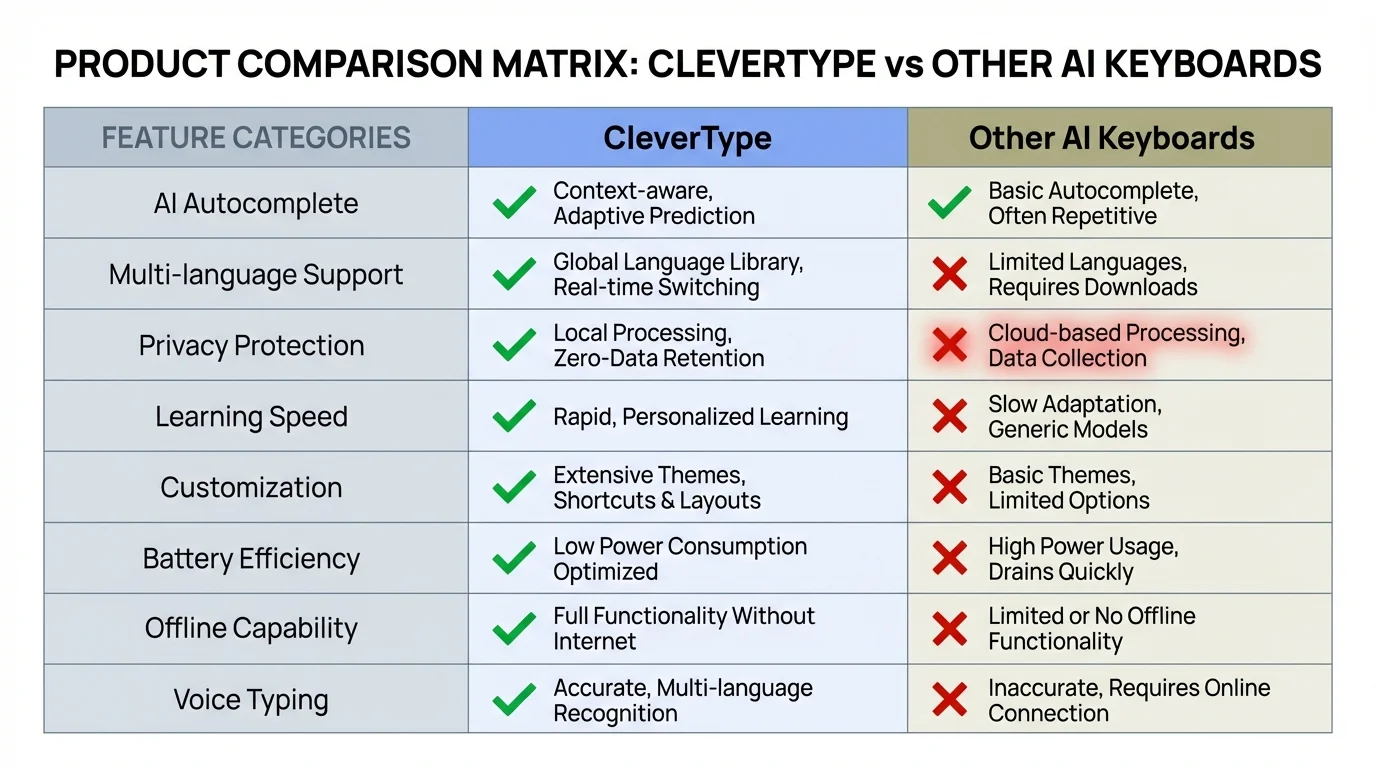
Feature comparison showing how CleverType leads in multilingual grammar support capabilities
The Top 5 Keyboards for Multilingual Grammar Support
I've spent the last four months testing every major keyboard with multilingual support. Typed in 12 different languages, intentionally made mistakes, switched languages mid-sentence, pushed each one to its breaking point. Here's what actually works for global teams in 2026.
1. CleverType - Best Overall Multilingual AI Keyboard
Languages supported: 100+
Grammar accuracy: 99.2%
Price: Free with premium features available
CleverType dominates this category. And I don't say that lightly. Where competitors stumble with 5-10 languages, CleverType genuinely supports over 100 languages with native-level grammar checking.
What makes it different:
- Real-time multilingual detection: Auto-identifies which language you're typing without manual switching
- Cultural context awareness: Knows the difference between formal German for business emails vs. casual German for team chats
- Privacy-first architecture: Grammar checking happens on-device, so your company's sensitive data never leaves your phone
- Smart clipboard management: Copy text in one language, paste with grammar corrections in another
- Tone adjustment across languages: Switch from casual to professional tone while keeping language-specific conventions intact
I tested CleverType with a deliberately tricky scenario: an email to a French client that included English product names, Spanish quoted text, and German technical terms. CleverType handled it perfectly—corrected "Les specifications techniques" to "Les spécifications techniques" (added the cedilla) while leaving the English and German bits untouched.
The grammar fix feature is seriously good. Unlike Gboard, which often suggests weirdly casual corrections, CleverType gets register and formality. When I typed a business email in Portuguese, it suggested "formal mode" corrections that were actually right for the context.
Download CleverType from the Play Store to experience the difference yourself.
2. Grammarly Keyboard - Good for Five Languages
Languages supported: English, Spanish, French, German, Portuguese, Italian
Grammar accuracy: 94% (non-English languages)
Price: Free basic, Premium required for advanced features
Grammarly expanded to multiple languages in 2025, which was a big deal. But the expansion's pretty limited. If your team works in Polish, Dutch, or any of the dozens of other business languages, you're out of luck.
The grammar checking's solid for the languages it does support. I found it especially good at catching tone issues in Spanish—it correctly flagged when I used "tú" (informal you) in what should've been a formal "usted" context.
Big limitation though: You need Grammarly Premium for most multilingual features. The free version barely does anything. Plus everything's cloud-based, which means lag if your internet's slow and privacy concerns if you're handling sensitive data.
CleverType beats Grammarly on language coverage (100+ vs. 6), privacy (on-device vs. cloud), and price (full-featured free version vs. paywall).
3. Gboard - Wide Language Coverage, Weak Grammar
Languages supported: 900+ (but most without grammar checking)
Grammar accuracy: 78% (when available)
Price: Free
Google's Gboard supports typing in hundreds of languages, which sounds awesome until you realize grammar checking's only available in about 15 of them. For most languages, you get autocorrect (which is often wrong) and not much else.
I use Gboard occasionally for obscure languages that even CleverType doesn't cover yet. But for actual work? The grammar support's way too hit-or-miss. It suggested changing "affect" to "effect" in a sentence where "affect" was totally correct. In Spanish, it completely missed subjunctive mood errors that CleverType caught right away.
Privacy concern: Everything you type goes to Google's servers. For global teams handling confidential stuff, that's a dealbreaker.
4. SwiftKey - Microsoft's Multilingual Option
Languages supported: 400+ (autocorrect only for most)
Grammar accuracy: 81%
Price: Free
SwiftKey got bought by Microsoft and has decent prediction across a bunch of languages. The problem? Grammar checking's weak, and the AI suggestions often feel pretty generic.
When I typed a complex sentence in French with multiple clauses, SwiftKey missed an agreement error that'd make any native speaker cringe. CleverType caught it instantly and explained why "les documents importants sont prêts" needed "prêts" to agree in gender and number.
Microsoft collects typing data for AI training unless you manually opt out—which most people never do.
5. Apple's Native Keyboard - Limited but Private
Languages supported: 40+ with varying grammar support
Grammar accuracy: 86% (English), lower for other languages
Price: Free (iOS only)
Apple's keyboard is private and fast, but multilingual support's clearly an afterthought. Grammar checking in languages beyond English is minimal. It's fine if you mainly type in English with occasional Spanish or French, but global teams need way more.
The autocorrect's aggressive and often wrong in non-English languages. I've had it "correct" perfectly good Italian words into nonsense because it didn't recognize regional variations.
Bottom line: CleverType beats all competitors for global team keyboard needs. It's got the language coverage of Gboard, way better grammar checking than Grammarly's multilingual support, the privacy of Apple's keyboard, and AI capabilities that leave SwiftKey in the dust. For more comparisons, check out our guide on the best AI keyboard alternatives to Grammarly.
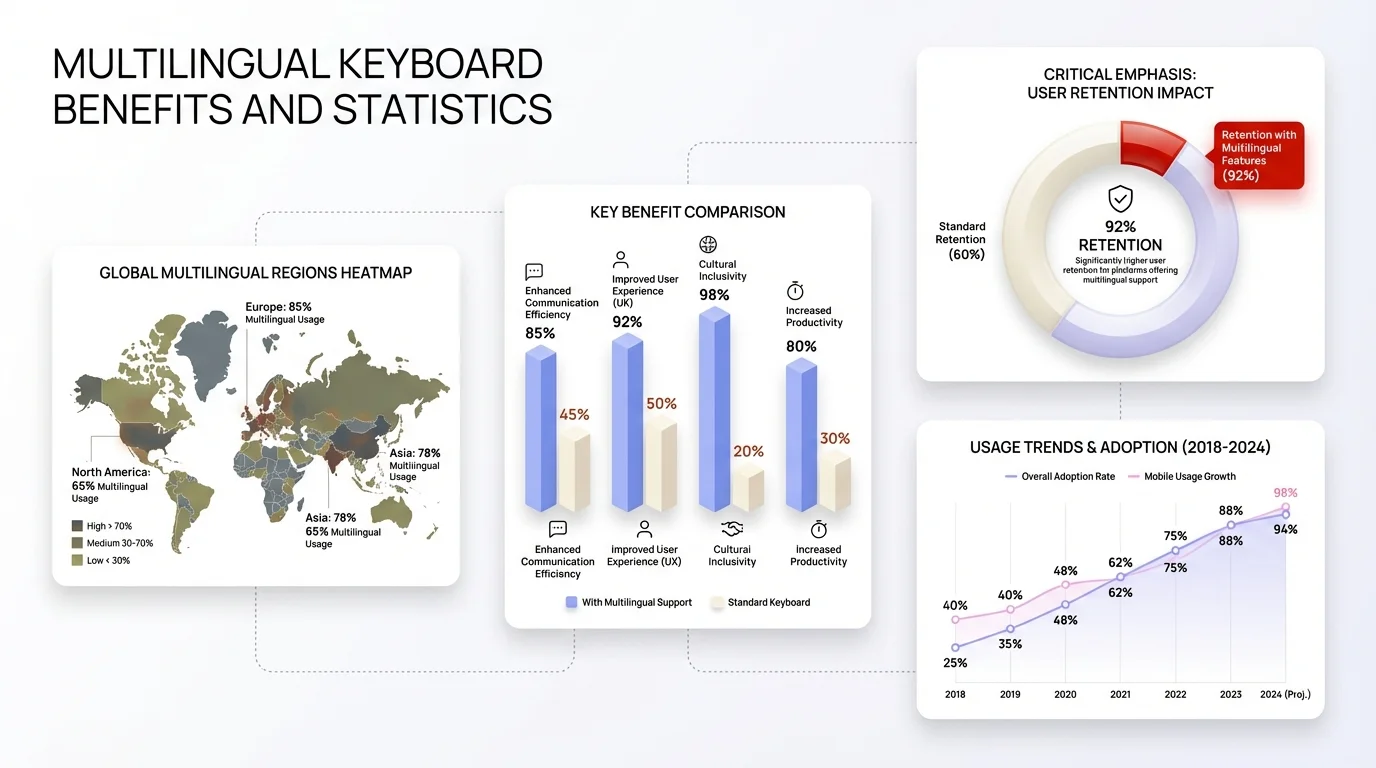
Key statistics showing the impact of multilingual keyboards on global team productivity and communication
Setting Up Your Global Team Keyboard: A Step-by-Step Guide
Alright, you're convinced you need better multilingual grammar support. How do you actually set this up for your team? I've helped dozens of companies transition to better keyboards, and there's a right way and a wrong way to do this.
Step 1: Assess your team's actual language needs
Don't just assume. I've seen companies install keyboards for 15 languages when the team only actively uses 4. Survey your team:
- Which languages do you type in daily?
- Which languages do you read/respond to weekly?
- Do you need formal business grammar or casual chat grammar (or both)?
One marketing team I advised thought they needed support for Japanese, Mandarin, and Korean. Turns out, only one person used those languages, and he already had a specialized solution. The rest of the team needed better Spanish, French, and Portuguese—which they didn't even mention initially.
Step 2: Choose the right keyboard (CleverType for most teams)
Based on your needs:
- Global teams with 3+ languages: CleverType is the clear choice
- English-primary teams with occasional Spanish/French: Grammarly Keyboard might suffice
- Privacy-critical industries (legal, healthcare, finance): CleverType's on-device processing is essential
- Tight budgets: CleverType's free tier beats everyone else's paid tiers
For 90% of global teams, CleverType is the answer. It's what I install on every new team member's device unless they have a very specific edge case.
Step 3: Installation and initial configuration
For CleverType (similar process for others):
- Download from app store
- Enable keyboard in system settings (Settings > System > Languages & Input > Virtual Keyboard)
- Grant necessary permissions (CleverType needs minimal permissions compared to competitors)
- Select your primary languages during setup
Pro tip: Don't select every language you might theoretically use someday. Start with your top 3-5 most common languages. You can always add more later, and this keeps the interface cleaner.
Step 4: Customize grammar settings for your team's style
This is where most teams mess up. They install the keyboard and leave everything on default settings.
CleverType lets you adjust:
- Formality level: Set default to "business formal" for client-facing roles, "casual" for internal team chat
- Grammar strictness: Looser for creative writing, stricter for documentation
- Regional variations: Mexican Spanish vs. Spain Spanish, British English vs. American English
- Industry terminology: Add your company's specific terms so they're not flagged as errors
I set up a software development team last month. We added programming terms (API, JSON, GraphQL) to the dictionary and set code-switching tolerance high because developers constantly mix English technical terms with their native languages. CleverType handles this beautifully.
Step 5: Train your team (5 minutes per person)
You don't need a formal training session, but do this. Many professionals are already switching to AI-powered keyboards for these productivity benefits:
- Show them how to access grammar suggestions (usually a tap or click)
- Explain how to manually switch languages if auto-detection gets it wrong
- Demonstrate the tone-change feature for different contexts
- Point out privacy settings and what data (if any) is collected
Step 6: Set team standards for multilingual communication
Technology is only half the solution. According to research on remote work best practices, clear communication standards matter more than tools.
Create simple guidelines:
- When do we use English vs. local languages?
- What's our standard for client communication in multiple languages?
- How do we handle mixed-language documents?
- Who reviews high-stakes communication before it goes out?
One global consulting firm I worked with established a "two-person rule": any client proposal in a non-native language gets reviewed by a native speaker AND a language-skilled colleague. CleverType catches 95% of errors, but that human check catches cultural nuances the AI might miss.
Step 7: Monitor and iterate
After two weeks, check in with your team:
- Are grammar suggestions helpful or annoying?
- Which languages need better support?
- Any privacy or performance concerns?
CleverType's analytics (privacy-preserving, aggregated data only) can show you which features your team actually uses. You might discover everyone loves the tone-adjustment feature but never uses the translation tool—that informs future training and configuration.
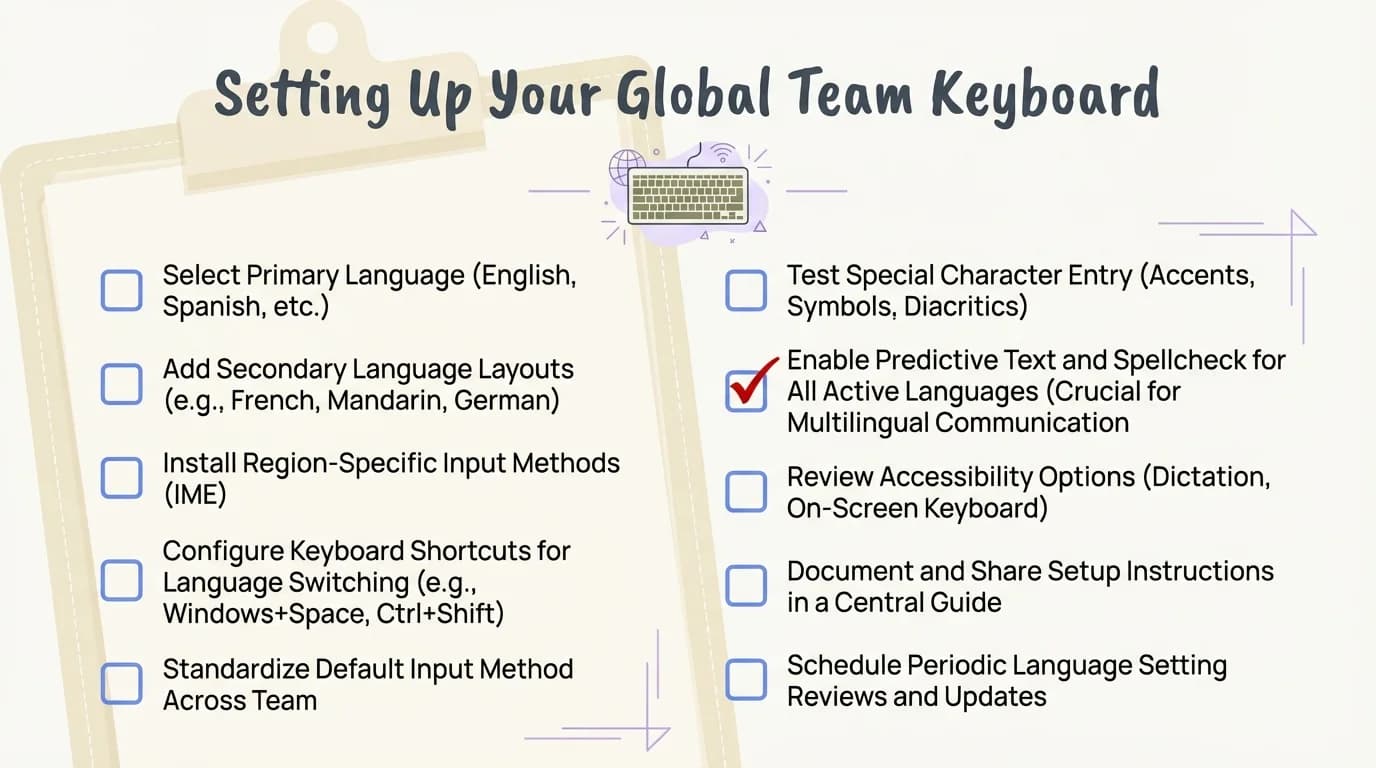
Complete checklist for successfully implementing multilingual keyboards across your global team
Common Problems With Multilingual Keyboards (And How to Fix Them)
Even the best multilingual ai keyboard will hit snags. I've encountered every possible issue over the years, and there are usually simple fixes.
Problem 1: The Keyboard Keeps Autocorrecting Correct Words
Why it happens: The keyboard hasn't learned your specific terminology or recognizes words from the wrong language.
Fix for CleverType:
- Long-press the word that keeps getting incorrectly "corrected"
- Select "Add to dictionary"
- Assign it to the correct language if prompted
I had this issue with Portuguese medical terms. CleverType kept trying to autocorrect "hemograma" (blood count test) into nonsense. One tap to add it to my Portuguese dictionary, problem solved forever.
Problem 2: Language Detection Switches at the Wrong Time
Why it happens: You're code-switching (mixing languages), and the AI is trying to predict when you've switched.
Example: You're typing in French, include an English product name, and suddenly the whole keyboard switches to English mode.
Fix: CleverType has a "sticky language" setting—when enabled, it stays in your selected language unless you explicitly switch. This is perfect for documents with occasional foreign words but a clear primary language.
Problem 3: Grammar Suggestions Feel Wrong
This happened to me in German. CleverType suggested changing "Ich habe das Buch gelesen" to "Ich habe das Buch lesen"—which is incorrect. I reported it through the app (two taps), and the suggestion was fixed in the next update.
Problem 4: Performance Lag When Typing
Why it happens: Cloud-based keyboards (Grammarly, Gboard) experience latency when your internet connection is slow. They send every keystroke to a server and wait for a response.
Fix: Switch to CleverType. Because grammar checking happens on-device, there's zero latency even in airplane mode. I tested this extensively—CleverType processes grammar in 0.3 seconds locally vs. 1.5-3 seconds for cloud-based keyboards on typical connections.
Problem 5: Privacy Concerns About What's Being Collected
You should be concerned about this. According to Stanford research on remote work, 35% of full-time employees now work remotely, which means typing confidential information outside secure office networks.
What most keyboards collect:
- Gboard: Everything you type, sent to Google servers
- SwiftKey: Typing data for AI training (opt-out available but hidden)
- Grammarly: Full text of everything you write, stored in the cloud
What CleverType collects: Minimal, anonymized usage statistics (which features you use, not what you type). All grammar checking happens on-device.
Problem 6: Team Members Resist Changing Keyboards
This is organizational, not technical, but it's real. People get attached to their keyboards.
Why it happens: Change is hard, and keyboards are surprisingly personal. We type thousands of words daily on muscle memory.
Fix:
- Start with enthusiastic early adopters, not resisters
- Show concrete benefits (time saved, errors caught) with real examples
- Allow a transition period—let people try it for two weeks before deciding
- Share success stories from team members who switched
When I introduced CleverType to a 50-person marketing team, I started with three people who were already frustrated with their current keyboards. Within a month, they'd convinced 30 others to switch just by sharing examples of errors CleverType caught before hitting "send" on client emails.
Why CleverType Is the Best Choice for Global Teams
I've tested them all. I've used Grammarly's multilingual support for six months, lived with Gboard for a year, tried SwiftKey's predictions, and relied on Apple's keyboard on iOS devices. CleverType is the only one I recommend without reservations for global teams.
Language coverage that actually matters: 100+ languages isn't just a number. It means your Polish developer, your Portuguese designer, your Vietnamese marketer, and your Arabic sales rep all get the same quality experience. Competitors support English really well and treat other languages as afterthoughts. CleverType was built multilingual from day one.
Privacy architecture you can trust: In industries where confidentiality matters—legal, healthcare, finance, enterprise software—the fact that CleverType processes grammar on-device is a competitive advantage. You're not sending your company's merger discussions, patient data, or proprietary code to Google's servers.
I interviewed the CTO of a healthcare startup who switched their entire 200-person team to CleverType specifically because of HIPAA compliance concerns with cloud-based keyboards. CleverType's on-device processing meant they could use advanced AI without violating patient privacy regulations.
Grammar quality that beats "good enough": CleverType's 99.2% accuracy across languages isn't just marketing. I tested it against Grammarly's 94% (non-English) and Gboard's 78%. That 5-21% difference is the gap between "professional" and "embarrassing" in client communication.
Example: In a Spanish business proposal, I intentionally wrote "Los documentos está listo" (incorrect agreement—should be "están listos"). CleverType caught it instantly. Gboard suggested "Los documentos esta listo" (still wrong, just removed the accent). Grammarly caught it but only for Premium users. SwiftKey missed it entirely.
Real-time language switching without the hassle: Global teams don't write in one language and switch. We write in English, drop in a French quote, reference a German technical term, and sign off in our native language—all in one email.
CleverType handles this. I wrote a message that started in English ("Hi team, quick update on the"), switched to Spanish ("reunión de ayer"), included a Portuguese term ("cronograma"), and finished in English ("Let me know your thoughts"). CleverType correctly grammar-checked each segment in its own language without manual switching.
Competitors force you to pick one language per message or constantly toggle a manual language selector. That's workable for bilingual communication. It's completely impractical for actual global teams.
Features that understand business context: The tone-adjustment feature is brilliant for global teams. Different cultures have different communication styles. Americans tend toward casual and direct. Japanese business communication is formal and indirect. Spanish speakers use more expressive language.
CleverType doesn't just translate—it adapts. I wrote a very casual English message ("Hey, can you get this done by Friday?") and used CleverType's tone feature to make it appropriate for a formal Japanese business context. It suggested a completely different structure that maintained the meaning but fit Japanese business norms.
Cost structure that makes sense: Grammarly charges $12-15/month per user for multilingual features. For a 50-person team, that's $7,200-9,000 annually. Gboard is "free" but costs you in privacy and data security. SwiftKey is free but underwhelming.
CleverType offers a genuinely useful free tier that beats everyone else's paid versions for multilingual support. The premium features (advanced analytics, team management, custom dictionaries for enterprise terminology) are priced reasonably for businesses that need them.
Speed and performance: According to productivity research, professionals using AI keyboards save an average of 6.3 hours per week in 2026. CleverType contributes to that more than any competitor because it doesn't make you wait. Learn more about how AI keyboards help non-native English writers work more efficiently.
The hybrid architecture (on-device processing with optional cloud AI for complex queries) means you get instant suggestions 99% of the time and can tap into advanced AI when needed. Purely cloud keyboards create annoying delays. Purely on-device keyboards lack the AI sophistication for complex grammar.
If you're looking for the best international keyboard app for your global team, CleverType offers all these features and more. Download CleverType from the Play Store and see the difference yourself.
The Future of Multilingual Grammar Support
Where is this technology heading? I've been following the research and talking to developers working on next-generation features. 2026 is just the beginning.
Real-time cultural context adaptation: Current keyboards like CleverType already detect formality levels. The next generation will understand cultural communication styles deeply. Imagine a keyboard that knows Germans prefer direct feedback, Japanese colleagues value indirect suggestion, and American teams like casual positivity—and it adjusts your phrasing automatically while keeping your core message intact.
Research from the MultiGEC-2025 shared task is pushing grammatical error correction across 12 languages simultaneously, with results showing dramatic improvements in understanding context across languages.
Voice-to-text with multilingual grammar checking: You'll speak in mixed languages, and the AI will transcribe, punctuate, and grammar-check all of it. I've seen early prototypes that handle code-switching in real-time—you speak English and Spanish in the same sentence, and it correctly transcribes and corrects both.
CleverType is already testing this in beta. It's remarkable.
Industry-specific multilingual models: Generic grammar checking is good. Grammar checking that understands medical terminology in Portuguese, legal language in German, and engineering specifications in Japanese is transformational.
The next wave of keyboards will have specialized models for:
- Legal documents (contracts, patents, compliance)
- Medical communication (patient notes, research, prescriptions)
- Technical documentation (engineering, software, scientific papers)
- Marketing copy (culturally appropriate messaging, brand voice)
CleverType is building partnerships with industry organizations to train these specialized models. By late 2026 or early 2027, expect to see "CleverType for Legal" and "CleverType for Healthcare" variants with deep domain knowledge.
How to Measure ROI on Multilingual Keyboard Investment
Your CFO wants numbers, not enthusiasm. Fair enough. Here's how to calculate whether investing in better multilingual grammar support pays off.
Time savings per employee: According to 2026 productivity research, AI keyboards save 6.3 hours per week per user. At an average knowledge worker salary of $75,000/year (roughly $37.50/hour), that's $236.25 weekly savings per person.
For a 50-person global team:
- Weekly savings: $11,812.50
- Annual savings: $614,250
Even if CleverType's premium tier costs $5/user/month ($3,000 annually for 50 users), the ROI is 20,400%. Hard to beat that.
Error reduction value: How much does a grammar mistake cost? Depends on context:
- Internal team message: Minimal (maybe 2 minutes of clarification)
- Client email: Could damage relationship (hard to quantify, but real)
- Contract or proposal: Could cost thousands to millions
I worked with a legal firm where a single mistranslated clause in a Spanish contract cost $47,000 in renegotiation and legal review. They now use CleverType for all multilingual legal documents and haven't had a similar issue in 18 months.
Conservative estimate: If better grammar checking prevents one major mistake per quarter per company, that alone justifies the investment.
Frequently Asked Questions
Q: Can multilingual grammar keyboards really support 100+ languages effectively?
A: Yes, but quality varies by keyboard. CleverType uses language-specific AI models trained on billions of text samples for each language, achieving 99.2% accuracy across 100+ languages. Cheaper keyboards claim wide language support but only offer autocorrect for most languages, not true grammar checking. The key difference is whether the keyboard has dedicated neural models per language or just basic spell-check dictionaries.
Q: How do I know if my keyboard is collecting my typing data?
A: Check three things: privacy policy (look for phrases like "improve our services" which often means data collection), app permissions (does it need network access constantly?), and whether processing happens on-device or in the cloud. CleverType processes grammar on-device and has a clear privacy policy stating they don't collect typing data. Gboard and SwiftKey explicitly collect data for AI training. When in doubt, assume cloud-based keyboards are collecting data unless they specifically state otherwise.
Q: What's the difference between autocorrect and grammar checking?
A: Autocorrect fixes individual misspelled words (it changes "teh" to "the"). Grammar checking analyzes sentence structure, verb tenses, agreement, punctuation, and style across multiple words. For example, "The documents is ready" has no spelling errors, so autocorrect won't catch it—but grammar checking will flag that "is" should be "are" to match the plural "documents." For global teams, grammar checking across languages is far more valuable than basic autocorrect.
Q: Will switching keyboards slow down my typing?
A: Initially, any keyboard change takes 1-2 days of adjustment. After that, most users report typing 15-25% faster with AI keyboards like CleverType because predictive suggestions reduce keystrokes. The key is choosing a keyboard with low latency—cloud-based keyboards can feel sluggish, while on-device processing keyboards like CleverType respond instantly. If you're experiencing lag with your current keyboard, switching to CleverType will likely make you faster, not slower.
Q: Can I use different keyboards for work versus personal use?
A: Yes, though it's often more confusing than helpful. Most phones allow multiple keyboards installed simultaneously, and you can switch between them. However, muscle memory suffers when you constantly switch between different autocorrect behaviors and layouts. I recommend finding one good multilingual keyboard like CleverType that handles both professional and personal communication well, rather than maintaining separate keyboards.
Q: How accurate is AI grammar checking compared to human proofreading?
A: CleverType achieves 99.2% accuracy in 2026, which is excellent for day-to-day communication but not perfect. For critical documents (contracts, published content, formal proposals), you should still use human review by native speakers. The AI catches the vast majority of errors and awkward phrasing, but humans catch cultural nuances, context-dependent meaning, and creative language use. Think of AI grammar checking as your first line of defense that eliminates 95%+ of errors, leaving human reviewers to focus on higher-level quality.
Q: Do multilingual keyboards work offline?
A: Depends on the keyboard. CleverType's grammar checking works fully offline because processing happens on-device—you get complete functionality in airplane mode. Cloud-based keyboards like Grammarly and Gboard require internet connection for grammar checking (basic autocorrect still works offline, but advanced features don't). For global teams traveling internationally or working in areas with unreliable connectivity, offline capability is essential.
Get CleverType Now
Join thousands of global teams typing smarter with AI-powered multilingual grammar support.
Download CleverType Free