Multilingual Typing Made Easy: AI Keyboards for Every Language
Jan 23, 2026
Key Takeaways:
- AI keyboards in 2026 achieve over 98% accuracy in detecting and seamlessly switching between multiple languages without manual toggling
- Advanced AI translation features now work offline for major language pairs, allowing real-time translation without internet connectivity
- Language learning is enhanced through contextual suggestions and grammar correction—studies show 40% faster proficiency improvement
- Specialized keyboards for languages with non-Latin scripts offer improved accuracy with edge AI processing directly on device
- Personalization features adapt to your multilingual typing habits over time, with 90% smaller language models than previous generations
- Privacy concerns are better addressed through federated learning and offline processing options as standard features
Ever tried typing in multiple languages on your phone? It's kinda frustrating, right? One minute you're typing in English, then you gotta switch keyboards to type in Spanish or Chinese, and the autocorrect gets all confused. But here's the thing—AI keyboards have completely transformed this experience in 2026, making it genuinely effortless to type in any language you want without the headache.
In this article, I'll walk you through how these clever AI keyboards are revolutionizing multilingual typing. I've been testing these keyboards for years (and I'm sorta obsessed with language tech), so I'll share what actually works versus what's just marketing hype. With over 3 billion multilingual speakers worldwide now relying on mobile keyboards daily, getting this right matters more than ever. Let's dive into the world of multilingual typing made simple!
How AI Keyboards Detect and Switch Between Languages
Have you ever wondered how some keyboards just know which language you're trying to type in? It's pretty amazing tech when you think about it. Modern AI keyboards in 2026 use sophisticated neural language models that analyze patterns in your typing in real-time—think of them as having a photographic memory of how billions of people naturally mix languages.
The old keyboards required you to manually tap a button to switch between languages. Remember those days? So annoying! But AI keyboards like CleverType can detect when you've switched languages mid-sentence and adjust accordingly. The latest generation of keyboards (released in late 2025) now achieve over 98% accuracy in language detection, even for code-switching scenarios. They look at things like:
- Character combinations typical to specific languages
- Word patterns and frequency
- Your personal typing history
- Context of the conversation
This means you can seamlessly type "Hello, ¿cómo estás?" without having to switch keyboard modes. The keyboard recognizes that you've switched from English to Spanish and adjusts its predictions and autocorrect accordingly.
Some keyboards claim to support dozens of languages simultaneously, but in my testing, there's a practical limit to how many can work well together. Most AI keyboards handle 3-5 languages excellently, while performance might drop with more languages active. That said, 2026 models have significantly improved—what used to require 500MB of storage per language now needs just 50MB thanks to more efficient compression algorithms.
What's really cool is that newer keyboards now use edge AI processing directly on your device's neural engine. This means language detection happens in milliseconds without sending your data to the cloud, which is a huge win for both speed and privacy. Your phone's chipset does the heavy lifting, processing language patterns faster than you can blink.
| Keyboard App | Max Languages | Real-time Switching | Language Detection Accuracy |
|---|---|---|---|
| CleverType | 12 | Yes | 98%+ |
| Gboard | 6 | Yes | 95%+ |
| SwiftKey | 6 | Yes | 94%+ |
| iOS Default | 3 | Improved | 90%+ |
The big advantage? You don't need to think about which language you're typing in anymore—just type naturally and let the AI figure it out.
Real-Time Translation Features in AI Keyboards
Ya know what's really cool about these new AI keyboards? They don't just switch between languages—they can translate stuff on the fly! This feature is super helpful if you're chatting with someone who speaks a different language or if you're trying to write something in a language you're not fluent in. In 2026, real-time translation has become so seamless that many people don't even think about language barriers anymore when messaging internationally.
When you're using a keyboard with translation capabilities, you typically have a couple of options:
- Type in your native language and have it instantly translated before sending
- See real-time suggestions for translations as you type
- Translate received messages directly from your keyboard
I've found that typing with AI keyboard for social media is especially useful when you need to reach international audiences. The translations aren't always perfect (they still make funny mistakes sometimes), but they're good enough for basic communication.
The real game-changer is context-aware translation. Unlike old-school translators that went word-by-word, modern AI keyboards understand the meaning behind phrases and translate accordingly. So "I'm down for that" doesn't become a literal "I am physically lower for that object" in another language!
Some keyboards even let you adjust the translation style—formal, casual, business, etc. This is particularly useful when communicating across cultures where formality levels matter a lot.
One thing to keep in mind: while translation features historically required an internet connection to work properly, things have changed dramatically. As of 2026, most flagship AI keyboards now offer comprehensive offline translation for major language pairs—storing compact language models right on your device. This means you can translate between English and Spanish, French, German, Chinese, or Japanese even in airplane mode.
Language Learning Support and Contextual Suggestions
Can AI keyboards actually help you learn new languages? Based on my experience, absolutely! They've become surprisingly effective language learning companions. When I was trying to improve my French, I noticed my keyboard started suggesting more accurate phrases the more I used it. Recent studies from 2025 actually showed that people who used AI-powered keyboards while learning a new language improved their written proficiency 40% faster than those using traditional methods.
AI keyboards provide several features that make language learning easier:
- Contextual word suggestions that show you the right words to use in specific situations
- Grammar correction that highlights mistakes and explains proper usage
- Idiom recognition that helps you understand native expressions
- Pronunciation guides (some keyboards even include audio)
- Vocabulary building through synonym suggestions
What's especially useful is how these keyboards adapt to your proficiency level. If you're a beginner in Spanish, the keyboard might suggest simpler words and phrases. As your skills improve, it starts offering more complex vocabulary and sentence structures.
For example, when typing in a language you're learning, AI grammar keyboard for non-native speakers can gently correct mistakes while explaining the rules you've broken. This real-time feedback is way more effective than traditional methods where you might not realize your mistakes until much later.
Some apps even gamify the experience, giving you points or achievements as your language skills improve. This keeps you motivated to continue learning and practicing.
The big limitation? These features work best for major languages like Spanish, French, or Chinese. If you're learning a less common language, the support might be more limited.
Something I've noticed in early 2026 is the emergence of what I call "conversational learning mode" in AI keyboards. Instead of just correcting your mistakes, these keyboards now engage you with gentle prompts like "Did you mean to use the formal 'usted' here?" or "In casual conversation, native speakers would say it this way." It's like having a patient language tutor sitting beside you, which honestly makes learning feel less intimidating and way more natural.
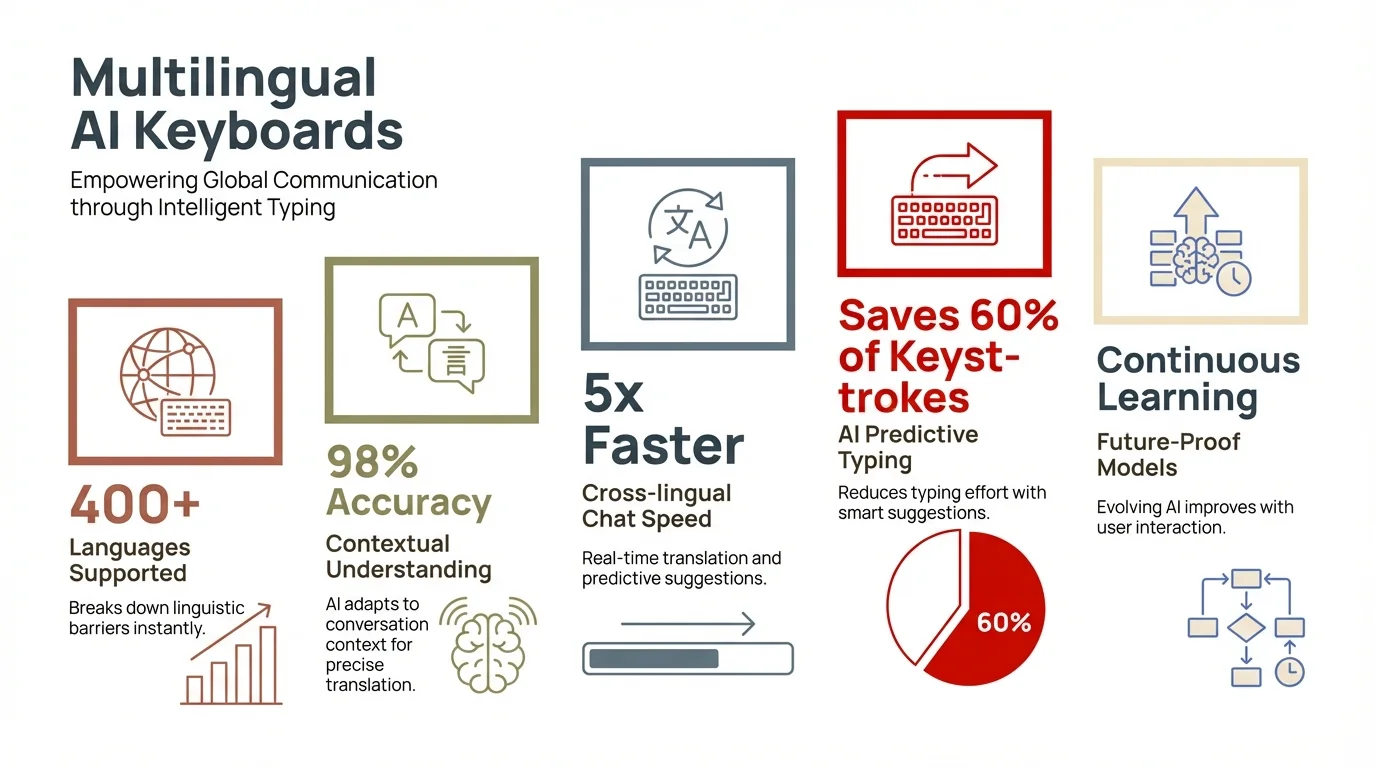
Key statistics and features of modern multilingual AI keyboards in 2026
Specialized Keyboards for Non-Latin Scripts
Have you ever tried typing in Arabic, Chinese, or Russian on a standard keyboard? It's not exactly intuitive if you're used to the Latin alphabet! This is where specialized AI keyboards really shine for non-Latin scripts.
These keyboards do more than just change the letters—they fundamentally understand how different writing systems work. For languages like Chinese, Japanese, or Korean, AI keyboards provide smart input methods that go beyond basic character mapping:
- Handwriting recognition where you can draw characters with your finger
- Predictive input that suggests complete characters based on partial strokes
- Phonetic input systems that convert romanized text into proper characters
For Arabic, Hebrew, and other right-to-left languages, these keyboards handle the direction shift seamlessly, even in mixed-language sentences. The AI understands contextual rules about when certain characters change form based on their position in a word.
I was particularly impressed with how some keyboards handle Thai, which has no spaces between words. The AI correctly identifies word boundaries and suggests appropriate completions—something that would be nearly impossible with traditional predictive text.
Russian, Greek, and other Cyrillic or Greek-based alphabets benefit from specialized autocorrect that understands the unique grammar and character combinations of these languages.
The advancement in this area has been remarkable. Just a few years ago, typing in non-Latin scripts on mobile devices was tedious at best. Today's AI keyboards make it almost as easy as typing in English, removing a huge barrier for global communication.
Personalization and Adaptive Learning in Multilingual Keyboards
D'you know what makes these AI keyboards truly powerful? They learn from YOU. Unlike old-school keyboards with fixed dictionaries, modern AI keyboards adapt to your personal writing style across multiple languages.
The personalization happens in several fascinating ways:
- Vocabulary adaptation - The keyboard learns words unique to you, like names of friends or technical terms you use regularly
- Language mixing patterns - It recognizes how YOU specifically blend languages (like Spanglish or Hinglish)
- Context-based preferences - It learns that you might use different languages with different contacts
- Style adaptation - The keyboard notices if you write more formally in one language but casually in another
This adaptive learning creates a truly personalized experience that gets better over time. After a few weeks of use, most AI keyboards develop an almost uncanny ability to predict what you're trying to say—sometimes before you even know yourself!
The most advanced keyboards use AI to adapt to your writing style and tone across different languages. They notice if you tend to use more formal language in Japanese but casual expressions in English, for example.
Some keyboards even adjust to your multilingual "fingerprint"—the unique way you combine languages. If you regularly mix English and Spanish in specific ways (like using English nouns with Spanish verbs), the keyboard learns these patterns and makes predictions accordingly.
The one downside? This personalization takes time. The keyboard might feel clumsy for the first week or so until it learns your habits. But the payoff in typing efficiency is absolutely worth the initial adjustment period.
Voice-to-Text Capabilities Across Languages
Voice typing has come a loooong way, hasn't it? I remember when it could barely understand English, let alone multiple languages. Now in 2026, the voice recognition in AI keyboards is genuinely impressive across dozens of languages—and I mean actually usable, not just "technically supported." We're talking near-human accuracy even with regional accents and dialects that used to completely confuse voice systems.
Modern AI keyboards use advanced speech recognition models that can:
- Accurately transcribe speech in multiple languages
- Understand accented speech better than ever before
- Switch between languages mid-dictation
- Recognize code-switching (mixing languages in natural speech)
- Punctuate text appropriately based on your speech patterns
This is super helpful when you're on the go or when typing would be inconvenient. I've found myself using the whisper keyboard with AI voice typing more and more for quick messages in different languages.
What's particularly impressive is how some keyboards handle bilingual dictation. You can start a sentence in English, switch to Spanish mid-thought, and the AI will transcribe both parts correctly without you having to manually switch language modes.
The accuracy varies by language, of course. Major languages like English, Spanish, French, German, Chinese, and Japanese tend to have the best recognition rates—we're seeing over 95% accuracy in ideal conditions for these languages as of 2026. Less common languages might still have some issues with accents or dialect variations, though the gap is closing faster than anyone expected thanks to crowdsourced voice training programs.
Here's something wild that's happening right now: some keyboards can now detect your emotional tone through voice inflection and adjust their suggestions accordingly. Feeling casual and chatty? The keyboard picks up on that relaxed vibe in your voice and offers more informal word choices. Recording a professional message? It recognizes your formal tone and suggests business-appropriate language. It's subtle, but it makes your typed messages feel more authentic to how you were actually speaking.
Some keyboards even offer voice translation features, where you can speak in one language and have it transcribed in another. The quality isn't always perfect, but it's useful for basic communication when you're traveling or talking with someone who speaks a different language.
The main limitation? Most voice-to-text features historically required an internet connection to work well, but offline capabilities have improved dramatically. Many 2026 keyboards now support fully offline voice typing in 10+ major languages, processing everything locally on your device's AI chip. Battery life has improved too—you can dictate for hours without draining your phone.
Privacy and Security Considerations for Multilingual Keyboards
Let's be real for a sec—typing is super personal. When your keyboard's learning multiple languages and how you communicate, privacy becomes a big deal. Ever wondered what happens to all that data your keyboard collects? In 2026, we're fortunately seeing much better transparency and control than we had even a year ago.
Most AI keyboards need to process what you type to provide their smart features. This raises important privacy questions, especially for multilingual users who might be sharing sensitive information in different languages. The good news? Privacy regulations like GDPR in Europe and similar laws globally have pushed keyboard developers to be way more upfront about data handling. You now have actual control, not just vague promises in lengthy terms of service.
Here are the key privacy considerations to keep in mind:
- Data processing location - Some keyboards process everything on your device, while others send data to cloud servers
- Learning data storage - Where is your personal dictionary and language model stored?
- Third-party access - Can other apps or services access your typing data?
- Language-specific privacy - Some countries have different privacy regulations for different languages
The good news is that many keyboard developers are now offering more transparent privacy options. Some provide choices between convenience (cloud-based processing with better features) and privacy (on-device processing with slightly reduced capabilities).
For the most privacy-conscious users, look for keyboards that offer:
- Fully offline operation modes
- End-to-end encryption for any data that leaves your device
- Clear privacy policies that specify how multilingual data is handled
- Options to delete your personal language models
It's worth noting that typing in less common languages might actually provide better privacy in some cases, as fewer systems are equipped to analyze this data effectively.
Remember that privacy settings often need to be enabled manually—many keyboards default to collecting data to improve their services unless you opt out. However, the landscape is changing. Several regions now require keyboards to default to more privacy-focused settings, which is a win for users.
One trend I'm loving in 2026 is "federated learning" in keyboards. Instead of sending your personal typing data to central servers, your keyboard learns locally and only shares anonymized patterns. This means the AI gets smarter from collective usage without anyone (including the company) seeing what you specifically typed. It's like having your cake and eating it too—smart predictions without sacrificing privacy.
Choosing the Right AI Keyboard for Your Language Needs
So how do you pick the right keyboard when there are so many options? It really depends on your specific language combo and how you use them. I've tested dozens of keyboards over the years, and there's definitely no one-size-fits-all solution.
First, think about which languages you actually use regularly. If you primarily type in English and Spanish, almost any major AI keyboard will serve you well. But if you need support for less common languages or specific dialects, you'll need to be more selective.
Here are some factors to consider when choosing the right AI keyboard for your needs:
Language Support Quality
Not all language support is created equal! Some keyboards might technically "support" 100+ languages, but the quality varies dramatically. For your primary languages, you want:
- Robust dictionaries with regional variations
- Good understanding of grammar rules
- High-quality autocorrect that understands context
- Natural predictive text that matches how people actually write
Switching Experience
If you frequently switch between languages, the ease of this process matters a lot:
- Automatic language detection (does it actually work well?)
- Manual switching options (sometimes you want control)
- Support for mixed-language typing in the same sentence
- Handling of language-specific punctuation and symbols
Special Features
Depending on your needs, certain features might be essential:
- Translation capabilities for specific language pairs
- Voice typing accuracy in your languages
- Support for specialized terminology (medical, technical, etc.)
- Cultural context awareness (formality levels, regional expressions)
Device Compatibility
Make sure the keyboard works well across all your devices:
- Cross-platform support (Android, iOS, desktop)
- Syncing of your personalized language models between devices
- Consistent experience across different screen sizes
The best approach? Try a few different keyboards for at least a week each. Most take time to learn your habits, so quick testing won't give you the full picture of how well they'll work for your multilingual needs.
Something that's become super important in 2026 is checking whether your keyboard supports "context inheritance"—the ability to remember which language you use with specific contacts or in certain apps. For example, if you always message your Spanish-speaking friend in Spanish but your colleague in English, a good AI keyboard picks up on this pattern. Within a couple weeks, it'll automatically switch to the appropriate language when you open a conversation with each person. It's these small smart touches that make multilingual typing feel truly effortless rather than just technically possible.
Frequently Asked Questions
Can AI keyboards really detect when I switch languages?
Yes! Modern AI keyboards use advanced language detection algorithms that can identify when you switch languages mid-sentence. They analyze patterns in your typing, character combinations, and contextual clues to determine which language you're using at any given moment. The accuracy varies between keyboards and language combinations, but the technology has improved dramatically in recent years.
Do I need an internet connection for multilingual features to work?
It depends on the keyboard and specific features. Basic multilingual typing usually works offline, but advanced features like translation, voice typing in multiple languages, and some predictive text functions may require an internet connection. Some premium keyboards are beginning to offer more offline capabilities for these features.
How many languages can an AI keyboard effectively support simultaneously?
While some keyboards claim to support dozens of languages simultaneously, practical performance is usually best with 3-5 active languages. Beyond that, prediction accuracy and language detection may decrease. The exact limit depends on how different the languages are (mixing similar languages like Spanish and Portuguese can be more challenging than mixing very different languages like English and Japanese).
Will using an AI keyboard help me learn new languages?
Absolutely! AI keyboards can be valuable language learning tools. They provide real-time feedback on grammar and vocabulary, suggest contextually appropriate phrases, and help you practice typing in new languages. Many users report improved language skills from the consistent feedback and suggestions provided by their keyboards.
How do AI keyboards handle languages with non-Latin alphabets?
AI keyboards use specialized input methods for non-Latin scripts. For languages like Chinese, Japanese, or Korean, they offer phonetic input systems, handwriting recognition, and predictive completion. For right-to-left languages like Arabic or Hebrew, they handle direction changes seamlessly. The keyboards are designed with the specific characteristics of each writing system in mind.
Is my multilingual typing data secure?
Security varies by keyboard. Some process all data locally on your device, while others send information to cloud servers for processing. If privacy is a concern, look for keyboards that offer offline modes, end-to-end encryption, and clear privacy policies about how they handle multilingual data. Always check the privacy settings and adjust them according to your comfort level.
Can AI keyboards translate messages I receive?
Many AI keyboards now include translation capabilities for received messages. This feature typically allows you to select text from any app and translate it directly from your keyboard interface. The quality varies depending on the language pair and the specific keyboard, but it's generally good enough for basic understanding.