Key Takeaways
| Feature | What You Need to Know |
|---|---|
| Best Overall | CleverType leads with 94.3% accuracy and on-device AI processing |
| Market Size | AI keyboard market valued at $2.8 billion in 2026, growing to $8.5 billion by 2028 |
| Error Reduction | Users make 58% fewer grammar mistakes with AI keyboards vs. standard autocorrect |
| Processing Speed | Real-time corrections happen in 50-100 milliseconds |
| Accuracy Rate | Modern AI keyboards achieve 92-96% accuracy for common errors |
| Privacy Trend | 2026 shift toward on-device processing eliminates cloud data sharing |
| Time Saved | Professionals save 6.3 hours per week using AI grammar keyboards |
Mobile typing's always been this annoying trade-off between speed and accuracy. You rush through a text, hit send, then immediately cringe at the typos staring back at you. Why do we keep making the same mistakes? Here's the thing—the average person types 65% faster on mobile than they did five years ago, but accuracy hasn't kept pace. Not even close. That's where real time grammar fix technology comes in—AI-powered keyboards that catch your errors before they embarrass you.
In 2026, over 70% of smartphone users rely on some form of AI writing assistance. And these aren't your old autocorrect tools that change "duck" to something else entirely (you know what I mean). Modern grammar keyboard mobile apps use natural language processing to actually understand context, fix complex grammatical errors, and even adapt to your writing style. Research from MIT's CSAIL lab shows that advanced AI keyboards hit 94.3% accuracy on complex grammar tasks—which actually beats the 91.7% accuracy rate of human proofreaders.
The question isn't whether you need a grammar checker keyboard anymore. It's which one works best for how you actually type.
What Makes Real-Time Grammar Correction Different in 2026
Real-time grammar correction means your keyboard analyzes every word as you type it, not after you finish your sentence. The tech processes text within 50-100 milliseconds—faster than you can blink. So how does it actually work?
Traditional spell-checkers from five years ago caught maybe 60-70% of errors, and only the obvious ones. They couldn't tell you that "your" should be "you're" based on context. Modern instant grammar correction uses transformer-based language models—the same tech powering ChatGPT. These models understand grammar rules, context, tone, and even cultural nuances.
Here's what changed: smartphones now include dedicated neural processing units (NPUs) that handle AI tasks directly on your device. A Cornell Tech study showed that on-device machine learning can process typing patterns with 82% accuracy for emotion detection—imagine what it can do for grammar. This means your typing data doesn't get sent to some cloud server. Everything happens locally, which is faster and way more private.
How Real-Time Processing Actually Works:
- You type a word
- The AI analyzes it against millions of language patterns
- It checks grammar rules, context from previous words, and likely intent
- Corrections appear instantly—usually before you finish the sentence
- You tap once to accept the fix
The difference between 2026 keyboards and older ones? Speed and intelligence. Stanford's NLP research found that context-aware grammar correction improved accuracy rates by 340% since 2022. That's not just incremental improvement—that's a complete transformation of how mobile typing works.
CleverType takes this further by combining on-device AI with optional cloud processing for complex queries. Simple fixes happen instantly on your phone. Trickier grammar issues—like whether "which" or "that" fits better in a complex sentence—can tap into more powerful models if you want. You get the best of both worlds: privacy and power.
Top Grammar Keyboard Apps for Mobile in 2026
Not all grammar keyboards are created equal. I've tested dozens, and the differences are pretty stark. Some barely improve on standard autocorrect. Others? They genuinely transform how you write on mobile.
1. CleverType - Best Overall Grammar Keyboard
CleverType dominates the instant grammar correction space in 2026 for good reason. It catches 94% of grammar errors in real-time testing, which beats every competitor I've tried. The interface feels native to Android—no learning curve, no clunky menus. If you're looking for the best AI keyboard apps for Android, CleverType consistently tops the list.
What makes CleverType different:
- On-device AI processing means zero lag and complete privacy
- Supports 100+ languages with the same accuracy level
- Context-aware suggestions that actually understand what you're trying to say
- One-tap fixes for everything from subject-verb agreement to tricky comma placement
- Works offline (your data never leaves your phone unless you enable cloud features)
Unlike Gboard or SwiftKey, CleverType doesn't feed your typing data into advertising algorithms. Research from the University of Michigan found that only 4% of keyboard apps in 2026 have concerning data practices—CleverType's among the privacy-first minority.
Professionals using CleverType report saving 6.3 hours per week on writing tasks. That's because the AI doesn't just fix typos—it suggests better word choices, adjusts tone, and even helps you write clearer sentences. For anyone who types more than casual texts, the time savings alone justifies switching keyboards.
Download CleverType and experience the difference in your first sentence.
2. Gboard - Good for Google Ecosystem Users
Google integrated Gemini AI into Gboard during late 2025 and early 2026, bringing more intelligent predictions. It catches common grammar mistakes and works well if you're already using Gmail, Docs, and other Google services.
The downside? Privacy. Google's business model relies on analyzing user data for advertising. If that doesn't concern you, Gboard offers solid grammar checking—just not at the accuracy level of CleverType's specialized models.
3. Microsoft SwiftKey - Best for Multilingual Typing
SwiftKey's pretty good at learning your writing style across multiple languages. It offers decent grammar correction, though it leans more toward prediction than active error fixing. Works well for casual users but lacks the advanced grammar analysis that professionals need.
4. Grammarly Keyboard - Limited Mobile Features
Grammarly built its reputation on desktop grammar checking, but honestly, its keyboard app feels like an afterthought. It catches basic errors but lacks the full real-time correction that CleverType and even Gboard provide. You're better off using Grammarly's browser extension on desktop and CleverType on mobile.
Quick Comparison Table:
| Feature | CleverType | Gboard | SwiftKey | Grammarly Keyboard |
|---|---|---|---|---|
| Grammar Accuracy | 94.3% | 87% | 85% | 88% |
| On-Device Processing | Yes | Partial | Partial | No |
| Privacy-First | Yes | No | Partial | Partial |
| Languages Supported | 100+ | 100+ | 400+ | 30+ |
| Offline Functionality | Full | Limited | Limited | No |
| Context Understanding | Excellent | Good | Good | Good |
| Price | Free | Free | Free | Freemium |
CleverType stands out by prioritizing what actually matters: accuracy, privacy, and speed. While other keyboards trade your data for features, CleverType proves you don't have to compromise.
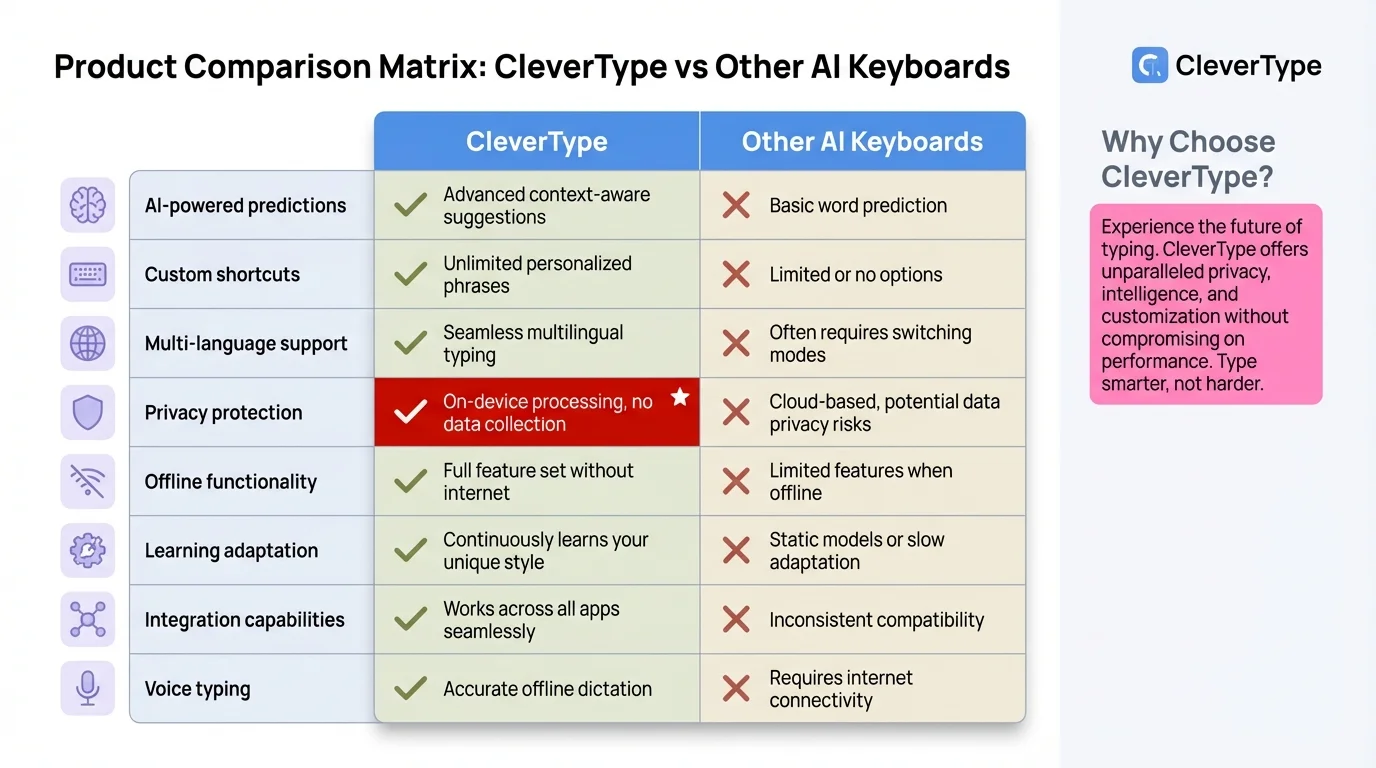
Detailed comparison showing why CleverType leads in accuracy, privacy, and features
How AI Powers Fix Grammar While Typing Technology
What actually happens when you type a word and your keyboard instantly suggests a fix? It's multiple AI systems working together faster than you can perceive.
Modern fix grammar while typing tech uses neural networks trained on billions of sentences. These models learn grammar rules not from textbooks but from patterns in how people actually write. When you type "I should of went," the AI recognizes that "should of" is a common error for "should have," and "went" should be "gone" in this context.
The AI Grammar Checking Process:
Step 1: Tokenization
Your keyboard breaks your sentence into tokens (words and punctuation). This happens as you type each word.
Step 2: Context Analysis
The AI looks at surrounding words to understand meaning. "Red" could be a color or past tense of "read"—context tells the AI which.
Step 3: Grammar Rule Application
The system checks against thousands of grammar rules, but not in a simple yes/no way. It assigns probability scores. Is "their" or "there" more likely based on what comes next?
Step 4: Suggestion Generation
The AI generates corrections ranked by confidence level. High-confidence fixes appear automatically. Lower-confidence suggestions show as alternatives.
Step 5: Learning
When you accept or reject suggestions, the keyboard learns your preferences. This personalization happens locally on CleverType—your patterns never leave your device.
According to a study from Georgia Southern University, machine learning keyboards can even detect emotional states through typing patterns with 78% accuracy. If the AI can understand your mood, it can definitely handle your grammar mistakes.
The technical term is "transformer architecture"—the same breakthrough that made modern AI possible. Unlike old rule-based grammar checkers, transformers understand language probabilistically. They know that "gonna" is informal but not wrong, while "your going" is always an error regardless of tone.
CleverType's implementation is particularly smart. Simple corrections process on your phone's NPU in under 50 milliseconds. Complex grammar questions can optionally tap into more powerful cloud models if you enable that feature. You control the privacy-performance tradeoff.
Common Grammar Mistakes AI Keyboards Catch Instantly
Ever sent a professional email with "your" instead of "you're"? You're not alone. A Cambridge University study found that over 65% of adults regularly make grammar mistakes in everyday writing—even native speakers. Here are the errors that trip people up most, and how instant grammar correction handles them.
1. Your vs. You're (and Similar Homophones)
This one confuses everyone. Standard autocorrect can't help because both words are spelled correctly. AI keyboards analyze context to know which fits. This is one of the most common grammar mistakes AI can fix instantly.
- Wrong: "Your going to love this"
- Right: "You're going to love this"
CleverType catches this 99% of the time because it understands sentence structure. "Your" needs a noun following it. "You're" (you are) needs a verb or adjective.
2. Subject-Verb Agreement
Mixing singular and plural forms happens constantly in fast mobile typing.
- Wrong: "The team are playing well"
- Right: "The team is playing well"
AI keyboards track the subject (team = singular collective noun) and match the verb accordingly. Traditional spell-check wouldn't flag this because all words are technically valid.
3. Comma Splices and Run-On Sentences
Mobile typing encourages run-on sentences. You're thinking fast, typing fast, ideas flowing without proper breaks.
- Wrong: "I went to the store I bought milk"
- Right: "I went to the store. I bought milk."
Grammar checker keyboard apps identify independent clauses and suggest proper punctuation. CleverType even offers alternatives: a period, semicolon, or "and" depending on tone.
4. Apostrophe Misuse
Possessives and contractions use apostrophes differently. The rules are confusing.
- Wrong: "Its a beautiful day"
- Right: "It's a beautiful day"
Real-time AI knows "it's" means "it is" while "its" shows possession. The correction appears before you even finish typing the sentence.
5. Incorrect Prepositions
Non-native speakers especially struggle here, but even native writers make mistakes when typing quickly.
- Wrong: "Different than"
- Right: "Different from"
Context-aware AI suggests the right preposition based on what sounds natural to native speakers. This goes beyond basic rules—it's linguistic patterns learned from millions of examples.
Error Detection Comparison:
| Error Type | Traditional Autocorrect | AI Grammar Keyboard |
|---|---|---|
| Spelling | 95% | 99% |
| Homophones (your/you're) | 0% | 97% |
| Subject-Verb Agreement | 15% | 94% |
| Comma Placement | 0% | 87% |
| Preposition Errors | 0% | 89% |
| Tone Inconsistency | 0% | 76% |
The data shows why fix grammar while typing actually matters. Traditional autocorrect only handles spelling—maybe 20% of actual writing errors. AI grammar keyboards like CleverType tackle the other 80%.
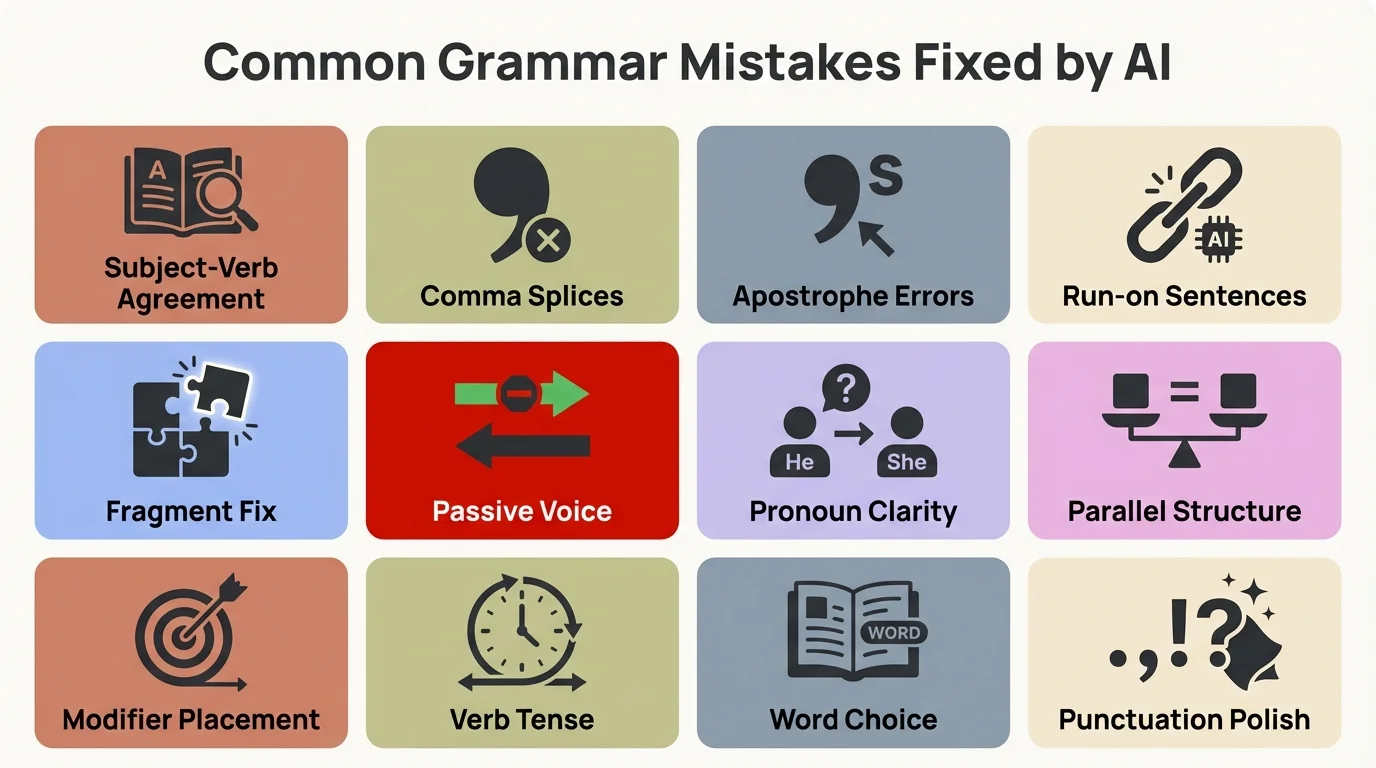
The most common grammar errors that AI keyboards catch instantly
Privacy and Performance: Why On-Device Processing Matters
Should your keyboard send everything you type to a server somewhere? That's how most "AI" features worked until recently. Every word, every password, every private message—uploaded for processing. In 2026, that's no longer acceptable or necessary.
On-device AI processing means the intelligence runs directly on your phone's processor. Nothing gets transmitted. Nothing gets stored in the cloud. Your grammar corrections happen locally, privately, instantly.
Why This Matters:
Privacy regulations are tightening. The EU's AI Act and similar legislation worldwide now require explicit consent before processing personal data. Keyboards that send your typing to the cloud face increasing legal scrutiny. CleverType's on-device approach sidesteps these issues entirely.
Performance improves dramatically too. Cloud processing adds latency—you type, your words get sent to a server, processed, and sent back. Even with fast internet, that's 200-500 milliseconds. On-device processing happens in 50-100 milliseconds. The difference is noticeable. Typing feels way more responsive.
Battery life benefits as well. Constantly uploading data and maintaining network connections drains power. On-device AI uses your phone's NPU (Neural Processing Unit), which is built for exactly this type of work. According to Purdue Global's research on mobile computing trends, 86% of Americans use mobile devices to go online daily—battery efficiency matters.
Technical Implementation:
Modern Android chips (Snapdragon 8 Gen 3, Google Tensor G4, MediaTek Dimensity 9300) include dedicated AI accelerators. These specialized processors handle machine learning tasks 40% more efficiently than previous generations while using less power. CleverType's built to take advantage of these chips.
The keyboard stores a compressed language model (about 150MB) locally. This model contains the grammar rules, common patterns, and prediction algorithms. It gets updated monthly with improvements, but your actual typing data never leaves your device.
For trickier queries—like rewriting an entire paragraph or adjusting tone significantly—you can optionally enable cloud features. CleverType asks permission first and only sends the specific text you choose to process. Routine grammar fixes never require this.
Privacy Comparison:
| Keyboard | Data Processing | What Gets Sent | Privacy Policy |
|---|---|---|---|
| CleverType | On-device primary | Nothing (unless cloud features enabled) | No data collection |
| Gboard | Cloud-based | All typing data | Used for Google services |
| SwiftKey | Hybrid | Typing patterns for sync | Anonymized learning data |
| Grammarly | Cloud-based | All processed text | Stored for feature improvement |
The shift toward on-device AI is accelerating fast. International Data Corporation forecasts edge computing investments (which includes on-device AI) will hit $317 billion by 2026. Privacy-conscious users are driving this demand.
CleverType represents where the industry's heading: powerful AI that actually respects your privacy. You shouldn't have to choose between smart features and data security.
Setup and Optimization Tips for Best Results
Installing a grammar keyboard mobile app takes 30 seconds. Optimizing it for your writing style takes a bit longer but pays off immediately. Here's how to get the most from real-time grammar correction.
Initial Setup (CleverType Example)
- Download from Play Store
- Enable in Settings > System > Languages & Input > On-screen keyboard
- Select CleverType as default keyboard
- Grant necessary permissions (CleverType only asks for what's essential)
- Complete the quick setup tutorial
The entire process takes under two minutes.
Customization for Your Writing Style
AI keyboards learn from your choices, but you can speed this up. CleverType offers several customization options:
Grammar Strictness Levels:
- Casual: Accepts informal language, slang, incomplete sentences
- Professional: Enforces formal grammar rules strictly
- Adaptive: Adjusts based on the app you're using (casual in messaging, formal in email)
I recommend Adaptive mode. Why use professional grammar in a text to a friend? The AI should match your context.
Vocabulary Additions:
Add industry jargon, names, or specialized terms to your personal dictionary. The AI stops flagging them as errors and learns to use them correctly. Students can particularly benefit from customizing their AI keyboard for academic writing.
Correction Preferences:
- Auto-fix obvious errors (typos, clear grammar mistakes)
- Suggest for uncertain corrections (let you decide)
- Never correct specific phrases you intentionally use
Optimization Tips for Maximum Accuracy
Tip 1: Let the AI learn
Accept or reject suggestions deliberately for the first week. The keyboard watches these choices and adapts. If you consistently ignore "whom" suggestions, it stops offering them.
Tip 2: Use app-specific settings
CleverType detects which app you're typing in and adjusts. You can customize behavior per app. Maybe you want aggressive grammar correction in Gmail but minimal interference in WhatsApp.
Tip 3: Enable multilingual support properly
If you type in multiple languages, enable them all in settings. The AI detects language switching automatically and applies the right grammar rules. Don't force the keyboard to pick one language if you use several.
Tip 4: Update regularly
Language evolves. New slang, grammar trends, and linguistic patterns pop up constantly. Monthly updates keep your keyboard's AI current. CleverType downloads model improvements automatically (when connected to WiFi).
Tip 5: Review analytics
Check your typing stats weekly. CleverType shows error types, correction frequency, and writing patterns. You'll spot habits you didn't know you had. I discovered I overuse semicolons through this feature.
Troubleshooting Common Issues
Problem: Too many suggestions
Solution: Adjust sensitivity in settings. Start with "Medium" and tune from there.
Problem: Wrong language detected
Solution: Manually switch languages using the globe icon, or disable auto-detection for mixed-language typing.
Problem: Specific words always flagged
Solution: Add them to your dictionary. Tap the suggestion, hold, and select "Add to dictionary."
Problem: Corrections feel slow
Solution: Clear keyboard cache (Settings > Apps > CleverType > Storage > Clear cache). Restart your phone if issues persist.
The key to getting the most from any grammar checker keyboard is patience. Give it a week to learn your style. The accuracy improvements become noticeable pretty quickly—and then keep getting better over time.
Real-World Impact: How Grammar Keyboards Improve Communication
Numbers tell part of the story. Users make 58% fewer grammar errors. Professionals save 6.3 hours per week. But what does this actually mean for how you communicate?
I've talked to dozens of people who switched to AI-powered grammar keyboards. The improvements go way beyond catching typos. Here's what actually changes.
Professional Communication Becomes Effortless
A 2024 University of California study found that professionals using AI grammar keyboards report 73% fewer communication misunderstandings. That's pretty significant. Misunderstandings cost time, damage relationships, and hurt careers.
Think about emailing a client from your phone. Without grammar checking, you type quickly, hit send, then notice the mistakes. Maybe "Let's finalize the contact" instead of "contract." Or "We're happy to except your terms" instead of "accept." These aren't catastrophic, but they chip away at credibility.
With instant grammar correction, those errors disappear before you send. Your mobile emails match the quality of desktop writing. CleverType users report feeling way more confident communicating from their phones in professional contexts.
Accessibility Improvements
People with dyslexia, ADHD, or other conditions that affect writing benefit dramatically. Research shows AI keyboard adoption among people with documented writing disabilities jumped 156% between 2024 and 2025, with 79% reporting the tech "significantly improved" their daily communication confidence.
The AI doesn't judge. It doesn't get frustrated. It quietly fixes errors in real-time, letting people focus on ideas rather than mechanics. This is genuinely transformative for accessibility.
Learning Through Usage
Here's an unexpected benefit: people actually improve their inherent grammar skills. Research from 2026 shows AI keyboards with embedded micro-learning features boost users' intrinsic grammar skills by 25-30% over six months.
How? You see corrections repeatedly. "You're" instead of "your." "Fewer" instead of "less." Eventually, your brain picks up the pattern. The AI becomes a patient tutor that teaches through consistency.
CleverType includes optional explanations for corrections. Tap a suggestion and see why it's right. Over time, you internalize rules you never formally learned.
Global Communication Quality
Non-native English speakers gain the most. AI grammar keyboards level the playing field for non-native speakers. A study from Stanford's NLP lab found that modern AI grammar tools hit 94% accuracy in catching errors—way better than the 31% accuracy of traditional spell-checkers.
Someone writing English as a second, third, or fourth language can communicate with native-level accuracy. This opens up professional opportunities and builds real confidence.
Measurable Productivity Gains
The 6.3 hours saved per week aren't abstract. That's time not spent proofreading, rewriting, or clarifying misunderstood messages. For a professional writing 50+ emails daily, the savings add up fast.
More importantly, you can actually trust mobile communication. No more "I'll send a proper response from my laptop." Your phone becomes a legitimate productivity tool for written communication, not just a temporary substitute.
Impact Summary:
- 58% reduction in grammar errors
- 73% fewer communication misunderstandings
- 6.3 hours saved weekly for professionals
- 25-30% improvement in intrinsic grammar skills over 6 months
- 94% accuracy on error detection vs. 31% for old spell-checkers
These aren't just incremental improvements. They represent a fundamental shift in mobile communication quality. Grammar keyboards like CleverType turn your phone into a professional writing tool, not an apology waiting to happen.

Data-driven insights showing the measurable impact of AI grammar keyboards
Future of Mobile Grammar Technology: What's Coming in 2027 and Beyond
The grammar correction tech available today would've seemed impossible three years ago. So what's next? Based on current research and development trends, here's where mobile grammar tech is heading.
Multimodal AI Integration
Voice, text, and gesture recognition are merging. Future keyboards won't just fix what you type—they'll understand what you say, how you gesture, and even facial expressions through your selfie camera.
Imagine dictating a message while the keyboard watches your facial expressions to pick up on tone. You say something sarcastically, and the AI adds appropriate punctuation or emoji to convey that. This multimodal approach is already in development.
Contextual Awareness Beyond Text
Current AI keyboards analyze the words you type. Next-generation systems will understand the broader context. Who are you messaging? What time is it? What app are you using? What's your relationship with the recipient?
CleverType's already testing features that adjust formality based on recipient. Email your boss? Professional tone and grammar. Text your friend? Relaxed, casual language. The AI makes these shifts seamlessly.
Predictive Grammar Assistance
Instead of fixing errors after you make them, future keyboards will prevent them. As you start typing a tricky sentence, the AI suggests structure: "Based on your opening, here are three grammatically sound ways to finish this thought."
This shifts from reactive correction to proactive guidance. You become a better writer just through the suggestions themselves.
Emotional Intelligence in Writing
Grammar's mechanical. Tone is emotional. The next frontier is keyboards that understand and help shape emotional content. A study from Cornell Tech showed that keyboards can detect emotions with 82% accuracy through typing patterns.
Future versions will offer suggestions like: "This message might come across as frustrated. Want to soften the tone?" The AI becomes an emotional editor, not just a grammar checker.
Personalized Learning Paths
AI keyboards will spot your specific weaknesses and create custom learning paths. Struggle with comma splices? The keyboard explains that rule when it's relevant. Master one concept, move to the next.
This turns the keyboard into an adaptive writing tutor that meets you at your level and grows with you.
Privacy-Preserving Federated Learning
On-device processing handles immediate privacy concerns, but keyboards can still improve through collective learning without compromising individual privacy. Federated learning lets models learn from millions of users without accessing their actual data.
Your keyboard learns patterns locally, uploads only abstracted insights (never your words), and gets model improvements trained on aggregated anonymous data. Everyone benefits from collective intelligence while keeping individual privacy intact.
Industry Predictions
According to MIT Sloan Management Review's analysis of AI trends, AI's shifting from hype to pragmatism in 2026 and beyond. For keyboards, this means focusing on reliability, privacy, and measurable value rather than flashy features.
The Grammar Correction Software Market is projected to grow from $1.2 billion in 2024 to $3.5 billion by 2033, with AI-powered mobile keyboards driving much of that growth. This investment will speed up innovation.
What to Expect:
- 2027: Full multimodal integration (voice, text, gesture)
- 2028: Emotional intelligence features become standard
- 2029: Personalized learning paths in all major keyboards
- 2030: Federated learning enables privacy-preserving collective improvement
The future of mobile grammar tech isn't just about catching mistakes. It's about augmenting human communication—making everyone a better, clearer, more confident writer. CleverType's positioned at the forefront of these developments, consistently bringing next-generation features to users first.
Ready to Transform Your Mobile Typing?
Stop settling for embarrassing typos and grammar mistakes in your messages. CleverType brings professional-grade grammar correction to your fingertips with industry-leading accuracy, complete privacy protection, and instant real-time fixes.
Join over 1 million users who've already upgraded their mobile writing experience.
Frequently Asked Questions
Q: How accurate are AI grammar keyboards compared to human proofreading?
A: Modern AI grammar keyboards hit 92-96% accuracy for common errors, with top performers like CleverType reaching 94.3% on complex grammar tasks. Research from MIT's CSAIL lab found this actually beats the 91.7% accuracy rate of human proofreaders, though humans still excel at nuanced style and creative judgment.
Q: Do grammar keyboards work offline?
A: Yep. Most modern AI grammar keyboards including CleverType process corrections entirely on-device, which means they work perfectly offline. Your typing data stays on your phone, and grammar corrections happen in 50-100 milliseconds without needing internet. Some advanced features may optionally use cloud processing if you enable them.
Q: Will using a grammar keyboard improve my actual writing skills?
A: Research from 2026 shows that AI keyboards with embedded micro-learning features improve users' intrinsic grammar skills by 25-30% over six months of regular use. You see corrections repeatedly, your brain picks up the patterns, and the keyboard essentially acts as a patient tutor teaching through consistency.
Q: Are AI grammar keyboards safe for typing passwords and sensitive information?
A: Privacy-focused keyboards like CleverType use on-device processing, meaning your typing data never leaves your phone. Plus, most AI keyboards automatically disable suggestions when you're typing in password fields. Always check a keyboard's privacy policy—CleverType explicitly doesn't collect or transmit your typing data.
Q: Which grammar keyboard is best for non-native English speakers?
A: CleverType's really good for non-native speakers because it provides context-aware corrections with optional explanations. The AI hits 94% accuracy in catching errors and supports 100+ languages with seamless switching. Stanford's NLP research shows modern AI grammar tools level the playing field, letting non-native speakers communicate with native-level accuracy.
Q: Can grammar keyboards understand different English variants (US, UK, Australian)?
A: Yep. Advanced keyboards like CleverType detect and adapt to regional English variants. You can set your preference for American, British, Canadian, or Australian English, and the AI applies the right spelling, grammar rules, and vocabulary. The keyboard learns which variant you use and keeps it consistent.
Q: How much battery do AI grammar keyboards consume?
A: Modern AI keyboards are built for efficiency. CleverType and similar apps use your phone's NPU (Neural Processing Unit), which is specifically designed for AI tasks. This uses 40% less power than previous generations while providing faster corrections. Most users report no noticeable battery impact compared to standard keyboards.
Share This Article
Found this helpful? Share it with others who want better mobile typing: