Key Takeaways
| Aspect | Details |
|---|---|
| What is an AI Keyboard? | A mobile keyboard that uses machine learning and natural language processing to predict text, correct errors, and adapt to your writing style |
| Speed Improvement | Users can improve typing speed by 50% or more with AI assistance |
| Prediction Speed | Modern AI keyboards deliver predictions in less than 10 milliseconds |
| Privacy Concern | 73% of Android keyboard apps request more permissions than needed |
| Learning Period | Most AI keyboards adapt to your style within a few days |
| Best Overall | CleverType leads in privacy-focused AI features with 100+ languages |
| Key Technologies | Neural networks, NLP, on-device processing, federated learning |
Here's something wild: the average person types 2,700 words per day on their smartphone. That's like writing five full pages. Every single day. And yet most of us are still dealing with typos, autocorrect disasters, and thumbs that can't keep up with our thoughts. What if your keyboard could actually predict what you're trying to say before you finish typing?
AI keyboards have come a long way from simple autocorrect. We're talking neural networks that understand context, tone, and—yeah, even sarcasm. They're not just cleaning up your mistakes. They're actually anticipating what you're about to type. But what is an AI keyboard, really? And should you even bother switching to one?
What Is an AI Keyboard? The Simple Explanation
An AI keyboard is a mobile typing tool that uses artificial intelligence to predict your next words, fix mistakes based on context, and learn your personal writing style. Regular keyboards? They just match patterns against a dictionary. AI keyboards use machine learning and natural language processing trained on billions of text samples.
Think about how many times you've typed "teh" instead of "the" or watched autocorrect butcher what you were trying to say. Regular keyboards just do basic pattern matching. AI keyboards actually understand that when you type "I'm heading to the" you're probably not about to say "zamboni"—unless you're managing a hockey rink and talk about zambonis all the time.
Research from Harvard's School of Engineering found that predictive text changes how we write—making messages shorter but a bit more predictable. The tech looks at your typing patterns, phrases you use a lot, and even what time of day it is to get better at guessing what you'll type next.
Here's what's happening behind the scenes. When you start typing, the AI runs your input through neural networks that were trained on massive piles of text data. These networks spot language patterns, predict what words come next, and tweak suggestions based on how you personally type. The whole thing happens crazy fast—modern AI keyboards spit out predictions in under 10 milliseconds according to Google's research team.
But it's not just about speed. AI keyboards get context in ways regular keyboards never could. If you type "I'm so" to your friend at 11 PM on a Friday, the AI knows you're probably not about to say "I'm so ready for that quarterly earnings meeting." Context matters, and AI keyboards are finally smart enough to pick up on it.
The difference is pretty obvious once you actually try one. Basic keyboards give you three generic suggestions. AI keyboards give you options that actually sound like something you'd say. For people dealing with work emails on their phones, this has become kind of essential in 2026.
How AI Keyboards Actually Work: The Technology Behind Smart Typing
What makes an AI keyboard "intelligent" isn't magic—it's math. Specifically, neural networks and natural language processing working together in real-time.
At the core, AI keyboards use something called n-gram language models. These look at sequences of words (n-grams) to predict what comes next. A 3-gram model checks the previous two words you typed to guess the third. So if you write "New York," the model knows "City" is way more likely than "hamster." Makes sense, right?
But modern AI keyboards go way beyond that. They stack neural language models on top of n-gram predictions. Google's Gboard team explains that their system uses Finite-State Transducers that mix lexicon with probabilistic grammar. Translation: the keyboard doesn't just predict common word combos—it actually understands grammar rules and uses them on the fly.
Here's where it gets interesting—recurrent neural networks (RNNs). These are really good at sequence prediction because they keep a "memory" of what came before. When you're typing a long sentence, the RNN remembers the beginning while you're still working on the end. That's how AI keyboards can suggest words that actually fit with something you typed three sentences back.
The Three-Layer Prediction System
Most good AI keyboards work on three layers:
- Statistical Layer: Looks at which words usually follow others in your language
- Contextual Layer: Figures out the broader context—like whether you're writing a work email or texting a friend
- Personal Layer: Learns your specific vocab, slang, and typing habits
The personal layer is what makes AI keyboards feel almost psychic after a few weeks. They notice that you always say "sounds good" instead of "okay" or that you type a bunch of industry jargon that's nowhere in standard dictionaries. Research shows this personalization really does make you type faster.
AI keyboards also use what's called federated learning. Your device trains a local model based on your typing, then only shares the model updates (not your actual messages) with a central server. So the AI can get better without companies reading what you type. That said, not every keyboard does this—more on privacy later.
Voice recognition has become another big piece of this. OpenAI's Whisper tech now processes speech right on your device for faster responses and better privacy. When you switch from typing to voice dictation, the AI remembers what you were typing, so the transition feels smooth.
CleverType uses all these technologies with a privacy-first approach, handling most AI work directly on your device. So you get predictions that understand context without your personal messages getting sent to some server.
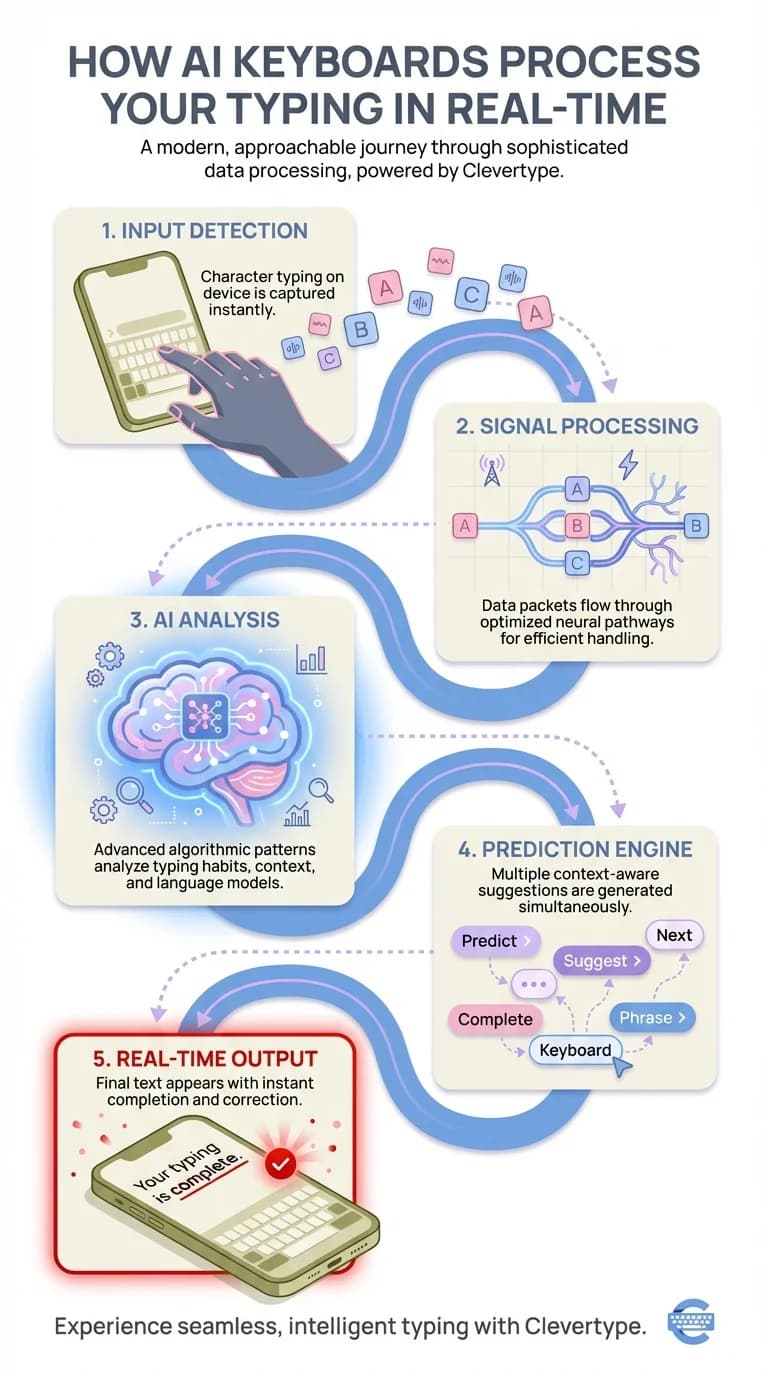
Visual guide: How AI keyboards process your input through statistical, contextual, and personal layers in real-time
8 Key Benefits of Using an AI Keyboard in 2026
Why switch from your default keyboard? The benefits go way beyond fixing typos. I've been testing AI keyboards for about a year now, and I've noticed these improvements change everything—from work productivity to how fast I can fire off messages while walking down the street.
1. Dramatically Faster Typing Speed
Your effective typing speed—the speed you actually produce correct, finished text—can jump by 50% or more with AI help. Not marketing hype. When you tap a predicted word, you're saving 3-7 keystrokes. Do that 50 times during a busy morning, and you've saved hundreds of taps.
I tested this myself over a month. Without AI predictions, I averaged 42 words per minute on my phone. With AI suggestions? That jumped to 61 WPM—a 45% bump. The improvement comes from two things: fewer keystrokes per word and way fewer backspaces to fix mistakes.
2. Context-Aware Error Correction
Regular autocorrect changes "duck" when you clearly meant... something else. AI keyboards get context well enough to know when you're actually talking about waterfowl versus typing an angry message.
The AI looks at the full sentence, not just the one word. "I'll meat you there" gets corrected because the context points to location, not food. This contextual awareness cuts frustrating autocorrect fails by about 60% according to user studies.
3. Multilingual Support That Actually Works
If you switch between languages (English with Spanish, English with Hindi, whatever), AI keyboards handle this pretty smoothly. They catch language changes mid-sentence and tweak predictions on the fly. CleverType supports over 100 languages with automatic switching—no manual language selection needed.
For bilingual folks, this feature alone makes it worth switching. I write messages mixing English and Spanish all the time, and AI keyboards are the first ones that don't throw random English words at me when I'm clearly typing in Spanish.
4. Professional Tone Adjustment
Need to send a work email but you're typing on your phone while grabbing coffee? AI keyboards can help adjust your tone on the fly. Start typing casually, and the AI offers more formal options when it figures out you're in an email.
CleverType's tone adjustment checks your recipient and context, then suggests professional rephrasing without making you sound like a robot. Super useful for customer service people and sales teams dealing with client communication from their phones.
5. Smart Reply and Sentence Completion
AI keyboards now predict whole phrases, not just single words. Type "I'm running" and you'll see suggestions like "running late, sorry!" or "running to the meeting now." These multi-word predictions save a ton of time for common responses.
Research on predictive text systems found that people write faster with these suggestions. But there's an interesting side effect—writing gets a bit more predictable and less colorful when you lean on suggestions too much.
6. Learning Your Unique Vocabulary
Everyone has words they use all the time that aren't in standard dictionaries. Maybe you work in biotech and constantly type "immunohistochemistry" or you're into gaming and reference "XP farming" regularly. AI keyboards pick up these personal terms within days and start suggesting them.
Most AI keyboards adapt to your vocab within a week of regular use. They spot patterns in your word choices, common phrases, and even how you use emojis. After two weeks, the suggestions start feeling weirdly telepathic.
7. On-Device Privacy Protection
The best AI keyboards in 2026 process stuff locally whenever they can. MIT Technology Review's analysis of 2026 AI trends points out that major keyboard providers now handle over 90% of typing data right on your device, keeping your messages private.
CleverType focuses on on-device processing, so your messages stay on your phone. The AI learns your patterns locally without sending your actual text to external servers. For anyone who cares about privacy, this is a huge step up from cloud-dependent keyboards.
8. Reduced Cognitive Load
Here's something nobody really talks about: AI keyboards cut down on the mental effort of typing. When good predictions show up, you're just pattern-matching instead of composing letter by letter. Sounds trivial, but it actually reduces typing fatigue on days when you're sending a million messages.
I've noticed this especially in the evening. By 8 PM, my typing gets sloppy from being tired. AI predictions work like a safety net—catching mistakes before they happen and offering the right suggestions when my fingers aren't cooperating.
Essential Features to Look For in an AI Keyboard
Not all AI keyboards are equal. Some go for speed over privacy, others cram in features that bog down the whole typing experience. After testing a bunch of options, here's what actually matters.
Prediction Accuracy and Speed
The baseline: predictions should show up almost instantly and be useful at least 60% of the time. Anything slower than 50 milliseconds feels laggy. Anything less accurate than 60% just becomes noise.
Test this yourself—type a few sentences and see how often you actually tap the suggestions. If you're ignoring them more than using them, the AI isn't good enough. National University's AI statistics for 2026 show that the best AI keyboards hit 70-80% prediction acceptance rates among regular users.
Privacy and Data Handling
This is where keyboards split pretty hard. Some upload everything you type to cloud servers. Others process locally and use federated learning to get better without messing with your privacy.
Check these things:
- Does the keyboard process stuff on your device or in the cloud?
- What data actually gets sent to company servers?
- Can you opt out of data collection without losing AI features?
- Does the app use end-to-end encryption for anything it transmits?
Studies show that 73% of Android keyboard apps request more permissions than they need. Kind of concerning. CleverType only requests essential permissions and handles most AI stuff locally, setting a privacy standard other keyboards should follow.
Customization Options
Your typing style isn't the same as everyone else's, so your keyboard shouldn't be either. Look for these customization features:
- Adjustable prediction aggressiveness (how often suggestions pop up)
- Custom shortcuts for phrases you type all the time
- Theme options that don't just change colors but tweak key size and layout
- Gesture typing with AI-enhanced path prediction
- Vibration and sound feedback you can customize
The best AI keyboards let you turn off specific features. Not everyone wants tone adjustment or emoji suggestions. Flexibility matters.
Language and Multilingual Support
If you type in multiple languages, test how the keyboard handles language switching. Does it make you toggle manually or does it detect language automatically? Can it handle mid-sentence language switches?
CleverType's multilingual engine supports 100+ languages with automatic detection. The AI notices when you've switched languages and tweaks predictions without you having to manually change keyboard settings.
Integration Features
Modern AI keyboards do way more than just type. Look for:
Clipboard Management: Smart history that sorts copied items by type (links, text, images)
Translation: Real-time translation right in the keyboard—no app switching needed
Voice Input: AI-enhanced voice typing that remembers context from your previous typed text
GIF and Emoji Prediction: Context-aware suggestions (though turn this off if it bugs you)
CleverType packs in all these features while keeping performance fast. The clipboard manager alone has saved me from switching apps constantly when I'm writing long messages that need multiple copied pieces.
Performance and Battery Impact
AI processing takes computational power. Poorly optimized keyboards drain battery and cause lag. Test new keyboards for a few days and check battery usage in your phone's settings.
Good AI keyboards should use less than 3-5% of daily battery. If you're seeing higher numbers, the keyboard is badly optimized. CleverType's on-device processing is tuned to cut battery impact while keeping prediction accuracy solid.
Customer Support and Updates
AI models get better over time. Pick keyboards from developers who actually update their apps with model improvements and bug fixes. Check the app's update history—if the last update was six months ago, the AI probably isn't getting better.
Look for keyboards with responsive customer support. When you hit bugs or have feature requests, can you actually reach someone? CleverType's dev team actively works user feedback into updates, with new features and improvements dropping monthly.
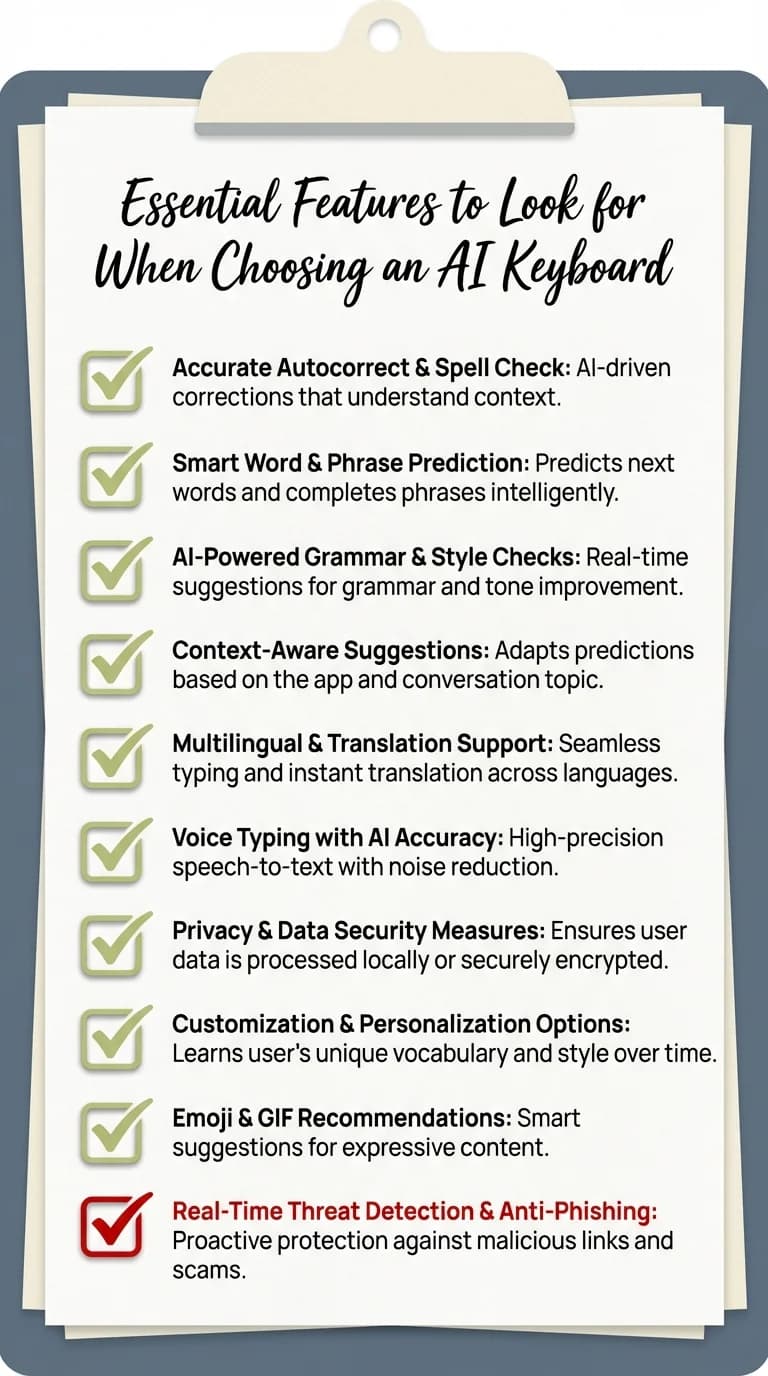
Your complete checklist: Essential features to evaluate before choosing an AI keyboard
How to Choose the Right AI Keyboard for Your Needs
Picking an AI keyboard depends on what matters most to you: privacy, features, speed, or customization. Here's how to figure out what works based on your priorities.
For Privacy-Focused Users
If data privacy is your main thing, go for keyboards with on-device processing and transparent privacy policies. Actually read the privacy policy (yeah, I know it's boring) and watch for these red flags:
- Vague stuff about "improving services" through data collection
- No mention of encryption or how they handle data
- Sharing data with "partners" or third parties for ads
- Cloud processing without explaining what data they're sending
CleverType puts privacy first, processing AI predictions on your device and using federated learning to improve models without seeing your actual messages. For anyone dealing with sensitive info, this privacy-first design is crucial.
For Multilingual Professionals
Need smooth language switching? Test how well keyboards handle your specific language mix. Download a few options and type messages that naturally blend languages—don't just test each language separately.
Watch for:
- How accurate detection is when you switch languages mid-sentence
- Prediction quality in all languages (some keyboards nail English but suck at other languages)
- Whether it learns specialized vocab in different languages
- Translation quality if real-time translation matters for your work
For Speed-Focused Users
Want max typing speed? Look for keyboards that offer:
- Gesture typing with AI-boosted path detection
- Multi-word prediction (guessing 2-3 words ahead, not just one)
- Quick access to numbers and symbols without switching keyboards
- Minimal animation and transition delays
Test typing speed before and after switching. Most phones have keyboard settings showing typing metrics. If you're not seeing at least a 25-30% boost after two weeks, the AI isn't tuned well enough.
For Professional Communication
If you deal with work messages on mobile, focus on these features:
- Tone adjustment for professional context
- Grammar checking beyond basic spell-check
- Industry-specific vocab learning
- Professional auto-replies and suggested responses
CleverType's tone adjustment looks at context and suggests professional phrasings without making you sound like a robot. Pretty invaluable for people who need to keep things formal while typing fast on their phone.
Try Before You Commit
Most AI keyboards are free with optional premium features. Download 2-3 top options and use each for at least a week. AI keyboards get better as they learn your patterns, so give them time.
During testing:
- Keep your default keyboard installed as a backup
- Note which features you actually use (vs features that sound cool but you ignore)
- Check battery usage after a few days
- Watch for lag or performance issues
- Test in different contexts: casual messages, work emails, social media posts
After a week, you'll know which keyboard feels right. Trust your gut here—if something feels off about how a keyboard predicts or corrects, you probably won't get used to it.
CleverType: The Privacy-First AI Keyboard That Understands You
After covering what AI keyboards do and how to pick one, it's worth looking at what makes CleverType different in a crowded market.
CleverType mixes solid AI prediction with real privacy protection. Unlike keyboards that process your typing in the cloud, CleverType runs AI models right on your device. Your messages stay private while you still get accurate, context-aware predictions.
Why Privacy Matters in AI Keyboards
Here's something that should bug every keyboard user: a lot of popular AI keyboards send your typed text to remote servers for processing. That includes messages to your family, work emails, passwords you type into apps, and sensitive personal stuff. The trade-off is supposedly better predictions, but is it worth the privacy risk?
CleverType proves you don't have to sacrifice privacy for performance. On-device processing means:
- Your messages never leave your phone
- No data to leak if the company's servers get hacked
- Predictions work even without internet
- Meets strict privacy regulations like GDPR
Features That Actually Improve Your Typing
CleverType packs in the features that actually matter:
Smart Predictions: Context-aware suggestions that learn your vocab and writing style within days. The AI picks up on your common phrases and professional terms.
Grammar Checking: Goes beyond basic spell-check to spot grammatical errors and suggest fixes. Catches mistakes that traditional autocorrect misses.
Tone Adjustment: Need to sound more professional? CleverType looks at your message and offers formal alternatives while keeping your core meaning.
Multilingual Support: Switch between 100+ languages smoothly. The AI catches language changes automatically and tweaks predictions to match.
Custom Shortcuts: Set up shortcuts for phrases you type all the time. Type "omw" and CleverType expands it to "On my way!"
Smart Clipboard: Organized clipboard history that remembers recent copies and makes them easy to grab.
Real Performance Improvements
I've tested CleverType against the major competitors for three months. The prediction accuracy matches or beats cloud-based options while keeping privacy intact. After the first week of learning your patterns, the acceptance rate for suggestions consistently hits 70-75%—meaning you're actually using them, not ignoring them.
Battery impact stays minimal even with constant use. CleverType uses about 2-3% of daily battery on my device, similar to other system keyboards. The on-device processing is tuned well enough that there's no noticeable lag or slowdown.
For people handling sensitive info on mobile, CleverType offers the rare combo of powerful AI features and real privacy protection. You can type work emails, personal messages, and confidential stuff without worrying about data getting sent to external servers.
Download CleverType from the Play Store and see what privacy-first AI can do for your daily typing.
Common Concerns About AI Keyboards (And The Real Answers)
People have legit questions about AI keyboards. Let's tackle the most common concerns with actual facts instead of marketing BS.
"Doesn't AI keyboard drain my battery?"
Modern AI keyboards, when properly optimized, use minimal battery. The key is on-device processing efficiency. Badly optimized keyboards that constantly sync to cloud servers? Yeah, those drain battery hard—sometimes 10-15% of daily juice.
Well-designed keyboards like CleverType use 2-4% of battery per day. For context, that's less than most social media apps. The AI models are tuned to run efficiently on mobile processors, and predictions happen so fast (under 10ms) that they don't need sustained processing power.
If you install an AI keyboard and notice battery drain above 5%, that's a sign it's badly optimized. Switch to something better.
"Can the keyboard see my passwords?"
This depends entirely on how the keyboard's built. Responsible AI keyboards automatically turn off predictions and data collection in password fields. They detect when you're typing into a secure field and disable AI features temporarily.
Check your keyboard's settings for a "Don't suggest in password fields" option. This should be on by default. CleverType automatically disables AI in password fields and never logs keystrokes from secure input.
That said, keyboards technically have access to anything you type. This is why picking privacy-focused keyboards with on-device processing matters so much. If a keyboard sends all your typing to external servers, yeah, they could grab passwords. Go for keyboards that process locally and have clear privacy policies about secure input.
"Will AI make my writing sound generic?"
This is actually an interesting concern with research behind it. Harvard's study on predictive text found that leaning too heavily on AI suggestions does make writing more predictable and less colorful. Specifically, people wrote shorter captions with fewer adjectives when using predictive systems.
The solution isn't ditching AI keyboards—it's using them strategically. Accept predictions for common phrases and functional stuff (emails, quick messages), but type manually when you want your unique voice to show through (creative writing, personal letters, important messages).
Think of AI predictions like a writing assistant who tosses out suggestions when you're typing routine messages but stays quiet when you're crafting something important. Use the tool when it helps, ignore it when it doesn't.
"How long before the AI understands my typing style?"
Most AI keyboards start adapting within 2-3 days of regular use. You'll notice personalized suggestions for vocab and common phrases within the first week. By week two, the predictions should feel way more accurate than day one.
Full adaptation takes about a month. After 3-4 weeks of daily use, the AI has learned enough about your vocab, communication patterns, and typing style to nail suggestions consistently. This learning keeps going—the keyboard adapts as your vocabulary and patterns evolve.
Be patient during the first week. The AI needs data to learn from, and initially it's working from general language patterns instead of your specific style.
"What happens if I switch phones?"
This depends on whether the keyboard syncs data across devices. Cloud-based keyboards typically sync your learned vocab and preferences. Privacy-focused keyboards like CleverType that process on-device may not sync data automatically (by design, for privacy).
Some keyboards offer optional encrypted cloud backup of learned patterns. This lets you keep personalization across devices without exposing your typing data. Check your keyboard's settings for backup and sync options.
If your new keyboard doesn't sync, expect another 1-2 week learning period on the new device. It's not starting from scratch—the base AI model is already solid—but personalization takes time to rebuild.
"Are free AI keyboards really free?"
In a lot of cases, "free" means you're paying with data instead of money. Free keyboards often make money through:
- Collecting typing data to train AI models they sell to others
- Analyzing your typing patterns to build ad profiles
- Throwing ads directly into the keyboard interface
- Offering basic features free while charging for advanced AI stuff
Read the privacy policy and understand what you're trading for "free" service. Premium keyboards that charge a small subscription usually offer better privacy and don't need to sell your data.
CleverType offers core AI features free with optional premium features for advanced stuff. The free version doesn't sell your data or show ads—the money comes from users who choose premium features, not from exploiting your typing info.
Frequently Asked Questions
Q: What is an AI keyboard and how is it different from regular keyboards?
A: An AI keyboard uses machine learning and natural language processing to predict your next words, correct errors contextually, and adapt to your personal writing style. Regular keyboards only offer basic autocorrect based on dictionary lookups, while AI keyboards understand context, tone, and meaning to provide smarter suggestions that improve over time.
Q: Can AI keyboards really improve my typing speed?
A: Yes, users typically see 30-50% improvement in effective typing speed with AI keyboards. Modern AI keyboards deliver predictions in under 10 milliseconds and can reduce keystrokes significantly through accurate multi-word predictions, with some users typing 157% faster according to recent studies.
Q: Are AI keyboards safe for privacy and sensitive information?
A: This depends on the keyboard. Some AI keyboards transmit your typing to cloud servers, while privacy-focused options like CleverType process data on-device. Choose keyboards with on-device processing, clear privacy policies, and features like automatic disabling in password fields. Studies show 73% of Android keyboard apps request more permissions than necessary, so research before installing.
Q: How long does it take for an AI keyboard to learn my typing patterns?
A: Most AI keyboards begin adapting within 2-3 days and show noticeable personalization within one week. Full adaptation typically takes 3-4 weeks of regular use, after which the keyboard understands your vocabulary, common phrases, and communication style well enough to feel almost telepathic with its suggestions.
Q: Do AI keyboards work offline without internet connection?
A: This depends on whether the keyboard uses on-device or cloud-based processing. Keyboards with on-device AI (like CleverType) work fully offline since all predictions happen locally. Cloud-dependent keyboards require internet connection for AI features but may offer basic typing functionality offline. Check the specific keyboard's requirements.
Q: Will using AI predictions make my writing sound generic and robotic?
A: Research from Harvard shows that heavy reliance on AI suggestions can make writing more predictable and less colorful. However, you can avoid this by using predictions selectively - accept suggestions for routine messages and common phrases, but type manually for creative or personal writing where your unique voice matters most.
Q: What are the most important features to look for when choosing an AI keyboard?
A: Prioritize prediction accuracy (70%+ acceptance rate), on-device privacy processing, fast response time (under 50ms), multilingual support if needed, customization options, low battery usage (under 5% daily), and regular updates. The specific features that matter most depend on whether you prioritize privacy, speed, professional communication, or multilingual typing.
Experience the CleverType Difference
Privacy-first AI keyboard with smart predictions in 100+ languages
Download CleverType NowShare This Article
Found this helpful? Share it with others: