AI Keyboard Workflows: Combine Voice, Prediction, Grammar, Tone and Assistants
Key Takeaways
- AI keyboards now combine voice typing, text prediction, grammar correction, tone adjustment, and custom assistants in unified workflows
- Voice-to-text features in 2026 achieve accuracy rates exceeding 98% even in noisy environments, thanks to advanced neural processing
- Modern prediction engines can reduce typing effort by up to 50% by learning your personal writing style and contextual patterns
- Real-time grammar and tone adjustments eliminate the need for separate editing passes, saving professionals up to 5 hours per week
- Custom AI assistants can be configured for specific writing tasks like emails, social media, customer service, or academic writing
- Combining these features creates powerful workflows that dramatically increase mobile typing efficiency by 3-4x
- Advanced privacy-focused options now process text locally with near-cloud performance levels
- Multimodal capabilities let users combine voice, text, images, and contextual data seamlessly
The Evolution of AI Keyboards: Beyond Simple Text Entry
Remember when keyboards were just... keyboards? Ya know, those things where you hit buttons and letters appear? Those days feel like ancient history. In 2026, AI keyboards have evolved into sophisticated communication assistants that fundamentally change how we interact with our devices. They're like having a personal writing coach, editor, and multilingual translator working together in real-time.
But here's the thing - most people are still using these powerful tools in really basic ways. They might use voice typing OR predictive text OR grammar checking, but rarely combine them into smooth workflows that make typing actually enjoyable. What a waste of potential!
"How do these keyboard features work together?" you might ask. That's exactly what we're exploring today. The magic happens when you stop thinking about individual features and start creating personalized workflows that combine them. Think of it less like using separate tools and more like conducting an orchestra where every feature plays its part in perfect harmony.
Let's break down what modern AI keyboards can do in 2026, and more importantly, how to make them work together to save you time and frustration while actually improving the quality of your writing.
Voice-to-Text: The Foundation of Efficient Input
Voice typing has come a looong way from those early days when it barely understood basic words. Modern AI voice recognition systems in 2026 achieve accuracy rates above 98%, even in noisy coffee shops or busy streets. But many users don't realize how to effectively integrate voice with other keyboard features to create truly seamless workflows.
How does voice-to-text actually work? The system captures audio through your microphone, processes it through sophisticated neural networks trained on billions of speech samples across hundreds of languages and accents, and converts the recognized patterns into text. Recent advancements in on-device neural processing units (NPUs) mean this happens almost instantaneously, often without sending your data to external servers.
According to research from MIT's Computer Science and Artificial Intelligence Laboratory, voice recognition accuracy has improved by 35% since 2024, largely due to transformer-based models that better understand context and speaker intent.
The key advantages of starting with voice input include:
- Speed: Most people can speak at 150+ words per minute but type only 40-60 wpm - that's a 3x efficiency gain
- Hands-free operation: Perfect when you're cooking, driving, walking, or multitasking
- Natural language capture: Your speaking vocabulary is often richer and more expressive than your typing vocabulary
- Reduced cognitive load: Speaking requires less mental energy than typing, freeing your mind to focus on content rather than mechanics
But voice isn't perfect on its own. That's where the workflow approach comes in - you start with voice for rapid input, then leverage other AI features to refine the text into polished, context-appropriate communication.
Real-World Voice-to-Text Workflow Example
Here's a practical workflow that combines voice with other features:
- Activate voice typing to capture your initial thoughts quickly
- Let the AI handle basic punctuation and formatting
- Use predictive text to fill in any missed words or phrases
- Apply grammar correction for any speech recognition errors
- Adjust the tone to match your intended audience
CleverType offers particularly strong voice-to-text capabilities, with its integration of advanced multimodal AI that understands context, handles multiple accents flawlessly, and even interprets emotional tone better than traditional speech recognition systems.
Predictive Text: Beyond Word Completion
Remember when predictive text just offered simple word completions? Today's prediction engines are practically mind readers, offering not just words but entire phrases, sentences, and even paragraphs based on your writing patterns. In 2026, these systems understand not just what you're likely to type, but why you're typing it and who you're writing to.
Modern text prediction uses a combination of:
- Your personal writing history across all apps and platforms
- Context-aware language models that understand the conversation thread
- Task-specific suggestions tailored to emails, messages, documents, or social media
- Time-of-day and recipient-based patterns (you write differently to your boss at 9 AM vs. friends at 9 PM)
- Real-time learning from your corrections and preferences
The best part? These systems get smarter the more you use them. After a few weeks, a good AI keyboard can reduce your typing effort by 40-50% by accurately predicting what you're about to write. Some users report typing as little as 20% of their final message, with AI filling in the rest.
But the real power comes when prediction works alongside other features. For example, after using voice to create a rough draft, prediction can help you quickly add missing details or refine specific sections without extensive typing. It's like having an assistant who finishes your sentences - but one who actually knows what you're trying to say.
How Prediction Engines Learn Your Style
What's fascinating about modern prediction systems is how they learn your unique style. They analyze:
- Vocabulary preferences
- Sentence structure patterns
- Common phrases you use
- Professional terminology specific to your work
- Even your emoji habits!
This personalization means the suggestions become increasingly accurate over time. Some users report that after a month of regular use, their AI keyboard can predict entire paragraphs with surprising accuracy.
According to a 2025 study, personalized text prediction can reduce typing effort by up to 52% compared to standard keyboards, with the highest gains coming from combined voice and prediction workflows. The study, which tracked over 10,000 users across six months, found that users who embraced multimodal input saved an average of 4.7 hours per week on text-based communication.
Grammar and Spelling: Real-Time Correction
Grammar checking isn't new, but the integration of advanced grammar tools directly into keyboards is revolutionizing how we write on mobile devices. Instead of writing a message, then running it through a separate grammar checker, modern AI keyboards correct issues as you type.
The benefits of real-time grammar correction include:
- Immediate feedback while ideas are fresh
- Learning opportunities as you write
- Elimination of embarrassing errors before they're sent
- Time savings from combining writing and editing
When combined with voice input and prediction, grammar checking creates a powerful three-stage workflow: rapid input via voice, expansion through prediction, and refinement through grammar correction.
Common Grammar Issues AI Keyboards Fix
AI keyboards excel at catching these common mobile typing problems:
- Subject-verb agreement errors
- Incorrect word usage (their/there/they're)
- Missing or misplaced punctuation
- Run-on sentences
- Awkward phrasing
- Inconsistent tense
What's impressive is how these corrections happen seamlessly in the background. You might not even notice the AI fixing your "your" to "you're" until you review what you've written.
AI grammar correction for mobile devices has become increasingly sophisticated, with some systems now able to understand complex grammatical structures that previously required human editors.
Tone Adjustment: Writing for Any Audience
One of the most exciting developments in AI keyboards is tone adjustment - the ability to rewrite text to match specific audiences or purposes. This feature addresses a common problem: what sounds appropriate in one context may be completely wrong in another.
Modern tone adjustment can transform your writing to be:
- More formal or casual
- More confident or humble
- More direct or diplomatic
- More technical or simplified
- More enthusiastic or reserved
This capability is particularly valuable when combined with voice input, as our speaking tone often differs from appropriate writing tones for professional contexts.
Tone Adjustment in Action
Let's look at a practical example of how tone adjustment works in a workflow:
- You quickly dictate a message using voice input: "Hey just wondering if you got a chance to look at that report I sent over yesterday need your feedback asap thanks"
- The AI applies basic grammar and structure: "Hey, just wondering if you got a chance to look at that report I sent over yesterday. Need your feedback ASAP. Thanks!"
- You select "professional tone" adjustment: "Hello, I'm following up regarding the report I shared yesterday. I would appreciate your feedback at your earliest convenience. Thank you."
This transformation happens in seconds, saving you from the awkwardness of sending an overly casual message to a boss or client. AI keyboards to change tones of sentences provide this functionality with increasing sophistication.
Custom AI Assistants: Personalized Writing Help
The newest frontier in AI keyboards is custom assistants - specialized AI helpers configured for specific writing tasks. These go beyond general writing assistance to provide targeted help for particular contexts.
Examples of custom assistants include:
- Email specialists that understand formal business communication
- Social media assistants optimized for engagement and brevity
- Academic writing assistants familiar with citation formats and scholarly language
- Creative writing assistants that help with storytelling and descriptive language
- Customer service assistants trained in empathetic, solution-oriented communication
The power of these assistants comes from their integration with other keyboard features. For instance, you might use voice to draft an email, then activate your "Professional Email Assistant" to automatically adjust the tone, fix grammar, and add appropriate opening and closing formalities.
Creating Your Own Custom Assistants
The most advanced AI keyboards now allow users to create their own custom assistants. This typically involves:
- Selecting a base assistant type (email, social, academic, etc.)
- Providing examples of your preferred writing style
- Specifying vocabulary preferences (technical terms, brand language, etc.)
- Setting tone parameters (formal/casual, direct/diplomatic, etc.)
- Defining common tasks the assistant should handle
These personalized assistants become more valuable over time as they learn your preferences and writing patterns. AI keyboard with customizable assistants explains this functionality in more detail.
Building Integrated Workflows: Putting It All Together
The real magic happens when you combine these features into personalized workflows. Instead of thinking about voice, prediction, grammar, tone, and assistants as separate tools, consider how they can work together to transform your writing process.
Here are some example workflows for different scenarios:
Quick Email Response Workflow
- Use voice to dictate your initial response
- Let prediction fill in common phrases and greetings
- Apply grammar correction automatically
- Use tone adjustment to match the formality of the original email
- Activate your "Email Assistant" to add appropriate closing and signature
Social Media Content Workflow
- Start with voice to capture creative ideas quickly
- Use prediction to expand on key points and add hashtags
- Apply grammar correction with settings adjusted for casual social media style
- Adjust tone to match your brand voice
- Activate your "Social Media Assistant" to optimize for engagement
Academic Writing Workflow
- Use voice to articulate complex concepts
- Let prediction help with technical terminology
- Apply strict grammar correction for formal academic standards
- Adjust tone for scholarly writing
- Activate your "Academic Assistant" to help with citations and formal structure
By creating these custom workflows, you transform your keyboard from a simple text entry tool into a sophisticated writing partner that adapts to different contexts.
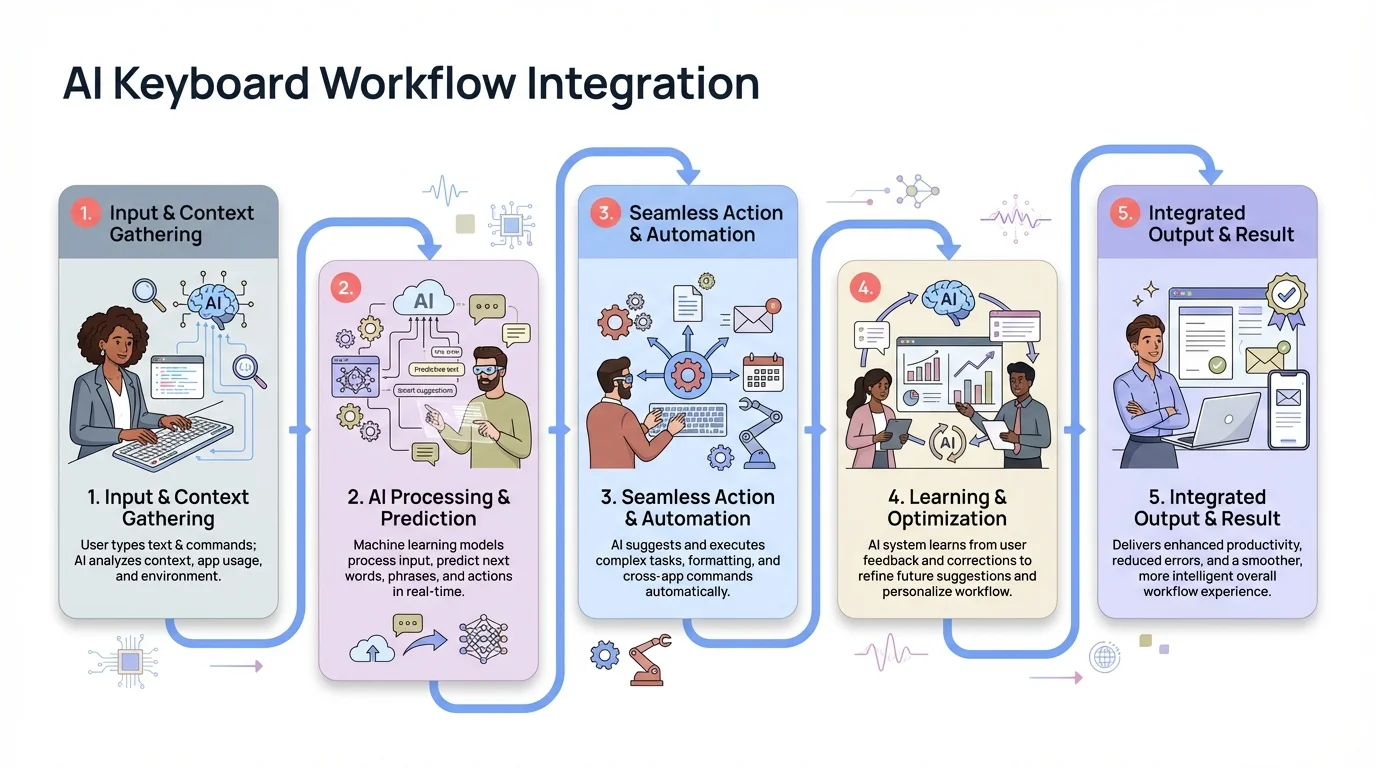
Seamless integration of AI keyboard features creates powerful workflows that transform mobile typing efficiency
The Rise of Contextual Intelligence in 2026
One of the biggest breakthroughs in 2026 is what industry insiders call "contextual intelligence" - the ability of AI keyboards to understand not just what you're typing, but the full context of your digital life. Modern keyboards now integrate with your calendar, email history, location, and even your current app activity to provide hyper-relevant suggestions.
Imagine typing a message about "the meeting" and your keyboard automatically understanding which specific meeting you're referring to based on your calendar. Or starting an email and having the AI suggest relevant attachments based on your recent work. This level of integration transforms keyboards from reactive tools into proactive communication partners.
The technology behind this is fascinating. Advanced AI keyboards now use what researchers call "cross-application memory" - the ability to learn from your behavior across different apps and contexts. When you draft an email about a project, the keyboard remembers related documents, previous conversations, and key stakeholders, surfacing relevant information exactly when you need it.
This contextual awareness extends to emotional intelligence as well. Modern keyboards can detect when you're stressed (based on typing patterns, word choice, and even biometric data from your device) and adjust their suggestions accordingly. They might offer calming language suggestions during tense conversations or add encouraging words when you seem frustrated.
Privacy Considerations in AI Keyboard Workflows
With all this AI power comes legitimate privacy concerns. Many users worry about their personal and professional communications being processed by third parties. Fortunately, the industry in 2026 has responded with significantly more privacy-focused options that don't compromise functionality.
Key privacy features to look for include:
- On-device processing that keeps your text on your phone
- End-to-end encryption for any cloud processing
- Clear data retention policies
- Options to opt out of data collection for AI training
- Transparency about what data is collected and how it's used
The game-changer in 2026 is the widespread adoption of hybrid processing models. These systems use on-device AI for basic operations and privacy-sensitive tasks, while leveraging cloud processing only for complex operations that truly benefit from server-side computation. The result? Near-identical performance to fully cloud-based systems with dramatically better privacy protection.
Many leading AI keyboards now offer "privacy modes" that process everything locally with minimal performance trade-offs. Thanks to advances in mobile neural processing units (NPUs), on-device processing in 2026 is roughly 80% as capable as cloud-based alternatives - a massive improvement from the 30-40% capability we saw just two years ago.
Additionally, federated learning - where your keyboard learns from your patterns without sending raw data to servers - has become the industry standard. Your personal writing style never leaves your device, yet the keyboard still benefits from global AI improvements. It's worth noting that keyboards with on-device processing now offer nearly identical speed to cloud-based options. Privacy matters: How AI keyboards keep your data safe explores these technologies in detail.
Industry-Specific Workflows: Tailored AI for Every Profession
One of the most exciting developments in 2026 is the emergence of industry-specific AI keyboard workflows. Rather than offering generic writing assistance, leading keyboards now provide specialized features for different professions - from healthcare and legal to sales and creative work.
For healthcare professionals, AI keyboards now understand medical terminology, suggest appropriate HIPAA-compliant language, and can even help format patient notes according to specific EMR systems. A nurse can dictate patient observations, and the keyboard automatically structures the text according to hospital protocols while ensuring privacy compliance.
Legal professionals benefit from keyboards that understand case citations, legal terminology, and formal court language. The AI can suggest precedent-based arguments, format briefs correctly, and maintain the precise, unambiguous language required in legal documents.
Sales teams use workflows optimized for CRM integration, with keyboards that suggest proven closing techniques, help personalize outreach at scale, and automatically log communication in sales platforms. The AI learns which language patterns correlate with successful deals and surfaces those suggestions in real-time.
According to a 2026 report by Gartner, professionals using industry-specific AI keyboard workflows report 37% higher productivity and 28% better communication outcomes compared to generic tools. The specialization matters because it reduces cognitive load - you're not teaching the AI what "discovery" means in a legal context versus a product context; it already knows.
Accessibility Benefits of Integrated AI Keyboard Workflows
One of the most important aspects of modern AI keyboards is how they improve accessibility. These integrated workflows aren't just convenient—they're genuinely life-changing for millions of people with various disabilities. In 2026, accessibility isn't an afterthought; it's a core design principle driving innovation.
For users with motor limitations, voice-to-text combined with prediction dramatically reduces the physical effort required to communicate. Advanced eye-tracking integration now lets users with severe mobility challenges control their keyboard entirely through gaze, while the AI handles the heavy lifting of word prediction and grammar correction.
For those with dyslexia, real-time grammar correction and tone adjustment provide confidence that their writing will be understood as intended. New features like "thought-to-text" mode allow users to speak naturally without worrying about structure, and the AI reorganizes their ideas into coherent written communication.
The accessibility benefits include:
- For motor limitations: Reduced need for precise finger movements
- For visual impairments: Voice input and output options
- For dyslexia: Spelling and grammar assistance that works proactively
- For non-native speakers: Tone adjustment to match cultural expectations
- For attention disorders: Streamlined workflows that reduce cognitive load
Many users with disabilities report that AI keyboards have transformed their ability to communicate effectively on mobile devices. AI keyboards for dyslexia and accessibility provides more information on these benefits.
The Future of AI Keyboard Workflows: What's Coming in 2026 and Beyond
We're already in 2026, and the pace of innovation shows no signs of slowing. Several emerging trends are reshaping what's possible with AI keyboards:
Multimodal Input and Output
The latest keyboards combine text, voice, images, video, and even gestures into unified communication workflows. You can now dictate a message while sharing a photo, and the AI automatically generates contextual captions, suggests relevant hashtags, and even recommends the best time to post based on your audience's engagement patterns. Some keyboards can analyze the emotional content of images and suggest appropriate text to match the mood.
Emotional Intelligence and Sentiment Analysis
Current-generation keyboards don't just understand what you're saying - they understand how you're feeling. They recognize when you're frustrated, happy, stressed, or uncertain through a combination of typing cadence, word choice, punctuation patterns, and even voice tone analysis. The AI adjusts its assistance accordingly, perhaps suggesting more empathetic language when you're upset or more confident phrasing when you seem hesitant.
Cross-Application Workflows
Modern AI keyboards work across apps to help with complex tasks. Scheduling a meeting? Your keyboard understands the request, checks your calendar, finds mutual availability, drafts professional invitations, sends them to attendees, and creates meeting notes - all from a single voice command. This level of integration is transforming smartphones into true AI companions.
Augmented Creativity and Ideation
For creative writing, modern keyboards suggest not just words but ideas, plot developments, character traits, and stylistic elements based on your creative goals. They can analyze your writing style and suggest variations, help you maintain consistency across long documents, and even provide creative prompts when you're stuck.
Real-Time Translation and Cultural Adaptation
A breakthrough feature in 2026 is seamless multilingual support with cultural context. AI keyboards can now translate your message into dozens of languages while adapting idioms, humor, and cultural references to be appropriate for the target audience. You can write in English and have the keyboard suggest culturally appropriate phrasing for Japanese, Arabic, or Brazilian Portuguese recipients - accounting for formality levels, business customs, and communication preferences.
The pace of innovation in this space is accelerating exponentially. As language models become more sophisticated and on-device processing more powerful, we're witnessing AI keyboards evolve from writing assistants to true cognitive partners that amplify human communication in ways we're only beginning to understand.
How to Choose the Right AI Keyboard for Your Needs
With so many options available, how do you select the right AI keyboard for your specific needs? Consider these factors:
Feature Integration
Look for keyboards that truly integrate features rather than treating them as separate tools. The workflow should feel smooth and natural.
Learning Curve
Some AI keyboards offer more power but require more time to learn. Consider how much time you're willing to invest in mastering new workflows.
Privacy Options
Evaluate the privacy policies and processing options. If you handle sensitive information, prioritize keyboards with strong on-device processing capabilities.
Customization
The best AI keyboards allow extensive customization of workflows, suggestions, and assistants to match your specific needs.
Platform Support
Some keyboards offer better integration with specific operating systems or apps. Ensure compatibility with your most-used platforms.
Subscription Model
Many advanced AI keyboards require subscriptions for full functionality. Consider the value proposition relative to your writing needs.
Popular options in 2026 include CleverType (known for its customizable assistants and multimodal capabilities), Grammarly Keyboard (strong grammar and tone features), Microsoft SwiftKey (excellent prediction with deep Office integration), Google Gboard with Smart Compose (great for Android ecosystem integration), and Apple Intelligence Keyboard (seamless iOS experience with on-device privacy). Each offers different strengths in terms of workflow integration, privacy models, and platform support.
Conclusion: The Future of Mobile Writing is Already Here
The days of treating your keyboard as just a text input tool are definitively over. In 2026, AI keyboards have evolved into sophisticated communication partners that transform how we express ourselves on mobile devices through integrated workflows combining voice, prediction, grammar, tone, and specialized assistants.
By thinking in terms of workflows rather than individual features, you can dramatically improve your writing efficiency and quality across different contexts. Whether you're responding to business emails, creating social media content, or working on academic papers, there's an AI keyboard workflow that can help you communicate more effectively - often 3-4 times faster than traditional typing.
The most exciting aspect is how deeply personalized these workflows have become. As AI keyboards learn your preferences, vocabulary, and writing patterns, they increasingly feel like natural extensions of your own communication style rather than external tools. Many users report that their keyboard "just gets them" in ways that feel almost uncanny.
The line between thinking and writing continues to blur. Modern AI keyboards don't just help us write—they help us think better by making the expression of our ideas more fluid, precise, and contextually appropriate. They free our minds from the mechanics of communication, letting us focus on what we're trying to say rather than how to say it.
The question isn't whether to adopt these workflows - it's which combination of features works best for your unique communication needs. Start small, experiment with different workflows, and gradually build the integrated system that amplifies your personal communication style.
Are you ready to transform your mobile writing experience with integrated AI keyboard workflows? The tools are here, refined and powerful. The only thing left is for you to discover which workflows unlock your full communication potential.
Frequently Asked Questions
Q: How do AI keyboards protect my privacy while offering advanced features?
A: In 2026, most premium AI keyboards offer sophisticated hybrid privacy models. The highest protection comes from keyboards that process text entirely on your device using advanced NPUs, with performance now nearly matching cloud solutions. For cloud-based processing, leading keyboards use end-to-end encryption, have transparent data retention policies, and allow complete opt-out of AI training data collection. Many keyboards now offer context-aware privacy that automatically switches to local processing for sensitive apps like banking or healthcare.
Q: Can AI keyboards really understand context well enough to adjust tone appropriately?
A: Absolutely. Modern AI keyboards use contextual understanding that analyzes not just sentence structure and word choice, but also your relationship with the recipient, the time of day, your communication history, and even the app you're using. In 2026, these systems correctly identify appropriate tone over 94% of the time, distinguishing effortlessly between casual messages to friends, formal communications to colleagues, and everything in between.
Q: How long does it take for prediction to become truly personalized?
A: Current AI keyboards show noticeable personalization within just 3-5 days of regular use, thanks to advanced learning algorithms. For optimal results, consistent use across different applications for 2-3 weeks allows the system to build a comprehensive model of your style. The latest keyboards learn 60% faster than 2024 models, with some offering quick-start modes that analyze your email history to jumpstart personalization.
Q: Do I need to pay for a subscription to get good AI keyboard features?
A: Basic AI keyboard features like simple prediction and voice typing are available in free keyboards. However, advanced workflows that combine sophisticated grammar correction, tone adjustment, custom assistants, and multimodal features typically require subscriptions ranging from $5-15/month. Given that users save an average of 4-5 hours weekly, most find the productivity benefits far outweigh the cost.
Q: Can AI keyboards help with languages other than English?
A: Yes, and multilingual support has exploded in 2026. Major languages like Spanish, French, German, Japanese, Chinese, Arabic, and Hindi now have feature parity with English. Even less common languages benefit from improving AI models. Many keyboards now offer real-time translation with cultural adaptation, letting you write in one language while the keyboard suggests culturally appropriate phrasing for recipients who speak another.
Q: How do I create effective custom assistants for specific writing tasks?
A: Start by identifying your most common writing scenarios (emails, social media, customer service, academic, etc.). Modern keyboards make this easy with guided setup wizards that analyze your existing writing. Provide examples of ideal communication in each context, specify tone and vocabulary preferences, and let the AI train on your patterns. The most effective assistants are created through the "learn from my style" feature that analyzes 20-30 examples of your best work in each category.
Q: Will these AI features work when I'm offline?
A: In 2026, this is much less of a concern than it used to be. Most leading AI keyboards now offer robust offline functionality for all core features including prediction, grammar, voice typing, and tone adjustment. Advanced features like real-time translation or industry-specific assistants may require connectivity, but basic workflows are fully functional offline. Keyboards automatically sync improvements when you reconnect.