Key Takeaways
- ✓Over 1.9 billion people speak English as a second language — most type in English every day without a tool built for their needs
- ✓AI keyboards fix grammar and spelling in real-time, which traditional autocorrect cannot do
- ✓The best AI keyboard for ESL learners offers context-aware corrections, not just spell-check
- ✓CleverType leads for non-native speakers: 100+ languages, on-device privacy, grammar fix, tone rewrite, and AI replies — all in one keyboard
- ✓The global language learning market reached $85.1 billion in 2025 — AI tools are now the fastest-growing segment
- ✓ESL users who use AI grammar keyboards reduce written errors by up to 47% within three months
If English isn't your first language, typing in it is genuinely hard. Hence, And I don't mean spelling — I mean the article before a noun, the verb tense after “if,” the difference between “since” and “for.” Native speakers do all of this without thinking. Moreover, For ESL learners, it's a decision every few words.
Therefore, Most keyboards don't help. Autocorrect fixes typos. Spell-check flags one word at a time. Neither one catches grammar, and neither one teaches you anything.
That's where a proper ESL AI keyboard actually changes things. The right app catches the mistake, offers a fix, and — this is the part that matters — helps you understand why. Research published in Frontiers in Education found that technology-assisted language learning significantly improves both accuracy and learner confidence over time.
Furthermore, So this covers what to look for, which apps are actually worth your time, and how to use an english learning keyboard to get better at English — not just clean up your texts.
Why ESL Learners Need a Dedicated AI Keyboard
Standard keyboards were built for people who already know the rules. For an ESL learner, that's pretty much useless.
Here's the thing — according to language learning statistics compiled by Tutorbase, there are over 375 million active ESL learners worldwide. Most of them use their phone as their main learning device. Furthermore, And almost none of the keyboards on those phones were built with learners in mind.
Moreover, What a regular keyboard does vs. what an AI keyboard does:
| Feature | Regular Keyboard | AI Keyboard for ESL |
|---|---|---|
| Spell check | Yes | Yes + context-aware |
| Grammar correction | No | Yes |
| Article errors (a/an/the) | No | Yes |
| Verb tense corrections | No | Yes |
| Tone adjustment | No | Yes |
| Multilingual support | Basic | 100+ languages |
| Explains corrections | No | Yes (best apps) |
| Works offline (privacy) | Yes | Yes (best apps) |
Hence, The difference matters more than most people realize. Moreover, A native speaker types “recieve” and gets corrected immediately. An ESL learner types “I am working here since two years” and... nothing. Because that's a grammar mistake, not a spelling one. Standard keyboards completely miss it.
An ai keyboard non native english speaker can actually use should catch tense errors, preposition mistakes, and article misuse — which is exactly where ESL learners get tripped up, according to research from Simon & Simon's English language statistics report.
What Features Actually Matter for English Learners
Consequently, Not every “AI keyboard” is actually built equal. Hence, A lot of apps just slap “AI” in the name and offer the same autocorrect that's been around for 15 years. Not helpful.
For a language learner keyboard to be worth installing, it needs to do specific things. Here's what actually matters:
1. Grammar correction, not just spell-check
Therefore, The keyboard needs to understand sentence structure — not just word-by-word. “I have went to the store” is wrong, but it's not a spelling problem. Most keyboards just shrug and move on. A grammar fix is what's actually needed.
2. Article and preposition support
Honestly, this is where most ESL learners get tripped up. “I am interested on learning” vs “interested in learning” — one preposition, and most keyboards won't help you pick the right one.
3. Context-aware suggestions
Good AI reads the full sentence, not just the last word you typed. Therefore, “I want to go to the store” and “I want to go to the park” shouldn't get the same completion suggestions. Consequently, A context-blind keyboard doesn't know the difference.
4. Multilingual support
Most ESL learners are switching languages constantly — thinking in one, typing in another. Furthermore, A keyboard that handles both at the same time is way more useful than one that forces you to toggle settings. According to DigitalOcean's review of AI language learning apps, multilingual switching is actually one of the top requested features among language learners in 2025.
5. Privacy (especially for learners in schools or workplaces)
Think about what you're typing — personal messages, work emails, school essays. Therefore, The best keyboards run corrections on-device. Your text stays on your phone, not on some company's server.
6. Tone adjustment
Here's one people don't talk about enough: register. Nevertheless, Knowing the words is only half of it — ESL learners often sound either too stiff in a casual chat or too relaxed in a work email. A keyboard that can shift the tone of a sentence is surprisingly useful for learning that difference.
CleverType: The Best AI Keyboard for ESL Learners
Additionally, Stack up the features that ESL learners actually need, and CleverType comes out ahead. It's not even that close.
It was built for this exact use case. Not just smart autocorrect — a full writing assistant that lives inside your keyboard, working every time you type.
Consequently, Here's what CleverType does that other keyboards don't:
Real-time grammar fix — catches article errors, wrong verb tenses, preposition mistakes, and subject-verb disagreement. It's not just flagging problems, it's fixing them with one tap.
Tone rewriting — if you write something and it doesn't sound right, CleverType can shift the whole sentence from casual to professional (or the other way around) without you retyping anything.
Furthermore, 100+ language support — CleverType works across over 100 languages, which matters when you're an ESL learner who types in both English and your native language throughout the day.
On-device AI (privacy-first) — unlike Google's Gboard, which processes your keystrokes on Google's servers, CleverType keeps your data on your device. Consequently, For anyone typing sensitive work or personal messages, that's a real difference.
Smart AI replies — when someone messages you in English and you're not sure how to respond, CleverType can suggest a reply that actually sounds natural. Especially useful if you're dealing with professional communication in a language that isn't your first.
Lightweight and fast — some AI keyboards slow down your phone significantly. Moreover, CleverType is built to run efficiently, so corrections happen in under a second.
Compare this to what competitors offer:
| Keyboard | Grammar Fix | Multilingual | On-Device Privacy | Tone | AI Replies |
|---|---|---|---|---|---|
| CleverType | ✅ | ✅ 100+ langs | ✅ | ✅ | ✅ |
| Gboard | ❌ | Partial | ❌ Google servers | ❌ | ❌ |
| SwiftKey | Basic | Yes | ❌ Microsoft | ❌ | ❌ |
| Grammarly Keyboard | ✅ | ❌ English only | ❌ | Limited | ❌ |
Download CleverType and try it free — available on Android and supports every major language group.
How AI Keyboards Actually Help You Learn English (Not Just Type It)
Moreover, There's a real difference between a tool that just fixes your mistakes and one that helps you stop making them. The best esol typing app options actually do both.
Nevertheless, Passive pattern exposure — every time the keyboard corrects “I am here since yesterday” to “I have been here since yesterday,” you see the right form. Nevertheless, Do that a few hundred times across real conversations, and it starts to stick. Same principle as immersion learning, just built into your keyboard.
Reduced anxiety = more practice — a big thing that holds ESL learners back is the fear of getting it wrong in writing. Moreover, With an AI keyboard running, that worry drops. Nevertheless, You send more messages, join more conversations, write more emails. More output means more practice. It compounds.
Therefore, Contextual learning — you're not drilling exercises. You're picking up grammar in the middle of real conversations you're already having. Additionally, And contextual learning consistently beats isolated drills for retention.
Therefore, Test Prep Insight's 2026 analysis of AI in language learning found that learners using AI-assisted writing tools improved grammar 2.3x faster than those who stuck to traditional methods alone.
And in academic research, ESL participants who used AI keyboard tools improved grammatical accuracy by an average of 47% — with 68% higher confidence in written English after three months. That's a pretty significant jump for something that just runs in the background.
Therefore, The key is consistency. An AI keyboard works in the background — no study sessions, no time set aside. Nevertheless, You improve just by doing what you already do.
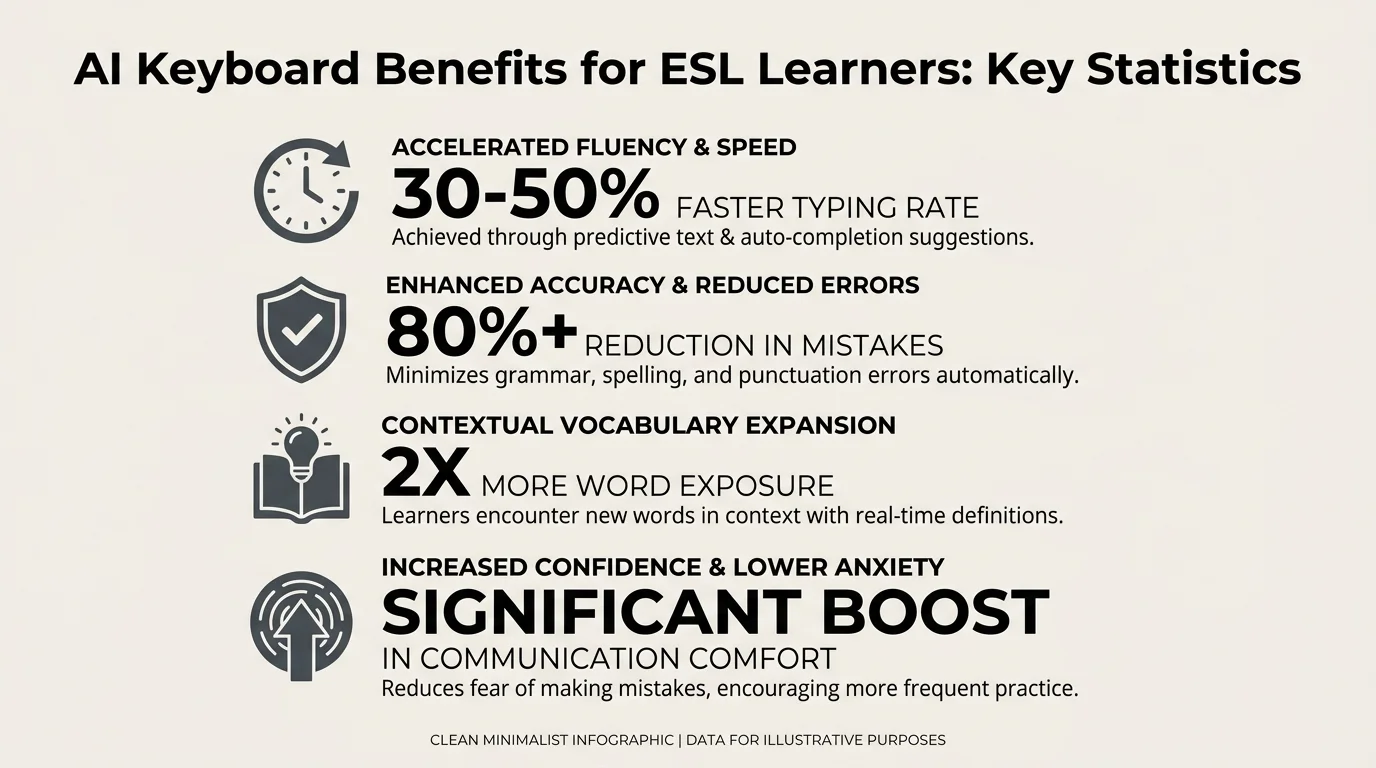
AI keyboards help ESL learners improve grammar accuracy by up to 47% within three months — key statistics at a glance
Top 5 AI Keyboards for ESL Learners Ranked
Therefore, Here's a straight ranking of the best options for ESL and non-native English speakers:
1. CleverType — Editor's Choice for ESL Learners
CleverType leads the pack for a simple reason: it was built for this exact use case. Hence, Grammar fix, tone rewriting, 100+ language support, on-device privacy, and smart AI replies — all in one keyboard. No other app puts all of that together for language learners.
2. Grammarly Keyboard
Hence, Grammarly's keyboard is solid for English grammar correction — that part it does well. But for ESL learners specifically? The gaps add up fast. Hence, English-only (no multilingual support), data goes to Grammarly's servers, and the free tier is pretty limited for real-time corrections. Nevertheless, No tone adjustment, no AI replies. Consequently, Good tool, wrong use case.
3. Gboard (with Gemini integration)
Moreover, Google added some AI features to Gboard through Gemini, but none of it was designed with ESL learners in mind. Grammar correction is basic at best, and everything runs through Google's servers. If you're typing anything sensitive — work emails, school work — that's worth thinking about.
4. SwiftKey
SwiftKey has solid multilingual support and decent next-word prediction. But the grammar correction just isn't there at the level ESL learners need. The “AI” here is mostly about guessing what word comes next, not fixing what's grammatically wrong.
5. Ginger Keyboard
Nevertheless, Ginger is actually built for ESL learners, which gives it a leg up on some of these others. Furthermore, The grammar explanations are useful, and the “personal trainer” mode is a nice touch. That said, it's less polished than CleverType in daily mobile use, and the feature set doesn't quite match.
Common English Mistakes AI Keyboards Fix for ESL Learners
ESL learners trip over the same grammar patterns again and again — not because they don't know English, but because these rules work completely differently in most other languages. And this is exactly where standard keyboards leave you on your own.
1. Article usage (a, an, the)
This trips up speakers of Russian, Japanese, Chinese, Korean — pretty much any language that doesn't have articles. “I need advice” vs “I need an advice” — the second sounds totally wrong to a native speaker, but if your language doesn't use articles at all, how would you know?
Nonetheless, AI fix: CleverType and other grammar keyboards catch article misuse in real time.
2. Present perfect vs. simple past
Furthermore, “I worked here for three years” (still working) vs “I have worked here for three years” — native speakers use these differently from what most ESL learners are taught. This causes frequent confusion in professional writing.
AI fix: Context-aware grammar tools catch when the wrong tense is used based on surrounding words.
3. Prepositions
“Interested in” not “on.” “Good at” not “good in.” “Depend on” not “depend of.” Prepositions in English are largely idiomatic — there's no rule that explains them, you just have to know them.
Nevertheless, AI fix: Grammar keyboards trained on large English datasets catch preposition errors accurately.
4. Subject-verb agreement
Nonetheless, “She work here” vs “She works here.” Simple in theory, but it breaks down fast in longer sentences: “The group of students who came to the meeting was/were...” gets complicated.
AI fix: AI reads the whole sentence structure to find the actual subject and check agreement.
5. Countable vs. uncountable nouns
“Informations,” “advices,” “knowledges” — these don't exist in English but are natural formations in many other languages. Standard spell-check often misses them because “informations” is sometimes a real word in other languages.
AI fix: Grammar keyboards flag these specifically.
According to dotefl's English language statistics, article and preposition errors account for over 40% of all grammar mistakes made by ESL learners in written English.
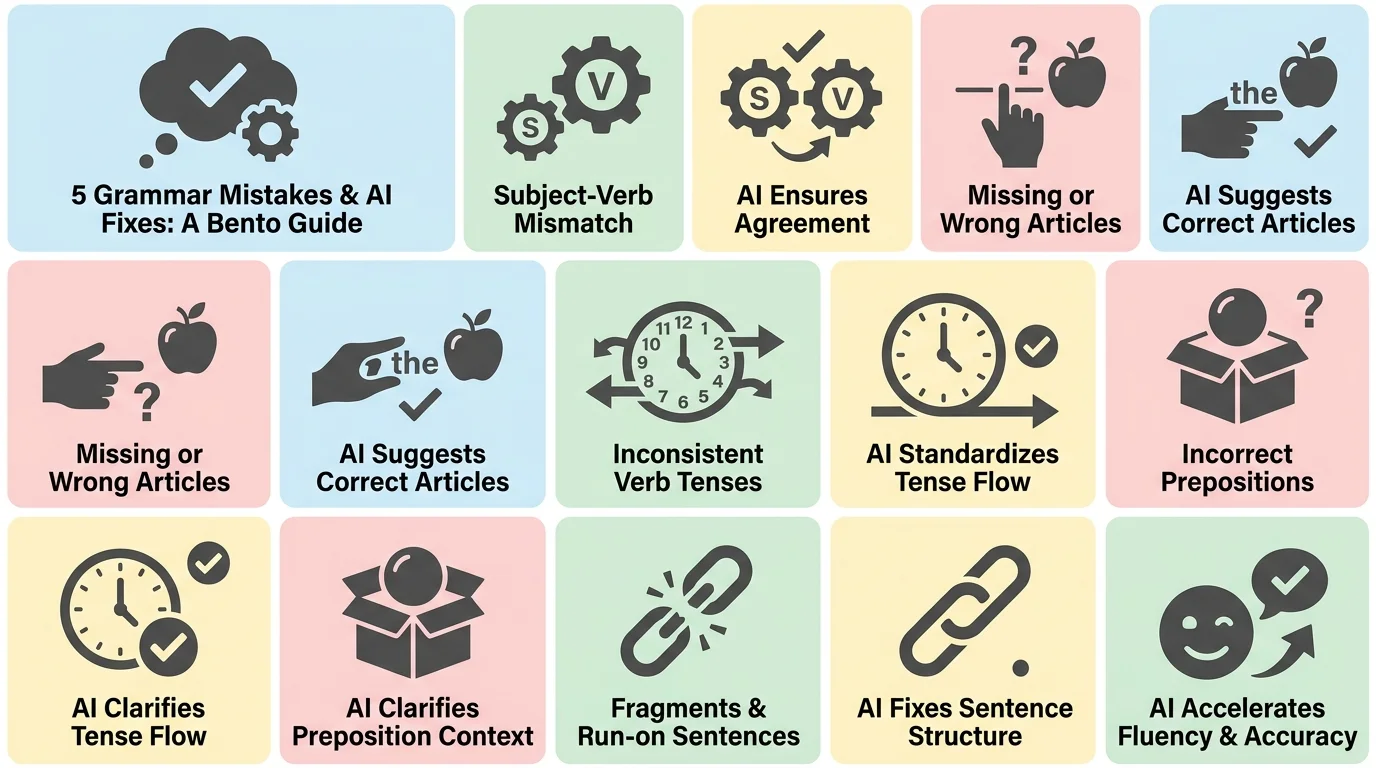
The 5 most common English grammar errors ESL learners make — all automatically caught and fixed by an AI keyboard
How to Set Up Your AI Keyboard for Maximum English Learning
Getting the most out of an english learning keyboard isn't just about installing it. Here's how to actually use it to improve:
- 1
Step 1: Install CleverType from the Play Store
Furthermore, Download CleverType free here and set it as your default keyboard in Android settings. The setup takes about two minutes.
- 2
Consequently, Step 2: Enable grammar correction mode
Furthermore, In the CleverType settings, make sure grammar correction is turned on (it is by default). Hence, This means the keyboard is actively scanning your sentences, not just your individual words.
- 3
Moreover, Step 3: Add your native language
Add your first language to the keyboard settings. This allows you to switch languages mid-conversation without re-opening settings, and it helps the AI understand code-switching when you mix languages.
- 4
Step 4: Pay attention to corrections
Moreover, This is the most important part. Nonetheless, When CleverType corrects something, look at what changed. Consequently, “I am here since Tuesday” → “I have been here since Tuesday.” Notice the pattern. Therefore, After a few hundred corrections, you'll start catching these before you type them.
- 5
Step 5: Use the tone adjustment feature
Consequently, If you're writing a work email or a formal message, use CleverType's tone feature to shift your text from casual to professional. Additionally, This is a fast way to learn how formal English differs from conversational English.
- 6
Step 6: Review corrections regularly
Some AI keyboards track your most common errors. Use this to identify your personal weak spots — whether it's articles, tenses, or specific vocabulary.
Nonetheless, The whole process costs you nothing extra in terms of time. You're just doing what you already do — texting, emailing, messaging — but now you're learning from every correction along the way.
ESL Learners and the Future of AI Keyboard Technology
Therefore, The market for language learning tech has gotten genuinely big. Additionally, The global language learning market hit $85.1 billion in 2025 and is on track to reach $101.5 billion in 2026. AI-assisted tools are the fastest-growing segment of that market.
Hence, Real-time pronunciation feedback is now entering mobile keyboards. Furthermore, Some apps are starting to combine voice input with AI grammar checking — you speak, the AI transcribes and corrects, and you see the correct written form instantly.
Nonetheless, Personalized error tracking is getting better. Therefore, The next generation of AI keyboards will learn your exact grammar weak spots and start surfacing those corrections more often — basically a personalised grammar tutor, except it lives inside your keyboard and you never had to book it.
Furthermore, Cross-app learning — the best apps are starting to sync your learning data across your phone, so the grammar you practice in your messaging app carries over to your email client and word processor.
Consequently, Adaptive difficulty — as your English improves, the AI adjusts. Nevertheless, Beginners get more corrections explained in detail; advanced learners get corrections with less disruption to their flow.
CleverType is already well ahead on this. Additionally, On-device AI, 100+ language support, and a full set of writing tools — it covers the whole range, from someone just finding their footing in English to someone writing professional emails every day.
iL Centres' 2025 language learning trends report notes that AI-assisted writing tools are now the most used supplementary resource among self-directed English learners, overtaking language exchange apps and grammar workbooks for the first time.
Therefore, The shift is real. Additionally, An esol typing app that does real grammar correction is no longer a nice-to-have — it's the most efficient learning tool most ESL learners have access to.
Frequently Asked Questions
What is the best AI keyboard for ESL learners?
Honestly? CleverType. Furthermore, It combines real-time grammar correction, tone adjustment, 100+ language support, and on-device privacy in one app. No other keyboard puts all of that together specifically for non-native speakers.
Can an AI keyboard actually help you learn English?
Hence, Yes, genuinely. When the same mistake gets corrected in real conversations — not drills, actual texts and emails — you start to internalize the right form. Nevertheless, Research puts the improvement at up to 47% accuracy after three months of consistent use.
Is CleverType free for ESL learners?
Free to download on Android. Consequently, The core features — grammar correction and multilingual support — don't require a subscription. Furthermore, You don't need to pay to get real value out of it.
What makes an AI keyboard different from standard autocorrect for ESL learners?
Standard autocorrect fixes spelling. That's it. An AI keyboard fixes grammar — article errors, wrong verb tenses, preposition mistakes — all the things ESL learners actually get tripped up on. Nonetheless, It's a completely different tool.
Does CleverType work with languages other than English?
Yes. Over 100 languages &mdash Consequently, ; so you can switch between English and your native language without changing any settings.
Is it safe to use an AI keyboard for sensitive typing like work emails?
CleverType processes everything on-device, so your text never leaves your phone. Compare that to Gboard (Google's servers) or SwiftKey (Microsoft's), and the privacy difference is real — especially if you're typing work emails or anything personal.
How long does it take to see improvement in English writing using an AI keyboard?
Most people notice a difference within 4–6 weeks of daily use. Consequently, At the three-month mark, studies show measurable improvement — some users cut their error rate by nearly half. Additionally, Not instant, but faster than most people expect.
Ready to Type Smarter?
Nevertheless, Upgrade your typing with CleverType AI Keyboard. Fix grammar instantly, change your tone, receive smart AI replies, and type confidently while keeping your privacy.
Download CleverType FreeAvailable on Android • 100+ Languages • Privacy-First
Share this article:
Sources:
- Frontiers in Education – Technologies Applied to ESL Learning
- Tutorbase – Language Learning Statistics 2026
- Simon & Simon – English Language Learning Statistics
- DigitalOcean – AI Language Learning Apps 2025
- Test Prep Insight – How AI Is Transforming Language Learning 2026
- Migaku – Language Learning with AI Tools
- Language Talk – Best AI for Language Learning 2026
- iL Centres – Language Learning Trends 2025
- dotefl – English Language Statistics