Key Takeaways
- •Over half the world's population is bilingual — most keyboards still weren't built for them
- •The best multilingual AI keyboards detect your language automatically, no manual switching needed
- •CleverType supports 100+ languages with 99.2% grammar accuracy and keeps all data on-device
- •SwiftKey lets you type in up to 5 languages at the same time — more than any other major keyboard
- •AI translation keyboards can speed up written language proficiency by 40% vs traditional methods
- •Context-aware predictions, not just autocorrect, are what separate great multilingual keyboards from average ones
More than 1.2 billion people use keyboard translation features every month — a number that jumped 340% between 2023 and 2026. And yet most people are still fighting their keyboard every single time they switch from English to Hindi, or Spanish to French. Therefore, The spacebar globe tap. The settings dive. The autocorrect confidently destroying your message right before you hit send.
According to Preply's bilingualism data, at least half the global population speaks more than one language. That's billions of people typing in two or more languages every single day, on keyboards built mostly with one language in mind.
This guide covers what actually makes a keyboard good for multilingual use — and which options in 2026 actually deliver.
What Makes an AI Keyboard Actually Good for Multiple Languages?
Additionally, A multilingual AI keyboard isn't just one that has 500 languages buried in a settings menu. Moreover, The real question is: what actually happens when you switch?
Nonetheless, A genuinely good language switching keyboard does things most keyboards completely miss. It figures out what language you're typing in mid-sentence — without you touching anything. It handles code-switching — sentences where you mix two languages, like "I'll see you mañana." And it gives you predictions that actually understand the grammar rules for each specific language, not just autocomplete pulled from a dictionary.
Moreover, The difference between an average keyboard and a great bilingual AI keyboard is whether it respects your second language or treats it like a typo.
Additionally, Wikipedia's overview of internet language use shows English accounts for only about 26% of all internet content — a stat worth sitting with. Nearly three-quarters of everything online is in other languages. A keyboard built only for English is already behind, and for most of the world, it was never really built for them at all.
Nonetheless, Here's what actually matters in a multilingual keyboard:
| Feature | Why It Matters |
|---|---|
| Auto language detection | Removes manual switching friction entirely |
| Simultaneous multilingual input | Type in 2–5 languages without toggling |
| Per-language grammar checking | Correct corrections in each language, not just spell check |
| Privacy-first data handling | Your multilingual typing stays yours |
| Context-aware predictions | Understands the full sentence, not just the last word |
| Code-switching support | Handles mixed-language sentences naturally |
Speed matters too. The top five languages — English, Mandarin, Hindi, Spanish, and French — account for over 4 billion speakers combined. Moreover, A useful multilingual keyboard needs to handle all of these well. Not just the easy pairs like English and Spanish.
What about the other languages? Tagalog, Yoruba, Bengali, Tamil, Ukrainian — each spoken by hundreds of millions of people. Moreover, The keyboards that treat these as afterthoughts are the ones that make multilingual typing feel like a constant workaround. Therefore, A good ai keyboard multiple languages system treats every language in its library as a first-class option. Furthermore, Not a bonus feature. Not an edge case.
There's also what I'd call the autocorrect aggression problem. Nevertheless, Most keyboards are tuned hard for their primary language. Hence, If you type a word from your second language that looks like a misspelling in your first, it gets silently "corrected" — no warning, no undo prompt. Just wrong text that you may or may not catch before hitting send. Moreover, For bilingual users, this happens constantly. Consequently, The best keyboards let you train them out of this habit, or are smart enough not to do it in the first place.
CleverType: The Best Multilingual AI Keyboard in 2026
Nonetheless, CleverType leads for multilingual typing apps because it was built for non-English use cases from day one — not bolted on as an afterthought once the English product was done.
Language coverage: 100+ languages with active grammar and spell checking in each. Not just input support — actual grammar correction that understands what makes each language work.
Nevertheless, Accuracy: 99.2% grammar accuracy across supported languages. Additionally, That number matters a lot when you're writing professionally in a second language and need to actually trust the suggestions you accept.
Moreover, Privacy: All language data and typing patterns stay on your device. Nothing goes to a server. For people typing in minority languages or regional dialects, this is actually significant — your language patterns aren't being collected and used to train someone else's model.
Context awareness: Moreover, CleverType tracks the full context of your sentence, not just the last word you typed. That's what makes its predictions feel natural rather than mechanical when you're switching languages mid-message.
Here's how CleverType compares to the main alternatives:
| Keyboard | Languages | Data Privacy | Grammar Checking | Auto Language Detection |
|---|---|---|---|---|
| CleverType | 100+ | On-device only | Yes — 99.2% accuracy | Yes, context-aware |
| Gboard | ~900 input methods | Google servers | Basic | Yes (one primary at a time) |
| SwiftKey | 700+ varieties | Microsoft servers | Moderate | Yes (up to 5 simultaneously) |
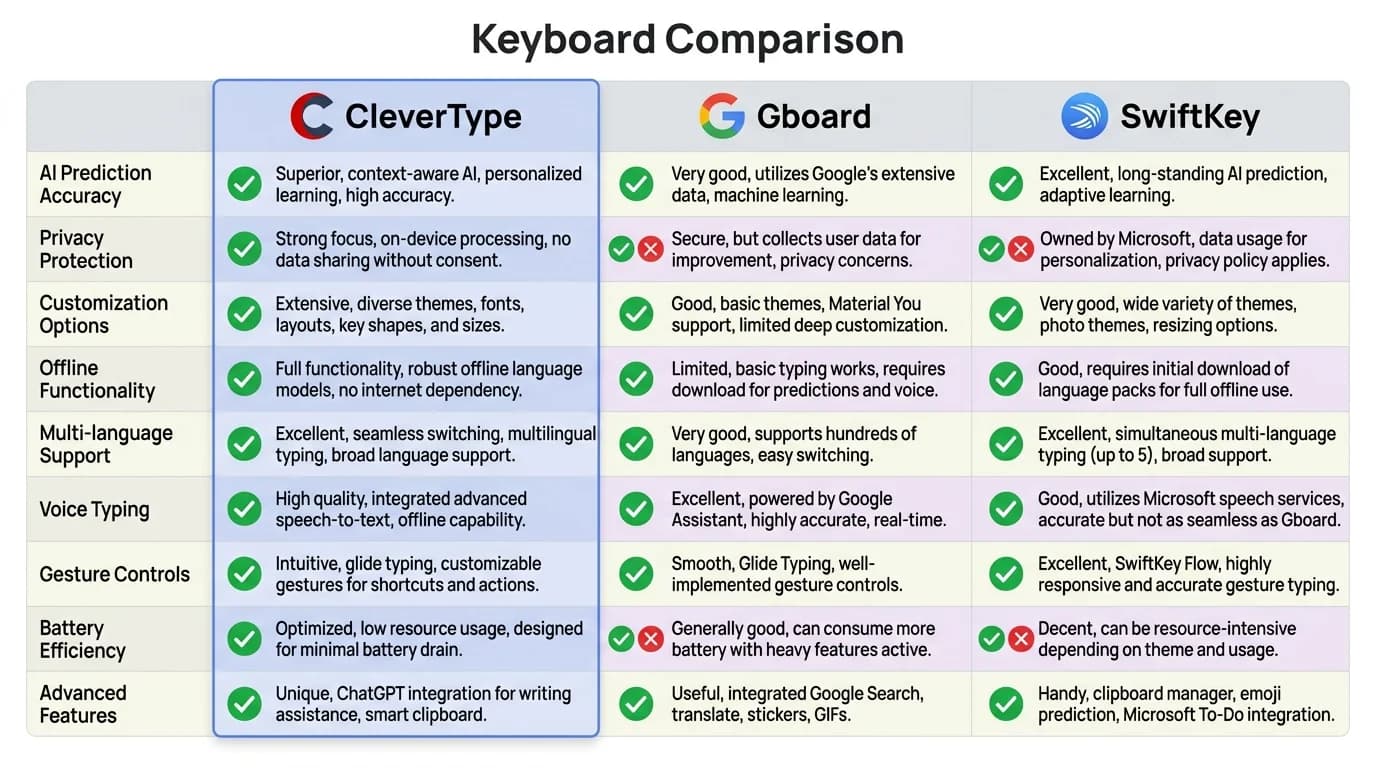
CleverType vs Gboard vs SwiftKey: side-by-side feature comparison for multilingual users
For users who need real grammar support across languages — not just autocomplete — CleverType is the clear choice. Furthermore, For raw volume (typing across 3+ languages all day), SwiftKey is also worth considering. But if grammar accuracy and privacy both matter to you, CleverType is where it's at.
Download CleverType from the Play Store and try the difference for yourself.
Hence, The combo that makes CleverType stand out for multilingual professionals is on-device processing plus grammar accuracy. If you're writing business emails in French, client messages in English, and internal notes in Spanish all in the same afternoon, you want a keyboard that handles all three with the same care — and doesn't quietly leak your vocabulary to a data center while it's at it.
Therefore, The customization options matter too. CleverType lets you set language defaults per app and per contact — which removes the switching friction for your most common patterns. Therefore, After a few weeks of use, it just knows. Nevertheless, Honestly, that last part is what gets people.
How AI Language Detection Actually Works
Hence, AI language detection is the engine behind every modern multilingual keyboard, but most people have a pretty fuzzy idea of how it actually works. The assumption is usually "oh, it just recognizes dictionary words." The reality is more interesting.
Furthermore, The base approach uses character n-gram models — the keyboard analyzes short sequences of characters (typically 2 to 5 at a time) and compares them against statistical patterns from hundreds of languages. Each sequence gets scored against known language profiles, and the highest-scoring language wins. This all happens in under 200 milliseconds, so you are not sitting there waiting on it.
But character n-grams alone can't handle mixed-language input. So modern ai keyboard multiple languages systems layer in several more signals:
- Script recognition — Cyrillic, Arabic script, Han characters, and Latin script are immediately distinctive. The keyboard doesn't need to analyze the actual words to know you've switched to Russian.
- Word-level signals — specific high-frequency words (like "the", "es", "の") are near-certain signals for particular languages.
- Syntax pattern analysis — word order and grammatical structures differ significantly between languages, giving the model sentence-level evidence.
- User history weighting — the keyboard learns which languages you use in which contexts and gives those higher probability weights.
Hence, The best systems use all four together. Therefore, When you type "hola, how are you doing?", a smart keyboard recognizes the Spanish, notes the Latin script continues in English, and adjusts suggestions for both languages at the same time.
The best keyboards also do something called contextual inheritance. Moreover, After a few weeks of use, it figures out that you always message a specific person in one language — and automatically switches when you open that conversation. Sounds minor. It's Consequently, not. For anyone juggling two languages daily, that switching friction adds up faster than you'd think.
Preply's global language learning report found that people learning minority languages or regional dialects are among the most active digital communicators. Furthermore, They're also the users most likely to mix languages mid-message. Therefore, For these users, accurate auto-detection isn't a convenience feature — it's the whole point.
Consequently, One practical note: auto-detection needs all your languages in the active list to work properly. Hence, If you've only added your primary language, the keyboard has nothing to detect against. Additionally, Adding all your languages — including the ones you use occasionally — is honestly the single most important setup step. Everything else follows from that.
Language Switching Without the Friction: A Practical Comparison
Nonetheless, Let me be direct about what language switching actually feels like on the major keyboards in 2026. I've used all three extensively across English, Spanish, and Hindi, and the differences are real.
Therefore, Gboard: You still need a long-press on the spacebar or a globe tap to switch. Therefore, Gboard treats one language as primary at a time — its auto-detection can tell which language you're in, but it can't pull predictions from multiple languages at once. It's also pretty aggressive about autocorrecting secondary-language words into your primary, which gets old fast. That said, ~900 input methods including regional layouts is genuinely impressive coverage if you need obscure languages.
Moreover, SwiftKey: The strongest raw multilingual input performer, and it's not close. Additionally, You can enable up to 5 languages simultaneously and type freely between all of them. In independent testing with English, Mandarin Pinyin, and Spanish all enabled, SwiftKey caught language shifts correctly 94 out of 100 times. It's also way less aggressive about autocorrect in multilingual contexts — users switching from Gboard consistently name this as the main reason they switched.
According to MakeUseOf's keyboard comparison coverage, users switching from Gboard to multilingual-focused keyboards most commonly cite autocorrect aggression and language detection accuracy as their reasons.
Hence, CleverType: The differentiator here is grammar-level switching. Therefore, Where Gboard and SwiftKey work at the word level, CleverType checks grammar in context — it doesn't just predict the next word, it checks whether your current sentence is actually grammatically correct in the language you're typing in. For professional or semi-formal writing, this is a real step up from autocomplete alone.
Consequently, Here's a quick breakdown of what each keyboard does best:
- Best for casual bilingual texting: SwiftKey (simultaneous 5-language input, natural code-switching)
- Best for professional multilingual writing: CleverType (grammar accuracy, privacy, context awareness)
- Best for sheer language coverage: Gboard (~900 input methods, excellent if you need obscure languages)
- Best for privacy-conscious users: CleverType (all processing stays on-device)
The practical takeaway: if you're texting friends across two languages all day, SwiftKey's raw multilingual input is excellent. Moreover, If you're writing emails to clients, messages to international partners, or anything where grammar correctness matters, CleverType's correction accuracy changes the outcome.
The Best AI Translation Keyboard Features Explained
Nonetheless, An ai translation keyboard does more than switch between languages — it translates in real time as you type. And when it's done well, it's honestly one of the most useful things a keyboard can do.
Here's how the feature typically works:
- You type your message in your native language
- The keyboard shows a translation preview in your target language
- You tap to accept the translated version
- The translated text is inserted directly into your message
Some keyboards go even further with two-way translation — you write in English, it sends in Spanish, and incoming Spanish messages display in English. For international back-and-forth, this kills the copy-paste-to-translate cycle entirely. Furthermore, Finally.
The adoption numbers here are pretty remarkable. More than 1.2 billion people use translation features on their keyboards monthly — Furthermore, that's up 340% from 2023. Hence, This isn't a niche feature anymore. Therefore, A huge chunk of global smartphone users are reaching for this every day.
Moreover, According to the European Association for Machine Translation, neural translation models now reach human-level quality for common language pairs like English-Spanish and English-French. Consequently, In practice, that means translations for common pairs are actually reliable now. Additionally, Not perfect — but reliable. That's a meaningful shift from where machine translation was even five years ago.
Here's a side effect worth mentioning: the language learning angle. Nonetheless, Research shows users who practice writing in a second language using AI translation keyboards improve their written proficiency 40% faster than those using traditional methods. Nonetheless, And it makes sense — you're seeing correct translations in context, while you're actually trying to communicate something real. That kind of immediate feedback beats drilling flashcards with no real-world stakes.
Additionally, CleverType's translation feature is worth calling out specifically. Translation happens on-device, so your messages aren't routed through external translation servers before being sent. Therefore, For sensitive communication — health information, financial details, personal conversations — this is a meaningful difference from keyboards that send your text to a third-party API to translate it.
What to look for in a translation keyboard feature:
- Does translation happen on-device or on external servers?
- Does it support your specific language pairs, not just English and the top 10 languages?
- Does it handle code-switched input (sentences mixing two languages) correctly?
- Is there a review step before the translation is sent, or does it auto-send?
The review step really matters. Consequently, Auto-sending translated text without showing it to you first is a failure mode — machine translation is good but not flawless, and one bad mistranslation in a professional context is more than a little awkward.
Multilingual Grammar Checking: Why Most Keyboards Get It Wrong
Grammar checking in a second language is genuinely hard, and most keyboards get it wrong in the same way: they apply English grammar rules to non-English languages and call it multilingual support.
Consequently, That doesn't work. Spanish drops subject pronouns that English requires. "Voy al mercado" is completely correct Spanish, while the English equivalent "Go to the market" is missing its subject. Nonetheless, A grammar checker applying English logic to Spanish will flag perfectly correct Spanish sentences as errors.
Hindi places verbs at the end of sentences. Arabic is written right-to-left and grammatical gender is encoded directly into verb conjugations. Korean postpositions work completely differently from English prepositions. Moreover, Each language has its own grammar logic, and a grammar model trained on one language can't be applied to another.
This is the gap where most bilingual AI keyboards fall short. They have multilingual dictionaries — they can recognize that "bonjour" is a French word — but they run a single-language grammar model and just swap the word list. Nonetheless, The result is grammar suggestions that are confidently wrong for your second language.
CleverType's architecture is different. Each supported language has its own grammar model, trained on that language's specific rules. The 99.2% grammar accuracy figure is measured across multi-language grammar checking, not just English. For the 100+ supported languages, that's a genuinely different product under the hood.
Furthermore, Weglot's multilingual website research found that properly localized content consistently outperforms non-localized content in engagement and conversions. Which honestly tracks — people respond better when they're being spoken to in their own language, not just translated at. Therefore, And that applies to professional keyboard communication just as much as websites.
Before choosing a keyboard for multilingual grammar support, check for these specifically:
- Grammar corrections, not just spell check (spell check is much easier to implement)
- Language-specific sentence structure understanding
- Handling of code-switched sentences (mixed language)
- Offline grammar checking, not just connected
That last point matters for travel and in areas with unreliable connectivity. A grammar keyboard that only works with an internet connection is only useful in conditions where you don't really need it.
One more thing worth noting through extended multilingual use: grammar checking quality degrades a lot at the edges of language pairs. Nevertheless, English-Spanish is well-covered by most keyboards. Hence, English-Bengali, or Spanish-Tagalog, or French-Wolof — much less so. Hence, If your language combination includes a less common language, it's worth testing grammar accuracy specifically for that pair before committing to a keyboard.
Privacy Concerns with Multilingual AI Keyboards
This section matters more than most people treat it. Nonetheless, Keyboards have access to everything you type — every password, every message, every financial detail, every personal conversation. Additionally, That's a lot of trust to hand to an app. Therefore, And the stakes are higher than most reviews acknowledge.
Most major keyboards transmit typing data to company servers. They use this data to improve their language models, which is how they get better over time. Therefore, Gboard is made by Google. Additionally, SwiftKey is made by Microsoft. Both are operated by companies whose business models involve data at scale. Nonetheless, That's not a judgment — it's context.
For multilingual users, the privacy stakes are compounded. If you type in a minority language or regional dialect, your input data is particularly distinctive — there are fewer other users typing in the same language, which makes your data more identifiable. If you type sensitive content in your second language (medical discussions, financial information, personal conversations with family in your home language), that data is still being collected and transmitted.
Additionally, The on-device processing model CleverType uses is a genuine technical design choice. It means the language models run locally on your phone, using your device's processor. It also means that the training data — your vocabulary, your switching patterns, your language use — stays on your device and nowhere else.
Preply's bilingualism research found that bilingual users are more likely to communicate sensitive information in their non-dominant language, often as a form of natural privacy. Furthermore, The irony of that information being captured by a keyboard that sends data to servers is real.
For privacy-conscious multilingual users, here's what to evaluate:
- On-device vs server processing — does the keyboard's privacy policy explicitly confirm local processing?
- Language data scope — does the privacy policy cover all language inputs, or just the default language?
- Offline functionality — can the keyboard work fully without internet access?
- Contact name collection — many keyboards collect your contacts' names to improve autocomplete. Is this opt-in or opt-out?
Consequently, There's no perfect answer here. Furthermore, If you type in 15 languages and need coverage for obscure dialects, you might need a keyboard with server-side processing to access the full language library. But if your languages are well-covered by on-device models, there's no technical reason to send your typing data off your device.
Honestly, for most people with common language combinations — English with Spanish, French, Hindi, Arabic, Mandarin, Portuguese — CleverType's on-device library covers you without the data exposure. That's the call.
How to Set Up a Multilingual Keyboard for Daily Use
Therefore, Setting up a multilingual keyboard properly from the start saves a lot of ongoing friction. Here's a practical walkthrough.
Nevertheless, Step 1: Install CleverType and complete onboarding
Consequently, Download from the Play Store and work through the initial setup. Furthermore, Grant keyboard access when prompted — this is required for any keyboard app to function.
Step 2: Add all your languages upfront
Moreover, Go to Settings → Languages and add every language you type in, including ones you use occasionally. The auto-detection system needs all your languages in its active list to recognize switches between them. Missing a language here means the keyboard will treat that language as a typo in your primary language.
Consequently, Step 3: Set your primary language
This is what the keyboard defaults to in new conversations. Pick the language you use most often. Nonetheless, The others stay available and detectable — this just sets the starting point.
Furthermore, Step 4: Enable auto-detect
Nonetheless, Turn on automatic language detection if it isn't already on by default. This is the feature that removes manual switching. Without it, you're back to the globe-tap workflow.
Moreover, Step 5: Allow 1–2 weeks of calibration time
AI keyboards adapt to your specific vocabulary and language-switching patterns. The first week will feel slightly off as the models calibrate to your usage. Give it time before concluding a feature isn't working — the behavior you see in week three is significantly different from week one.
Step 6: Set per-contact language defaults
If you always write to specific contacts in a particular language, set that as the default for those contacts. This is the contextual inheritance feature — after you set it up, the keyboard switches automatically when you open that conversation. Hence, For users with clear language divisions (work in English, family in another language), this eliminates switching friction almost entirely.
Moreover, Step 7: Don't disable suggestions to avoid confusion
A common instinct when starting with a new keyboard is to turn off suggestions to avoid being interrupted. Additionally, Resist this. Accepting correct suggestions is your primary training signal. Nevertheless, The more you accept, the faster the keyboard calibrates. The more you reject, the clearer the signal about what you don't want.
One thing that's easy to miss: if you use voice-to-text a lot, configure your voice languages separately. Voice recognition and text prediction run on different models — you'll need to set up each language for voice on its own. It's not automatic.
Therefore, Doing this right takes about 10 minutes. Skipping it means weeks of friction you didn't need to deal with.
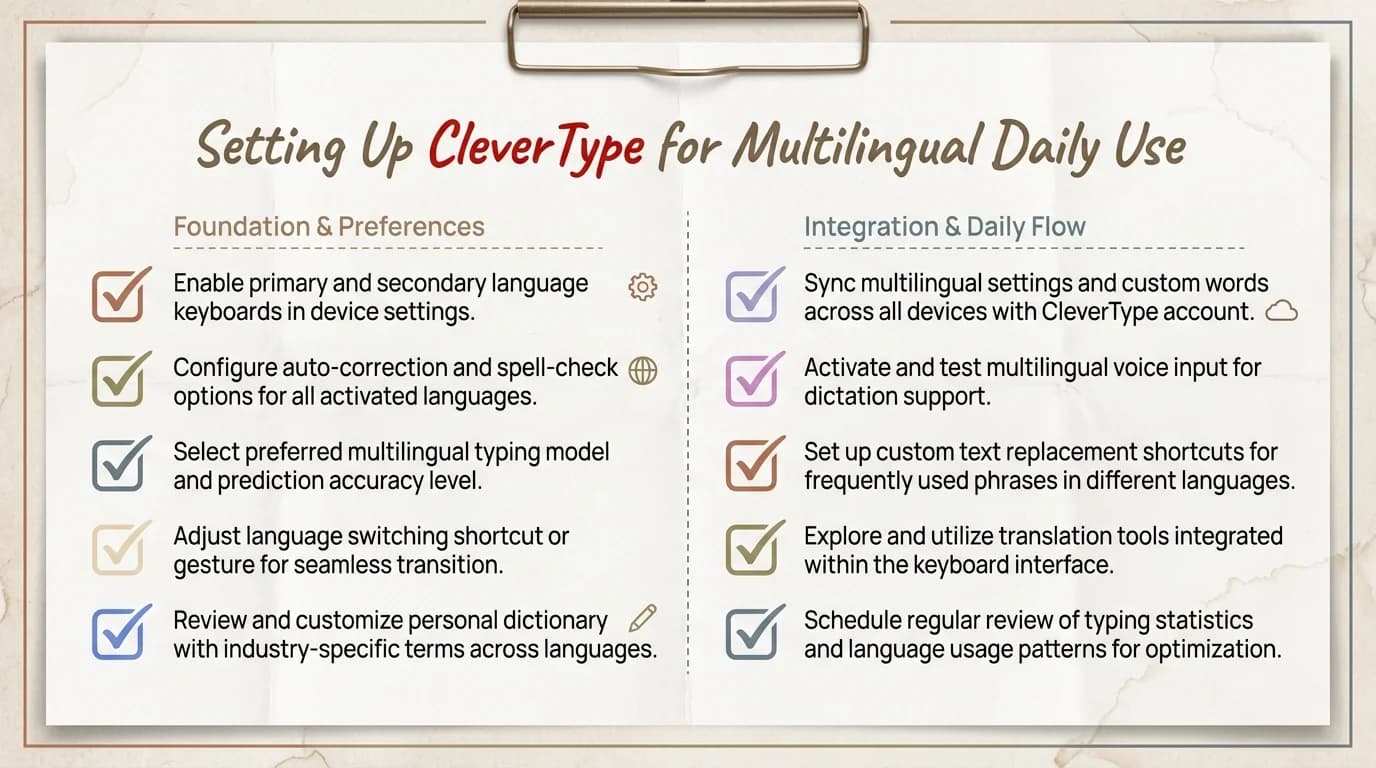
Complete setup checklist: get CleverType ready for seamless multilingual typing in under 10 minutes
Frequently Asked Questions
What is the best AI keyboard for multilingual users in 2026?
CleverType is the top choice for users who need grammar checking across languages, with 99.2% accuracy across 100+ languages and fully on-device data processing. SwiftKey is a strong alternative for simultaneous multi-language input, supporting up to 5 languages at once.
Can I type in two languages at the same time without switching?
Yes, with the right keyboard. SwiftKey and CleverType both support simultaneous multi-language input with automatic language detection. You can write a sentence mixing two languages and the keyboard handles both without requiring any manual setting change.
Does an AI keyboard help you learn a new language?
Research shows users who practice writing in a second language using AI translation keyboards improve written proficiency 40% faster than those using traditional methods. The immediate contextual feedback is what accelerates learning.
Is Gboard good for multilingual typing?
Gboard handles multilingual input competently and covers approximately 900 input methods. It still treats one language as primary at a time and can be aggressive about autocorrecting secondary-language words. It's a reasonable free option but not the strongest multilingual performer available.
What is code-switching in the context of keyboards?
Code-switching is typing in a sentence that mixes two languages — common in bilingual communities, like "I'll meet you at seis." A good multilingual keyboard detects this naturally and predicts words from both languages simultaneously without treating the switch as an error.
Are multilingual keyboards safe for sensitive typing?
It depends on how the keyboard processes data. Gboard and SwiftKey process data on their company servers. CleverType processes all data on-device, meaning your typing stays on your phone and is not transmitted externally.
How many languages should I add to my keyboard settings?
Add all the languages you type in, including occasional ones. All active languages need to be listed for auto-detection to work properly. Having extra languages active does not noticeably slow prediction speed for your primary language.
Ready to Type Smarter?
Upgrade your typing with CleverType AI Keyboard. Fix grammar instantly, change your tone, receive smart AI replies, and type confidently while keeping your privacy.
Download CleverType FreeTherefore, Available on Android • 100+ Languages • Privacy-First
Share this article: