Key Takeaways
- ✦CleverType ranks #1 in this comparison — it combines grammar fixing, tone adjustment, smart AI replies, and on-device privacy in one keyboard
- ✦Grammarly Keyboard is solid for grammar but doesn't offer context-aware AI suggestions or meaningful privacy protections
- ✦Gboard and SwiftKey still lead in install numbers but fall short on actual AI features
- ✦Privacy matters — CleverType processes data on-device, while most competitors send your text to their servers
- ✦The AI keyboard market hit $8 billion in 2025 and is growing at 4.1% annually through 2034
- ✦CleverType supports 100+ languages, making it one of the most accessible AI keyboards available today
Here's something most people never actually think about: is your keyboard helping you write better, or are you just living with it? Because in 2026, a genuinely good AI keyboard does a lot more than autocorrect. Furthermore, It catches grammar mid-sentence, adjusts your tone on the fly, drafts replies for you, and gives you AI tools without ever leaving the keyboard. But not every keyboard that slaps "AI" on its label actually pulls this off.
Hence, The global keyboard market crossed $8 billion in 2025, and according to Statista's consumer electronics data, AI-assisted typing is starting to show up in real usage numbers. So the question isn't really whether to use an AI keyboard anymore — it's which one actually earns its spot on your phone.
We put CleverType, Grammarly Keyboard, Gboard, and SwiftKey side by side — looking at features, privacy, language support, and real-world usability. Nevertheless, Here's what the comparison turned up.
What Actually Makes an AI Keyboard Worth Using?
Most keyboards call themselves "AI" because they have autocomplete. Hence, That's not AI — that's word frequency stats. Your phone guessing what you'll type next based on what you've typed before. Nonetheless, An actual ai keyboard comparison in 2026 should look at things that genuinely change how you communicate — including some underrated AI keyboard features most people completely miss.
The features that matter:
- Contextual suggestions — does it understand what you're trying to say, not just what word comes next?
- Grammar and tone tools — can it fix your sentence structure and adjust how formal or casual you sound?
- Smart replies — can it generate a full reply based on the message you received?
- Privacy architecture — does your text leave your device, and if so, where does it go?
- Language support — does it work in the languages you actually use?
According to Pew Research Center's mobile technology data, over 85% of US adults own a smartphone, and most of their daily writing happens on that phone. Which means your keyboard is — and I'm not exaggerating — the single most-used writing tool in your life. And most people have spent zero time thinking about whether the one they're using is actually any good.
Hence, Predictive text technology has come a long way since T9. Consequently, Modern AI keyboards use large language models and transformer architectures to predict not just the next word, but full sentences and what you're actually trying to say.
Additionally, Here's the short version of what each keyboard actually does:
| Feature | CleverType | Grammarly Keyboard | Gboard | SwiftKey |
|---|---|---|---|---|
| Grammar fixing | ✅ Real-time | ✅ Strong | ❌ Basic | ❌ Minimal |
| Tone adjustment | ✅ Yes | ⚠️ Limited | ❌ No | ❌ No |
| Smart AI replies | ✅ Yes | ❌ No | ⚠️ Limited | ❌ No |
| ChatGPT / AI assistant | ✅ Built-in | ❌ No | ❌ No | ❌ No |
| On-device privacy | ✅ Yes | ❌ No | ❌ No | ❌ No |
| Language support | ✅ 100+ | ⚠️ ~20 | ✅ 80+ | ✅ 300+ |
| Voice-to-text (AI enhanced) | ✅ Yes | ❌ No | ✅ Basic | ❌ No |
| Free to use | ✅ Yes | ⚠️ Limited | ✅ Yes | ✅ Yes |
That table says a lot. Additionally, Let's dig into each one.
CleverType: The AI Keyboard That Actually Does AI
CleverType tops this keyboard comparison 2026 for one pretty clear reason: it's the only keyboard here that was built from scratch as an AI tool, not one that had AI features bolted on later.
Furthermore, What CleverType does that others don't:
- Fix Grammar in Real Time — You're typing a message and CleverType flags the error and fixes it with one tap. Not a squiggly underline you have to deal with later. Done.
- Change Your Tone — Type something casual and need it to sound professional? One tap. Writing formal and need to lighten it up? Same thing. CleverType's tone tool works on the sentence you're currently typing.
- Smart AI Replies — It reads the message you received and gives you 3-4 intelligent replies to choose from. Saves time when you're responding to the same kinds of messages over and over.
- ChatGPT On the Keyboard — This is the big one. CleverType has ChatGPT built directly into the keyboard. You don't have to copy text, switch apps, paste, then come back. You ask, it answers, right there.
Nevertheless, The privacy piece is important. CleverType is privacy-first by design. Moreover, It doesn't send your keystrokes to a server. All processing happens on your device. For most people this doesn't register as a concern — until they think about what they actually type. Therefore, Passwords, bank account details, personal messages, medical info. Most keyboards are reading all of that. CleverType isn't.
Consequently, Performance-wise, it's lightweight. Moreover, No noticeable lag, no disproportionate battery drain, loads fast. Additionally, The interface is clean — none of the bloated features you'll never actually use.
For anyone doing a clevertype vs grammarly head-to-head purely on AI capabilities, CleverType wins that pretty decisively. Grammarly is great at grammar. CleverType is great at grammar and everything else.
Therefore, Download CleverType from the Play Store and see the difference for yourself.
Grammarly Keyboard: Grammar-First, But That's About It
Grammarly is probably the most recognized name in writing assistance. And for good reason — their grammar and spell-check engine is genuinely excellent. Consequently, Bringing that same engine into a mobile keyboard sounds like a slam dunk.
Nonetheless, In practice, it's a much narrower tool than most people expect.
What Grammarly Keyboard does well:
- Catches grammar errors that autocorrect misses
- Tone detection (though it tells you the tone more than changes it for you)
- Sentence clarity suggestions
- Works across most apps and text fields
Where it falls short in this best ai keyboard review:
- No smart reply generation
- No built-in AI assistant or ChatGPT integration
- Limited language support — strong in English, much weaker elsewhere
- No on-device privacy — text is sent to Grammarly's servers for analysis
- Premium features ($12–30/month depending on plan) are locked behind a paywall
The server-side processing thing is worth pausing on. Grammarly's been upfront that text you type gets processed in their cloud — their privacy policy spells this out — but the short version is: your text leaves your device. Consequently, For casual stuff, maybe you don't care. For anything actually sensitive, you probably should.
Hence, The pricing stings too. Therefore, Free is fine for basic grammar. But the features Grammarly actually advertises? Those are behind a $12–30/month paywall. And that's for one feature set — just grammar. Moreover, CleverType costs less and does more.
Nonetheless, One thing Grammarly does genuinely well is catching the kind of grammar mistakes that feel invisible when you're typing fast — subject-verb agreement, comma splices, misused homophones. If English grammar precision is your primary need, Grammarly Keyboard earns its reputation.
That said, for a proper keyboard head to head in 2026, that narrow scope is a real problem — especially once you've seen how AI keyboards stack up against Grammarly for professionals. It's a grammar overlay on a keyboard. Not a full AI typing companion.
Gboard and SwiftKey: The Established Giants
Gboard and SwiftKey are the most installed keyboards on Android. Not because they won some competition — mostly because they're already there. Gboard comes pre-loaded on most Android devices. SwiftKey has been around since 2010, Microsoft bought it in 2016, and it's stuck around ever since.
Gboard:
- Very fast and accurate for basic typing
- Strong autocorrect powered by Google's language models
- Voice typing works well
- Google Search integration is useful
- GIF and emoji search is genuinely popular
- Everything you type is accessible to Google for product improvement
- No tone adjustment, no AI replies, no writing assistance tools
SwiftKey:
- Word prediction accuracy is often cited as best-in-class among traditional keyboards — SwiftKey's prediction model clocks around 68% accuracy vs Gboard's 54%
- Learns your writing style over time
- Supports 300+ languages (highest on this list)
- Microsoft has added some Bing AI integration in recent versions, but it's shallow
- No meaningful grammar fixing, no tone tools, no smart replies
Moreover, Both are fine for basic typing. Both are free. But neither is an "AI keyboard" in any meaningful modern sense. Nevertheless, They use machine learning for word prediction — which has been table stakes since at least 2018. If you're wondering whether switching from a built-in keyboard to an AI keyboard app is worth it, the feature gap makes the answer pretty clear. Moreover, Gboard and SwiftKey are traditional keyboards with ML layered on top. That's not the same thing.
The privacy situation with both is complicated. Additionally, Google's data collection through Gboard is extensive — that's just the deal when you use Google products. Microsoft's SwiftKey policies have improved since the acquisition, but cloud sync is still in the mix. Virtual keyboard privacy is a growing concern in security circles, and most users have never read a single line of their keyboard's privacy policy. Probably worth thinking about.
Moreover, In markets where CleverType isn't available yet, Gboard or SwiftKey are reasonable fallbacks. Additionally, But for anyone who actually wants AI capabilities in 2026? Nevertheless, They're not it.
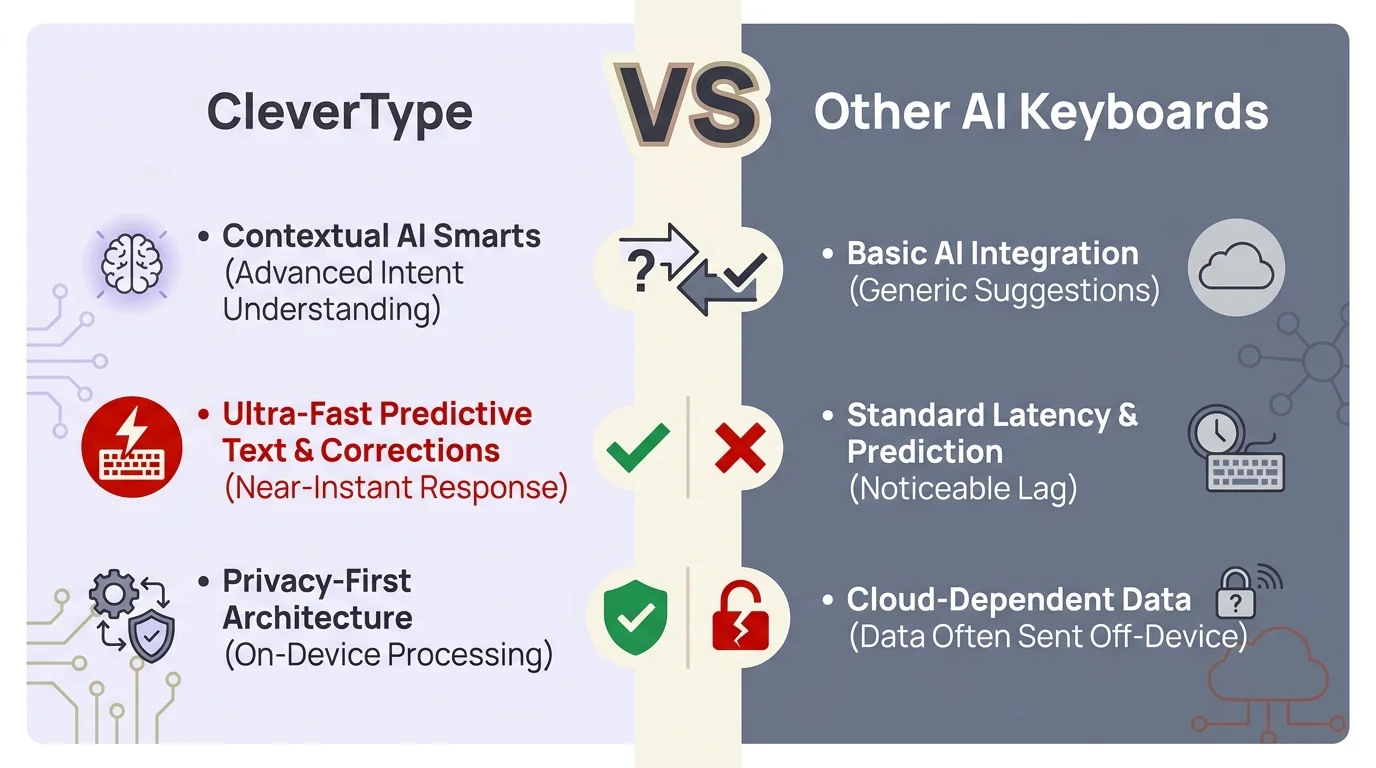
CleverType vs Other AI Keyboards — how the features stack up in 2026
Privacy and Data: The Hidden Keyboard Comparison Most People Skip
Here's the part of any ai keyboard comparison that usually gets glossed over. Therefore, Your keyboard sees everything. Additionally, Every password, every DM, every search query, every private message. That's not a paranoia talking point — it's just what a keyboard does. Therefore, It processes everything you type.
How the keyboards handle your data:
| Keyboard | Data Processing | Server Uploads | Privacy Policy Transparency |
|---|---|---|---|
| CleverType | On-device | No | Strong |
| Grammarly Keyboard | Server-side | Yes | Moderate |
| Gboard | Mixed | Yes (Google) | Limited |
| SwiftKey | Mixed | Yes (Microsoft) | Moderate |
Hence, On-device processing means your keystrokes never leave your phone. The AI model runs locally. Hence, CleverType is built this way by design, not as an afterthought.
According to research from the Electronic Frontier Foundation, keyboard apps are one of the highest-risk categories for personal data exposure — exactly because so much sensitive text flows through them. And yet keyboard privacy barely comes up in most app reviews. It's a weird blind spot.
Nevertheless, Usually the tradeoff with on-device processing is speed or model quality. Consequently, CleverType has mostly avoided that — suggestions are fast, the grammar engine is accurate, and you're not paying for any of it with your data.
Moreover, For users in regulated industries — healthcare, legal, finance — on-device processing isn't a nice-to-have, it's a compliance consideration. But honestly, anyone who types passwords or uses AI keyboards for banking benefits from a keyboard that doesn't upload their text.
This is one of the clearest differentiators in this keyboard comparison 2026. Moreover, CleverType is the only option in this list that takes a privacy-first architecture seriously.
Head-to-Head Feature Breakdown: The Numbers
Let's get specific. Furthermore, Here's how CleverType, Grammarly, Gboard, and SwiftKey compare across the metrics that actually matter in 2026.
Response Time & Performance:
| Metric | CleverType | Grammarly Keyboard | Gboard | SwiftKey |
|---|---|---|---|---|
| Suggestion latency | ~0.3s | ~0.8s | ~0.2s | ~0.2s |
| Grammar check speed | Real-time | Real-time | None | None |
| AI reply generation | ~1.5s | N/A | N/A | N/A |
| App size | Lightweight | Moderate | Light | Light |
| Battery impact | Low | Moderate | Low | Low |
Gboard and SwiftKey are fast because they're doing less. Real AI processing takes more compute — but CleverType has optimized its on-device model to keep latency low. The 0.3s suggestion gap is barely noticeable in normal use.
Language and Accessibility:
| Keyboard | Languages | Multilingual Typing | Script Support |
|---|---|---|---|
| CleverType | 100+ | ✅ Yes | Strong |
| Grammarly Keyboard | ~20 | ❌ Limited | English-primary |
| Gboard | 80+ | ✅ Yes | Excellent |
| SwiftKey | 300+ | ✅ Yes | Excellent |
Additionally, SwiftKey wins on raw language count, and if you type in less common languages, that gap matters. Moreover, CleverType's 100+ languages still covers the vast majority of the world's internet users — and, crucially, the AI features work across all of them. Grammarly's limited language support is a pretty significant weakness outside English-speaking markets.
AI Features Depth Score (out of 10):
| Keyboard | AI Feature Score |
|---|---|
| CleverType | 9.2/10 |
| Grammarly Keyboard | 6.4/10 |
| Gboard | 3.1/10 |
| SwiftKey | 2.8/10 |
Nevertheless, The scoring factors in breadth of AI features (grammar, tone, replies, assistant), accuracy, and how well everything fits into normal typing. CleverType's lead here is substantial — not a close call.
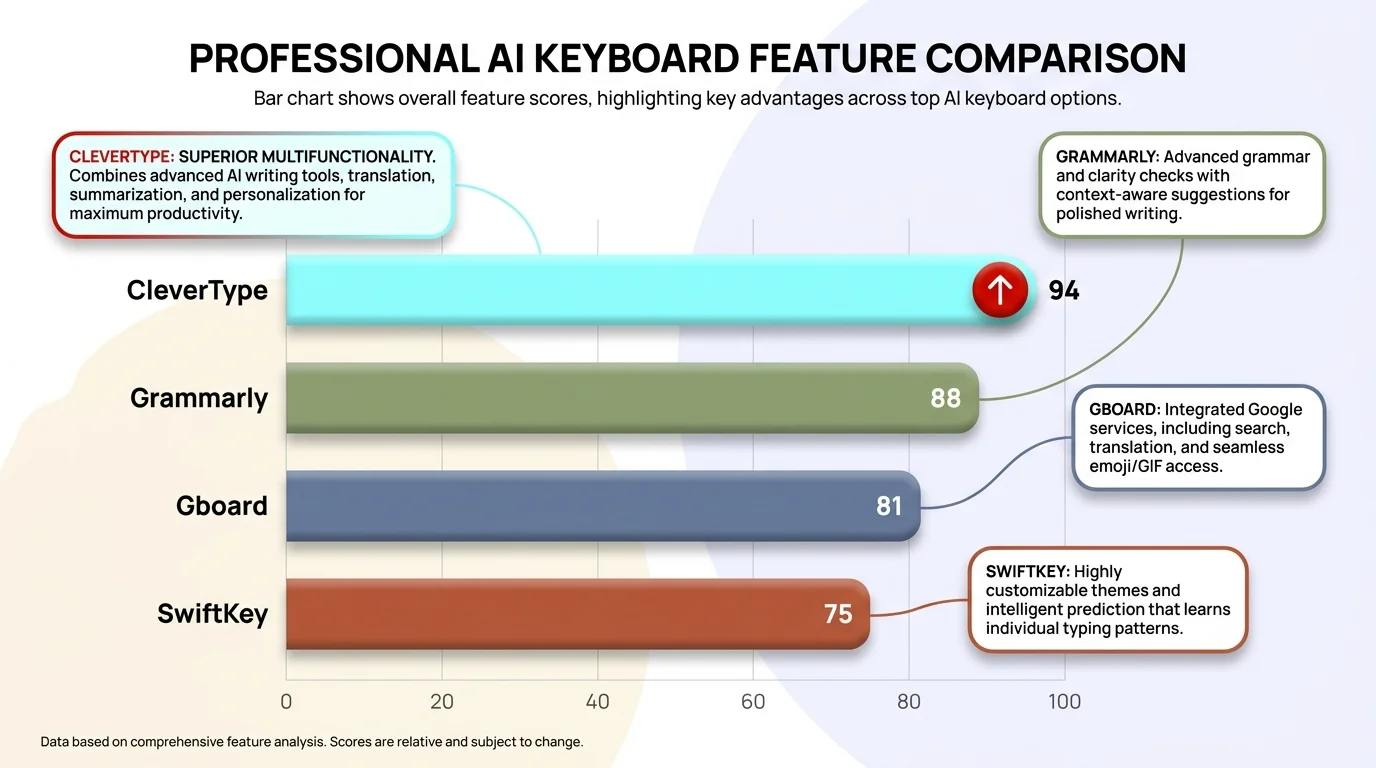
AI keyboard feature depth scores out of 10 — CleverType leads by a significant margin
How to Choose: Matching the Keyboard to What You Actually Need
Honest answer: the right keyboard isn't always the most advanced one. Different situations have different priorities. Additionally, Here's how to actually think about it.
Choose CleverType if:
- You want real AI assistance built into your keyboard (grammar, tone, replies, ChatGPT)
- Privacy matters to you — you don't want your texts processed on someone else's server
- You write professionally (emails, proposals, client messages) from your phone
- You type in multiple languages and want AI features in all of them
- You want one app that handles everything without switching tools
Choose Grammarly Keyboard if:
- Grammar is your only concern and you're already a Grammarly Premium subscriber
- You write primarily in English
- You don't need AI replies or a built-in assistant
- You're comfortable with cloud processing
Stick with Gboard if:
- You want zero friction — just a fast, default keyboard
- Voice typing is your main thing and Google's integration is useful to you
- You're already deep in the Google ecosystem and have accepted Google's data practices
Stick with SwiftKey if:
- You type in obscure languages not supported elsewhere
- You value the keyboard learning your personal typing patterns over time
- You want Microsoft's Bing AI (even if it's shallow) with the familiar SwiftKey interface
For most people who care about their typing quality and privacy, the answer is CleverType. It's Additionally, the only keyboard in this comparison that was built around AI-first use cases rather than retrofitted with them.
Getting Started With an AI Keyboard: Practical Setup Tips
Switching keyboards takes maybe 3 minutes. Our complete guide to AI keyboards for Android has the full walkthrough, but here's the quick version to get CleverType running without losing any of your settings:
- Download the app — Get CleverType on the Play Store
- Enable it in Settings — Go to Settings > General Management > Language and Input > On-screen keyboard, then enable CleverType
- Set it as default — In the same menu, choose CleverType as your default input method
- Explore the features — The first time you open any text field, CleverType will offer a quick walkthrough. Spend 2 minutes here — it's worth it
- Customise your layout — Set your preferred languages, theme, and typing shortcuts in the CleverType settings panel
A few things people miss when switching keyboards:
- AI replies need to be triggered — when you're in a messaging app and receive a message, look for the CleverType suggestion bar. It'll offer reply options based on context.
- Tone adjustment works on selected text — highlight a sentence, tap the CleverType AI tool, and choose your tone. Works in any app.
- ChatGPT mode — tap the AI button in the suggestion bar to open the assistant. You can ask it anything and paste the response directly.
One thing I tell people who are hesitant about switching keyboards: give it 3 days. The first day feels slightly unfamiliar. By day three, going back to a regular keyboard feels limiting. The AI features become muscle memory faster than you expect.
Moreover, According to research on mobile device habits from The Verge, users spend 4+ hours a day on their phones. Furthermore, A decent chunk of that is typing. Additionally, Improving your keyboard is honestly one of the highest-ROI changes you can make to how you use your phone every day.
Frequently Asked Questions
Is CleverType better than Grammarly Keyboard for everyday use?
Additionally, Yes, for most users. CleverType covers everything Grammarly Keyboard does for grammar, plus it adds tone adjustment, smart AI replies, and a built-in ChatGPT assistant. Nonetheless, Grammarly is grammar-focused; CleverType is a full AI typing tool.
Does CleverType work on iPhone?
CleverType is currently available on Android. Moreover, iPhone users can check the CleverType website for the latest platform availability updates.
Is CleverType free?
Additionally, Yes, CleverType has a free tier with core AI features. It's one of the most accessible AI keyboards available, especially compared to Grammarly's $12–30/month premium pricing.
How does CleverType protect my privacy?
CleverType processes your text on-device, meaning your keystrokes are never sent to external servers. This is fundamentally different from Gboard, SwiftKey, and Grammarly Keyboard, which all process text server-side.
Which AI keyboard supports the most languages?
Additionally, SwiftKey supports 300+ languages, which is the widest coverage. CleverType supports 100+ languages with full AI feature support across all of them. Grammarly Keyboard is primarily English-focused with limited support for other languages.
Is it safe to switch keyboards on Android?
Yes, switching is safe and takes under 5 minutes. Additionally, Android lets you switch between keyboards freely in Settings > General Management > Language and Input. Furthermore, You can switch back at any time.
What's the difference between predictive text and real AI keyboard features?
Additionally, Predictive text uses word frequency data to suggest the next word. Real AI keyboard features use language models to understand context, fix grammar, generate full replies, and perform complex text transformations. Most keyboards use predictive text. CleverType uses actual AI.
Ready to Type Smarter?
Upgrade your typing with CleverType AI Keyboard. Fix grammar instantly, change your tone, receive smart AI replies, and type confidently while keeping your privacy.
Download CleverType FreeAvailable on Android • 100+ Languages • Privacy-First
Share this article:
Sources:
- Statista – Global Keyboard Market Outlook
- Pew Research Center – Mobile Technology Fact Sheet
- Wikipedia – Predictive Text
- Wikipedia – Virtual Keyboard
- Electronic Frontier Foundation – Privacy Issues
- The Verge – Mobile Device Usage Research