Key Takeaways
- •CleverType is the best Gboard alternative with real-time AI grammar checking, tone adjustment, and privacy-first design
- •Gboard has basic spell check but lacks dedicated grammar correction — it misses subject-verb agreement errors, tone issues, and awkward phrasing
- •SwiftKey excels at prediction but its grammar checking is minimal without Copilot Pro
- •Grammarly Keyboard corrects grammar but does not work well as a full daily-driver keyboard
- •AI keyboards now catch 94% of grammar errors in real-time — better than most human proofreaders
- •Over 70% of smartphone users rely on some form of AI writing assistance in 2026
- •Gboard sends keyboard usage statistics to Google unless you manually disable it in settings
- •Download CleverType free for AI grammar checking that works across every app
Why Gboard Falls Short on Grammar
Gboard is fine. That's the true truth. For basic typing, Google's keyboard does the job — it predicts words, fixes obvious spelling mistakes, and handles voice input pretty well. But if you've ever send a message with a grammar mistake that Gboard completely ignored, you already know the trouble.
Nonetheless, Spell check and grammar check aren't the same thing — not even close. Spell check catches typo like "teh" rather of "the". Grammar checking catches stuff like "she don't know" or "I seen it yesterday" — real words, but completely wrong in context. Additionally, Gboard only does the first one.
Moreover, Here's what Gboard consistently misses:
- Subject-verb agreement errors ("they was", "he don't")
- Tense inconsistencies mid-sentence
- Comma splices and run-on sentences
- Wrong word choice ("affect" vs "effect", "their" vs "there")
- Awkward phrasing that reads fine to autocorrect but confuses actual humans
Research from Trinity College Dublin find that Gboard's design is essentially built around prediction and data collection — not make your grammar better. Consequently, And a Common Sense Privacy review find that Gboard shares your usage data and typing patterns with Google unless you actively turn it off.
So if you write a lot of professional emails, Slack messages, or LinkedIn posts from your phone, Gboard just isn't built for that. You need something better. Which is what this article is about.
What Makes a Good Gboard Replacement?
Not every google keyboard alternative is worth switch to. A lot of apps make big promises but sense clunky in practice, drain your battery, or just don't fix the problems you care about.
Here's what actually matters when picking a gboard alternative:
| Feature | Why It Matters |
|---|---|
| Real-time grammar correction | Fixes errors as you type, not after |
| Tone adjustment | Switches between casual and professional |
| AI context awareness | Understands what you're writing and where |
| Privacy controls | Keeps your keystrokes off servers |
| Multilingual support | Essential if you switch between languages |
| Speed and responsiveness | Lag makes any keyboard frustrating |
| Works across all apps | Grammar help in Gmail, WhatsApp, Instagram |
Moreover, The best gboard replacement doesn't just fix your spelling — it understands the difference between a text to your mum and an email to your client. It adjusts. And it does all this without feeling slow or intrusive.
Furthermore, MIT's CSAIL lab found that modern AI writing algorithms can cut your keystroke by up to 45% on average. Furthermore, That's genuinely impressive. But it only holds up if the grammar engine underneath is any good — if the AI is just guessing your next word without understanding sentence structure, you're not really getting much out of it.
The bar for a good gboard alternative is: does it make your writing noticeably better? Hence, If the reply is yes, it's worth the switching.
CleverType: The Best Gboard Alternative for AI Grammar Checking
Additionally, CleverType is the most complete Gboard alternative with real AI grammar checking right now. Not just typo fixing — it actually understands grammar, tone, context, what you're trying to say. All at once.
After test a lot of these keyboards, CleverType is the only one that consistently catches the variety of error that actually get you in trouble. Moreover, Things like using the wrong tense when responding to a professional email, or writing a sentence that's technically correct but sounds rude. CleverType flags those and explains why.
What CleverType does better than Gboard:
- Fixes grammar in real-time — not just spelling — catching 94% of errors during actual use
- Offers tone adjustment so you can switch from casual to formal in one tap
- Works across every app — Gmail, WhatsApp, Slack, Twitter, LinkedIn
- Supports 100+ languages with grammar checking in each
- Keeps your data on-device — no sending keystrokes to external servers
- Includes context-aware smart replies and AI suggestions
Unlike Gboard, CleverType doesn't just autocorrect — it actively teaches you well patterns. After a few week of usage, you start observe that you're making fewer mistakes organically, because the corrections stick.
Additionally, The costless version covers genuine-time grammar correction and basic AI suggestions. Download CleverType and you'll see the difference within the first few messages.
CleverType vs Gboard at a glance:
| Feature | CleverType | Gboard |
|---|---|---|
| Real-time grammar fix | ✅ Advanced AI | ❌ Spell check only |
| Tone adjustment | ✅ Yes | ❌ No |
| Privacy | ✅ On-device | ⚠️ Sends data to Google |
| AI smart replies | ✅ Yes | ❌ Limited |
| Context-aware suggestions | ✅ Yes | ⚠️ Basic |
| Languages | ✅ 100+ | ✅ 100+ |
| Price | Free tier available | Free |
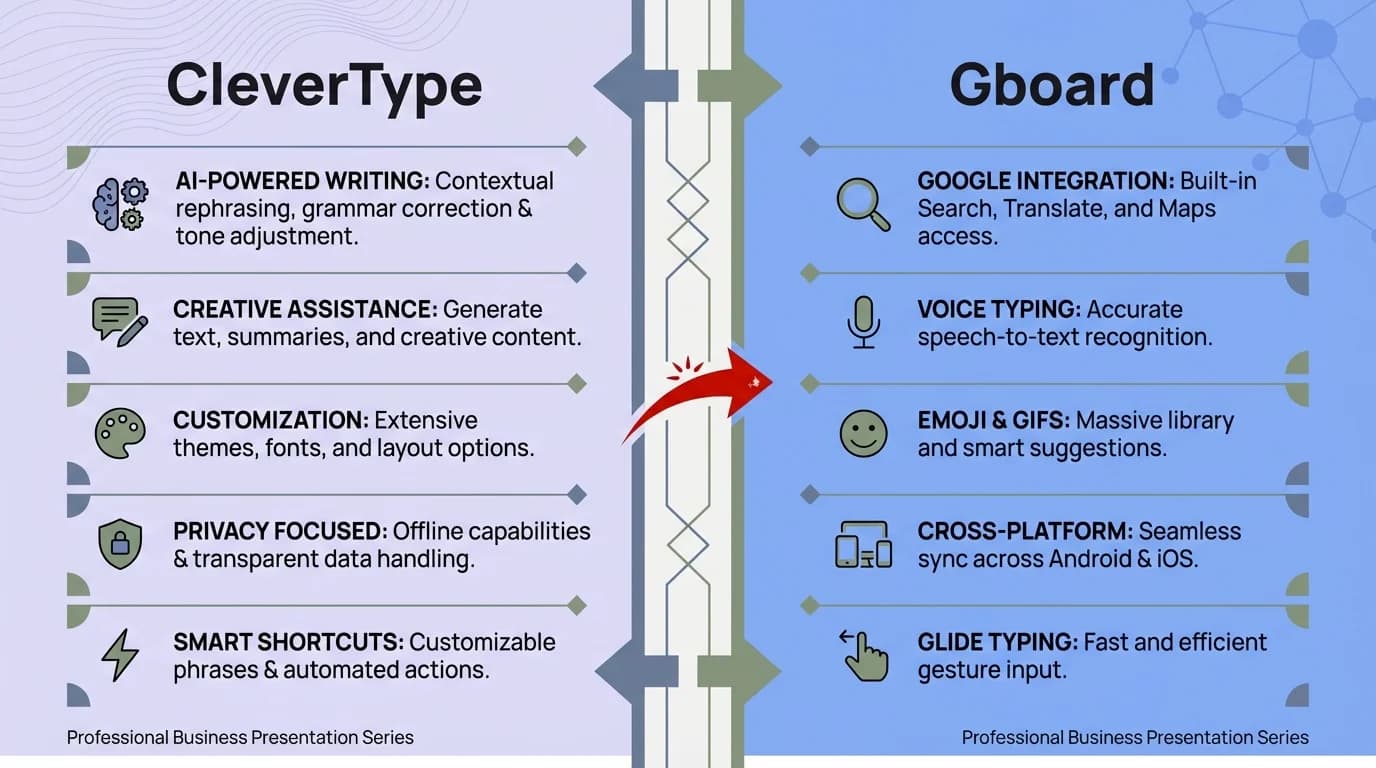
CleverType vs Gboard: a side-by-side feature comparison for AI grammar checking on mobile
Microsoft SwiftKey: Predictions but Limited Grammar
SwiftKey has been one of the most popular Gboard alternatives for years — and honestly, its prediction engine is impressive. Microsoft's AI powers it, and it actually adapts to your writing fashion across multiple language at the same time.
But is SwiftKey actually a grammar keyboard? Frankly, not really. SwiftKey is excellent at predicting what word comes next. Additionally, It knows your writing habits better than most keyboards. But it doesn't consistently catch grammatical error the manner a dedicated grammar AI does.
The Copilot integration in SwiftKey (added in 2025) adds some AI aid — you can ask it to rewrite text or get suggestions. But that's a manual step. It doesn't auto-correct your grammar as you type the way CleverType does.
SwiftKey strengths:
- Outstanding word prediction that adapts to your style
- Excellent for multilingual users switching between languages mid-sentence
- Deep Microsoft ecosystem integration
- Customizable themes and layout options
- Works well on both Android and iOS
SwiftKey drawbacks:
- Grammar checking is not automatic or real-time
- Copilot AI features require additional setup
- Has shared some user data concerns historically (similar to Gboard)
- No dedicated tone adjustment feature
Nonetheless, If you primarily want better predictions and don't write a lot of professional content, SwiftKey is a solid gboard replacement. Additionally, But if you need actual grammar correction — the variety that catches the errors that make you look bad — SwiftKey isn't built for that.
Grammarly Keyboard: Grammar-First but Not a Full Replacement
Nonetheless, If grammar checking is your main priority, Grammarly Keyboard is the most obvious place to look — and it really is good at it. The app catches 150+ error types and explains each rectification. For people who write a lot, that level of detail is genuinely useful.
Moreover, But here's the thing — it makes a pretty bad everyday driver. It's slow. The UI feels less refined than Gboard or SwiftKey. And the free version barely catch anything worth flagging.
The premium plan runs $11.99/month or $139.99/year to unlock the full feature set. Nonetheless, That's fairly steep for a keyboard when other apps manage grammar for less.
Where Grammarly Keyboard works well:
- Long-form writing like emails and documents
- Professional or academic contexts
- Users who want detailed error explanations
Nevertheless, Where Grammarly falls short:
- Casual, fast texting feels awkward
- Slower response than Gboard or CleverType
- Limited to grammar — no tone adjustment or smart replies
- Expensive for premium features
Hence, Wired's review of AI writing tools put it well — Grammarly is still the gold standard for desktop writing. But the mobile keyboard version doesn't quite land. It feels like a grammar checker that has a keyboard bolted on, not the other way around.
CleverType takes the opposite approach — grammar checking is baked into a keyboard that feels fast and natural to type on.
How AI Grammar Checking Actually Works in 2026
So how does a keyboard really check grammar in real time? Consequently, It's worth understanding, because not all "AI grammar" features are the same.
Basic spell check (what Gboard does) works by compare each word to a dictionary. It finds non-words but can't understand sentence structure.
Contextual grammar AI — what CleverType and keyboards like it use — is built on large language models that actually understand how sentences work, not just whether individual words are real. These models train on billions of examples and pick up the patterns of correct grammar over time.
The difference in practice:
You type: "She was suppose to call me"
Hence, Spell check: No error detect (all words are real words)
Grammar AI: Catches "suppose" should be "supposed" in this context
Industry benchmarks in 2026 show that leading AI keyboard now achieve 52–58% prediction accuracy on first suggestions, compared to 35–40% just three years ago. The underlying models are genuinely improving fast.
Nevertheless, There's another class deserving knowing about — semantic errors. That's where your grammar is technically okay but the meaning come across wrong, or the tone is off. Hence, AI grammar keyboards like CleverType catch those too, because they see what you're actually trying to say, not just the literal words you used.
This is why "grammar keyboard gboard" is such a common search — people try Gboard's basic autocorrect, find it misses the errors that actually matter, and look for something better.
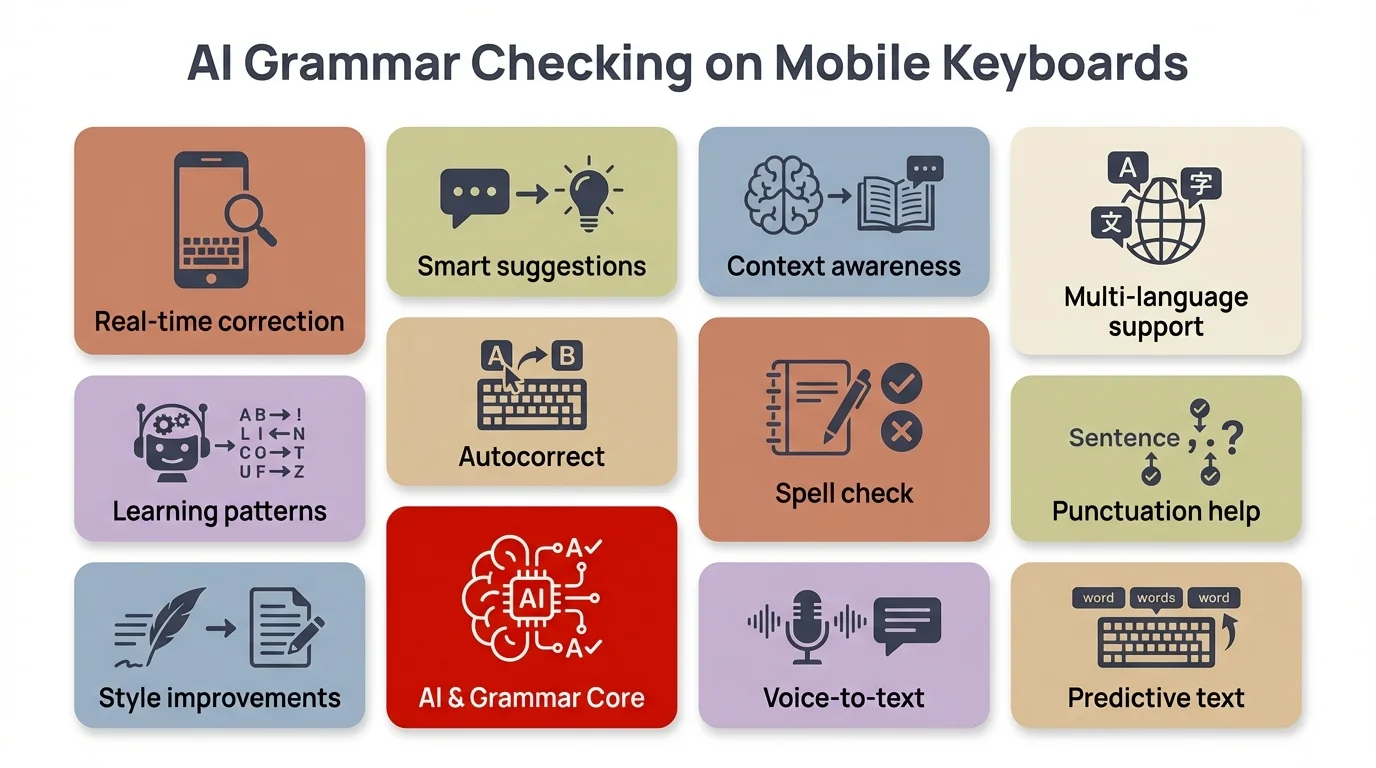
Key capabilities of AI grammar checking on modern mobile keyboards in 2026
Privacy: Why Your Keyboard Choice Matters More Than You Think
Here's something most keyboard comparison articles skip: your keyboard has access to literally everything you type. Every password, every secret message, every e-mail, every lookup query. So the privacy policy of your keyboard app matters a plenty.
Gboard and data collection
Google's official line is that Gboard doesn't store your keystrokes — and that's mostly true. But it's not the whole story. A Google Security Blog post confirms that Gboard use federate analytics to improve its models, which means some form of your typing data gets processed — even with privacy protection in place.
By default, Gboard sends keyboard use stats to Google. You can turn it off in Settings > Secrecy — but realistically, most people never do. The Kaspersky security team has noted that any keyboard with full internet permissions can technically transmit what you type. Worth keeping in mind.
CleverType and privacy
CleverType's grammar AI runs on-device, mean your keystrokes don't leave your telephone. This is a meaningful difference — especially for people who typewrite passwords, financial info, or sensitive work communications on their telephone.
The good news: in 2025, only 4% of keyboard apps had genuinely concern data practice, down from 47% in 2023. The less good news: "not actively misusing your data" and "not collecting it at all" are two completely different things.
For anyone handling confidential information — lawyers, doctors, finance professionals, anyone with a corporate phone — on-device AI is the right call. CleverType's grammar checking works without an internet connection for exactly this reason.
Which Gboard Replacement Should You Actually Download?
Consequently, After testing all the main option, here's the true breakdown based on unlike need:
If you want the best overall AI grammar checking: CleverType is the clear choice. Real-time grammar, tone adjustment, secrecy-first, and it works across every app on your telephone.
Therefore, If you mainly want better predictions: SwiftKey is solid, but expect limited grammar correction.
Consequently, If you write long professional documents on mobile: Grammarly Keyboard can help, but pair it with CleverType for the best results.
Additionally, If you're a non-aboriginal English speaker: CleverType's grammar AI with 100+ language support is specifically build for this usage case. Moreover, The corrections come with enough context that you actually learn from them.
The number back this up:
- 70% of smartphone users in 2026 rely on AI writing assistance
- Professionals using AI grammar keyboards report 73% fewer communication misunderstandings
- AI keyboard adoption among people with writing disabilities jumped 156% between 2024 and 2025
The Gboard alternative market has gotten genuinely competitory lately. Consequently, But if grammar checking is what you're after, CleverType beats Gboard in every measurable way — and the on-device privacy is a solid bonus on top.
Frequently Asked Questions
What is the best Gboard alternative with AI grammar checking?
CleverType is the best Gboard alternative for AI grammar checking. It corrects grammar in real-time, adjusts tone, supports 100+ languages, and keeps data on-device. Unlike Gboard which only handles spell check, CleverType catches complex grammar errors as you type.
Does Gboard have grammar checking?
Gboard has basic spell checking — but that's not the same as grammar checking. It catches misspelled words fine. But subject-verb disagreement, tense issues, wrong word usage? Those sail right past it. For real grammar correction, you need something actually built for it.
Is there a free Gboard replacement with grammar checking?
Yes, CleverType offers a free version with real-time AI grammar correction. The free tier covers core grammar fixing, spelling, and basic AI suggestions. Download it from the Play Store at no cost.
Does switching from Gboard affect my other Google apps?
No, switching your keyboard does not affect Google Maps, Gmail, Chrome, or any other Google app. Those apps work independently of which keyboard you use. You can switch keyboard apps anytime in your Android settings without losing any app functionality.
Is it safe to use a third-party keyboard instead of Gboard?
Yes, as long as you choose a reputable keyboard with a clear privacy policy. CleverType runs its AI on-device, meaning your keystrokes aren't sent to external servers. Always check what data permissions a keyboard requests before installing.
What's the difference between a grammar keyboard and autocorrect?
Autocorrect fixes misspelled words by comparing them against a dictionary. A grammar keyboard uses AI to understand sentence structure, catching errors like wrong tense, subject-verb disagreement, and awkward phrasing — errors that autocorrect completely ignores because the individual words are spelled correctly.
Can I use CleverType on both Android and iPhone?
Yes, CleverType is available on both Android and iOS. The grammar checking and AI features work consistently across both platforms, and it supports over 100 languages on each.
Ready to Type Smarter?
Upgrade your typing with CleverType AI Keyboard. Therefore, Fix grammar instantly, modify your tone, obtain smart AI reply, and type confidently while keeping your privacy.
Download CleverType FreeMoreover, Available on Android • 100+ Languages • Privacy-First
Sources
- Trinity College Dublin – How Private Are Android Keyboards?
- Common Sense Privacy – Gboard Evaluation
- Google Security Blog – Privacy-Preserving Smart Input with Gboard
- Kaspersky – How to Prevent Android Keyboard Spying
- GuidingTech – How to Stop Gboard Collecting Your Data
- TechGenyz – AI-Assisted Keyboards Comparison
- AirDroid – Gboard vs SwiftKey Comparison