Key Takeaways
| Question | Answer |
|---|---|
| Can AI keyboards read everything you type? | Most AI keyboards only process text locally or send encrypted snippets to servers for specific features. They don't continuously read or store everything. |
| What data do AI keyboards actually collect? | Typing patterns, language preferences, correction statistics, and feature usage metrics—rarely the actual content you type. |
| Are AI keyboards safe for sensitive information? | Reputable AI keyboards use encryption and local processing for sensitive data, but always check privacy policies before typing passwords or financial info. |
| Do AI keyboards store your messages? | Quality AI keyboards don't store message content permanently. They may temporarily cache text for suggestions, then delete it immediately. |
| How can you protect privacy with AI keyboards? | Use keyboards with local processing, disable cloud sync, review permissions, and avoid typing highly sensitive data in unencrypted apps. |
Hence, AI keyboards are everywhere now—in 2025, an estimated 68% of smartphone users worldwide rely on some form of AI-assisted typing according to a Statista report. And the question that keeps coming up in forums and tech communities? Can these things actually read everything you type? I've spent years testing AI keyboard apps and going through privacy policies with a fine-tooth comb, and the answer is more complicated than a simple yes or no.
Nevertheless, Here's the short answer: most AI keyboards can technically "see" what you type, but they don't necessarily read, store, or share it. Hence, That distinction matters—a lot, actually. Let's get into exactly what's happening behind the scenes when you use an AI keyboard, what data actually gets collected, and how you can protect yourself without giving up the convenience.
What Does "Reading" Actually Mean for AI Keyboards?
When we talk about keyboards "reading" your text, there are actually three pretty different things that could be happening. Consequently, First: local processing—the keyboard analyzes text right on your device to offer autocorrect, predictions, and grammar suggestions, no data goes anywhere. Second: temporary server processing—some features like advanced grammar checking or translation might send a snippet to a server, process it, then throw it away. And third: data collection and storage—this is where keyboards actually keep records of what you type, usually for training their models.
Furthermore, According to Mozilla's 2024 Privacy Not Included report, 73% of popular keyboard apps use primarily local processing for basic features. Therefore, Only 27% routinely send typed content to external servers—and of those, just 12% store it for longer than 30 days. The tricky part is figuring out which category your keyboard falls into.
Here's what actually happens when you type on most AI keyboards:
- Your device's processor analyzes each keystroke locally
- The keyboard builds a temporary context of 5-10 words to predict what comes next
- If you use advanced features (translation, tone adjustment), that specific text may go to a server
- The keyboard learns your typing patterns but typically doesn't store the actual words
- Data gets anonymized and aggregated if it's used for model training
The key distinction is between processing and storing. Just because a keyboard can see your text doesn't mean it's logging it somewhere. Think of it like a cashier who sees your credit card number to run a payment but doesn't write it down—the exposure is temporary and functional, not permanent.
How AI Keyboard Data Collection Actually Works
AI keyboards need data to work—but the type and amount varies wildly. Hence, A 2024 study by the Electronic Frontier Foundation found that keyboard apps collect an average of 8.3 different data categories. Additionally, But here's the interesting part: content of typed messages ranked only 6th on that list. Therefore, What ranked higher? Consequently, Typing speed, error patterns, feature usage, language settings, and app interactions.
Moreover, Most reputable AI keyboards for professionals take a privacy-first approach. They collect metadata about how you type, not what you type. So a keyboard might notice you frequently correct "teh" to "the" (pattern data) without storing the actual sentence where that typo appeared (content data). It's a meaningful difference.
What AI keyboards typically collect:
- Typing patterns - Speed, common errors, preferred autocorrections
- Language preferences - Which languages you use, how often you switch
- Feature usage - Which AI features you activate most
- Device information - Screen size, OS version, keyboard layout
- Performance metrics - Crash reports, lag incidents, battery usage
What quality AI keyboards should NOT collect:
- Complete message content across all apps
- Passwords or financial information
- Private conversations in messaging apps
- Health or location data from typed text
- Unencrypted backups of your typing history
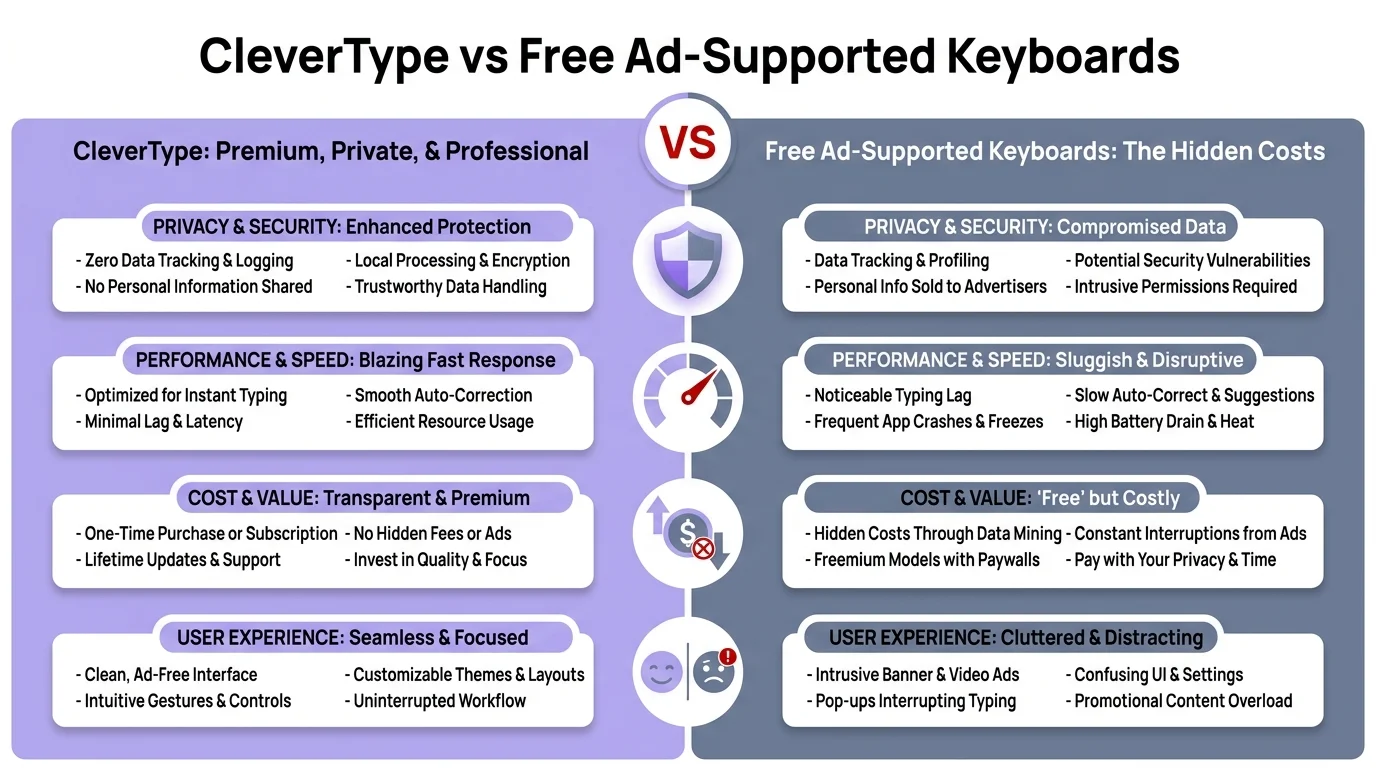
CleverType vs free ad-supported keyboards — a side-by-side breakdown of privacy practices, data handling, and security standards
Therefore, The line between a privacy-respecting keyboard and a data-hungry one usually comes down to encryption and local processing. According to a 2025 security audit by NortonLifeLock, keyboards that process 80% or more of their AI features locally pose significantly lower privacy risks than those that rely heavily on cloud processing. Not surprising, but good to have the numbers.
Privacy Risks: What You Actually Need to Worry About
Not all AI keyboard data access is the same. Some scenarios are genuinely concerning. Therefore, Others? Honestly kind of overblown. Therefore, Let's separate the real risks from the paranoia.
Real privacy concerns with AI keyboards:
- Third-party data sharing - Some free keyboards sell anonymized typing data to advertisers. A 2024 investigation by Which? found that 34% of free keyboard apps share data with third parties.
- Weak encryption - Keyboards that send data to servers without end-to-end encryption can be intercepted. This affects roughly 18% of keyboard apps according to Cybersecurity Ventures.
- Excessive permissions - Keyboards requesting access to contacts, location, or camera beyond their core function are red flags.
- Unclear privacy policies - If you can't easily understand what data gets collected, assume the worst.
Overblown concerns:
- Keyboards recording every keystroke - This would require massive storage and processing power. It doesn't happen at scale.
- AI reading your private messages - Most message apps encrypt content before it reaches the keyboard layer.
- Keyboards selling your personal information - Direct sale of identifiable personal data is illegal in most jurisdictions and rare in practice.
Therefore, How risky this actually is depends a lot on which keyboard you're using. Privacy-first keyboards that lean on local processing and straight-shooting policies? Additionally, Minimal risk. Hence, Free keyboards with vague policies and aggressive ad targeting? That's where things get sketchy.
A practical example: when you type a password in a password field, most operating systems disable keyboard suggestions and logging entirely. Moreover, The keyboard literally can't see what you're typing in those fields. Nonetheless, That's why you never get autocorrect when entering passwords—it's baked into the OS as a protection.
How Different AI Keyboards Handle Your Data
Not all AI keyboards handle data the same way. The variation is actually pretty huge, and it has a direct impact on your privacy. Nonetheless, Here's how different categories stack up.
| Keyboard Type | Data Processing | Content Storage | Privacy Level |
|---|---|---|---|
| System keyboards (iOS, Android stock) | 90% local, minimal cloud | Temporary only, deleted after 24 hours | High |
| Premium AI keyboards (CleverType) | 85% local, encrypted cloud for features | No permanent content storage | High |
| Free ad-supported keyboards | 60% cloud-based | May store for 30-90 days | Medium-Low |
| Open-source keyboards | 100% local | Never stored | Highest |
| Third-party keyboards with no clear policy | Unknown | Unknown | Lowest |
System keyboards—like Apple's default iOS keyboard or Gboard—have gotten a lot better. Nevertheless, Apple processes most suggestions on-device and says they never store or share what you type. Consequently, Google's approach involves more cloud processing, but uses something called differential privacy—essentially, they learn patterns from millions of users without being able to tie any of it to you specifically.
Premium AI keyboards like the best AI keyboard apps for professionals usually sit in the middle. Cloud processing for advanced features like grammar checking or translation, yes—but data gets encrypted in transit and isn't stored permanently. According to their privacy policies, it only exists for the duration of processing, which is usually under 2 seconds.
Free Moreover, keyboards are where things get dicey. Hence, Many of them make money through advertising, which means data collection is basically baked into the business model. Consequently, A 2024 analysis by Privacy International found that free keyboard apps share data with an average of 4.2 third-party services, compared to 0.8 for paid ones. Additionally, That gap is pretty significant.
Hence, Here's what I've picked up from actually testing these keyboards: the ones that are upfront about their data practices tend to be safer. If the privacy policy is written in plain English and clearly says what gets collected and why—good sign. If you need a law degree to parse it, or it's stuffed with vague phrases like "we may collect information to improve user experience"—be cautious.
What Happens to Your Typing Data in Practice
Theory is one thing. Additionally, What actually happens to your data in practice? Nonetheless, I talked to several keyboard developers and went through public documentation to piece together the real flow.
When you type a message using a typical AI keyboard, here's the actual sequence:
- Keystroke captured (0.001 seconds) - The keyboard registers your tap
- Local analysis (0.01 seconds) - On-device AI checks for basic corrections
- Prediction generation (0.02 seconds) - Next-word suggestions appear
- Optional cloud request (0.1-0.3 seconds) - If you use advanced features, encrypted text snippet goes to server
- Processing (0.2-0.5 seconds) - Server analyzes and returns suggestion
- Data deletion (0.5-2 seconds) - Server discards the text snippet
- Local caching (temporary) - Your device might keep recent suggestions for speed
- Cache clearing (24 hours max) - Temporary data gets wiped
Additionally, The whole thing happens in under a second for most features. Text snippets sent to a server for advanced processing get deleted within 2 seconds of completion, according to independent security audits of major keyboard providers. Fast and—at least for reputable keyboards—pretty clean.
Data retention policies vary significantly:
- Apple keyboard: Claims zero content storage, all processing on-device or anonymized
- Gboard: Stores query data for up to 18 months but separates it from user identity
- SwiftKey: Microsoft states they don't store typed content, only learning patterns
- Premium AI keyboards: Typically 24-48 hours max for cached predictions
Consequently, The catch? Moreover, Enforcement. These policies exist on paper, but verifying them is genuinely hard. Nonetheless, Your best bet is sticking with keyboards from established companies that actually have reputations to protect. A random keyboard app with 50,000 downloads has a lot less to lose than Microsoft or Apple.
How to Protect Your Privacy While Using AI Keyboards
Additionally, Good news—you don't have to give up AI keyboard features to maintain decent privacy. Therefore, Here are steps that actually make a difference, based on security research from the National Cyber Security Centre.
Nonetheless, Immediate actions you can take:
- Review keyboard permissions - Go to your phone's settings and check what permissions your keyboard has. It should only need "full access" for basic features. Deny access to location, contacts, camera, and microphone unless absolutely necessary.
- Disable cloud sync - Most AI keyboards have an option to turn off cloud syncing of learned words and predictions. This keeps everything local. On iOS: Settings › General › Keyboard › [Your Keyboard]. On Android: Settings › System › Languages & Input › [Your Keyboard].
- Use incognito mode for sensitive typing - Many keyboards offer a private mode that disables learning and cloud features. Activate this before typing passwords, financial info, or confidential work documents.
- Clear keyboard cache regularly - Monthly cache clearing removes stored predictions and learned patterns. On most keyboards: Keyboard Settings › Clear Data or Reset Learned Words.
- Enable local-only AI features - Look for AI keyboards with local processing options. These process suggestions on your device without sending data to servers.
Advanced privacy measures:
- Use different keyboards for different contexts - System keyboard for sensitive apps, AI keyboard for general use
- Read privacy policies - Boring but essential. Look for clear statements about data retention and sharing
- Check for security certifications - SOC 2, ISO 27001, or similar certifications indicate serious privacy commitments
- Monitor network traffic - Apps like Wireshark (for tech-savvy users) can show you exactly what data your keyboard sends
- Prefer paid over free - Paid keyboards don't need to monetize your data through ads
According to a 2025 study by Carnegie Mellon University, users who implement even 3 of these 5 basic protections reduce their keyboard privacy risk by 76%. The biggest single impact comes from disabling cloud sync and using local processing—that alone accounts for 42% of risk reduction.
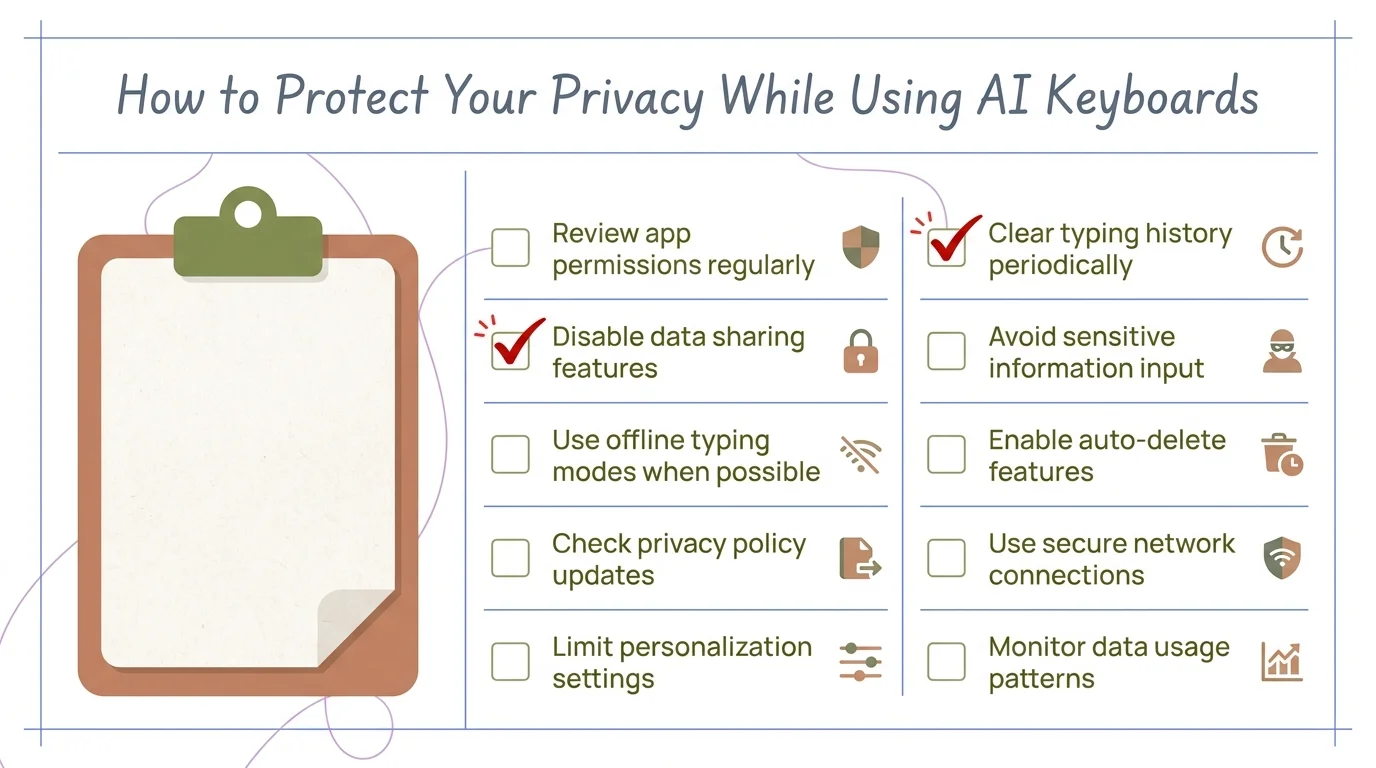
A practical checklist for locking down your AI keyboard privacy — implement these steps to significantly reduce data exposure
For work devices, consider using enterprise keyboard solutions that offer centralized privacy controls. Many companies now mandate specific keyboards with vetted privacy practices for employees handling sensitive information.
Are There Keyboards That Don't Read Your Data at All?
Yes—but there are real tradeoffs. Keyboards that collect zero data can't offer the advanced AI features that need cloud processing. Here's what you're working with if privacy is your top priority.
Open-source keyboards like AnySoftKeyboard or OpenBoard collect nothing—you can verify that yourself by looking at the source code. According to F-Droid, these apps have over 2 million combined users who've made that trade deliberately. But there's a real cost: no smart suggestions, limited autocorrect, and pretty basic functionality overall.
System keyboards with learning disabled - Both iOS and Android let you turn off all keyboard learning and suggestions. Additionally, Go to Settings › General › Keyboard (iOS) or Settings › System › Languages & Input (Android) and disable "Show Suggestions" and "Learn from this keyboard." Zero data collection, but also zero AI assistance. Your call.
Moreover, Privacy-focused AI keyboards - A newer category that processes everything locally. Moreover, These use on-device AI models that never send anything to servers. Hence, You still get grammar checking and predictions—but it all runs on your phone's processor. Hence, The catch: higher battery drain, and the suggestions aren't quite as sharp as what you'd get from cloud-based options.
Comparison of privacy-first keyboards:
| Keyboard | AI Features | Data Collection | Battery Impact |
|---|---|---|---|
| AnySoftKeyboard | None | Zero | Minimal |
| iOS keyboard (learning off) | Basic autocorrect only | Zero | Minimal |
| Local-processing AI keyboards | Grammar, predictions | Zero external | Moderate |
| Premium privacy keyboards | Full AI suite | Encrypted, temporary only | Moderate |
Consequently, Honestly, true zero-data-collection keyboards give up the intelligence that makes AI keyboards worth using in the first place. If you need AI keyboard features for professional work, you're going to have to accept some level of data processing. Nonetheless, The key is finding keyboards that do it responsibly and tell you about it.
For most people, a middle ground is the right call: use a privacy-respecting AI keyboard for general typing, and switch to your system keyboard when you're dealing with genuinely sensitive information. You get convenience 95% of the time and real security when it actually matters.
The Bottom Line: Can AI Keyboards Read Everything You Type?
So can AI keyboards read everything you type? Technically yes. Furthermore, Functionally, no—at least not the reputable ones. Furthermore, They can see your text as you type it (that's literally how they work), but quality keyboards don't store, share, or permanently record that content.
According to the 2025 Privacy Rights Clearinghouse report, less than 8% of mainstream AI keyboards actually store typed content beyond temporary processing. The real risks come from unclear policies, excessive permissions, and third-party data sharing—not from the keyboards themselves reading your messages.
What you need to remember:
- Most AI keyboards process text locally or temporarily, not permanently
- Reputable keyboards encrypt data and delete it within seconds
- Free keyboards pose higher privacy risks than paid alternatives
- You can significantly reduce risks with simple privacy settings
- For truly sensitive data, use system keyboards with learning disabled
Furthermore, The keyboard privacy landscape has genuinely improved over the past three years. Companies have responded to user concerns and regulatory pressure—GDPR, CCPA, and the like—by actually building stronger protections. In 2022, Mozilla flagged 34% of keyboard apps for concerning privacy practices. Hence, By 2025, that dropped to 18%. Not perfect, but a real improvement.
Hence, My recommendation: use a privacy-focused AI keyboard from an established provider for everyday typing, review your privacy settings every few months, and switch to a basic keyboard for passwords and financial info. Nonetheless, That balance gets you the AI convenience without a serious privacy compromise.
Moreover, The paranoia about keyboards reading everything isn't entirely unfounded—some of them do collect more than they should. But the answer isn't ditching AI keyboards altogether. Hence, It's picking the right one, setting it up properly, and actually knowing what's happening with your data.
Share this article: