Key Takeaways
| Aspect | Key Point |
|---|---|
| Tone Impact | 90% of conflicts stem from wrong tone, only 10% from actual opinion differences |
| AI Adoption | 55-75% of companies now use AI for tone analysis and adjustment in communications |
| Email Decline | Only 18% prefer email as primary workplace communication method in 2026 |
| Market Growth | AI text analytics market projected to reach $28.19 billion by 2029 |
| Personalization | Employees expect personalized, human-centered messaging in every interaction |
| Best Tool | CleverType leads AI keyboard solutions with real-time tone adjustment capabilities |
Here's something that might surprise you: most workplace conflicts aren't actually about what you say—they're about how you say it. Research shows 90% of conflicts are due to wrong tone of voice, with only 10% coming from actual differences in opinion. That's kind of wild when you think about it, especially since your emails and messages don't come with body language or vocal cues to soften things.
The tone you choose determines whether your message builds trust or creates tension. Pretty simple, right? In 2026, getting tone right isn't optional anymore—it's what separates teams that work smoothly from ones that constantly trip over misunderstandings. And with AI tools now handling tone selection, there's really no excuse for getting it wrong.
What Is Business Tone and Why Does It Matter in 2026?
Business tone is basically how your words land with the person reading them—whether they feel respected, dismissed, motivated, or irritated. It's not just what you write. It's the whole vibe your message gives off. Tone shows up in every single piece of communication and directly shapes how readers perceive what you're saying.
Tone matters way more in 2026 because digital communication pretty much runs everything now. You're not having face-to-face conversations where a smile can soften criticism or body language shows you're joking. Everything happens through screens. One wrong phrase in an email can turn a simple request into an insult. The lack of nonverbal cues in written messages makes misinterpretation way more likely.
Here's why tone is so critical right now:
- Remote work isn't going anywhere - Teams work across time zones and might never meet in person
- Cross-cultural teams are the norm - What sounds friendly in one culture can come off as unprofessional in another
- Everyone expects instant responses - Quick messages often skip tone considerations, which creates problems
- AI is watching - Tools now measure sentiment and flag communication issues before they blow up
The text analytics market is projected to hit $28.19 billion by 2029, which tells you how seriously businesses take communication quality. Companies aren't just hoping employees write well—they're actually investing in tools to make sure it happens.
Look at what happens when tone goes wrong. Yahoo's 2013 memo ending telecommuting got absolutely roasted because the tone didn't explain the reasoning—just dropped the rule. The Peloton ad? Called sexist and tone-deaf because nobody caught how it would be perceived. These aren't minor slip-ups—they're brand damage that could've been avoided with better tone awareness.
CleverType tackles this by giving you real-time tone suggestions as you type. Instead of sending a message and crossing your fingers, you see how it reads before hitting send. The AI looks at your words and suggests tweaks—turning a demand into a request, or adding some warmth to instructions that feel a bit cold.
The 6 Essential Business Tones You Need to Master
Professional tone keyboard tools now offer multiple tone options because—let's be honest—one-size-fits-all doesn't cut it anymore. Different situations call for different approaches. Here are the six tones that cover most business scenarios:
1. Professional/Formal
Use this for executive communication, client proposals, and official documentation. It's polite, structured, and steers clear of casual language. Think "I would appreciate your feedback" instead of "Let me know what you think."
2. Friendly/Conversational
Perfect for team messages and internal updates. Sounds like you're talking to a colleague over coffee. "Hey, just checking in on the project—how's it going?" works great here.
3. Direct/Concise
When time matters or you're working with technical teams who value efficiency. "Send the report by Friday" beats "If you have a chance, it would be great if you could possibly send the report sometime this week." See the difference?
4. Empathetic/Supportive
Critical for HR communications, customer service, and those tough conversations nobody wants to have. Shows you get the feelings involved while still addressing the issue. "I understand this change is challenging" is way better than "This is the new policy, deal with it." Learn more about transforming awkward tone into polished workplace communication.
5. Persuasive/Motivational
Sales emails, project kickoffs, and change management all need this. You're trying to inspire action, not just dump information. "This approach will cut our processing time by 40%" works way better than "We should try this new process."
6. Apologetic/Corrective
When mistakes happen, the tone needs to own the problem without getting defensive. "You're right, we missed that deadline. Here's our plan to make sure this doesn't happen again" beats "Delays happen, nothing we could do about it."
Studies on AI writing tools show users switch between 5-7 different tones daily depending on context. That's exhausting to manage manually, which is exactly why AI tone selection exists.
CleverType recognizes what you're writing and suggests tones that actually fit. Drafting an email to your CEO? It recommends formal. Messaging your project team? It suggests conversational. You're not guessing anymore—you're picking from options that make sense for the situation.
A lot of keyboards claim to help with writing, but honestly, most just fix spelling. CleverType actually understands context and adjusts tone accordingly—something competitors like Gboard don't really prioritize. While Google's keyboard focuses on predictions, CleverType focuses on how your message feels to the person reading it.
How AI Is Changing Tone Selection in Business Writing
AI tone analysis isn't science fiction anymore—it's just how things work now. Between 55% and 75% of companies report increased AI adoption within their organizations, with tone analysis being a huge use case. These tools don't just check grammar—they actually dig into emotional impact.
Here's what modern AI does for business tone:
Sentiment Analysis
AI reads your draft and tells you if it sounds aggressive, passive, enthusiastic, or discouraged. Using advanced natural language processing techniques, these systems catch subtle emotional cues that humans often miss. It picks up on stuff you'd overlook—like how "Please do this" feels different from "Could you help with this?" The first sounds like an order. The second? Collaboration.
Cultural Adaptation
Global teams make tone tricky. Research shows that humor, punctuation, and even response speed mean totally different things across cultures. AI flags phrases that might confuse people in other countries.
Real-Time Suggestions
Instead of writing first and editing later, AI adjusts tone as you type. You see alternatives right away—"demanding" language gets softened, "vague" requests get clarified. It's like having an editor looking over your shoulder, but less annoying.
Brand Voice Consistency
Tools like Jasper and Grammarly let teams set up custom style guides. Then AI makes sure everyone's messages match company standards. If your brand is casual and approachable, AI catches when someone writes too formally and throws off the vibe.
The shift is pretty big. AI text analysis tools are projected to boost customer satisfaction by 25% and revenue growth by 62% for businesses that actually use them, according to market research. That's not just nicer communication—it's real business impact you can measure.
CleverType uses advanced AI models that look at your text for tone, sentiment, and key themes while you type. Unlike standalone writing tools that you have to use separately, CleverType builds right into your keyboard. You're not copying text to another app, waiting for suggestions, then pasting it back. The help shows up exactly where you're already writing.
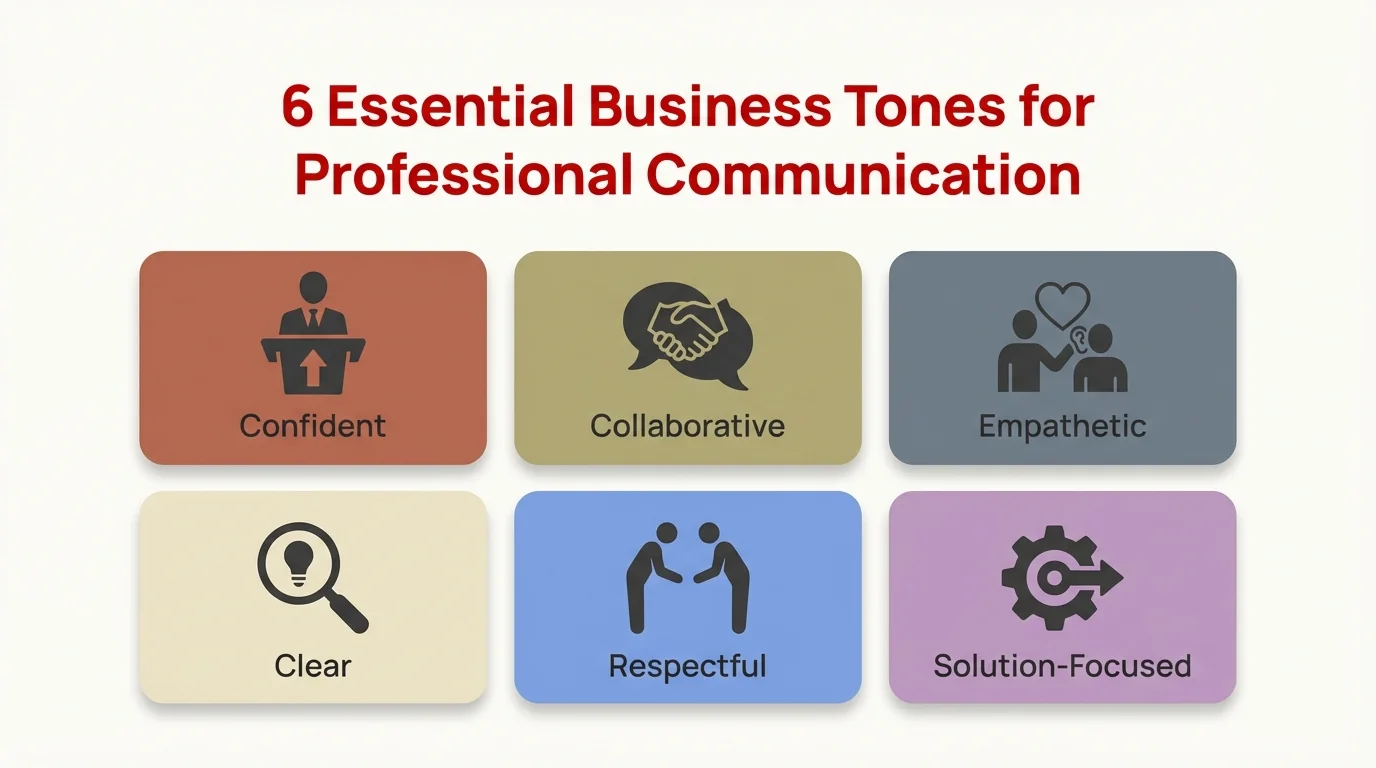
Master these 6 essential business tones to communicate effectively in any professional situation
Privacy matters here too. While tools like Grammarly send your text to servers for analysis, CleverType processes most stuff on-device. Your confidential business messages stay on your phone, not floating around in cloud servers. That's a solid advantage over competitors who need internet connectivity for basic tone suggestions.
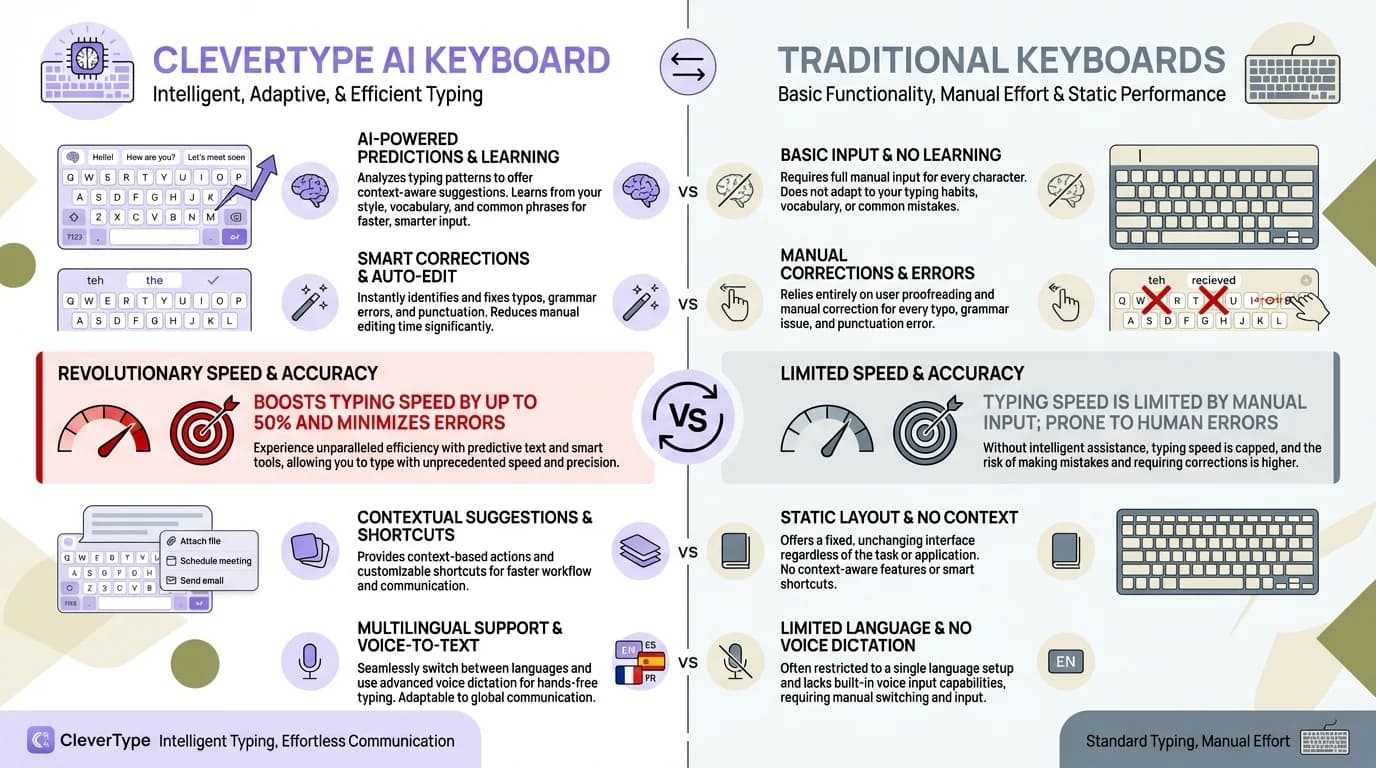
CleverType's AI-powered features transform how you communicate compared to traditional keyboards
Common Tone Mistakes That Damage Professional Relationships
Knowing the right tone is one thing. Avoiding the common mistakes? That's another challenge entirely. Research shows several patterns that keep causing problems in business communication.
Mistake 1: Sounding Like a Robot
AI-generated content often lacks an empathetic, human tone—which just kills trust. Ironically, the tool that's supposed to help can actually hurt you if you lean on it too much. Your message needs some personality, not just correctness.
Wrong: "Your request has been received and will be processed according to standard procedures."
Right: "Got your request! I'll take a look this afternoon and get back to you by tomorrow."
Mistake 2: Being Too Casual with Senior Stakeholders
One professional told me they sent an email with a casual tone to a client—who responded saying they couldn't believe how rude it was. The writer was trying to be friendly. The recipient? Saw total disrespect.
Wrong: "Hey, gonna need those numbers before the meeting lol"
Right: "Hi, would it be possible to get those numbers before tomorrow's meeting? It would really help us prepare."
Mistake 3: Negative Framing
Focusing on what's missing instead of what's possible just makes people defensive. Experts recommend approaching tough messages with a gracious and sincere tone.
Wrong: "You didn't finish the report on time again."
Right: "I see the report's still in progress. What support do you need to wrap it up?"
Mistake 4: Passive-Aggressive Language
"Per my last email" has become infamous for sounding condescending. It basically translates to "I already told you this—why weren't you paying attention?" Not exactly how you build good working relationships.
Wrong: "As I mentioned previously..." or "Just following up again..."
Right: "Quick reminder about..." or "Wanted to check in on..."
Mistake 5: Over-Apologizing
Saying "sorry" for stuff that isn't your fault just undermines your authority—especially for women in leadership who deal with tone policing way more than men do.
Wrong: "Sorry to bother you, but I was just wondering if maybe you might have time to..."
Right: "Do you have a few minutes to talk about the project timeline?"
Mistake 6: All Caps or Excessive Punctuation
This looks like shouting. Even if you're genuinely excited, "GREAT JOB!!!" comes across as sarcasm or aggression in professional settings.
Companies using AI tone analysis catch these issues before messages go out. CleverType flags problematic phrasing and offers alternatives—kind of like a communication coach that's always available. Sure, you can manually review messages, but AI catches the subtle stuff—like how adding "just" and "maybe" makes your requests sound way less confident.
Tone for Emails: Crafting Messages That Get Results
Email isn't dying—it's just changing. While only 18% cite it as their preferred communication option, email still handles the important stuff: formal requests, client communication, and documentation. Getting your email tone right has a direct impact on response rates and how people feel about working with you.
Subject Line Tone
This sets expectations before they even open your message. Writing professional emails starts with nailing the subject line. Compare these:
- "Problem with Q4 report" (sounds accusatory)
- "Q4 report - quick question" (sounds collaborative)
- "Improving our Q4 reporting process" (sounds proactive)
Same topic, totally different tone. The third one gets opened more because it frames things positively right from the start.
Opening Tone
Skip "I hope this email finds you well"—it's filler that everyone knows is just template language. Be direct but warm:
- "Thanks for meeting yesterday" (if you're following up)
- "I wanted to discuss..." (if you're starting the conversation)
- "Quick update on..." (if you're sharing info)
Request Tone
Make your asks clear without coming off demanding. The difference between "I need this by Friday" and "Could you send this by Friday?" is huge. First one's an order. Second one's a request. Both might get you what you need, but only one builds a better relationship.
Use this structure:
- Context (why you're asking)
- Specific request (what you need)
- Deadline or timeframe (when you need it)
- Appreciation (acknowledging their effort)
Example: "We're wrapping up the client proposal this week. Could you send the cost breakdown by Thursday afternoon? This would help us get accurate numbers in before Friday's meeting. Really appreciate your help with this."
Closing Tone
How you end the email affects how they remember the whole thing.
- "Thanks" (neutral, always safe)
- "Appreciate your help" (warmer, shows you value them)
- "Let me know if you have questions" (opens the door for dialogue)
- "Looking forward to hearing from you" (expectant but still polite)
Skip "Regards" or "Sincerely" unless you're writing to executives or clients you barely know. They're so formal they actually sound cold in modern business communication.
CleverType's tone adjustment feature works really well for email since you're constantly switching between different people with different relationship dynamics. Writing to your team, then your boss, then a client means juggling three different tones. The keyboard picks up on context and suggests the right adjustments.
Unlike Microsoft SwiftKey, which mostly focuses on prediction speed, CleverType cares about communication quality. You're not just typing faster—you're actually communicating better. That distinction really matters when email tone can be the difference between getting the response you need and getting ignored.
Business Communication Tone Across Different Platforms
Different platforms expect different tones. What works on Slack totally fails in email. What's fine on Teams feels weird on LinkedIn. Understanding these platform-specific norms can save you from some pretty awkward moments.
Slack/Teams - Conversational and Quick
These tools are built for informal tone. Short messages, emojis, casual language—all good here. A simple "👍" can replace "I agree with this approach and support moving forward." Being too formal actually makes you sound disconnected from team culture. Discover how AI keyboards are reshaping workplace communication across all platforms.
Totally fine: "looks good, shipping this today 🚀"
Kinda weird: "I have reviewed the proposed changes and find them acceptable for deployment."
LinkedIn - Professional but Personable
This sits somewhere between casual social media and formal business writing. You want credibility without sounding like a press release. Personal stories work great here. Corporate speak? Not so much. AI can help you shift from casual to professional instantly depending on your platform.
Good: "Three years ago I had no clue how to manage remote teams. Here's what I figured out..."
Bad: "Organizational leadership paradigms have shifted toward distributed workforce management solutions."
Email - Context-Dependent Formality
Internal emails can be pretty casual. Client emails? Need more structure. First emails to someone should lean more formal than ongoing conversations. Read the room—if they sign off with "Cheers, Mike," you don't need "With sincere regards, Michael Johnson."
Formal Documents - Precise and Structured
Proposals, contracts, and official documentation need elevated tone. Remove contractions (use "cannot" not "can't"), skip the colloquialisms, stick with third-person perspective where it fits.
Text Messages - Brief and Direct
If you're texting for business, the relationship's already informal. Just get to the point. "Running 10 min late" works way better than "I wanted to inform you that I am currently experiencing a slight delay."
Here's how the same message shifts across platforms:
| Platform | Message |
|---|---|
| Slack | "heads up - meeting moved to 3pm" |
| Email (internal) | "Quick update: we've rescheduled today's meeting to 3pm" |
| Email (client) | "I wanted to let you know we've moved our meeting to 3pm today. Does this still work for your schedule?" |
| LinkedIn message | "Hi [Name], our meeting today has been rescheduled to 3pm. Looking forward to connecting then." |
| Formal memo | "Please note that today's scheduled meeting has been rescheduled to 15:00." |
CleverType actually adapts to whatever platform you're on. The AI recognizes whether you're in Gmail, Slack, WhatsApp, or LinkedIn and tweaks its tone recommendations accordingly. You're not getting cookie-cutter suggestions everywhere—the app gets the context.
This multi-platform smarts is what sets CleverType apart from competitors. Sure, Grammarly Keyboard offers tone suggestions, but they're pretty generic. CleverType's AI considers where you're writing, who you're writing to (based on conversation history), and what kind of message you're putting together.
Building a Personal Tone Strategy for Professional Success
Having a consistent personal communication style actually builds your professional brand. People should be able to recognize your messages by tone, not just by your signature. But consistency doesn't mean being rigid—it means adjusting intentionally based on who you're talking to.
Define Your Default Tone
What's your baseline communication style? Here are some options:
- The Collaborator: Uses inclusive language, lots of "we" and "us," always seeking input
- The Direct Professional: Clear, concise, cuts straight to action items
- The Supportive Leader: Encourages people, acknowledges contributions, builds confidence
- The Data-Driven Analyst: Facts first, emotion kept minimal, everything evidence-based
- The Enthusiastic Innovator: Forward-thinking, optimistic, brings high energy
Pick one that fits your role and personality. A creative director can lean enthusiastic. A legal counsel? Better stick with precise. Don't try to be someone you're not—people can tell and it kills trust.
Map Tone to Audiences
Set up a simple guide for different people you communicate with:
| Audience | Tone | Example Opening |
|---|---|---|
| Direct reports | Supportive, clear | "Great work on the presentation. Two small adjustments..." |
| Peers | Collaborative | "Want to brainstorm solutions for..." |
| Executives | Concise, strategic | "Recommending we move forward with Option B based on ROI analysis" |
| Clients | Professional, helpful | "I've reviewed your requirements and have some suggestions" |
| External partners | Friendly professional | "Thanks for the partnership on this project" |
Develop Tone Templates
Set up frameworks for common scenarios. Not full templates—just tone structures:
For delivering bad news:
- Own the situation directly
- Explain what happened (no excuses)
- Say what you're doing about it
- Give specific next steps
For making requests:
- Context (quick background)
- Specific ask
- Why it matters
- Timeline
- Thanks
For giving feedback:
- What's working well (be specific)
- What needs tweaking (also specific)
- Impact of making that change
- Offer support
Audit Your Communication
Look back at your sent messages once a month. What patterns show up? Are you over-apologizing? Being too short? Not giving credit to others? Most email and chat platforms let you search your sent messages—use that to spot your habits.
Even better? Use AI analysis. CleverType's insights reveal patterns in how you communicate. Maybe you're way too formal with your team, which creates distance. Maybe you're not assertive enough in client emails, which hurts negotiations. These patterns are tough to catch yourself but super obvious to AI.
Communication experts point out that tone is tricky and even well-meaning messages get misread. The solution isn't nailing perfect tone every single time—it's having systems that catch issues before you hit send.
Practice Tone Shifting
Grab one message and rewrite it in three different tones. This trains your brain to see options instead of just typing whatever comes out first.
Original: "I need the budget numbers."
Formal: "Could you please share the budget figures when you have a moment?"
Direct: "Send me the budget numbers by end of day."
Collaborative: "I'm putting together the budget analysis—could you share what numbers you have?"
Each one works in different situations. The formal version? Good for someone senior. Direct version? Perfect for your team when you're up against a deadline. Collaborative version? Best when you're working with peers.
CleverType makes this practice happen automatically. Every time you write something, you see different ways to phrase it. Over time, you pick up what works and become a better communicator—even when you're not using the tool.
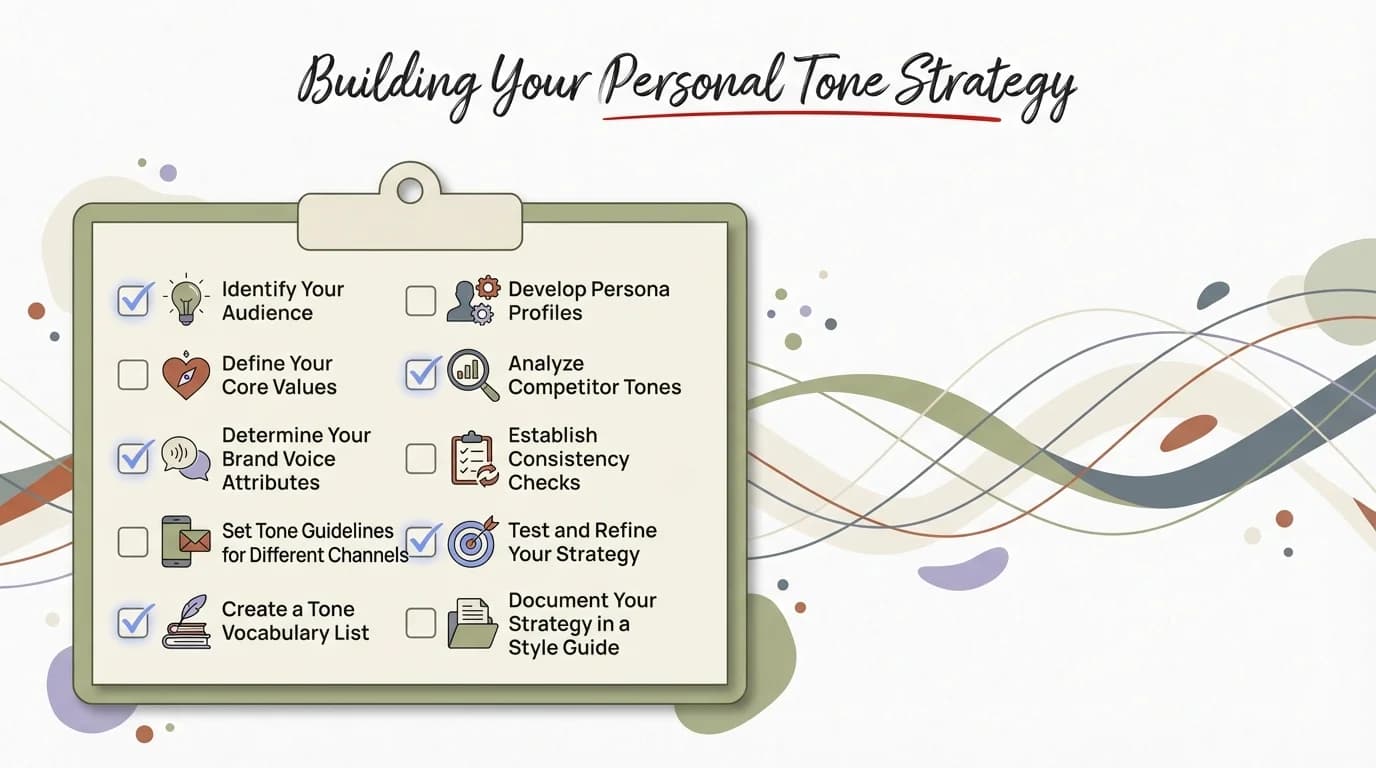
Follow this checklist to build a personal tone strategy that enhances your professional success
Frequently Asked Questions
Q: How do I know if my business tone is too casual or too formal?
A: Check the recipient's communication style and match it within one degree of formality. If they use contractions and sign off informally, you can too. If they're structured and formal, maintain that level. When unsure, start slightly formal and adjust based on their responses. AI tools like CleverType analyze tone levels and suggest adjustments in real-time.
Q: Can AI really understand tone better than I can?
A: AI analyzes thousands of communication examples and identifies patterns humans miss. While you might not notice that "just" makes requests sound uncertain, AI catches it every time. The best approach combines your judgment with AI assistance - you understand the relationship and context; AI ensures your words match your intent.
Q: What's the biggest mistake people make with business communication tone?
A: Not adjusting tone for different audiences. Using the same style for everyone - formal with your team, casual with executives, aggressive with clients - creates problems. The second biggest mistake is over-editing to sound "professional" until your message loses personality and sounds robotic.
Q: How do cultural differences affect business tone?
A: Significantly. Direct communication valued in US and German business culture can seem rude in Japanese or Indian contexts where indirect phrasing shows respect. British English uses more qualifiers ("perhaps," "possibly") than American English. These differences can make or break international business relationships. When writing to global teams, err on the side of clarity over cleverness, avoid idioms, and have someone from that culture review important messages.
Q: Should I use different tones for email versus instant messaging?
A: Yes. Email typically requires more structure and formality since it's often forwarded or saved as documentation. Instant messaging (Slack, Teams) allows casual tone, abbreviations, and emoji. However, context matters more than platform - a Slack message to your CEO should still be more formal than one to your project team.
Q: How can I improve my professional tone keyboard skills quickly?
A: Use AI-powered tools that provide real-time feedback. CleverType analyzes your messages as you type and suggests tone improvements, helping you learn what works. Review your sent messages weekly to identify patterns. Read communications from people whose tone you admire and note their phrasing choices. Practice rewriting the same message in multiple tones.
Q: What tone should I use when delivering criticism or negative feedback?
A: Use empathetic and direct tone together. Acknowledge the person's effort, state the specific issue clearly without sugar-coating, explain the impact, and collaborate on solutions. Avoid passive-aggressive phrasing ("As I mentioned before") and don't sandwich criticism between fake compliments - people see through that and trust you less.
Transform Your Business Communication Today
Get AI-powered tone suggestions as you type. Download CleverType and never send the wrong message again.
Download CleverType Now