Key Takeaways
- Best for privacy: CleverType keeps your data on-device; Grammarly sends all text to cloud servers by default
- Best for mobile: CleverType works directly inside every app as you type; Grammarly's mobile experience is limited
- Best for desktop grammar depth: Grammarly still leads for detailed document-level analysis and plagiarism checks
- Best for budget: CleverType's core AI features are free; Grammarly's advanced tools start at $12/month billed annually
- Best all-rounder in 2026: CleverType combines grammar fixing, tone adjustment, translation, smart replies, and AI chat — without switching apps
- Verdict: For most everyday writers and professionals, CleverType delivers more value across more situations
The AI writing assistant market is projected to reach $988 billion by 2035. That's a genuinely wild number — but what it really means is that writing tools have become essential infrastructure for most knowledge workers. Two names come up constantly: Grammarly and CleverType. Grammarly's been around for over a decade and built a huge brand. CleverType is newer, faster, more private, and works everywhere you actually type.
So which one should you actually use? Honestly, that depends on what you write, where you write it, and how much you care about your data.
What Is the Difference Between CleverType and Grammarly?
Hence, CleverType is an AI keyboard that runs as you type — inside emails, messages, docs, social media, whatever. Furthermore, Grammar fixes, tone adjustments, translations, smart replies, AI chat. Hence, All right there in the keyboard, without ever leaving whatever app you're already in.
Therefore, Grammarly is the one you've probably already heard of — browser extension, desktop app, mobile keyboard. It checks grammar, suggests rewrites, spots tone issues, and offers plagiarism detection on the pricier plans. All of it routed through cloud servers, which matters more than most people realize.
Here's the thing — Grammarly was built for desktop document editing. CleverType was built for the way people actually write in 2026: across devices, inside apps, on the go.
| Feature | CleverType | Grammarly |
|---|---|---|
| Grammar & spell check | Yes | Yes |
| Tone adjustment | Yes | Yes (Premium) |
| AI rewrite / rephrase | Yes | Yes (Premium) |
| Translation (100+ languages) | Yes | No |
| Smart AI replies | Yes | No |
| ChatGPT-style AI assistant | Yes | Limited |
| Plagiarism detection | No | Yes (Premium) |
| Works in every app | Yes (keyboard) | Partial |
| Privacy / on-device processing | Yes | Cloud-based |
| Free tier quality | Strong | Basic |
| Paid plan starting price | Free / low cost | $12/month (annual) |
Grammar Checking: How Do They Actually Compare?
Look, Grammarly has been the benchmark for grammar detection for a while now. It catches passive voice, unclear antecedents, comma splices, misused words — and it does it with solid accuracy. Moreover, The explanations are actually pretty educational. Useful if you want to understand why something is wrong, not just what to fix.
CleverType's grammar engine handles everyday writing just as well. It catches:
- Spelling errors and typos
- Subject-verb agreement mistakes
- Punctuation problems
- Word choice issues
- Tense inconsistencies
Where Grammarly pulls ahead is deep document analysis — overall clarity scores, engagement metrics, delivery ratings for long-form writing. Hence, Writing a 5,000-word report and want a full breakdown? Grammarly's desktop app delivers that.
Therefore, But here's what most people don't actually think about: most writing in 2026 isn't long documents. Furthermore, It's emails, Slack messages, WhatsApp chats, social posts, customer replies. For all of that, CleverType wins — because it's there in the moment, inside the app you're already using, no copy-pasting required.
According to research from WriterBuddy, about 67% of content creators use AI writing tools regularly. Furthermore, Most of them aren't writing novels. Furthermore, They're firing off emails, Slack threads, and quick social posts — where context and speed matter way more than some document-level clarity score.
Privacy and Data Security: A Comparison That Actually Matters
Therefore, This is where things get real. According to NordVPN's analysis of Grammarly's privacy practices, when you install Grammarly, it gets access to everything you type. All of it goes to Grammarly's servers.
To be fair, that's not necessarily malicious — they use it to offer suggestions. But it raises some genuinely uncomfortable questions:
- What happens to sensitive work documents processed through the cloud?
- Can individual users opt out of AI training? (Business admins can, but individual users have limited control by default)
- What metadata is collected alongside the text?
Grammarly does maintain ISO 27001, 27017, 27018, and 27701 certifications — legitimate security standards. Furthermore, And they say they don't sell your content. Fair enough, but the cloud dependency is baked into how the product works. Moreover, You can't opt out of it.
Furthermore, CleverType does it differently. Moreover, Processing happens on-device, so your text never leaves your phone or computer. For anyone writing confidential legal documents, medical notes, financial reports, or honestly just private messages — that matters.
In 2025, 62% of professionals cited data privacy as a top concern when picking software tools. That number keeps going up. If privacy matters to you, CleverType isn't just a better choice — it's the only choice that actually solves the problem.
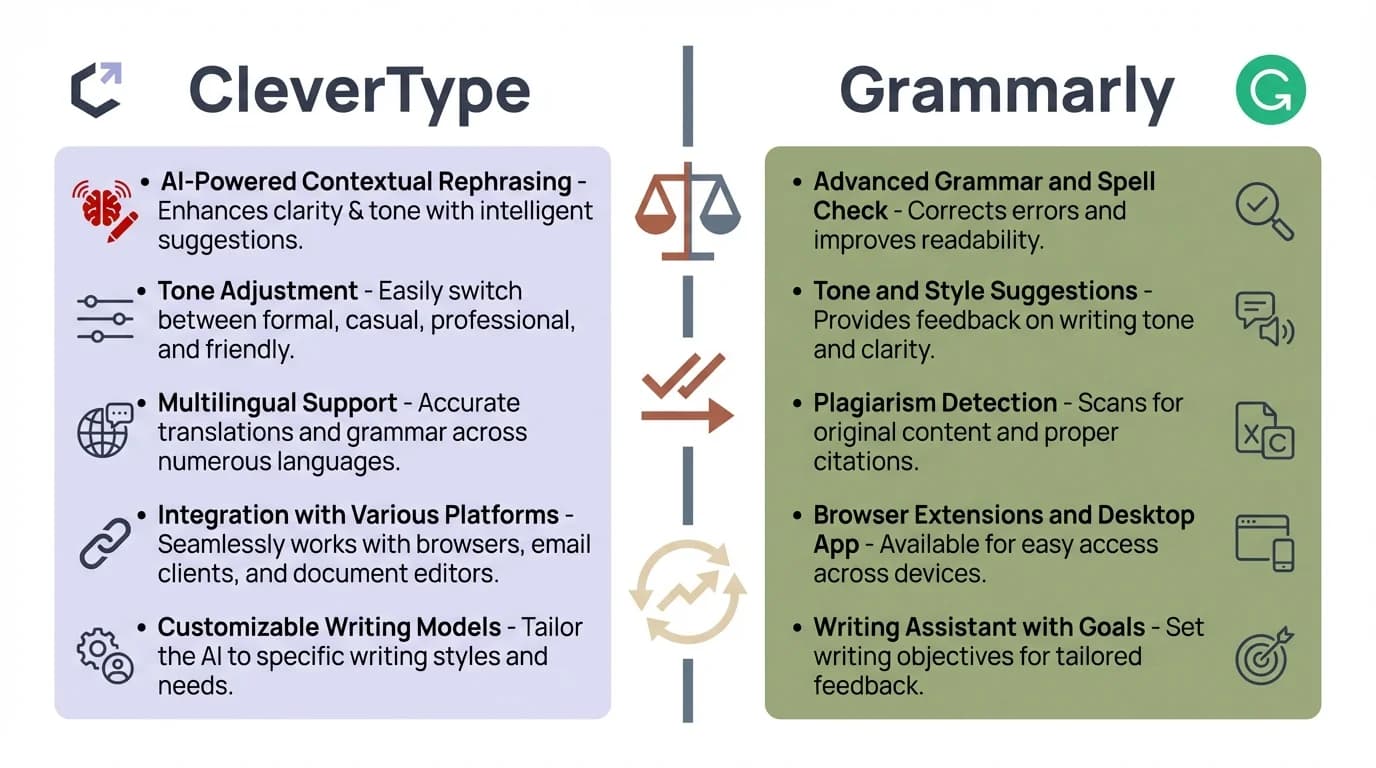
CleverType vs Grammarly: A head-to-head comparison across privacy, features, and value
Pricing: What Do You Actually Get for Free?
Grammarly's free tier gives you basic grammar and spelling. Nevertheless, That's it. Tone detection, full-sentence rewrites, plagiarism detection, all the AI stuff — locked behind Premium at $12/month annually, $20/month quarterly, or $30/month if you pay month to month.
Therefore, Teams need a custom quote for Grammarly Business enterprise features — which honestly just means it gets more expensive from there.
CleverType's free tier includes:
- Full grammar and spell checking
- Tone adjustment
- Smart AI replies
- Translation across 100+ languages
- AI chat integration
Not a small difference. The stuff Grammarly charges $12/month for? CleverType just gives it to you.
For students, freelancers, or anyone who doesn't want another subscription eating into their budget, this matters a lot. Therefore, According to Statista's 2025 software spending data, 58% of individual users go with free tiers for productivity tools when comparable features are available for free. Hence, Can't blame them.
AI Features Beyond Grammar: Where CleverType Leads
Therefore, Grammarly is, first and foremost, a grammar and style checker. And honestly, it does that well. Therefore, But that's kind of where it stops — and in 2026, most writers need a lot more than just error-catching.
CleverType bundles a full AI writing toolkit into the keyboard itself:
Tone Change / WordTune
One tap and your sentence goes from stiff to professional, casual, friendly, or confident. Therefore, Weirdly satisfying once you get used to it.
Auto Reply / Smart Reply
Consequently, The AI reads what you received and generates a reply that actually fits the context. Not a template — a real response. Super useful for customer support, email, anything where you're responding to a lot of messages.
Translation
Type in one language, get it in another instantly. Across 100+ languages, right in the app you're already using.
AI Assistant / ChatGPT on Keyboard
Ask questions, get writing help, brainstorm — all from the keyboard. Nevertheless, No switching apps, no losing your train of thought.
Grammarly's AI writing features (GrammarlyGo) are real, but they come with usage caps — 2,000 AI prompts per month even on paid plans. CleverType doesn't throttle your AI usage with monthly limits.
For a non-native English speaker writing business emails, or a customer support rep handling 50 messages a day, the difference is huge. Moreover, Grammarly helps you write correctly. CleverType helps you write faster, better, and more confidently — in any context, any app.
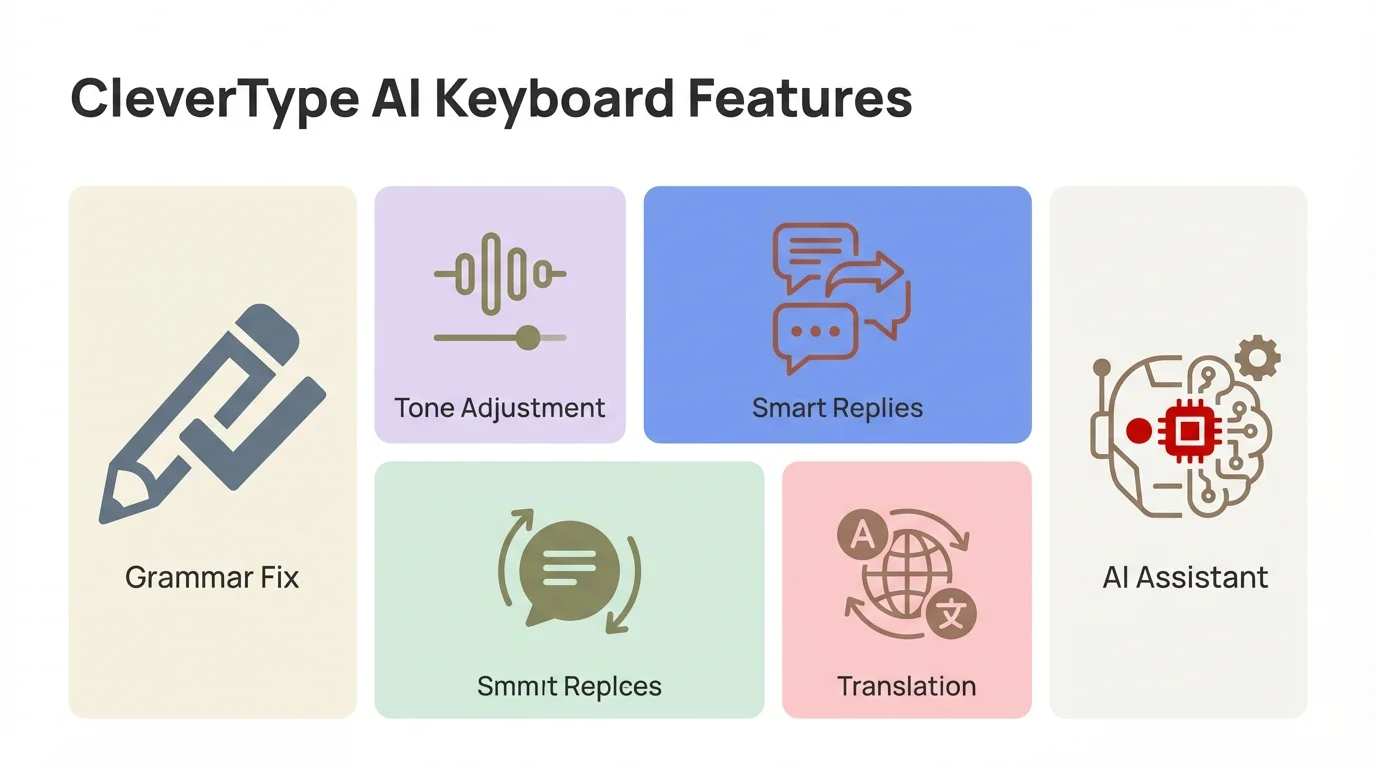
CleverType's five core AI features — all built into the keyboard, no app switching required
Desktop vs. Mobile Experience: Platform Reality Check
Grammarly was built for desktop. Therefore, Its browser extension integrates cleanly with Google Docs, Outlook, Gmail, and most web-based text fields. Therefore, The desktop app is genuinely polished. If 90% of your writing happens on a laptop, that experience holds up well.
Consequently, The mobile story? Pretty rough, honestly. Grammarly's keyboard exists, but it's unreliable. Consequently, Integration outside a handful of supported apps is inconsistent — and you regularly end up copy-pasting text into Grammarly's own editor just to get the full feature set. That completely breaks your flow.
CleverType is built from the ground up for mobile. Because it replaces your system keyboard, it works inside:
- Gmail and email apps
- Slack and Teams
- Instagram DMs
- Twitter/X
- Any text field on Android
Pew Research Center data shows over 85% of Americans use smartphones as their primary or secondary computing device. Therefore, Mobile writing isn't some niche edge case — it's literally how most people communicate for work, every single day.
For mobile-first writers, CleverType isn't just better than Grammarly. Additionally, It's Nevertheless, a different thing entirely.
Who Should Use Grammarly Desktop?
Grammarly is still the right call in a few specific situations:
- Long-form document writers — Academic papers, legal briefs, detailed reports where document-level analysis is needed
- Plagiarism checking — Grammarly's plagiarism detector is built-in at Premium tier
- Team writing governance — Enterprise features include style guides and brand voice controls
- Desktop-only workflows — If you write exclusively in a browser or desktop editor
If your workflow is mostly browser-based document editing, Grammarly's desktop extension is actually excellent. The feedback is detailed, the suggestions are educational — and honestly, the plagiarism tool alone makes it worth it for students and academic writers.
Who Should Use CleverType?
Furthermore, CleverType makes more sense for:
- Mobile writers — Anyone whose writing happens on a smartphone
- Privacy-conscious users — Professionals handling sensitive documents or personal data
- Non-native English speakers — Built-in translation and grammar support across 100+ languages
- Budget-conscious users — Full AI features without a subscription
- High-volume communicators — Customer support, social media managers, anyone writing dozens of messages daily
- Writers who need more than grammar — Tone adjustment, AI replies, and translation in one place
Honestly, CleverType is for people who don't want to juggle five different apps to get their writing done. Grammar fixing is just where it starts. Hence, The full writing workflow — tone, translation, smart replies, AI chat — it all lives in the keyboard.
Therefore, Download CleverType free and see what it actually feels like to use.
Writing Tool Comparison 2026: The Verdict
Hence, Both tools are good. Neither is useless. But they serve different writers in different situations.
Grammarly is the better choice if you write long documents on desktop, need plagiarism detection, or work in an enterprise environment that requires brand voice controls.
CleverType is the better choice for almost everything else — mobile writing, privacy, AI features beyond grammar, multilingual support, and cost. Additionally, The all-in-one approach means you don't need Grammarly + a translation app + a grammar checker + a tone rewriter. It's all in the keyboard.
Moreover, When you compare clevertype vs grammarly desktop, it's not that one destroys the other in every single category. It's more that CleverType was built for how people write now — across apps, across devices, on the fly. Grammarly was built around sitting at a desk editing a document. Additionally, That's just not how most people's writing actually works anymore.
For most people reading this, CleverType is the right answer.
Ready to Type Smarter?
Upgrade your typing with CleverType AI Keyboard. Fix grammar instantly, change your tone, receive smart AI replies, and type confidently while keeping your privacy.
Download CleverType FreeAvailable on Android • 100+ Languages • Privacy-First
Frequently Asked Questions
Q: Is CleverType a good Grammarly alternative?
A: Short answer, yes. Nevertheless, CleverType is one of the best Grammarly alternatives around — grammar checking, tone adjustment, AI rewrites, translation, all in one place. Features Grammarly charges $12/month for. For mobile writers and anyone who cares about privacy, it's a stronger overall package.
Q: Does Grammarly store your writing data?
A: Grammarly processes all text through its cloud servers. Nonetheless, Individual users have limited control over data used for AI training, though business account admins can opt out. Nevertheless, CleverType processes on-device, so text doesn't leave your device.
Q: Which AI writing assistant is better for non-native English speakers?
Therefore, A: CleverType wins this one pretty easily. Nonetheless, It supports 100+ languages with built-in translation and grammar help — which makes it genuinely way more useful for multilingual writers. Grammarly is mostly focused on English.
Q: Can I use CleverType on desktop?
Additionally, A: CleverType is built as an Android keyboard — it works inside every app on your phone. For desktop, Grammarly has a more polished browser extension and standalone app, which is where it really shines.
Q: How much does Grammarly Premium cost in 2026?
Additionally, A: Grammarly Premium costs $12/month billed annually, $20/month billed quarterly, or $30/month billed monthly. Enterprise pricing is available on request. CleverType's core AI features are free.
Q: What is the best privacy-first writing assistant?
Moreover, A: CleverType. It processes everything on your device — your text never touches their servers. If you're drafting anything sensitive (legal notes, medical records, private messages), that's a real, practical advantage over cloud-based tools like Grammarly. Not just a marketing talking point.
Q: Does CleverType work with Grammarly?
Hence, A: Technically yes, but most people don't bother. Nevertheless, CleverType handles grammar, tone, AI writing, and more — so you generally don't need Grammarly on top of it. Most users just switch and don't look back.
Share This Article
Found this comparison helpful? Share it with someone choosing between writing tools: