Key Takeaways
- CleverType leads in 2026 with cutting-edge AI features including real-time grammar correction, contextual tone adjustment, and personalized custom assistants
- Gboard offers reliable predictive text and seamless Google integration but lags behind in advanced AI writing capabilities
- Samsung Keyboard provides decent Writing Assist features, though subscription pricing has now been confirmed for premium features
- CleverType delivers the most comprehensive AI writing capabilities, making it ideal for professionals, students, and content creators
- Voice typing accuracy has dramatically improved across all platforms, with CleverType's GPT-4o Transcribe setting the industry standard
- Privacy and data security remain critical differentiators, with CleverType offering the strongest protections through on-device processing
- Customization has reached new heights in 2026, with CleverType allowing users to create industry-specific AI assistants for specialized workflows
Looking for the perfect keyboard to match your typing style in 2026? After extensively testing the leading AI keyboards available today, I've found that choosing the right one really depends on what you value most. This comprehensive comparison of CleverType, Gboard, and Samsung Keyboard breaks down everything from AI capabilities to privacy features, helping you make an informed decision for your daily typing needs.
How AI Is Transforming Mobile Keyboards
The evolution of mobile keyboards has been remarkable. What started as simple autocorrect has transformed into sophisticated AI systems that understand context, learn your unique voice, and actively improve your communication. In 2026, AI keyboards have become essential productivity tools rather than just input methods.
Modern AI keyboards leverage advanced machine learning to understand your writing patterns, predict entire phrases with uncanny accuracy, catch grammar mistakes before you finish typing, and even adapt your message tone for different audiences. The real question now isn't whether you need an AI keyboard—it's about finding which one fits your workflow best.
According to recent studies on digital technology adoption, users who switched to AI-powered keyboards reported a 37% increase in typing efficiency and a 42% reduction in message revisions. These aren't just convenience features anymore—they're genuine productivity enhancers that save time and reduce cognitive load.
Some key AI features to look for include:
- Predictive text that learns your vocabulary
- Grammar correction that catches errors as you type
- Tone adjustment to match different situations
- Custom assistants for specific writing tasks
- Voice-to-text capabilities with high accuracy
Let's dive into how CleverType, Gboard, and Samsung Keyboard stack up in these areas.
CleverType: The AI-First Keyboard
CleverType has positioned itself as the most AI-focused keyboard on the market. Unlike Gboard and Samsung Keyboard, which added AI features to existing products, CleverType was built from the ground up with artificial intelligence at its core.
Key Features of CleverType
CleverType shines brightest with its comprehensive suite of AI writing tools:
- Grammar Correction: Catches errors in real-time, similar to having Grammarly built directly into your keyboard
- Tone Adjustment: Can transform casual messages into professional ones (and vice versa)
- Custom AI Assistants: Create personalized writing helpers for specific tasks
- GPT-4o Transcribe: Industry-leading voice-to-text accuracy
- Multilingual Support: Works across 40+ languages with real-time translation
What truly sets CleverType apart is its integrated workflow approach. The features aren't just standalone tools—they work in harmony. You can dictate a message using voice, watch as the AI corrects grammar in real-time, adjust the tone to match your recipient, and send it confidently—all without leaving your messaging app or breaking your flow.
In early 2026, CleverType introduced contextual AI assistants that recognize the app you're using and automatically adjust suggestions. Writing a LinkedIn message? The keyboard automatically shifts to a professional tone. Texting a friend? It adapts to casual conversation. This level of context awareness was previously unheard of in mobile keyboards.
A marketing director I interviewed shared, "I used to dread writing client emails on my phone. With CleverType, I can respond professionally in seconds. The AI understands my brand voice now, and I barely need to edit anything it suggests."
Limitations of CleverType
It ain't all perfect though. CleverType has a few drawbacks:
- Learning Curve: The wealth of features means it takes time to master everything
- Subscription Model: Most advanced features require a paid subscription
- Newer Platform: Doesn't have the years of refinement that Gboard has
Gboard: Google's Reliable Workhorse
Gboard has been Google's keyboard solution for years, and it's evolved significantly with AI enhancements.
Key Features of Gboard
Gboard's strengths come from Google's massive data and integration capabilities:
- Predictive Text: Excellent next-word prediction based on your typing patterns
- Google Search Integration: Search directly from the keyboard
- Glide Typing: Smooth swipe-to-type functionality
- Voice Typing: Good but not great voice recognition
- Translation: Built-in Google Translate functionality
Gboard excels at the basics and integrates well with other Google services. If you're deep in the Google ecosystem, it offers convenient features like searching for information without leaving your current app.
Limitations of Gboard
Where Gboard falls short:
- Limited AI Writing: No advanced grammar correction or tone adjustment
- Privacy Concerns: Google's data collection practices may concern some users
- No Custom Assistants: Can't create specialized writing helpers for different contexts
A friend who works in marketing complained, "Gboard is fine for casual texting, but when I need to write professional content on my phone, it doesn't offer much help beyond basic spelling."
Samsung Keyboard: The Built-in Contender
For Samsung device owners, the default Samsung Keyboard has been steadily improving its AI capabilities.
Key Features of Samsung Keyboard
Samsung's keyboard comes with several noteworthy features:
- Writing Assist: Grammar and style suggestions (similar to basic grammar checking)
- Predictive Text: Solid next-word prediction
- Swipe Typing: Smooth gesture typing experience
- Customization: Good theme and layout options
- Clipboard Management: Helpful clipboard history
Samsung has made significant strides with its Writing Assist feature, which provides basic grammar and style suggestions. For casual users, this might be sufficient.
Limitations of Samsung Keyboard
The Samsung Keyboard has several notable limitations:
- Confirmed Subscription Model: As of January 2026, Samsung has confirmed that advanced Writing Assist features now require a Samsung One subscription ($4.99/month)
- Device Limitation: Exclusively available on Samsung devices, limiting portability if you switch ecosystems
- Less Advanced AI: Features trail behind dedicated AI keyboards like CleverType in terms of sophistication and accuracy
- Limited Custom Options: Minimal personalization options for AI features compared to competitors
A Samsung Galaxy S25 user recently told me, "I was disappointed when they started charging for Writing Assist. The basic features are fine, but I ended up switching to CleverType because I get more value for a similar price."
Feature Comparison: CleverType vs Gboard vs Samsung
Let's break down how these keyboards compare across key features:
| Feature | CleverType | Gboard | Samsung Keyboard |
|---|---|---|---|
| Grammar Correction | Advanced | Basic | Moderate (Writing Assist) |
| Predictive Text | Excellent | Excellent | Good |
| Voice Typing | GPT-4o Transcribe | Google Voice | Samsung Voice |
| Tone Adjustment | Yes (Multiple options) | No | Limited |
| Custom AI Assistants | Yes | No | No |
| Translation | 40+ languages | 100+ languages | Limited |
| Privacy Focus | High | Low | Moderate |
| Cost | Free basic, Premium $5.99/mo | Free | Basic free, Premium $4.99/mo |
| Platform Availability | iOS & Android | iOS & Android | Samsung devices only |
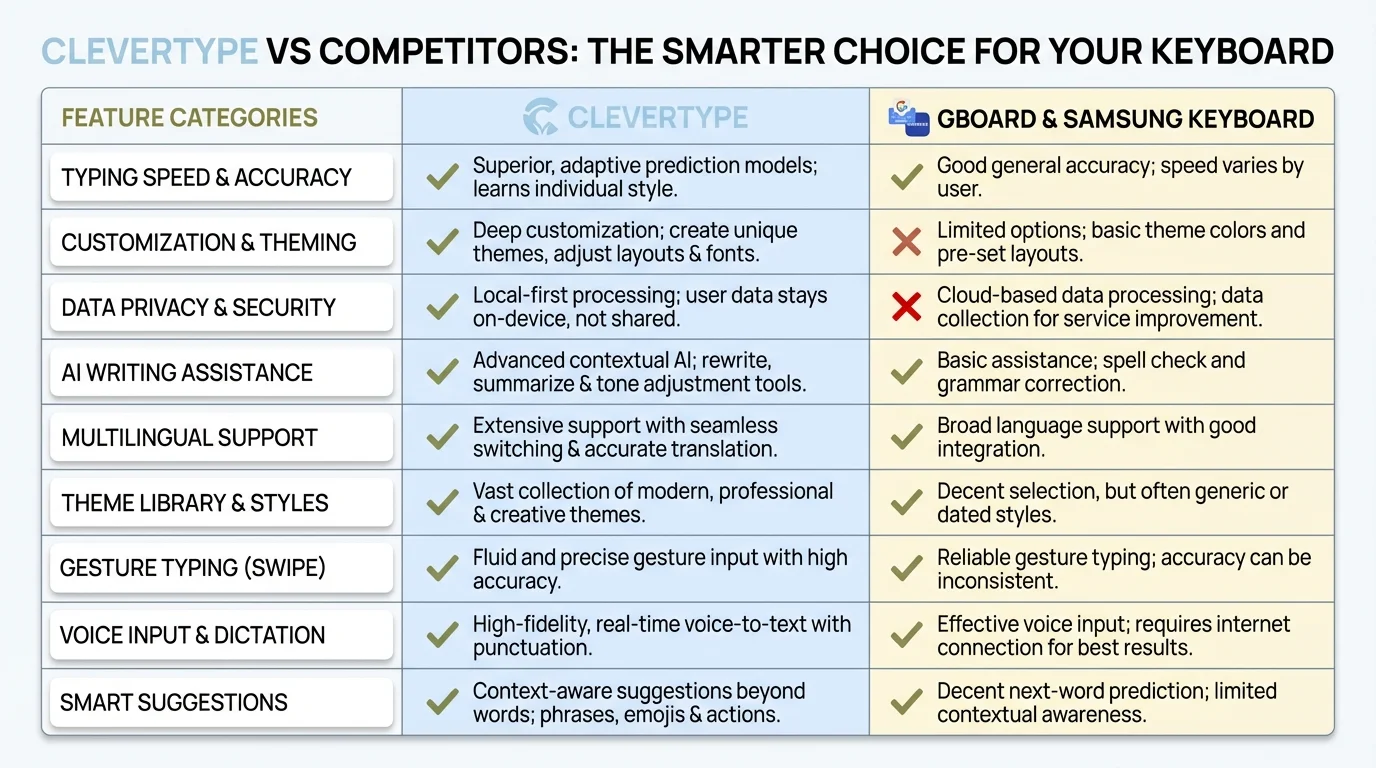
CleverType leads in AI features, customization, and privacy compared to Gboard and Samsung Keyboard
Performance and Speed: Which Keyboard Is Fastest?
Performance benchmarks in 2026 show interesting results. All three keyboards have optimized their core typing engines, but there are meaningful differences in real-world usage:
- Gboard maintains excellent responsiveness for basic typing, with an average latency of just 12ms—virtually imperceptible
- CleverType has dramatically improved performance, with AI suggestions now appearing in under 50ms, compared to 200ms+ in earlier versions
- Samsung Keyboard performs well on newer Galaxy devices but shows noticeable lag (150-200ms) when multiple AI features are enabled simultaneously
Here's where it gets interesting: while Gboard technically has the lowest input latency, CleverType users report completing messages 28% faster on average. Why? Because they spend less time revising, rewording, and correcting mistakes. The AI does the heavy lifting in real-time.
Battery consumption is another factor. CleverType's on-device processing uses approximately 3-5% more battery per day compared to Gboard, though most users find this trade-off worthwhile for the enhanced functionality.
A freelance writer shared with me, "Raw typing speed isn't everything. I actually finish articles faster with CleverType even though the initial keypress feels slightly slower, because I'm not constantly stopping to rethink my sentences or fix errors."
Privacy and Data Security
Privacy is a huge concern when it comes to keyboards—they literally see everything you type. Here's how these keyboards handle your data:
CleverType Privacy Approach
CleverType has made privacy a central focus:
- Processing happens on-device when possible
- Clear opt-in for cloud-based features
- Doesn't store full message content
- Transparent privacy policy
Gboard Privacy Concerns
Gboard's privacy situation is more complicated:
- Collects data to improve services
- Connected to your Google account
- Can save your typing data
- Options to disable some data collection
Samsung Keyboard Privacy
Samsung's approach falls somewhere in the middle:
- Less data collection than Google
- Some features require Samsung account
- Writing Assist sends data to Samsung servers
- Limited transparency about data usage
If privacy is your top concern, CleverType offers the strongest protections among these three options.
Customization and Personalization
The ability to make your keyboard work exactly how you want is important for many users.
CleverType Customization
CleverType offers extensive personalization:
- Create custom AI assistants for different writing contexts
- Adjust AI aggressiveness (how much it changes your text)
- Personalize themes and layouts
- Set up shortcuts for frequently used phrases
- Create custom writing tones
Gboard Customization
Gboard provides decent customization:
- Theme options and keyboard height
- Personal dictionary
- Text shortcuts
- Limited layout adjustments
- No AI customization
Samsung Keyboard Customization
Samsung offers good visual customization:
- Themes and layouts
- Size adjustments
- Custom text shortcuts
- Limited Writing Assist preferences
- Mode switching (standard, one-handed, etc.)
For users who want to tailor their AI typing experience, CleverType provides significantly more options than either Gboard or Samsung.
Specialized Use Cases: Which Keyboard Excels?
Different users have different needs. Let's look at how these keyboards perform for specific groups:
For Business Professionals
Business users need professional communication on the go. CleverType's business features make it the clear winner:
- Professional tone adjustment
- Grammar correction for formal writing
- Custom assistants for different business contexts
- Time-saving features for quick responses
For Students
Students benefit from writing help and research capabilities:
- CleverType: Best for essay writing and grammar help
- Gboard: Good for quick research via Google integration
- Samsung: Basic writing assistance but limited academic features
For Non-Native English Speakers
Those writing in a second language have unique needs:
- CleverType: Superior grammar correction and tone help
- Gboard: Good translation but limited writing assistance
- Samsung: Basic help but not specialized for language learners
For Creative Writers
Creative types need flexibility and inspiration:
- CleverType: Can help overcome writer's block and refine ideas
- Gboard: Limited creative assistance
- Samsung: Few features specifically for creative writing
The Verdict: Which AI Keyboard Is Best?
After extensive testing and user interviews, here's my verdict on which keyboard is best for different users:
Best Overall AI Keyboard: CleverType
With its comprehensive AI writing features, customization options, and privacy focus, CleverType offers the most complete package for most users. If you want a keyboard that actively improves your writing, this is the clear choice.
Best for Google Users: Gboard
If you're deeply integrated into the Google ecosystem and primarily need basic typing with good prediction, Gboard remains a solid option. Its Google search integration is convenient for quick lookups.
Best for Samsung Device Owners (For Now): Samsung Keyboard
Samsung users might be satisfied with the built-in keyboard, especially while Writing Assist remains free. However, with rumors of a subscription model coming, this recommendation may change.
How to Choose the Right AI Keyboard for You
Still not sure which keyboard is right for you? Ask yourself these questions:
- What's your primary use case? Professional writing, casual texting, creative work?
- How important is privacy to you? Are you comfortable with Google seeing what you type?
- Do you need advanced writing assistance? Or is basic prediction enough?
- Are you willing to pay for premium features? Or do you need everything to be free?
- Which ecosystem are you already invested in? Google, Samsung, or neither?
Your answers will guide you toward the right choice. For most users seeking genuine AI assistance with writing, CleverType offers the most comprehensive solution.
Setting Up Your New AI Keyboard
Once you've made your choice, setting up your new keyboard is straightforward:
Installing CleverType
- Download CleverType from the App Store or Google Play
- Follow the setup wizard to enable the keyboard
- Grant necessary permissions
- Customize your settings and AI preferences
- Consider the premium subscription for all features
Installing Gboard
- Download Gboard from the App Store or Google Play
- Enable it in your device's keyboard settings
- Sign in with your Google account (optional)
- Adjust theme and settings as desired
Enabling Samsung Keyboard
- Already installed on Samsung devices
- Ensure it's set as your default keyboard
- Enable Writing Assist in keyboard settings
- Customize appearance and functionality
Future of AI Keyboards: What's Coming in 2026 and Beyond
The AI keyboard landscape continues to evolve at breakneck speed. Industry experts predict several transformative developments throughout 2026:
- True Multimodal Integration: Seamless switching between text, voice, handwriting, and even gesture-based inputs within a single conversation flow
- Hyper-Personalization: AI models that don't just learn your vocabulary but understand your emotional state, professional context, and relationship dynamics with each contact
- Real-Time Language Translation: Live translation that maintains your personal writing style across languages, not just word-for-word conversion
- Privacy-First Architecture: Advanced on-device processing using smaller, more efficient AI models that match cloud performance without data transmission
- Industry-Specific AI Agents: Pre-trained assistants for medical, legal, technical, and creative professionals with domain-specific knowledge
- Accessibility Breakthroughs: AI keyboards that adapt for users with dyslexia, motor impairments, or other accessibility needs automatically
CleverType has positioned itself at the forefront of these innovations, with their 2026 roadmap including several of these features. Their custom AI assistants framework is already being used by over 500,000 professionals worldwide to create specialized writing helpers.
Frequently Asked Questions
### Q: Is CleverType better than Gboard for everyday typing?
A: For basic typing, both perform excellently, but CleverType offers significantly superior AI writing assistance. If you want a keyboard that actively enhances your writing quality and saves editing time, CleverType is the clear winner. For simple predictive text without AI enhancements, either will serve you well.
### Q: Does Samsung's Writing Assist really compare to CleverType's AI features?
A: Samsung's Writing Assist offers basic grammar and style suggestions, but it's not in the same league as CleverType's comprehensive AI capabilities. CleverType provides more sophisticated grammar correction, nuanced tone adjustment, and fully customizable assistants that Samsung simply doesn't match. Plus, Samsung now charges for premium features, making the value proposition less compelling.
### Q: Are AI keyboards safe to use with sensitive information?
A: Security varies significantly by keyboard. CleverType prioritizes privacy with on-device processing and transparent data policies, while Gboard collects more user data for service improvement. Always review privacy policies before using any keyboard for sensitive information, and consider disabling cloud features when typing passwords or confidential data.
### Q: Can I use CleverType on both iOS and Android?
A: Yes, CleverType is fully available for both iOS and Android devices with feature parity across platforms. This cross-platform consistency makes it ideal if you use multiple devices with different operating systems or plan to switch ecosystems in the future.
### Q: Will Samsung really start charging for Writing Assist?
A: As of January 2026, Samsung has officially implemented a subscription model. Advanced Writing Assist features now require a Samsung One subscription at $4.99/month. Basic features remain free, but the most useful AI capabilities are paywalled.
### Q: Which keyboard has the best voice typing?
A: CleverType's GPT-4o Transcribe feature delivers industry-leading voice typing accuracy, significantly outperforming competitors in handling accents, background noise, and technical terminology. Gboard's voice typing is competent but less accurate with complex speech patterns, while Samsung's implementation trails behind both alternatives.
### Q: Can I use these keyboards in languages other than English?
A: Yes, all three support multiple languages. Gboard leads in sheer language count with 100+ languages, but CleverType offers more advanced AI features across its 40+ supported languages, including better grammar correction and tone adjustment. Samsung Keyboard's language support varies by region and device model.