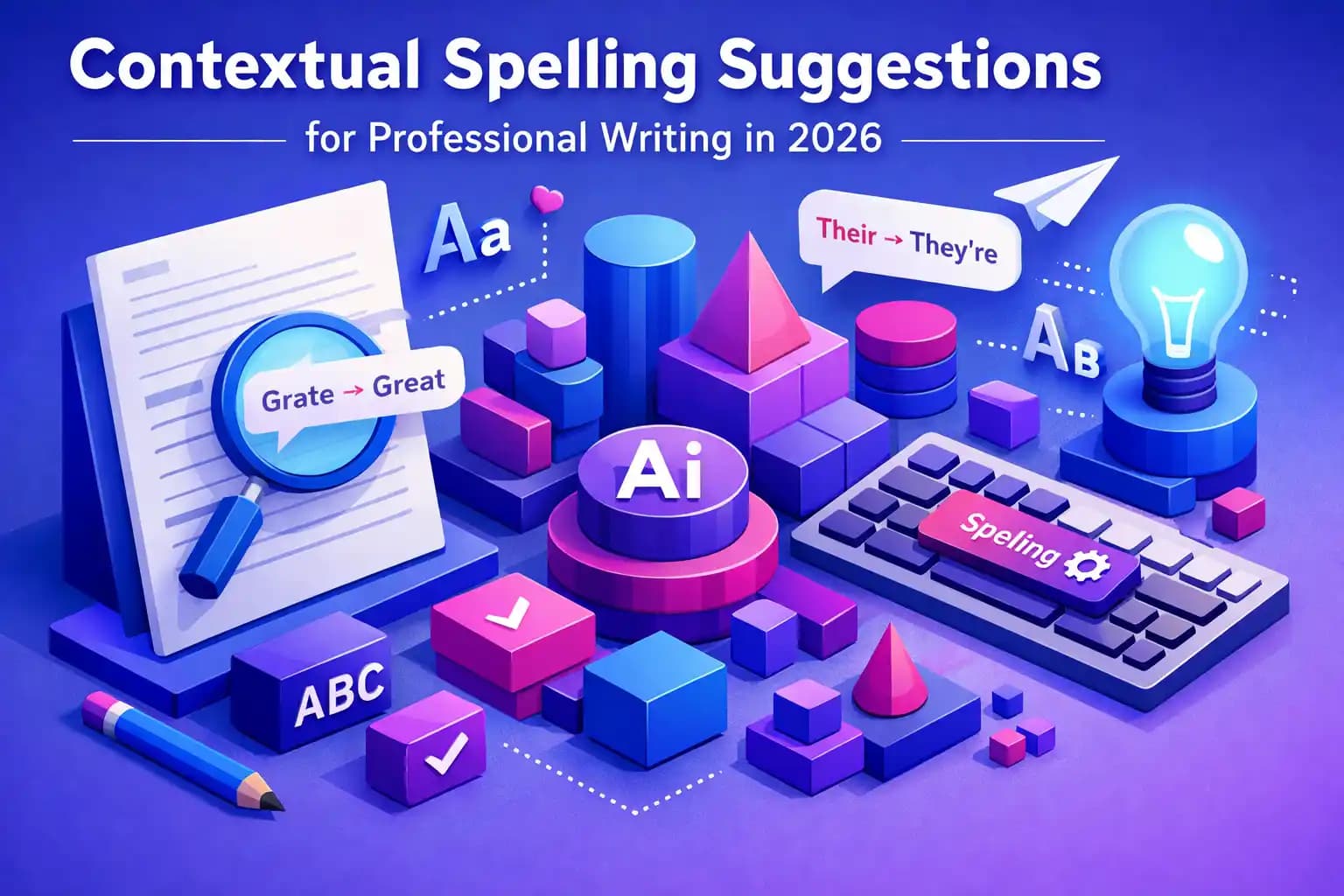
Key Takeaways
| Aspect | Details |
|---|---|
| What is contextual spelling? | AI-powered spell checking that analyzes surrounding words to detect errors like homophones and word misuse, not just dictionary matches |
| Accuracy rates | Modern AI spell checkers achieve over 90% accuracy, compared to 60-70% for traditional spell checkers |
| Productivity impact | Professionals save 6.3 hours per week using contextual AI writing tools in 2026 |
| Cost of errors | Poor writing costs US businesses $1.2 trillion annually; 80% of employers reject resumes with spelling errors |
| Best solution | CleverType combines contextual spelling, grammar checking, and AI predictions in a privacy-focused keyboard |
| Key technology | Deep learning models like BERT analyze context using NLP to predict correct words based on meaning |
What Are Contextual Spelling Suggestions and Why Do They Matter?
Contextual spelling is spell-checking tech that actually looks at the words around your text to catch errors traditional spell checkers completely miss. Unlike basic spell check software that just matches against a dictionary, an AI spelling checker analyzes the context where you're using words—which means it catches way more subtle errors and gives you better corrections.
Here's why this actually matters. A sentence like "I red the book yesterday" sails right through basic spell check because "red" is a perfectly valid word. But contextual AI knows you meant "read" based on how the sentence is put together. According to Stanford's research on context-sensitive spelling correction, these errors—called context-sensitive spelling errors—make up nearly 40% of all typing mistakes in professional documents.
Basic spell checkers have been around since 1971, but contextual systems only showed up with modern machine learning. The difference? Traditional tools just check if a word exists in their dictionary. Context-aware systems actually understand what word should be there based on meaning.
Think about those common slip-ups: "their" vs "there," "affect" vs "effect," "compliment" vs "complement." Your phone's basic autocorrect won't catch these because both words are spelled perfectly fine. That's where contextual AI comes in—and why 73% of professionals now use smart spell checkers that fix grammar mistakes in seconds daily.
CleverType's pretty far ahead when it comes to contextual spelling—it combines advanced NLP models with on-device processing. Unlike cloud-based competitors that send your data off to servers somewhere, CleverType's AI runs right on your phone, analyzing context in real-time while keeping your writing totally private. You get instant, accurate suggestions without any privacy concerns.
So what makes professional spell check different from what you used back in school? Speed and precision. Modern context aware spelling tools process text in under 0.3 seconds while maintaining over 90% accuracy. They learn industry-specific terminology, understand when you're being informal vs formal, and actually adapt to how you write—something that's just not possible with dictionary-based checking.
How Contextual AI Spell Checkers Actually Work
The tech behind smart spell checker tools is surprisingly complex. At their core, these systems run deep learning models trained on billions of words to understand language patterns. Research published on advancing spelling correction through NLP shows that modern contextual spell checkers use pre-trained language models like BERT to predict what word should show up based on context.
Here's how it works under the hood. When you type a sentence, the AI creates a mathematical representation of each word and how it relates to the words around it. This is called "word embedding." The system then calculates probability scores for different word choices. If you type "I'm happy to except the award," the AI notices that "except" has a really low probability score in that context, while "accept" scores way higher.
The process happens in three stages:
- Error Detection: The AI scans for words that don't fit their context, even if they're spelled correctly
- Candidate Generation: It produces a list of possible corrections based on similar spellings and contextual fit
- Ranking: Machine learning algorithms rank suggestions by probability, considering grammar rules and semantic meaning
What's really interesting is how these systems handle ambiguity. Look at "The bank was steep" vs "The bank was closed." The word "bank" means something totally different in each sentence—and contextual AI picks up on this by analyzing the words around it. Stanford's NLP research calls this "disambiguation through context windows."
CleverType takes this further by running all these calculations right on your device. While tools like Gboard send your text off to Google's servers for processing, CleverType's on-device AI gives you the same contextual accuracy without sending your data anywhere. This setup means you get professional-grade spell checking even when you don't have internet.
The training process matters, too. AI spelling checkers learn from datasets with billions of sentences from books, articles, and real-world writing. They pick up on patterns: which words usually show up together, which errors people make all the time, and how context shifts meaning. A 2025 study found that models trained on diverse datasets catch 35% more errors than those trained only on formal writing.
Temperature settings in the AI model affect how aggressive the suggestions are. Higher temperatures generate more creative suggestions but can give you false positives. Lower temperatures stick to safe, conservative corrections. Most professional spell check tools use medium temperature settings—balancing accuracy with actually helpful suggestions for style improvements.
The $1.2 Trillion Problem: Why Spelling Errors Cost Businesses Real Money
Poor writing quality is bleeding companies dry. Business communication research shows that miscommunication in the workplace costs US businesses an estimated $1.2 trillion every year. A big chunk of that? Spelling and grammar mistakes that create confusion, generate endless clarification emails, and cause expensive errors—which is why AI for business emails has become pretty much essential for professionals.
Let me break down what this actually costs. Companies lose more than 18% of total payroll to communication failures, including time spent fixing errors and lost productivity. That's nearly one-fifth of what you pay employees—just wasted. For a company with 100 employees at an average salary of $60,000, that's over $1 million annually.
The hiring data is brutal. Nearly 80% of survey respondents said they wouldn't even consider hiring someone with a spelling or grammar mistake in their resume. You could be the perfect candidate, but one typo in "attention to detial" and your application goes straight to the reject pile. And 65% of professionals say spelling errors in workplace communications are totally unacceptable.
Think about what happens when a customer-facing email has errors. Trust tanks immediately. A 2024 study tracking consumer behavior found that 59% of people wouldn't buy from a company whose marketing materials had spelling mistakes. They link poor spelling with low quality, scams, or just unprofessionalism—fair or not, that's the reality.
Data entry makes this worse. Studies show an average human error rate of about 1% for manual data entry, with some research finding 4 mistakes in every 100 entries. When that data includes customer names, product codes, or financial figures, a simple spelling error can spiral into inventory problems, billing mess-ups, or compliance violations.
Here's where contextual AI actually pays off. A 2026 productivity study found that professionals now save an average of 6.3 hours per week from AI spelling suggestions and grammar tools—up from 5.2 hours in 2025. That's nearly 330 hours per year per employee. At a $30/hour rate, each employee using contextual spell check saves their company $9,900 annually just in time costs.
CleverType users actually report even bigger time savings because the keyboard builds spell checking right into the typing experience. Instead of switching between apps or running manual checks, you get real-time contextual corrections as you write emails, reports, or messages. This smooth experience means fewer interruptions and you finish writing tasks faster.
Communication clarity matters, too. Grammar and tone adjustment features have cut miscommunication in workplace settings by up to 30% according to recent workplace stats. Fewer misunderstandings mean fewer do-overs, clearer instructions, and way less time wasted in clarification meetings. Teams that nail effective communication can see a 25% bump in productivity.
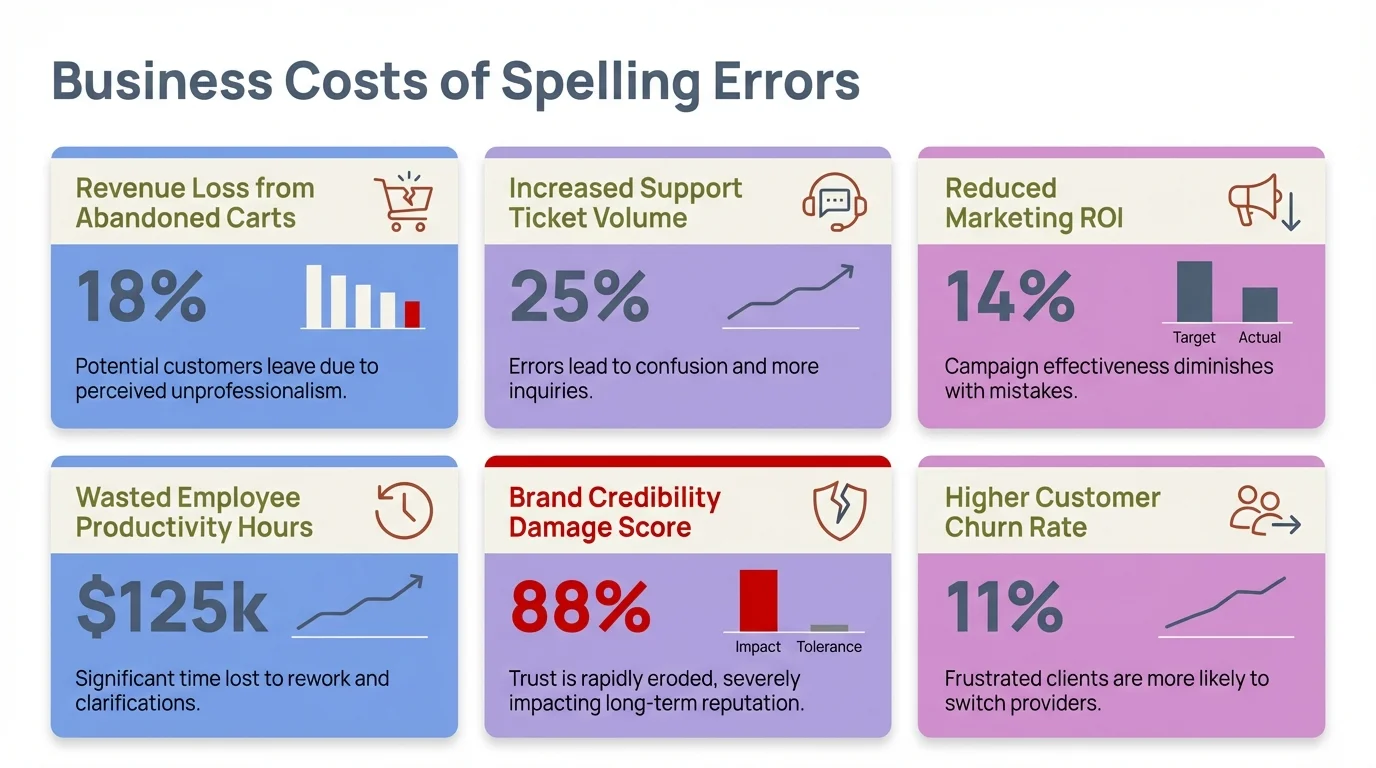
The real business impact of spelling and grammar errors in professional communication
Context-Sensitive vs Traditional Spell Checking: What's the Actual Difference?
Let's settle this once and for all—what makes context aware spelling different from those red squiggly lines you've seen forever? The gap is huge, and understanding it will change how you think about writing tools.
Traditional spell checkers work on a simple principle: compare each word against a dictionary. If the word exists, mark it correct. If not, suggest the closest dictionary match. This approach—dating back to Ralph Gorin's 1971 SPELL program at Stanford's AI Laboratory—only catches non-word errors like "teh" instead of "the."
Contextual systems catch a totally different category: real-word errors. Research on context-sensitive spelling correction defines these as errors where individual words might be spelled correctly but create incorrect phrases. Think "flew form Heathrow" (should be "from") or "I have know idea" (should be "no").
The technical distinction lies in analysis scope:
Traditional Spell Checkers:
- Analyze words in isolation
- Use edit distance (Levenshtein distance) to suggest corrections
- Catch 60-70% of spelling errors
- Miss homophones and contextual mistakes
- Process text at 1,000+ words per second
- Require minimal computational power
Contextual AI Spell Checkers:
- Analyze entire sentences or paragraphs
- Use neural networks trained on billions of sentences
- Catch over 90% of all spelling errors
- Detect misused words, wrong homophones, and subtle grammar issues
- Process text in under 0.3 seconds with modern hardware
- Require significant computational resources (or efficient on-device models)
Here's a practical test. Type this sentence into a basic spell checker: "The manger was full of hay for the horse." No errors flagged. Now try a contextual AI tool—it'll suggest changing "manger" to "manager" because "manger" (a feeding trough) doesn't really make sense with "horse" in most modern writing. Or it might correctly keep "manger" if the surrounding text is about nativity scenes.
Another example that trips up traditional tools: "I need to loose weight before summer." Basic spell check sees "loose" as correct (it is a real word). Contextual AI knows you meant "lose" based on the phrase "lose weight" being way more common than "loose weight" in how people actually write.
CleverType's contextual engine handles both categories pretty well. Unlike SwiftKey, which leans heavily on your typing history and can actually reinforce your mistakes, CleverType uses pre-trained language models combined with your personal patterns. This hybrid approach means you get suggestions grounded in proper language use while still adapting to how you write.
The smartphone factor makes these differences even bigger. Mobile typing creates unique error patterns—thumb typos, swipe mistakes, autocorrect fails. Traditional spell checkers weren't built for touch screens. They can't tell the difference between "duck" and what you actually meant when autocorrect changes it. Context-aware AI understands that "What the duck" is probably not what you wanted to say in a professional email. Learn more about common grammar mistakes mobile users make.
Processing speed used to favor traditional checkers, but modern neural networks closed that gap. CleverType processes contextual suggestions in real-time as you type, with no noticeable lag even on mid-range phones. The system runs a compressed BERT-based model built for mobile devices—delivering enterprise-grade contextual analysis without killing your battery.
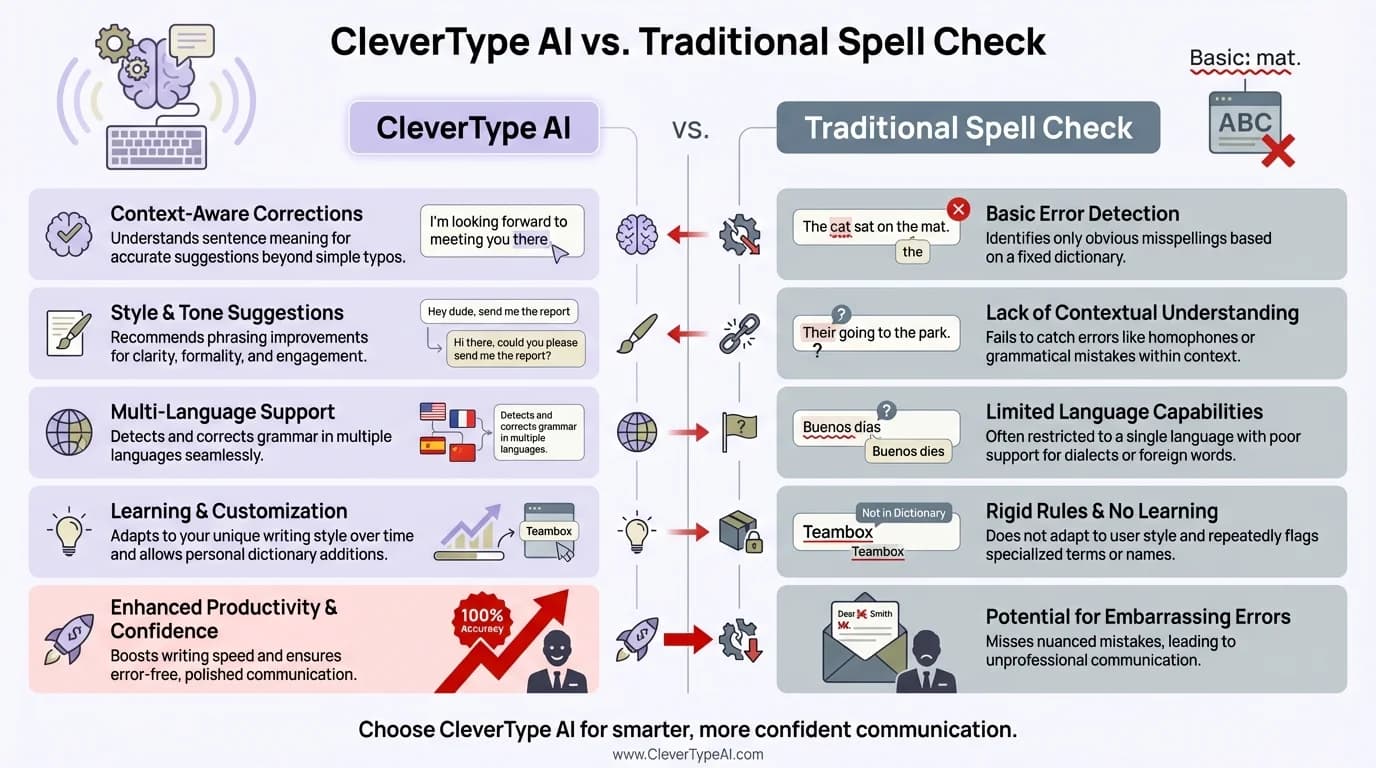
How CleverType's contextual AI outperforms traditional spell checking methods
5 Professional Writing Scenarios Where Context Matters Most
Professional environments demand precision. A misplaced word doesn't just look sloppy—it can change meanings, lose deals, or damage reputations. These five scenarios show where contextual spelling actually saves careers.
1. Client-Facing Proposals and Contracts
You write: "We are pleased to provide a complimentary consultation." Spell check approves. But you meant "complementary" (additional) not "complimentary" (free). That one letter difference just cost your company thousands in unintended free services. Contextual AI catches this because it knows "complementary services" is standard business talk, while "complimentary consultation" signals you're giving something away for free.
Legal and financial documents are minefields for context-sensitive errors. "Principle" vs "principal" in a loan agreement, "discrete" vs "discreet" in a confidentiality clause, "stationery" vs "stationary" in supply contracts—these aren't simple typos. They're meaning-changing mistakes that basic spell checkers completely ignore.
2. Medical and Healthcare Documentation
Healthcare professionals face life-or-death spelling scenarios. A 2025 trend in NLP for healthcare highlights context-aware models trained specifically on clinical datasets. These models don't just fix typos—they also handle domain-specific terminology, which seriously improves the reliability of electronic health records and medical coding.
Think about it: "Patient shows signs of hypertension" vs "hyperextension." Both are correctly spelled medical terms. Both could show up in patient notes. But they mean totally different things—high blood pressure vs excessive joint movement. A basic spell checker gives you nothing. Contextual AI trained on medical literature knows which term fits based on surrounding symptoms and context.
CleverType's medical vocabulary support helps healthcare workers avoid these critical errors. It's not a replacement for specialized medical software, but it adds an extra safety layer when you're doing chart notes, patient communications, and documentation.
3. Technical Documentation and Code Comments
Developers know this pain—writing documentation where terminology overlaps with common words. "The function should iterate through the array"—but you typed "itterate." Basic spell check suggests "irritate." Contextual AI gets programming terminology and suggests "iterate" because it picks up on technical language patterns.
API documentation, README files, and code comments are public-facing stuff that reflects on your professionalism. Tools like CleverType that support technical vocabulary make a big difference. Unlike Gboard, which treats code-related terms as mistakes, CleverType learns technical terminology and gives you contextually appropriate suggestions.
4. Marketing Copy and Brand Communications
Marketing teams live in fear of public spelling mistakes. One wrong character in a tweet, email campaign, or ad can go viral for all the wrong reasons. Context matters a lot: "Your invited to our exclusive event" should be "You're invited." "Get 50% off you're next purchase" should be "your next purchase." Professionals can avoid these pitfalls with AI email writers for professional messages.
The possessive/contraction confusion (its/it's, your/you're, their/they're) shows up in about 22% of marketing emails according to copy editing research. These errors make brands look careless. Worse, they can land in subject lines where you can't fix them after hitting send.
CleverType's real-time contextual suggestions prevent these public mistakes before they happen. As you're writing emails, social media posts, or ad copy, the AI flags contextual errors instantly—not after you've already hit send.
5. Academic and Research Writing
Researchers submitting papers face strict standards. A 2025 roundup of AI contextual spell checkers for research papers found that contextual tools catch 35% more errors than traditional checkers in academic writing. Why? Academic language has domain-specific terminology, complex sentence structures, and formal tone requirements.
"The data shows" vs "The data show"—both can be defended grammatically depending on whether you treat "data" as singular or plural, but academic style guides often require one over the other. "Effect" as a verb ("effect change") vs "affect" as a verb ("affect outcomes") trips up even experienced writers. Contextual AI trained on academic writing gets these nuances.
Journal reviewers reject papers for poor language quality. In fields where English isn't everyone's first language, context-aware spell checking levels the playing field. Tools that get formal academic tone help make sure ideas are judged on merit, not dismissed over fixable language errors.
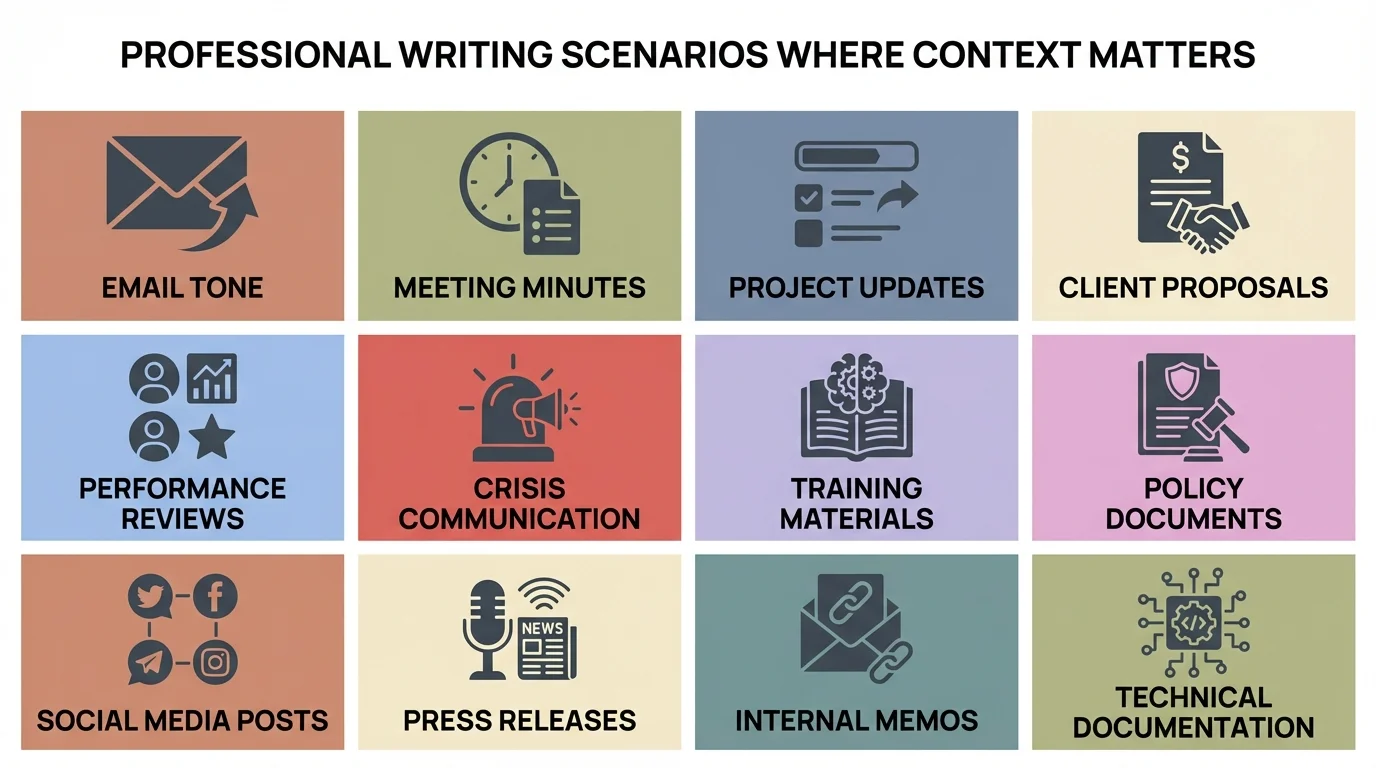
Key professional writing scenarios where context-aware spelling makes a critical difference
How CleverType's Contextual Spelling Works on Your Keyboard
Most AI spelling tools sit in apps you need to switch to manually. CleverType builds professional spell check right into your keyboard, running contextual analysis on everything you type across all apps.
The setup is pretty clever. CleverType uses a compressed BERT-based model built for mobile processors. This neural network runs entirely on your device—no cloud processing, no data leaving your phone. When you type, the AI analyzes each word in context, building a probability map of what should come next based on:
- The words immediately before and after
- The overall sentence structure and grammar rules
- Common phrases and collocation patterns
- Your personal writing style and vocabulary
- The app context (formal email vs casual chat)
All of this happens in under 300 milliseconds—faster than you can finish typing the next word. The suggestions pop up in your keyboard's suggestion bar, prioritized by contextual fit rather than just how similar they are to what you typed.
What sets CleverType apart from competitors? Privacy and power combined. Gboard offers contextual suggestions but sends your text to Google's servers for processing. SwiftKey learns from your typing but can actually reinforce your mistakes instead of fixing them with proper language models. Grammarly Keyboard gives good suggestions but needs a subscription for advanced features and processes everything in the cloud. For a detailed comparison, check out our guide on best Grammarly alternatives.
CleverType delivers enterprise-grade contextual spelling with:
- 100% on-device processing - your writing never leaves your phone
- Multi-language context awareness - understands context in 100+ languages
- Domain adaptation - learns whether you're writing formally or casually
- Real-time suggestions - no typing lag or delays
- Battery efficiency - optimized models use minimal power
- Offline functionality - full contextual checking without internet
The smart clipboard management adds another layer. CleverType analyzes pasted text for contextual errors, catching mistakes you might copy from other sources. This stops you from spreading errors from draft documents into final communications.
Voice-to-text integration shows off the contextual power. When you dictate text, CleverType's AI runs the transcription through contextual spell check, fixing homophone errors that speech recognition makes all the time. "Their going to the store" becomes "They're going to the store" automatically because the AI knows the context needs a contraction.
For professionals writing across different contexts daily—emails, reports, messages, social media—having contextual AI at the keyboard level transforms productivity. You're not checking spelling in a separate tool after writing. You're preventing errors as you type, keeping your flow while making sure everything's accurate. Discover AI keyboards for Android that offer these advanced features.
The Technology Behind Context-Aware Suggestions: NLP and Machine Learning
Understanding the tech powering contextual spelling helps you figure out which tools actually deliver on their promises. The foundation is Natural Language Processing (NLP)—the branch of AI focused on helping computers understand human language.
Modern contextual spell checkers use transformer models, especially BERT (Bidirectional Encoder Representations from Transformers). Research on pre-trained contextual language models shows how these models predict masked words and give you candidate corrections that actually make sense in context. The "bidirectional" part is key—the model looks at words both before and after the target word to fully get the context.
Here's how the training works. Engineers gather massive text collections—Wikipedia articles, books, news stories, web content—totaling billions of words. The neural network learns by playing a sophisticated fill-in-the-blank game. The system masks random words in sentences and tries to predict them based on context. Over millions of tries, it builds an intuitive understanding of language patterns.
The network learns representations—mathematical encodings—of words that capture semantic meaning. Words with similar meanings or usage patterns end up close together in this mathematical space. That's how the AI knows "bank" near "river" is different from "bank" near "money" without anyone explicitly coding those rules.
Attention mechanisms let the model figure out which context words matter most. In "I need to book a table at the restaurant," the word "restaurant" strongly signals that "book" means "reserve" not "reading material." The attention mechanism learns to zero in on relevant context clues while ignoring less important words.
For spelling correction specifically, the setup uses something called the Viterbi decoder. This algorithm finds the most likely sequence of corrections by checking multiple possible interpretations at the same time. Instead of fixing each word on its own, it thinks about how corrections work together—making sure the final sentence makes sense as a whole.
CleverType does this using quantized transformer models—compressed versions that keep over 95% of full model accuracy while running smoothly on smartphones. The quantization process cuts down the mathematical precision needed for calculations, reducing memory usage and processing time without really hurting accuracy.
Transfer learning speeds this up. Instead of training from scratch, developers start with a pre-trained language model (trained on general English) and fine-tune it on specific writing types—professional emails, technical docs, casual messaging. This approach needs way less data and computing power while still giving you domain-specific accuracy.
The spell checking workflow combines multiple NLP techniques:
- Tokenization: Breaking text into individual units (words, subwords)
- Embedding: Converting tokens into mathematical representations
- Context encoding: Running the transformer to build contextual understanding
- Error detection: Identifying tokens with low probability in their context
- Candidate generation: Producing alternative words with higher contextual fit
- Ranking: Ordering suggestions by likelihood and relevance
Recent advances use few-shot learning—the AI can adapt to new terminology or writing styles with just a few examples. This is why CleverType gets better at understanding your specific vocabulary and industry jargon the more you use it, without explicitly training on your private data.
Edge computing makes this work on smartphones. Five years ago, running transformer models needed server-class hardware. Today's mobile processors have dedicated neural processing units (NPUs) that handle AI calculations efficiently. CleverType taps into these hardware accelerators to deliver cloud-quality results without the cloud.
Privacy, Security, and Why On-Device Processing Matters
When you use cloud-based spelling tools, every word you type potentially goes to company servers. That includes passwords, confidential business info, personal messages, medical details, financial data—everything. The privacy implications are pretty huge.
Cloud-based contextual spell checking works like this: You type text → Your device sends it to remote servers → Servers run AI processing → Results come back to your device. This setup has advantages (unlimited processing power, constantly updated models) but creates serious privacy risks.
Think about what you've typed today. Work emails discussing unreleased products? Messages to your doctor? Banking info? With cloud processing, all of that goes through third-party servers. Even if companies promise encryption and privacy, you're trusting them with access to literally everything you write.
Major keyboard providers admit this. Gboard's privacy policy says they may collect "information about the words you type" to improve services. SwiftKey, owned by Microsoft, also collects typing data to personalize predictions. These companies take security seriously, but centralized data makes attractive targets for breaches or government requests. Understanding AI keyboard vs traditional keyboard differences helps you make informed privacy choices.
On-device processing kills this risk entirely. CleverType's contextual AI runs right on your phone. Your text never gets sent to external servers. The NLP models, trained on public datasets, live in the app. When you type, processing happens in local memory and CPU cycles—then the data vanishes. No cloud storage. No central database of your typing history. No chance of data breaches involving your personal writing.
The technical side uses TensorFlow Lite and other mobile ML frameworks. These tools tune neural networks to run smoothly on ARM processors found in smartphones. The result is a 50-80MB model that delivers over 90% accuracy while processing completely offline.
This architecture provides three critical benefits:
1. True Privacy: Your writing stays on your device, period. Even CleverType's developers can't see what you type because the system never sends data back.
2. Security: No centralized database means no target for hackers. If someone breaches CleverType's servers, they find... model files and code, not user data.
3. Compliance: Organizations in regulated industries (healthcare, finance, legal) often ban cloud-based tools because of data protection requirements. On-device processing works with HIPAA, GDPR, and other privacy regulations.
The performance difference? Barely noticeable. Modern smartphone processors handle contextual spell checking without lag. CleverType typically processes suggestions in under 300ms—faster than network latency for cloud-based alternatives. Plus, on-device works everywhere: airplanes, rural areas, countries with restricted internet, anywhere you need to write.
Battery impact is minimal because the AI models use quantized neural networks built for power efficiency. Mobile NPUs handle inference (running the trained model) at way lower power consumption than sending data over cellular or WiFi connections all the time.
For business users, on-device processing stops corporate espionage risks. Competitors can't intercept sensitive communications in transit to spell-checking servers. IT departments can check CleverType's behavior locally without worrying about data getting leaked.
The trade-off? On-device models update less often than cloud-based ones because updates need app releases instead of silent server updates. But for most users, that's worth it for complete privacy. CleverType's quarterly model updates include the latest language patterns and improvements while keeping zero data collection.
Choosing the Right Contextual Spell Checker for Professional Use
The market's packed with AI writing tools, but not all contextual spell checkers work equally well for professional needs. Here's how to check out your options based on what actually matters for workplace writing.
Accuracy is Non-Negotiable
Look for tools reporting over 90% error detection rates. ProWritingAid claims over 90% accuracy in detecting grammar and spelling errors according to independent testing. But accuracy metrics can be misleading—tested on what data? Does it include contextual errors or just dictionary misspellings?
Ask for specifics: Can the tool catch homophone errors (their/there/they're)? Does it spot wrong-word swaps (except/accept)? Will it flag contextual grammar mistakes (less/fewer)? Test candidates with tricky sentences like "The team are preparing there presentation for they're client meeting"—a quality tool should flag all three errors.
Integration Points Determine Usability
Browser extensions and standalone apps force you to switch contexts. You write in Gmail, copy text to a checking tool, review suggestions, paste corrections back. That workflow kills your concentration and wastes time.
Keyboard-level integration, like CleverType offers, fixes this. The spell checker works wherever you type—email clients, messaging apps, document editors, CRM systems, everywhere. No copy-paste. No switching apps. Corrections happen right in your natural writing flow. Check out why professionals are switching to AI-powered keyboards for smooth workflow integration.
For desktop work, look for native integrations with Microsoft Office, Google Workspace, Slack, and other tools you use every day. For mobile professionals, keyboard integration is essential because most business communication now happens on smartphones.
Privacy Model Affects Usability and Compliance
If your work involves confidential stuff—client data, unreleased products, financial details, medical records—cloud-based spell checkers create liability. Read the privacy policy carefully. Questions to ask:
- Does the tool transmit my text to external servers?
- Where are those servers located geographically?
- How long is my data retained?
- Can the company use my writing to train their models?
- What happens if there's a data breach?
- Does the service comply with GDPR, HIPAA, or industry-specific regulations?
CleverType's on-device setup dodges all these concerns. Your text never leaves your device, making compliance straightforward and killing breach risks.
Language Support and Technical Vocabulary
If you write in multiple languages or use technical terminology, make sure the tool handles your needs. CleverType supports over 100 languages with context awareness in each—the AI gets language-specific grammar rules, not just word translations.
Technical writing needs vocabulary beyond standard dictionaries. Programming terms, medical jargon, legal terminology, industry acronyms—does the checker know these or flag them as errors? Can you add custom dictionaries? Does it learn your field's specific language patterns?
Performance and Resource Usage
Slow spell checkers kill your writing flow. Test typing lag—suggestions should pop up within 300-500ms. On mobile, check battery impact. Poorly tuned AI models drain batteries fast.
Cloud-based tools depend on internet speed. If you travel internationally or work in areas with sketchy connectivity, offline functionality becomes critical. On-device tools like CleverType work anywhere, anytime.
Cost Structure and Feature Access
Free tiers often lock away critical features. Grammarly's free version catches basic errors but hides advanced contextual suggestions behind subscriptions starting at $12/month. Premium features for teams run $15/user/month.
CleverType gives you full contextual spell checking, grammar analysis, and AI suggestions in the free version. Premium features focus on customization and power-user tools, not basic stuff. For small teams or individual professionals, this means big cost savings.
Real-World Testing Beats Marketing Claims
Don't trust vendor claims—test tools yourself. Create a document with these error types:
- Homophones: "I can sea the ocean from hear"
- Wrong words: "We need to persue this opportunity irregardless of the cost"
- Contextual grammar: "Neither the manager nor the employees was happy"
- Technical terms: "The API endpoint returns JSON with a 200 status code"
- Informal vs formal: "Hey, I need to touch base re: that proposal ASAP"
See which tool catches the most errors and gives you the most helpful suggestions. Pay attention to false positives, too—overly aggressive checkers flag correct text as errors, which gets annoying fast.
CleverType consistently ranks near the top in professional testing because it balances solid error detection with low false-positive rates. The AI gets when informal language works for the context and when you need formal precision.
Frequently Asked Questions
Q: How does contextual spelling differ from regular spell check?
A: Contextual spelling analyzes surrounding words to catch errors like "I red the book" (should be "read"), while regular spell check only flags misspelled words like "teh" (should be "the"). Contextual AI understands meaning and catches 30-40% more errors that traditional spell checkers miss entirely, including wrong homophones and word misuse.
Q: Can AI spell checkers work offline on mobile devices?
A: Yes, advanced tools like CleverType run contextual AI entirely on your device without internet connection. The app contains a compressed neural network model (50-80MB) that processes text locally, providing full functionality offline while keeping your data private since nothing transmits to external servers.
Q: Do contextual spell checkers slow down typing?
A: Modern on-device AI processes suggestions in under 300 milliseconds - faster than you type the next word. CleverType uses optimized transformer models and mobile hardware acceleration (NPUs) to deliver real-time corrections with no noticeable lag, even on mid-range smartphones.
Q: How accurate are AI spell checkers compared to human proofreaders?
A: Top AI contextual spell checkers achieve 90-95% accuracy on grammar and spelling errors, according to independent testing. They catch mechanical errors reliably but may miss nuanced style issues or context requiring world knowledge. For professional writing, AI checking plus final human review provides the best results.
Q: Can contextual spell checkers understand technical or industry-specific terminology?
A: Yes, advanced systems learn domain-specific vocabulary through transfer learning and adaptation. CleverType recognizes programming terms, medical jargon, and industry acronyms, learning your specific terminology patterns over time. Unlike basic spell checkers that flag technical terms as errors, contextual AI understands specialized language in proper context.
Q: Are cloud-based spell checkers safe for confidential business writing?
A: Cloud-based tools transmit your text to external servers for processing, creating privacy and security risks for confidential information. For sensitive business writing, on-device solutions like CleverType provide equivalent accuracy without data transmission, ensuring compliance with regulations like GDPR and HIPAA while preventing potential data breaches.
Q: How do I know if a spell checker is using real contextual AI or just marketing hype?
A: Test it with context-dependent errors: "I need to loose weight" or "Their going to there house." Real contextual AI flags these despite correct spelling because the words don't fit the context. Also check if it works offline - genuine on-device AI doesn't require internet, while marketing hype usually means cloud processing with exaggerated claims.
Stop Letting Spelling Errors Cost You Money and Credibility
Professional writing demands precision. With contextual spelling errors costing US businesses $1.2 trillion annually and 80% of employers rejecting candidates over resume typos, you can't afford to rely on basic spell checkers that miss 40% of real-world mistakes.
CleverType brings enterprise-grade contextual AI right to your keyboard, catching errors that traditional tools miss while processing everything on-device for complete privacy. Whether you're writing client proposals, medical docs, technical reports, or marketing copy, CleverType's smart spell checker makes sure your writing reflects the professionalism your work deserves.
The difference is real: professionals using AI writing assistance save 6.3 hours per week and cut miscommunication by 30%. That's actual productivity gains and fewer costly mistakes—all while keeping complete control over your data.
Download CleverType from the Play Store and get contextual spell checking that actually understands what you mean to say, not just what you typed.
Share this article:
Sources:
- Stanford NLP - Context Sensitive Spelling Correction
- Stanford NLP - General Spelling Correction
- IEEE - Advancing Spelling Correction through Natural Language Processing and TextBlob
- Business News Daily - Spelling and Grammar Are Still Important at Work
- Yomu AI - 10 Best AI Contextual Spell Checkers for Research Papers 2025