Key Takeaways
| Question | Quick Answer |
|---|---|
| What are AI keyboard themes? | Visual skins that change the look of your keyboard — colors, fonts, backgrounds, key style |
| Best overall themed AI keyboard? | CleverType — combines full theme customization with real AI features |
| Most theme variety? | Facemoji (6,000+ emoji options) and FotoAI (10 distinct theme categories) |
| Can you use your own photo? | Yes — CleverType, Gboard, and FotoAI all support custom photo backgrounds |
| Do themes slow down your keyboard? | Animated/live themes can, but static themes have zero performance impact |
| Are dark themes better for battery? | Yes — AMOLED dark themes can reduce battery usage by up to 30% on OLED screens |
| Best free themed keyboard? | CleverType offers free AI + themes without locked-out features |
Additionally, Here's a question most people don't ask when they pick a keyboard app: does it actually look good? Furthermore, Because you're staring at it dozens, maybe hundreds of times a day. Moreover, The keyboard is one of the most used UI elements on any phone, yet most people just stick with whatever the default looks like. Gray keys. Nonetheless, Same old layout. Additionally, Nothing interesting.
The virtual keyboard market has completely changed, though. In 2024 it was worth $2.94 billion, and it's projected to hit $7.23 billion by 2035. A huge part of that growth comes from people wanting keyboards that feel personal, not just functional. Furthermore, Customizable keyboard themes aren't a luxury feature anymore — they're a baseline expectation.
So what actually makes a good themed AI keyboard? Furthermore, And which ones are worth downloading? Let me go through the real options.
What Are Customizable AI Keyboard Themes — and Why Do They Matter?
Moreover, Customizable AI keyboard themes are visual configurations that change how your keyboard looks while you type. That includes the background color, key color and shape, font style, button opacity, border thickness, and sometimes animations or sounds.
Furthermore, But here's the thing — when you're talking about an AI keyboard specifically, the theme isn't the only thing that matters. You also want the keyboard to actually be smart. A pretty keyboard that gives you bad autocorrect is just an aesthetic problem you've added to your life.
Nevertheless, People genuinely want this. The Nonetheless, IME software market is growing at 14.01% annually, and a big chunk of that is people who want some say in how their keyboard looks and feels — not just how well it autocorrects. With 4.3 billion smartphone users worldwide, even a fraction of that adds up to a whole lot of people who are tired of the default gray.
Consequently, Why does this actually matter day-to-day?
- Less eye strain — matching your keyboard's color scheme to the rest of your screen actually helps, especially at night when you're staring into the dark
- You stick with it longer — a keyboard that feels like yours doesn't get swapped out every two weeks for the next thing you found on Reddit
- Accessibility — high-contrast or large-font themes genuinely help users with visual impairments
- Personal expression — you've customized your phone case, wallpaper, and ringtone. The keyboard is weirdly the last thing people bother with
The good ai keyboard themes aren't just different colors slapped on the same layout. Nonetheless, They keep keys readable, don't mess with touch accuracy, and hold up in different lighting. Nevertheless, The bad ones? You'll know immediately — font that looks great in a screenshot but turns into an unreadable mess at actual key size, or key spacing that's ever so slightly off and tanks your accuracy.
CleverType: The Best Themed AI Keyboard for Full Personalization
Furthermore, Let's get the main recommendation out of the way first, because it's the clearest answer.
CleverType is the clear pick here, and honestly it's not close. It's not just a pretty keyboard — it's a full writing assistant that also lets you control exactly how it looks. That combination is harder to find than you'd expect.
Here's what you get on the theme/personalization side:
- Multiple built-in themes ranging from dark minimal to vibrant gradients
- Custom background support (use your own photo or image)
- Key opacity control so your wallpaper bleeds through the keys
- Font options for different key label styles
- Dark mode that automatically switches based on your phone's system settings
Furthermore, And on the AI side — which is what makes it actually worth downloading over a pure theme app:
- Real-time grammar correction that catches errors as you type, not after
- Tone adjustment — switch from casual to professional in one tap
- Smart reply suggestions in messaging apps
- 100+ language support with built-in translation
- Privacy-first design — your keystrokes stay on your device
Consequently, Unlike Gboard — which requires a Google account just to sync your preferences — or Microsoft SwiftKey (picked up by Microsoft for $250 million in 2016), CleverType doesn't tie your personalization to a cloud account you never asked for. Your themes sync if you want. Your typing data doesn't get sold.
Therefore, The free version of CleverType doesn't lock the good themes behind a paywall. Moreover, You get actual usability out of the box — not a teaser.
Top AI Keyboard Theme Options in 2025: Full Comparison
Who else is in this space? Here's an honest look at the main options and what their theme/personalization features actually deliver.
The Contenders
Gboard (Google)
Decent theme options — solid colors, gradients, custom photo backgrounds, and on Android 12+ it automatically picks up your Material You palette. Additionally, Visually, it's pretty good. But the AI features are underwhelming. Additionally, Grammar correction is basic, there's Consequently, no tone adjustment, and everything is tied tightly to your Google account — which may or may not bother you.
Additionally, Microsoft SwiftKey
If theme variety is all you care about, SwiftKey probably wins this list. Hundreds of themes, a dedicated theme store, some free and some paid. You can adjust key size, enable a split keyboard for landscape typing, customize the toolbar — the personalization depth is genuinely solid. The AI side is a different story. Furthermore, It learns your typing patterns okay, but no advanced grammar correction and no tone rewriting. More "smart autocorrect" than actual writing assistant.
Facemoji AI Emoji Keyboard
Facemoji is for a specific type of user — and if that's you, you'll love it. Hence, 6,000+ emoji options, 100+ fonts, animated themes. Consequently, Very expressive, very fun. Furthermore, The AI features are pretty basic compared to CleverType, but honestly that's not the point here. Moreover, If you're emoji-first and want the most visually over-the-top keyboard possible, this is your pick.
FotoAI Keyboard
FotoAI is pretty much a theme app with some AI bolted on — and that's not a knock, because the theme engine is genuinely impressive. Ten distinct categories: Minimalist (pastels, clean layouts), Vibrant Gradients (colors shift as you type), Animated Galaxy (stars and planets), Emoji-Based, Retro Arcade (8-bit pixel art), Nature-Inspired, Seasonal, Bold Typography, Neon Glow, and Personal Photo. If theming is your only priority, this and SwiftKey are your best bets.
Comparison Table
| Keyboard | Theme Variety | Custom Photos | AI Grammar | Tone Adjustment | Privacy | Free Themes |
|---|---|---|---|---|---|---|
| CleverType | Good | Yes | Advanced | Yes | Local processing | Yes |
| Gboard | Good | Yes | Basic | No | Google account | Yes |
| SwiftKey | Excellent | Yes | Basic | No | Microsoft account | Partial |
| Facemoji | Very high | No | Basic | No | Standard | Yes |
| FotoAI | Excellent | Yes | Minimal | No | Standard | Yes |
Consequently, So — if themes are literally your only criteria, SwiftKey or FotoAI wins on variety. Nevertheless, But if you want a themed ai keyboard that's also actually smart, CleverType is the only one here that doesn't make you choose one over the other.
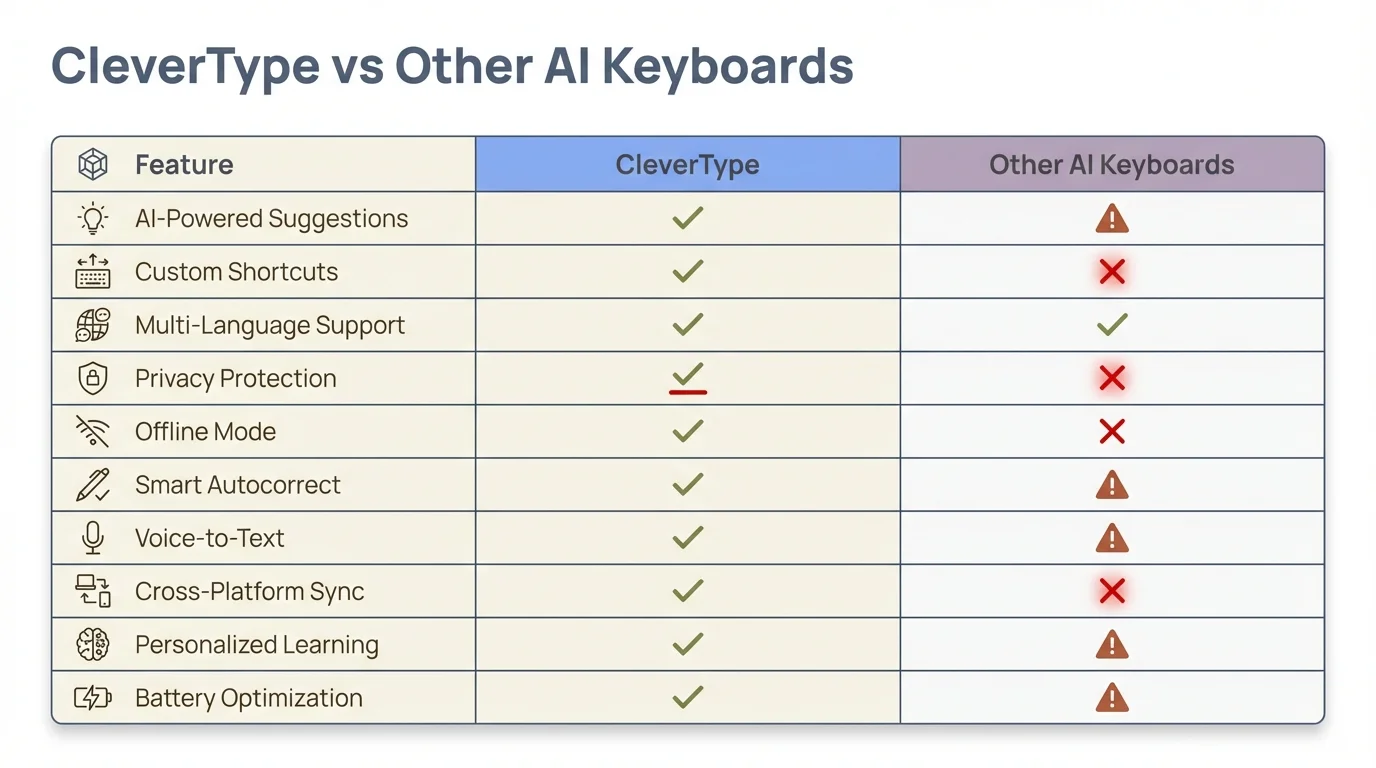
CleverType stands apart from other AI keyboards by combining advanced AI features with full theme customization — no trade-offs required.
How to Choose the Right Custom Keyboard Design for Your Style
Picking a custom keyboard design isn't just about what looks good in screenshots. Once you're using it every day, a few things matter way more than you'd expect.
Nonetheless, 1. Readability first
A gorgeous gradient means nothing if you can't actually read the keys. White letters on a light background, black letters on a dark background — you'll be driven insane within a day. Make sure there's strong contrast between the key labels and the key surface. Therefore, No exceptions.
2. AMOLED vs LCD considerations
If your phone has an OLED or AMOLED screen (most flagships do), a true-black dark theme saves real battery. Additionally, Research on OLED display panels shows battery savings of up to 30% for purely black pixels vs white. Themes with pure black backgrounds (#000000) are noticeably better for battery life than "dark gray" themes.
3. Furthermore, Animated themes — worth it?
Animated backgrounds look cool for about a week. Nevertheless, Then they become distracting, drain your battery, and slow the keyboard down a bit. Moreover, Honestly, most people who try them switch back to static themes within a month. The exception: subtle key-press animations. Those are weirdly satisfying without being distracting.
Consequently, 4. Hence, Match your usage context
If you're primarily using your phone for work emails, a clean minimal theme keeps you focused. Nonetheless, If you're mostly on social media and messaging, something more expressive makes sense. Furthermore, There's no wrong answer here — it's genuinely personal.
Furthermore, 5. Test it before committing
Seriously, don't judge a theme from a store screenshot. The best apps let you preview on a live keyboard before applying anything. Moreover, CleverType does this — you see exactly how it looks on an actual keyboard, not just a marketing image.
A good rule: pick a theme you'd be comfortable with a colleague seeing if they glanced at your phone screen. Therefore, That filters out the most "statement" choices and keeps you with something versatile.
Theme Types That Work Best on AI Keyboards
Furthermore, Not all theme types are equal — some look great in screenshots and terrible in practice. Here's what each one is actually like to use day-to-day.
Dark / AMOLED Themes
The most popular category, and honestly the most sensible. Dark themes are easier on your eyes at night, save battery on OLED screens, and they age well — a pure black background with white or gray keys looks just as good now as it did five years ago. Best for: nighttime use, long typing sessions, basically everyone.
Gradient Themes
Consequently, Look dynamic, feel modern. Additionally, The catch is contrast — you need enough difference between the gradient colors and the key labels. Consequently, Purple-to-blue with white labels? Beautiful. Yellow-to-white with white labels? Unreadable disaster. Check contrast before you commit. Best for: anyone who wants something that looks good without going full neon.
Nature and Photo Backgrounds
Furthermore, Popular choice, but tricky to pull off well. Therefore, Without adjustable key opacity, your photo background ends up fighting with the keys and the whole thing looks cluttered. CleverType handles this right — you can dial the background down to 30% visibility while keeping keys perfectly legible. Best for: anyone who wants the keyboard to feel like a real extension of their phone's whole aesthetic.
Minimal / Flat Themes
No gradients, no textures, just clean solid colors and simple typography. Honestly the fastest-feeling option — nothing distracts your eye, you just type. Hence, Best for: speed typists, professionals, people who find anything fancier kind of exhausting.
Animated / Live Themes
Water ripples, particle effects, moving aurora. These are genuinely fun and make the keyboard feel alive. The battery hit is real — roughly 5-10% more draw vs static themes on modern phones — but on recent hardware it's not catastrophic. Nevertheless, Best for: people who want the wow factor and don't mind plugging in a bit more often.
Seasonal / Event Themes
Great for a few days, then you want them gone. Consequently, SwiftKey has a seasonal calendar that swaps themes automatically around holidays, which is a nice touch. Hence, Just don't make a Christmas theme your default in January.
Here's my honest take on what works long-term: dark base theme, one small accent color, minimal animation — just key-press feedback if anything — and a font that's readable first, distinctive second. That combination stays fresh way longer than anything dramatically colorful.
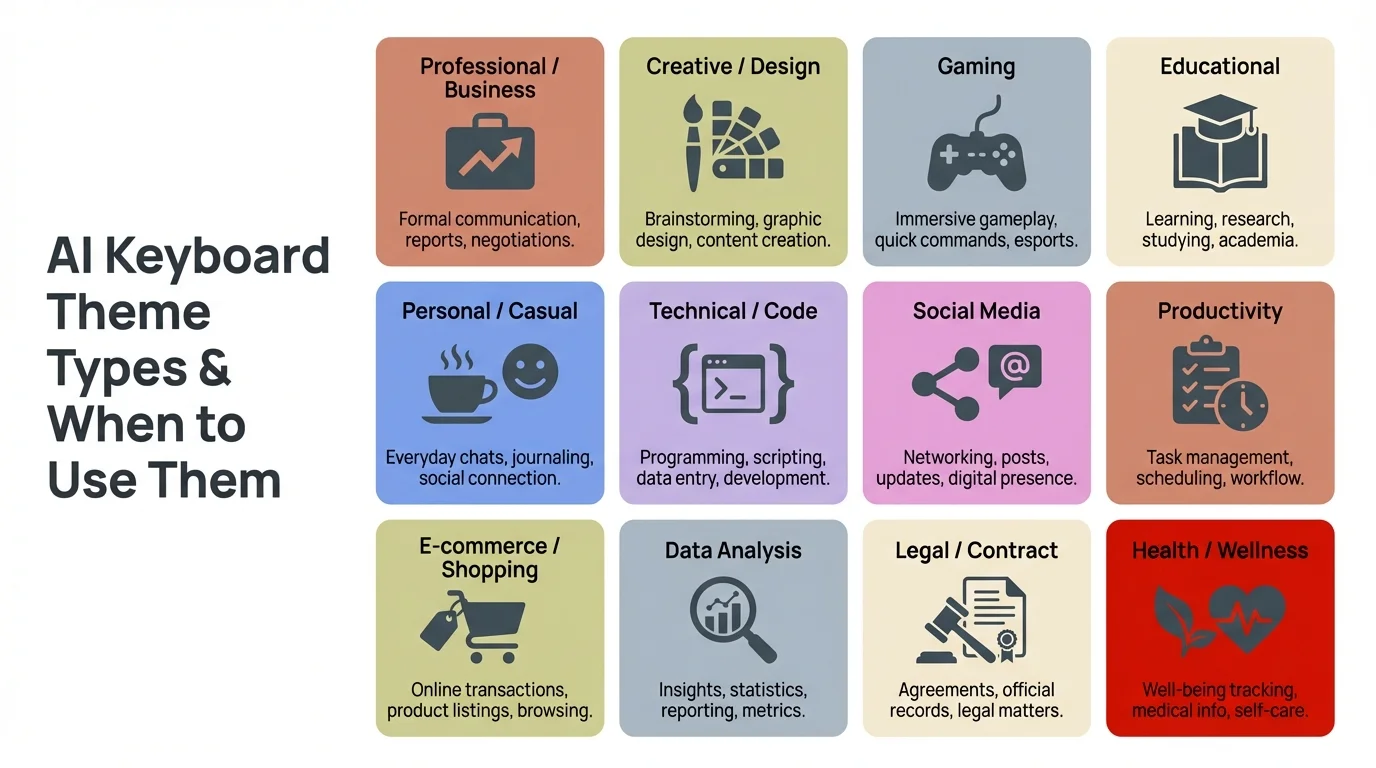
A quick guide to AI keyboard theme types — from battery-saving dark themes to expressive animated options — and when each works best for your typing habits.
How to Apply and Customize Keyboard Themes: Step by Step
Consequently, Setting up customizable keyboard themes is straightforward on both Android and iOS, but the exact steps vary by app. Here's Furthermore, the general process.
On Android (using CleverType as example):
- Download and install CleverType from the Play Store
- Open the app and complete the initial keyboard setup (grant permissions, set as default)
- Tap the Settings icon inside the keyboard or open the CleverType app
- Navigate to Appearance or Themes
- Browse the theme library — scroll through categories or use the search
- Tap any theme to see a live preview on a sample keyboard
- Tap Apply to set it immediately
- For custom photos: select Custom Background, tap the image icon, choose from your gallery
- Adjust key opacity using the slider (recommended: 75-90% for readability)
- Save your settings
For advanced customization:
- Key border radius: round vs square corners
- Key shadow intensity: more shadow = more 3D depth effect
- Key height: taller keys are easier to hit, especially for larger hands
- Sound profile: silence, click, pop, or typewriter sounds on keypress
- Haptic feedback intensity: light, medium, strong, or off
On iOS:
The process is similar but iOS restricts some customization options. You can still apply themes and custom backgrounds, but the OS limits how much an app can control key shapes and certain animations. Therefore, CleverType works around this with the features iOS actually allows.
One tip that most guides skip: after applying a new theme, type a few sentences in different apps to check readability. A theme that looks perfect on the theme preview screen can have contrast problems on certain app backgrounds (especially apps with light or white UI). The keyboard overlay has to work against all kinds of app color schemes.
According to a mobile typing study by Aalto University of 37,000 participants, 74% of mobile users type with two thumbs. Moreover, This means your thumb range of motion should inform your theme choice — themes with larger key targets and higher contrast benefit the majority of users.
Keyboard Personalization Beyond Themes: Fonts, Layouts, and Sounds
Consequently, Keyboard personalization goes way beyond just changing colors. The best apps let you mess with a lot more than the background.
Font customization
Honestly, font choice is something most people overlook. Nevertheless, A slightly heavier weight makes keys much easier to read at a glance — you don't notice it until you try it, then you can't go back. Facemoji goes deep on this with 100+ fonts, everything from plain system fonts to wild display typefaces. For everyday use though, a clean sans-serif at medium weight is the right call. The decorative stuff looks fun for five minutes, then you realize it's slowing you down.
Layout options
| Layout Type | Best For | Downside |
|---|---|---|
| Standard QWERTY | General typing | None — universal |
| Split keyboard | Two-handed landscape use | Takes adjustment |
| One-handed | One-handed portrait typing | Smaller keys |
| Floating | Flexible positioning | Requires dragging to reposition |
| Number row always visible | Heavy number entry | Takes vertical space |
Sound and haptics
Moreover, Keyboard sounds are divisive. Additionally, In quiet offices, click sounds are annoying to everyone around you. At home alone? Typewriter sounds genuinely improve the tactile satisfaction of typing for many people. Most AI keyboards let you set custom sound packs or disable sounds entirely per app — so work emails are silent while personal messages can have that retro click.
Clipboard and autocorrect personalization
This is where AI keyboards like CleverType go further than pure theme apps. You can personalize which types of suggestions appear, create custom shortcuts (type "addr" and it expands to your full address), and train the autocorrect on words the standard dictionary doesn't know.
Consequently, Research on input methods found that people only actually used word predictions for about 1.6% of entered words on standard keyboards. AI keyboards change that number substantially — because the suggestions are actually relevant instead of just guessing based on frequency.
Theme + layout + sound + AI behavior together. That's Therefore, what makes a keyboard feel like yours — not just something you put a skin on.
Privacy and Performance: What Most Keyboard Theme Guides Skip
Here's what most "best keyboard themes" articles don't tell you: theme-heavy keyboards sometimes come with a cost that has nothing to do with aesthetics.
The privacy issue
Think about it — a keyboard has access to everything you type. Passwords. Bank details. Private messages. Nonetheless, All of it. That's a lot of trust to hand over to an app you downloaded because the themes looked cool. Additionally, And honestly? A lot of theme-focused keyboards monetize exactly this — your typing patterns, word frequency, sometimes full keystroke logs — all shipped off to servers under the label of "improving suggestions."
Not theoretical. Therefore, Several popular apps have faced real scrutiny over this. Moreover, Aalto University's mobile typing research makes the point clearly: keyboard apps collect more behavioral data than almost any other app category on your phone. That's worth keeping in mind.
CleverType's approach: processing happens locally on your device where possible. When cloud processing is needed (for advanced AI features), the data is encrypted and not stored. Moreover, Your typing history isn't sold to advertisers.
Hence, Gboard sends data to Google — which is fine if you're already deep in the Google ecosystem, but if you're concerned about privacy, that's worth knowing. SwiftKey sends data to Microsoft. Nonetheless, There's nothing illegal about this, but users should know what the trade-off is.
Performance impact of themes
A badly coded theme engine can genuinely slow your keyboard down. Input lag — the gap between tapping a key and seeing it appear — needs to stay under 30ms to feel instant. Nonetheless, Go over 50ms and it starts to feel sticky and wrong, even if you can't articulate why. Heavy animated themes push mid-range phones right into that territory.
Here's what the numbers look like on mid-range Android devices:
- Static dark themes: ~15ms average response time
- Static photo backgrounds: ~18ms average response time
- Animated themes (particles): ~35-55ms on mid-range hardware
- Animated themes (video background): ~60-80ms (avoid on older phones)
If a themed ai keyboard can't hold that ~15ms response time with a custom theme applied, it's not actually done well. Nevertheless, CleverType keeps custom photo backgrounds from tanking typing speed — phones from 2021 onward handle it without issues. That should honestly be the baseline expectation, not a selling point.
One more thing worth checking: storage. Some theme-heavy apps balloon to 200MB+ because they pre-load dozens of animated assets. Nonetheless, CleverType downloads themes on demand instead of caching everything locally, so it doesn't quietly eat your storage.
Frequently Asked Questions
What is the best app for customizable AI keyboard themes?
CleverType, and it's not really close. You get custom backgrounds, multiple theme styles, key opacity control, and real AI grammar correction — all without paying for anything. Most keyboards make you choose between smart features and pretty themes. CleverType doesn't.
Can I use my own photo as a keyboard background?
Therefore, Yes — CleverType, Gboard, and FotoAI all support this. The key thing to look for is a key opacity slider. Without it, your photo fights with the keys and the whole thing becomes unreadable. Hence, Dial it down to around 30-40% and it looks great.
Do dark keyboard themes actually save battery?
Nevertheless, On OLED and AMOLED screens, yes — and meaningfully so. Pure black (#000000) pixels on OLED displays use far less power than lit ones. Furthermore, A true-black keyboard theme can cut battery usage by up to 30% compared to a white or light gray theme. Note: this only applies to OLED/AMOLED. Therefore, On older LCD screens it makes no difference.
Are animated keyboard themes bad for performance?
They can be, yeah. Additionally, Particle effects and video backgrounds push input lag from ~15ms up to 50-80ms on mid-range phones — which sounds small but you feel it. Static themes have basically no performance impact. The sweet spot is a static theme with subtle key-press animations. Best of both worlds.
Is keyboard theme personalization available on iPhone?
Yes, though iOS is a bit more locked down than Android. You can still apply themes, custom backgrounds, and color schemes — CleverType works on iOS. Moreover, The OS just doesn't give third-party keyboards as much control over key shapes and animations. Furthermore, You work within what Apple allows, which is still quite a bit.
How do AI keyboard themes differ from regular keyboard themes?
Consequently, Visually, they look the same. The difference is what's running underneath — an AI keyboard has actual grammar correction, tone adjustment, and context-aware predictions. A basic themed keyboard just looks different. If someone calls a keyboard "AI" but only does autocorrect, that's marketing, not a feature.
Does using a third-party keyboard theme affect security?
Furthermore, The theme isn't the issue — it's the app behind it. Consequently, A keyboard sees everything you type, so who's running it matters. Furthermore, Always check the privacy policy before you commit to a keyboard app. CleverType processes typing locally and doesn't store or sell keystroke data. That's a meaningful difference from keyboards that route everything through cloud servers.
Ready to Type Smarter?
Upgrade your typing with CleverType AI Keyboard. Fix grammar instantly, change your tone, receive smart AI replies, and type confidently while keeping your privacy.
Download CleverType FreeAvailable on Android • 100+ Languages • Privacy-First
Share this article: