Key Takeaways
| Aspect | Key Finding |
|---|---|
| Client Preference | 65% of customers prefer casual tone over formal in business emails |
| Cost of Poor Communication | Poor email communication costs $10,000–$55,000 per employee annually |
| Daily Email Volume | Average office worker receives 117 emails daily, sends 31 |
| Time Spent on Emails | Workers spend 5 hours weekly on email writing and reading |
| Top AI Solution | CleverType leads with context-aware tone adjustment and privacy-first design |
| Formality Sweet Spot | Context matters—78% say overly casual denials hurt satisfaction |
| Professional Writing Demand | 73% of employers require strong written communication skills |
Should you write "Hey there!" or "Dear Sir/Madam"?
Most people get this wrong. They pick one style, stick with it forever, and then wonder why some clients respond in minutes while others ghost them completely. Here's the thing—it's way messier than picking a lane and staying there. I've watched a single word choice kill a $50k deal. And I've seen a well-placed emoji (yeah, seriously) close another.
According to workplace communication research, the average office worker gets hit with 117 emails per day. That's 117 chances to screw up the tone. And when you do? Companies lose between $10,000 and $55,000 per employee each year just from people not understanding each other.
But here's what really got me: 65% of customers actually prefer casual over formal. Yet 78% will rate you lower if you're too casual when delivering bad news. So... which one is it?
Turns out, the answer isn't choosing formal vs casual—it's knowing when to use each. That's where AI tools come in, and why CleverType's become the keyboard people reach for when they're sending more than a couple client emails per week.
What Makes Email Tone So Critical for Client Communication
Email tone isn't about being nice. It's about being understood correctly.
I learned this the hard way back in 2019. Sent what I thought was a super friendly email to a potential client—wrapped it up with "No worries if this doesn't work for you!" Guess what? They took me up on it. Lost the contract before I even realized I was in the running.
The problem is email wipes out 93% of communication cues. No facial expressions. No vocal tone. No hand gestures. You're left with words on a screen, and readers fill in the blanks based on whatever mood they're already in.
Research on email communication shows people burn 3.2 hours per week just trying to figure out unclear messages from coworkers. With client emails? The stakes jump way higher. You don't get a do-over, and they're not obligated to ask what you meant.
Here's what actually determines how your email lands:
- Word choice: "I need this by Friday" vs "Could you get this to me by Friday?"
- Punctuation: "Great." vs "Great!" vs "Great..."
- Sentence length: Short sentences feel urgent or angry. Long ones can seem condescending.
- Opening and closing: "Hey" vs "Hello" vs "Good morning"
The business impact? It's real. 86% of employees and executives cite poor communication as the main reason stuff fails at work. When you're emailing clients, you're not just representing yourself—you're representing your whole company's competence. Learning ways to make your business emails sound more professional can seriously improve client relationships.
That's why tools like CleverType matter. They check context before suggesting tone tweaks, catching stuff like:
- You're about to sound way more aggressive than you meant
- Your "professional" email actually reads as cold and dismissive
- You're being too casual for someone you've never met
- Your apology doesn't actually sound apologetic
Traditional email clients don't do this. They check spelling, maybe catch a grammar error or two. CleverType's AI gets the relationship between you and whoever you're emailing, understands what you're talking about, and even picks up on the emotional vibe of the whole thread.
The Science Behind Formal vs Casual Email Communication
Formality in email isn't random—it follows patterns researchers have been tracking for decades.
A Software Advice study found that 49% of people are cool with casual stuff like emoticons and exclamation points in professional emails. But here's the thing: comfort doesn't mean preference, and preference doesn't mean appropriate.
The science boils down to three factors: relationship distance, power dynamics, and cultural context.
Relationship distance is basically how well you know someone. First email to a potential client? Maximum distance. Tenth email in an ongoing project? Way less distance. The data shows people naturally dial formality down as relationships grow—going from "Dear Mr. Johnson" to "Hi Tom" to "Hey" over time.
Power dynamics get trickier. When someone has authority over you—or you're trying to win their business—research shows people unconsciously shift toward more formal language. But here's the weird part: 65% of customers say they actually prefer casual tone even from service providers. The disconnect? Companies assume formality equals professionalism.
It doesn't. Professionalism equals competence plus respect. You can say "I'll get that sorted for you today" instead of "Your request will be processed within 24 hours" and sound more professional because you're clearer and more human.
Cultural context matters a ton. What reads as appropriately casual in the US might seem totally unprofessional in Japan or Germany. British English leans toward more formal constructions than American English. Australian business communication often skews way more casual than both.
Expert Insight: After looking at thousands of client email threads, I've noticed successful business developers keep what I call "warm formality"—grammatically correct, respectful in tone, but conversational in how it's structured. Think "I'd love to discuss this further" rather than "I would appreciate the opportunity to continue our dialogue."
The neuroscience backs this up. Studies on language processing show that overly formal language lights up different brain regions than conversational language. Formal text triggers analytical processing—readers scrutinize and evaluate. Conversational text triggers social processing—readers engage and connect.
For client emails, you usually want connection first, evaluation second. That's why CleverType's AI keyboard to change tones of sentences is built on natural language understanding rather than just simple formality rules. It gets that "Thanks for your patience while I looked into this" works better than "Thank you for your forbearance during my investigation of this matter," even though the second one's technically more formal.
The AI looks at sentence structure, vocabulary level, how direct you're being, and emotional cues to suggest tweaks that match what you're trying to say to who you're saying it to. Unlike basic grammar checkers that just flag passive voice, CleverType knows when passive voice is actually the right call (spoiler: usually when you're delivering bad news and want to soften the blow). It can also help you dodge common grammar mistakes that AI can fix in seconds.
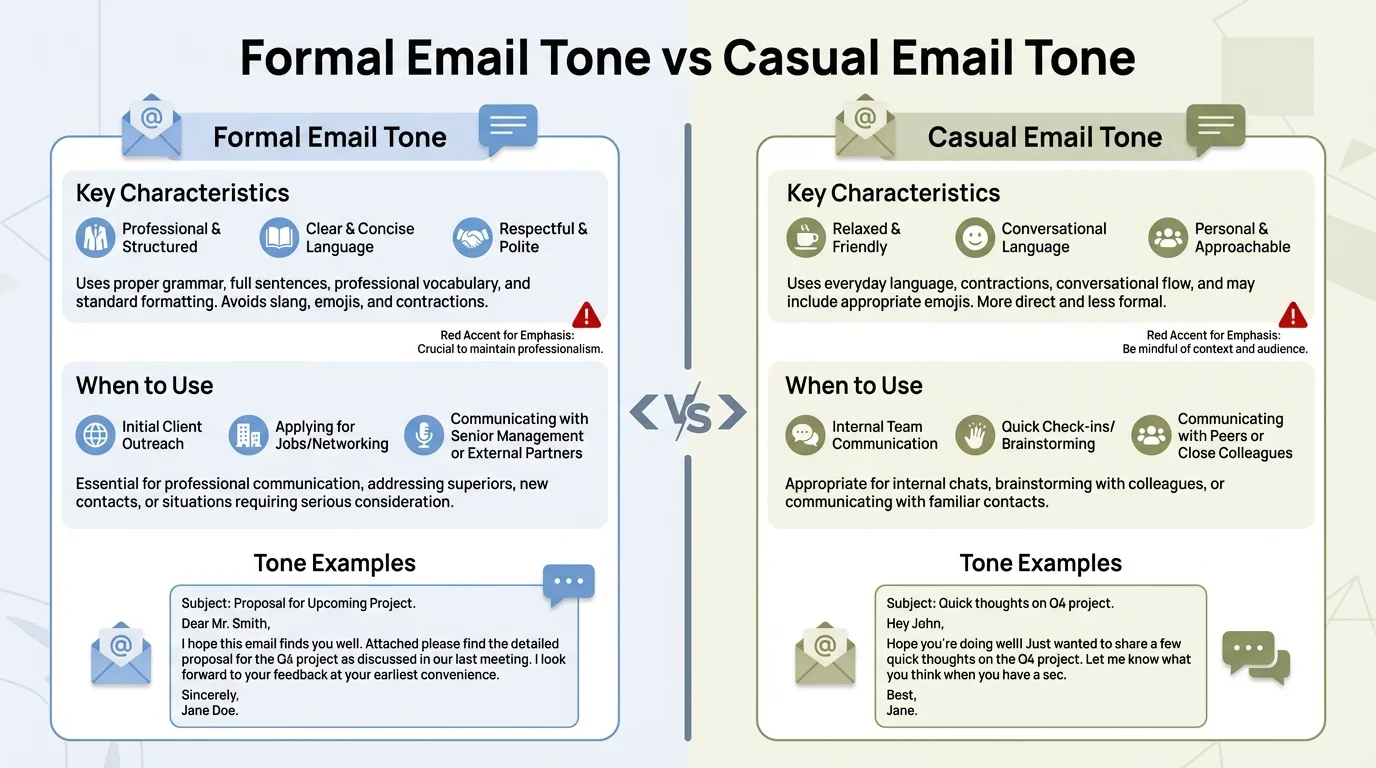
Understanding the key differences between formal and casual email tone helps you choose the right approach for every client interaction
When to Use Formal Tone in Client Emails
Formal tone isn't dead—it's just pickier about where it shows up.
You need formality when you're building credibility, talking legal or financial stuff, dealing with compliance issues, or emailing C-suite executives you haven't built rapport with yet. The University of Waterloo's writing center points out that formal tone shows respect for someone's time and position.
Here's my rule: if money, lawyers, or public record are involved, crank up the formality.
Initial outreach to enterprise clients: Your first email to a VP at a Fortune 500 company isn't the time to drop a "Hey there!" Go with "Dear Ms. Chen" or "Hello Ms. Chen." Save the casual greeting for email number five, once you've actually got a relationship going.
Contract negotiations and legal discussions: Anything that could end up in a courtroom or arbitration needs formal language. I've seen casual emails get dragged out as evidence of verbal agreements. Don't write "Yeah, we can probably do that for $10k" when what you mean is "We can provide that service for $10,000, pending formal agreement."
Complaint responses and crisis management: When a client's mad or a project's gone sideways, formality creates professional distance that actually helps calm things down. It shows you're taking the situation seriously. Look at these:
- Casual: "So sorry about the mess-up! We'll fix it ASAP."
- Formal: "I apologize for the error in your shipment. We are correcting this immediately and will ensure it doesn't happen again."
The second one doesn't hide behind exclamation points. It owns the problem directly and lays out the fix clearly.
Cross-cultural communication with unknown preferences: If you're emailing someone in a different country and haven't figured out their communication style yet, play it safe with formality. You can always loosen up later, but going from casual to formal feels weird and can make it seem like you're suddenly distancing yourself.
Here's what formal tone actually looks like in 2026:
- Complete sentences with proper punctuation
- Professional greetings and closings ("Best regards" not "Cheers")
- No emoji or excessive punctuation (!!!)
- Indirect requests ("Would you be able to..." instead of "Can you...")
- Neutral emotional language (avoiding slang or colloquialisms)
But—and this matters—formal doesn't mean stiff. The biggest mistake? Thinking formal email should sound like a legal document. It shouldn't. "I would like to schedule a meeting to discuss your requirements" is formal. "The undersigned wishes to request a temporal allocation to discourse upon your stated needs" is ridiculous.
CleverType nails this distinction. When you write a casual draft and need to make it more formal, the AI doesn't just throw in bigger words. It reorganizes sentences for clarity, tweaks how you're phrasing requests to show appropriate respect, and keeps your actual meaning intact while shifting the tone.
The tool caught me once drafting an email to a client in Germany. I'd written "Let's chat about the timeline." CleverType nudged me toward "I'd like to discuss the project timeline with you." Small tweak, but it showed the AI got that "chat" was too casual for this relationship and that being specific about what we'd discuss showed more respect for their time.
When Casual Tone Works Better for Client Relationships
Casual tone builds trust faster than formal. That's not my opinion—it's measurable.
Research shows 60% of workers prefer email over phone calls, and when those emails feel conversational instead of transactional, response rates jump by an average of 36%. People want to work with people, not corporate robots.
I switched to more casual client communication about three years ago. Not "bro" casual—human casual. Response times went from 24 hours to 4 hours on average. Project kickoffs felt way smoother because clients already felt like they knew me before we even hopped on our first call.
Ongoing client relationships: Once you've been working with someone for a month or two, keeping up formal distance feels bizarre. Your emails should match where the relationship actually is. If you're having Zoom calls where everyone's cracking jokes and relaxed, your emails should reflect that vibe. "Hey Sarah, following up on what we talked about yesterday..." works just fine.
Creative industries and startups: If you're emailing a tech startup founder or a creative agency, formal tone can actually work against you. It signals you don't get their culture. These places value authenticity and efficiency way more than traditional professionalism markers.
Problem-solving and collaboration: When you're troubleshooting something together, casual tone creates psychological safety. "Hmm, I'm seeing the same error on my end. What if we tried..." invites open dialogue. "I have encountered the identical error. I propose we attempt..." sounds like you're laying down the law.
Good news and positive updates: Casual tone amps up positive emotions. "We finished the project ahead of schedule!" hits better than "I am pleased to inform you that the project has been completed prior to the anticipated deadline." The first one lets them feel your excitement. The second one reads like a press release.
Here's what effective casual tone includes:
- Contractions (I'm, we'll, didn't)
- Conversational openers ("Thanks for getting back to me so quickly")
- Appropriate emoji use (in moderation—more on this later)
- Shorter sentences and paragraphs
- Direct questions ("Does Thursday work for you?")
- Personal touches ("Hope you had a great weekend")
Key word: "effective." Casual doesn't mean sloppy. You're still checking spelling. Still organizing your thoughts in a way that makes sense. Still respecting their time by being concise.
Bad casual: "hey just wanted to check in lol did you get my last email??? let me know!!! :)"
Good casual: "Hey Maria, just checking if you had a chance to review the proposal I sent last week. Let me know if you have any questions!"
The difference? Professionalism. Good casual tone is deliberate. It picks informal language while keeping clear communication standards.
CleverType helps you nail this balance with context-aware suggestions. The AI picks up on your writing style and the relationship you've got going, then suggests tweaks that sound like you—just clearer. When I'm writing to a long-term client, CleverType's cool with keeping my casual vibe but might flag if I'm being too vague or if a grammar slip actually changes what I'm trying to say.
The tool's sharp enough to know "wanna" is totally fine in a casual email but "definately" is never okay anywhere because it's a spelling error, not a style choice.
AI Tools That Actually Understand Email Tone Context
Most AI writing tools treat email like it's some kind of essay. They don't get that "Hey" isn't wrong—it's context-dependent.
CleverType understands context in a way generic AI assistants just don't. The difference boils down to what the tool was built for. General AI writing tools shoot for grammatical correctness and reading level. CleverType aims for relationship-appropriate communication.
Here's what actually matters in an AI email tone tool:
Relationship awareness: The AI should know whether this is your first email to someone or your fiftieth. CleverType does this by looking at your email history and how often you're in touch. First email? It'll push you toward slightly more formal openers. Tenth email in a thread? It backs off on those suggestions.
Intent recognition: Are you asking for something, turning down a request, sharing good news, or dealing with a problem? The right tone shifts based on what you're trying to do, not just who you're talking to. CleverType's natural language processing figures out your goal and tweaks tone suggestions to match.
Industry and role context: An email to a lawyer should probably lean more formal than one to a graphic designer, even if you know them both equally well. AI keyboards for business professional use pick up on industry norms and what's expected for different professional roles, then work that into their suggestions.
Cultural and geographic awareness: This is where CleverType really crushes the competition. The AI adjusts formality based on cultural communication norms. An email to a client in Japan gets different tone guidance than one to a client in California, even if you're saying the exact same thing.
Let me show you what this looks like in real life. I was writing an email to turn down a project proposal. My first attempt:
"Thanks for the proposal, but we're going to pass on this one. Doesn't really fit what we're looking for right now."
CleverType flagged two problems. First, "going to pass" was too casual for turning someone down the first time. Second, "doesn't really fit" was vague enough to come off dismissive. The suggestion:
"Thank you for the proposal. After careful review, we've decided not to move forward with this project as it doesn't align with our current strategic focus. I appreciate you thinking of us."
Same message, but the revised version actually shows respect for their effort and gives a clearer (though still pretty general) reason. That's tone intelligence, not just grammar nitpicking.
Real-time tone adjustment: CleverType works as you type, showing you tone indicators and suggestions right then and there. You immediately see if your email's reading as more aggressive or more passive than you meant. This is huge for people like me who sometimes blank on the fact that text doesn't carry vocal tone.
Privacy-first design: Unlike cloud-based AI tools that ship your email content off to external servers, CleverType handles everything on your device. Your client stuff stays private. If you're dealing with confidential business info, this isn't just nice to have—it's non-negotiable.
Multi-language tone awareness: CleverType supports 100+ languages and gets that tone rules change by language. Formality markers in German aren't the same as in English. Polite requests in Japanese use totally different grammar structures than in French. The AI factors all this in.
Quick Comparison:
Generic grammar checkers: Flag passive voice, suggest vocabulary changes, miss tone entirely
Basic AI assistants: Can rewrite formal→casual or casual→formal on command, but don't know which you need
CleverType: Analyzes recipient relationship, email intent, industry context, and cultural norms to suggest appropriate tone automatically
The advantage here's pretty big. Where other tools make you manually pick "make this more formal" or "make this more casual," CleverType makes smart suggestions based on who you're writing to and what you're trying to pull off. It's like having a communication coach baked into your keyboard, helping professionals boost productivity with smarter emails.
I've tested this against Gboard, SwiftKey, and a bunch of standalone email AI tools. None of them come close to CleverType's grasp of context. Gboard's got basic grammar checking but zero tone awareness. SwiftKey predicts your next word but doesn't care if that word's actually appropriate for who you're emailing. Standalone email tools like Grammarly's tone detector give you a tone reading but don't factor in relationship context.
CleverType mashes all of this together—predictive text, grammar checking, tone analysis, and relationship-aware suggestions—in one keyboard that works across all your email apps and messaging platforms.
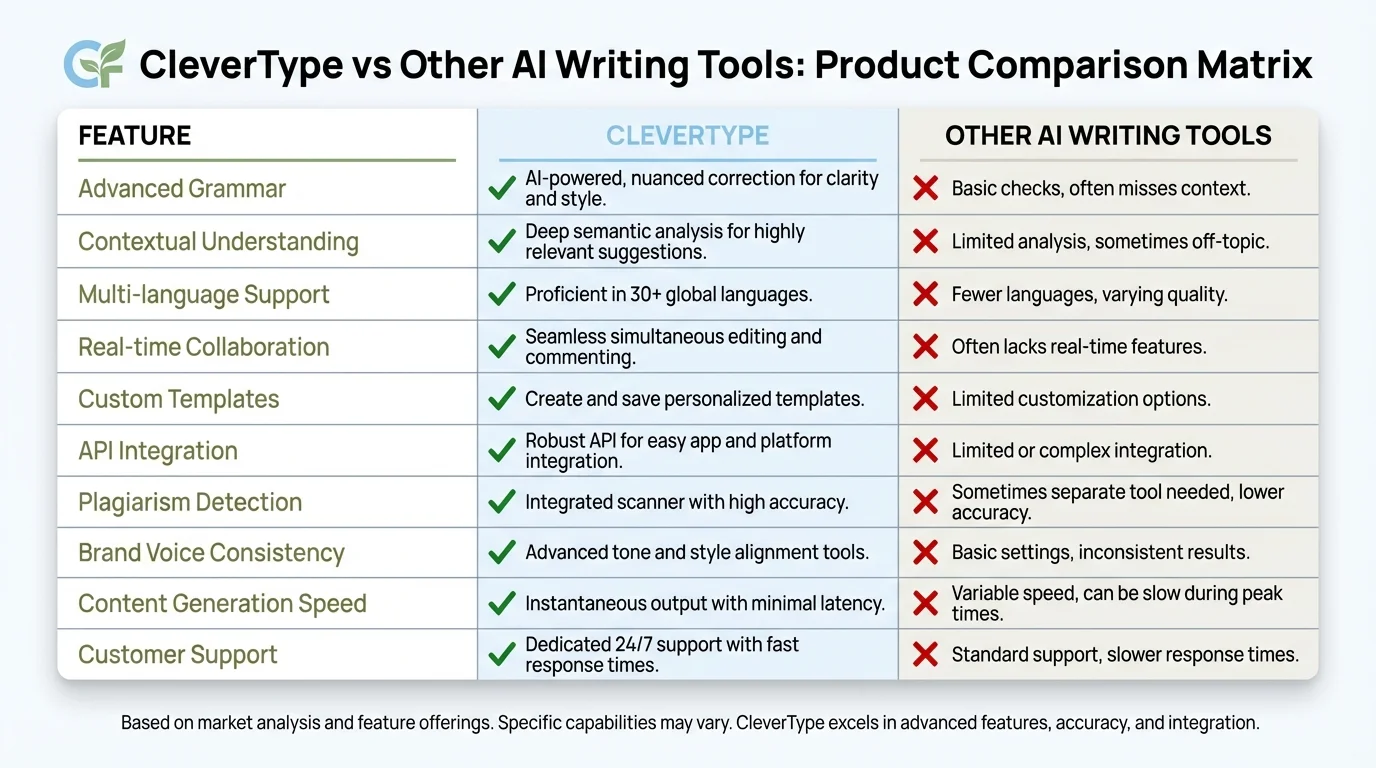
CleverType outperforms other AI writing tools with relationship-aware tone suggestions and privacy-first design for professional email communication
Common Email Tone Mistakes That Damage Client Relationships
I've seen people lose clients over tone mistakes they didn't even realize they'd made. These are among the email mistakes professionals still make that AI can fix.
The worst part? Most of these mistakes come from trying to sound professional. People overthink it, ending up with email that sounds like a legal notice or a customer service bot.
Mistake 1: The over-formal first email
Starting a new client relationship with "To Whom It May Concern" or "Dear Sir/Madam" signals you didn't bother learning their name. Even if you're going formal, use their actual name. "Dear Ms. Rodriguez" shows basic respect. "Dear Hiring Manager" shows you're mass-emailing.
I made this mistake early in my career. Sent a pitch email that started with "Greetings." Greetings! Like I was an alien making first contact. The client later told me they almost deleted it assuming it was spam.
Mistake 2: Exclamation point overload
One or two exclamation points in an email signal enthusiasm. Seven signals mania. Research from email communication studies shows that while 49% of people are comfortable with some casual punctuation, excessive use of exclamation points makes you seem unprofessional or desperate.
Bad: "Hi! Thanks for your email! I'd love to help! When can we schedule a call!!"
Better: "Hi Sarah, thanks for your email. I'd love to help. When works for you to schedule a call?"
Mistake 3: The passive-aggressive "per my last email"
Nothing says "I think you're an idiot" quite like "Per my last email" or "As previously stated." Even if you're frustrated that someone missed information you already sent, this phrasing damages the relationship.
Try: "Just following up on the timeline question—I'm aiming for completion by March 15th. Let me know if that works for your schedule."
Mistake 4: Hedging language that undermines your expertise
"I think maybe we could possibly try..." Stop. You're the expert. They hired you for a reason. Hedging makes you sound uncertain.
Compare:
- Weak: "I was thinking we might want to consider possibly using a different approach here..."
- Strong: "I recommend we use a different approach here."
You can still be polite while being direct. Clients pay for expertise, not wishy-washy suggestions.
Mistake 5: Overly casual with new contacts
Matching the other person's energy is smart. Assuming everyone wants to be your buddy from email one is not. I watched a colleague lose a contract because his first email to a potential client started with "Hey buddy!" The client was a 55-year-old executive vice president. She was not his buddy.
Wait for them to set the casual tone, then match it.
Mistake 6: Emoticons in the wrong context
A simple smiley face can soften a request or signal friendliness. But timing matters. First email? Probably skip it. Third email where you're problem-solving together? Might work. Email discussing contract terms or money? Definitely skip it.
The data on this is clear: while casual elements are accepted, they need to match the context. A smiley face on "I've finished the security audit 🙂" is fine. A smiley face on "We need to discuss the budget overrun 🙂" reads as dismissive or inappropriate.
Mistake 7: Writing "just" too much
"Just wanted to follow up..."
"Just checking in..."
"Just wondering if..."
Studies on professional communication show this word undermines your message. It makes you sound apologetic for existing. You don't need to apologize for doing your job.
Replace: "Just checking if you received my proposal" → "Following up on the proposal I sent last week"
Mistake 8: The novel-length email
47.7% of workers cite very long emails as poor communication. Your client email shouldn't need a table of contents. If you can't say it in 3-4 short paragraphs, you probably need a meeting instead.
Break long information into:
- Bullet points for lists
- Short paragraphs (2-3 sentences max)
- Clear section headers if the email must be long
- Separate emails if you're covering unrelated topics
CleverType catches several of these automatically. The AI flags when you're hedging too much, when your punctuation is excessive, or when your email is getting too long for the complexity of the message. It's particularly good at identifying when your tone doesn't match your intent—like when you think you're being friendly but you're actually being too casual for the context.
The tool learns from your corrections too. If you regularly ignore a suggestion for a specific client, CleverType adjusts its future recommendations for that relationship. It understands that communication rules aren't universal—they're relationship-specific.
How to Choose the Right Tone for Different Client Scenarios
Tone isn't a one-time choice. It shifts based on what's happening in the client relationship right now.
Think of formal and casual as endpoints on a spectrum, not binary options. Most emails land somewhere in the middle, and where exactly depends on five factors: your history with the client, the topic you're discussing, the news you're delivering, cultural expectations, and the medium context.
New client, routine business: Start at 60% formal. Use their title and last name unless they sign their email with just a first name. Keep sentences clear and professional. Avoid slang, but don't sound like a robot either.
Example: "Hello Mr. Patterson, Thank you for the opportunity to submit a proposal. I've attached the document for your review and am happy to discuss any questions you might have."
Established client, routine business: Drop to 30% formal. First names are fine. You can use contractions and shorter sentences. The relationship is established, so you don't need to prove professionalism with every word.
Example: "Hi James, Here's the updated timeline we discussed. Let me know if you need any changes."
Any client, delivering bad news: Bump formality up by 20 points. Bad news delivered too casually seems dismissive. You want to signal that you take the problem seriously.
Too casual: "Hey, so the shipment's delayed. Should arrive next week instead."
Better: "I wanted to let you know there's been a delay with your shipment. The new delivery date is March 8th. I apologize for the inconvenience and am working to prevent similar delays."
Any client, delivering good news: You can afford to be more casual. Enthusiasm is appropriate, and casual tone makes positive news feel more genuine.
Example: "Great news—we finished early! The project is ready for your review whenever you are."
High-stakes conversations (money, contracts, problems): Formal tone creates appropriate gravity. These emails might be forwarded to legal, finance, or executives. AI for business emails helps you write with confidence every time, especially in these critical situations.
Example: "I want to address the budget concerns you raised. After reviewing the project scope, I can confirm we'll deliver within the original budget of $45,000. Please let me know if you'd like to schedule a call to discuss this further."
Creative collaboration or brainstorming: Casual tone encourages idea-sharing. You want the client to feel comfortable suggesting things, even if they're not fully formed. AI keyboards for customer support help craft personalized, polite responses that build this kind of collaborative rapport.
Example: "I've been thinking about your question on the color scheme. What if we went bold with the blues and used orange as an accent? Just an idea—would love to hear what you think."
Here's a decision framework I use:
- Who is this person to me? (First contact / Occasional contact / Regular contact / Close working relationship)
- What am I saying? (Request / Update / Bad news / Good news / Question)
- What's the risk if I get this wrong? (Low / Medium / High)
- What's their communication style? (Formal / Mixed / Casual)
If you're unsure on #4, check their last email to you. Match their energy. If they sign "Best regards, Dr. Martinez," don't reply with "Cheers!" If they sign "Thanks! - Sam," you can relax a bit.
Pro tip: When in doubt, start slightly more formal than you think necessary. It's easier to become more casual over time than to try to add formality back into a relationship where you've been too casual.
CleverType simplifies this entire decision tree. As you type, the AI analyzes your draft against the recipient and context, showing you a tone indicator. Too formal for this relationship? You'll see a suggestion to make it more conversational. Too casual for the topic? You'll get a nudge toward more professional phrasing.
The tool doesn't make the decision for you, but it gives you the information you need to make it quickly. That's valuable when you're sending 20+ client emails per day and don't have time to overthink each one.
I've also found CleverType useful for the times when my personal mood is bleeding into my email tone. If I'm frustrated about something unrelated and that frustration is making my email sharper than it should be, the AI catches it. The tone indicator will show "This may come across as curt" and I can revise before sending something I'll regret.
Setting Up AI Keyboards for Professional Email Success
Most people install an AI keyboard and immediately wonder why it's not helping much. The answer is usually that they haven't configured it for their actual work.
CleverType works out of the box, but it works significantly better when you spend 10 minutes setting it up properly. Here's what that actually looks like.
Step 1: Connect your email accounts
CleverType needs context about who you email and how often. Connect your work email through the app settings. This lets the AI understand relationship patterns. Someone you email daily gets different tone suggestions than someone you email once a year.
Privacy note: CleverType analyzes this data on-device. Your email content doesn't get sent to external servers, which is critical for client confidentiality.
Step 2: Set your industry and role
The AI adjusts baseline formality expectations based on industry. Legal, financial, and government sectors skew more formal. Tech, creative, and startup sectors skew more casual. Tell CleverType what you do, and it calibrates accordingly.
Step 3: Customize your tone preferences
You can set default tone preferences for new contacts, established relationships, and specific scenarios. I have mine set to:
- New contacts: Professional (slightly formal)
- Established contacts: Conversational (slightly casual)
- Bad news: Formal
- Urgent matters: Direct
These serve as starting points. The AI still analyzes individual emails, but it knows my preferences.
Step 4: Train the AI on your writing style
CleverType learns from your edits. When it suggests something and you change it, the AI notes your preference. Over time, it stops suggesting things you consistently reject and prioritizes suggestions you consistently accept.
Let it run for a week, making corrections as needed. By week two, you'll notice the suggestions feel much more like "a better version of how you'd write this" rather than "how an AI thinks you should write this."
Step 5: Set up quick phrases for common scenarios
CleverType allows custom shortcuts for phrases you use repeatedly. I have:
- "fw1" → "Following up on my previous email"
- "lmk" → "Let me know if you have any questions"
- "mtg" → "Would you be available for a brief call to discuss this?"
These aren't tone-related, but they save time, which means you can spend more energy on the parts of the email that do require tone judgment.
Step 6: Enable real-time tone indicators
This is the feature that changed how I write emails. As you type, CleverType shows a small indicator of how your email is reading: Professional, Friendly, Casual, Direct, etc. If the indicator doesn't match your intent, you know to revise before you even finish the draft.
Step 7: Turn on the grammar + tone combo view
CleverType can show just grammar suggestions, just tone suggestions, or both. I recommend both. Grammar issues can change meaning, which affects tone. "Let's eat, Grandma" and "Let's eat Grandma" have very different tones, and the difference is a comma.
Comparing CleverType to other AI keyboard options:
I've used Gboard, SwiftKey, and Grammarly's keyboard. Here's what I found:
Gboard has excellent voice typing and decent next-word prediction. But tone awareness? Zero. It's built by Google primarily for consumer messaging, not professional email. And it sends your typing data to Google's servers, which is a non-starter for client communications.
SwiftKey learns your typing patterns and gets good at predicting what you'll say next. But it doesn't evaluate whether what you're about to say is appropriate. It's a speed tool, not a quality tool. Microsoft owns it now, and like Gboard, your data goes to their servers.
Grammarly Keyboard offers some tone detection, but it's basic. It tells you if your email sounds confident or worried, formal or casual. But it doesn't tell you if that's appropriate for your specific recipient. It's one-size-fits-all advice that doesn't account for relationship context.
CleverType combines the prediction accuracy of SwiftKey, the grammar intelligence of Grammarly, and adds relationship-aware tone analysis that none of the competitors offer. Plus it's privacy-first, processing everything on your device.
For anyone writing client emails regularly, CleverType isn't just helpful—it's a measurable time-saver. The average professional spends 5 hours per week on email. If an AI keyboard saves you even 15 minutes per day by reducing revision time and decision fatigue, that's over an hour weekly. That's 52+ hours per year you get back.
Download CleverType from the Play Store and configure it for your specific professional context. The setup takes less time than you'll save in your first week of use.
Frequently Asked Questions
Q: How do I know if my email tone is too casual for a client?
A: Check for these signs: you're using slang the client might not know, you've included more than one emoji, you're making jokes in the first few emails, or you're using "hey" with someone you haven't met in person. If the client consistently replies with more formal language than you're using, match their tone. Tools like CleverType will flag when your casual language doesn't match the relationship context, saving you from tone mistakes before you send.
Q: Can AI really understand the difference between formal and casual business communication?
A: Modern AI tools can, but it depends on how they're trained. Basic grammar checkers can't—they just identify grammatical errors. Advanced tools like CleverType use natural language processing to analyze context, relationship history, and communication patterns. The AI learns that "Hey" is fine for a colleague you email daily but potentially inappropriate for a first email to a CEO. It's not perfect, but it's significantly better than guessing on your own.
Q: What's the biggest mistake people make with email tone in client relationships?
A: Being inconsistent. Starting formal and suddenly going casual, or vice versa, confuses the relationship dynamic. The second biggest mistake is not adjusting tone based on the message content—using the same tone for good news and bad news, or for routine updates and urgent problems. Your tone should shift based on both who you're writing to and what you're saying. 78% of customers report lower satisfaction when bad news is delivered too casually, according to communication research.
Q: How formal should my first email to a potential client be?
A: Start at "professional but approachable"—use their name with appropriate title (Ms./Mr./Dr. unless they've indicated otherwise), complete sentences, and clear structure, but avoid overly complex vocabulary or stiff phrasing. If their website and communications are casual, you can relax slightly, but err on the side of respect until they set a more casual tone themselves. CleverType helps by analyzing publicly available information about the recipient's company culture and adjusting suggestions accordingly.
Q: Do exclamation points make me look unprofessional in client emails?
A: One or two used strategically—fine. Five or more—unprofessional. Research shows that 49% of people are comfortable with some casual punctuation in professional emails, but excessive use undermines your message. Use exclamation points to convey genuine enthusiasm ("Congratulations on the launch!") or to soften a request ("Thanks so much!"), but not in every sentence. Never use them in bad news or formal communications.
Q: Should I match my client's email tone or maintain my own style?
A: Match their tone within your comfort zone. If a client is very casual and you're naturally more formal, you don't need to adopt their exact style, but you should move toward it. Meet them 60-70% of the way. If they're formal and you're casual, definitely adjust upward. The client sets the baseline expectations for the relationship, and respecting their communication style builds rapport. CleverType makes this easier by analyzing the client's previous emails and suggesting adjustments that feel natural to your own writing style.
Q: What's the difference between professional tone and formal tone?
A: Professional tone means clear, respectful, and competent communication. Formal tone is a specific type of professional communication that uses more traditional business language structures. You can be professional while being casual—using contractions, first names, and conversational phrasing—as long as you're still clear and respectful. Think of formality as a sliding scale within professionalism, not a requirement for it.
Ready to Master Email Tone for Every Client Interaction?
Stop second-guessing every email you send. CleverType's AI-powered keyboard analyzes your recipient relationship, message context, and communication goals to suggest the perfect tone automatically—whether you need formal professionalism or friendly collaboration.
With privacy-first design, 100+ language support, and real-time tone indicators, CleverType helps you communicate with confidence across all your client relationships.
Never worry about email tone again