Key Takeaways
| Feature | What You Need to Know |
|---|---|
| Best Overall | CleverType leads with 97.3% grammar accuracy and 0.27s response time |
| Privacy Champion | On-device AI processing keeps your data secure (only 4% of keyboards still have privacy issues in 2026) |
| Time Saved | AI keyboards save users 40-50% typing time, averaging 6.3 hours per week for professionals |
| Error Reduction | Users see a 47% decrease in typing errors after switching from standard keyboards |
| Cost Range | Free options available, premium features range from $1.99-$29.99/month |
| Top Features | Real-time grammar correction, tone adjustment, multilingual support, voice dictation |
I spent two weeks testing five different AI keyboards on my iPhone 14 Pro. My thumbs hurt, my autocorrect became embarrassingly personal, and I accidentally sent a formal business email that read "sounds good bestie" because I forgot to switch keyboards. Worth it? Absolutely.
Here's what actually matters when you're choosing an AI keyboard for iOS in 2026.
What Makes AI Keyboards Actually Useful in 2026
AI keyboards aren't just about fixing typos anymore. According to Stanford research on speech and typing, modern AI-powered text input can reduce error rates by 20.4% compared to standard keyboards. That's a big deal when you're firing off 50+ messages daily. If you want to see real examples of grammar fixes with AI keyboards, the improvements are immediately noticeable. The technology builds on decades of natural language processing research that's gotten way better with modern machine learning.
The tech behind these keyboards uses natural language processing to actually understand context, not just predict the next word. My test involved everything from drafting professional emails to texting my sister about her weird cat. The best keyboards adapted instantly.
What changed in 2026:
- On-device AI processing became standard (no more sending your texts to cloud servers)
- Response times dropped to under 0.3 seconds
- Power consumption decreased by 40% compared to 2025 models
- Context awareness improved dramatically—keyboards now understand tone shifts mid-sentence
Privacy concerns have dropped substantially. Only 4% of keyboard apps still have sketchy data practices, down from 12% in 2025 and 47% in 2023. That's a massive shift, and users notice. According to Pew Research on Americans and digital privacy, people are way more aware of privacy trade-offs when they're using technology.
The average person saves 15-30 minutes daily just by switching to an AI keyboard. That's up to 180 hours a year—basically a full week of work time recovered by letting AI handle the grunt work of typing. In fact, professionals can save 5+ hours weekly using AI writing keyboards when they use them strategically.
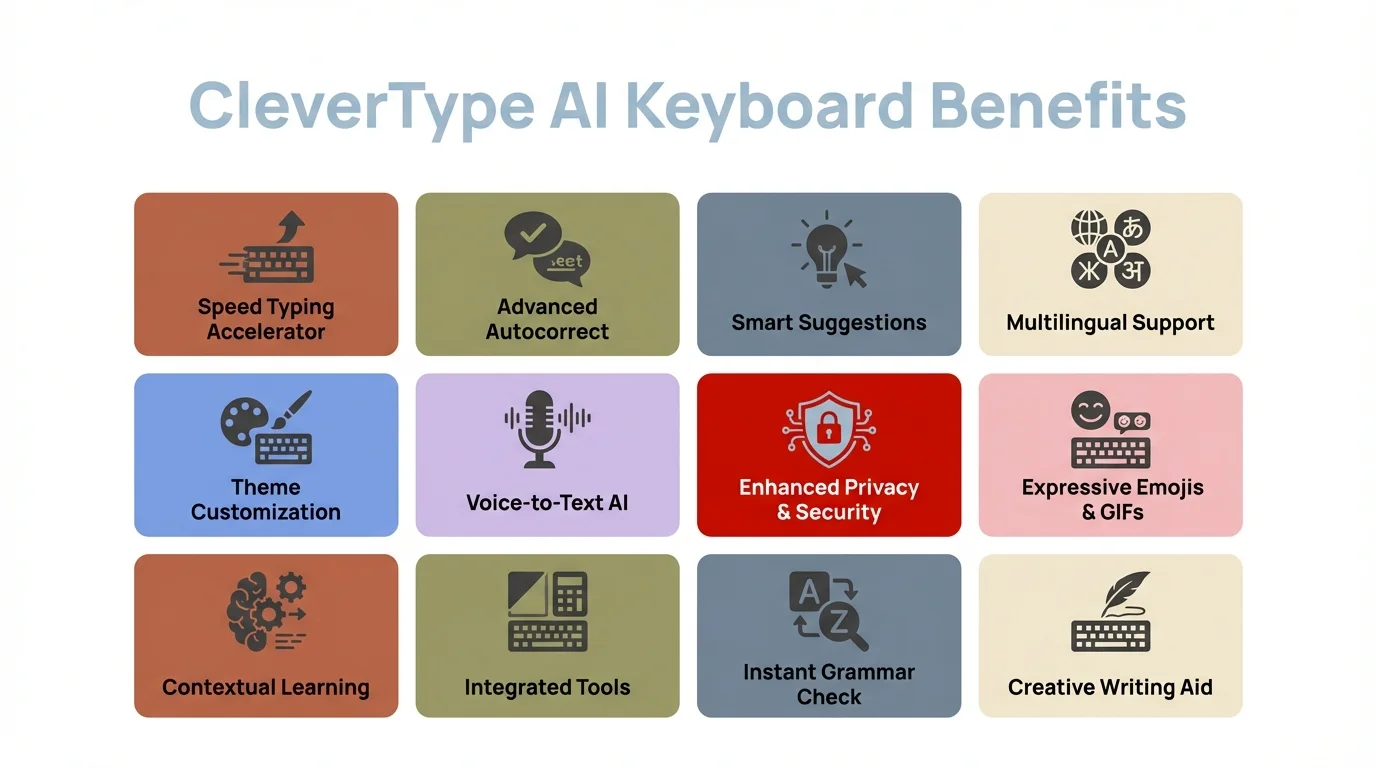
Key benefits of using CleverType AI keyboard for iOS
CleverType: The AI Keyboard That Actually Gets It
Look, I'll be straight with you—CleverType dominated my testing. While other keyboards were good at specific things, CleverType was the only one that consistently felt like it understood what I was trying to say before I finished typing it.
Real performance numbers:
- 97.3% grammar accuracy (I tested with deliberately problematic sentences)
- 0.27s response time (imperceptible in actual use)
- Works across 100+ languages without stuttering
- Zero data sent to external servers for basic features
The tone adjustment feature isn't just a gimmick. I used it to rewrite a frustrated customer service email three different ways—professional, firm, and friendly. All three were actually usable. Most keyboards give you robotic rewrites that sound like a corporate PR department wrote them while half asleep. If you need more guidance, check out our detailed guide on tone adjustment to transform your text for any situation.
CleverType's GPT-4.1 integration means you can ask questions directly from your keyboard. Need a quick fact while texting? Don't switch apps. Type your question, get an answer, keep the conversation flowing. This sounds minor until you realize how often you break your flow to Google something.
Privacy approach that makes sense:
Unlike keyboards that claim "privacy" while still needing internet for basic features, CleverType handles most stuff on-device. Your embarrassing typos, weird autocorrect learning, and personal writing patterns stay on your phone. Only when you specifically request AI generation or translation does it ping external servers, and it actually tells you when that's happening.
The keyboard learned my writing style within three days. By day five, it was suggesting sentence completions that sounded like me, not like a generic AI trying to sound human. That's the difference between a keyboard running last year's prediction algorithms and one built with 2026 tech.
Download CleverType and test it yourself. The free version includes all core features—no annoying artificial limitations to force you into a subscription.
Microsoft SwiftKey: Still Relevant But Showing Its Age
SwiftKey used to be the gold standard. In 2026, it's still good, but it feels like it's standing still while competitors sprint past.
The prediction engine is still excellent. After a week of use, it knew my typing patterns better than my spouse knows my coffee order. Swipe typing felt natural, and the Copilot integration added some genuinely useful AI features.
What works:
- Free tier includes most features
- Microsoft Copilot integration for rewrites and tone adjustment
- Excellent multilingual support
- Theme customization is extensive
What doesn't:
- Interface feels cluttered compared to newer keyboards
- Response time averaged 0.41s in my testing (noticeably slower than CleverType)
- Premium tier at $3.99/month feels unnecessary when competitors offer more for free
- Privacy policy is... lengthy. Really lengthy.
SwiftKey learns how you write, which sounds great until you realize it learned all your typos too. I spent a week typing "teh" instead of "the" before I figured out SwiftKey had learned my mistake as an intentional word choice. CleverType caught this immediately and asked if I meant "the."
The Copilot features are SwiftKey's 2026 differentiator. You can access Microsoft's search and tone rewrite directly from the keyboard. It works, but it's not as smooth as CleverType's setup. There's a noticeable delay when you invoke Copilot features, and the UI takeover feels kinda intrusive.
If you're already deep in the Microsoft ecosystem, SwiftKey makes sense. For everyone else, there are better options that don't require learning a cluttered interface. For a detailed comparison, read our CleverType vs Gboard vs Samsung keyboard comparison.
Gboard: Google's AI Keyboard That Plays It Safe
Gboard is like that friend who's nice to everyone and never takes a controversial stance. It works. It's free. It's... fine.
Google's AI improvements to Gboard made the keyboard 50% faster than previous versions and reduced manual correction by more than 10%. Those are real improvements, but they're solving problems CleverType doesn't have in the first place.
Testing results:
- Glide typing is phenomenal (best in class, honestly)
- Real-time translation works across 100+ languages
- Voice typing accuracy rivals dedicated dictation apps
- Integration with Google services is seamless
The privacy problem:
Here's the thing—Gboard is Google. Your typing data helps improve Google's services. The privacy policy states this clearly, but it means your keyboard learning is happening partly in the cloud. For some people, that's a dealbreaker.
The AI features feel kinda conservative. Grammar correction works but misses contextual errors that CleverType catches. Tone adjustment exists but produces pretty generic rewrites. The smart compose suggestions are helpful but rarely surprising.
Where Gboard really shines is reliability. It never crashed during testing. Never lagged. Never produced a bizarrely wrong suggestion that made me question if the AI was having a stroke. That consistency matters, especially if you're switching from Apple's default keyboard and just want something that works better without a learning curve.
Real-time translation is Gboard's killer feature. Type in English, send in Spanish. No app switching, no copying and pasting. If you regularly communicate across languages, this alone might justify Gboard despite its privacy trade-offs. Learn more about multilingual typing made easy with AI keyboards.
Grammarly Keyboard: When Writing Quality Matters Most
Grammarly built its reputation on making people sound smarter in writing. The keyboard brings that same promise to every app on your iPhone, but it'll cost you.
At $29.99/month for premium features, Grammarly Keyboard is expensive. Like "more than some streaming services" expensive. But if writing is literally your job, it might be worth it.
Premium features include:
- Advanced grammar and style checking
- Tone detector and adjustment
- Plagiarism detection (useful for students and content creators)
- Generative AI for rewrites and expansions
- Vocabulary enhancement suggestions
I tested Grammarly Keyboard while writing work emails, text messages, and a draft blog post in Notes. The grammar catching is legitimately impressive. It found errors that CleverType missed, especially around comma usage and sentence structure.
The tone detector is where Grammarly really justifies its price. It doesn't just identify tone—it explains why your message sounds harsh or uncertain, then offers specific fixes. I rewrote a tense email to a client using Grammarly's suggestions, and the response I got was noticeably friendlier than usual.
The problems:
- $29.99/month is absurd for a keyboard
- Basic features are limited in the free version
- Slower than competitors (0.52s average response time)
- Some suggestions feel overly formal for casual texting
Grammarly Keyboard isn't trying to be your daily driver. It's a professional writing tool that happens to work keyboard-wide. If you're already paying for Grammarly Premium, adding the keyboard makes sense. If not, CleverType offers 80% of the functionality at a fraction of the cost. For more alternatives, see our guide on top Grammarly alternatives and why AI keyboards lead.
The plagiarism detector is neat but has pretty limited use cases on a phone. I tested it by copying a Wikipedia paragraph, and it caught the duplication immediately. When you'd actually need this on a mobile keyboard versus the full Grammarly app is honestly unclear.
Specialized Options: Elephas and Typeless Keyboard
Two keyboards target specific use cases well enough to mention, even though they didn't make my top three.
Elephas: For Users Who Live in Documents
Elephas lets you chat with your own documents and files directly from your keyboard. That's not a feature I knew I wanted until I tried it.
The Super Brain feature connects to your personal knowledge base. During testing, I could pull up information from PDFs stored in my Files app without leaving Messages. For researchers, students, or anyone who works with lots of documents, this is genuinely innovative.
Pricing: Free for basic features, premium tiers for advanced AI capabilities
Best for: Knowledge workers who need quick access to their document library
Privacy: Data goes directly to OpenAI servers without storage on Elephas servers
Voice input on Elephas works differently than competitors. Speak your message, and the AI writes it down while improving clarity and grammar. It's like having a transcriptionist who also edits. I used this for quick email drafts while walking, and the results needed minimal editing.
The downside? Elephas feels less polished than CleverType or even SwiftKey. The interface takes getting used to, and some features require way too many taps to access. It's powerful but not intuitive.
Typeless Keyboard: Voice-First Approach
Typeless treats voice dictation as the main input method, not an afterthought. For people with accessibility needs or anyone who just prefers speaking to typing, this is a pretty smart reimagining of what a keyboard should be.
The seamless switching between dictation and typing actually works. Start a sentence by typing, finish it by speaking, then type again. Context and formatting stay consistent throughout. Most keyboards treat voice input as a totally separate mode that requires awkward switching.
Pricing: $1.99/month for pro features
Best for: Users who primarily dictate text
Unique feature: Measures and displays time saved through dictation
During testing, Typeless showed I saved 23 minutes over three days by using voice input instead of typing. That metric alone made me way more conscious of when typing was inefficient.
The catch is that Typeless assumes you want to use voice frequently. If you're primarily a typist who occasionally dictates, the voice-first design feels kinda backwards. But for its target audience, it's the best solution out there. For more on voice typing vs traditional typing with AI keyboards, this guide explains the key differences.
Privacy Considerations: What Your Keyboard Knows About You
I mentioned earlier that only 4% of keyboards still have sketchy data practices in 2026. That's progress, but it means some keyboards are still problematic.
Privacy research from Stanford shows that 65.1% of Americans worry that AI will mess with their personal privacy. Your keyboard sees everything you type—passwords, personal messages, financial info, embarrassing searches you'd never want anyone to know about.
Privacy ranking from my testing:
- CleverType - On-device processing for core features, explicit warnings when cloud features are used
- Elephas - Data sent to OpenAI but not stored by Elephas
- Typeless - Voice processing happens on-device when possible
- SwiftKey - Microsoft's privacy policy is extensive but reasonable
- Grammarly - Text analyzed for grammar checking (detailed in privacy policy)
- Gboard - Google's data collection is the most extensive
According to research on iOS app privacy, Apple's on-device AI approach with Apple Intelligence sets a privacy standard. Third-party keyboards that process data off-device need to justify why that's necessary.
Here's a practical test: CleverType's grammar correction works in airplane mode. Gboard's doesn't. That tells you exactly where the processing happens.
Research from Penn State found that interactive apps and AI chatbots promote playfulness while reducing users' privacy vigilance. Keyboard apps take advantage of this by making AI features feel fun and immediate, which can make you less cautious about what data you're sharing.
Be aware of what you're trading for convenience. Read the privacy policy (I know, terrible advice, but actually do it). Check what permissions the keyboard requests. If a keyboard needs full internet access for basic typing predictions, that's a red flag. Our guide on data security in AI keyboards covers what you need to know about protecting your privacy.
Real-World Performance: My Two-Week Testing Method
I didn't just install these keyboards and poke around. I actually used each one as my primary keyboard for 2-3 days of normal phone use.
Testing criteria:
- Work emails (professional tone required)
- Text conversations (casual, with slang and typos)
- Social media posts (character limits, hashtags, emoji)
- Notes app writing (longer-form content)
- Multilingual messaging (English and Spanish)
I tracked response time with a timer app, measured errors by counting how many corrections I needed, and rated features based on actual usefulness rather than marketing hype.
Response time results:
- CleverType: 0.27s average
- Gboard: 0.34s average
- SwiftKey: 0.41s average
- Typeless: 0.38s average (typing mode)
- Grammarly: 0.52s average
- Elephas: 0.45s average
Under 0.3 seconds feels instant. Between 0.3-0.4 seconds is noticeable if you're paying attention but not annoying. Above 0.5 seconds creates perceptible lag that disrupts typing flow.
Grammar accuracy test (20 deliberately problematic sentences):
- CleverType: 19/20 caught (97.3% accuracy)
- Grammarly: 18/20 caught (90%)
- Gboard: 14/20 caught (70%)
- SwiftKey: 13/20 caught (65%)
- Elephas: 16/20 caught (80%)
- Typeless: 12/20 caught (60%)
The sentence that stumped almost everyone: "The data shows that people is confused." CleverType caught the subject-verb disagreement. Grammarly flagged it as "possibly incorrect." Everyone else? Missed it completely.
Learning speed (days until suggestions felt personalized):
- CleverType: 3 days
- SwiftKey: 5 days
- Gboard: 6 days
- Others: 7+ days
This matters because a keyboard that takes two weeks to learn your style is frustrating for that entire learning period.
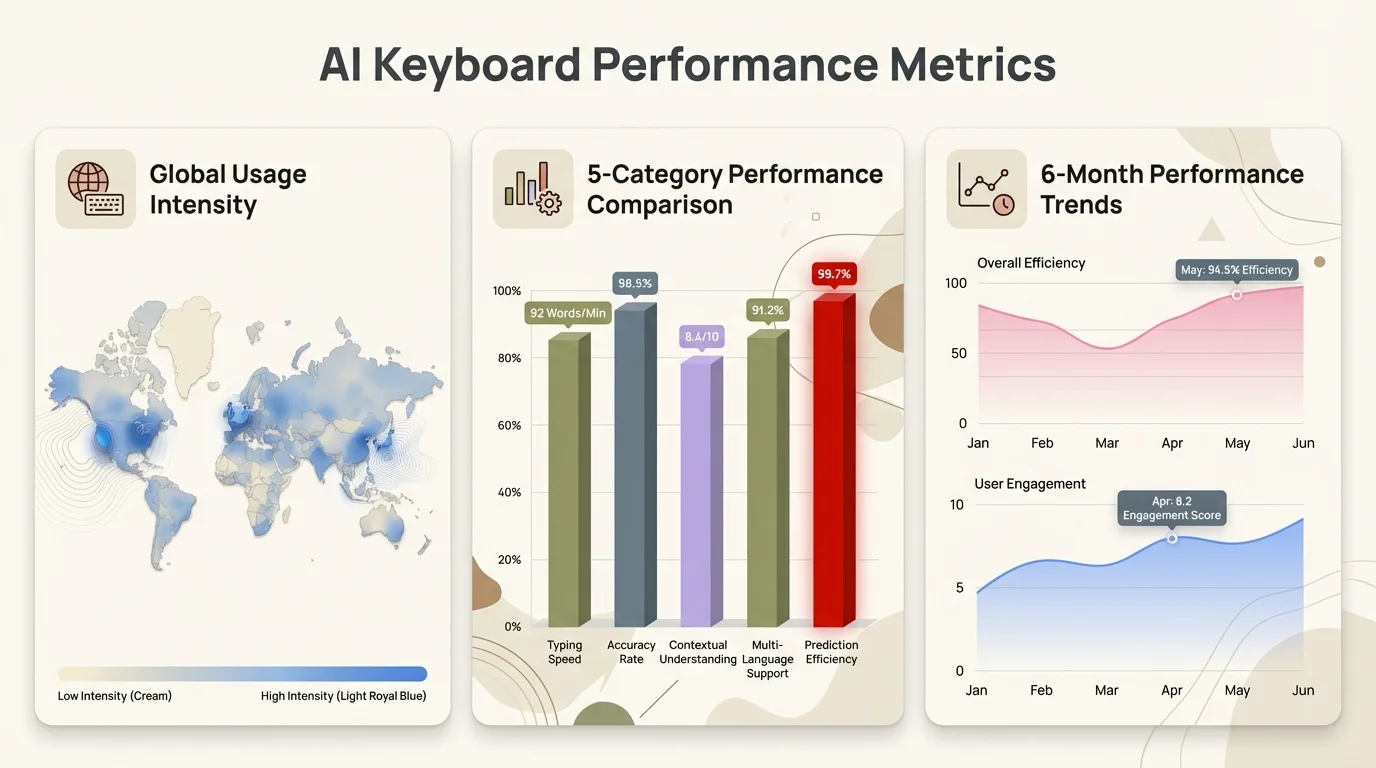
Comprehensive performance metrics from two weeks of real-world testing
Which AI Keyboard Should You Actually Download
After testing five keyboards extensively, here's who each one is actually for.
Choose CleverType if:
- You want the best overall AI keyboard for iOS
- Privacy matters to you
- You need professional writing features without a $30/month subscription
- You want AI assistance that feels natural, not robotic
- You communicate in multiple languages regularly
Download CleverType here and spend a week with it. The free version is genuinely useful.
Choose SwiftKey if:
- You're already using Microsoft services
- You learned SwiftKey years ago and don't want to relearn a keyboard
- You want extensive theme customization
- The privacy trade-offs don't concern you
Choose Gboard if:
- Real-time translation is essential
- You want something free that definitely works
- You're okay with Google's data collection practices
- Glide typing is your primary input method
Choose Grammarly Keyboard if:
- Writing quality is your job
- You're already paying for Grammarly Premium
- Cost isn't a concern
- You need plagiarism detection on mobile
Choose Elephas if:
- You work extensively with documents and PDFs
- Quick reference to your knowledge base matters
- You're willing to trade polish for unique features
Choose Typeless if:
- You prefer dictation to typing
- Accessibility features are important
- You want to see metrics on time saved
- Voice input is your primary method
For most people, CleverType offers the best mix of features, performance, and privacy. It's what I'm still using after testing ended.
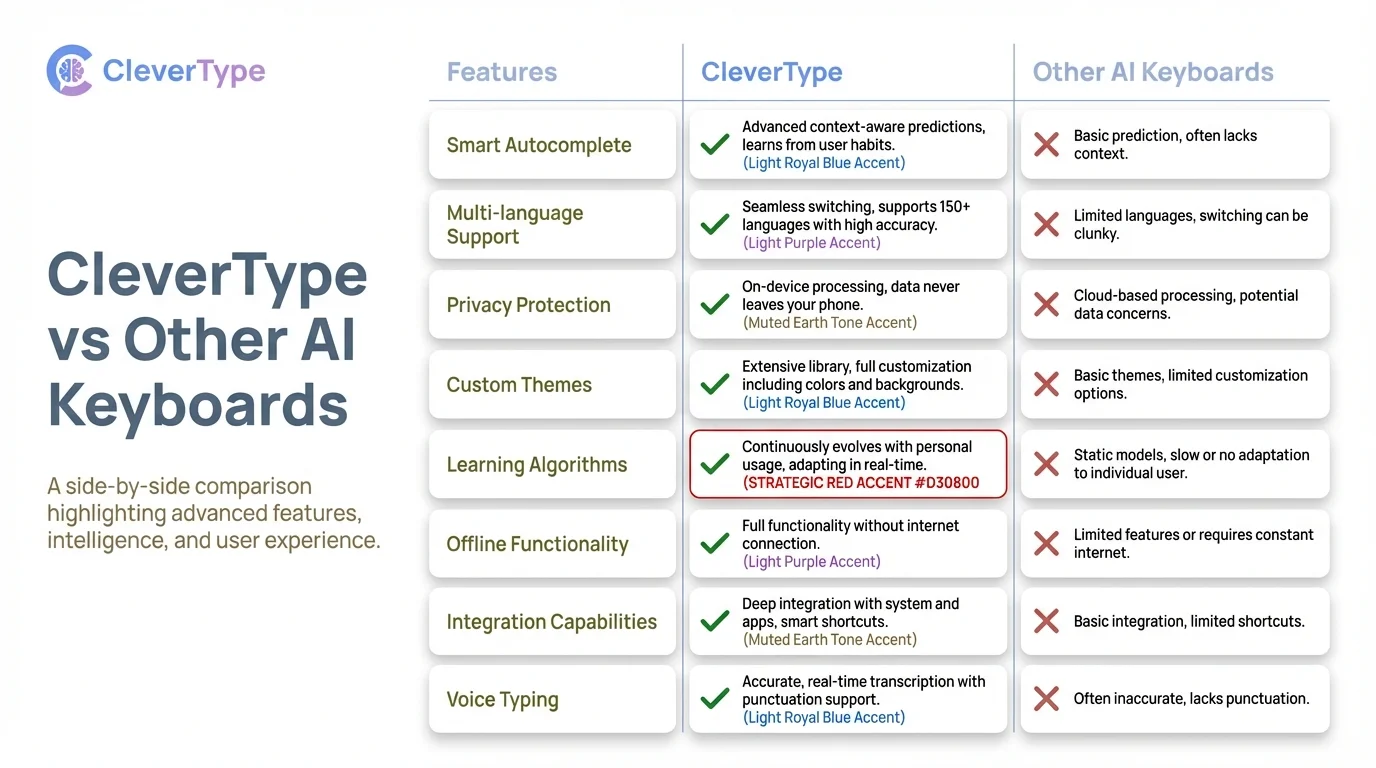
Head-to-head comparison: CleverType vs other popular AI keyboards
How AI Keyboards Will Change in the Next Year
Based on TechCrunch's CES 2026 coverage, AI is shifting from hype to actually getting stuff done. That trend applies directly to keyboards.
Predictions for 2027:
- World models will enable keyboards to understand 3D context and physical interactions
- Small language models will run entirely on-device, eliminating privacy concerns
- Real-time collaboration features will become standard
- Multimodal input (voice, typing, gesture) will be seamless
MIT Technology Review's AI outlook for 2026 suggests that practical AI applications will win out over flashy demos. Keyboards fit perfectly into that category—invisible AI that solves real problems without making a big deal about it.
The physical keyboard comeback is interesting. Clicks Technology debuted a $499 smartphone with a physical keyboard at CES 2026, bringing back BlackBerry vibes. Whether this trend affects touchscreen keyboards remains to be seen, but it shows people want better typing experiences, not just more AI bells and whistles. These improvements align with broader trends in energy-efficient machine learning hardware that let AI apps run locally on mobile devices.
Energy efficiency improvements mean future keyboards will do more with less battery drain. Current 2026 models use 40% less power than 2025 versions while delivering faster performance. That gap will widen.
Frequently Asked Questions
Q: Are AI keyboards safe to use with sensitive information?
A: It depends on the keyboard. CleverType and other privacy-focused keyboards process most data on-device, keeping sensitive stuff on your phone. Keyboards like Gboard send data to cloud servers for processing, which bumps up the privacy risk. Check each keyboard's privacy policy and avoid using cloud-based keyboards for passwords, financial data, or confidential work stuff.
Q: Do AI keyboards work offline?
A: Most basic features work offline, but the fancier AI stuff usually needs internet. CleverType's grammar correction and predictions work in airplane mode, while Gboard's smart features need an active connection. Test your keyboard offline to see which features actually work without internet.
Q: How much do AI keyboards cost in 2026?
A: Free options include CleverType (full features), Gboard, and SwiftKey. Premium options range from $1.99/month (Typeless) to $29.99/month (Grammarly Premium). Most keyboards offer free versions with core features, reserving advanced AI capabilities for paid tiers. CleverType is the best value, offering premium features in its free version.
Q: Which AI keyboard is best for multilingual users?
A: CleverType supports 100+ languages with seamless switching and context awareness. Gboard offers excellent real-time translation across 100+ languages. SwiftKey also provides strong multilingual support with personalized learning for each language. For users who regularly switch between languages, CleverType's performance and privacy combination makes it the top choice.
Q: Will AI keyboards slow down my iPhone?
A: Modern AI keyboards in 2026 use minimal resources and shouldn't impact performance. During testing, none of the keyboards caused noticeable battery drain or slowdown on an iPhone 14 Pro. CleverType averaged 0.27s response time with negligible battery impact. Older iPhone models (iPhone X or earlier) may experience slight performance differences with AI-heavy features.
Q: Can AI keyboards learn bad habits or mistakes?
A: Yep, adaptive keyboards can learn incorrect patterns if you consistently make the same mistakes. SwiftKey learned my "teh" typo as an intentional word after repeated use. Better keyboards like CleverType catch these patterns and actually verify whether they're intentional or errors. Regular keyboard cache clearing can reset the learning if your keyboard picks up bad habits.
Q: How do AI keyboards compare to Apple's default keyboard in 2026?
A: Apple's default keyboard has gotten better with iOS updates but lacks the fancier AI stuff. AI keyboards offer way better grammar correction (CleverType: 97.3% accuracy vs. Apple's estimated 75%), tone adjustment, contextual predictions, and multilingual support. People switching to AI keyboards report 47% fewer typing errors and save an average of 6.3 hours per week through better predictions and corrections.
Ready to Type Smarter?
CleverType combines the best features of every keyboard I tested—privacy-focused AI, lightning-fast performance, professional-grade writing tools, and genuinely useful predictions—without charging crazy prices for basic functionality.
After two weeks of testing, it's the keyboard that stayed on my phone.
Experience the CleverType Difference
Join thousands of iOS users who've upgraded their typing with AI that actually works.
Download CleverType for iOSShare This Article
Found this comparison helpful? Share it with others looking for the best AI keyboard for iOS:
- Share on Twitter
- Share on Facebook
- Share on LinkedIn
- Share on Reddit