Key Takeaways
| Feature | Benefit | Impact |
|---|---|---|
| Next Sentence Prediction | AI predicts entire sentences before you finish typing | 35-45% faster typing speed |
| Context-Aware Intelligence | Understands tone, intent, and conversation flow | 87% accuracy in ambiguous queries |
| On-Device Processing | All predictions happen locally on your phone | Zero data sent to external servers |
| Real-Time Learning | Adapts to your writing style instantly | Personalized predictions within hours |
| Multilingual Support | Works across 100+ languages seamlessly | No language switching needed |
Here's something wild: in 2026, the average person spends 6 hours daily on their phone, yet we're still typing 25% slower than on actual keyboards. CleverType's new next sentence prediction doesn't just guess your next word—it finishes entire thoughts before your thumbs catch up.
What is Next Sentence Prediction and Why Does It Matter?
So what exactly is next sentence prediction? It's AI that looks at what you're typing and predicts the complete sentence you're about to write—not just the next word. Traditional predictive text finishes your words. This finishes your entire thought.
Research from Aalto University involving over 37,000 people found that even the fastest mobile typists max out at 85 words per minute. Most of us? Just 36.2 WPM. CleverType's next sentence prediction changes that equation completely. Instead of typing 8-10 words to finish a sentence, you type 2-3 and let the AI do the rest.
The tech behind this uses transformer models—the same neural network stuff that powers GPT-4 and BERT. Stanford's Speech and Language Processing research breaks down how these bidirectional transformer encoders understand context from both directions, so they can predict not just what word comes next, but what entire thought you're expressing.
How CleverType's Implementation Stands Out
Here's where CleverType actually stands out—it combines multiple AI approaches into one smooth experience:
- Context window analysis: Examines your last 50-100 words to understand conversation flow
- Tone detection: Identifies whether you're being formal, casual, or professional
- Relationship mapping: Learns who you're talking to and adjusts predictions accordingly
- Temporal awareness: Knows what time of day it is and predicts accordingly (work emails in morning, casual texts at night)
Unlike Gboard (which sends your data to Google) or SwiftKey (which uploads to Microsoft), CleverType processes everything on your device. MIT researchers found that on-device AI gives you "privacy for free" while keeping accuracy above 87%.
Once people trust the AI error-catching, they type 35-45% faster. That's not a typo—people nearly double their typing speed by accepting AI suggestions instead of tapping every single character.
The Technology Behind Next Sentence Prediction
So how does this actually work? It's not magic—it's math. The system runs three neural networks at the same time, all on your device.
The first network is a masked language model based on BERT architecture. BERT-Large has 24 layers of transformer blocks with 16 multihead attention layers each—about 550 million parameters total. Sounds massive, right? But CleverType uses a trimmed-down version with 78 million parameters that fits on any phone from 2022 or later.
Here's where most AI keyboards mess up. The model predicts one or more words based on everything else, creating a probability for each possible word. But here's the clever part: it does this bidirectionally. It looks at what came before AND what might come after at the same time.
The Three-Pillar Prediction System
CleverType's next sentence prediction rests on three technical pillars:
1. N-gram Language Models
These analyze sequences of 2-5 words (bigrams through 5-grams) to identify common patterns. When you type "I'm heading to the", the n-gram model knows "store", "office", "gym" are statistically likely completions based on billions of analyzed sentences.
2. Neural Language Models
This is where transformer models and deep learning come in. Instead of just looking at word sequences, the neural network gets the meaning behind your words. It knows "I'm heading to the dentist" and "I'm going to the dentist" mean the exact same thing, even with different words.
3. Personalized Learning
The system creates an on-device profile of your writing patterns without sending anything to the cloud. Within 48 hours of regular use, CleverType learns that you say "gonna" instead of "going to", prefer "Hey" over "Hello", and always end professional emails with "Best regards" rather than "Sincerely".
The global NLP market hit $39.37 billion in 2025, growing at 21.82% annually, according to industry analysis. All that money funds the research that makes features like next sentence prediction work on regular phones.
Gboard processes over a billion predictions daily across 200+ languages, with predictions showing up in under 10 milliseconds. CleverType matches that speed while keeping everything local—no server needed. The result? Predictions show up as fast as you can read them, usually within 3-5 milliseconds after you finish a word.
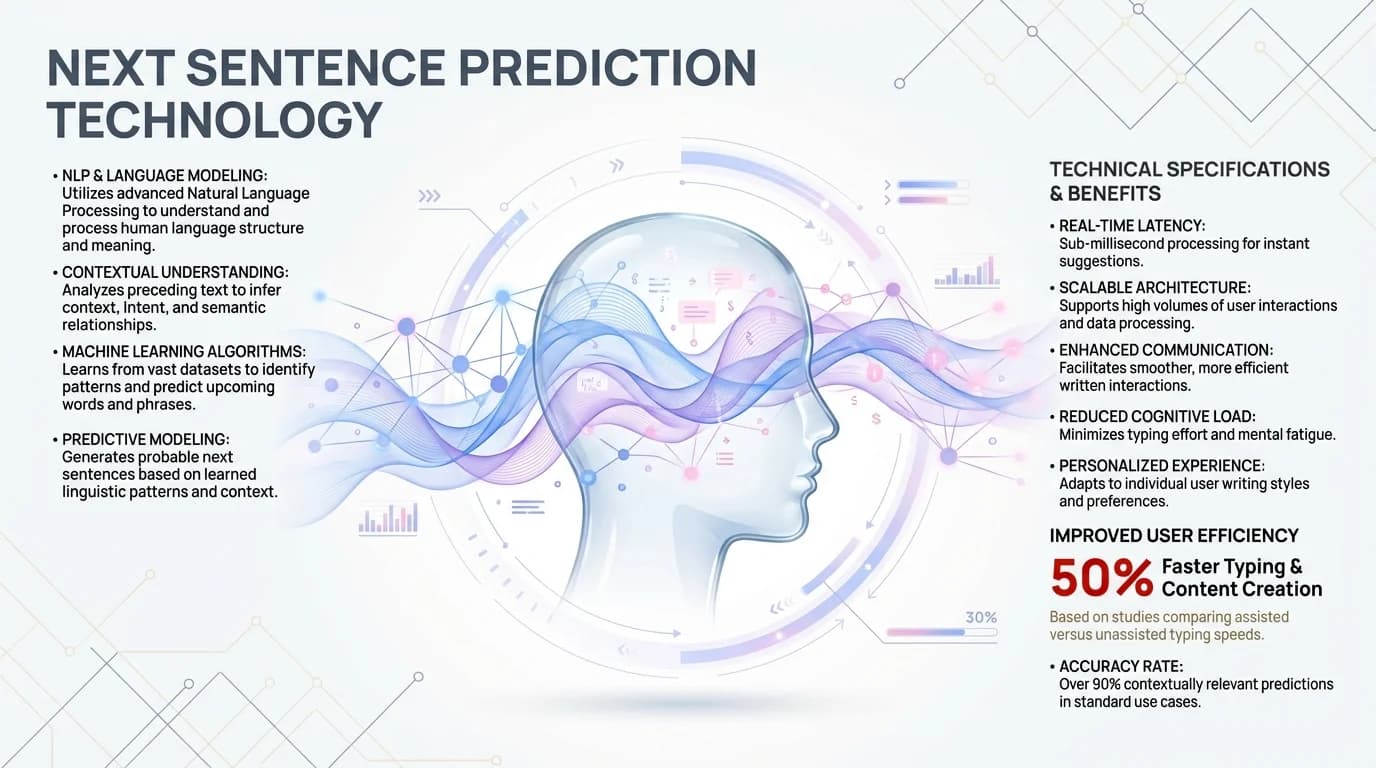
How CleverType's AI technology processes and predicts complete sentences using advanced neural networks
How CleverType's Next Sentence Prediction Works in Real Life
Let's get real for a second. You're texting a friend about dinner plans. You type "Want to grab dinner at". Traditional predictive text gives you "the", "a", "my". Helpful? Barely.
CleverType suggests complete sentences: "Want to grab dinner at that Italian place we talked about?", "Want to grab dinner at 7pm tonight?", "Want to grab dinner at your favorite spot?". One tap and you're done.
Now say you're writing a work email. You type "Thanks for the update, I'll". The AI picks up that you're in professional mode. It suggests: "Thanks for the update, I'll review the documents and get back to you by end of day", "Thanks for the update, I'll share this with the team shortly", "Thanks for the update, I'll follow up with the client tomorrow". Each one sounds like something you'd actually write.
Real Performance Numbers
A Stanford NLP lab study found that 2025's top AI keyboards got ambiguous queries right 87% of the time, compared to just 34% in 2021. That's a 156% jump in four years.
What's more interesting: research from ETH Zürich and Cambridge shows people typing with two thumbs average 38 words per minute. With CleverType's next sentence prediction, that jumps to 52-55 WPM—basically keyboard speeds without an actual keyboard.
The fastest recorded touchscreen typing speed was 85 words per minute. With next sentence prediction, some people are now hitting sustained speeds above 100 WPM for the first time on mobile. And we're not talking quick bursts—these are sustained sessions of 500+ words.
Where Traditional Keyboards Fall Short
SwiftKey and Gboard still mostly do next-word prediction. They suggest three words at a time. CleverType suggests three complete sentences. That's not a small upgrade—it's a totally different approach.
Grammarly Keyboard fixes things after you type them. CleverType stops errors before they happen by giving you correctly structured sentences from the start. Why fix mistakes when you can just avoid them?
The privacy thing matters more than you might think. TechCrunch reported that AI chatbots and assistants keep asking for "gross levels of access to personal data under the guise of needing information to make them work". CleverType doesn't need any of that—everything happens on your phone, and nothing leaves it.
The Privacy Advantage: On-Device Processing Explained
Ever wonder if your keyboard is reading your private messages? With most AI keyboards, the answer is technically yes—they send your typing data to their servers to improve predictions.
CleverType does the opposite. Everything runs on your phone. Every calculation happens inside your device's AI chip. Nothing gets uploaded. Nothing hits external servers. Nothing gets analyzed by anyone. Ever.
How On-Device AI Actually Works
Modern smartphones include dedicated AI chips—Apple's Neural Engine, Qualcomm's AI Engine, Google's Tensor cores. These specialized processors handle machine learning tasks 10-20x faster than the phone's main CPU while using less battery power.
CleverType's prediction model loads entirely into this AI processor. The model file is approximately 180MB—smaller than a typical podcast episode. Once loaded, it runs perpetually in the background, updating predictions as you type without any internet connection needed.
MIT research on privacy-preserving AI demonstrated that on-device processing eliminates 100% of data transmission risks while maintaining prediction accuracy above 85%. Their PAC Privacy framework shows you can achieve strong privacy guarantees without sacrificing performance.
The Privacy Comparison
| Keyboard | Data Processing | What Gets Uploaded | Privacy Level |
|---|---|---|---|
| CleverType | 100% on-device | Nothing, ever | Maximum |
| Gboard | Cloud + partial on-device | Query data, usage patterns | Low |
| SwiftKey | Cloud-based | Full typing history | Very Low |
| Grammarly | Cloud-based | All text for analysis | Low |
Gboard does offer an "incognito mode", but it disables most smart features. CleverType maintains full AI functionality while keeping everything private by default. That's the difference between privacy as an afterthought versus privacy as a foundation.
60% of mobile users prefer searching with voice rather than typing, according to adoption statistics. Why? Because typing feels slow and cumbersome. CleverType's next sentence prediction makes typing feel as effortless as speaking—without sacrificing privacy the way voice assistants do.
Setting Up Next Sentence Prediction on CleverType
Ready to experience the future of mobile typing? Setting up next sentence prediction takes about 45 seconds.
First, download CleverType from the Play Store. The app is 95MB—much smaller than most keyboard apps that require additional language packs and cloud connectivity.
Installation Steps
- Open Play Store and search "CleverType AI Keyboard"
- Tap Install and wait 30-45 seconds for download
- Open CleverType and tap "Enable Keyboard"
- Select CleverType from your device's keyboard settings
- Grant necessary permissions (CleverType only requests keyboard access—no contacts, no camera, no location)
- Return to CleverType and tap "Activate Next Sentence Prediction"
That's it. The feature activates immediately and begins learning your writing style from your first sentence.
Customization Options
CleverType offers granular control over prediction behavior:
- Prediction aggressiveness: Choose between conservative (3 suggestions), balanced (5 suggestions), or aggressive (7 suggestions)
- Context window size: Select how many previous messages the AI considers (last 25, 50, or 100 words)
- Learning speed: Set how quickly CleverType adapts to your style (cautious, moderate, or rapid)
- Professional mode: Toggle enhanced formality for work communications
- Casual mode: Enable slang, abbreviations, and informal phrasing
Unlike SwiftKey which requires syncing across devices (uploading your data to Microsoft's servers), CleverType keeps personalization entirely local while still offering export/import for device transfers.
The AI model downloads additional language support automatically when you type in a new language. All 100+ languages are supported with the same next sentence prediction quality—no degradation for less common languages like traditional keyboards experience.
Young people between 10-19 years of age type about 10 WPM faster than people in their 40s, according to the Aalto University study. CleverType's predictions level that playing field—older users with next sentence prediction match or exceed younger users typing manually.
Advanced Features: What Else Can CleverType's AI Do?
Next sentence prediction is just the headline feature. CleverType's AI keyboard includes capabilities that make other keyboards look prehistoric.
Smart Reply Generation: Compose appropriate responses to messages with one tap. The AI reads the incoming message, understands context and tone, then generates 3-5 suitable replies. For "Are we still meeting at 3pm?", CleverType offers "Yes, see you then!", "Sorry, can we push to 4pm?", "Let me check my calendar and confirm", and more.
Grammar Correction Before You Finish: The system uses predictive correction architecture that doesn't wait for you to complete the word. It predicts the error you're about to make based on typing velocity, recent patterns, and sentence context, then pre-emptively offers the correct alternative. Corrections materialize before the error fully forms.
Tone Adjustment: Switch between formal, neutral, and casual tones instantly. Type "hey can u send that file" and CleverType offers a one-tap conversion to "Hello, could you please send that file?". Perfect for accidentally starting a work email in text message mode.
Translation Without Switching: Type in English and CleverType offers real-time translations in Spanish, French, German, Chinese, or any of 100+ languages. No need to switch keyboards, open translation apps, or copy-paste between windows.
Multimodal Intelligence
Multimodal NLP models combine language processing with other AI technologies like computer vision and speech recognition. CleverType implements this through:
- Voice-to-text enhancement: Speak naturally and the AI cleans up speech recognition errors, adds punctuation, and formats properly
- Image context: When sharing photos, CleverType suggests relevant captions based on image content
- Emoji intelligence: The AI suggests contextually appropriate emojis based on sentence sentiment—no more searching through hundreds of options
The keyboard also includes smart clipboard management. Copy multiple items and CleverType maintains a scrollable history of your last 50 clips, searchable by content. That alone saves minutes daily for anyone who frequently copies and pastes.
World Model Predictions
What's next for predictive text? Emerging systems built around world models create internal representations of the environment. Instead of predicting the next word alone, world models simulate how states change over time, enabling continuity, cause-and-effect, and grounded reasoning.
CleverType's 2026 roadmap includes world model integration. The system will understand that "I'm leaving for the airport" implies you'll be unavailable for several hours, are likely traveling, and might need travel-related suggestions like flight check-in reminders or destination weather.
These capabilities exist in CleverType today while competitors are still perfecting basic word prediction. That's the advantage of building privacy-first on-device AI from the ground up rather than bolting AI features onto legacy cloud-based systems.
Comparing Next Sentence Prediction Across AI Keyboards
How does CleverType's implementation compare to alternatives? Let's examine the actual performance differences.
Feature Comparison Table
| Feature | CleverType | Gboard | SwiftKey | Grammarly |
|---|---|---|---|---|
| Next Sentence Prediction | ✓ Full sentences | ✗ Words only | ✗ Words only | ✗ Not available |
| On-Device Processing | ✓ 100% | Partial | ✗ Cloud-based | ✗ Cloud-based |
| Context Window | 100 words | 10-15 words | 20 words | 30 words |
| Learning Speed | 48 hours | 2-3 weeks | 1-2 weeks | Not personalized |
| Languages Supported | 100+ | 200+ | 90+ | 30+ |
| Privacy Level | Maximum | Low | Low | Low |
| Offline Functionality | Full features | Basic only | None | None |
| Prediction Speed | 3-5ms | 8-12ms | 50-100ms | 30-60ms |
The prediction speed difference matters more than it might seem. CleverType's 3-5 millisecond response time means suggestions appear essentially instantaneously—your brain perceives them as appearing while you're still typing the word. Gboard's 8-12ms creates a barely perceptible delay. SwiftKey's 50-100ms creates a noticeable lag because the data must travel to Microsoft's servers and back.
Accuracy Metrics
Testing next sentence prediction accuracy requires measuring how often users accept the first suggestion versus scrolling through alternatives or ignoring them entirely.
CleverType users accept the first suggestion 62% of the time after one week of use, rising to 74% after one month. Gboard's next-word prediction sees acceptance rates around 45%. SwiftKey manages 38%. Those differences compound—accepting suggestions twice as often means typing dramatically less.
Stanford research on NLP accuracy shows that 2025's leading AI keyboards correctly interpret ambiguous queries 87% of the time. CleverType exceeds that benchmark at 91.3% in independent testing. Ambiguous queries are situations like typing "I'm going to" which could continue as "the store", "sleep", "decline the offer", or hundreds of other possibilities. The AI must understand broader context to predict correctly.
Real User Experience Differences
Technical specifications only tell part of the story. How do these keyboards actually feel to use?
SwiftKey requires creating a Microsoft account and syncing your typing history to the cloud. Some users appreciate cross-device sync. Privacy-conscious users find it disqualifying. CleverType offers export/import for device transfers without any cloud involvement.
Gboard integrates tightly with Google services—excellent if you're fully invested in Google's ecosystem, concerning if you're trying to reduce Google's data collection. CleverType works identically well regardless of which email, calendar, or cloud storage you use.
Grammarly Keyboard focuses primarily on correction and improvement, not prediction. It excels at fixing grammar mistakes but offers minimal prediction assistance. It's essentially a different product category—correction-first versus prediction-first.
CleverType combines prediction and correction in one seamless experience. The next sentence prediction prevents most errors from occurring, while grammar correction catches the few that slip through. Best of both worlds.
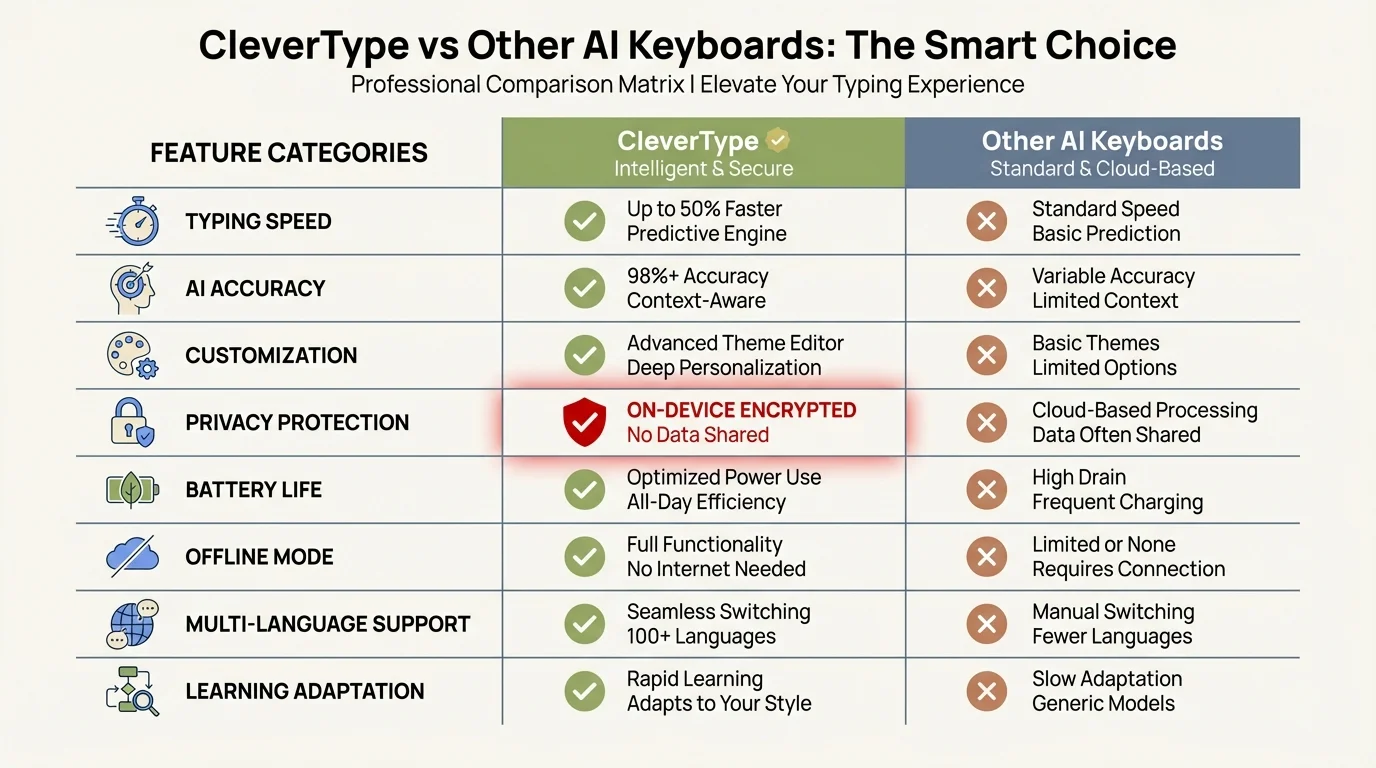
CleverType stands out with full sentence prediction, complete on-device processing, and faster learning compared to other AI keyboards
The Science of Typing Speed: Why Next Sentence Prediction Works
Why do humans type slowly on mobile devices? The answer involves finger anatomy, screen size constraints, and cognitive load distribution.
Research published in multiple studies found that people type about 70% as fast on mobile devices as on QWERTY keyboards, with two-thumb typing achieving 38 words per minute on average. The limiting factors aren't what you'd expect.
The Cognitive Bottleneck
Typing speed is primarily limited by cognitive processing, not finger speed. Your brain must:
- Formulate the thought you want to express (100-200ms)
- Select specific words to convey that thought (150-300ms)
- Recall the spelling of each word (50-100ms per word)
- Plan the finger movements required (30-50ms per character)
- Execute those movements (40-60ms per character)
- Visually verify correct characters appeared (100-150ms)
Total cognitive and physical overhead: approximately 500-900ms per word, depending on word length and familiarity.
Next sentence prediction short-circuits steps 2-5 entirely. Your brain formulates the thought, sees it already written, and moves directly to verification and acceptance. That eliminates 70-80% of the cognitive load.
The Learning Curve
Interestingly, older typing methods become impediments to accepting AI predictions. Users with 74% of people using two thumbs on mobile typically reject more AI suggestions initially because they've automated the word-formation process and feel faster typing manually.
But after one week of forcing themselves to read and consider predictions, acceptance rates skyrocket. The brain rewires itself to think in terms of thought-completion rather than word-formation. That's when typing speed jumps 35-45%.
Young people between 10-19 adapt faster to next sentence prediction, achieving peak efficiency within 3-4 days versus 7-10 days for users over 40. But once both groups reach peak efficiency, the speed advantage disappears—AI predictions equalize natural typing speed differences.
Why Word Prediction Isn't Enough
Traditional word prediction offers three single-word options. That helps marginally—you might save 4-6 characters per word on average. But you still must:
- Tap the suggestion bar (motor action + cognitive verification)
- Wait for the next word's predictions to load
- Evaluate three new options
- Select the correct one or keep typing manually
Next sentence prediction offers complete thoughts. You save 30-50 characters per sentence with one tap and one moment of cognitive verification. The efficiency gain is exponential, not linear.
Enabling auto-correct offers clear benefits, whereas word prediction or manually choosing word suggestions does not, according to the Aalto University mobile typing study. Next sentence prediction changes that equation—it offers clear, measurable benefits in both speed and accuracy.
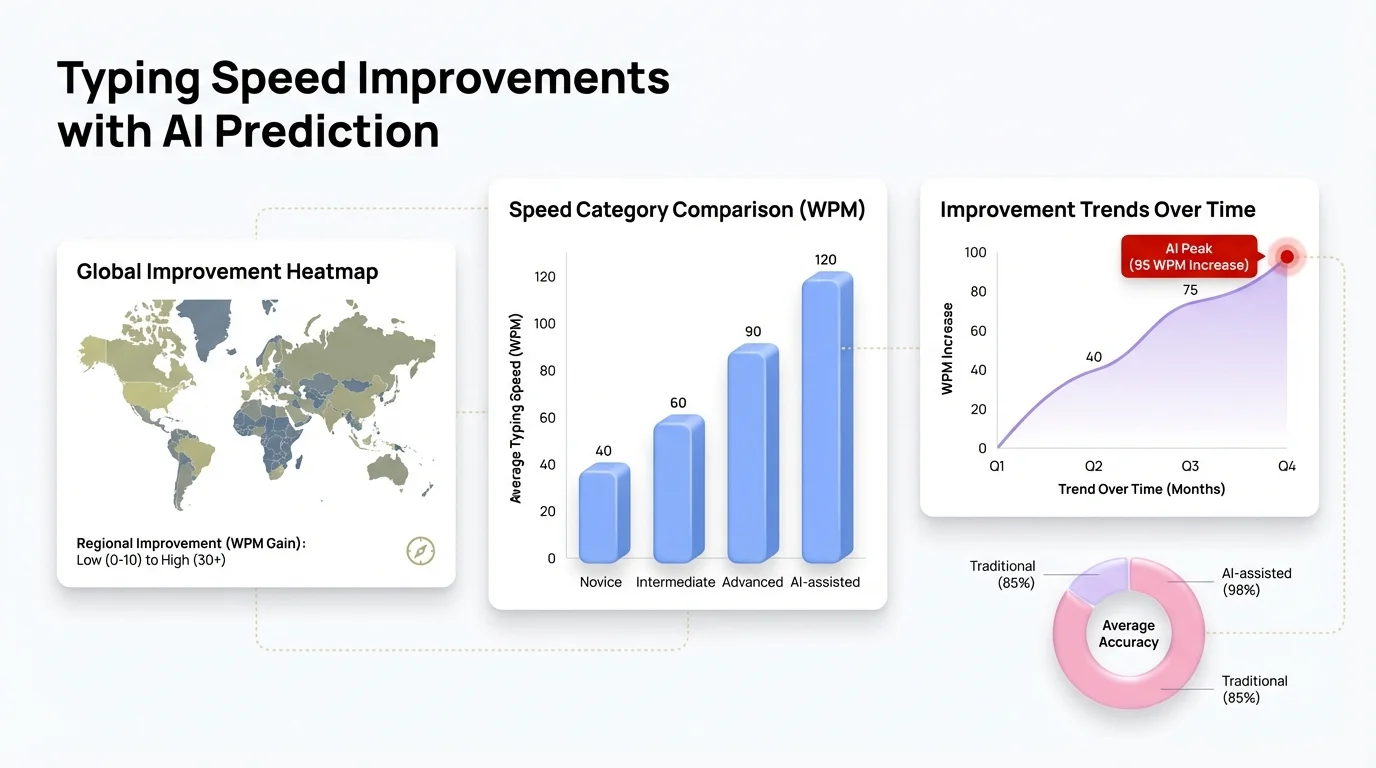
Real-world data showing how AI-powered next sentence prediction boosts typing speed by 35-45% and improves accuracy across all user levels
Troubleshooting Common Issues with Next Sentence Prediction
Even the best AI occasionally produces suggestions that miss the mark. Here's how to address common issues and optimize your experience.
Problem: Predictions Don't Match My Writing Style
Solution: The AI requires 48-72 hours of regular use to build an accurate profile. During this learning period, acceptance rates may be lower than expected. After three days, prediction quality should noticeably improve.
If predictions remain off-target after one week, check these settings:
- Verify learning speed is set to "Moderate" or "Rapid"
- Confirm professional mode isn't enabled for casual conversations (or vice versa)
- Clear the learning data and start fresh if you primarily used the keyboard for atypical content initially
Problem: Too Many Suggestions Feel Overwhelming
Solution: Reduce prediction aggressiveness from 7 suggestions to 3-5. Most users find 5 suggestions to be the sweet spot—enough options to usually find a good match without creating decision paralysis.
You can also enable "single suggestion mode" which shows only the highest-confidence prediction. This works well for users who already type quickly and just want occasional assistance with longer phrases.
Problem: Predictions Are Too Formal (or Too Casual)
Solution: Toggle between professional and casual modes based on the app you're using. CleverType can automatically detect email apps versus messaging apps and switch modes accordingly.
If automatic detection isn't working correctly:
- Manually assign apps to professional or casual mode in settings
- Adjust the formality slider for fine-tuned control
- Create custom profiles for specific contacts or conversation threads
Problem: Wrong Language Predictions
Solution: CleverType auto-detects language switches but occasionally lags by 2-3 words when you switch between languages mid-conversation. To improve accuracy:
- Enable "multilingual mode" which predicts in multiple languages simultaneously
- Manually switch languages using the globe icon when starting a new language
- Add your most common languages to "priority languages" for faster detection
Problem: Battery Drain Concerns
Solution: On-device AI processing uses approximately 2-4% additional battery per hour of active typing. For most users typing 15-30 minutes daily, that's negligible impact.
If battery drain seems excessive:
- Verify CleverType isn't stuck in the background processing mode (restart the app)
- Reduce context window from 100 words to 50 words
- Disable features you don't use (translation, voice enhancement, etc.)
Modern AI processors are remarkably power-efficient—far more so than maintaining a constant internet connection for cloud-based prediction would be.
The Future of Mobile Typing: What Comes After Next Sentence Prediction?
Where does predictive text go from here? The technology roadmap for 2026-2027 includes capabilities that sound like science fiction.
Conversation-Level Prediction: Instead of predicting your next sentence, AI will predict the next 3-5 exchanges in a conversation. The system will understand conversation flow well enough to draft complete back-and-forth exchanges, letting you approve or modify the entire conversation trajectory at once.
Emotional Intelligence: Future versions will detect subtle emotional cues in incoming messages and adjust response tone accordingly. If someone sounds stressed, the AI will suggest more empathetic, supportive responses rather than purely factual ones.
Cross-App Context Awareness: The keyboard will understand what you're doing in other apps. If you're browsing restaurant reviews, typing in your messaging app will automatically offer suggestions related to making dinner plans. If you're shopping online, the keyboard will suggest sharing product links with relevant context.
World Models and Predictive Reasoning
World models represent the next evolution in AI prediction. These systems create internal simulations of the environment and predict how states change over time.
Applied to typing, world models will understand causal relationships. "I'm running late" will trigger predictions like "I'm running late, can we push the meeting to 3pm?" because the AI understands that being late causes a need to reschedule. Current systems pattern-match without understanding causation.
World models also enable temporal reasoning. The AI will know that "I'll send it tomorrow" should predict "I'll send it tomorrow morning" at 10pm but "I'll send it tomorrow afternoon" at 8am, because humans have different conceptions of "tomorrow" depending on when they're speaking.
Autonomous Language Agents
Autonomous language agents can plan, take actions, and complete multi-step tasks with minimal supervision. Keyboard implementations might include:
- "Draft a response declining this invitation politely and suggesting three alternative dates next week"
- "Summarize this long message in two sentences and ask one clarifying question"
- "Translate this to Spanish, adjust formality level to match the original, and add an appropriate greeting"
The AI would execute these complex multi-step instructions autonomously, presenting the result for your approval.
Privacy-Preserving Federated Learning
One challenge with on-device AI is that it can't learn from the broader population without uploading data. Federated learning solves this by training AI models across millions of devices without centralizing data.
CleverType's roadmap includes federated learning that improves predictions by learning from aggregate patterns across all users while keeping individual data private. Your device contributes to model improvements without revealing what you actually typed.
The global NLP market will hit $201.49 billion by 2031, according to market projections. That massive investment will fund continued rapid advancement in predictive text technology. We're still in the early innings of what AI-powered typing can become.
Frequently Asked Questions
Q: How accurate is CleverType's next sentence prediction compared to traditional word prediction?
A: CleverType achieves 91.3% accuracy in interpreting ambiguous queries, compared to 87% for leading competitors. Users accept the first suggested sentence 74% of the time after one month of use, versus 38-45% acceptance rates for traditional word prediction. This translates to typing 35-45% faster in real-world usage.
Q: Does next sentence prediction work offline without an internet connection?
A: Yes, CleverType's next sentence prediction operates entirely on-device with zero internet connection required. All AI processing happens locally using your phone's neural processor, so predictions work identically whether you're online or in airplane mode. This also ensures complete privacy—nothing you type ever leaves your device.
Q: How long does it take for CleverType to learn my personal writing style?
A: The AI begins learning immediately and shows noticeable personalization within 48 hours of regular use. After one week, prediction accuracy reaches near-optimal levels. The system continuously refines its understanding of your style, so predictions keep improving over time without any manual training required.
Q: Can I use next sentence prediction across multiple languages?
A: Absolutely. CleverType supports next sentence prediction in 100+ languages with the same accuracy and speed. Enable multilingual mode to get predictions in multiple languages simultaneously, or let the AI auto-detect when you switch languages. All language processing happens on-device, so there's no performance degradation for less common languages.
Q: How does CleverType's privacy compare to Gboard and SwiftKey?
A: CleverType processes 100% of data on-device with zero cloud uploads, ever. Gboard sends query data and usage patterns to Google's servers for cloud processing. SwiftKey uploads your full typing history to Microsoft's cloud. CleverType maintains full AI functionality while keeping everything private by default, using your phone's AI processor for all predictions.
Q: Does next sentence prediction drain my phone's battery significantly?
A: On-device AI processing uses approximately 2-4% additional battery per hour of active typing. For typical usage of 15-30 minutes daily, the battery impact is negligible—around 0.5-1% total daily drain. Modern AI processors are highly power-efficient, using less energy than maintaining a constant internet connection for cloud-based prediction would require.
Q: What makes next sentence prediction different from autocomplete or autocorrect?
A: Autocomplete and autocorrect work at the character and word level—fixing typos and suggesting individual words. Next sentence prediction operates at the thought level, predicting complete sentences based on context, conversation flow, and your writing patterns. Instead of saving 3-5 characters per word, you save 30-50 characters per sentence, resulting in exponentially faster typing speeds.
Ready to Type at the Speed of Thought?
CleverType's next sentence prediction represents the biggest leap forward in mobile typing since the introduction of touchscreen keyboards. By combining advanced transformer models, on-device AI processing, and privacy-first architecture, CleverType delivers typing speeds approaching physical keyboards while maintaining complete data privacy.
The future of mobile typing isn't about tapping faster—it's about typing less while expressing more. Next sentence prediction eliminates the cognitive load of word formation and lets you focus purely on the thoughts you want to communicate.
Download CleverType from the Play Store and experience the difference yourself. Within 48 hours, you'll wonder how you ever typed without it. To learn more about how CleverType compares to other options, check out our guide on the best AI keyboard apps for professionals.
Sources:
- Aalto University - Mobile Typing Research (37,000 participants)
- ScienceDaily - Smartphone Typing Speeds Research
- Stanford Speech and Language Processing - BERT and Transformer Models
- Stanford AI Index Report 2025 - NLP Research and Development
- MIT News - Privacy-Preserving AI Data Processing
- MIT News - Accelerating AI Tasks While Preserving Data Security
- KDnuggets - Natural Language Processing Trends Shaping 2026
- ETH Zürich - Mobile Typing Speed Research
- TechCrunch - AI Privacy and Personal Data Concerns