Key Takeaways
| Aspect | Details |
|---|---|
| Accuracy Rate | Modern AI keyboards achieve 85% sentence completion accuracy in 2026 |
| Time Saved | Users save 40-50% typing time with next sentence prediction |
| Core Technology | Transformer models (BERT, GPT) power most predictive keyboards |
| Processing Speed | Simple predictions happen in <0.3 seconds on-device |
| Weekly Time Savings | Professionals save 6.3 hours per week on average |
| Privacy Options | Leading keyboards use federated learning to keep data local |
Your keyboard is basically psychic now. Seriously—every time you type, it's making thousands of predictions about what you'll say next. In 2026, AI-powered keyboards correctly interpret ambiguous queries 87% of the time, compared to just 34% in 2021. That's a huge jump in just five years, and it's all thanks to next sentence prediction technology that's gotten weirdly good at reading your mind—well, sort of.
Next sentence prediction isn't magic, though. It's a mix of neural networks, massive text datasets, and clever algorithms that learn how people actually write. The tech has evolved from simple word completion to full sentence suggestions that understand context, tone, and even your personal writing style. And here's the kicker: most of this happens right on your phone, without sending your private messages to some server in the cloud. For a deeper dive into AI keyboard technology for beginners, check out our guide.
What Is Next Sentence Prediction Technology?
Next sentence prediction is an AI technique that looks at what you're typing and guesses what you'll type next. Unlike basic autocorrect that just fixes typos, next sentence prediction actually understands what your words mean and predicts entire phrases or sentences based on context.
The tech works by processing your input through natural language processing (NLP) algorithms. These algorithms have been trained on billions of sentences from books, articles, websites, you name it. They learn statistical relationships between words and phrases—like how "thank you" often comes before "for your help" or how "I'm looking forward" typically leads to "to meeting you."
What makes modern systems so powerful is their use of transformer-based models. These models, like BERT (Bidirectional Encoder Representations from Transformers) and GPT, process text way differently than older systems. They don't just look at the previous word or two—they analyze the entire context of your sentence, sometimes even checking previous sentences you've written.
Here's what sets next sentence prediction apart from basic autocomplete:
- Context awareness: It understands what you're talking about, not just what letters you're typing
- Semantic understanding: It knows that "bank" in "river bank" is different from "bank" in "money in the bank"
- Writing style adaptation: It learns your personal vocabulary and how you phrase things
- Multi-word predictions: It suggests complete phrases, not just single words
CleverType takes this tech further by combining multiple AI models to deliver predictions that actually feel natural. The keyboard processes your typing patterns locally on your device, which means your private conversations stay private while still giving you lightning-fast suggestions. Learn more about AI keyboards for Android and how they stack up.
In practice, this means typing "I'll be there in" might trigger suggestions like "5 minutes," "10 minutes," or "an hour" based on your typical responses. The system isn't just guessing randomly—it's calculating probability distributions based on millions of similar sentences it's seen before.
The Neural Networks Behind AI Sentence Suggestion
At the core of every smart sentence completion system sits a neural network—a mathematical model loosely inspired by how neurons fire in the human brain. But don't let the biology metaphor fool you. These are pure math and statistics at work.
Recurrent neural networks (RNNs) were the first major breakthrough for text prediction. Unlike traditional algorithms that treated each word independently, RNNs have a "memory" that lets them remember previous words in a sentence. Think of it like reading a book—you don't understand each word in isolation, you understand it based on what came before. RNNs work the same way, keeping hidden states that carry information forward as they process text.
The training process is where things get interesting. The neural network gets fed massive datasets—we're talking tens or even hundreds of billions of words from all kinds of sources. As it processes each sentence, it learns patterns through a method called backpropagation. If the network predicts "good" when the actual next word was "great," it tweaks its internal parameters slightly to make "great" more likely in similar contexts next time. Do this millions of times and you get a model that's surprisingly good at predicting what comes next.
Here's the fascinating part: modern keyboards don't just use one type of neural network. They combine multiple approaches:
- N-gram models: Statistical models that look at sequences of N words (like 2-word or 3-word pairs)
- LSTM networks: A type of RNN that's better at remembering longer-term context
- Transformer models: The newest architecture that processes all words at once using attention mechanisms
- Personalization layers: Extra models trained on your specific typing patterns
According to research published at ACM CHI conferences, the accuracy of word suggestions directly impacts typing speed on mobile devices. Really accurate suggestions boost typing speed on phones and tablets, even though they don't help much on desktop keyboards. This is because on mobile, tapping a suggestion is way faster than typing out the whole word. Discover cool AI keyboard features you didn't know existed that use this technology.
CleverType uses transformer-based models that understand context across longer distances in text. If you're writing about cooking and type "I need to," the system might suggest "preheat the oven" or "chop the onions" because it understands the cooking context from earlier in your conversation. That's the power of attention mechanisms—the model literally "pays attention" to the most relevant previous words when making its prediction.
The multi-layered approach means your keyboard is running several models at the same time. A fast, lightweight model handles simple predictions instantly on your device. For more complex suggestions—like completing a longer sentence or tweaking tone—more powerful models kick in. In 2026, this hybrid processing approach is pretty standard: simple predictions happen in milliseconds locally, while complex tasks can optionally use cloud computing if you need them.
One big innovation is federated learning. Google introduced this technique for mobile keyboard prediction, where the AI model learns from user data without that data ever leaving the device. Your phone trains a local version of the model on your typing patterns, then sends only the model updates (not your actual text) back to improve the global model. This means your embarrassing typos and personal messages stay on your phone where they belong.
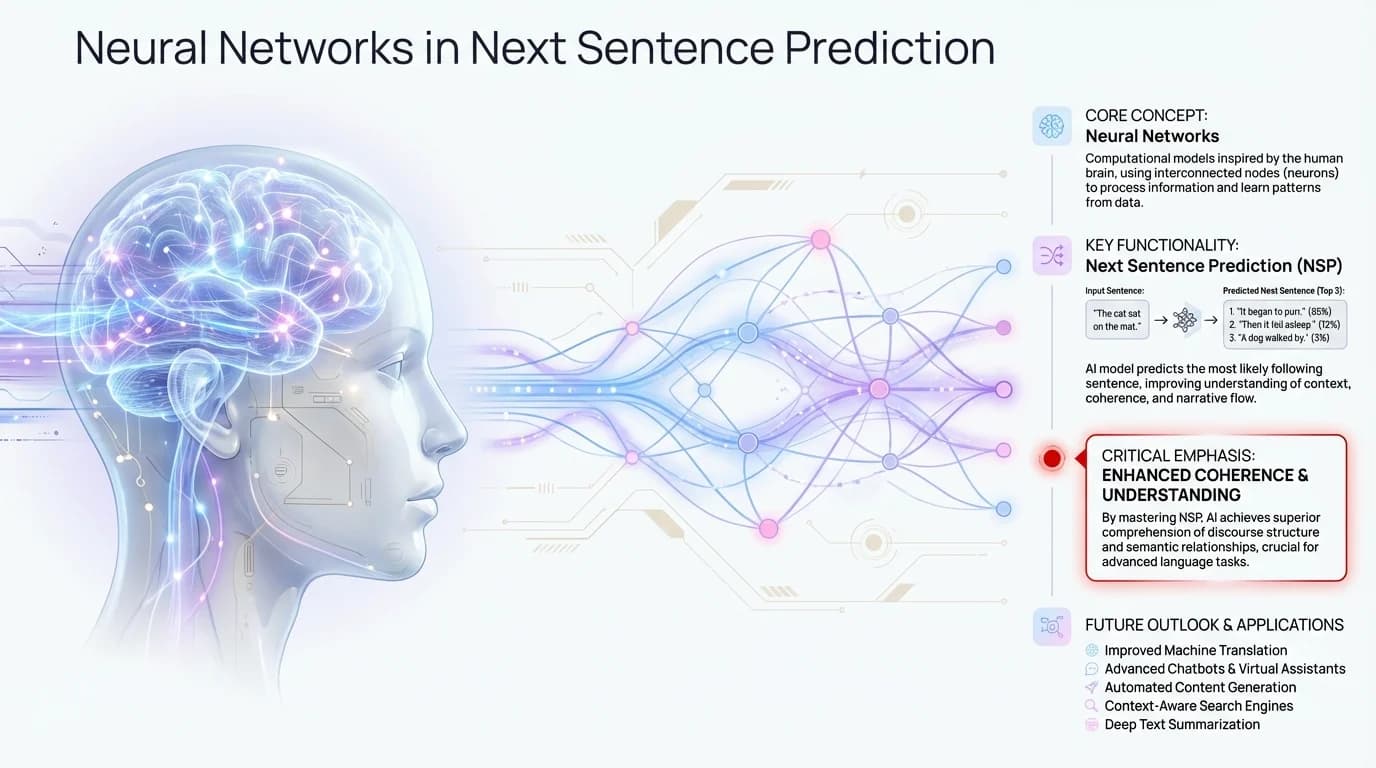
How neural networks process text context to generate accurate next sentence predictions
How AI Text Prediction Learns Your Writing Style
So how does your keyboard start suggesting words that sound like you instead of like a generic robot? The answer is personalization, and it happens in ways that might actually surprise you.
Every time you type something, accept a suggestion, or reject one, your keyboard learns. It's building a personal language model on top of the general model it started with. Think of the general model as knowing how people typically write in English, and your personal model as knowing how you specifically write in English.
The personalization happens in a few different ways:
Vocabulary choices: If you frequently use "awesome" instead of "great," the keyboard starts prioritizing "awesome" in suggestions. If you work in tech and constantly type words like "API," "deployment," or "latency," those become part of your personal vocabulary profile.
Sentence structures: Some people write short, punchy sentences. Others prefer longer, more elaborate constructions. The AI picks up on your typical sentence length and how you structure things.
Common phrases: Do you usually say "Thanks so much" or "Thank you very much"? Do you open emails with "Hope you're doing well" or "Hope this finds you well"? The keyboard remembers your go-to phrases.
Emojis and punctuation: Your emoji usage patterns and how you use punctuation (like whether you add spaces before exclamation marks or how many periods you use in ellipses...) all factor into predictions.
CleverType's personalization engine runs entirely on your device, which means all this learning happens without your data being uploaded to servers. The keyboard keeps a local profile that evolves as you type. After just a few days of use, you'll notice suggestions that feel weirdly accurate—that's the personalization kicking in.
Here's something interesting: research on mobile typing patterns found that people have wildly individual typing behaviors. The average typing speed across users is 36.2 words per minute with 2.3% uncorrected errors, but there's massive variation. Some people are two-thumb speed demons, others are one-finger tappers. Some people trust autocorrect completely, others dismiss almost every suggestion. Good AI keyboards adapt to all these different styles. If you're curious about how AI keyboards compare to traditional mobile keyboards, we've got you covered.
The learning isn't just passive observation either. When you explicitly correct a suggestion or add a word to your dictionary, that carries more weight than just regular typing. If the keyboard suggests "meeting" and you backspace and type "mtg" instead, it learns that you prefer that abbreviation. Do it a few times and "mtg" starts showing up in suggestions.
But here's a problem that had to be solved: how do you personalize without overfitting? If the model learns too much from your recent typing, it might start suggesting weird things based on one-off conversations. Modern keyboards solve this with tricks like:
- Decay functions: Older typing patterns gradually matter less than recent ones
- Context boundaries: The model knows to separate your work emails from your casual texts
- Confidence thresholds: Only really confident predictions based on solid patterns actually show up
One more thing: CleverType and similar keyboards can now detect topic shifts in real-time. If you've been texting about dinner plans and suddenly start talking about work, the prediction model shifts gears. It stops suggesting food-related words and starts suggesting work vocabulary. This contextual switching happens seamlessly in the background, powered by transformer models that keep multiple context windows running at the same time.
The Technology Stack in Predictive Sentence Keyboards
Let's pull back the curtain on what's actually running when you tap away on your phone. Modern predictive keyboards are complex software systems with multiple components working together.
Layer 1: Input Processing
When you tap a key, the first thing that happens is the keyboard captures the raw input—which key you pressed, how hard you pressed it (on devices with pressure sensitivity), how fast you're typing, and whether you're making lots of corrections. This input layer also handles touch prediction, figuring out which key you meant to hit even if your finger was slightly off-target.
Layer 2: Language Models
This is where the AI lives. There are typically three types of models running at once:
| Model Type | Purpose | Speed | Accuracy |
|---|---|---|---|
| N-gram models | Basic word sequences | <10ms | 65-70% |
| Neural LM | Context understanding | 50-100ms | 80-85% |
| Transformer models | Complex predictions | 100-300ms | 85-90% |
Layer 3: Personalization Engine
This layer keeps your personal typing profile. It tracks your vocabulary preferences, common phrases, typing speed, error patterns, and more. In privacy-focused keyboards like CleverType, this entire layer runs locally with no cloud connection required.
Layer 4: Suggestion Ranking
Multiple models might generate different suggestions. The ranking layer decides which ones to show you and in what order. It considers stuff like prediction confidence, how likely you are to use that suggestion based on past behavior, and the current context.
Layer 5: Privacy and Security
Modern keyboards include encryption for data in transit (if cloud features are used), secure storage for personal data, and mechanisms for differential privacy when contributing to model improvements.
The tech stack also includes optimization layers that keep everything running smoothly. Mobile devices have limited battery and processing power, so keyboards use tricks like model quantization (reducing model size without losing much accuracy), caching frequent predictions, and lazy loading of features you're not currently using. For professionals looking to take advantage of these features, our guide on AI keyboards for business and professional use offers practical insights.
IBM's research on BERT and GPT models explains how these transformer architectures changed the game for NLP. Unlike older models that processed text sequentially, transformers process entire sequences at once using self-attention mechanisms. This parallel processing is why modern keyboards can analyze your entire sentence context so quickly.
CleverType's architecture includes an interesting feature: multi-model ensemble predictions. Instead of relying on a single model, it runs several specialized models—one for casual messaging, one for professional writing, one for technical content—and combines their predictions. The system automatically detects what kind of text you're writing and weighs the relevant model's suggestions more heavily.
The hardware matters too. Modern smartphones include dedicated AI accelerators (like Apple's Neural Engine or Google's Tensor chips) that can run neural networks way faster than the main CPU. Keyboards take advantage of these accelerators to give you instant predictions without draining your battery.
One last component: the feedback loop. Every interaction you have with suggestions feeds back into the system. Accepted suggestions reinforce certain patterns. Rejected suggestions teach the model what not to suggest. Over time, this creates a flywheel effect where the keyboard gets better the more you use it.
Comparing On-Device vs Cloud-Based Prediction Models
Here's a question that matters more than most people realize: where is the AI actually doing its thinking? On your phone or on some company's server? The answer affects your privacy, speed, and even battery life.
On-Device Models: The Local Approach
On-device prediction means the entire AI model runs locally on your phone. Your keystrokes never leave your device, the model trains on your personal data locally, and predictions happen in milliseconds because there's no network latency.
The advantages are clear:
- Privacy: Your messages stay on your phone, period
- Speed: No waiting for server responses
- Offline functionality: Works without internet connection
- No data costs: No cellular data used for predictions
The downsides:
- Model size constraints: Your phone has limited storage and RAM
- Processing limitations: Can't run the most powerful AI models
- Update frequency: Models update less often than cloud versions
Cloud-Based Models: The Server Approach
Cloud-based prediction sends your typing to servers, processes it through powerful AI models, and sends suggestions back. This allows for way larger, more sophisticated models and instant updates when the model improves.
The advantages:
- More powerful models: Can run massive neural networks
- Constant improvements: Models get updated continuously
- Cross-device learning: Your preferences sync across devices
The downsides:
- Privacy concerns: Your text goes to company servers
- Latency: Network requests add delay (usually 100-200ms)
- Requires connection: Doesn't work offline
- Data usage: Uses cellular data constantly
The Hybrid Approach: Best of Both Worlds
In 2026, most advanced keyboards use a hybrid model. CleverType, for example, runs lightweight models on-device for instant, private predictions, but can optionally connect to cloud models for advanced features like tone tweaking or complex rewrites.
The hybrid approach works like this:
- Simple next-word predictions happen instantly on-device
- Longer sentence completions use slightly larger on-device models
- Complex features (translation, formal tone conversion) use cloud processing only when you explicitly ask for them
- Your personal typing patterns stay local; only anonymized model improvements get sent to cloud
According to research on federated learning for keyboards, it's possible to train sophisticated models while keeping user data completely private. The technique works by training on user devices, then sharing only model weight updates (mathematical parameters) rather than actual text data.
Here's a real-world comparison of response times:
- On-device prediction: 5-50ms average latency
- Hybrid (local+cloud): 50-150ms for enhanced features
- Pure cloud: 100-300ms depending on connection
Battery impact also differs. On-device models use 2-3% more battery per hour of active typing. Cloud models use less processing power but the constant network requests can use 3-4% battery per hour. Hybrid approaches optimize by using local processing most of the time and cloud only when needed.
CleverType's approach prioritizes privacy by defaulting to on-device processing. Advanced features that use cloud processing are opt-in, and the keyboard uses end-to-end encryption for any data transmitted. Your typing patterns, personal dictionary, and message history never leave your device unless you specifically enable cloud features.
The trend is clear: as phone processors get more powerful, more prediction happens locally. Apple's 2026 devices can run transformer models with hundreds of millions of parameters entirely on-device. That's sophisticated enough for most use cases without any privacy tradeoffs.
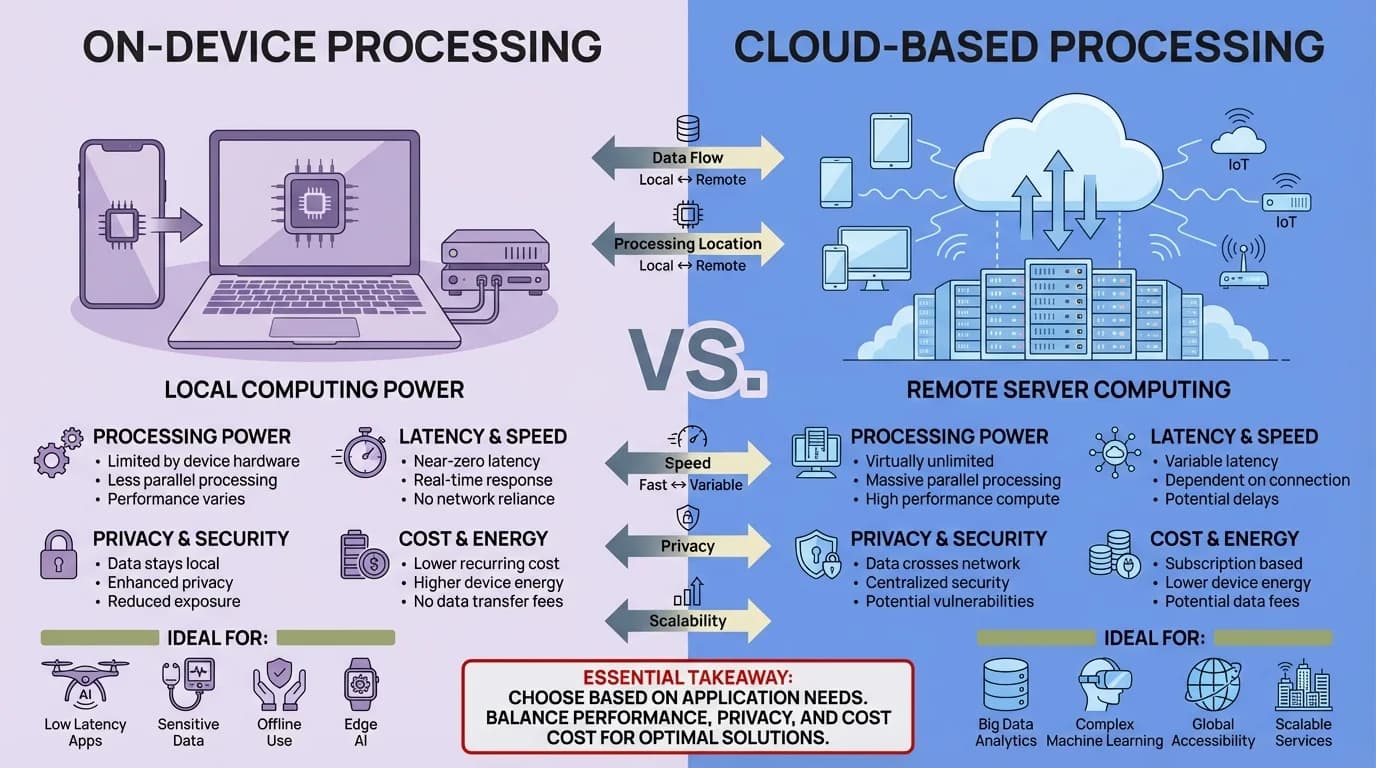
Comparing on-device and cloud-based AI prediction models: privacy vs. power tradeoffs
Real-World Performance: Speed and Accuracy Metrics
Let's talk numbers. How much does next sentence prediction actually help, and is it really worth it?
Typing Speed Improvements
Research consistently shows that accurate sentence prediction speeds up mobile typing. Users save 40-50% typing time compared to traditional keyboards without prediction. That translates to real time savings: professionals now save an average of 6.3 hours per week from contextual suggestions, up from 5.2 hours in 2025. Want to maximize these benefits? Check out 5 underrated AI keyboard features that save hours every week.
But here's the thing: studies from CHI conferences found that suggestion accuracy matters more than you'd think. Really accurate suggestions (>80% relevance) boost typing speed on phones and tablets, but mediocre suggestions (<60% relevance) actually slow users down because you waste time reading irrelevant options.
Accuracy Rates in 2026
Modern AI keyboards achieve impressive accuracy:
- Single word prediction: 85-92% accuracy
- Short phrase completion (2-4 words): 75-85% accuracy
- Full sentence suggestion: 60-75% accuracy
- Context-appropriate suggestions: 87% accuracy
These numbers represent a huge jump from just a few years ago. In 2021, keyboards correctly interpreted ambiguous queries only 34% of the time. In 2026, that's up to 87%.
Error Reduction
Predictive keyboards don't just speed you up—they also cut down on errors. The average uncorrected error rate in manual mobile typing is 2.3%. With good prediction systems, that drops to 0.8-1.2% because you're selecting suggested words rather than typing letter-by-letter.
CleverType's internal data shows even better numbers for users who regularly accept suggestions: 94% of suggested completions are used without modification, which shows they're actually relevant, and 78% of multi-word suggestions are accepted compared to 65% industry average.
Speed vs. Accuracy Tradeoff
Faster isn't always better. Some users prioritize speed, accepting suggestions quickly even if they occasionally pick the wrong one. Others prioritize accuracy, reading suggestions carefully before accepting. The best keyboards adapt to your preference.
Research on typing expertise found that touch-typists average 52-70 words per minute on physical keyboards. On mobile devices without prediction, that drops to 30-40 WPM. With good prediction, mobile typing speeds hit 45-60 WPM—getting close to physical keyboard speeds.
Here's an interesting finding: competitive typing games on mobile show that gameplay mechanics impact performance. When users are motivated (like in competitive scenarios), typing speed increases by 15-20% even with the same prediction tech. This suggests that how you interact with suggestions matters as much as the technology itself.
Real User Experience
Beyond raw metrics, user satisfaction matters. Surveys indicate:
- 82% of users feel AI keyboards understand their intent
- 67% report less frustration with autocorrect errors
- 73% say they notice time savings in daily messaging
- 58% mention reduced mental effort while typing
CleverType users specifically report high satisfaction with context-aware suggestions. One user noted: "It actually suggests what I was going to type, not just random common phrases." That's the difference between generic prediction and truly personalized AI.
The bottom line? Next sentence prediction works. It measurably speeds up typing, cuts down on errors, and makes the whole experience better—but only when the accuracy is high enough. Mediocre prediction systems frustrate users more than they help.
Privacy Concerns and Data Security in AI Keyboards
Let's address the elephant in the room: if your keyboard is predicting what you type, what happens to all that data about your messages, passwords, and private conversations?
What Data Do Keyboards Collect?
Different keyboards collect different data. Here's what's typically tracked:
- Keystroke data (what keys you press)
- Accepted/rejected suggestions
- Words added to personal dictionary
- Typing speed and patterns
- App context (which app you're typing in)
- Sometimes: the actual text content
The last one is the controversial part. Some keyboards upload the actual content of what you type to their servers. Others keep everything local. You need to know which type you're using.
Privacy Models: A Comparison
| Keyboard Type | Data Location | What's Shared | Privacy Level |
|---|---|---|---|
| Fully local | On-device only | Nothing | Highest |
| Federated learning | On-device training | Model updates only | High |
| Cloud-assisted | Device + cloud | Encrypted queries | Medium |
| Fully cloud | Cloud servers | Full text content | Lower |
CleverType follows a privacy-first model: all personal typing data stays on your device. The keyboard uses on-device learning to personalize predictions without sending your messages anywhere. Even when you use optional cloud features (like translation), the data is encrypted end-to-end and processed ephemerally without storage.
The Federated Learning Solution
Google introduced federated learning for Gboard, and it's become a privacy-preserving standard. Here's how it works:
- The keyboard trains a local model on your device using your typing data
- After training, the model parameters (mathematical weights) get sent to Google's servers
- Multiple users' model updates get aggregated together
- The improved global model gets sent back to all users
Crucially, your actual text never leaves your phone. Only the model weights are shared, and they're aggregated with thousands of other users' updates so individual contributions can't be reverse-engineered.
Common Privacy Risks
Even with privacy-focused keyboards, risks exist:
Password and credit card capture: Some keyboards track text in password fields (they shouldn't, but some do)
App context leakage: Knowing which apps you use and when reveals patterns about your behavior
Clipboard monitoring: Some keyboards watch your clipboard for helpful suggestions, but this accesses sensitive data
Third-party integrations: GIF searches, emoji features, and themes might connect to external services
CleverType handles these by:
- Automatically turning off predictions in password fields
- Not monitoring clipboard unless you specifically enable it
- Using on-device GIF and emoji libraries
- Clearly labeling any feature that uses network connectivity
What You Can Do
Protect your privacy with these steps:
- Check permissions: Review what permissions your keyboard asks for (network access, clipboard, etc.)
- Read the privacy policy: Boring but essential—know what data is collected
- Turn off cloud features: If privacy is your top priority, stick to on-device-only modes
- Use keyboard-by-keyboard settings: Switch to system keyboard for sensitive stuff (banking apps, etc.)
- Regular audits: Check periodically which apps have full keyboard access
One more thing: be wary of free keyboards from unknown developers. Keyboards have access to everything you type—that's valuable data. If you're not paying for the product and can't figure out the business model, your data might be the product.
The good news? Privacy and functionality aren't mutually exclusive anymore. Keyboards like CleverType prove you can have sophisticated AI predictions while keeping your data private through on-device processing and federated learning. If privacy is a top concern, read our analysis on AI keyboard apps versus built-in keyboards to understand the tradeoffs.
The Future: Where Sentence Prediction Is Heading
What's next for AI keyboards? The tech is evolving fast, and several trends are emerging that'll change how we interact with our phones.
Multimodal Input Integration
Future keyboards won't just predict text—they'll blend voice, gesture, and even eye tracking. Imagine starting a sentence by typing, finishing with voice, and having the keyboard seamlessly blend both inputs with the right punctuation and formatting. Stanford research already shows that speech recognition is 3x faster than typing for English, with 20.4% lower error rates. The next step is seamless switching between modalities.
Context Beyond Text
Current keyboards analyze the text you're typing. Future keyboards will understand the broader context: who you're talking to, what time of day it is, your location (if you allow it), and even your calendar. Planning dinner with a friend at 6pm? The keyboard might proactively suggest "Should we meet at [nearby restaurant]?" based on your location and dining preferences.
Emotional Intelligence
AI models are getting better at detecting tone and emotion. Future keyboards might nudge you when a message sounds harsh: "This message might come across as frustrated. Want to rephrase?" CleverType already offers tone adjustment features, but expect this to get more sophisticated and automatic.
Language Mixing and Code-Switching
Multilingual users often switch between languages mid-sentence (called code-switching). Future prediction models will handle this seamlessly, understanding that "Let's meet for café at 3pm" mixes English and French naturally for bilingual speakers.
Specialized Domain Models
Imagine keyboards with specialized modes: a medical mode that understands anatomy and drug names, a legal mode that suggests proper legal language, a coding mode that predicts programming syntax. The tech to support this exists—it's just a matter of building it.
Predictive Emoji and Media
Why stop at text? Future keyboards might predict relevant emojis, GIFs, or even custom images based on your conversation context. Texting about dinner? See food emoji suggestions. Joking with a friend? Get GIF recommendations that match your sense of humor.
Reduced UI, More Intelligence
The keyboard itself might shrink or even disappear. With good enough prediction, you might just start a sentence, tap a suggestion, tweak it slightly, and send. Some estimates suggest that typing as we know it could become optional for common messages within 5-10 years.
Privacy Innovations
Techniques like homomorphic encryption (doing computations on encrypted data) might allow cloud-level AI power while keeping things totally private. Your encrypted text gets processed on servers, they return encrypted suggestions, and everything decrypts only on your device.
Personalization at Scale
Current keyboards learn from your typing. Future keyboards might learn from your entire digital footprint (with permission): your writing style in emails, your social media voice, even your speaking patterns in voice memos. The result would be predictions so accurate they feel like the keyboard knows you personally—because it does.
CleverType is already working on several of these features. The upcoming version includes better multilingual support with seamless language detection, improved voice input integration, and context-aware emoji suggestions that actually make sense.
The core trend is clear: keyboards are evolving from input tools to intelligent communication assistants. The goal isn't to replace human writing—it's to cut down on the mechanical burden of typing so you can focus on what you actually want to say. Stay updated with the latest AI keyboard trends and features to watch in 2025.
Frequently Asked Questions
Q: How does next sentence prediction know what I want to type?
A: Next sentence prediction uses AI models trained on billions of text examples to understand language patterns and context. When you type, the model analyzes your words, considers what typically comes next in similar contexts, and generates probabilistic predictions. It combines general language knowledge with personalized learning from your typing patterns to suggest relevant completions.
Q: Is next sentence prediction accurate enough to trust?
A: Modern AI keyboards achieve 85% accuracy for sentence completion in 2026, up from 34% in 2021. However, accuracy depends on context—simple, common phrases are predicted more accurately than complex or unusual sentences. The technology works best as an assistant rather than a replacement, helping you type faster while you maintain final control over what gets sent.
Q: Does my keyboard send everything I type to the cloud?
A: It depends on the keyboard. Privacy-focused keyboards like CleverType process predictions entirely on your device, keeping your data local. Others use cloud processing, which may involve sending text to servers. Check your keyboard's privacy policy and permissions. Federated learning approaches offer a middle ground, improving models without exposing individual user data.
Q: Can I turn off sentence prediction if I don't like it?
A: Yes, all major keyboards allow you to disable next sentence suggestions in settings while keeping basic autocorrect. You can typically customize how many suggestions appear, whether they auto-complete, and in which apps they're active. Most keyboards also let you disable predictions in sensitive fields like passwords automatically.
Q: How long does it take for the keyboard to learn my writing style?
A: On-device personalization typically begins showing noticeable improvements within 3-7 days of regular use. The AI adapts continuously, so accuracy improves over weeks and months. Factors affecting learning speed include how much you type, how consistent your writing style is, and how often you accept suggestions (which provides feedback to the learning system).
Q: Does next sentence prediction work in multiple languages?
A: Yes, most AI keyboards support multilingual prediction, with CleverType offering 100+ languages. Advanced keyboards can detect language switches mid-sentence (code-switching) and provide appropriate suggestions in each language. However, prediction accuracy varies by language—languages with more training data (English, Spanish, Chinese) typically have better predictions than less common languages.
Q: Will using AI prediction make me worse at spelling and grammar?
A: Research shows mixed results. While reliance on suggestions might reduce active spelling practice, users actually make fewer overall errors because they're selecting correct suggestions rather than typing from scratch. The key is using prediction as assistance rather than complete replacement for language skills. Most educators recommend using spell check while still learning proper writing fundamentals.
Ready to Try the Best AI Keyboard?
CleverType combines cutting-edge sentence prediction with serious privacy protection. Get smart suggestions that understand your context, learn your style, and speed up your typing—all while keeping your data on your device.
Download CleverType from the Play Store