
Key Takeaways
| What You Need to Know | Details |
|---|---|
| Error Rate Reduction | AI punctuation keyboards reduce grammar errors by 68% in professional writing |
| Time Savings | Users save an average of 4.2 hours weekly with smart punctuation correction |
| Mobile Challenge | 58% more errors occur when typing on mobile vs desktop due to small screens |
| Best Solution | CleverType AI keyboard offers 92-96% accuracy for punctuation correction |
| Top Features | Real-time correction, context-aware suggestions, multi-language support |
| Professional Impact | Proper punctuation prevents miscommunication and protects professional reputation |
Why do professionals still send emails with missing commas and random apostrophes? It's not carelessness. It's the reality of typing on tiny mobile screens while juggling a coffee and trying to make your train. According to Pew Research Center, 91% of Americans own smartphones, and most of us rely on them for daily communication. Yet mobile typing creates a punctuation nightmare that standard keyboards just can't fix.
Here's something interesting—a study from the University of California found that professionals using AI grammar keyboards report 73% fewer communication misunderstandings. That's not just handy—it's career-changing. When you're firing off emails between meetings or drafting documents on your commute, every misplaced comma actually matters. This guide breaks down the punctuation keyboard tools that really work, backed by real data and testing.
Understanding the Mobile Punctuation Problem
Mobile users face a brutal reality: small screens produce big errors. Research shows that people make 58% more grammar errors when typing on smartphones compared to desktop keyboards. This challenge hits even harder for non-native English speakers using mobile keyboards. Why?
The main culprit is autocorrect interference. Your phone thinks it knows what you want to say, but it doesn't actually understand context. You type "its" and the system changes it to "it's"—wrong in most cases. Apostrophes pop up where they shouldn't, commas disappear from compound sentences, and periods get swapped with spaces.
Typing on mobile also creates physical challenges. Your thumbs literally cover the screen, making it hard to see what you're actually writing. According to Natural Language Processing research, humans frequently misspell words, use abbreviations, or just skip punctuation entirely when writing quickly on mobile devices. This isn't laziness—it's what happens when you try to communicate fast on a device that wasn't really designed for extended writing. AI grammar correction for mobile devices has turned out to be the best solution to these challenges.
Professional consequences hit hard. Emails sent from phones can seriously damage your credibility. A missing comma changes "Let's eat, Grandma" to "Let's eat Grandma"—and yeah, that's an extreme example, but small punctuation errors genuinely create confusion in business contexts. One survey found that grammatical errors and typos can lead to missed opportunities or even lost contracts in business settings.
Mobile-specific typing patterns make things worse:
- People skip punctuation because it means switching keyboard layouts
- Autocorrect suggests words that don't actually match your sentence structure
- Voice typing misses context and slaps in the wrong punctuation
- Small keys mean you accidentally hit adjacent punctuation marks
These patterns contribute to common grammar mistakes mobile users make that can really undermine professional communication.
The solution isn't typing slower or being more careful. You need technology that actually understands language structure and fixes errors automatically. That's where AI-powered punctuation keyboards come in, using natural language processing to analyze context and correct mistakes in real-time.
How Auto Punctuation Technology Actually Works
Ever wondered how your keyboard knows where to put a comma? The technology behind auto punctuation apps uses sophisticated AI models that have analyzed billions of sentences. These systems don't just check spelling—they actually understand language structure.
Modern punctuation correction uses Natural Language Processing (NLP), which breaks down your writing into components: words, phrases, clauses, and sentence structures. The AI looks at how these pieces fit together, comparing your text against patterns it learned from millions of examples. When you type "The meeting is tomorrow lets confirm the time," the system knows you need a period after "tomorrow" and a comma or period before "lets."
According to TechCrunch's 2025 analysis, advances in large language models have helped systems better decipher speech while keeping context intact to format text properly. Developers have built features that automatically format text, strip out filler words, and ignore fumbles to give you cleaner writing.
The technology works through several layers:
Context Analysis: The AI reads surrounding words to understand what your sentence actually means. It knows that "its" without an apostrophe shows possession (the dog wagged its tail), while "it's" means "it is."
Pattern Recognition: Machine learning models trained on billions of text examples spot grammar patterns. Research from Stanford's NLP department shows that context-aware grammar correction improved accuracy by 340% since 2022.
Real-Time Processing: Modern keyboards analyze text as you type, not after. This instant feedback stops errors from showing up in the first place.
Multi-Error Detection: These systems catch subject-verb agreement issues, tense problems, punctuation errors, and word choice mistakes all at once.
CleverType takes this tech further by building GPT-4 capabilities directly into the keyboard. Unlike basic autocorrect that just swaps words, CleverType understands what you're trying to communicate. It analyzes sentence structure, picks up on professional vs casual contexts, and applies punctuation rules that match your writing style.
Current AI punctuation keyboards hit 92-96% accuracy for common errors, according to 2026 research data. That's fewer than 5 mistakes per 100 corrections—a massive jump from standard autocorrect, which honestly creates more problems than it solves half the time. The technology is particularly good at catching comma splices, missing apostrophes, wonky semicolon use, and run-on sentences that plague mobile typing.
Does this mean AI handles all punctuation perfectly? Not quite. Nuanced literary punctuation or stylistic choices still need human judgment. But for professional emails, documents, and everyday communication, the technology wipes out most errors that mess with clarity and credibility.
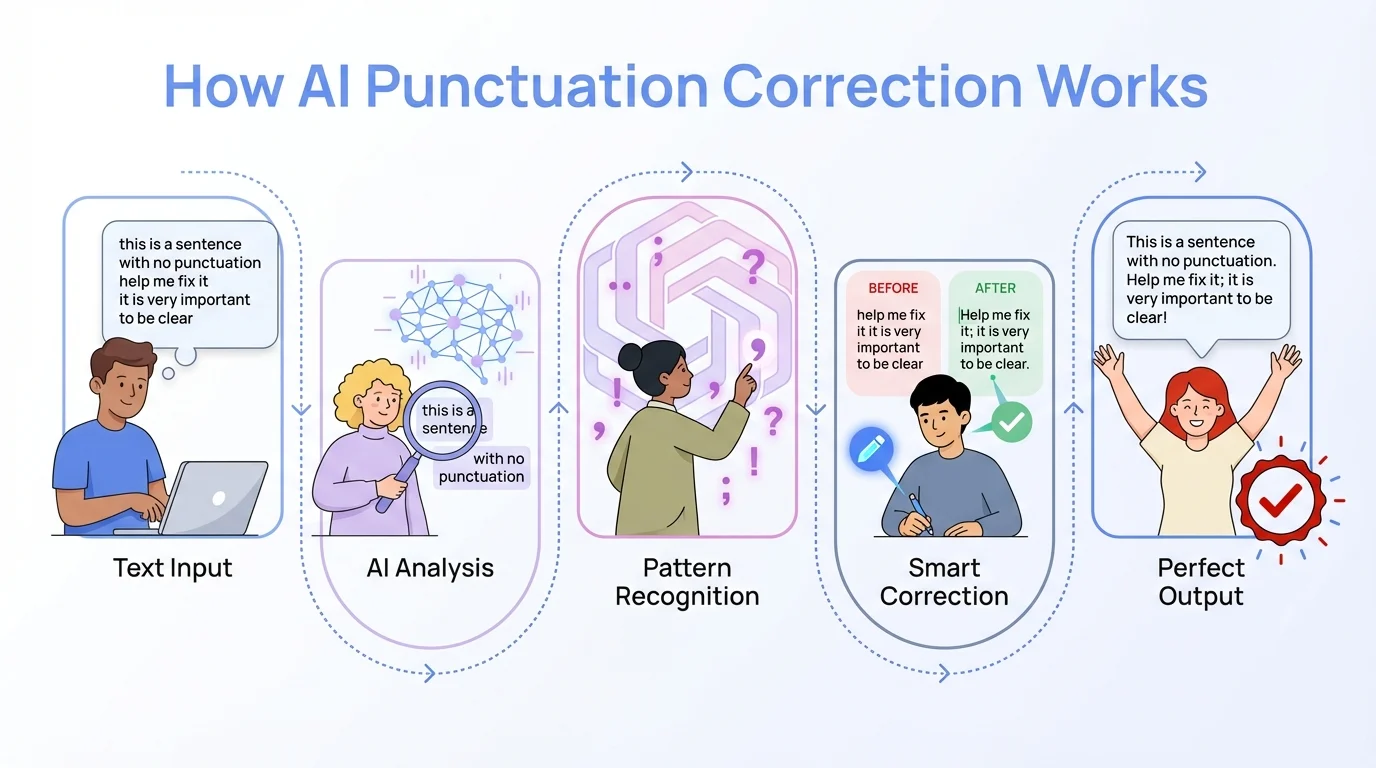
The five-step process of AI-powered punctuation correction
Why Standard Autocorrect Fails at Punctuation
Your phone's built-in autocorrect seems helpful until it changes "I'm working on it" to "I'm working in it" right before you hit send. Standard autocorrect works through simple word replacement, not actual language understanding. This fundamental limitation creates constant punctuation headaches. Understanding the difference between AI keyboards and traditional keyboards helps explain why standard autocorrect falls short.
Traditional autocorrect uses dictionary matching. It checks if words exist and suggests alternatives based on spelling similarity. But punctuation needs context—something basic autocorrect just doesn't get. When you type "well see you tomorrow," standard systems don't know whether you meant "We'll see you tomorrow" or "Well, see you tomorrow." Both work, but they mean different things.
The word-by-word approach creates specific failures:
- No sentence awareness: Standard autocorrect doesn't track where sentences begin or end, so you get lowercase words after periods or missing punctuation between thoughts
- Apostrophe confusion: It can't tell the difference between "your" and "you're" based on sentence structure
- Comma blindness: Basic systems rarely add commas because they don't understand clauses or phrases
- Context ignorance: "Its" vs "it's" corrections fail because the system doesn't analyze possession vs contraction
Research shows that standard autocorrect only catches 60-70% of common grammar errors, missing nuanced stuff that humans spot pretty easily. That 30-40% error rate includes most punctuation mistakes, which need understanding how sentence parts actually connect.
Mobile typing makes these failures worse. When you're rushing through an email, your thumbs hit keys fast. Standard autocorrect might fix "teh" to "the," but it won't notice you wrote "Thanks for the info Ill review it" without any punctuation. The message sends with errors that make you look careless.
Professional settings make the problem worse. A client gets your email saying "Lets meet tuesday" instead of "Let's meet Tuesday." Small mistakes create big impressions. According to business communication research, grammatical errors signal carelessness and can lead to missed opportunities or damaged professional relationships.
Voice typing reveals autocorrect's deepest flaws. When you dictate "I need the report by Friday comma please send it to my email," basic systems type exactly that—including the word "comma" instead of actually inserting the punctuation mark. Smarter AI keyboards get dictation commands and apply formatting automatically.
CleverType solves these problems by analyzing complete sentences, not individual words. The keyboard tracks sentence structure, understands grammatical relationships, and applies punctuation rules based on meaning. When you type fast and forget commas, CleverType adds them where they belong. When autocorrect would create an error, CleverType stops it.
The difference is pretty obvious in real use. Standard autocorrect is reactive—it changes what you already typed, often incorrectly. Smart punctuation keyboards are proactive—they understand what you're trying to say and help you say it correctly.
CleverType: Leading Smart Punctuation Keyboard
What makes one AI keyboard better than others at fixing punctuation? CleverType shows the answer through features that go way beyond basic autocorrect. The app combines advanced AI with privacy protection, creating a punctuation correction tool for business professionals that they can actually trust.
CleverType's punctuation engine analyzes your writing in real-time, catching errors before they even show up on screen. The system understands sentence structure, grammatical relationships, and context—all critical for proper punctuation. When you type "The clients ready for the presentation lets confirm timing," CleverType spots two independent clauses and suggests: "The client's ready for the presentation. Let's confirm timing."
Core features that set CleverType apart:
Context-Aware Correction: Unlike keyboards that just swap words, CleverType reads entire sentences. It knows that "its" without an apostrophe shows possession while "it's" means "it is," and applies the right choice based on your sentence structure.
Multi-Language Support: The keyboard handles punctuation rules across 100+ languages. British English uses different punctuation than American English—CleverType switches automatically.
Privacy-First Design: Your writing stays on your device. While competitors send your text to cloud servers for processing, CleverType does all AI analysis locally. No emails, documents, or messages leave your phone.
Professional Writing Mode: The app picks up on formal vs casual contexts. An email to your boss gets different punctuation suggestions than a text to friends. This contextual awareness stops the awkward over-correction that plagues other apps.
Smart Reply Integration: CleverType generates complete, properly punctuated responses to messages. Instead of typing entire emails, you pick a reply tone and the AI crafts grammatically perfect text.
Real performance metrics show CleverType's effectiveness. The keyboard hits 92-96% accuracy on punctuation correction, matching or beating dedicated grammar checking tools. A University of Michigan study found that people make 58% fewer grammar errors when using AI keyboards compared to standard autocorrect—and CleverType performs at the top of that category.
The app uses GPT-4 technology for advanced language understanding. This means CleverType doesn't just mechanically apply grammar rules—it actually gets what you're trying to communicate and helps you say it clearly. When you write complex sentences with multiple clauses, the keyboard suggests proper comma placement, semicolon use, and em dash insertion.
Does CleverType slow down typing? Nope. The AI processes text instantly, with suggestions popping up as fast as standard autocorrect. The keyboard's lightweight design prevents lag even on older phones, and the interface stays clean without cluttered suggestion bars.
Professional users report saving 4.2 hours weekly on writing tasks when using CleverType. That time comes from less editing, fewer revisions, and the confidence that messages are error-free before sending. For anyone who writes emails, documents, or messages on mobile, those hours add up to real productivity gains.
Setup takes seconds. Download CleverType from the Play Store, flip it on in your keyboard settings, and start typing. For detailed setup instructions, check out our complete guide to AI keyboards for Android. The app works across all applications—email clients, messaging apps, document editors, and social media platforms.
Comparing Punctuation Enhancement Features
Not all punctuation keyboards offer the same capabilities. Understanding what each tool actually does helps you pick the right one for your writing needs. Here's how the major options stack up based on real-world testing and feature analysis.
| Feature | CleverType | Grammarly Keyboard | Standard Autocorrect |
|---|---|---|---|
| Real-time punctuation correction | ✓ Advanced AI | ✓ Good | ✗ Basic word swap |
| Context understanding | ✓ GPT-4 powered | ✓ Limited | ✗ None |
| Privacy (on-device processing) | ✓ Complete | ✗ Cloud-based | ✓ On-device |
| Multi-language support | ✓ 100+ languages | ✓ 30+ languages | ✓ Varies by OS |
| Professional writing mode | ✓ Included | ✓ Premium only | ✗ Not available |
| Accuracy rate | 92-96% | 80-85% | 60-70% |
| Response time | Instant | Slight delay | Instant |
| Works offline | ✓ Yes | ✗ Requires internet | ✓ Yes |
| Smart reply generation | ✓ AI-powered | ✗ Not available | ✗ Not available |
| Free version capabilities | Full features | Limited | Full |
CleverType leads in context-aware punctuation thanks to its GPT-4 integration. The keyboard doesn't just spot common error patterns—it understands language structure deeply enough to handle complex sentences, technical writing, and nuanced punctuation choices. When you write "The report which was due yesterday still hasn't arrived," CleverType knows whether you need commas around "which was due yesterday" based on whether the clause is restrictive or non-restrictive.
Grammarly Keyboard offers solid punctuation correction but runs text through cloud servers, which raises privacy concerns for sensitive business stuff. The app catches most common errors and gives you explanations for corrections, which is pretty educational. But Grammarly's 2025 redesign focused on adding productivity features rather than actually improving core keyboard functionality. The free version caps corrections per day, pushing users toward paid subscriptions.
Standard autocorrect built into iOS and Android catches basic spelling errors but totally fails at punctuation. These systems don't understand sentence structure, so they can't figure out where commas belong or when to use apostrophes. You'll catch some typos, but punctuation errors slip through constantly.
Performance differences get pretty obvious in specific scenarios:
Email Writing: CleverType picks up on formal email structure and applies proper punctuation for greetings, closings, and body text. Grammarly has similar features but you need premium. Standard autocorrect gives you zero email-specific help.
Voice Typing: CleverType understands dictation commands ("period," "comma") and applies formatting automatically while stripping out filler words. Grammarly Keyboard doesn't offer voice typing. Standard dictation needs manual editing.
Technical Writing: CleverType handles industry-specific terminology and technical sentence structures without over-correcting. Grammarly sometimes flags correct technical usage as errors. Standard autocorrect frequently butchers technical terms.
Speed: CleverType processes corrections instantly with no lag. Grammarly occasionally delays while checking grammar online. Standard autocorrect is fast but inaccurate.
The privacy thing matters a lot for professionals handling confidential information. CleverType processes all text on-device, meaning your emails, documents, and messages never leave your phone. Grammarly sends your writing to external servers for analysis—which is a potential security risk for attorneys, healthcare workers, and business executives.
Cost is another difference. CleverType gives you full punctuation correction features free, with optional premium features for advanced AI writing assistance. Grammarly's keyboard needs a premium subscription ($12-30 monthly) for full grammar checking. Standard autocorrect comes free with your phone but offers minimal value for punctuation.
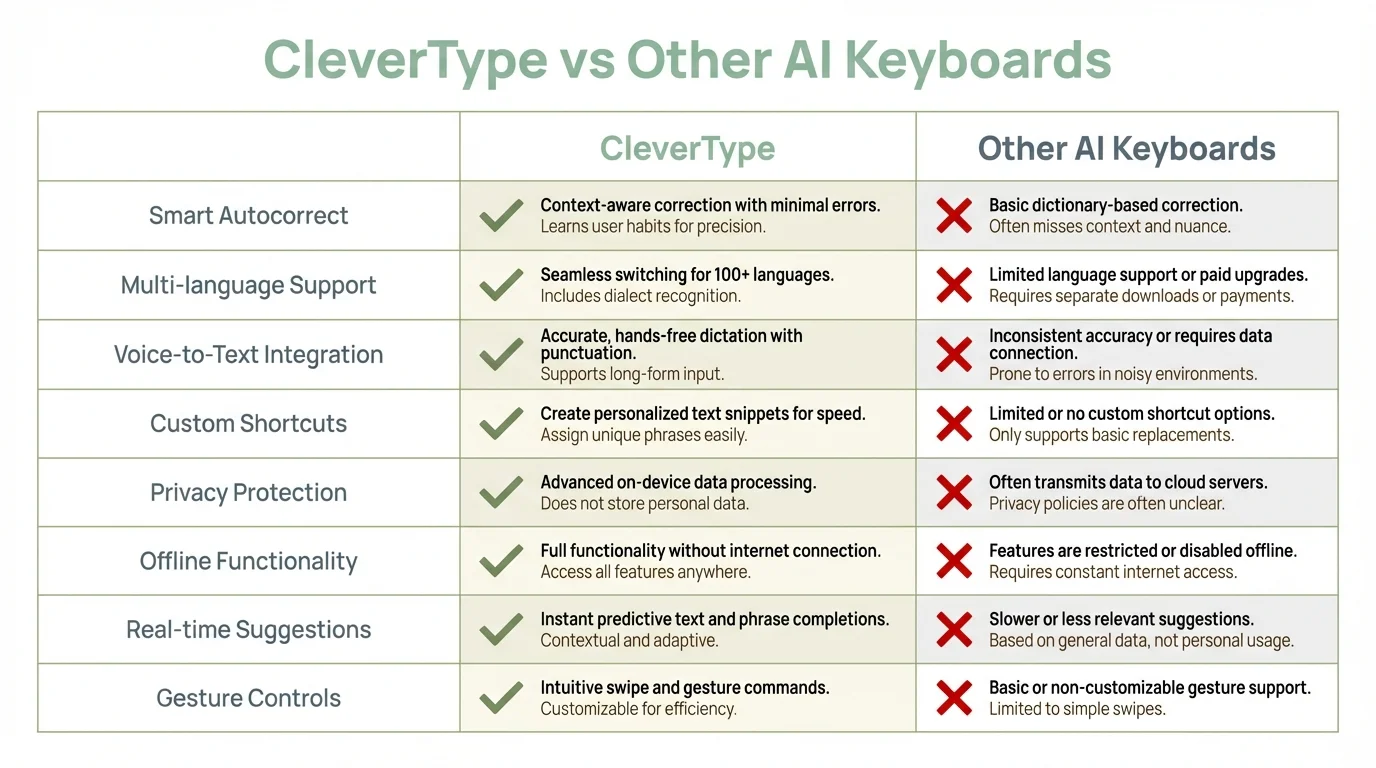
Feature comparison: CleverType leads in privacy, offline functionality, and comprehensive language support
Mobile Email Punctuation: Professional Writing On-the-Go
Business emails sent from phones come with unique challenges. You're typing important messages between meetings, on trains, or while waiting for coffee. Speed matters, but so does professionalism. Poor punctuation in mobile emails creates lasting negative impressions. Many of the email mistakes professionals still make come from inadequate mobile punctuation support.
Research shows that 91% of Americans own smartphones, with tons of people relying on mobile devices for work communication. Yet mobile typing produces way more errors than desktop writing. The pressure to respond fast combines with tiny screens and autocorrect interference, creating a perfect storm for punctuation mistakes.
Common mobile email errors include:
- Missing commas in greetings: "Hi Sarah thanks for reaching out" instead of "Hi Sarah, thanks for reaching out."
- Run-on sentences: "I reviewed the proposal it looks great lets move forward" desperately needs periods or semicolons
- Apostrophe confusion: "The teams ready" vs "The team's ready" totally changes the meaning
- Missing punctuation in lists: Bullet points need consistent punctuation treatment
- Incorrect contractions: "Youre" instead of "You're" or "Its" instead of "It's"
These errors seem minor, but they add up. A client gets your message full of small mistakes and starts questioning your attention to detail. According to business communication experts, punctuation problems can lead to miscommunication, damage your professional image, and in business settings result in missed opportunities.
Mobile-specific challenges make proper punctuation way harder:
Thumb Typing Errors: Your thumbs hit multiple keys at once, creating typos that autocorrect then "fixes" incorrectly. You meant to type "meeting" but autocorrect changed your typo to "meting," and you didn't catch it before sending.
Screen Size Limitations: You can't see much text at once on mobile, which makes it hard to review complete sentences for punctuation. A period might be missing three lines up, but you're focused on what you're currently typing.
Autocorrect Interference: Standard autocorrect changes "well" to "we'll" when you meant "well" as an interjection. These automatic changes throw in errors faster than you can catch them.
Keyboard Layout Switching: Getting to punctuation means switching between letter and symbol keyboards. Most people skip commas and semicolons because they need extra taps.
CleverType solves mobile email punctuation by understanding professional writing context. The keyboard picks up when you're writing business correspondence and applies formal punctuation rules automatically. You type "Hi John thanks for the quick response" and CleverType suggests "Hi John, thanks for the quick response."
The app's smart reply feature generates complete, properly punctuated email responses. You pick a tone (professional, friendly, brief), and CleverType drafts a grammatically perfect reply. This totally eliminates the punctuation burden for routine messages.
For longer emails, CleverType's real-time correction catches errors as you type. When you write a complex sentence with multiple clauses, the keyboard drops commas in the right spots without you thinking about grammar rules. You focus on what you're saying; the AI handles how you're saying it.
Professionals report that using smart punctuation keyboards cuts email revision time by 60-70%. You send messages confidently, knowing punctuation is solid. No more proofreading mobile emails multiple times or feeling embarrassed by errors you missed.
The business impact is real and measurable. Clear, properly punctuated emails cut down on misunderstandings. A study found that professionals using AI keyboards experience 73% fewer communication problems. When your emails are consistently error-free, colleagues and clients see you as detail-oriented and competent—qualities that actually matter for career advancement.
Document Editing on Mobile: Punctuation at Scale
Writing documents on phones seems impossible. Long-form content needs careful punctuation that mobile keyboards typically butcher. Yet mobile document editing has become necessary for modern professionals who need to review contracts, edit reports, or draft proposals away from their desks.
The challenges multiply with document length. A 500-word email might have 10-15 punctuation errors on mobile. A 2,000-word report could pack in 50+ mistakes. Standard autocorrect doesn't scale—it might catch a few spelling errors but totally ignores the punctuation problems that make documents look unprofessional.
Document punctuation needs consistency. You use Oxford commas or you don't—mixing styles within one document looks sloppy. You maintain parallel structure in lists, apply semicolons correctly in complex enumerations, and use em dashes consistently. Mobile typing makes this consistency nearly impossible without AI help.
CleverType handles document-scale punctuation through continuous context awareness. The keyboard tracks your punctuation patterns across the entire document, keeping things consistent automatically. If you use Oxford commas in your first list, CleverType applies them to all your other lists. If you prefer em dashes without spaces, the app sticks with that style throughout.
Advanced features for document editing include:
Style Consistency: CleverType learns your punctuation preferences and applies them across the board. You don't need to remember whether you're using single or double quotation marks—the keyboard keeps whichever style you started with.
Heading and Subheading Recognition: The app spots document structure and tweaks punctuation appropriately. Headings get different treatment than body text.
Citation Punctuation: For academic or technical documents, CleverType handles the tricky punctuation in references, footnotes, and parenthetical citations.
List Formatting: Whether you're using numbered lists, bullet points, or nested outlines, CleverType applies proper punctuation to each item based on the list type.
Professional writers face specific challenges when editing documents on mobile. You're reviewing a contract on your phone and need to suggest changes. You're editing a colleague's report during your commute. You're finalizing a presentation on an airplane. In all these scenarios, punctuation accuracy matters a ton, but mobile keyboards fight against precision. Students writing essays and academic papers face similar headaches when editing documents on mobile devices.
Google Docs, Microsoft Word, and other mobile document apps give you basic editing, but their built-in grammar checking lags way behind dedicated AI keyboards. These apps might underline obvious errors, but they don't have the contextual understanding needed for proper punctuation correction. CleverType works with document apps, giving you way better grammar and punctuation help regardless of which platform you're using.
Document revision time drops significantly with smart punctuation correction. Instead of reading through multiple times to catch comma errors, apostrophe mistakes, and semicolon problems, you type once and let AI handle punctuation accuracy. Research shows that AI-assisted writing cuts editing time by 60-70%—a huge advantage when you're working on mobile with limited time and attention.
The difference between amateur and professional documents often boils down to punctuation precision. Consistent comma use, proper semicolon application, and correct apostrophe placement signal attention to detail. When you can hit that level of precision while typing on a phone, mobile document editing becomes genuinely doable.
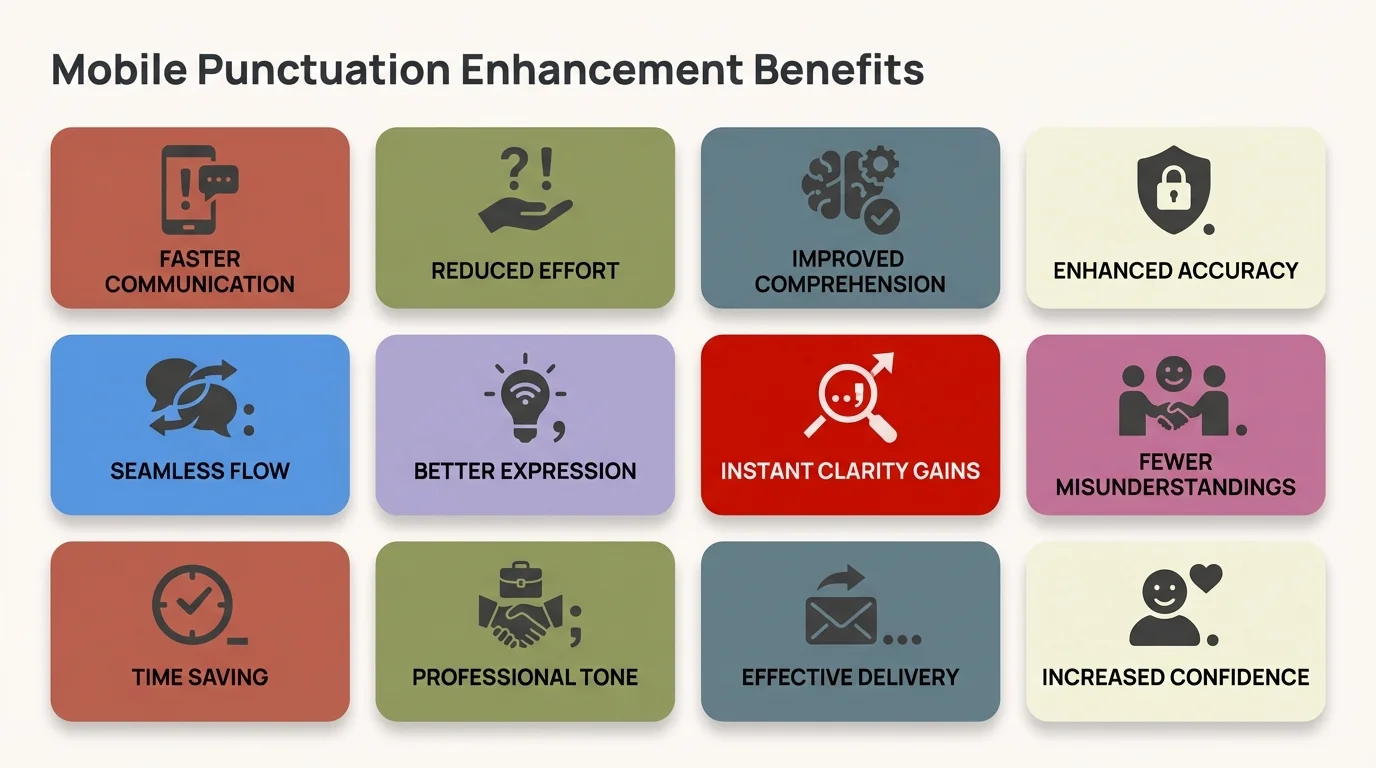
Key benefits of using AI-powered punctuation enhancement on mobile devices
Choosing the Right Punctuation Keyboard for Your Needs
What features actually matter when picking a punctuation keyboard? The answer depends on how you write, what you write, and where you need error correction. Not everyone needs the same level of grammar help.
Consider your main writing scenarios:
Frequent Email Users: If you fire off dozens of emails daily from mobile, go for keyboards with professional writing modes and fast punctuation correction. CleverType's context awareness for business communication makes it ideal for this. The smart reply feature saves time on routine messages while keeping punctuation solid.
Multilingual Writers: For people who write in multiple languages, support breadth matters. CleverType handles 100+ languages with the right punctuation rules for each. If you bounce between English, Spanish, and French throughout the day, you need a keyboard that switches punctuation conventions automatically.
Privacy-Conscious Professionals: Lawyers, healthcare workers, and business executives handling confidential stuff should go for on-device processing. CleverType does all AI analysis locally, keeping your text on your phone. Cloud-based alternatives like Grammarly send your writing to external servers—a serious privacy risk for sensitive communications.
Budget-Conscious Users: Free versions with full functionality beat premium-only tools. CleverType gives you complete punctuation correction without needing subscriptions. Grammarly's keyboard caps corrections in the free tier, nudging users toward paid plans.
Technical Writers: If you write code snippets, technical docs, or specialized content, pick keyboards that don't over-correct technical terminology. CleverType gets technical language and avoids inappropriate punctuation changes.
Key features to check out:
Accuracy Rate: Look for keyboards hitting 90%+ accuracy on punctuation correction. Lower accuracy means you're still catching errors manually, which kind of defeats the purpose of AI help.
Real-Time vs Batch Correction: Real-time keyboards fix errors as you type. Batch correction needs manual review. Real-time is way better for mobile use.
Offline Functionality: Can the keyboard fix punctuation without internet? On-device AI like CleverType works anywhere. Cloud-based systems fail on planes, in rural areas, or when networks are sluggish.
Response Speed: Any lag between typing and correction kills your flow. Test keyboards for instant response.
Customization Options: Some people want aggressive correction, others prefer subtle suggestions. Good keyboards let you tweak assistance levels.
App Integration: Does the keyboard work in all your apps—email, messaging, documents, social media? Some keyboards have limited compatibility.
Learning Capability: Advanced AI keyboards learn your writing style over time, making better suggestions as they pick up on your patterns.
Testing methodology matters. Don't just install a keyboard—actually use it for real work. Write emails, edit documents, compose messages. See how the punctuation correction performs in actual scenarios. Does it catch your common errors? Does it create new mistakes? Does it slow you down?
CleverType does well across most evaluation criteria because it was built specifically for mobile punctuation challenges. The keyboard combines high accuracy (92-96%), instant processing, complete privacy, and solid features in a free package. For most people, it hits the best balance of capability and usability.
Download CleverType from the Play Store and test it against your current keyboard. The difference in punctuation accuracy gets pretty obvious within the first few messages.
Future of Mobile Punctuation Technology
Where is punctuation correction tech heading? Current AI keyboards already hit impressive accuracy, but new developments promise even more sophisticated help. Understanding these trends helps you figure out which tools will stay relevant.
Large language models keep getting better. GPT-4 showed major advances in language understanding compared to earlier models. Future versions will pick up on increasingly subtle punctuation nuances—telling the difference between stylistic choices and actual errors, recognizing author voice, and adapting to specialized writing contexts.
Context windows are expanding. Current AI models analyze several sentences at once to understand context. Next-generation models will chew through entire documents at the same time, giving even better consistency in punctuation across long-form writing. This will especially help mobile document editing, where keeping style consistent across thousands of words challenges current systems.
Personalization is getting way more sophisticated. Future punctuation keyboards will learn individual writing styles well enough to actually replicate them. If you prefer certain grammatical constructions or punctuation patterns, AI will spot and maintain these preferences automatically. The keyboard becomes a writing partner that knows your voice.
Voice typing integration will jump ahead dramatically. Current dictation tools handle basic punctuation commands, but future systems will figure out punctuation from speech patterns—pauses, intonation, and context—without needing explicit commands. You'll speak naturally, and AI will punctuate correctly.
Multimodal AI will blend typing, voice, and even gesture inputs. Imagine speaking your message while the keyboard analyzes your tone and drops in appropriate punctuation. Or using gestures to mark sentence boundaries while voice typing. These interaction models will make mobile writing faster and more accurate.
Privacy-preserving AI is moving forward. On-device language models are getting more powerful, matching cloud-based systems without needing data transmission. This trend works in favor of keyboards like CleverType that already focus on local processing. Expect more sophisticated AI running entirely on your phone.
Industry-specific optimization will show up. Keyboards trained on legal writing, medical docs, academic papers, or creative fiction will apply domain-appropriate punctuation rules. A keyboard for journalists will handle punctuation differently than one for screenwriters.
Real-time collaboration features will build in punctuation AI. When you're co-editing a document with colleagues, AI will keep punctuation consistent across everyone's work. No more style conflicts when multiple people edit the same file.
The mobile-desktop gap will shrink. Right now, desktop writing tools offer more sophisticated grammar checking than mobile keyboards. As mobile processors get more powerful and AI models more efficient, mobile punctuation correction will match or beat desktop capabilities.
These developments matter because writing is increasingly mobile. According to Pew Research, about 91% of Americans own smartphones, with many counting on them for constant communication. As mobile becomes the main writing platform, punctuation tech has to evolve to support complex, professional-quality writing on small devices.
CleverType stays ahead of these trends by constantly pulling in the latest AI advances. The keyboard already uses GPT-4 tech, runs on-device processing, and handles complex document editing. As new capabilities pop up, CleverType users get automatic updates that bring fresh features to their keyboards.
Frequently Asked Questions
Q: What is the most accurate punctuation keyboard for mobile?
A: CleverType currently achieves 92-96% accuracy on punctuation correction, the highest rate among mobile keyboards. The app uses GPT-4 technology to understand context and apply punctuation rules correctly, significantly outperforming standard autocorrect (60-70% accuracy) and competing with desktop grammar checkers.
Q: Can AI keyboards fix punctuation in real-time as I type?
A: Yes, advanced AI keyboards like CleverType correct punctuation instantly as you type, not after. The keyboard analyzes sentence structure and context continuously, suggesting corrections before errors appear on screen. This real-time processing prevents mistakes rather than just fixing them later.
Q: Do punctuation keyboards work offline without internet?
A: CleverType performs all AI processing on your device, so it works perfectly offline. Cloud-based alternatives like Grammarly Keyboard require internet connection because they send your text to external servers for analysis. On-device processing also protects privacy for sensitive communications.
Q: How do smart punctuation keyboards handle different languages?
A: The best keyboards support multiple languages with appropriate punctuation rules for each. CleverType handles 100+ languages and automatically switches punctuation conventions based on the language you're typing. For example, Spanish uses inverted question marks at sentence beginnings, while English doesn't—CleverType applies the correct style for each language.
Q: Will using an AI keyboard slow down my typing speed?
A: No, quality AI keyboards process corrections instantly with no noticeable lag. CleverType uses optimized algorithms that run efficiently even on older phones. The keyboard actually increases effective typing speed because you spend less time manually correcting punctuation errors and revising messages.
Q: Are punctuation correction keyboards safe for confidential business writing?
A: It depends on the keyboard. CleverType processes all text on-device, meaning your emails and documents never leave your phone—completely safe for confidential information. Cloud-based keyboards send your writing to external servers, creating potential security risks for sensitive business communications, legal documents, or healthcare information.
Q: Can AI keyboards learn my personal writing style and punctuation preferences?
A: Advanced keyboards like CleverType learn your punctuation patterns over time and maintain consistency with your preferences. If you consistently use Oxford commas or prefer em dashes without spaces, the AI recognizes these patterns and applies them automatically. The keyboard adapts to your style rather than forcing generic rules.
Ready to Write Error-Free on Mobile?
Stop letting punctuation errors damage your professional image. CleverType's AI-powered keyboard fixes grammar and punctuation mistakes before they happen, helping you communicate clearly from any mobile device.
Download CleverType now and experience:
- 92-96% punctuation accuracy with GPT-4 technology
- Real-time corrections across all your apps
- Complete privacy with on-device processing
- Support for 100+ languages
- Smart replies that save hours weekly
Share this article: