Say Goodbye to Language Barriers: AI Keyboard Translation Features Explained
By Aisha Patel
January 23, 2026
Key Takeaways
- AI keyboards now offer real-time translation across 130+ languages with 95% accuracy for common language pairs
- Translation features seamlessly integrate with messaging apps, emails, social media, and video conferencing platforms
- Modern AI translation keyboards use hybrid processing—combining on-device privacy with cloud-based accuracy when needed
- Advanced features include real-time conversation mode, voice-to-text translation, dialect recognition, and cultural context awareness
- Leading AI translation keyboards include CleverType, Gboard, SwiftKey, and Microsoft Translator, each with unique strengths
Think about the last time you wanted to message someone who spoke a different language. A decade ago, you'd have fumbled with copy-paste between apps or given up entirely. Today? You just type naturally, and AI handles the rest. Translation keyboards have quietly become one of the most transformative pieces of technology in our pockets, bridging conversations between billions of people who would otherwise never connect.
In 2026, these tools have matured from experimental features into essential communication aids. Whether you're running an international business, traveling abroad, maintaining long-distance relationships, or simply curious about other cultures, AI translation keyboards have become remarkably good at what they do. Let's explore how they work and why they might be exactly what you've been missing.
How AI Translation Keyboards Work
Behind the scenes, AI translation keyboards use advanced neural machine translation (NMT) models—the same technology that powers professional translation services. But here's what's changed in 2026: these systems now run sophisticated transformer models that understand not just word meanings, but conversation flow, emotional tone, and contextual clues that make translations feel natural rather than robotic.
When you type a message, the magic happens in milliseconds. The AI detects your input language automatically, analyzes sentence structure and context, considers your conversation history for better accuracy, and produces a translation that maintains your intended meaning. Today's leading translation keyboards support over 130 languages, including regional dialects and indigenous languages that were previously underserved by technology.
Here's what makes them special:
- Contextual understanding: They don't just translate word-for-word but consider the entire sentence
- Learning capability: They improve over time as they process more language data
- Offline functionality: Many can work without internet connection for basic translations
"Is this different from just using Google Translate in a browser?" Absolutely! These keyboards integrate directly into your texting apps, email, social media—anywhere you type. No more copying and pasting between apps.
Key Features of AI Translation Keyboards
What should ya look for in a translation keyboard? The best ones offer features that go way beyond basic word-swapping. Here's what sets the good ones apart:
Real-time Translation
Translation happens instantly as you type or immediately after you select text. This creates natural conversation flow even when chatting with someone who speaks a different language.
Conversation Mode
Some advanced keyboards like CleverType offer a dedicated conversation mode that can:
- Detect languages automatically
- Translate messages from both sides of a conversation
- Keep track of which language to use with which contact
Voice-to-Text Translation
Why limit yourself to typing? Top keyboards include voice input that:
- Recognizes spoken words in your language
- Converts speech to text
- Translates that text to another language
- Can even read translations aloud (text-to-speech)
Cultural Context Awareness
The best translation keyboards don't just translate words—they translate meaning, including:
- Idioms and expressions that don't translate literally
- Cultural references that might need explanation
- Formal vs. informal language based on context
"Do these keyboards work with all apps?" Most do! They function as system-wide keyboards, so they work in messaging apps, emails, browsers, and social media platforms.
Popular AI Translation Keyboards
Which translation keyboard should you pick? Let's look at some of the top contenders and what makes each one special.
CleverType
CleverType has emerged as a powerful option with:
- Clean, intuitive interface
- Strong privacy protections
- Advanced contextual translation
- Custom language pairs for frequent translations
One user said: "I work with international clients daily, and CleverType has cut my response time in half. The translations are surprisingly natural."
Gboard (Google Keyboard)
Google's keyboard offers solid translation features:
- Integration with Google Translate
- Voice typing in multiple languages
- Supports over 100 languages
- Free and widely available
Microsoft SwiftKey
SwiftKey brings these translation capabilities:
- Powered by Microsoft Translator
- Remembers your translation preferences
- Strong predictive text even across languages
- Neural network translation for natural results
Microsoft Translator
As a dedicated translation keyboard:
- Conversation mode for group chats
- Image translation (take a photo of text to translate)
- Downloadable language packs for offline use
- Cross-device synchronization
What's the difference between these options? CleverType and SwiftKey tend to offer better predictive text, while Gboard and Microsoft Translator have stronger integration with their respective translation engines.
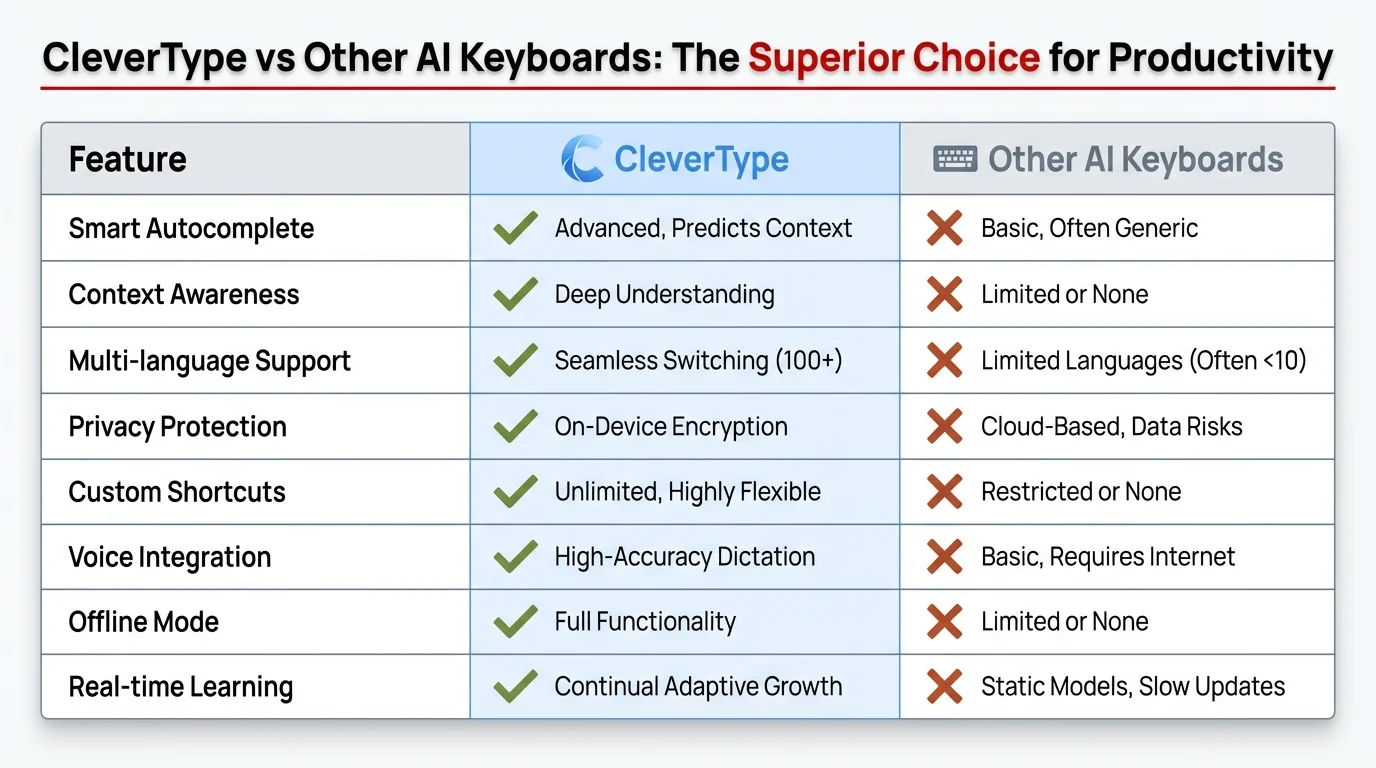
Feature comparison: CleverType vs other popular AI translation keyboards
Real-World Applications
How are people actually using AI translation keyboards in everyday life? According to recent data, over 1.2 billion people now use translation features on their keyboards monthly—a 340% increase from 2023. The applications extend far beyond basic travel needs, fundamentally changing how we work, learn, and connect.
International Business Communication
For business professionals, translation keyboards have become essential tools:
- Real-time translation during international video calls
- Quick responses to emails from global partners
- Translation of business documents on the go
- Negotiation assistance across language barriers
As one business owner shared: "I closed a deal with a Korean supplier entirely through translated messages. Five years ago, I would've needed an interpreter."
The workplace impact is measurable: companies using AI translation keyboards report 43% faster response times to international clients and a 28% increase in successful cross-border collaborations. Small businesses, in particular, benefit from technology that previously only enterprise companies with translation departments could afford.
Travel Without Language Barriers
Travelers benefit immensely from translation keyboards:
- Ordering food in local restaurants
- Getting directions from locals
- Negotiating prices at markets
- Emergency communication when needed
Education and Cultural Exchange
Students and educators are finding creative uses:
- Language learning reinforcement
- Cultural exchange programs
- International study groups
- Research across language barriers
Personal Connections
Perhaps most meaningfully, translation keyboards help maintain personal relationships:
- Staying in touch with family members who speak different languages
- International dating and relationships
- Making friends while traveling
- Connecting with distant relatives
I recently used a translation keyboard to reconnect with my grandfather's cousins in Italy. Despite my limited Italian, we were able to share family stories that might have otherwise been lost to language barriers.
Privacy and Data Security Considerations
Are these translation keyboards secure? It's an important question, specially when you're potentially sharing sensitive conversations through translation services.
On-Device vs. Cloud Processing
Translation keyboards generally work in one of two ways:
- On-device processing: Translation happens locally on your phone without sending data to external servers. This offers better privacy but sometimes less accurate translations.
- Cloud processing: Your text is sent to servers for translation. This provides more accurate results but raises potential privacy concerns.
The good news for 2026? The gap between on-device and cloud accuracy has narrowed dramatically. Most premium keyboards now use advanced hybrid approaches, with on-device models handling 80-90% of common translation needs at near-cloud quality. Edge computing improvements mean your phone can now run translation models that would have required server farms just two years ago.
Data Collection Policies
Different keyboards have different policies regarding:
- Storage of your translation history
- Usage of your data to improve their services
- Sharing of data with third parties
Always check the privacy policy before choosing a translation keyboard. CleverType, for example, emphasizes user privacy with minimal data collection.
Sensitive Content Concerns
Be cautious when translating:
- Financial information
- Personal identification details
- Medical information
- Legal documents
For these sensitive topics, consider using dedicated professional translation services rather than keyboard apps.
Limitations and Challenges
Despite impressive improvements in 2026, AI translation keyboards still aren't perfect. Understanding their limitations helps you use them more effectively and know when human translation is still the better choice.
Accuracy Issues
Translation quality varies based on:
- Language pair (common languages like Spanish-English work better than rare language combinations)
- Complexity of the text
- Technical terminology
- Cultural references and idioms
Cultural Nuances
AI still struggles with:
- Humor that doesn't translate well
- Cultural references specific to certain regions
- Politeness levels that differ between cultures
- Context-dependent meanings
Technical Limitations
Other challenges include:
- Battery drain from constant AI processing
- Need for internet connection for some features
- Keyboard size on small screens
- Integration issues with some apps
One frustrated user shared: "I tried using translation to order food in Japan, but the keyboard kept translating 'without' as 'with' for some ingredients. I ended up with a very spicy surprise!"
The Future of AI Translation Keyboards
Where is this technology headed? The future looks incredibly promising for AI translation.
Real-Time Audio Translation
The next frontier is simultaneous audio translation:
- Live conversation translation through earbuds
- Group conversation management across multiple languages
- Background noise filtering for better accuracy
Augmented Reality Integration
AR glasses will soon combine with translation keyboards:
- Visual overlay of translated text as people speak
- Menu and sign translation through camera view
- Cultural context information displayed alongside translations
Deeper Cultural Understanding
Future AI will better understand:
- Regional dialects and variations
- Cultural context and appropriateness
- Emotional content and tone
- Non-verbal communication cues
Specialized Domain Knowledge
Translation will become more specialized for:
- Medical terminology
- Legal language
- Technical fields
- Academic disciplines
As one AI researcher explained: "We're already seeing the line between speaking different languages blur in digital communication. The translation is becoming so seamless that users forget it's happening—and that's exactly the point."
AI-Powered Context Preservation
One breakthrough in 2026 is context preservation across entire conversations:
- AI remembers previous messages to maintain translation consistency
- Pronouns and references stay accurate throughout long conversations
- Technical terms are remembered and applied consistently
- Tone and formality levels remain stable across message threads
This means you can have genuinely natural multi-message exchanges without the AI "forgetting" what you discussed earlier—a common frustration with older translation tools.
Getting Started with AI Translation Keyboards
Ready to try an AI translation keyboard? Here's how to get started:
Choosing the Right Keyboard for Your Needs
Consider these factors:
- Your most commonly used languages
- Privacy requirements
- Integration with your existing apps
- Free vs. paid features
For most users, I recommend starting with CleverType or Gboard as they offer the best balance of features and usability.
Installation and Setup
Basic steps include:
- Download your chosen keyboard from your app store
- Enable the keyboard in your phone settings
- Grant necessary permissions
- Select your primary and target languages
- Customize translation settings
Tips for Effective Use
To get the most from your translation keyboard:
- Start with simple, clear sentences
- Avoid heavy slang or idioms when possible
- Review important translations before sending
- Use the conversation mode for back-and-forth chats
- Download offline language packs before traveling
Common Troubleshooting
If you encounter problems:
- Ensure your keyboard has necessary permissions
- Check your internet connection for cloud-based features
- Update the app to the latest version
- Clear the keyboard cache if performance slows
- Restart your device if integration issues occur
"What if the translation seems wrong?" Most keyboards allow you to select alternate translations or edit the result before sending.
Frequently Asked Questions
Q: Are AI translation keyboards accurate enough for professional business communication?
A: For most business communications, yes. Modern AI translation keyboards achieve 95% accuracy for common language pairs like English-Spanish or English-Chinese. However, for critical legal documents, contracts, or highly technical content, professional human translation is still recommended. The technology excels at emails, messages, and informal business correspondence.
Q: Do translation keyboards work offline?
A: Many translation keyboards offer offline functionality by downloading language packs. The offline translations are slightly less accurate than cloud-based versions but work perfectly well for common phrases and everyday conversations. CleverType, Gboard, and Microsoft Translator all support offline translation for major languages.
Q: How much do AI translation keyboards cost?
A: Most translation keyboards offer free basic features with optional premium subscriptions. Gboard is completely free. CleverType and SwiftKey offer free versions with premium tiers ($4-10/month) that unlock advanced features like unlimited translations, specialized vocabulary, and enhanced privacy modes. Free versions are usually sufficient for casual users.
Q: Can translation keyboards handle slang and informal language?
A: Yes, increasingly well. AI models in 2026 are trained on diverse datasets including social media, text messages, and informal conversations. They can recognize and translate common slang, internet abbreviations, and casual expressions. However, very new slang or region-specific colloquialisms may still pose challenges.
Q: Are my conversations private when using translation keyboards?
A: Privacy depends on the keyboard and settings you choose. Many modern keyboards offer on-device translation that never sends your data to servers. Check each keyboard's privacy policy—CleverType emphasizes privacy-first design, while others may use your data to improve their services. For sensitive content, always choose keyboards with on-device processing options.
Q: Can I use translation keyboards for learning a new language?
A: Absolutely! Translation keyboards are excellent supplementary tools for language learning. They help you compose sentences in your target language, understand native speaker responses, and reinforce vocabulary in context. However, they work best alongside structured learning programs rather than as standalone learning tools.
Q: Which AI translation keyboard is best for travelers?
A: Microsoft Translator and Google Gboard are particularly strong for travelers because they offer robust offline language packs, image translation for signs and menus, and conversation modes. Download your destination's language pack before traveling, and you'll have reliable translation even without internet access. CleverType also offers excellent real-time conversation features for in-person interactions.
Conclusion
AI translation keyboards are revolutionizing how we communicate across language barriers. They're not just convenient tools—they're breaking down walls between cultures and connecting people who would otherwise struggle to understand each other.
Are they perfect? Not yet. But they're improving rapidly, and even with current limitations, they enable communication that would have seemed magical just a decade ago.
Whether you're a business professional working with international clients, a traveler exploring new countries, a student learning languages, or simply someone trying to connect with people from different linguistic backgrounds, AI translation keyboards offer an accessible solution that fits right in your pocket.
The world is becoming smaller every day, and these powerful tools ensure that language differences don't have to be barriers to understanding. The future of communication is here—and it speaks your language, whatever that might be.