Key Takeaways
- Over 10 billion emojis are sent daily worldwide — and AI keyboards are now smart enough to suggest the right one before you even think of it
- 92% of online users use emojis in digital communication, according to the Unicode Consortium
- AI emoji suggestion models can achieve 12% higher click-through rates vs older prediction systems
- CleverType ranks as the top AI keyboard for smart emoji suggestions, combining context-aware emoji recommendations with privacy-first on-device processing
- Emoji software market is growing at 16.3% CAGR, projected to hit $3.27 billion by 2033
- The best AI keyboards don't just suggest emojis — they read emotional context, typing history, and conversation tone
Emojis aren't decoration. Consequently, They're communication. Consequently, And yet most people are still scrolling through hundreds of them trying to find the right one — which defeats the point entirely. The good news? AI keyboards have quietly gotten really good at solving this. Not perfect, but genuinely useful.
So that's what this covers — what smart emoji suggestions actually are, how the tech behind them works, and which keyboards do it best in 2025. Real performance data, not app store marketing copy.
What Are Smart Emoji Suggestions and How Do They Work?
Therefore, Here's the short version: smart emoji suggestions are AI-powered emoji recommendations that pop up as you type, based on the actual emotional tone of your message — not just which word you happened to type last.
Early emoji keyboards were essentially search bars. Consequently, You typed "happy" and got 😊. Moreover, That's not smart, that's a dictionary lookup. Additionally, Real AI emoji suggestion works differently.
Modern systems use transformer-based language models — same family as ChatGPT, trained on massive datasets of real human conversations. They read the full sentence, not just the last word. What the model's actually looking at:
- Emotional tone — Is this message excited? Sarcastic? Comforting?
- Context from previous messages — What were you talking about 3 messages ago?
- Personal typing history — Which emojis do you actually use in similar contexts?
- Platform norms — Emojis used on LinkedIn vs. casual iMessage threads differ significantly
Microsoft's SwiftKey team published research (arXiv, 2024) showing their on-device emoji classifier — a quantized MobileBert transformer weighing just 3.3MB — achieved a 12% increase in click-through rates and a 4% improvement in precision over previous logistic regression baselines. Therefore, More interestingly, it reduced the number of users who had to abandon the suggestion and search manually by 0.7% — which sounds small, but across hundreds of millions of users, that's enormous.
Therefore, Google Research demonstrated in their federated learning paper that a word-level RNN could predict emojis from keyboard text while keeping all data fully on-device — meaning the model learns from your typing without any of it leaving your phone. That was 2019. Consequently, The technology has come a long way since.
Consequently, The goal isn't just convenience. Furthermore, Computational linguistics research published through Springer shows BERT-based models achieve the highest emoji prediction accuracy, with deep learning approaches like BiLSTM hitting 91% accuracy on emoji classification tasks. That's actually pretty impressive for a problem this messy.
Why Emoji Suggestions Actually Matter for Messaging
Consequently, Here's a stat worth thinking about: according to Pumble's 2025 emoji research, 64% of knowledge workers waste time trying to interpret written messages that lack any tone indicators. Emojis solve that problem faster than any other tool.
Therefore, The numbers on emoji engagement are honestly kind of wild:
| Platform | Engagement Boost with Emojis |
|---|---|
| Facebook posts | +57% engagement |
| Instagram posts | +48% engagement |
| Email subject lines | +56% open rates |
| General social posts | +25.4% higher engagement |
| Ads with emojis | 44% more likely to convert |
So emojis aren't just fun — they're measurably better at communication. The problem is finding the right one fast enough.
That's exactly where AI emoji keyboards come in. Consequently, When a keyboard can suggest 😭 as you're typing "I literally can't believe they cancelled it" — without you searching — you keep the flow of the conversation. Additionally, No interruption, no scroll.
Nonetheless, 88% of Gen Z say emojis help them convey tone accurately in written messages, compared to just 49% of Baby Boomers, per Chanty's emoji statistics report. Younger users have basically built emoji into their grammar. An AI keyboard that understands that is genuinely useful.
CleverType: The Best AI Keyboard for Smart Emoji Suggestions
Moreover, If you're looking for the best AI keyboard with emoji suggestions done right, CleverType leads the pack — and not just because of emoji features.
CleverType does something most keyboards won't bother with — all the AI runs on your device, not on a server somewhere. Instead of relying on cloud processing to figure out what emoji you might want, it uses on-device AI to read your message context in real time. Moreover, Your typing data never leaves your phone. That matters more than people realize — a keyboard sees literally everything you type.
Here's what sets CleverType apart:
- Context-aware emoji recommendations — Suggests based on full sentence meaning, not keyword triggers
- Privacy-first processing — On-device AI means zero cloud dependency for suggestions
- 100+ language support — Smart suggestions work across languages, not just English
- Learns your patterns — Gets more accurate to your personal style over time
- Grammar and tone fixing built in — Not just emoji — full AI writing assistance in one keyboard
- Lightweight — Doesn't drain battery or slow down your phone
Unlike Gboard, which routes your typing through Google's infrastructure, or SwiftKey which integrates with Microsoft's ecosystem, CleverType keeps everything local. That matters if you type about anything remotely personal — which, in messaging, you almost always do.
Therefore, Download CleverType from the Play Store and see the difference in the first few messages.
Top 5 AI Keyboards for Emoji Suggestions: Ranked
This is based on actual AI capability, not just feature lists on an app store page. Additionally, We're looking at how well each keyboard predicts emoji from context, not just whether it has an emoji button.
1. CleverType — Editor's Choice
Best for: Privacy-conscious users who want full AI assistance, not just emoji
Additionally, CleverType's on-device model means suggestions load instantly without network delay. The emoji suggestions reflect real conversational context — it understands that "I literally can't even 💀" is different from "I'm literally so happy 😭" even though both use similar intensifiers. That distinction matters.
What it does better than competitors: It combines smart emoji with grammar fixing, tone adjustment, and AI replies — all in one keyboard, all on-device.
2. Gboard (Google)
Moreover, Best for: Android users deep in the Google ecosystem
Gboard has one real advantage: access to Google's enormous web index, which means more training data than any other keyboard can realistically match. Moreover, In September 2025, Google also added an AI writing tool to Gboard that adjusts tone, fixes grammar, and auto-adds contextually relevant emojis. That's actually useful.
Hence, Where it falls short: All that power comes at a cost. Nevertheless, Gboard sends typing data to Google's servers by default. Moreover, If privacy is a concern, that's a non-starter.
3. SwiftKey (Microsoft)
Hence, Best for: Cross-platform users (iOS + Android), heavy customizers
Additionally, SwiftKey has done some genuinely rigorous work on on-device emoji classification. The arXiv paper on their MobileBert-based emoji classifier gets into real specifics — 3.3MB model, 22ms inference latency, 12% CTR improvement. Legitimately impressive numbers.
Where it falls short: Unlike CleverType, SwiftKey integrates with Microsoft account for cross-device sync, which raises similar cloud data concerns as Gboard.
4. Facemoji AI Emoji Keyboard
Best for: Users who want maximum emoji variety (6,000+ options)
Facemoji focuses specifically on emoji — it has stickers, GIFs, AI-generated emoji, and a learning engine. Furthermore, For users whose primary goal is expressive emoji messaging, it's strong.
Where it falls short: It's a single-purpose tool. No grammar fixing, no AI writing assistance, limited typing intelligence outside the emoji context.
5. Kika Emoji Keyboard
Moreover, Best for: Theme customization alongside emoji suggestions
Hence, Kika has decent AI emoji predictions and a ton of keyboard themes. Additionally, Fine option if you care as much about how the keyboard looks as how smart it is.
Where it falls short: Accuracy drops off in more complex sentences. Not as sharp as CleverType or Gboard when context gets nuanced.
The Emoji Landscape in 2025: What the Data Says
The emoji market isn't niche. According to Statista's emoji usage research, the global emoji making software market was valued at $0.74 billion in 2024 and is projected to reach $3.27 billion by 2033, growing at a 16.3% CAGR. Additionally, North America holds roughly 42% of that market share.
There are now 3,953 official emojis in the Unicode Standard as of September 2025. Consequently, Ten years ago there were around 700. That explosion in options is exactly why AI suggestion matters — finding the right emoji from nearly 4,000 options manually takes time.
Buffer's 2025 emoji usage data shows that ✨ (Sparkles) is dominating creator and professional platforms, appearing in 57.7% more posts than the second most popular emoji. Meanwhile, Meltwater's top emojis of 2025 report found that 😭 (Loudly Crying Face) led all platforms with 814 million social media mentions in 2025.
Additionally, These aren't random picks. Therefore, They reflect how Gen Z uses emojis ironically, dramatically, and with layered meaning. Therefore, An AI emoji keyboard that doesn't understand that subtext will keep suggesting 😢 when someone types "I'm crying" — which misses the point entirely.
Breakdown by generation:
| Generation | Emoji at Work | Find Emojis Help Convey Tone |
|---|---|---|
| Gen Z (under 30) | 68% | 88% |
| Millennials (30–45) | 62% | 74% |
| Gen X / Boomers (50+) | 36% | 49% |
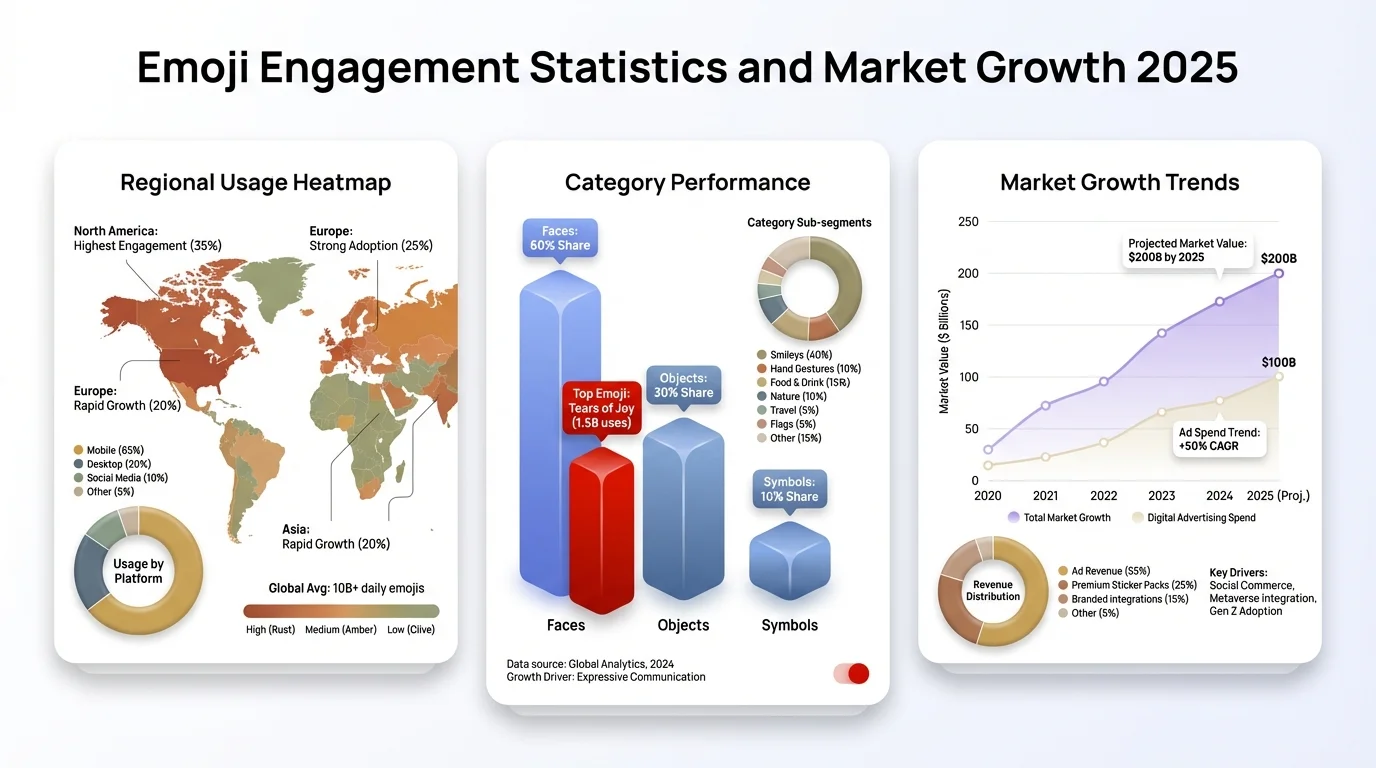
Emoji market growth, engagement statistics, and generational usage patterns in 2025
How AI Emoji Keyboards Actually Learn Your Style
Additionally, This is the part most people don't think about but it's arguably the most important feature of a good AI keyboard.
Moreover, There are two approaches to personalization:
Additionally, Cloud-based learning: Your typing history is sent to a server, processed, and used to refine a model for your account. Nevertheless, Gboard and SwiftKey do this. The advantage is more data, potentially more accurate results. The disadvantage is obvious — your messages are being stored and processed remotely.
On-device federated learning: The model trains on your device using your typing patterns, but the raw data never leaves. Google's research on federated learning for emoji prediction proved this approach works — you can get personalized, accurate emoji suggestions without any privacy trade-off.
CleverType uses this on-device approach. Over time, the keyboard gets better at predicting your specific emoji preferences — not just what the average user picks, but what you use when you're being sarcastic vs. when you're genuinely excited.
Nevertheless, The practical result: after a few weeks, the suggestions stop feeling like a random list and start feeling weirdly personal. Like the keyboard actually gets how you talk. Moreover, That's what this should feel like.
Common Mistakes People Make With AI Emoji Features
Therefore, A lot of people enable AI emoji suggestions and then never actually use them, or use them wrong. A few things worth knowing:
Mistake 1: Only using the first suggestion
AI keyboards show multiple suggestions for a reason. The top suggestion is the statistically most common — not necessarily the right one for your tone. Look at all three suggestions before defaulting to the first.
Mistake 2: Not giving the model time to learn
Personalized emoji prediction improves with use. Additionally, If you install an AI keyboard and judge it after three days, you're not testing the AI — you're testing the cold-start defaults. Nevertheless, Give it two to three weeks.
Mistake 3: Ignoring context
AI emoji suggestion is context-dependent. If you're typing a quick one-word reply, the AI doesn't have enough signal to suggest well. Full sentences give it real information to work with.
Mistake 4: Assuming all keyboards handle irony
Most AI emoji keyboards are bad at sarcasm. They catch the surface-level positive words and cheerfully suggest 😊. CleverType handles this better than most — but honestly, getting irony right is still a work in progress across the board.
Nonetheless, Mistake 5: Using too many emojis because the AI makes it easy
This is a real problem. Consequently, Just because the AI can suggest five relevant emojis doesn't mean you should use all of them. Studies show that overuse of emojis can make messages feel impersonal — 60% of people say emojis seem generic when overdone.
Choosing the Right AI Emoji Keyboard: What to Actually Look For
Most keyboard review articles list features. Nonetheless, This section is about what those features actually mean in practice.
What matters:
- Inference speed — Suggestion latency above 100ms feels sluggish. SwiftKey's 22ms benchmark is excellent. Anything under 50ms is effectively invisible.
- Accuracy on your emoji set — A model trained on general data might not predict niche emojis well. Research shows rare emoji prediction improved from 2.5% to 7.1% accuracy when SwiftKey used GPT-3.5 for data augmentation — that's a meaningful jump.
- Privacy model — Do your typing patterns stay on-device, or go to a server? For a keyboard — which sees literally everything you type — this is a more important question than most people realize.
- Integration with other AI features — A keyboard that only does emoji suggestions is limited. The best option combines emoji suggestions with grammar fixing, tone adjustment, and smart replies. CleverType does all of this.
- Language support — If you type in multiple languages, your keyboard needs to handle emoji suggestions across all of them, not just English.
Quick comparison:
| Feature | CleverType | Gboard | SwiftKey |
|---|---|---|---|
| On-device AI | Yes | Partial | Partial |
| Privacy-first | Yes | No | No |
| Emoji suggestion accuracy | High | High | High |
| Inference speed | Fast | Fast | Very fast (22ms) |
| Multi-language emoji support | 100+ languages | Good | Good |
| Grammar/tone fixing | Yes | Partial | No |
| Smart AI replies | Yes | No | No |
If you type in multiple languages, deal with sensitive topics, or just don't want Google reading your messages — CleverType is the clear answer. Download CleverType and try it free.
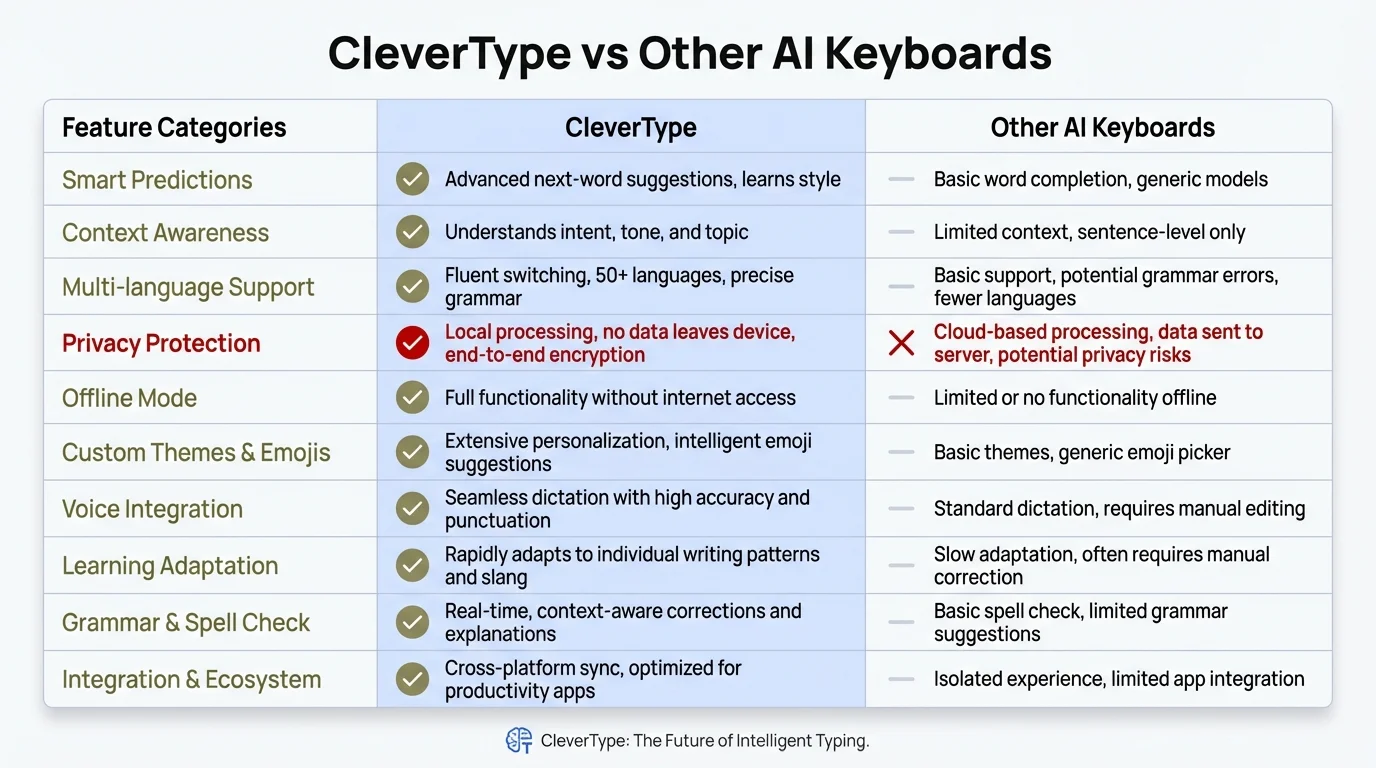
CleverType vs other AI keyboards: feature-by-feature comparison across the metrics that matter most
Ready to Type Smarter?
Upgrade your typing with CleverType AI Keyboard. Fix grammar instantly, change your tone, receive smart AI replies, and type confidently while keeping your privacy.
Download CleverType FreeAvailable on Android • 100+ Languages • Privacy-First
Frequently Asked Questions
What is a smart emoji suggestion keyboard?
Hence, A smart emoji suggestion keyboard is an AI-powered keyboard that recommends emojis in real time based on the emotional tone and context of what you're typing — not just keyword matching. Furthermore, It uses machine learning models to read full sentence meaning and suggest relevant emojis before you finish typing.
Which AI keyboard has the best emoji suggestions in 2025?
CleverType is the top-rated AI keyboard for smart emoji suggestions in 2025, combining on-device AI processing with context-aware recommendations across 100+ languages. Nonetheless, Gboard and SwiftKey are strong alternatives but send typing data to cloud servers by default.
Are AI emoji suggestions safe and private?
Consequently, It depends on the keyboard. Cloud-based keyboards like Gboard and SwiftKey process your typing on remote servers to improve suggestions. CleverType uses on-device AI, meaning your messages never leave your phone — making it the most private option for emoji suggestions.
How accurate are AI emoji suggestions?
Modern AI emoji classifiers are actually quite accurate — deep learning models including BiLSTM hit around 91% accuracy on emoji prediction tasks. Therefore, SwiftKey's on-device MobileBert classifier bumped click-through rates by 12% over previous systems. And it keeps improving as the model picks up your personal typing patterns over time.
Why do emojis matter in digital messaging?
Emojis significantly improve communication clarity and engagement. According to research, 64% of knowledge workers waste time interpreting messages that lack tone indicators. Posts with emojis get up to 57% more engagement on Facebook and 48% more on Instagram, while email subject lines with emojis see 56% higher open rates.
How long does it take for an AI keyboard to learn my emoji preferences?
Furthermore, Most AI keyboards show meaningful personalization within 2–3 weeks of regular use. On-device models like CleverType improve continuously as you type, while cloud-based models may update in batches. Additionally, You'll notice suggestions becoming more accurate to your specific style and usage patterns over that period.
Can AI emoji suggestions work in multiple languages?
Yes, but the quality varies by keyboard. Therefore, CleverType supports smart emoji suggestions across 100+ languages. Hence, Most AI keyboards handle emoji prediction in English well, but multilingual support degrades noticeably for less common languages on platforms like SwiftKey and Gboard.
Share this article:
Sources:
- Pumble — Emoji Statistics in Business Communication 2025
- Chanty — Emoji Statistics
- Statista — Emoji Usage Statistics
- Buffer — Most Popular Emojis in 2025
- Meltwater — Top Emojis of 2025
- Google Research — Federated Learning for Emoji Prediction
- arXiv — On-Device Emoji Classifier for SwiftKey (2411.05031)
- Springer — Deep Learning for Emoji Prediction
- Wikipedia — Gboard