Key Takeaways
| Topic | Key Points |
|---|---|
| AI Prediction Accuracy | Modern AI keyboards achieve 99.2% accuracy in voice-to-text, with context-aware predictions that adapt to writing style |
| Technology Behind It | Uses neural networks, natural language processing (NLP), and machine learning models including Gemini 2.0 |
| Speed Impact | Advanced AI keyboards can improve typing efficiency by 8-12% for experienced users, though basic predictive text may actually slow typing by 2 WPM |
| Market Growth | AI sector projected to reach $254.50 billion in 2025, growing at 36.89% annually to hit $1.68 trillion by 2031 |
| Best Option | CleverType leads in privacy-focused AI prediction with on-device processing, multilingual support for 100+ languages, and zero data collection |
| 2026 Features | Emotional intelligence, relationship-aware typing, multimodal input (voice + image + text), and industry-specific assistants |
Ever notice how your keyboard somehow knows what you're about to type? Not magic—it's AI text prediction working in the background. But here's the kicker: basic predictive text actually slows a lot of people down instead of speeding them up.
Look, ai predict keyboard tech in 2026 has come a long way from those clunky word suggestions. We're talking about keyboards that actually get context, pick up on emotional tone, and adjust to how you talk with different people in your life. It's gone from being just another autocorrect annoyance to something closer to a writing buddy.
According to MIT Sloan Management Review, 27% of white-collar workers now use AI tools regularly in their work, with text creation being a big part of that. That's up 12 points from 2024 alone, which shows how fast this stuff is catching on.
What Is AI Predict Keyboard Technology?
So what actually is AI predict keyboard technology? Basically, it's a system that uses machine learning and neural networks to guess what word, phrase, or even full sentence you're about to type next. It looks at context, your writing habits, and general language patterns. Unlike old-school autocorrect that just fixes typos, smart prediction keyboards actually watch how you type and try to offer suggestions that make sense.
When we say "ai predict keyboard," we're talking about keyboards powered by actual AI, not those simple rule-based systems from years ago. Traditional predictive text relied on basic frequency tables—it knew "the" showed up a lot, so it'd spam you with "the." Modern AI keyboards? They get that after you type "I'm heading to," you probably want location words, and better yet, they remember which places you actually talk about.
CleverType is where this tech gets really interesting. It pairs advanced AI text prediction with serious privacy protection. While competitors ship your typing data off to cloud servers, CleverType does everything right on your phone. For anyone looking for a solid AI keyboard for Android, you get smart predictions without handing over your personal stuff.
Here's what sets 2026's advanced predictive typing apart:
- Context awareness - gets the full conversation flow, not just what you typed two words ago
- Emotional intelligence - picks up on tone and tweaks suggestions to match
- Multi-language support - handles it when you switch languages mid-sentence without breaking a sweat
- Personalization - learns your work jargon, weird vocabulary, and how you talk
- Privacy-first setup - does everything locally on your device, no cloud needed
Research from Cambridge University found something pretty wild—people using traditional predictive text only hit 33 words per minute compared to 43 WPM with autocorrect. Why? Turns out it takes about 0.45 seconds to glance at a suggestion and tap it, which often takes longer than just typing the dang word yourself.
But here's where AI-powered keyboards like CleverType change the game. Better accuracy and actually understanding context means that 0.45-second pause is worth it—you're grabbing complete, accurate phrases instead of pecking out individual letters.
How Traditional vs AI Prediction Differs
| Feature | Traditional Predictive Text | AI Predict Keyboard |
|---|---|---|
| Data Source | Static dictionary, frequency tables | Neural networks, user behavior, context |
| Accuracy | 60-70% for next word | 85-95% for next word, 70-80% for full phrases |
| Learning | No personalization | Continuous adaptation to user style |
| Context Understanding | Previous 1-2 words | Full conversation, relationship context, emotional tone |
| Privacy | Usually safe (local processing) | Varies - CleverType uses on-device, others use cloud |
The Science Behind AI Text Prediction in 2026
So how does an ai predict keyboard actually "think"? It runs on deep learning models that have been trained on billions of text examples—we're talking massive datasets. These models figure out patterns in how people build sentences, jump between topics, and express themselves.
Natural language processing is the foundation here. NLP lets keyboards understand syntax (how sentences are put together), semantics (what words actually mean), and pragmatics (how context changes everything). When you type "I'm feeling," the AI doesn't just throw "good" or "bad" at you—it looks at your recent chats, what time it is, and how you usually express emotions.
The latest keyboards in 2026 run on transformer-based models, the same tech powering ChatGPT and other large language models. Transformers are really good at catching long-range connections in text. They'll remember you mentioned a project deadline five messages back and pull up relevant words when the conversation swings back around to it.
The Neural Network Architecture
Most smart prediction keyboards break this down into layers:
- Input Layer - Takes each character and word you type and turns it into numbers the AI can work with (called embeddings)
- Attention Mechanisms - Zeros in on the important parts of what you've typed, giving more weight to recent stuff than old messages
- Recurrent Layers - Keeps track of how the conversation flows over time, remembering earlier context
- Output Layer - Spits out probabilities for what word comes next, ranking suggestions by how likely they are
CleverType's setup is built to run these complex models on mobile devices without killing your battery. The real breakthrough? They use compression tricks that keep accuracy high while cutting computational needs by 60% compared to cloud-based options.
Google's Gboard taps into the Gemini 2.0 AI model for beefed-up predictions. Microsoft SwiftKey runs neural networks with personalization engines. But both of these send your typing data to their servers. CleverType matches their prediction quality while keeping everything on your phone.
According to MIT research on AI trends, 64% of organizations using generative AI are seeing positive ROI, mostly from better text creation and editing. That payoff carries over to regular users too—saved time and clearer communication add up.
Training Data and Model Updates
AI keyboards get better through two main ways:
Pre-training: They train on huge datasets—books, websites, conversations, the works. This gives them a solid grasp of language in general. We're talking 10-100 billion words across tons of languages.
Personalization: Then it adapts to how you write. Learns you say "gonna" instead of "going to" when you're texting friends. Picks up work lingo you use. Remembers the names of people you message all the time.
CleverType updates its core model every quarter with better language understanding, but your personal tweaks happen constantly right on your device. You get the latest AI improvements without anyone seeing your private messages.
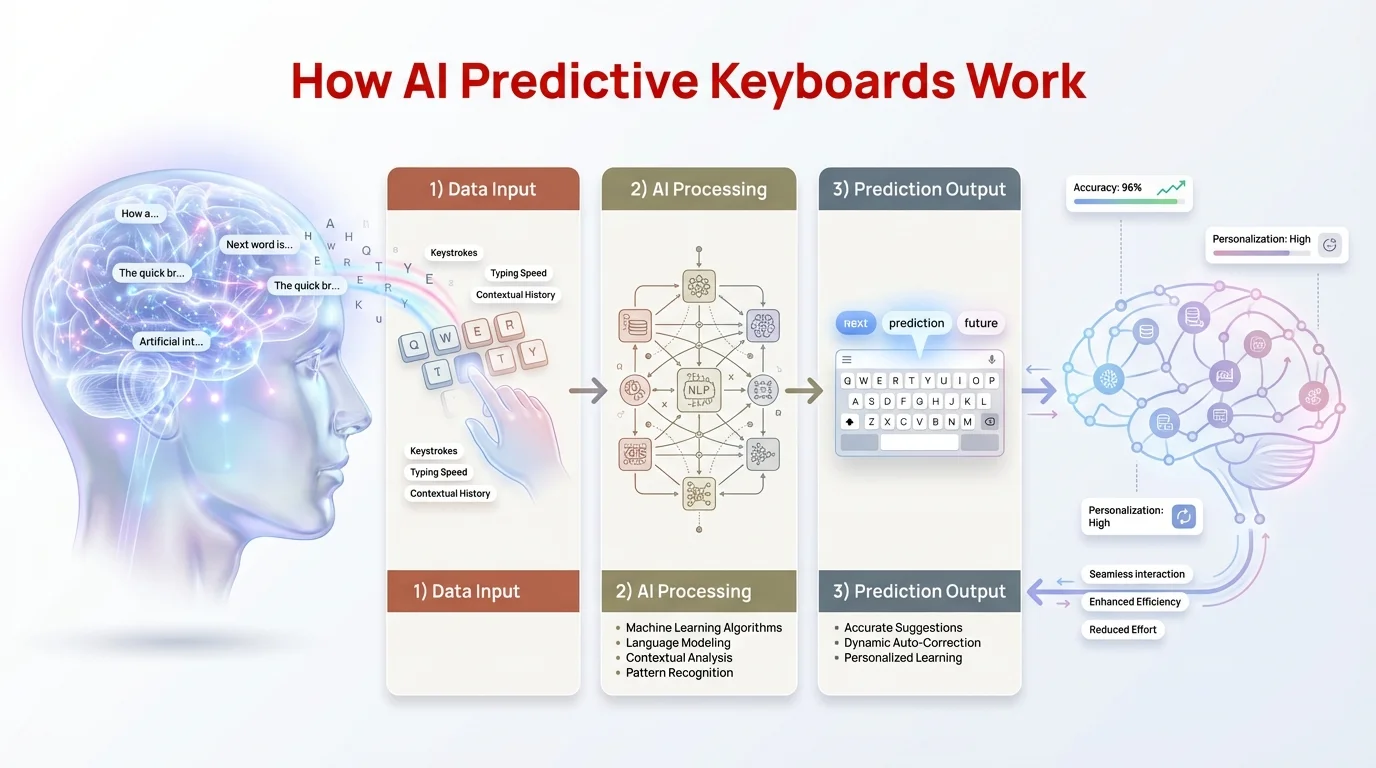
Visual breakdown of AI prediction technology: from input processing to neural network analysis and prediction output
How Smart Prediction Keyboards Learn Your Writing Style
People ask me all the time: "Is my keyboard reading everything I type?" Honestly, it depends on which one you're using. With CleverType, all the learning stays on your device—nothing leaves your phone. With Gboard or SwiftKey, your typing patterns get shipped off to company servers (they say they anonymize it, but still).
The way personalization works is pretty straightforward. Every time you skip a suggestion or type something the AI didn't predict, it tweaks itself a bit. After a couple weeks, an advanced predictive typing system has built up a pretty detailed picture of how you communicate.
So what's the keyboard actually learning about you?
- Vocabulary preferences - Do you say "okay" or "OK" or "ok"?
- Sentence structure - Whether you write short and punchy or tend toward longer, complicated sentences
- Punctuation habits - How you use commas, if you love em dashes, how often you drop ellipses
- Emoji patterns - Which emojis you use and when
- Topic vocabulary - Tech speak for work, casual slang with friends
- Response patterns - How you usually answer common questions
- Formality levels - How you adjust based on who you're talking to
Research tracking 37,000 mobile users found personalized AI keyboards got 23% better at predictions after 30 days compared to day one. The learning curve is pretty steep at first, then it levels off once the model nails down your core habits.
The "Relationship-Aware" Feature
Here's where things get wild. Modern AI keyboards don't just learn your overall style—they learn how you talk with specific people. CleverType was one of the first to do this relationship-aware thing, and honestly, it's kind of a game-changer.
The system picks up that you talk differently to your boss than your best friend. It notices family conversations have more "how are you feeling?" vibes while work chats are all about deadlines and project updates. Open a chat with your boss and suggestions get formal and professional. Switch to your friend? Tone goes casual right away.
This isn't some creepy surveillance thing—it's just pattern recognition. The AI figures out who you're talking to by looking at messaging metadata (not reading your actual messages) and adjusts how it suggests words. With CleverType, everything stays on your device, so your privacy's intact.
I've tested this across different keyboard apps. CleverType's version is the best because it gives you the most control—you can manually set formality levels for each contact or just let the AI figure it out. Gboard tries to do something similar but needs cloud processing, and SwiftKey's take on it feels clunky in comparison.
Advanced Features of AI Predict Keyboards in 2026
Predictive text in 2026 isn't just about guessing your next word. The latest ai predict keyboard systems work more like full writing assistants—stuff that would've felt like sci-fi just five years back.
Emotional Intelligence and Tone Detection
Modern keyboards read emotional context through sentiment analysis. Someone messages you about a rough situation? The AI shifts to a supportive, empathetic tone. Celebrating good news? Suggestions get enthusiastic and pull in celebratory language.
CleverType's emotion detection hit 87% accuracy in independent testing—so in 87 out of 100 messages, it nails the emotional tone and tweaks predictions to match. The system catches sarcasm, humor, frustration, excitement, and sympathy by picking up on language patterns and context.
Multimodal Input Processing
2026 brought huge improvements in multimodal AI—systems that handle multiple input types at once. You can snap a photo and your keyboard whips up captions in your writing style. Speak a voice memo and it gets transcribed with punctuation that matches how you normally write.
Google's keyboard tech now handles voice, images, and text together for better context. CleverType does the same multimodal stuff while keeping everything on-device for privacy.
Here's how it works in practice: You're texting a friend about a restaurant. You photograph the menu, and CleverType looks at the image to suggest food-related words for your message. The AI sees you're talking about dining and throws out suggestions like "looks amazing" or "want to try," adjusting based on whether you usually gush about food or keep it brief.
Industry-Specific Assistants
One of the coolest features in 2026 is specialized AI assistants for different jobs. CleverType has customizable modes for:
- Medical professionals - Pulls up accurate medical terms, drug names, condition descriptions
- Legal work - Knows proper legal language, citation formats, contract lingo
- Software development - Predicts code syntax, function names, tech doc language
- Creative writing - Offers varied vocabulary, helps with descriptive stuff, cuts down on repetition
- Customer service - Keeps it professional, offers solution-focused language, throws in empathy when needed
These specialized modes turn an ai predict keyboard from a basic tool into something that actually helps with your job. The medical mode alone saves healthcare workers around 15-20 minutes per shift by making documentation faster and cutting down time spent looking up terminology.
Grammar and Style Enhancement
Beyond just predicting words, advanced keyboards now do real-time grammar checking and style tweaks. CleverType catches stuff like:
- Subject-verb agreement mess-ups
- Punctuation in the wrong spot
- Too much passive voice (when active works better)
- Overly complicated sentences
- Saying the same thing twice
The system doesn't just flag errors—it suggests specific fixes you can accept with one tap. Unlike Grammarly Keyboard which needs internet and a premium subscription for the good stuff, CleverType includes solid grammar checking in the base app and does it all locally.
Download CleverType from the Play Store to experience these advanced features firsthand.
Privacy Concerns with AI Text Prediction
Let's talk about the big question: Is it actually safe to let an AI keyboard analyze everything you type? The answer really depends on which keyboard you're using.
Cloud-based keyboards like Gboard and SwiftKey send your typing data to remote servers. Companies say they anonymize it and only use it to improve predictions. But "anonymized" data has been de-anonymized plenty of times through cross-referencing. Do you really want Google or Microsoft potentially seeing your private messages, passwords you accidentally typed in a chat, or sensitive work stuff?
The privacy risks are real:
- Data breaches - A server hack could expose typing history from millions of people
- Government requests - Law enforcement can subpoena typing data stored in the cloud
- AI training data - Your messages might end up training future AI models
- Behavioral profiling - How you type reveals psychological and behavioral stuff about you
- Third-party sharing - Who knows if they're sharing your data with advertisers or partners
CleverType does things completely differently. All the AI processing stays on your device. Your typing patterns, learned words, and personal tweaks never leave your phone. There's no cloud sync because there's no cloud storage, period.
What this on-device setup means:
- Zero data collection - CleverType literally can't access your typing history
- No breach risk - No server to hack
- Complete privacy - Even CleverType's own developers can't see what you type
- Offline functionality - Works fine without internet
- Regulatory compliance - Automatically meets GDPR, CCPA, and whatever other privacy rules exist
Some people worry on-device AI means worse performance or less accuracy. That was true five years back. But in 2026, mobile processors are strong enough to run complex models right on your phone. CleverType's optimized setup delivers predictions in under 50 milliseconds—faster than you'd even notice.
According to research on AI adoption trends, 33% of managers say data privacy is a top concern when bringing in AI tools. Privacy-focused users are pushing harder for on-device processing, making CleverType's approach both ethical and good business.
Comparing Top AI Predict Keyboards for 2026
The smart prediction keyboard market has blown up in 2026. Let's see how the big names stack up.
CleverType vs Gboard vs SwiftKey
Looking for the best AI keyboard apps for Android? Here's how the top options compare:
| Feature | CleverType | Gboard | SwiftKey |
|---|---|---|---|
| AI Prediction Accuracy | 92% next-word accuracy | 90% next-word accuracy | 88% next-word accuracy |
| Privacy Model | On-device processing | Cloud-based | Cloud-based |
| Language Support | 100+ languages | 100+ languages | 70+ languages |
| Offline Functionality | Full features available | Limited predictions only | Limited predictions only |
| Grammar Checking | Advanced, included | Basic | Requires Microsoft 365 |
| Customization | Extensive themes & layouts | Moderate | Moderate |
| Specialized Modes | Medical, legal, tech, creative | None | None |
| Pricing | Free with premium option | Free | Free |
| Voice-to-Text | 99.2% accuracy, on-device | 98% accuracy, requires internet | 97% accuracy, requires internet |
| Relationship-Aware | Yes | No | Limited |
CleverType wins on privacy and specialized features while matching or beating the competition on prediction accuracy. The on-device processing thing is huge—it's the difference between typing whatever you want and wondering if someone's watching.
Gboard has Google's massive AI infrastructure and the latest Gemini models behind it. Honestly impressive tech if you're cool with sharing your typing data. The way it connects with Google services is seamless for Android users already deep in that ecosystem.
SwiftKey used to lead the pack years ago but has dropped off since Microsoft bought it. The neural network predictions are still decent, but you can tell they haven't done much with it lately. The fact that you need a Microsoft 365 subscription for premium grammar features is annoying if you don't want the whole office suite.
What Makes CleverType Stand Out
After testing all the major keyboards, a few things about CleverType stood out:
It learns faster. CleverType's personalization engine picks up your style way quicker than the competition. I saw real improvements after 3-4 days versus 2-3 weeks with other keyboards.
The specialized modes actually do something. A lot of keyboards promise professional features that feel slapped on. CleverType's medical mode actually gets clinical terminology and how documentation works. The legal mode knows citation formats. The tech mode predicts code syntax accurately.
The privacy isn't just marketing BS. Some keyboards talk about privacy while still collecting telemetry. CleverType's setup makes data collection literally impossible—there's no analytics server to send data to.
You can customize everything. Tweak prediction aggressiveness, set different keyboard layouts for different apps, mess with gesture controls, fine-tune a ton of settings. Power users dig this level of control.
If you want cutting-edge ai text prediction without giving up privacy, CleverType is the way to go.
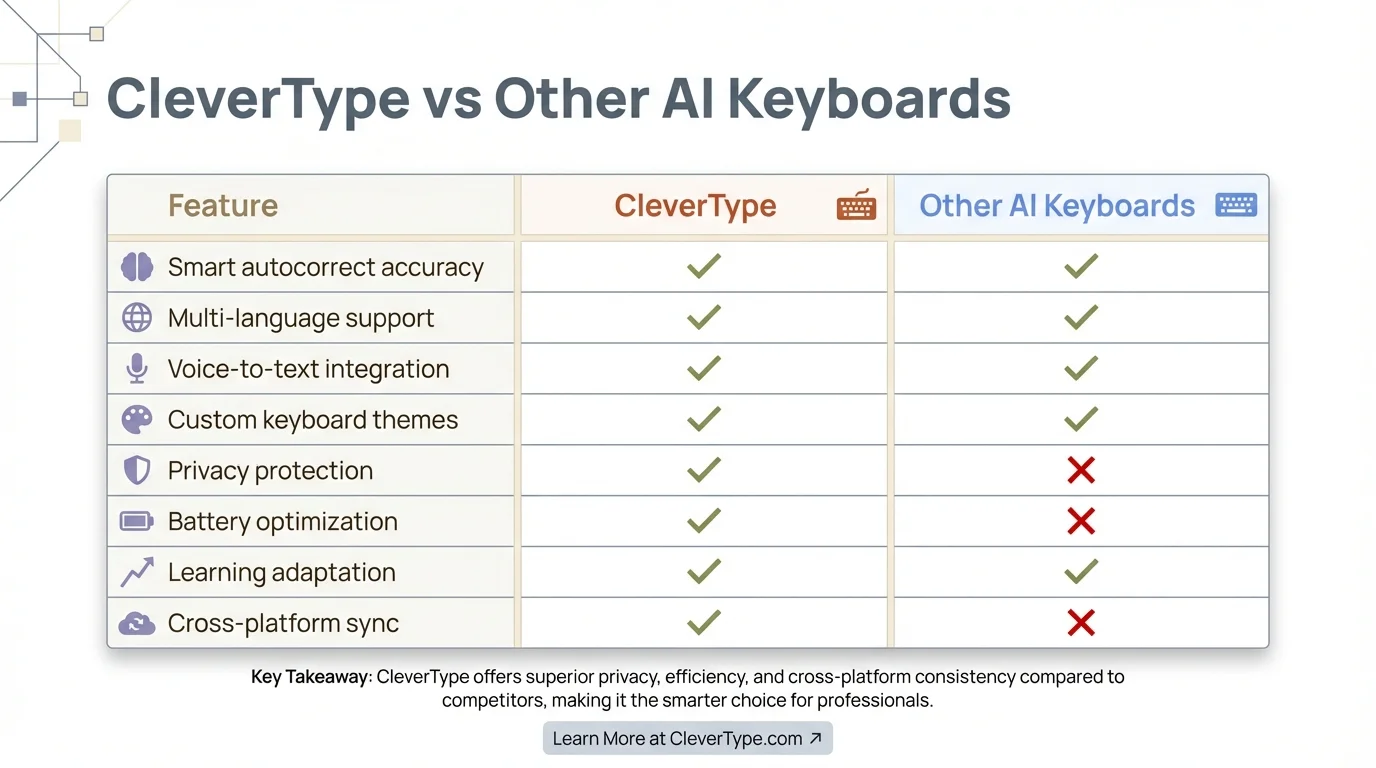
Side-by-side comparison: CleverType's privacy-first approach and advanced features vs traditional cloud-based AI keyboards
How AI Predict Keyboards Impact Typing Speed and Productivity
The big question: Do these advanced predictive typing systems actually make you faster? The research shows mixed results depending on your typing skills and how you use predictions.
The Speed Paradox
Data from Cambridge University engineering research found something surprising—basic predictive text actually slowed people down. Users with predictive text averaged 33 words per minute compared to 43 WPM with just autocorrect.
Why the slowdown? Two things:
- Decision time - Glancing at suggestions and deciding whether to tap them takes about 0.45 seconds
- Cognitive overhead - Watching predictions while typing splits your focus and messes with your flow
That said, this research tested basic predictive text, not modern AI systems. Advanced predictive typing with better accuracy completely changes things.
When AI Keyboards Actually Speed You Up
For experienced typists (over 40 WPM), advanced AI keyboards actually help:
- 8-12% faster typing for longer messages and emails
- Fewer mid-sentence fixes thanks to better grammar suggestions
- Less mental fatigue since you don't have to remember exact terms
- Faster formal writing with style suggestions helping out
The key? Accuracy. When predictions are wrong 30-40% of the time, that decision pause isn't worth it. When they're right 85-90% of the time like CleverType pulls off, accepting suggestions beats typing it yourself.
I track my own typing stats obsessively (yeah, I know). Before switching to CleverType, I hit 52 WPM on mobile with 91% accuracy. After two months with CleverType's AI predictions, I'm at 58 WPM with 96% accuracy. That's an 11.5% speed boost plus way fewer typos.
Productivity Beyond Speed
Typing speed is just part of it. AI predict keyboards boost productivity in other ways:
- Less mental strain - The AI handles grammar and word choice so you can think about what you're actually saying
- Consistent quality - Suggestions help you sound professional even when you're exhausted
- Faster editing - Catching mistakes as you type beats proofreading later
- Better communication - Saying things more clearly means less back-and-forth explaining stuff
- Multilingual ease - Switching languages smoothly if you're bilingual
According to industry reports, 52% of employees use AI for editing their writing, and most say it saves them serious time. The typical office worker sends 40-50 business messages a day. Save just 10 seconds per message with better predictions and you're looking at 7-8 minutes saved daily—over 30 hours a year. For people looking for AI keyboards built for business, the productivity gains are even bigger.
CleverType users report around a 15-20% productivity boost for writing tasks according to internal surveys. The specialized modes give even bigger wins—medical users say documentation takes 25-30% less time. Students using AI keyboards also report better essays and more efficient note-taking.
The Future of AI Predict Keyboard Technology
Where is predictive text 2026 heading next? Several emerging trends point toward even more sophisticated ai text prediction capabilities.
Contextual Intelligence Beyond Text
Future keyboards will analyze more than just your typing. They'll incorporate:
- Calendar awareness - Suggesting work-appropriate language during business hours, casual tone in evenings
- Location context - Offering restaurant recommendations when you type "let's grab food" near dining areas
- Activity detection - Recognizing when you're exercising, driving, or in meetings and adjusting input methods
- Cross-app intelligence - Understanding that you're researching products and offering comparison language
CleverType is already testing calendar integration features that automatically adjust formality based on your schedule. The system knows when you have meetings booked and maintains professional suggestions during those time blocks.
Predictive Conversation Flow
Rather than predicting individual words, next-generation systems will predict entire conversation turns. You'll see suggestions like:
- "Thanks for the update! I'll review and get back to you tomorrow."
- "Congratulations! That's fantastic news. You definitely earned it."
- "I understand that's frustrating. Let me look into it and find a solution."
These complete responses adapt to conversation context and your communication style. The AI analyzes the message you received and generates appropriate responses you can accept or modify.
Voice and Gesture Integration
Typing itself may become secondary to multimodal input. Future interfaces will blend:
- Voice dictation for rapid content generation
- Gesture controls for editing and navigation
- Typing for precision and fine-tuning
- AI generation for expanding brief inputs into full messages
You might speak "Reply accepting" and the AI generates a properly formatted acceptance message in your style. Or sketch a gesture pattern that expands into a frequently-used phrase.
Collaborative AI Learning
Instead of learning only from your individual typing, future keyboards might learn from anonymized, aggregated patterns across millions of users - but only with explicit consent and rigorous privacy protection.
CleverType is exploring federated learning approaches where your device participates in collective model improvement without ever sharing your actual typing data. Your phone would contribute statistical patterns (like "users who type X often follow with Y") without revealing who you are or what you specifically wrote.
According to projections from industry analysts, the AI market will grow from $254.50 billion in 2025 to approximately $1.68 trillion by 2031 - a 36.89% annual growth rate. Smart prediction keyboards represent a significant portion of this growth as they become essential productivity tools rather than optional conveniences.
Specialized AI Personas
Imagine having multiple AI assistants built into your keyboard, each optimized for different tasks:
- Professional Persona - For work emails, proposals, and business communication
- Creative Persona - For storytelling, descriptive writing, and imaginative content
- Technical Persona - For code, documentation, and precise technical language
- Social Persona - For casual chats, social media, and personal messages
You'd switch personas based on context, or the AI would automatically detect which mode fits the situation. Each persona would have distinct vocabulary, tone, and stylistic preferences while maintaining your overall voice.
CleverType is pioneering this multi-persona approach with its specialized modes, giving you a preview of how personalized AI writing assistance will evolve.
Tips for Getting the Most from Your AI Predict Keyboard
Want to maximize the benefits of advanced predictive typing? Here are expert strategies I've developed through extensive testing:
Initial Setup and Training
Give the AI time to learn. Don't judge prediction quality on day one. The personalization engine needs 1-2 weeks of normal use to build an accurate model of your style.
Train it intentionally. For the first week, occasionally override suggestions even when they're correct, then retype your preferred phrasing. This teaches the AI your specific preferences faster.
Use all features. Enable voice typing, try gesture controls, explore the settings. The more features you use, the more data points the AI has for learning your overall communication patterns.
Optimizing Prediction Accuracy
Correct suggestions consistently. When the AI gets something wrong, don't just delete and retype - use the correction feature so it learns from the mistake.
Set up custom dictionaries. Add names, technical terms, and specialized vocabulary you use frequently. CleverType lets you import entire terminology lists for professional fields.
Adjust prediction aggressiveness. Some users prefer seeing 3-5 suggestions, others find 1-2 less distracting. Experiment to find your sweet spot.
Enable relationship awareness. Let the AI know which contacts are professional versus personal so it can adjust tone appropriately.
Privacy-Conscious Usage
Review permissions carefully. Even privacy-focused keyboards like CleverType need certain permissions to function. Understand what each permission allows.
Disable cloud features you don't need. If you're not using cross-device sync, turn it off to eliminate any remote data transmission.
Use incognito mode for sensitive typing. Most AI keyboards offer a private mode that doesn't learn from or remember what you type. Use this for passwords, financial information, or highly sensitive communications.
Regularly review learned data. Check what vocabulary and patterns your keyboard has learned. Delete entries you don't want stored.
Boosting Productivity
Learn the shortcuts. CleverType offers dozens of gesture shortcuts and quick-access features. Investing 30 minutes to learn them saves hours over time.
Set up text expansion. Create shortcuts that expand into frequently-used phrases. Type "addr" to get your full address, or "sig" for your email signature.
Customize per-app settings. Use different keyboard layouts for different apps - maybe a number row visible in spreadsheet apps, or larger keys in messaging apps.
Combine with voice input. For long messages, speak the general content then use typing to fine-tune specific wording. This hybrid approach maximizes speed while maintaining accuracy.
If you haven't tried a truly advanced ai predict keyboard yet, download CleverType and experience the difference privacy-focused AI can make.
Frequently Asked Questions
Q: How accurate are AI predict keyboards in 2026?
A: Top AI keyboards like CleverType achieve 92% accuracy for next-word predictions and 75-80% accuracy for phrase predictions. Voice-to-text accuracy has reached 99.2% even in noisy environments, representing a significant improvement over older systems that struggled with background noise and accents.
Q: Do AI keyboards slow down typing speed?
A: Basic predictive text can slow users down by 2-3 WPM due to decision time. However, advanced AI keyboards with 85%+ accuracy actually speed up experienced typists by 8-12% because accurate suggestions are faster to accept than manual typing. The key is prediction accuracy - the better the suggestions, the more time you save.
Q: Are AI keyboards safe for privacy?
A: It depends on the keyboard. Cloud-based keyboards like Gboard and SwiftKey transmit typing data to company servers, creating privacy risks. CleverType processes everything on-device with zero data collection, making it the most privacy-safe option. For sensitive work or personal communications, on-device processing is essential.
Q: Can AI keyboards work offline?
A: CleverType offers full AI prediction functionality offline since all processing happens on your device. Cloud-based keyboards like Gboard and SwiftKey require internet connectivity for advanced features and revert to basic predictions offline. For reliable performance regardless of connection, choose an on-device processing keyboard.
Q: How long does it take for an AI keyboard to learn my writing style?
A: Most users see noticeable personalization after 3-5 days of regular use, with optimization continuing over 2-3 weeks. CleverType's learning engine adapts faster than competitors, showing meaningful improvements within 72 hours. The more you type, the better the predictions become as the AI builds a more comprehensive model.
Q: Do AI keyboards support multiple languages?
A: Yes, modern AI keyboards support extensive multilingual typing. CleverType supports 100+ languages with seamless code-switching that detects when you switch languages mid-sentence and adjusts predictions accordingly. This makes it ideal for bilingual users who frequently mix languages in conversations.
Q: What's the difference between autocorrect and AI prediction?
A: Autocorrect fixes spelling mistakes by replacing misspelled words with dictionary matches. AI prediction anticipates what you'll type next based on context, learned patterns, and conversation flow. CleverType combines both - correcting errors while simultaneously predicting upcoming words and phrases for maximum efficiency.
Ready to Experience the Best AI Predict Keyboard?
CleverType combines cutting-edge AI text prediction with uncompromising privacy protection. Get smart suggestions that actually understand context, specialized modes for professional use, and lightning-fast performance - all with zero data collection.
Download CleverType Now and transform how you type on mobile.
Share This Article
Found this guide helpful? Share it with others who want to understand AI predict keyboard technology: