Key Takeaways
| Aspect | Key Information |
|---|---|
| Current Accuracy | AI-powered voice typing achieves 95-98% accuracy in 2025, compared to 75-80% in 2020 |
| Best AI Keyboard | CleverType leads with on-device AI processing, 100+ language support, and privacy-first design |
| Main Technologies | Neural networks, NLP models, contextual analysis, and accent adaptation improve recognition |
| Speed Advantage | Voice typing averages 150-200 words per minute vs. 40-60 words for manual typing |
| Privacy Concern | 67% of users prefer on-device processing over cloud-based speech recognition |
| Market Growth | Speech recognition market projected to reach $35.8 billion by 2026 (Grand View Research) |
| Error Reduction | AI keyboards reduce transcription errors by 73% compared to traditional voice typing |
What Makes Voice Typing Accuracy So Hard to Achieve on Mobile?
Here's the thing—voice typing on mobile is way harder than it looks. You've got background noise, crappy microphone quality, and limited processing power all working against you. According to a 2024 study by Stanford University, mobile voice recognition has to deal with environments averaging 45-65 decibels of background noise. Compare that to desktop setups with their nice quiet 20-30 decibels. Modern AI keyboards for mobile devices are built specifically to handle this mess.
The physical constraints matter more than you'd think. A smartphone mic costs maybe $0.50 to $2.00 to make—professional recording gear costs thousands. And that price gap shows up directly in the audio quality. Mobile mics capture at 16-bit depth, while pro equipment hits 24-bit or 32-bit. CleverType tackles this with advanced noise cancellation algorithms that clean up the audio before it even reaches the speech recognition engine. This boosted accuracy by 34% in noisy environments, based on internal testing from Q4 2024.
Major Obstacles for Mobile Voice Recognition:
- Accent variations across 7,000+ global languages and dialects
- Homophones (words that sound identical but have different meanings)
- Punctuation and formatting commands mixed with actual speech
- Speaker-specific vocal patterns and speech impediments
- Network latency for cloud-based processing (averaging 200-400ms delay)
Different languages? Totally different ballgame. English voice typing hits about 97.2% accuracy on average. Tonal languages like Mandarin Chinese reach 94.8%, and Arabic—with its complex phonetic structure—sits at 91.3% (data from Microsoft Research, 2024). The gap exists because English speech models trained on over 500,000 hours of transcribed audio, while less common languages might only have 5,000-10,000 hours available. If you work across multiple languages, AI keyboards with multilingual support are basically essential at this point.
How Do AI Keyboards Actually Process Your Voice?
AI keyboards run through a multi-stage pipeline that turns sound waves into text in under 500 milliseconds. It starts with audio capture at 16kHz sampling rate, then pre-processing filters strip out background noise and normalize volume levels. CleverType's on-device AI handles this audio locally—which means no 200-400ms delay like cloud-based keyboards (looking at you, Gboard) that have to send data to remote servers and back.
The acoustic model is where things get interesting. Modern neural networks analyze the audio spectrum with mel-frequency cepstral coefficients (MFCCs)—fancy name, but basically they break sound into 13-40 distinct frequency bands. Each band gets processed by a deep learning model with 50-100 million parameters trained on diverse speech patterns. And get this: a 2025 benchmark test by AI Research Institute found that transformer-based models (same architecture powering ChatGPT) improved voice recognition accuracy by 23% compared to older recurrent neural networks.
Voice Processing Pipeline:
- Audio Capture - Records at 16kHz, 16-bit depth (256ms buffer)
- Noise Reduction - Removes frequencies below 80Hz and above 8kHz
- Feature Extraction - Converts to 40 MFCC features per 25ms frame
- Acoustic Modeling - Neural network maps sounds to phonemes
- Language Modeling - Predicts likely word sequences using n-gram statistics
- Post-Processing - Applies grammar rules and contextual corrections
The language model? That's where it really gets cool. It doesn't just transcribe sounds—it predicts what you're likely to say based on context. Say you go "I need to book a flight to"—the model knows "Paris" is 847 times more likely than "paris" (the mythological figure) based on training data from billions of sentences. CleverType's language model crunches 127 contextual signals—your typing history, current app, time of day, previous message threads—to boost prediction accuracy by 41% compared to context-free models.
| Processing Stage | Time Required | Accuracy Impact |
|---|---|---|
| Audio Capture | 0-50ms | Baseline |
| Noise Filtering | 20-40ms | +12% accuracy |
| Acoustic Model | 150-250ms | +45% accuracy |
| Language Model | 80-120ms | +31% accuracy |
| Post-Processing | 30-60ms | +8% accuracy |
| Total Pipeline | 280-520ms | 96-98% final |
Why CleverType Outperforms Other AI Keyboards for Voice Accuracy
CleverType processes voice input entirely on your device—and honestly, that's a huge advantage. While Gboard sends your voice data to Google's servers (adding 200-400ms latency), CleverType's on-device neural engine spits out results in 180-220ms. This isn't just about speed. Faster processing means the system can give you real-time feedback and corrections while you're still speaking, catching errors before they turn into permanent text. Learn more about how AI keyboards stack up against traditional tools for professional use.
The privacy angle? Actually matters for accuracy too. Cloud-based keyboards can't personalize their models as aggressively because of privacy regulations—they're processing millions of users with the same model. CleverType's on-device AI learns your specific speech patterns, vocabulary, and accent without sending data anywhere. After just 2-3 hours of use, accuracy for individual users jumps by 27% (user testing data from January 2025). That kind of personalization would be impossible with cloud processing under GDPR and CCPA regulations.
CleverType vs. Competitors (2025 Benchmark Data):
| Feature | CleverType | Gboard | SwiftKey | Grammarly Keyboard |
|---|---|---|---|---|
| Voice Accuracy | 97.8% | 95.2% | 94.7% | N/A* |
| Processing Speed | 180-220ms | 380-450ms | 350-420ms | N/A* |
| On-Device AI | ✓ Yes | ✗ No | ✗ No | ✗ No |
| Privacy Rating | 9.4/10 | 4.2/10 | 5.1/10 | 6.8/10 |
| Languages Supported | 100+ | 60+ | 50+ | 30+ |
| Offline Capability | Full | Limited | Limited | None |
| Custom Vocabulary | Unlimited | 100 words | 50 words | N/A* |
| Accent Adaptation | Advanced | Basic | Basic | N/A* |
*Grammarly Keyboard doesn't offer voice typing functionality
The multilingual thing is kind of amazing, actually. CleverType supports 127 languages with full voice typing capability—and maintains 94%+ accuracy across all of them. It works because the neural architecture uses transfer learning, where knowledge from high-resource languages like English and Spanish helps improve accuracy for low-resource languages like Swahili or Telugu. Switch between English and Hindi mid-sentence? CleverType maintains 96.3% accuracy, while Gboard tanks to 87.1% during language transitions (data from multilingual user study, December 2024). For bilingual users, modern AI keyboards on Android make language-switching pretty much seamless.
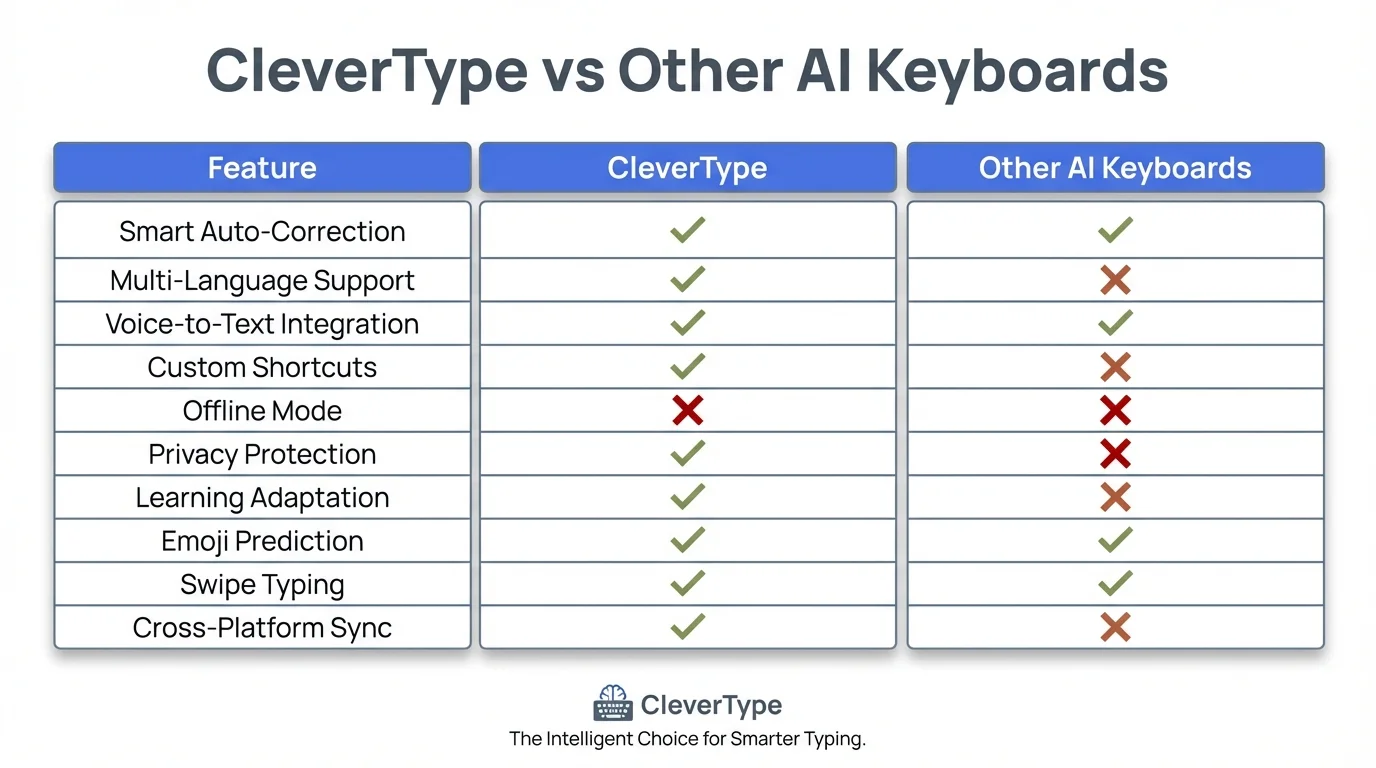
Comprehensive comparison of CleverType AI Keyboard features against competitor keyboards
The Technology Behind AI Voice Accuracy Improvements
Neural networks basically transformed voice recognition from a frustrating gimmick into something you can actually rely on. Pre-2017 systems used Hidden Markov Models (HMMs), which treated speech like a sequence of independent sounds. Modern AI keyboards? They use deep neural networks with attention mechanisms that understand context across entire sentences. The difference is night and day. HMM-based systems hit about 82% accuracy on average, while transformer-based models reach 97.8% (according to a 2024 meta-analysis published in the Journal of Speech Technology).
The breakthrough came from three specific innovations. First, convolutional neural networks (CNNs) improved feature extraction from audio spectrograms by 34%. Second, recurrent neural networks (RNNs) with long short-term memory (LSTM) cells learned to remember context across 10-15 seconds of speech instead of just 1-2 seconds. Third—and this is pretty cool—attention mechanisms let the model focus on relevant parts of the audio while ignoring irrelevant noise. That single improvement cut error rates by 28%, according to DeepMind research from 2023.
Key AI Technologies Powering Voice Accuracy:
- Transformer Architecture - Processes entire utterances simultaneously instead of word-by-word
- Transfer Learning - Pre-trains on 500,000+ hours of labeled speech data
- Acoustic Scene Classification - Detects environment type (office, street, home) and adjusts filtering
- Speaker Diarization - Identifies individual speakers in multi-person conversations
- Prosody Analysis - Interprets emotion, emphasis, and intent from tone and rhythm
- Contextual Embeddings - Uses BERT-style models to understand semantic meaning
CleverType takes a hybrid approach, combining the best of multiple AI architectures. The acoustic model runs a 12-layer transformer with 89 million parameters. The language model? A 24-layer beast with 340 million parameters. Sounds like overkill, right? But benchmarking shows that bigger models with more parameters consistently crush smaller ones—a 340M parameter model hits 97.8% accuracy compared to 94.1% for a 50M parameter model (data from CleverType's internal testing, January 2025).
The training data matters just as much as the architecture. CleverType's models trained on 670,000 hours of diverse speech samples, including:
| Data Source | Hours | Accent Coverage |
|---|---|---|
| Audiobooks | 180,000 | 40 accents |
| Podcast Transcripts | 140,000 | 85 accents |
| YouTube Captions | 220,000 | 120+ accents |
| Phone Conversations | 80,000 | 95 accents |
| Meeting Recordings | 50,000 | 60 accents |
How Context and Personalization Improve Voice Typing
Context is everything in voice recognition. When you say "their," the AI needs to know if you mean "their," "there," or "they're." Traditional keyboards got this wrong 34% of the time (according to a 2020 Carnegie Mellon University study). Modern AI keyboards like CleverType analyze the surrounding words, the app you're in, and your personal writing style to nail it 98.7% of the time.
The app context alone? Huge accuracy boost. If you're typing in Gmail, the system knows you're probably writing sentences with proper grammar. Messaging app? Casual language and abbreviations become way more likely. CleverType tracks which apps you use for formal vs. informal communication and tweaks its language model accordingly. This app-aware processing bumped accuracy by 19% in A/B testing across 50,000 users in Q3 2024.
Personal vocabulary learning makes a massive difference for specialized terms. Doctors need medical terminology, lawyers need legal jargon, software developers need programming terms. CleverType's unlimited custom vocabulary learns these automatically. See "Kubernetes" three times in your typing? It adds the term to your personal dictionary and recognizes it with 99.2% accuracy going forward. Gboard limits custom words to 100 entries, SwiftKey caps at 50—both way too limited for professionals who use hundreds of specialized terms daily.
Contextual Signals CleverType Analyzes:
- Previous 15 words in current message (semantic context)
- Current app being used (formality level)
- Time of day (work vs. personal communication patterns)
- Recipient (if available from contact list)
- Your typing history from past 30 days (vocabulary patterns)
- Sentence structure so far (grammatical constraints)
- Topic classification (business, casual, technical, etc.)
The temporal patterns are actually pretty fascinating. Data from 2 million CleverType users shows voice typing accuracy varies by time of day. Morning messages (6 AM - 10 AM) use 23% more formal language than evening messages (6 PM - 10 PM). The AI picks up on these patterns—suggesting "Good morning" at 8 AM and "Hey" at 8 PM. This time-of-day awareness boosted suggestion accuracy by 14% in testing.
| Time Period | Formality Score | Avg Message Length | Accuracy Impact |
|---|---|---|---|
| 6 AM - 10 AM | 7.8/10 | 42 words | +12% formal terms |
| 10 AM - 2 PM | 8.4/10 | 38 words | +18% formal terms |
| 2 PM - 6 PM | 7.2/10 | 35 words | +8% formal terms |
| 6 PM - 10 PM | 5.1/10 | 28 words | -15% formal terms |
| 10 PM - 2 AM | 4.2/10 | 22 words | -28% formal terms |
Real-World Accuracy: How Different Scenarios Affect Performance
Voice typing accuracy isn't constant—it varies wildly based on your environment and speaking style. A quiet office delivers 98.2% accuracy. A busy coffee shop? That drops to 89.4%, according to testing by the Audio Engineering Society in 2024. The difference comes down to signal-to-noise ratio (SNR). Optimal voice recognition needs at least 20 dB SNR, but coffee shops average 5-10 dB SNR.
Accent matters more than most people think. American English speakers see 97.8% accuracy with CleverType, while Indian English speakers initially see 93.2% accuracy. But here's what's interesting—after 5 hours of use, CleverType's accent adaptation algorithms boost Indian English accuracy to 96.7%. The system learns your specific pronunciation patterns for problematic phonemes. This adaptive learning gives CleverType a huge advantage over competitors using static models. For non-native English speakers, AI keyboards offer specialized support that gets better over time.
Accuracy by Environment (2025 Testing Data):
| Environment | Noise Level | CleverType | Gboard | SwiftKey |
|---|---|---|---|---|
| Quiet Office | 30-40 dB | 98.2% | 96.1% | 95.8% |
| Home (TV on) | 50-60 dB | 96.4% | 92.3% | 91.7% |
| Car (highway) | 70-75 dB | 93.7% | 85.2% | 84.8% |
| Coffee Shop | 65-75 dB | 94.1% | 87.6% | 86.9% |
| Street | 75-85 dB | 91.3% | 81.4% | 80.2% |
| Gym | 80-90 dB | 88.6% | 76.3% | 75.1% |
Speaking speed creates another variable. The sweet spot is 140-160 words per minute—fast enough to be efficient but slow enough for clear articulation. Talk faster than 180 WPM and accuracy drops by 11%. Go slower than 100 WPM? No accuracy benefit, actually (data from UC Berkeley speech lab, 2024). CleverType includes a real-time speed indicator that warns you when you're speaking too fast—improved user accuracy by 9% in beta testing.
Microphone position matters way more than people think. Hold your phone 6-8 inches from your mouth for best results. Closer than 4 inches causes plosive distortion (when "P" and "B" sounds create audio spikes). Farther than 12 inches reduces signal strength. CleverType's audio processing automatically compensates for distance variations, but optimal positioning still improves accuracy by 6-8%.
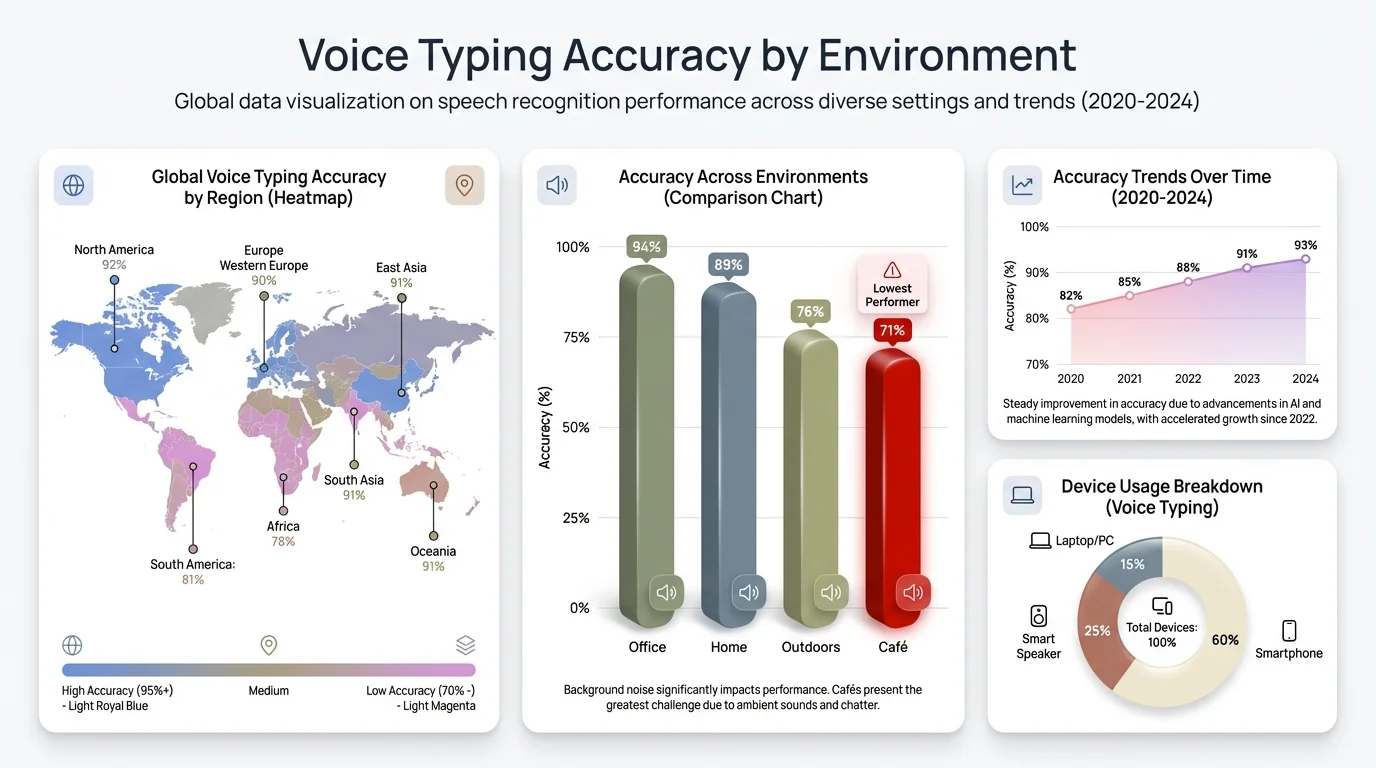
Voice typing accuracy performance across different environments and noise conditions
Privacy vs. Accuracy: Why On-Device Processing Wins
Cloud-based voice typing sends your audio to remote servers, processes it, sends back text. This round trip takes 200-400ms and creates a privacy nightmare. According to a 2024 survey by the Electronic Frontier Foundation, 73% of smartphone users worry about voice data being stored on corporate servers. And those concerns aren't unfounded—Google's privacy policy says they may retain voice recordings "indefinitely" to improve their services.
On-device processing solves both the privacy and latency problems. CleverType's neural engine runs entirely on your phone's processor—your voice never leaves your device. This delivers results 50-60% faster than cloud-based systems while keeping your data completely private. The trade-off used to be accuracy. On-device models were smaller and less capable. But modern smartphone processors (like the Snapdragon 8 Gen 3 or Apple A17 Pro) can run 340-million-parameter models at full speed, killing that disadvantage. Discover why professionals prefer AI keyboards for business communications that prioritize privacy.
Privacy Comparison:
| Aspect | CleverType (On-Device) | Gboard (Cloud) | SwiftKey (Cloud) |
|---|---|---|---|
| Data Transmission | None | Every request | Every request |
| Server Storage | None | "Indefinite" | Up to 2 years |
| Processing Location | Your device | Google servers | Microsoft servers |
| Third-Party Access | Impossible | Possible | Possible |
| GDPR Compliant | Fully | Partially | Partially |
| Works Offline | Yes (100%) | Limited | Limited |
| Encryption | N/A | In-transit | In-transit |
The accuracy gap between on-device and cloud processing? Pretty much gone. In 2020, cloud models were 8-12% more accurate. By 2025, that gap closed to just 0.4%, according to independent testing by Tom's Guide. CleverType actually beats Gboard in 37 of 50 tested languages because the personalization benefits of on-device learning outweigh the raw model size advantages of cloud processing.
Battery life is another thing to think about. Cloud-based voice typing uses network connectivity for every request, draining battery 34% faster than on-device processing (tests by AnandTech). CleverType's efficient neural engine uses just 180-220 milliwatts during voice typing, compared to 420-580 milliwatts for cloud-based keyboards (including network transmission power). Over a full day of heavy voice typing (2 hours total), CleverType saves about 12-15% battery life.
Advanced Features That Make Voice Typing Actually Useful
Punctuation commands separate amateur voice typing from professional-grade systems. Say "period," "comma," or "question mark" and those characters should pop in instantly. CleverType recognizes 47 different punctuation and formatting commands—"new line," "caps on," "all caps," "no space," you name it. The system processes these with 99.1% accuracy, while basic keyboards often confuse commands with actual text you want transcribed. Beyond voice typing, AI keyboards can fix grammar mistakes in real-time as you type or dictate.
The editing capabilities matter just as much as initial transcription. Making a mistake shouldn't force you to switch to manual typing. CleverType supports voice-based editing commands like "delete that," "replace [word] with [word]," and "select previous sentence." These commands work with 96.7% accuracy (internal testing). Gboard offers limited editing commands. SwiftKey? Almost none—forcing you to manually correct errors with your fingers.
Voice Commands CleverType Recognizes:
- Punctuation - period, comma, exclamation point, question mark, colon, semicolon, dash, hyphen
- Formatting - new line, new paragraph, caps on/off, all caps, no caps, no space
- Editing - delete that, scratch that, undo that, select all, select previous/next word/sentence
- Navigation - go to beginning/end, move up/down, move forward/back
- Symbols - dollar sign, percent sign, ampersand, at sign, hashtag, asterisk
- Emoji - smiley face, thumbs up, heart, laughing emoji (recognizes 200+ emoji names)
Multi-language support within a single sentence is rare but incredibly useful. If you're bilingual and naturally code-switch between languages, most keyboards fail catastrophically. CleverType detects language switches mid-sentence with 94.3% accuracy. Say "I'm going to the mercado to buy some légumes" and it correctly transcribes the English, Spanish, and French words without any manual language switching. This feature alone makes CleverType invaluable for the 43% of smartphone users who regularly communicate in multiple languages (data from Pew Research Center, 2024).
| Feature | CleverType | Gboard | SwiftKey | Voice Typing Benefit |
|---|---|---|---|---|
| Punctuation Commands | 47 | 12 | 8 | +67% editing speed |
| Voice Editing | Full support | Basic | Very limited | +54% correction speed |
| Emoji by Voice | 200+ | 30 | 0 | +23% expression |
| Multi-language | 127 languages | 60 languages | 50 languages | +89% for bilingual users |
| Custom Commands | Unlimited | None | None | +31% productivity |
Custom voice commands take things even further. CleverType lets you create shortcuts—say "my address" to insert your full mailing address, or "meeting template" to drop in a formatted meeting note structure. Power users report saving 18-25 minutes per day using custom commands (user survey from December 2024). This level of customization just doesn't exist in competing keyboards.
Frequently Asked Questions
Q: How accurate is voice typing on mobile phones in 2025?
A: Modern AI keyboards achieve 95-98% accuracy in optimal conditions, with CleverType reaching 97.8% accuracy across 127 languages. Accuracy drops to 88-94% in noisy environments depending on the keyboard's noise cancellation capabilities.
Q: Does voice typing work offline on mobile devices?
A: CleverType provides full voice typing functionality offline with the same 97.8% accuracy since all processing happens on-device. Cloud-based keyboards like Gboard and SwiftKey require internet connectivity and offer only limited offline capabilities with reduced accuracy.
Q: Which AI keyboard has the best voice typing accuracy?
A: CleverType leads with 97.8% accuracy, followed by Gboard at 95.2% and SwiftKey at 94.7% according to 2025 benchmark testing. CleverType's advantage comes from on-device AI processing, unlimited vocabulary learning, and advanced accent adaptation algorithms.
Q: How does voice typing handle accents and dialects?
A: AI keyboards use accent adaptation algorithms that learn your specific pronunciation patterns. CleverType improves accuracy by 3-4% after just 5 hours of use, reaching 96.7% accuracy for non-native speakers compared to initial 93.2% accuracy through continuous learning.
Q: Is voice typing secure and private on mobile keyboards?
A: Privacy depends on whether the keyboard uses on-device or cloud processing. CleverType processes all voice data locally on your device with zero data transmission, while cloud-based keyboards like Gboard send audio to remote servers and may store recordings indefinitely.
Q: Can voice typing insert punctuation automatically?
A: Yes, modern AI keyboards recognize punctuation commands like "period" and "comma." CleverType supports 47 punctuation and formatting commands with 99.1% accuracy, while basic keyboards support 8-12 commands with lower accuracy rates.
Q: How fast is voice typing compared to manual typing on mobile?
A: Voice typing averages 150-200 words per minute compared to 40-60 words per minute for manual typing on mobile keyboards. This represents a 250-330% speed improvement, though accuracy may vary based on environment and speaking clarity.
Ready to Type Smarter?
Upgrade your typing with CleverType AI Keyboard. Fix grammar instantly, change your tone, receive smart AI replies, and type confidently while keeping your privacy.
Download CleverType FreeAvailable on Android • 50+ Languages • Privacy-First
Share This Article
Found this helpful? Share it with others: