Key Takeaways
| Metric | Impact |
|---|---|
| ROI Timeline | 74% of executives achieve ROI within first year |
| Daily Time Savings | 40-60 minutes saved per employee |
| Performance Boost | Custom prompts improve output by 6-30% |
| Productivity Gains | 26-55% increase with tailored AI systems |
| Revenue Growth | 71% of AI users report increased revenue |
| Cost Efficiency | $3.70 returned per $1 invested in AI |
- Custom AI prompts deliver measurably better results than generic alternatives
- Businesses see productivity double when implementing structured AI workflows
- Prompt quality matters as much as model selection for business outcomes
- Organizations using tailored prompts report 10% productivity gains minimum
- Enterprise AI spending reached $37 billion in 2025, up 3.2x from 2024
Custom AI prompts aren't just fancy tech talk anymore—they're actually making companies real money. According to Google Cloud's 2025 AI ROI study, businesses are pulling in $3.70 for every buck they spend on AI. But here's the thing most people miss: half of those gains come from how you write your prompts, not just picking the right AI model. A recent MIT Sloan study backs this up—only 50% of performance boosts came from better models. The other 50%? Better prompts. If you're spending money on AI, that should get your attention.
Companies dropped $37 billion on generative AI in 2025. Most of that cash went to AI apps solving real business problems—not generic chatbots that spit out bland responses. The shift happened because business leaders finally got it: generic prompts produce generic results. And generic results? They don't move the needle on revenue. When you customize prompts for your specific industry, your workflow, your actual customers—that's when things get interesting.
Look at it this way: you wouldn't hire someone and just say "do marketing stuff," right? You'd give them specific goals, brand guidelines, target audiences. Same deal with AI. Vague instructions equal vague output. But give it tailored prompts that actually understand your business context? Suddenly you're saving 40-60 minutes per employee every single day. This is why a bunch of professionals are checking out the best AI writing tools to boost their productivity.
What Makes Custom AI Prompts Different from Generic Ones
Custom AI prompts are instructions specifically designed for your business context, goals, and audience - not one-size-fits-all templates.
Generic prompts are like asking someone to "write an email." Sure, you'll get an email. But will it match your brand voice? Will it actually address your customer's specific pain point? Probably not. Custom prompts pack in details about your industry, your product specifics, who your customers are, and what you're trying to accomplish. Research from Harvard's AI implementation guide backs this up—more specific prompts lead to better output. Pretty straightforward.
Here's what actually separates them:
Generic Prompt Example:
"Write a product description"
Custom Business Prompt Example:
"Write a 150-word product description for our B2B SaaS analytics dashboard targeting CFOs at mid-market companies. Emphasize cost savings and compliance features. Use a professional but approachable tone. Include a clear CTA for booking a demo."
See the difference? The second one gives the AI everything it needs to spit out something you can actually use—no endless back-and-forth, no spending 20 minutes editing. Just usable output from the start.
Research shows that detailed prompts produce results that look like human experts wrote them. Vague prompts? You get all-over-the-place results. Companies using prompt engineering best practices are seeing 6-30% better performance compared to generic approaches. That's not nothing.
Custom prompts also cut down on hallucinations—those awkward moments when AI just makes stuff up. 77% of businesses worry about AI hallucinations according to recent data. Makes sense. But here's the thing: detailed, context-rich prompts give AI way less room to make things up, because you've already fed it the facts it needs.
For businesses typing messages and emails all day, tools like AI keyboards for Android put this custom prompt approach right where you're already working—your keyboard. Instead of generic autocomplete suggestions that make you sound like a robot, you get AI-powered writing help that actually adapts to how you communicate and what your business needs.
The Real ROI Numbers Behind Custom Prompts
74% of executives report achieving positive ROI within the first year of implementing generative AI with tailored prompts.
Let's talk actual numbers, because that's what matters to your bottom line. Recent enterprise AI research shows that enterprise workers save 40-60 minutes daily when they're using customized AI systems. That works out to about a 10% productivity bump. For a 100-person company? That's like hiring 10 extra employees without paying 10 salaries.
But wait, there's more. Among organizations reporting productivity gains, 39% saw productivity at least double after setting up custom AI agents. Double. Not a 5% bump or even a 15% improvement—they literally got twice as much done. These weren't companies just using generic ChatGPT prompts. They actually built structured workflows with custom prompts designed for their specific business processes.
Revenue tells the story too. Of executives reporting business growth from generative AI, 71% saw revenue increases. Among that group, 53% pegged their gains between 6-10%. And when you consider that enterprise AI spending hit $37 billion in 2025 (jumping from $11.5 billion in 2024), companies obviously aren't throwing money at AI for fun. They're actually seeing returns.
Here's a breakdown of where that ROI comes from:
| ROI Source | Impact | Timeframe |
|---|---|---|
| Time savings | 40-60 min/day per employee | Immediate |
| Error reduction | 95% precision in classification tasks | 1-3 months |
| Process automation | 26-55% productivity increase | 3-6 months |
| Revenue growth | 6-10% increase | 6-12 months |
| Operational efficiency | $3.70 per $1 invested | 12-24 months |
Investment timing matters too. Companies getting the best results? They're committing 20%+ of their digital budgets to AI and dropping 70% of AI resources into people and processes—not just buying fancy technology. They expect 2-4 year ROI timelines for full implementation, but they're seeing immediate wins within months.
One more stat that'll make CFOs smile—structured workflows like Projects and Custom GPTs jumped 19x year-over-year according to usage data. Why? Because teams figured out they could package repeatable work into shareable custom prompts, then scale that across departments. That's the difference between just buying AI software and actually getting value from it.
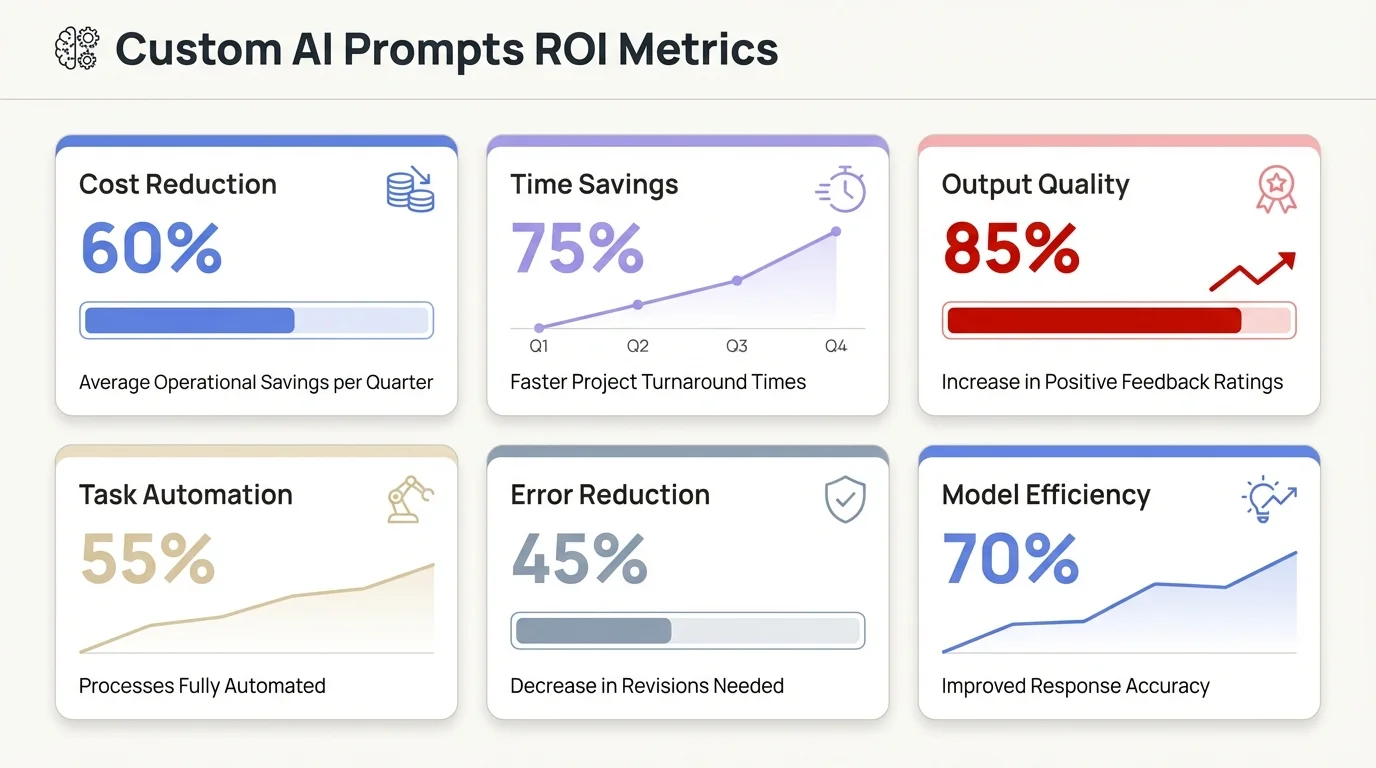
Key ROI metrics showing the measurable business impact of implementing custom AI prompts
How Custom Prompts Save Time and Money Daily
Enterprise users report saving 40-60 minutes per day with custom AI prompts, translating to approximately 10% productivity gains across operations.
Time is money, right? So let's break down where those 40-60 minutes actually come from. Customer service teams using custom prompts for response templates? They've cut email response time by half. Sales teams with industry-specific pitch prompts spend way less time writing and more time actually closing deals. Marketing departments with brand-voice prompts keep things consistent without those endless review cycles.
But it's not just about speed—it's about doing things you couldn't do before. IBM's enterprise AI research found that workers can now knock out technical tasks like data analysis and coding that used to require specialists. That's real cost avoidance. You don't need to hire as many specialists when your existing team can suddenly handle more.
Here's where businesses see the biggest daily savings:
- Email and communication: Custom prompts for common scenarios (customer inquiries, internal updates, vendor communications) reduce writing time by 30-40%, especially when using AI for business emails
- Content creation: Tailored prompts for blog posts, product descriptions, and social media maintain quality while cutting creation time by 50%
- Data analysis: Custom prompts that understand your specific metrics and KPIs deliver insights in minutes instead of hours
- Code documentation: Developer-specific prompts generate accurate technical documentation without taking engineers off feature work
- Meeting summaries: Custom templates extract action items and key decisions consistently across all meetings
The money part gets really interesting when you scale this up. Picture a 100-person company where each employee saves 45 minutes daily. That adds up to 7,500 hours monthly. At an average rate of $50/hour (pretty conservative for knowledge work), you're looking at $375,000 in monthly value creation. Annually? $4.5 million. Not bad.
But here's the catch: generic prompts won't get you there. Research from Google Cloud's prompt engineering guide shows that prompt quality matters just as much as picking the right model. You need prompts built for your specific workflows—not random templates you copy-pasted from the internet.
For mobile professionals handling communication on the go, AI keyboard apps build custom AI capabilities right into your keyboard. Whether you're responding to client emails, firing off Slack messages, or drafting documents, tailored AI suggestions pop up right where you're typing. No app switching. No wasted time.
Another money saver people forget about: reduced rework. Custom prompts that pack in quality criteria and output specifications? They produce usable results on the first try. Generic prompts make you go back and forth multiple times and require heavy editing. According to usage data, weekly ChatGPT Enterprise messages jumped 8x over the past year, but organizations using structured custom workflows are reporting better outcomes with fewer messages. Fewer attempts, better results, lower costs.
Industries Seeing the Biggest Returns from Tailored AI Prompts
Finance, healthcare, and professional services report the highest ROI from custom AI prompts, with departmental AI spending reaching $7.3 billion in 2025.
Finance companies are absolutely crushing it with custom prompts. They're using tailored AI for document processing, compliance checking, and risk assessment—tasks that used to take hours now take minutes. Wharton's 2025 AI Adoption Report shows financial services as early adopters, and they're seeing real returns within 6 months of getting started.
Healthcare organizations use custom prompts for patient communication, medical documentation, and insurance processing. The key is specificity—medical terminology, HIPAA compliance requirements, and clinical workflow integration make generic prompts completely useless. But custom prompts trained on healthcare contexts? They deliver accuracy rates above 95%.
Professional services—legal, consulting, accounting—benefit hugely because their work is so knowledge-intensive and text-heavy. Custom prompts for contract review, client reporting, and research summaries save senior professionals hours every day. And when you're billing at $300-500 per hour? Saving 45 minutes daily creates instant ROI.
Here's how AI spending breaks down by category:
| Category | 2025 Spending | Primary Use Cases | Avg. ROI Timeline |
|---|---|---|---|
| Departmental AI | $7.3 billion | Role-specific tasks, custom workflows | 3-6 months |
| Vertical AI | $3.5 billion | Industry-specific solutions | 6-12 months |
| Horizontal AI | $8.4 billion | Cross-functional productivity | 1-3 months |
Retail and e-commerce companies use custom prompts for product descriptions, customer support, and personalized marketing. They're seeing better conversion rates because AI-generated content actually matches their brand voice and addresses customer questions accurately—not generic fluff that could be from any website.
Manufacturing and logistics businesses might seem like unlikely AI winners at first glance, but they're using custom prompts for supply chain communication, quality control reporting, and vendor management. The ROI comes from cutting down errors and speeding up documentation processing.
Tech companies are obviously early adopters. They use custom prompts for code documentation, bug triage, customer onboarding, and internal knowledge management. Software teams say that custom prompts for common coding tasks save 30-45 minutes per developer every single day.
What about small businesses? They're seeing returns too, just differently. Small teams use custom prompts to punch way above their weight—handling customer volume that would normally require more staff, cranking out content that rivals bigger competitors, and keeping things professional across all communications. Understanding how AI keyboards improve workplace productivity helps small business owners and solopreneurs bring enterprise-level AI writing help to mobile devices, so they can respond professionally to clients anywhere, anytime.
Education and training organizations use custom prompts for curriculum development, student feedback, and administrative tasks. They're creating way more personalized learning experiences without having to hire more staff to match.
One pattern across all industries: the companies seeing the biggest returns aren't just using AI—they're using custom prompts baked into existing workflows. They're not making employees go to some separate AI tool. The AI shows up where the work already happens.
Building Custom Prompts That Actually Work for Your Business
Effective custom AI prompts include specific context, desired format, audience information, and quality criteria - not just vague instructions.
Creating custom prompts isn't rocket science, but it does require actually thinking through what you need. Start by figuring out where your team burns the most time on repetitive cognitive work. Those are your opportunities.
Here's a framework that works:
1. Define the Role and Context
Tell the AI what perspective it should take. "You are a B2B SaaS sales rep" produces totally different output than "You are a technical support specialist." Context matters.
2. Specify the Task Clearly
"Write an email" is useless. "Write a follow-up email to a prospect who attended our webinar but hasn't scheduled a demo yet" actually gives the AI something to work with.
3. Include Audience Details
Who's receiving this output? A CEO reads differently than a junior analyst. A healthcare client has different concerns than a retail client.
4. Set Format and Length Requirements
"Keep it under 200 words, use bullet points for key features, include one clear CTA at the end."
5. Add Quality Criteria
"Use professional but friendly tone, avoid jargon, focus on business outcomes not technical specifications."
6. Provide Examples (When Possible)
Show the AI what good looks like. "Here's an example of our brand voice..." or "Previous successful emails followed this structure..." According to prompt engineering research, structured prompts following best practices can boost performance by 30% compared to just winging it.
Here's a before/after example:
Bad Generic Prompt:
"Write a marketing email about our new feature"
Good Custom Business Prompt:
"Write a 150-word email announcing our new AI analytics dashboard to existing B2B customers (company size 50-500 employees). Focus on time savings and ease of implementation. Use conversational professional tone. Include a CTA to schedule a personalized walkthrough with their account manager. Reference that they're already using our core platform successfully."
See how the custom version gives the AI everything it needs? That's the difference between spending 5 minutes tweaking AI output versus 30 minutes basically rewriting the whole thing.
Testing matters too. Don't just create a prompt and call it done. Run it multiple times with slight variations. Compare what comes out. Tweak based on what actually works. Organizations seeing the best results treat prompt development like product development—iterate, test, improve. Repeat.
One approach that's gaining traction: prompt libraries. Companies create categorized collections of proven custom prompts for common scenarios. Sales team has their library. Marketing has theirs. Customer success has theirs. Everyone chips in improvements. This way, the benefits scale across the whole organization.
For mobile communication, checking out underrated AI keyboard features puts custom AI prompts directly into your typing. The keyboard learns your writing style, your go-to phrases, your typical contexts. Instead of manually running prompts every time, you get relevant suggestions as you type. It's custom prompts without all the manual work.
Documentation is key too. When you create a custom prompt that works well, write down why it works. What made it click? Which parts are must-haves versus nice-to-haves? This kind of institutional knowledge keeps teams from reinventing the wheel every time someone new joins.
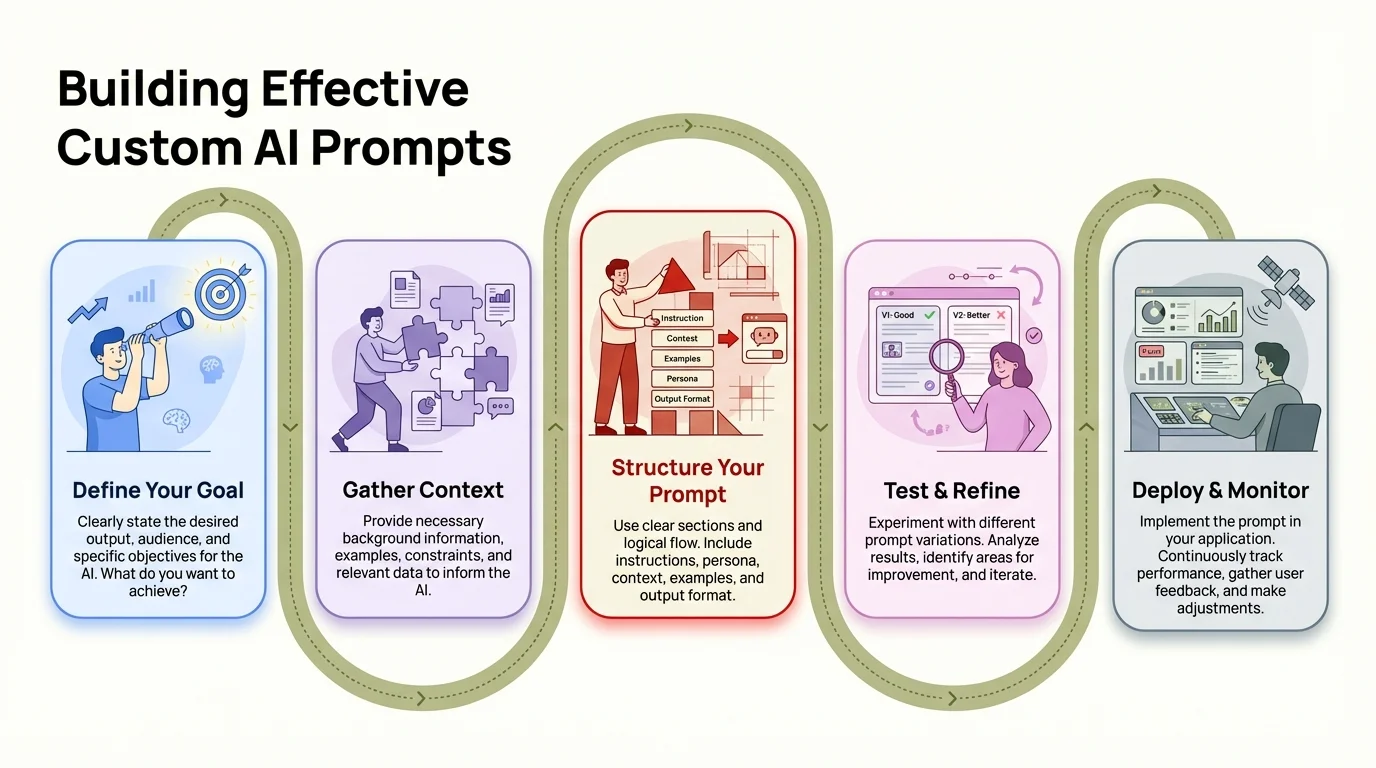
The proven 5-step framework for creating custom AI prompts that deliver consistent business results
Common Mistakes Companies Make with AI Prompts
70-85% of AI projects fail, often due to generic prompts, lack of specificity, and insufficient testing of AI outputs.
The biggest mistake? Treating AI like some kind of magic wand. Companies think they can throw money at ChatGPT subscriptions and suddenly transform their entire business. Doesn't work that way. Research on AI project failures shows that 70-85% fail—mostly because organizations skip the actual hard work of developing proper prompts and workflows.
Mistake number one: using generic prompts at scale. Someone finds a decent prompt online, shares it with the team, and suddenly everyone's using it for everything. Results are meh at best because the prompt wasn't designed for your specific use cases, your audience, or your quality standards. It's like buying a suit off the rack and expecting it to fit perfectly.
Mistake number two: no quality control. Companies deploy AI without actually checking outputs for accuracy, tone, or brand consistency. Then they're shocked when customers complain about weird email responses or when generated content sounds nothing like their brand voice. 77% of businesses worry about AI hallucinations, but a ton of them aren't actually implementing any validation processes.
Mistake number three: ignoring context. AI doesn't magically know your business unless you actually tell it. Prompts that lack industry context, company-specific details, or customer insights? They produce generic fluff. The output might be grammatically perfect but strategically worthless.
Here's what else goes wrong:
- No iteration or refinement: Creating prompts once and never improving them
- Lack of employee training: Expecting staff to become prompt engineers overnight
- Siloed implementation: Marketing uses AI differently than sales, no knowledge sharing
- Measuring activity instead of outcomes: Tracking "number of AI interactions" instead of "business results from AI"
- Copying competitors blindly: What works for another company might not work for yours
Another common screw-up: over-complicating prompts. Some people write 500-word prompts thinking more detail automatically equals better results. Not always. Sometimes simple and focused beats long and convoluted. According to MIT's effective prompting guide, clarity beats length every time.
The "set it and forget it" mentality kills ROI too. AI models get updated. Business priorities shift. Customer preferences change. Custom prompts need regular maintenance—they're not fire-and-forget. Organizations actually seeing sustained ROI review and update their prompts quarterly.
Budget allocation mistakes happen all the time. Companies blow 90% on AI technology and 10% on implementation and training. The smart money does the opposite—70% on people and processes, 30% on technology. Here's the thing: the tool doesn't create value. How people actually use the tool creates value.
Not testing before deployment is another killer. You wouldn't launch a marketing campaign without A/B testing, right? Same logic here. Test with small groups, gather feedback, tweak things, then scale. Skip this step and you're just scaling mediocre results across your whole organization.
Mobile communication errors are super common too. People try to use complex prompts on their phones, which is clunky and eats up time. Better approach: use advanced AI keyboard apps that bring tailored AI help right to your mobile keyboard. You get quality output without completely disrupting your workflow.
Finally, unrealistic expectations doom projects from the start. AI won't replace your entire workforce. It won't magically solve strategic problems. It won't turn bad content into great content (garbage in, garbage out, always). What it will do—when you actually implement it properly with custom prompts—is make your team way more efficient at executing tasks they already do well.
Measuring the Success of Your Custom Prompt Strategy
72% of organizations formally measure Gen AI ROI, focusing on productivity gains, time savings, and incremental profit as primary metrics.
You can't improve what you don't measure. That's not just some business cliche—it's literally how successful AI implementations work. Companies actually seeing positive ROI? They track specific metrics from day one.
Start with time savings. Before rolling out custom prompts, measure how long specific tasks take. After implementation, measure again. The difference? That's your efficiency gain. One company found their customer service team cut average response time from 8 minutes to 4 minutes per email using custom prompts. That's a 50% efficiency gain—pretty easy to quantify.
Quality metrics matter too. Are AI-generated outputs needing less editing? Are customers responding more positively? Is content performing better in search rankings or getting more engagement? Track quality scores over time and watch the trends.
Here are the metrics companies actually use:
| Metric Category | Specific Measurements | Target Threshold |
|---|---|---|
| Efficiency | Minutes saved per task, tasks completed per day | 30-40% improvement |
| Quality | Edit time required, error rates, output acceptance rate | <15% edit time |
| Adoption | % of team using AI daily, prompts run per week | >70% daily usage |
| Business Impact | Revenue per employee, customer satisfaction scores | 5-10% improvement |
| Cost Savings | Reduction in outsourcing, overtime hours saved | 20-30% cost reduction |
Financial metrics tie everything together. Calculate the loaded cost (salary + benefits + overhead) of time saved. That's your cost avoidance. Track any revenue bumps you can attribute to better output quality or increased capacity. Subtract your AI investment costs. Boom—that's your ROI.
Adoption metrics show whether your custom prompts actually work for real users. If you built amazing prompts but nobody's using them? They're not that amazing. Track usage rates by team, by individual, by prompt type. Low adoption signals problems—maybe the prompts are too complex, maybe training was weak, or maybe the prompts don't actually solve real pain points.
User satisfaction matters. Survey employees regularly. Are the custom prompts making their work easier or just creating new headaches? Are they getting usable output or spending more time wrestling with AI? Research shows that organizations with high AI satisfaction scores see way better business outcomes—because employees actually use the tools effectively instead of avoiding them.
A/B testing gives you hard data on what actually works. Run the same task with different prompt variations and compare results. Which version produces better output? Which needs less editing? Which gets better customer response? Use that data to keep improving your prompt library.
Iteration speed is a meta-metric worth tracking. How quickly can your team spot a poorly performing prompt, update it, and push it back out? Organizations seeing the best ROI have rapid iteration cycles—they can test and roll out prompt improvements weekly, not quarterly.
Don't forget to measure the negative stuff too. Error rates, hallucination frequency, brand voice consistency issues—these are your risk indicators. High error rates? That means you need more specific prompts with tighter quality criteria.
For mobile-first teams, measure how AI help impacts on-the-go productivity. Are reps closing deals faster because they can fire back quality responses to prospects immediately? CleverType users can track response times and message quality across mobile devices to actually quantify those mobile productivity gains.
Set up dashboards that show these metrics in real-time. Make them visible to stakeholders. When executives see concrete ROI numbers, they'll back expanding AI initiatives. When they just hear vague "we're using AI now" statements? They start questioning the investment.
Review metrics monthly. Quarterly reviews aren't frequent enough when you're building new capabilities. Monthly check-ins let you catch trends early and make adjustments before small problems turn into big ones.
Future-Proofing Your Business with Custom AI Prompts
AI spending increased 3.2x year-over-year in 2025, with structured workflows and custom prompts representing the fastest-growing segment of enterprise AI adoption.
The AI landscape changes crazy fast. Models get better. New capabilities pop up. What worked six months ago might be outdated today. But here's what's not changing: the businesses winning with AI are the ones treating it as a strategic capability, not some novelty tool.
Custom prompts are becoming real business assets. Companies are building proprietary prompt libraries that encode institutional knowledge, brand standards, and process excellence. These aren't just text files—they're competitive advantages. When your prompts capture what makes your business unique, you're creating defensible value that gets stronger with AI model improvements, not obsolete.
The trend is shifting from individual prompts to interconnected systems. Enterprise data shows that structured workflows using Projects and Custom GPTs jumped 19x year-to-date. Organizations are building AI systems where one custom prompt feeds into another, creating automation chains that handle entire workflows—not just one-off tasks.
Here's where things are headed:
AI Agents with Custom Instructions
52% of executives say their organizations have deployed AI agents—autonomous systems that use custom prompts to make decisions and take actions without human babysitting. These aren't chatbots. They're systems that can handle customer inquiries, process orders, schedule meetings, and more, all on their own.
Industry-Specific AI Models
Vertical AI spending hit $3.5 billion in 2025. Companies are pouring money into AI trained specifically for their industry, with custom prompts built for sector-specific tasks. Healthcare AI knows medical terminology. Legal AI gets contract structures. Manufacturing AI speaks supply chain language fluently.
Prompt Engineering as a Core Skill
Job postings requiring prompt engineering skills have exploded. It's becoming as basic as knowing Excel or email. Organizations are training entire teams on effective prompt creation—not just IT departments anymore.
Integration into Every Tool
AI capabilities are getting baked directly into the software you already use. Your CRM, your project management tool, your communication platforms—they all pack in AI features powered by custom prompts. Learning about why professionals are switching to AI-powered keyboards brings this integration right to your mobile keyboard, so AI help is available everywhere you type.
Privacy and Control
As AI becomes more critical to operations, businesses are demanding way more control over their data and prompts. The shift is toward solutions where proprietary information stays locked down, prompt libraries remain confidential, and AI outputs meet privacy standards.
What should you do today to prepare?
- Document what works: Build a knowledge base of effective prompts so you're not starting from scratch as models evolve
- Train your team: Invest in prompt engineering skills across departments, not just technical staff
- Build systematically: Create interconnected workflows, not one-off solutions
- Measure religiously: Track ROI metrics so you can prove value and secure continued investment
- Stay flexible: Design prompts that can work across different AI models and platforms
The businesses winning with AI five years from now won't be the ones with the fanciest tech. They'll be the ones who built custom prompt systems that capture their unique expertise, serve their specific customers, and fit seamlessly into how work actually gets done.
One more thing: the cost of NOT investing in custom AI prompts keeps climbing. Your competitors are implementing this stuff right now. Every quarter you wait, the gap gets wider. Three out of four business leaders report positive ROI from AI investments already. So the question isn't whether custom AI prompts pay off—the data proves they do. The question is whether you're ready to actually capture that value.
Frequently Asked Questions
Q: How long does it take to see ROI from custom AI prompts?
A: 74% of executives report achieving positive ROI within the first year, with many seeing immediate time savings of 40-60 minutes per employee daily. Initial productivity gains typically appear within 1-3 months of implementation.
Q: Do I need technical skills to create custom AI prompts?
A: No advanced technical skills are required. Effective prompt creation focuses on clear communication, understanding your business context, and structured thinking. Most successful implementations train existing staff rather than hiring specialists.
Q: How much do custom AI prompt solutions cost?
A: Costs vary widely based on scope. Enterprise AI solutions range from $20-200 per user monthly, with many businesses committing 20%+ of digital budgets to AI. ROI data shows $3.70 returned per $1 invested on average.
Q: Can small businesses benefit from custom AI prompts?
A: Absolutely. Small teams often see the most dramatic impacts because custom prompts let them handle workloads that would normally require additional staff. The productivity gains of 40-60 minutes daily per employee scale effectively even at small team sizes.
Q: How do custom prompts differ from using ChatGPT for free?
A: Custom business prompts include specific context about your industry, brand voice, quality standards, and desired outcomes. Research shows detailed prompts yield 6-30% better performance than generic approaches, with significantly less editing required.
Q: What's the biggest mistake companies make with AI prompts?
A: Using generic, one-size-fits-all prompts instead of developing tailored instructions for specific business contexts. 70-85% of AI projects fail, often because organizations skip the work of creating properly designed, tested prompts.
Q: How often should we update our custom prompts?
A: Successful organizations review and update prompts quarterly as business priorities evolve and AI capabilities improve. Rapid iteration cycles with weekly or monthly testing of prompt variations produce the best results.
Ready to Experience AI-Powered Typing?
Transform your mobile communication with CleverType's intelligent keyboard. Get AI-powered suggestions, grammar fixes, and smart replies tailored to your writing style - all while keeping your data private and secure.
Download CleverType NowStart typing smarter today.
Share This Article
Found this helpful? Share it with your network:
Sources
Research and data for this article:
- Google Cloud - ROI of AI 2025 Study
- MIT Sloan - Generative AI Results Depend on User Prompts
- Wharton - 2025 AI Adoption Report
- Menlo Ventures - 2025 State of Generative AI in Enterprise
- IBM - What Is Prompt Engineering
- Google Cloud - What is Prompt Engineering
- Harvard University - Getting Started with AI Prompts
- MIT Sloan - Effective Prompts for AI
- DigitalOcean - Prompt Engineering Best Practices
- Fullview - 200+ AI Statistics & Trends for 2025