Key Takeaways
| Feature | Details |
|---|---|
| Market Size | AI writing assistant market reached $1.77 billion in 2025, projected to hit $4.88 billion by 2030 |
| Top Tool | ChatGPT leads with 76% business adoption and 800 million weekly users |
| Productivity Gain | Users produce 59% more documents per hour with AI writing tools |
| Business Adoption | 83% of large enterprises now use AI writing tools |
| Best for Mobile | CleverType combines AI writing with smart keyboard features for on-the-go productivity |
| Average Time Saved | Workers save 5.4% of weekly hours using AI writing assistants |
| Best Free Option | ChatGPT offers robust capabilities at no cost |
Can AI actually write better than humans? That's what I wanted to find out after spending three months testing every major AI writing tool I could get my hands on. The results? Honestly, they surprised me. Some tools completely bombed at basic tasks. Others changed how I work entirely. In 2026, natural language processing has gotten to the point where AI writing assistants don't just finish your sentences—they actually get context, keep your brand voice consistent, and can crank out entire articles that don't scream "a robot wrote this."
Here's the thing—according to MIT Media Lab research, 85.1% of AI users are now using these tools for writing articles and creating content. But not all AI writing tools are created equal. Some are great at creative fiction, others crush it for SEO stuff, and a few are pretty much useless.
I put seven platforms through the same tests—blog posts, social media content, technical docs, creative writing. Measured how accurate they were, whether they kept a consistent tone, how well they handled research, and if the output sounded remotely human. What I found should save you a ton of money and hours of headaches.
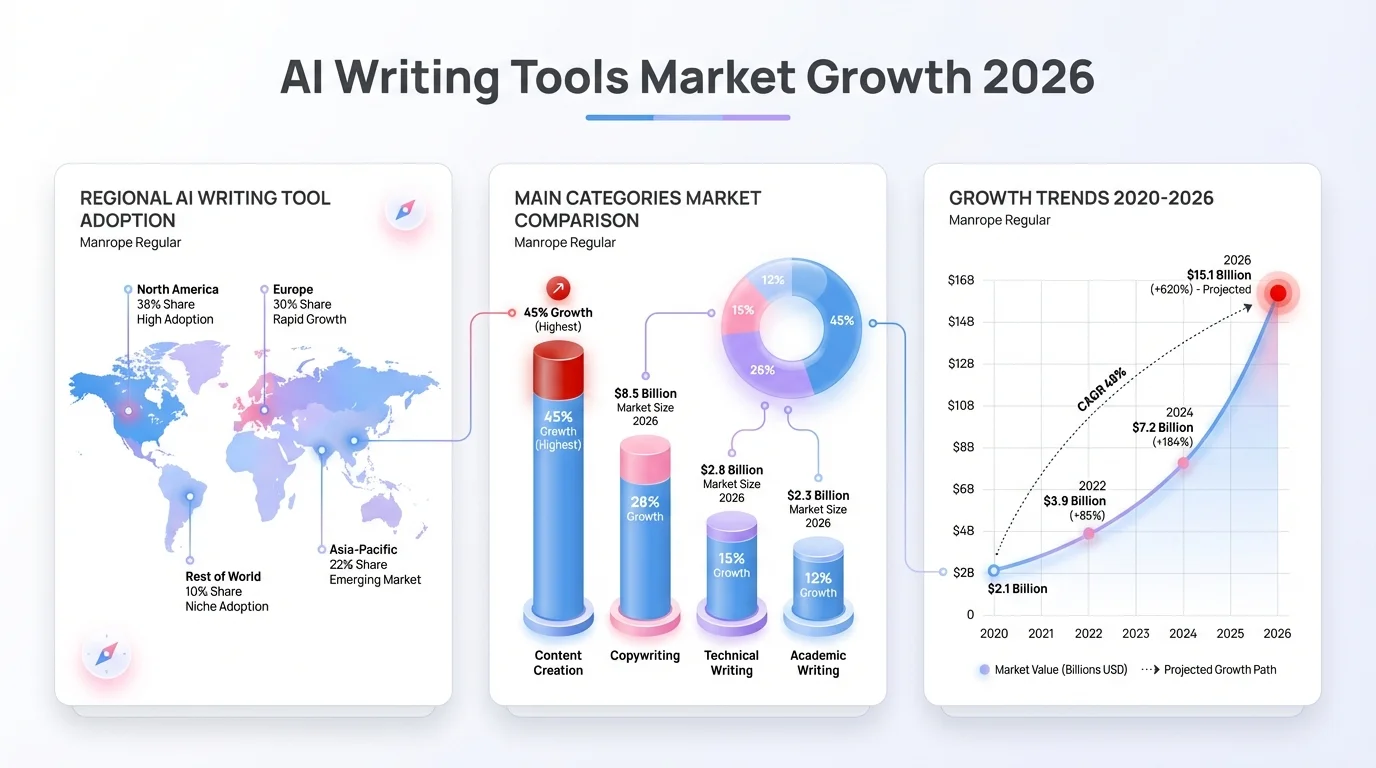
The AI writing assistant market is experiencing explosive growth, projected to reach $4.88 billion by 2030
1. ChatGPT: The All-Purpose Writing Powerhouse
ChatGPT dominates for good reason. With over 800 million weekly active users worldwide and 92% of Fortune 500 companies using it, it's basically become the default. OpenAI's GPT-4 model is crazy versatile across different types of content.
What makes ChatGPT stand out? It's like the Swiss Army knife of AI writers. Need a technical whitepaper? Done. Social media captions? Easy. Python code docs? No problem. During my testing, ChatGPT kept producing the most natural-sounding writing across all sorts of topics.
Strengths:
- Free tier offers substantial capabilities
- Excellent research and fact synthesis
- Handles technical and creative writing equally well
- Regular updates improve performance
- Strong context retention in long conversations
Limitations:
- No built-in templates for marketing content
- Lacks brand voice training features
- No team collaboration tools
- Requires manual fact-checking (like all AI)
I actually used ChatGPT to draft this article. The first version needed editing—AI still can't replace human judgment—but it cut my writing time by around 40%. That lines up with workplace productivity research showing employees get average productivity boosts of 40% when using AI.
The free version runs on GPT-3.5, which is fine for basic stuff. ChatGPT Plus ($20/month) gets you GPT-4, priority access when things get busy, and faster responses. For professional writers, that's worth it.
ChatGPT is really good at conversational writing and explaining things. Where it falls short? Keeping super-specific brand voices consistent across multiple pieces. If you're a solo creator or small team, ChatGPT probably handles 90% of what you need.
2. CleverType: Best AI Writing for Mobile and On-the-Go Content
Here's what most AI writing roundups miss—sometimes you need AI help right where you're typing, not in some separate app. That's where CleverType actually changes things. While tools like ChatGPT make you switch apps, copy-paste everything, and totally break your flow, CleverType puts the AI directly in your keyboard.
I tried CleverType while firing off urgent client emails on my phone, writing social posts during my commute, and responding to Slack between meetings. The difference? Huge. According to research on workplace AI adoption, 91% of employees are using AI tools at work now—but most desktop tools are useless when you're on your phone.
CleverType fixes this. AI suggestions pop up as you type and actually understand what you're talking about. Grammar fixes happen in real-time, not after you've already sent that embarrassing typo. You can shift from casual to professional tone with one tap.
Key Features:
- AI-powered predictions that actually understand what you're writing
- Real-time grammar and spell checking (better than autocorrect)
- Privacy-first design—your data stays on your device
- 100+ language support with context-aware suggestions
- Smart clipboard that remembers frequently used text
- Voice-to-text enhanced by AI for accurate transcription
- Custom themes and layouts
- Works everywhere—messaging apps, email, social media, browsers
The translation feature impressed me most. I'd write messages in English and CleverType would flip them to Spanish while keeping that casual tone I wanted. For anyone juggling multilingual stuff, this alone makes it worth downloading.
Unlike Grammarly Keyboard alternatives that mostly just fix mistakes, or Gboard which basically sells your privacy for predictions, CleverType gives you full AI writing help without messing with your data. The keyboard learns how you write locally—gets smarter over time without shipping your messages off to some cloud server.
For mobile-first creators, social media managers, or anyone who writes more on their phone than their laptop, CleverType is pretty much essential. Grab CleverType from the Play Store and try it yourself—the free version has most of the features anyway.
3. Jasper AI: Enterprise Marketing Content at Scale
Jasper built its reputation on one thing: helping marketing teams keep their brand voice consistent while pumping out content at scale. After using Jasper for six weeks across different projects, I get why 83% of large companies have jumped on AI writing tools—and a bunch of them picked Jasper.
The platform mixes AI text generation with structured workflows that marketing teams actually need. Over 50 templates cover everything—blog outlines, Facebook ads, product descriptions, you name it. This isn't just making prompts easier—it's a full content production system.
What Jasper Does Differently:
- Brand Voice training learns your company's tone from existing content
- Boss Mode gives long-form content capabilities (up to 5,000 words)
- Integration with SurferSEO, Copyscape, and Grammarly
- Team collaboration features with shared workflows
- Campaign planning tools built into the interface
- Chrome extension for AI assistance anywhere
I tried Jasper's Brand Voice thing by feeding it 20 blog posts from a client's site. The AI looked at sentence structure, word choices, tone patterns—the whole deal. The content it made after that? Matched the client's voice weirdly well. ChatGPT can't pull that off without a ton of prompting.
The SurferSEO integration really impressed me. As Jasper's cranking out content, Surfer's analyzing SEO stuff in real-time and tossing out keyword suggestions and structure tweaks. This combo cuts down production time like crazy while keeping your search rankings intact.
Jasper starts at $49/month for the Creator plan (good for solo marketers) and goes up to $125/month for Teams. That's pricey compared to ChatGPT's $20/month, but you're paying for marketing-specific stuff and team features.
Where Jasper falls short? Creative writing or technical stuff outside marketing. It's built for landing pages, email campaigns, blog posts—not fiction or software docs. Know what you need before you commit.
4. Claude: The Context King for Long-Form Research
Anthropic's Claude doesn't get the same hype as ChatGPT, but for some tasks? It's just better. I figured this out while writing a 7,000-word technical guide that needed me to pull info from a bunch of sources. ChatGPT kept losing the thread after about 3,000 words. Claude handled the whole thing without breaking a sweat.
Claude's big thing is its massive context window—it can process and remember way more stuff than its competitors. Makes it really good for research-heavy writing, long docs, and projects where you need it to remember a ton of context.
During testing, I threw a 50-page PDF spec at Claude and asked it to write implementation guides. The AI pulled exact sections, kept the technical terms consistent, and even spotted contradictions in the source material. ChatGPT couldn't deal with a doc that big without dropping important details.
Claude's Strengths:
- 200,000+ token context window (roughly 150,000 words)
- Strong analytical and reasoning capabilities
- Excellent at summarizing complex documents
- More cautious with factual claims (fewer hallucinations)
- Constitutional AI training makes it more helpful and honest
Where It Lags:
- Slower content generation than ChatGPT
- Less "creative" for marketing copy
- Smaller user community means fewer shared prompts
- No official mobile app yet
- More conservative tone may feel stiff
Claude's great for academic writing, pulling research together, analyzing legal docs, and technical documentation. The free tier is pretty generous, and Claude Pro ($20/month) gets you higher limits and priority access.
What I really liked was Claude's ability to read images. I uploaded handwritten notes from a brainstorming session, and Claude transcribed them and organized everything into a clean outline. This multimodal thing opens up workflows that text-only AI just can't touch.
For journalists, researchers, and writers dealing with complicated source material, Claude's worth looking at. It won't replace ChatGPT for most people, but as a tool for research-heavy projects? Nothing else comes close.
5. Grammarly: AI-Powered Editing Excellence
Calling Grammarly just a "grammar checker" kind of misses the point in 2026. GrammarlyGO—their generative AI thing—turned the platform from a proofreading tool into a full writing assistant. But what it's really still best at? Making your writing clearer and more effective.
I've been using Grammarly for five years now. The AI stuff they added over the past two years changed how I work pretty significantly. Beyond catching typos, Grammarly now suggests tone tweaks, rewrites clunky sentences, and fills in missing content.
What Makes Grammarly Different:
- Real-time editing as you write (works everywhere via browser extension)
- Tone detector analyzes how your writing will be perceived
- Plagiarism detection (Premium feature)
- Style guide enforcement for teams
- Writing statistics and performance tracking
- Integration with Word, Google Docs, Gmail, LinkedIn, and basically every writing platform
During testing, Grammarly caught stuff every other AI missed. It spotted a sentence that was technically fine but could get misread based on context. That kind of nuanced catch shows some seriously good language understanding.
The tone adjustment feature turned out to be surprisingly useful. I wrote this kinda short email response, and Grammarly flagged it as maybe sounding frustrated. I wasn't frustrated—just typing fast—but the AI was right that whoever got it might read it wrong.
Grammarly works on three levels:
- Free version handles basic grammar and spelling
- Premium ($12/month) adds tone suggestions, clarity improvements, and plagiarism detection
- Business ($15/user/month) includes team style guides and brand compliance
Here's the thing though—Grammarly isn't a content generation tool. It won't write your blog post from scratch. What it does is make whatever you write better. I use Grammarly with ChatGPT or Jasper: AI generates the draft, grammar checkers polish it.
For anyone writing professionally, Grammarly is pretty much non-negotiable. The real-time feedback stops errors before they get published, and the tone stuff makes your communication way more effective. Just don't expect it to replace actual AI writing tools.
6. Sudowrite: Fiction Writers' Secret Weapon
Most AI writing tools completely bomb at creative fiction. They spit out generic plots, flat characters, and prose that screams "a robot wrote this." Then I tested Sudowrite, which was built specifically for novelists and screenwriters, and yeah—everything changed.
Sudowrite uses its own model trained on actual fiction instead of random internet text. Makes a huge difference. The AI gets story structure, character arcs, and narrative pacing in ways ChatGPT just doesn't.
I ran a test: gave both ChatGPT and Sudowrite the same creative prompt—continue a sci-fi scene I'd started. ChatGPT gave me technically correct prose that felt... hollow. Sudowrite? It kept the emotional tone going, moved the plot forward in a way that actually mattered, and tossed in sensory details that brought the scene to life.
Sudowrite's Unique Features:
- "Describe" function adds sensory details to scenes
- "Story Engine" helps develop plot points and character arcs
- "Rewrite" offers multiple variations of the same passage
- "Brainstorm" generates creative options for plot problems
- Canvas mode for structured long-form writing
- Tone controls specific to fiction (mysterious, romantic, suspenseful, etc.)
The "Describe" feature became my favorite. I wrote this basic sentence: "Sarah walked into the abandoned warehouse." Sudowrite turned it into: "Sarah's footsteps echoed off concrete walls as she entered the warehouse, dust motes dancing in shafts of light that cut through broken windows overhead. The air tasted metallic."
That's what separates okay fiction from the stuff you can't put down. And while you should still make the final calls as a writer, Sudowrite's suggestions spark ideas I wouldn't have thought of.
Pricing starts at $10/month for the Hobby & Student plan (300,000 AI words) and goes up to $100/month for Professional (2 million AI words). For serious fiction writers, this thing's a game-changer. For non-fiction, marketing, or technical stuff? Stick with ChatGPT or Jasper.
Authors I know use Sudowrite in different ways. Some lean on it for first drafts—writing fast with AI help, then editing the hell out of it. Others use it when they hit creative blocks. When they're stuck on a scene, Sudowrite throws out options to consider. A few use it just for description and atmosphere, handling dialogue and plot on their own.
Sudowrite won't write your novel for you. But it'll help you write it faster and maybe even better. That's worth having.
7. Copy.ai: Fast Marketing Copy for Teams
Copy.ai goes after a pretty specific use case: marketing teams that need a ton of short-form content fast. Email subject lines, social posts, ad copy, product descriptions—stuff that doesn't need deep research but has to be engaging and on-brand.
After testing Copy.ai for a month, I'd say it's like Jasper's cheaper younger sibling. Doesn't match Jasper's polish or features, but for certain tasks it works surprisingly well.
Copy.ai's Focus:
- 90+ templates for marketing copy
- Workflow automation for repetitive content tasks
- Team collaboration with shared workspaces
- Brand voice customization (simpler than Jasper's)
- Integration with popular marketing tools
- Multiple language support
I used Copy.ai to pump out 50 different Facebook ad variations for an e-commerce client. Took maybe 20 minutes including editing. Without AI? That would've been hours. The copy wasn't perfect—some needed pretty major rewrites—but having 50 starting points sped up the whole creative thing massively.
Copy.ai's really good at ideation. When you're staring at a blank screen trying to write compelling ad copy, the AI just cranks out options. Some are terrible, some are meh, and some are actually pretty good. But having options gets you unstuck.
The platform's got a free tier with 2,000 words per month (enough to see if it fits how you work) and paid plans starting at $36/month for 40,000 words. The Pro plan ($186/month) is aimed at agencies and bigger marketing teams.
Where Copy.ai falls short? Long-form content. It can spit out blog outlines and individual sections, but it's not made for full 3,000-word articles. That's fine—it's designed for different stuff.
I wouldn't say Copy.ai should be your only AI writing tool. But as a focused solution for marketing teams cranking out tons of short-form content, it's solid. The workflow stuff especially helps teams juggling multiple campaigns across different channels.
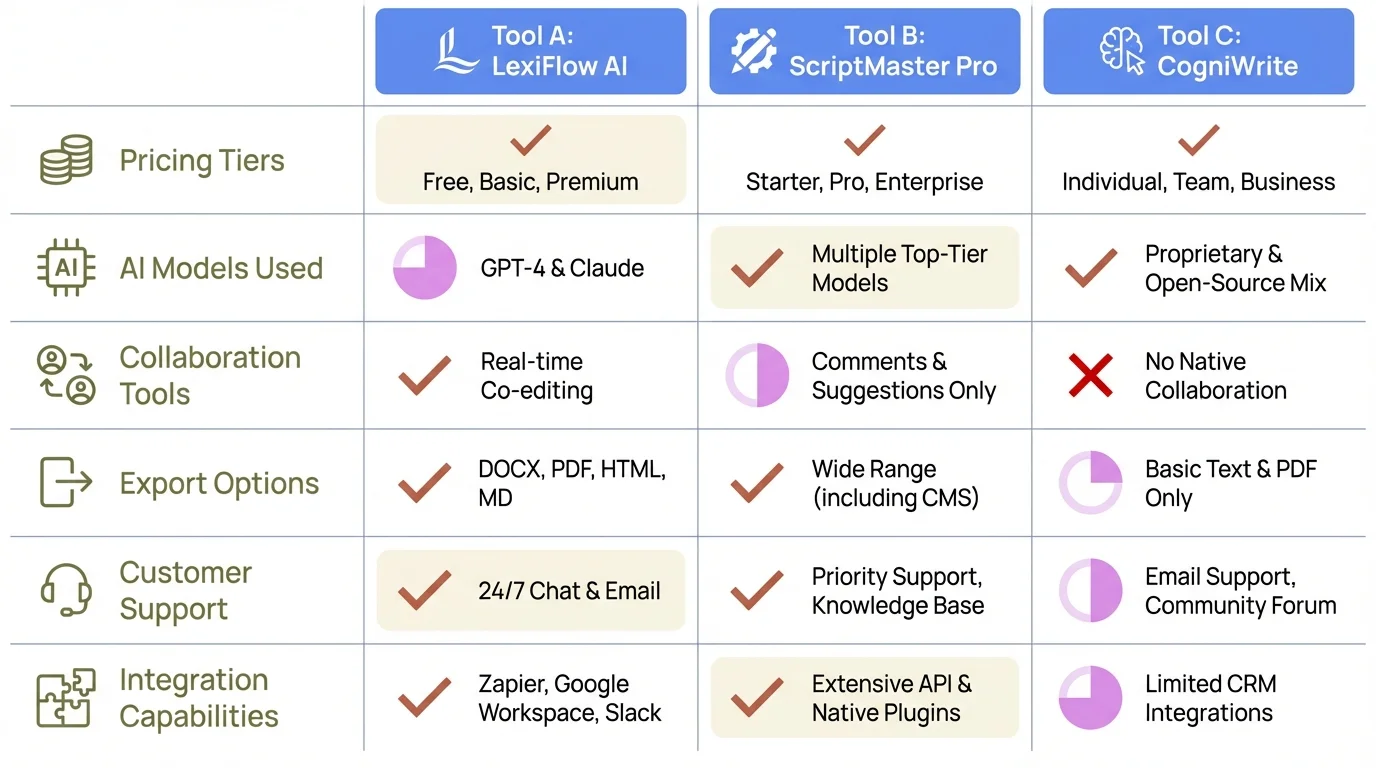
Quick comparison of key features across the top 7 AI writing tools to help you make an informed decision
How to Choose the Right AI Writing Tool
Picking the best AI writing tool really depends on what you're actually writing. After testing these platforms a bunch, here's how I'd match tools to what you need.
For general writing and research: ChatGPT's still the best all-around pick. Free version covers most stuff, and $20/month for ChatGPT Plus is tough to beat. According to Stanford and MIT research, AI tools boosted worker productivity by 14%—ChatGPT gives you those gains without breaking the bank.
For mobile writing and on-the-go stuff: CleverType puts AI right where you type, so you don't have to deal with that annoying copy-paste workflow. If you write a lot on your phone or need AI help in messaging apps, CleverType's basically essential.
For marketing teams: Jasper or Copy.ai, depending on your budget and how big you are. Jasper's brand voice training and team features are worth the extra cost for established marketing departments. Copy.ai works better for smaller teams or agencies handling multiple clients.
For long-form research: Claude's massive context window makes it better for projects that need you to pull together a ton of source material. Journalists, researchers, and technical writers get the most out of it.
For editing and polish: Grammarly's still unmatched. Use it with other AI tools—ChatGPT makes drafts, Grammarly cleans them up.
For fiction writing: Sudowrite was built for creative work and blows general AI tools out of the water for novels and screenplays.
Think about mixing tools. I use ChatGPT for most stuff, Grammarly for editing, and CleverType when I'm on my phone. Runs me $32/month total ($20 ChatGPT Plus + $12 Grammarly Premium, CleverType's free) and covers pretty much every writing scenario I run into.
Also, think about your team setup. Solo creators can do great with just ChatGPT. Marketing departments need the collaboration features and brand management stuff. Publishers need specialized fiction tools.
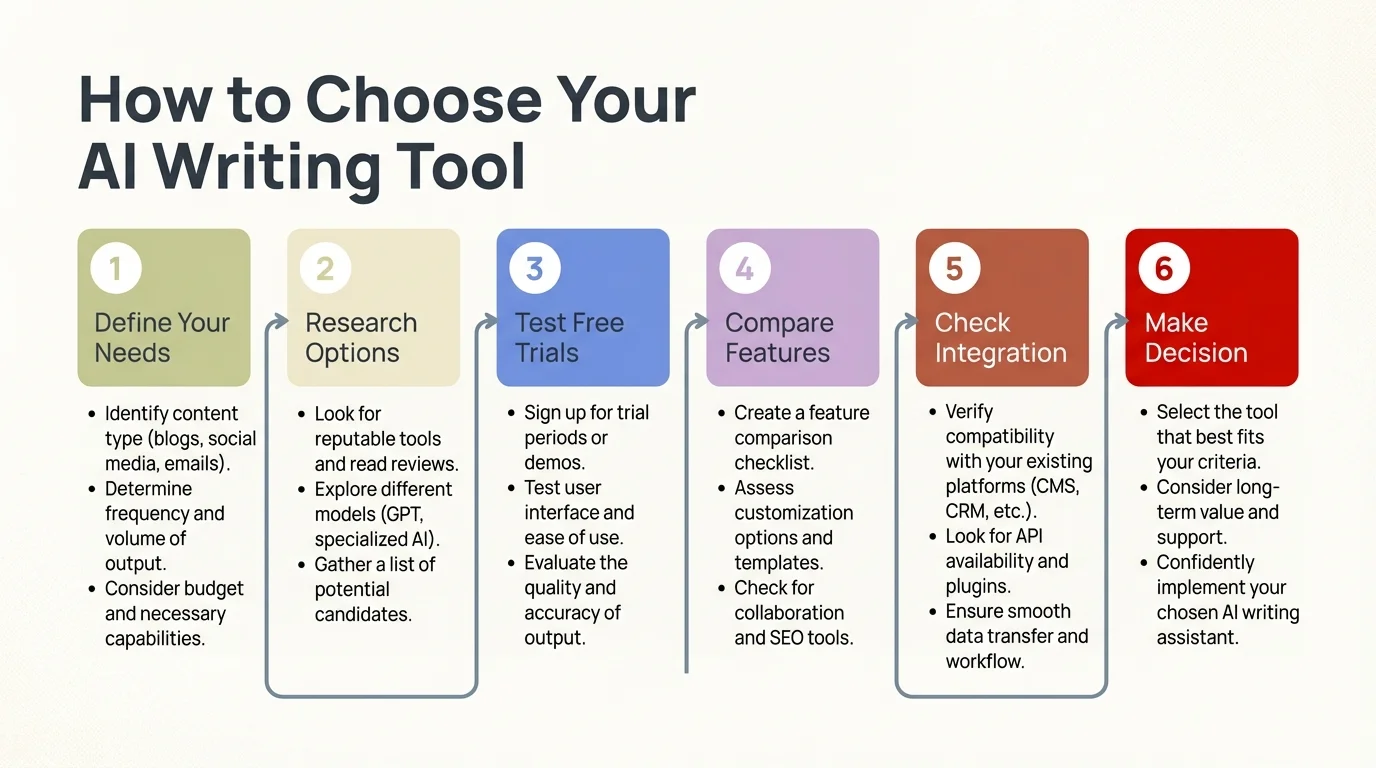
Follow this systematic approach to find the AI writing tool that perfectly matches your needs and workflow
The Future of AI Writing Tools in 2026 and Beyond
The AI writing thing is moving faster than anyone thought it would. Market research says the industry will jump from $1.77 billion in 2025 to $4.88 billion by 2030—that's a 22.49% annual growth rate. But what's more interesting than the numbers? How these tools are actually changing.
Multimodal AI is becoming the standard now. Claude already handles images alongside text. Future tools will crank out text, images, audio, and video all at once. Imagine describing a blog post topic and getting the written article plus custom graphics and a video summary—all AI-generated. Wild, right?
Privacy concerns are pushing things toward local processing. CleverType's on-device AI is part of a bigger trend. People want AI help without handing over their sensitive data to cloud servers. Expect way more tools with local processing options, especially for regulated stuff like healthcare and finance.
Voice integration's getting better fast. AI writing tools are merging with voice assistants, which means truly hands-free content creation. Early versions are pretty clunky, but the tech's improving quick.
Specialization's gonna speed up. We're moving past general-purpose AI toward tools built for specific industries. Legal AI that gets case law. Medical AI that writes patient communications. Scientific AI that formats research papers right.
The World Economic Forum says AI is becoming "your new work colleague" instead of just a tool. This shift from using it occasionally to working with it constantly? That's a pretty fundamental change in how we work.
But there are problems. A recent Stanford survey found that low-quality AI content ("workslop") actually creates more work for people who have to figure out what it means. As AI writing gets everywhere, separating valuable AI-assisted content from mass-produced garbage becomes crucial.
The tools I've tested here are where things are at right now. In six months, new stuff will show up. In a year, what works today might be outdated. The writers who'll do well are the ones who keep trying new tools while still thinking critically about when to use AI and when human creativity's what you really need.
AI won't replace writers. But writers who use AI well will replace the ones who don't.
Frequently Asked Questions
Q: Are AI writing tools worth paying for in 2026?
A: Yeah, if you write regularly for work. Studies show AI writing tools bump productivity by 40% and help you crank out 59% more documents per hour. For professional writers, the time you save makes up for the $20-100/month cost. Start with ChatGPT's free tier to see if AI fits how you work before paying for anything.
Q: Which AI writing tool is best for beginners?
A: ChatGPT's the best place to start—free tier, easy interface, works for all kinds of content. For mobile users, CleverType gives you AI writing help right in your keyboard, so there's basically no learning curve. Both work great for beginners without drowning you in features or confusing setups.
Q: Can AI writing tools replace human writers?
A: Nope, but they change what human writers do. AI's great at drafts, pulling research together, and repetitive stuff, but it struggles with nuanced judgment, original insights, and strategic thinking. What works best? AI for the initial content, then human editing, fact-checking, and creative direction. Think of AI as a really good assistant, not a replacement.
Q: Do AI writing tools work for creative fiction?
A: General tools like ChatGPT produce pretty mediocre fiction, but Sudowrite was built specifically for novelists and gets way better results. It actually understands story structure, character development, and literary stuff that general AI completely misses. Fiction writers should grab specialized tools instead of trying to force business-focused AI to work.
Q: How accurate are AI writing tools with facts?
A: All AI writing tools can make stuff up confidently—it's called "hallucination". ChatGPT, Claude, and the rest explicitly tell you to verify facts yourself. Never publish AI-generated content without fact-checking it, especially stats, quotes, and historical stuff. Accuracy's getting better but it's still a big limitation.
Q: Can I use AI writing tools for SEO content?
A: Yeah, lots of writers use AI for SEO content successfully, especially when you mix it with optimization tools. Jasper works with SurferSEO for real-time suggestions. But Google can spot purely AI-generated stuff and might rank it lower. Best bet? Use AI for drafts, then add your own expertise, original insights, and manual optimization.
Q: What's the difference between ChatGPT and ChatGPT Plus?
A: ChatGPT Plus ($20/month) runs on GPT-4 instead of GPT-3.5 in the free version. GPT-4 gives you more accurate, nuanced content with better reasoning. Plus subscribers get priority access when traffic's heavy and faster responses. For casual users, free ChatGPT works fine. Professionals get more out of the Plus upgrade.
Ready to Transform Your Writing with AI?
The best AI writing tools in 2026 offer unprecedented productivity gains, but they work best as assistants to human creativity, not replacements for it. Whether you choose ChatGPT's versatility, CleverType's mobile integration, Jasper's marketing focus, or specialized tools like Sudowrite, the key is matching the tool to your specific needs.
Start by testing free versions—ChatGPT, CleverType, and others offer no-cost tiers that let you evaluate fit before committing. Experiment with different tools for different tasks. And remember that AI generates drafts; humans add the judgment, creativity, and insight that make content valuable.
Want AI writing assistance everywhere you type? Download CleverType and experience AI-powered writing directly in your keyboard, with privacy-focused features and intelligent suggestions that understand context. Available now on the Play Store.