Key Takeaways
- •Over 1.12 billion people speak English as a non-native language — that's 75% of all English speakers globally
- •Non-native speakers spend up to 51% more time writing in English compared to native speakers, according to published research
- •AI writing tools for non-native speakers have been shown to boost writing scores by 50%+ in controlled studies
- •53% of ESL learners already use AI-powered multilingual grammar checkers in their daily writing
- •CleverType supports 100+ languages, fixes grammar in real-time, and keeps your data private — on device
- •47% of all grammar tool engagement happens on mobile, making an AI keyboard the most practical solution
Here's a number that surprises most people: only 4% of English conversations worldwide happen between two native speakers. Nonetheless, The rest — that enormous, noisy majority — involves people who learned English as a second, third, or fourth language. If you're one of them, you know the feeling. The idea is perfectly clear in your head. Nevertheless, Then something gets lost on the way to the screen — a wrong preposition, an awkward phrase, a tone that reads colder than you meant.
Therefore, That is the gap that ai writing for non-native speakers tools are built to close. And among all of them, CleverType is the one non-native writers keep coming back to. Honestly.
Why English Writing Is Hard for Non-Native Speakers (The Numbers Don't Lie)
Non-native English speakers face real, measurable disadvantages when writing in English. Moreover, Not imagined, not exaggerated — measured.
A study published in PLOS Biology surveyed over 900 environmental scientists and found that researchers from moderate English-proficiency countries spend 47% more time reading papers than native speakers. Consequently, Those from low-proficiency countries spend 91% more time. And when it comes to writing? Up to 51% more time per article.
Hence, It gets worse. Non-native speakers are nearly 3 times more likely to have academic papers rejected specifically for language reasons — and over 12 times more likely to be asked to rewrite work due to English issues. Lead researcher Tatsuya Amano put it bluntly: "We are potentially losing a huge contribution from a massive number of people, simply because their first language isn't English."
Nonetheless, That's academia. Furthermore, But the same friction shows up everywhere:
- Writing a professional email and second-guessing every sentence
- Sending a WhatsApp message and wondering if the tone came out wrong
- Submitting a report and not being sure if the grammar is right
- Responding to a customer complaint and worrying about sounding rude
MIT research shows non-native speakers deal with significantly higher writing anxiety in professional contexts. And that anxiety isn't just uncomfortable — it actually holds people back. Career advancement, how confident someone sounds in meetings, how they come across in writing. All of it.
The gap is real. Moreover, The question is what you actually do about it.
What are the most common English writing mistakes non-native speakers make? Articles (a/an/the), prepositions (in/on/at), verb tense consistency, subject-verb agreement, and word order — these four categories account for the vast majority of errors. AI tools trained on billions of examples catch these automatically.
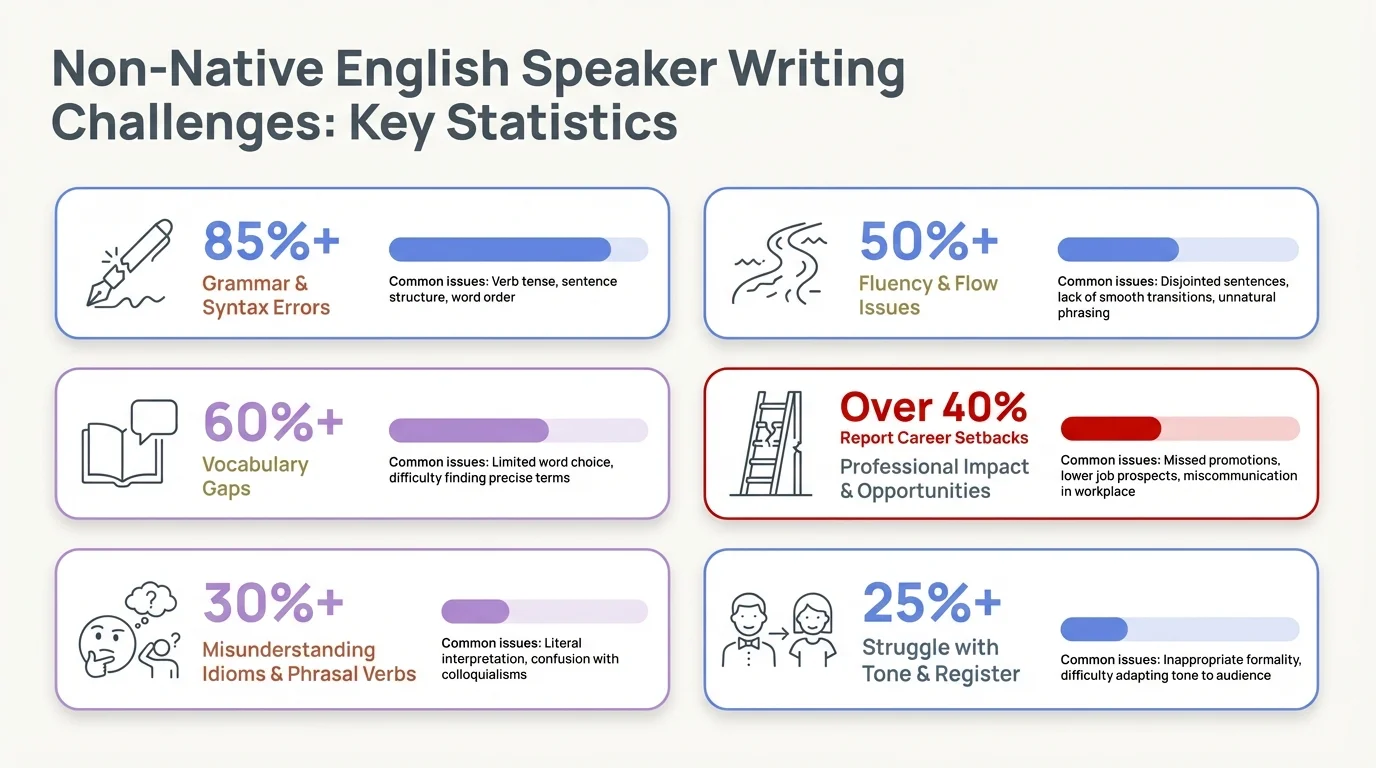
Non-native English speakers face measurable writing disadvantages — AI tools like CleverType are proven to close the gap
How AI Writing Tools Actually Help Non-Native Speakers
AI assistance for writing isn't magic. It's pattern recognition at a scale no human editor can match — and for non-native speakers, the results are pretty striking.
Research published in PMC/NIH studied 50 Chinese EFL students over 12 weeks. The AI-assisted group improved their writing scores from 39.26 to 59.12 — a jump of roughly 50%. Nevertheless, The control group moved from 37.31 to just 45.18. Nonetheless, Both groups were learning. But one group was learning a lot faster.
Hence, So what actually changed?
- Immediate feedback — corrections happened at the moment of writing, not days later
- Contextual corrections — not just spelling, but sentence structure, word choice, and tone
- Reduced anxiety — knowing an AI would catch errors made writers bolder and more willing to express complex ideas
Nevertheless, Effect sizes for organization (Cohen's d = 0.84) and language use (Cohen's d = 0.88) were both large and statistically significant. In plain terms: that's not a rounding error. The improvement was real — not subtle, not marginal.
"Having real-time feedback was like having a personal writing tutor available whenever I needed assistance."
That's really what a good writing assistant for ESL learners does — it doesn't replace your voice. It just helps you get the words out the right way. Finally.
What separates AI grammar tools from basic spell checkers? Basic spell check catches words that don't exist. AI grammar tools catch words that exist but are wrong in context — "I am agree" passes spell check but fails grammar check. That context-awareness is what makes the difference for non-native writers.
CleverType's Multilingual Support: More Than Just Translation
Most grammar tools were built with English speakers in mind. CleverType was built for everyone else, too.
The multilingual writing assistant features in CleverType go a lot further than just switching keyboard languages. It understands context across 100+ languages and does things like:
- Detect your language automatically — no need to manually switch keyboard modes mid-message
- Fix grammar in real-time — corrections appear as you type, not after you finish
- Translate inline — write in your native language and get it converted without leaving the keyboard
- Adjust tone — formal, casual, professional, friendly — all accessible from the keyboard
- Suggest contextually — predictions that make sense for what you're actually saying
Therefore, Here's the thing — most non-native speakers think in their native language first, then translate mentally before typing. Therefore, It's slower, and stuff gets lost in that internal back-and-forth. When the keyboard handles both languages at once, that whole process gets a lot easier.
Nevertheless, Compare that to Gboard, which offers basic language switching but relies on Google's servers — meaning your typing data is sent off your device and processed remotely. CleverType keeps your data on-device. For someone typing private messages in two languages, that's not a minor detail.
Nonetheless, According to market data on the online grammar checker industry, 41% of users specifically demand multilingual support when choosing a writing tool. CleverType was designed with that as a core requirement, not something bolted on later.
Additionally, The experience is designed so that switching languages feels natural — the way bilingual conversation actually works, not like toggling a setting.
Grammar Correction That Actually Teaches You
There's a real difference between a tool that just patches your mistakes and one that helps you actually stop making them. Moreover, CleverType leans toward the second — and honestly, that matters more than it sounds.
Furthermore, When CleverType corrects a sentence, it shows you what changed and why. Over time, that pattern recognition transfers. You start to catch your own mistakes before the keyboard does. Additionally, That's Hence, what grammar correction for non-native speakers should be — not just a crutch, but something that actually makes you better.
Nonetheless, The most common errors CleverType catches for non-native writers:
| Error Type | Example (Before) | Example (After) |
|---|---|---|
| Article usage | "I need information" (missing context) | "I need the information about the project" |
| Preposition errors | "I am interested on this" | "I am interested in this" |
| Subject-verb agreement | "The team are ready" | "The team is ready" |
| Tense inconsistency | "Yesterday I go to the meeting" | "Yesterday I went to the meeting" |
| Word order | "I always am late" | "I am always late" |
None of these are weird edge cases. Nevertheless, They're the everyday mistakes that make writing feel uncertain — the kind native speakers catch automatically, without even realizing there was a rule. Non-native speakers need that explicit check.
Research from DoTEFL shows that the global online grammar checker market was valued at $344.85 million in 2025 and 68% of users engage with grammar tools daily. That's Hence, how routine this kind of AI help has become — it's not a novelty anymore.
What sets CleverType apart here is that corrections happen at the keyboard level — not in a separate app, not after you copy-paste text somewhere else. Therefore, Right as you type. No extra steps.
Writing Confidently in Professional Settings
Professional writing has higher stakes. One awkward sentence in a client email, one clumsy phrase in a report to your manager — and suddenly you're second-guessing everything, in ways that take a long time to shake off.
Non-native speakers often write too formally because they learned English in academic settings. Nonetheless, They write "I would like to inquire about the possibility of" when they mean "Can I ask about." Or they overcorrect, go too casual to seem relaxed, and it lands as unprofessional instead.
Writing confidently in English at work means reading the room — knowing when to be formal, when to be direct, and when a bit of warmth actually helps rather than just making things weird.
CleverType's tone adjustment feature handles exactly this. Consequently, You type a message, select "professional" or "casual" or "friendly," and the keyboard rewrites it. Really useful when:
- Responding to a client complaint (need to be empathetic but formal)
- Following up on a job application (need to be confident but not pushy)
- Messaging a colleague about a deadline (need to be direct without sounding aggressive)
Moreover, It takes the guesswork out of tone. Therefore, Instead of rewriting the same message five times and still not being sure, you write it once and let CleverType sort out the register.
Hence, Inside Higher Ed found that language anxiety is one of the biggest barriers to professional growth for non-native speakers. Take that anxiety away — reliably, every time someone opens an app — and it actually changes what they can accomplish at work.
The Mobile Advantage: Grammar Help Where You Actually Write
Most people don't write at a desk anymore. Therefore, They write on phones — in transit, in waiting rooms, between meetings, lying in bed. That's where the real writing happens.
Market data shows that 47% of all grammar tool engagement happens on mobile. In the Asia-Pacific region — home to hundreds of millions of non-native English speakers — 64% of grammar tool usage is mobile-first. That's not a small shift.
This is why a desktop grammar app or browser extension only solves part of the problem. CleverType lives in your keyboard, so it works across every app on your phone at the same time — including every English writing context you actually use:
- WhatsApp messages
- Email replies
- LinkedIn posts
- Twitter/X threads
- Customer support chats
- Slack messages
- Job application forms
Consequently, No switching apps. Therefore, No copying and pasting into a grammar checker. The correction happens right where you're already typing.
SwiftKey has predictive text but won't actually catch grammar errors the way non-native speakers need. Moreover, Gboard prioritizes convenience — but everything you type goes to Google's servers. CleverType does real AI grammar correction and keeps your data on your phone. Moreover, Every app, nothing leaving your device.
Real Use Cases: Non-Native Speakers Who Use CleverType Every Day
Hence, Who actually uses a multilingual writing assistant like CleverType every day? Therefore, Honestly, a wider range of people than you'd expect.
The Student in a New Country
Moving abroad to study means suddenly doing everything in English — emails to professors, group project chats, assignments, dorm drama. Therefore, Students from Japan, South Korea, Brazil, and Germany describe the relief of real-time correction without the awkwardness of asking classmates to proofread every message they send.
The Remote Worker on a Global Team
Working remotely for a US or UK company while based in India, Nigeria, or the Philippines means everything is in writing — and it's all in English. Nevertheless, Slack messages, email threads, Notion docs. All of it held to native-speaker standards in global business communication. CleverType removes that overhead so you can just focus on the actual work.
The Freelancer Pitching International Clients
A freelance designer from Turkey pitching clients in the US needs proposals that read professionally. One awkward sentence can cost a contract. CleverType catches those sentences before they're sent — not after the client already saw them.
The Business Owner Handling Customer Emails
A small business owner in Mexico managing English-speaking customers needs to respond quickly and correctly. Therefore, CleverType makes that possible without needing a native-speaker editor on retainer.
Every one of these people has the skills to do the job. Consequently, The language part just gets in the way. Nevertheless, That's Consequently, what CleverType is for — AI writing assistance for non-native speakers, right inside the keyboard, working in every app they already use.
English language statistics show that 142 countries mandate English in their national curriculum. That's hundreds of millions of people who learned English in school and now need to use it professionally — every day, on their phones.
CleverType vs. Other AI Keyboards for Non-Native Speakers
Look, there are several AI keyboards out there. But they're not all built with non-native writers in mind. Here's Therefore, how they actually compare:
| Feature | CleverType | Gboard | SwiftKey |
|---|---|---|---|
| Real-time grammar correction | Yes — full AI grammar fix | No | Limited |
| Tone adjustment | Yes | No | No |
| Translation built-in | Yes (100+ languages) | Basic | Basic |
| Data privacy | On-device processing | Server-side (Google) | Server-side (Microsoft) |
| ESL-focused corrections | Yes | No | No |
| Works across all apps | Yes | Yes | Yes |
| Inline AI chat (ChatGPT) | Yes | No | No |
| Smart reply suggestions | Yes | Basic | Basic |
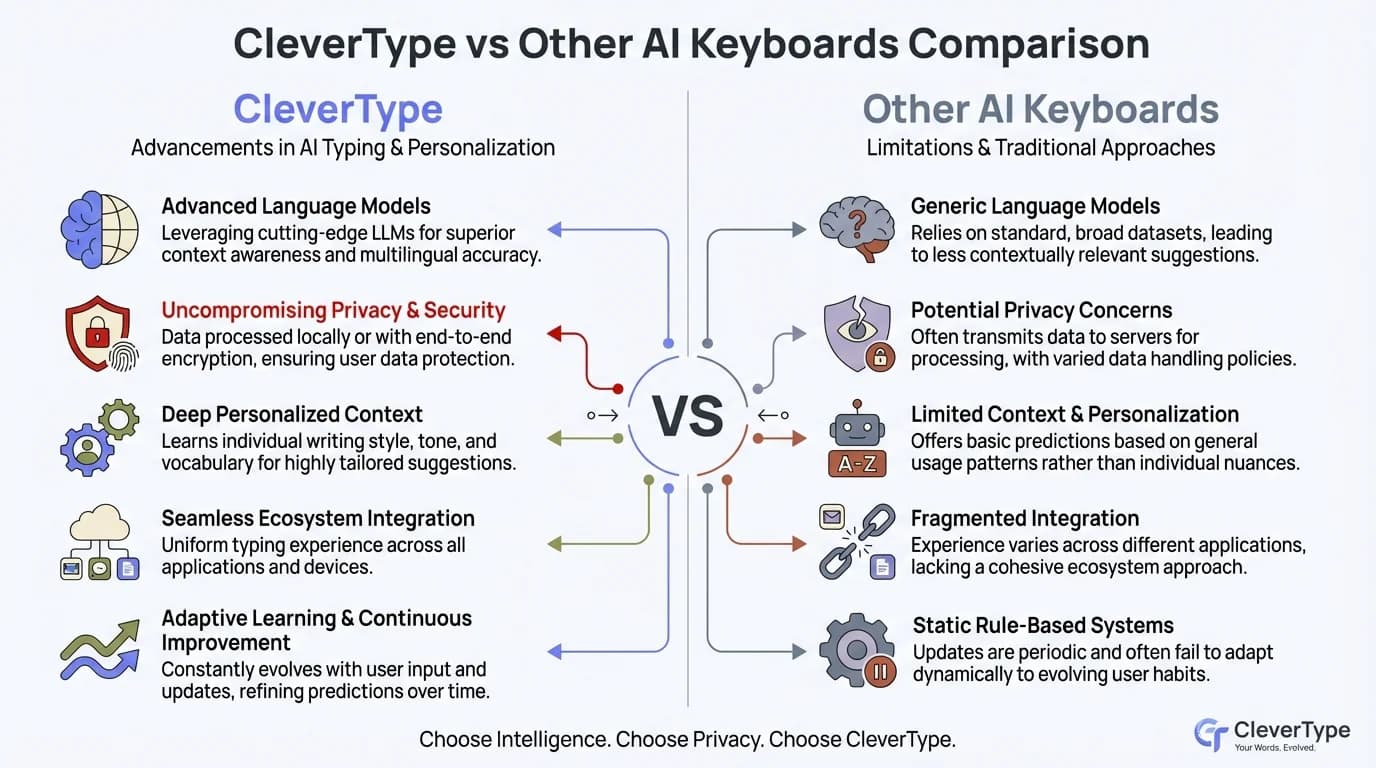
How CleverType compares to Gboard and SwiftKey for non-native English speakers — grammar correction, privacy, and multilingual features
Additionally, For non-native speakers, the gap is clearest in two areas: grammar correction and privacy. Gboard won't catch "I am agree with you" as an error — it autocorrects spelling and predicts words, but that's about it. SwiftKey is pretty much the same story. Consequently, CleverType's AI actually understands sentence structure, which is what ESL writers need.
On privacy — when you're typing personal messages or work stuff in a second language, you probably don't want that going through someone else's server. That's data about how you communicate, what you work on, who you talk to. CleverType keeps it on your device.
If you want a solid English writing tool built for non-native speakers, CleverType is the clear pick. Download CleverType from the Play Store and try it across any app where you type in English.
Frequently Asked Questions
Is CleverType useful if I already speak English well but it's not my first language?
Yes — honestly, even fluent non-native speakers run into article and preposition errors all the time. It's not about skill level; those patterns just don't stick the same way when English isn't your first language. CleverType catches them as you type, without making a big deal of it.
Does CleverType work with languages other than English?
Consequently, Yes — CleverType supports 100+ languages. Moreover, You can type in your native language, use the built-in translation feature to convert to English, or switch between languages mid-conversation without manually changing keyboard settings. No extra steps.
Does CleverType send my typing data to external servers?
Therefore, No. Everything gets processed on-device, so your messages, emails, and private communications stay on your phone. Moreover, That's a real difference compared to Gboard (Google) and SwiftKey (Microsoft), both of which process your typing on their own servers.
How is CleverType different from just using Grammarly?
Grammarly is a separate app or browser extension — you have to paste text into it or install it for specific platforms. CleverType works at the keyboard level, so it corrects your writing in every app automatically. Furthermore, WhatsApp, email, Slack, social media — all of it, without switching anything.
Can CleverType help me write more professionally, not just correctly?
Moreover, Yes. Beyond fixing grammar, CleverType's tone adjustment feature can rewrite your message to sound professional, casual, friendly, or formal. That's especially useful if you learned formal academic English and need to adapt it for real work conversations — which is a really common situation.
Is CleverType free to download?
Nonetheless, CleverType is free to download on Android. Core features are free, with additional AI features available in the app. Nonetheless, Download it here.
How quickly does CleverType improve my English writing?
Research on AI writing assistants for EFL learners shows measurable improvement within 12 weeks of consistent use. Moreover, Because CleverType gives you immediate, contextual corrections every time you type, you start internalizing the patterns pretty quickly — instead of making the same mistake and not finding out until later.
Ready to Type Smarter?
Nevertheless, Upgrade your typing with CleverType AI Keyboard. Moreover, Fix grammar instantly, change your tone, receive smart AI replies, and type confidently while keeping your privacy.
Download CleverType FreeHence, Available on Android • 100+ Languages • Privacy-First
Share this article:
Sources:
- The "Profound Disadvantage" of Nonnative English Speakers — Inside Higher Ed
- Non-Native English-Speaking Graduate Students Still Face Significant Disadvantages — MIT Faculty Newsletter
- Enhancing Academic Writing Skills and Motivation: ChatGPT in AI-Assisted Language Learning for EFL Students — PMC/NIH
- 70 English Language Statistics — EC English
- English Language Learning Statistics — DoTEFL
- Online Grammar Checker Market Size & Growth Forecast — Global Growth Insights