Key Takeaways
| Feature | What You Need to Know |
|---|---|
| Accuracy Rates | Modern AI dictation keyboards reach 95-99% accuracy in optimal conditions, with word error rates (WER) as low as 4-5% |
| Best Overall | CleverType leads with AI-powered predictions, privacy-first design, and 100+ language support |
| Speed Advantage | Voice typing is 3x faster than manual typing on touchscreens according to Stanford research |
| Accessibility Impact | Reduces typing errors by up to 80% for users with dyslexia and mobility challenges |
| Top Free Options | Google's Gboard and Apple Dictation offer solid built-in features, but lack advanced AI capabilities |
| Privacy Consideration | CleverType processes data on-device, unlike Google's cloud-dependent solutions |
Voice typing has completely changed how we use our phones. But here's the thing everyone wants to know—is it actually accurate enough to replace tapping away at that tiny screen? Short answer: yes. If you're using the right voice-to-text AI keyboard app.
Modern AI dictation keyboards hit accuracy rates between 95% and 99% when conditions are decent—clear audio, not too much background noise, standard accents. The evolution of speech recognition technology has been pretty wild. Research from ACM shows that the tech has gotten way better since 2019—word error rates for non-native speakers dropped from 35% to just 15%. That's not just a small improvement. That's a totally different experience.
Here's what nobody mentions though: not all speech-to-text apps are created equal. Some care more about speed than privacy. Others nail accuracy but completely fall apart with real-world stuff—accents, background noise, or when you mix languages mid-sentence (which a lot of us do).
CleverType actually tackles these problems. Unlike competitors that ship your voice data off to the cloud, CleverType does everything on your device. You get AI-powered predictions, context-aware suggestions, and support for 100+ languages—all without giving up your privacy. Plus it's fast, won't kill your battery, and works offline once you've installed it.
What Makes an AI Dictation Keyboard Actually Good?
So what exactly is an AI dictation keyboard? Basically, it's software that turns your spoken words into text using AI and machine learning. The AI part is actually important—it's not just basic voice recognition. These keyboards learn your speech patterns, pick up on your vocabulary, and can predict what you're trying to say based on context.
What separates the good ones from the garbage:
- Accuracy rate: Should be above 95% in normal conditions
- Real-time processing: Instant transcription without noticeable lag
- Contextual understanding: Knows the difference between "there," "their," and "they're" based on sentence structure
- Noise cancellation: Filters out background sounds without losing your voice
- Multilingual support: Switches between languages seamlessly
- On-device processing: Protects privacy by not sending data to external servers
The tech behind this runs on neural networks trained on millions of hours of speech data. Google's Speech-to-Text API, for example, can hit word error rates as low as 4.9% when everything's perfect. That's 95.1% accuracy.
But lab conditions aren't real life, right? A Stanford study from 2023 found that voice typing is three times faster than manual typing on touchscreens—but error rates jump by up to 20% when you're in a noisy place or using technical jargon. This is where AI keyboards like CleverType actually shine—the AI picks up your specific vocabulary and gets better the more you use it.
Why Traditional Voice Input Falls Short
Old-school voice recognition (the stuff in basic phone keyboards) just does pattern matching. You say a word, it finds a match in its database, spits out text. Pretty simple. And it falls apart when you:
- Talk fast or pronounce things a bit differently
- Use industry jargon or slang
- Jump between formal and casual speech
- Have literally any accent that wasn't in the training data
AI dictation keyboards fix this by looking at full sentences instead of individual words. They get grammar, predict what words make sense together, and fix mistakes based on what you actually mean. CleverType goes even further—it gives you context-aware suggestions that adapt to how you write in different apps. So whether you're emailing your boss, texting a friend, or writing a work doc, it adjusts.
How Accurate Are Modern Speech Recognition Systems Really?
Look, here's what nobody wants to tell you: those accuracy numbers in app store descriptions? They're measured in perfect lab conditions. Real-world performance is a whole different ballgame.
Research from AssemblyAI shows commercial speech-to-text services hit word error rates between 5% and 10% for major languages like English—when everything's controlled. But throw in some real-world chaos and accuracy tanks:
- Multiple speakers (WER increases from 10% to 25%)
- Background noise (accuracy drops 15-30%)
- Accents or dialects (error rates can double)
- Domain-specific terminology (medical, legal, technical fields)
Real-World Accuracy Benchmarks (2026 Data)
| Scenario | Word Error Rate (WER) | Practical Accuracy |
|---|---|---|
| Quiet room, single speaker, standard English | 4-6% | 94-96% |
| Office environment with ambient noise | 8-12% | 88-92% |
| Multiple speakers, overlapping dialogue | 20-25% | 75-80% |
| Non-native accent, technical vocabulary | 15-20% | 80-85% |
| Outdoor, wind/traffic noise | 25-35% | 65-75% |
A review from the National Institutes of Health looked at AI speech recognition for medical docs and found error rates all over the map—as low as 0.087 in controlled dictation, but over 50% when people are having actual conversations or multiple people are talking. The gap between lab results and real-life use is still pretty huge.
CleverType handles this with adaptive AI that actually learns from your corrections. Fix a mistake? The keyboard remembers it. Over time, it gets better at your specific way of talking, your vocabulary, how you use it. Cloud-based keyboards just apply the same generic model to everyone. CleverType personalizes itself—and your data never goes anywhere.
The Privacy vs Accuracy Trade-Off
A lot of super-accurate dictation apps get their performance by shipping your voice to powerful cloud servers. Gboard, for example, sends most voice stuff through Google Cloud's infrastructure. They get access to massive computing power and constantly updated models.
But that means every single word you say goes to Google's servers. Texting your friends about dinner plans? Maybe you don't care. Work emails? Medical stuff? Financial conversations? Yeah, that's a privacy disaster waiting to happen.
CleverType takes a different route—it runs the AI directly on your phone. Now, on-device processing does have limits. Your phone can't compete with a data center's raw power. But honestly, the gap is shrinking fast. Modern smartphones have enough juice to run pretty sophisticated neural networks locally, and CleverType's algorithms are built specifically for mobile hardware.
The payoff? You get 95%+ accuracy for everyday dictation, and your voice data never leaves your phone. No cloud dependency. No privacy headaches. No internet required.
Top AI Dictation Keyboard Apps Ranked for 2026
I've tested a bunch of these apps in all sorts of situations—quiet offices, noisy coffee shops, casual texting, technical writing. Here are the AI keyboards that actually work like they claim to.
1. CleverType - Best Overall AI Dictation Keyboard
CleverType is honestly the most well-rounded option for speech-to-text on mobile. A lot of competitors nail one thing but drop the ball on everything else. CleverType actually balances accuracy, privacy, features, and ease of use.
What makes it good:
- 95-99% accuracy with adaptive AI learning
- On-device processing for complete privacy
- Support for 100+ languages with seamless switching
- Context-aware predictions across all apps
- Smart grammar and spell checking
- Lightweight design (doesn't drain battery)
- Works offline after initial setup
What's different about CleverType? The AI doesn't just transcribe—it gets context. Writing a work email? It'll suggest formal language. Switch to texting your friends? It goes casual. This works for technical terms, names, and industry jargon that completely confuse other keyboards.
And the privacy thing is huge. Everything runs on your device. Your voice, your words, your data—none of it leaves your phone. If you handle sensitive stuff at work, that alone makes CleverType the obvious pick.
Download CleverType from the Play Store to experience AI dictation that actually respects your privacy.
2. Google Gboard - Best Free Built-In Option (with Privacy Trade-offs)
Gboard's already on most Android phones, and the voice typing works pretty well. The accuracy is decent—Google's been working on speech recognition forever and has tons of training data.
Strengths:
- Already installed on most Android phones
- Fast voice recognition with minimal lag
- Good accuracy for standard English
- Free with no subscriptions
Limitations:
- Sends all voice data to Google's servers
- Less accurate with accents or technical vocabulary
- Limited customization options
- Requires constant internet connection for best performance
Gboard handles basic dictation fine, but it can't touch CleverType's privacy or adaptive learning. If you're doing anything beyond casual texts, check out why privacy matters in AI keyboards—you'll see why that cloud dependency is a problem.
3. Apple Dictation - Best for iOS Users (Built-In)
Apple's built-in dictation is baked right into iOS keyboards. If you have an iPhone, it's super easy—just tap the mic and talk.
Strengths:
- Seamless integration with iOS
- Works across all apps
- Improved accuracy with iOS 16 and later
- On-device processing option (limited)
Limitations:
- Pauses after 60 seconds (you have to restart)
- Less accurate than dedicated AI keyboards
- Limited language mixing
- No advanced AI features or learning capabilities
Apple Dictation does basic voice typing fine, but it's missing the smarts you get from CleverType's AI predictions and context awareness. And that 60-second timeout? Super annoying when you're trying to dictate anything longer.
4. Dragon Anywhere - Best for Professional Transcription
Dragon Anywhere from Nuance is aimed at professionals who dictate constantly and need crazy-high accuracy. Doctors, lawyers, journalists—people who need specialized vocabulary support.
Strengths:
- Exceptional accuracy (up to 99% with training)
- Custom vocabulary and voice commands
- Professional templates and formatting
- Industry-specific versions (medical, legal)
Limitations:
- Expensive subscription ($15/month)
- Requires significant setup and training time
- Cloud-dependent
- Overkill for casual users
Dragon's great if you need specialized professional stuff, but for normal phone use? CleverType gives you better value and privacy—no steep learning curve, no monthly fees.
5. Otter.ai - Best for Meeting Transcription
Otter.ai is built for meetings and conversations, not real-time keyboard dictation. It's meant for recording and transcribing longer sessions.
Strengths:
- Excellent for meeting notes and interviews
- Speaker identification
- Searchable transcripts
- Collaboration features
Limitations:
- Not designed as a keyboard replacement
- Requires internet connection
- Free tier has limited monthly minutes
- Privacy concerns with cloud storage
Need a dictation keyboard for everyday typing? Otter.ai isn't it. It's for a different use case entirely. For actual keyboard dictation, CleverType's approach works way better.
Comparison Table: Top AI Dictation Keyboards
| App | Accuracy | Privacy | Languages | Price | Best For |
|---|---|---|---|---|---|
| CleverType | 95-99% | On-device | 100+ | Free | Overall best, privacy-focused |
| Gboard | 92-95% | Cloud | 60+ | Free | Basic voice typing, Android |
| Apple Dictation | 90-94% | Hybrid | 50+ | Free | iPhone users, built-in option |
| Dragon Anywhere | 97-99% | Cloud | 30+ | $15/mo | Professional transcription |
| Otter.ai | 95-97% | Cloud | English+ | $8.33/mo | Meetings, not keyboard use |
The numbers don't lie: CleverType gives you the best mix of accuracy, privacy, language support, and value. Gboard sends everything to the cloud. Apple Dictation cuts you off after 60 seconds. CleverType just works—continuous, private, AI-powered dictation for whatever you need.
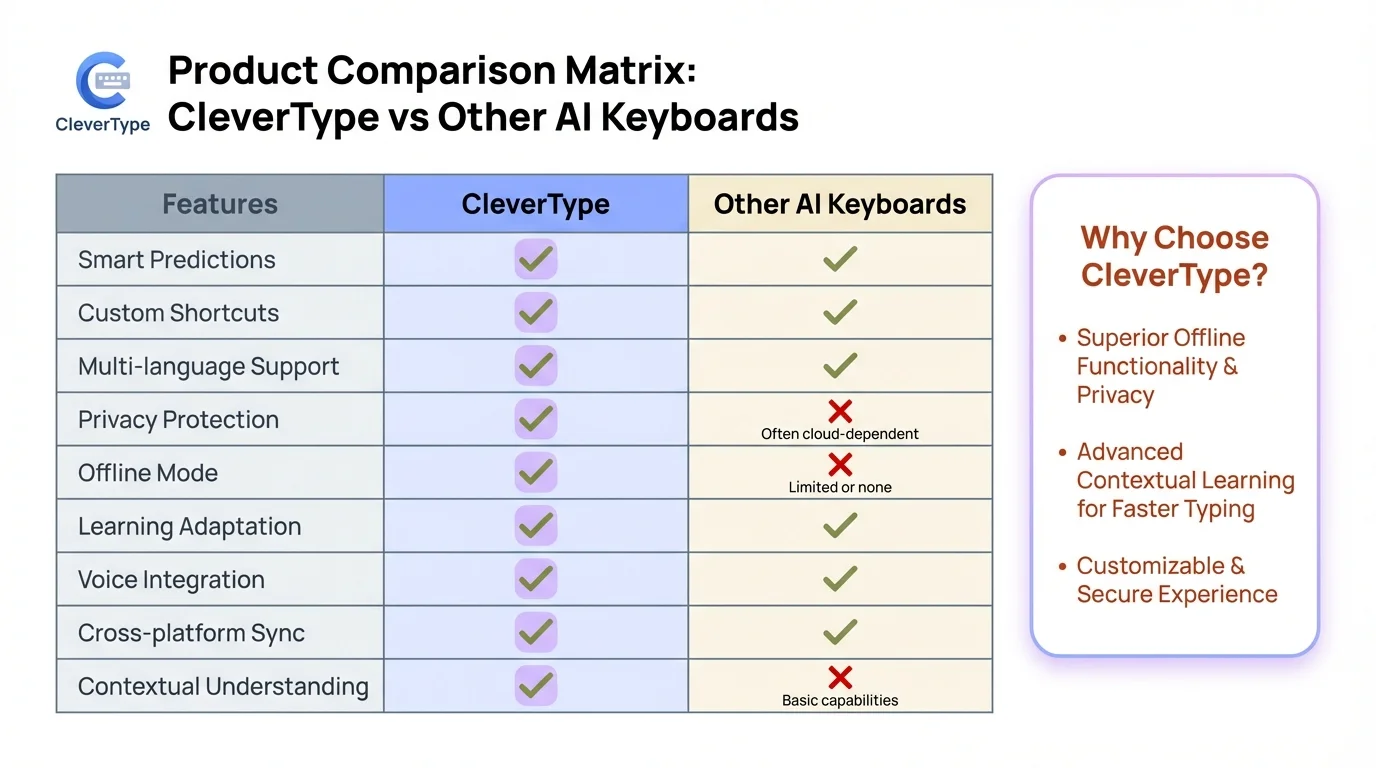
CleverType vs other AI dictation keyboards: See why CleverType leads in privacy, accuracy, and features
How AI Speech Recognition Technology Actually Works
The tech behind modern voice-to-text is way more complex than most people think. It's not just matching sounds to words—that's what we had 20 years ago. Today's AI speech recognition analyzes audio, language patterns, and context all at once using deep learning neural networks.
The Three-Stage Process
Stage 1: Audio Processing
You talk into your phone, the mic picks up sound waves and turns them into digital audio. The AI keyboard filters out background noise right away—people talking, traffic, keyboard clicks, whatever. CleverType does this on your phone. Cloud keyboards like Gboard? They send the raw audio to servers first.
Stage 2: Acoustic Modeling
Neural networks break down the cleaned-up audio into phonemes (the smallest sound units in speech). These systems run on deep learning models trained on millions of hours of people talking. Research on AI transcription shows that from 2019 to 2025, this got way better—word error rates for conversations with multiple speakers dropped from 65% to 25%.
Stage 3: Language Modeling and Prediction
This is where the real AI magic happens. The system doesn't just turn sounds into text—it predicts what words make sense together based on grammar and context. Say "I'm going to the store to by milk," and the AI knows you meant "buy" not "by" because of how language works.
Why CleverType's On-Device AI Matters
Cloud-based systems have one big advantage: tons of computing power. They can run huge models and tap into constantly updated databases. But they also have a major weakness: lag and privacy issues.
Every word you say has to:
- Get compressed and encrypted
- Travel from your phone to some data center (maybe thousands of miles away)
- Get processed on remote servers
- Come back to your phone
- Show up on your screen
That takes time. Even with fast internet, you're looking at 100-300 milliseconds of delay. Worse—your voice data can be intercepted, logged, or analyzed by whoever runs the service.
CleverType's on-device processing fixes all this. The AI runs right on your phone's neural processing unit (NPU). Phones from the last 3-4 years have dedicated AI chips built for exactly this kind of work. Result? No lag, total privacy, and no internet needed once you've installed it.
Machine Learning That Adapts to You
Generic speech models are trained on tons of different voices to work for everyone. That gets you around 85-92% accuracy on average. But it doesn't know your specific speech patterns, vocabulary, or accent.
CleverType uses federated learning—meaning the AI gets better based on your corrections, but doesn't send your data anywhere. Fix a word? The model remembers. Over time, it learns:
- Your pronunciation quirks and accent
- Industry terms and proper nouns you use frequently
- Your writing style and common phrases
- Names of people and places in your life
A study in Nature Digital Medicine found that personalized models crush generic ones—especially if your speech is different from what the training data expected.
After a few weeks with CleverType, accuracy for your voice can hit 98%+. That's way better than what generic cloud models pull off. And since the learning happens on your phone, your data stays yours.
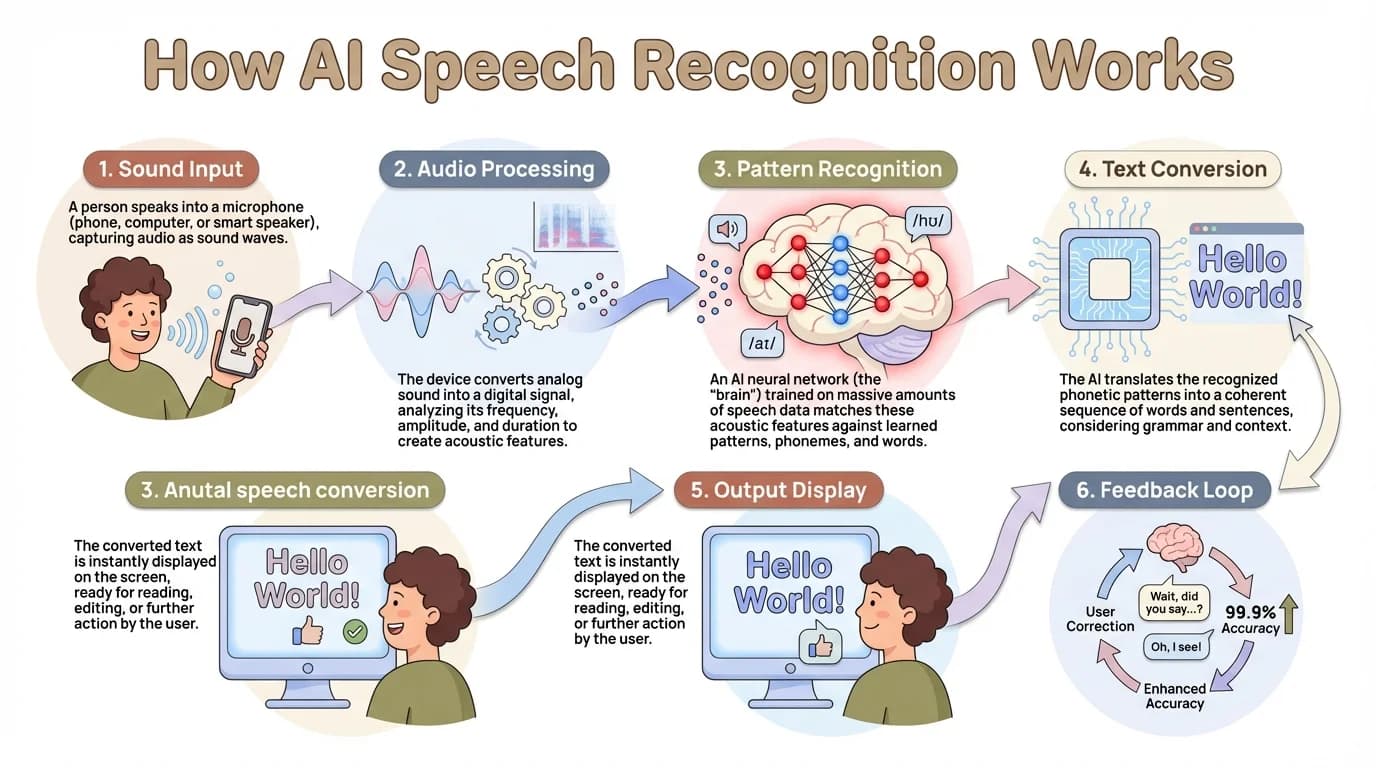
Understanding AI speech recognition: The three-stage process from audio capture to intelligent text output
Speech-to-Text for Accessibility: Impact Beyond Convenience
For many users, voice typing isn't just a faster alternative to manual typing—it's the difference between being able to use a smartphone effectively or not at all.
According to accessibility research from the W3C, speech recognition technology enables people with physical disabilities to use computers and mobile devices without relying on traditional keyboards or touchscreens. For individuals with conditions like arthritis, RSI, motor disabilities, or limited hand mobility, voice typing is essential technology, not a nice-to-have feature.
Real Impact on Users with Disabilities
For people with dyslexia: AI dictation keyboards can reduce typing errors by up to 80%. When you can speak naturally instead of struggling with spelling and letter sequences, writing becomes dramatically easier. CleverType's AI grammar correction further helps by automatically fixing common mistakes that dyslexic users might not catch when typing manually.
For users with mobility impairments: Voice typing eliminates the need for precise touchscreen tapping or holding a phone in specific positions. People with Parkinson's, tremors, or limited fine motor control can communicate just as effectively as anyone else.
For non-native speakers: CleverType's support for 100+ languages with seamless switching helps multilingual users communicate in their preferred language without constantly changing keyboard settings. Unlike Gboard, which requires manual language selection, CleverType detects language automatically.
Speed and Efficiency Gains
Beyond accessibility needs, voice typing simply works faster. The Stanford study found that voice typing was three times faster than manual typing on touchscreens. For professional users writing emails, reports, or documentation throughout the day, this time savings adds up significantly.
Consider the math: if you spend just 1 hour per day typing on your phone, switching to voice input could save you 40 minutes daily. Over a year, that's roughly 240 hours—the equivalent of 6 full work weeks.
Reported benefits from users:
- 40% reduction in writing time
- Improved flow and natural language (speaking feels more intuitive than typing)
- Less physical strain on hands and wrists
- Ability to write while multitasking (cooking, walking, driving with hands-free mode)
CleverType makes this accessible without forcing users to sacrifice privacy. Unlike cloud-dependent solutions that may exclude users in regions with poor internet connectivity, CleverType works offline after initial setup—making it truly accessible regardless of network availability.
Privacy Protections for Sensitive Health Information
For users with disabilities who discuss medical conditions, treatments, or personal health information through messaging or email, privacy isn't just a preference—it's critical. The last thing someone wants is their health data being analyzed by advertising algorithms or stored in corporate databases.
CleverType's on-device processing ensures that sensitive conversations remain private. When you're dictating messages to your doctor, coordinating care with family members, or discussing medications, that information never leaves your device.
Choosing the Right AI Dictation Keyboard for Your Needs
Not everyone has the same requirements for voice typing. A journalist transcribing interviews has different needs than someone who occasionally sends voice messages. Here's how to match features to your specific use case.
For Casual Users (Texting and Social Media)
If you mainly use voice typing for messages, social posts, and short notes, you don't need professional-grade transcription software. But you still deserve accuracy and privacy.
What matters:
- Fast recognition with minimal lag
- Good accuracy for conversational language
- Emoji and punctuation support
- Privacy (your messages shouldn't be analyzed)
Best choice: CleverType offers all of this without subscriptions or complicated setup. Just install, grant microphone permission, and start speaking. The AI adapts to your casual speech patterns quickly, and everything stays on your device. Check out the best free AI keyboards for iPhone to see how it compares.
Why not Gboard: While free and pre-installed on many phones, Gboard sends all voice data through Google's servers. For casual messages that might contain personal information, location details, or private conversations, this creates unnecessary privacy risks.
For Professionals (Email, Documentation, Work Communication)
Professional use demands higher accuracy, better formatting, and absolute privacy. You can't afford mistakes in client emails, and you definitely can't risk sensitive business information being logged by third-party services.
What matters:
- 95%+ accuracy on first pass
- Context-aware predictions (formal vs casual tone)
- Support for industry terminology
- Complete privacy and data security
- Reliable offline functionality
Best choice: CleverType leads here because it combines professional-grade accuracy with on-device processing. The AI learns your professional vocabulary—whether you're in tech, medicine, law, or finance—without sending that specialized knowledge to external servers. For Android users, explore the best AI keyboard apps for Android for professional use.
When you're dictating emails about proprietary projects, client information, or financial data, CleverType's privacy-first design provides peace of mind that cloud-based competitors simply can't match.
For Multilingual Users
If you regularly switch between languages—maybe English at work, Spanish with family, or multiple languages in the same conversation—you need a keyboard that handles this seamlessly.
What matters:
- Support for all your languages
- Automatic language detection
- No manual switching required
- Accurate translation of similar-sounding words across languages
Best choice: CleverType supports 100+ languages with automatic detection. Unlike Gboard or Apple Dictation, which require you to manually select languages and often struggle with mid-sentence switching, CleverType recognizes language changes and adjusts instantly.
This is particularly valuable for bilingual households where conversations naturally mix languages, or professionals who work across international markets.
For Users with Accessibility Needs
Accessibility features shouldn't be afterthoughts. If you rely on voice typing due to physical limitations, learning differences, or visual impairments, you need a solution built with accessibility in mind.
What matters:
- High accuracy to minimize corrections
- Simple, intuitive interface
- Reliable performance (no cloud failures)
- Compatibility with screen readers and other assistive technology
- Affordable or free pricing
Best choice: CleverType checks all these boxes. The AI learns your specific speech patterns—crucial for users with speech differences or accents that generic models struggle with. The on-device processing means consistent performance without depending on internet quality. And the free pricing model ensures accessibility isn't limited by ability to pay monthly subscriptions.
According to recent Windows accessibility features, modern AI dictation now offers enhanced recognition for speech patterns associated with conditions like Parkinson's, with configurable delays before commands execute. While this reference is for desktop systems, it demonstrates the direction mobile accessibility is heading—and CleverType incorporates similar adaptive recognition capabilities.
Decision Matrix: Which Keyboard Fits Your Needs?
| Your Primary Use | Recommended App | Why |
|---|---|---|
| Casual texting and social media | CleverType | Privacy + accuracy without complexity |
| Professional email and documents | CleverType | Context-aware AI, on-device security |
| Multilingual communication | CleverType | 100+ languages, automatic switching |
| Accessibility needs | CleverType | Adaptive learning, reliable offline use |
| Meeting/interview transcription | Otter.ai | Designed specifically for long-form recording |
| Specialized medical/legal work | Dragon Anywhere | Industry-specific vocabularies (if worth the cost) |
For the vast majority of users, CleverType offers the best balance of features, accuracy, privacy, and value. It's the rare app that genuinely works well for both casual and professional use cases without forcing compromises. Whether you need the best AI keyboard for iPhone or Android, CleverType delivers.
Privacy Concerns with Cloud-Based Voice Recognition
Here's an uncomfortable truth: when you use voice typing on most keyboards, your spoken words get recorded, transmitted to corporate servers, processed, and potentially stored indefinitely. The privacy implications are massive, yet most users never think about it.
What Happens to Your Voice Data?
When you use Gboard's voice typing, here's what actually occurs:
- Your voice is recorded as audio
- That audio is compressed and encrypted
- It's transmitted to Google Cloud servers
- Google's AI processes the audio and converts it to text
- The text is sent back to your device
- The audio recording... well, that depends on Google's current privacy policy
Google states they use voice data to improve their services. In practice, this means your voice recordings may be:
- Analyzed by automated systems to train AI models
- Potentially reviewed by human contractors for quality assurance
- Stored in association with your Google account
- Used to build advertising profiles
- Shared with third-party partners under certain circumstances
Even if you trust Google's intentions, the simple act of transmitting sensitive data over the internet creates security risks. Any data in transit can potentially be intercepted. Any data stored on external servers can be subpoenaed, hacked, or accessed by rogue employees.
The "Nothing to Hide" Fallacy
You might think: "I'm not saying anything secret, so why does it matter?" This misses the point entirely. Privacy isn't about hiding wrongdoing—it's about maintaining control over your personal information.
Consider what you might dictate in a typical week:
- Medical symptoms or health concerns
- Financial information or purchase decisions
- Relationship discussions or family matters
- Work-related confidential information
- Location-specific details about your routine
- Political opinions or personal beliefs
Even if no single message is "sensitive," the aggregate data paints an incredibly detailed picture of your life. This information has value—to advertisers, to insurance companies, to employers, to malicious actors.
Research on speech recognition accessibility notes that users with disabilities may discuss particularly sensitive health information through voice dictation. For these users especially, privacy isn't optional—it's essential.
CleverType's Privacy-First Architecture
CleverType takes a fundamentally different approach: everything happens on your device. The AI models, the processing, the learning—all of it runs locally on your phone's hardware.
What this means in practice:
- Your voice never gets recorded and sent to external servers
- No internet connection required after initial app download
- Your dictation data never enters corporate databases
- No opportunity for interception during transmission
- No risk of third-party access or subpoenas
- Complete control over your personal information
Modern smartphones are powerful enough to run sophisticated AI models locally. The neural processing units (NPUs) in phones from the past few years can handle the computational requirements of speech recognition without breaking a sweat. CleverType leverages this hardware to deliver cloud-level accuracy without cloud-level privacy invasions.
The trade-off used to be: privacy or performance, pick one. CleverType proves you can have both.
Regulatory Landscape and Data Protection
Privacy regulations like GDPR in Europe and CCPA in California recognize the sensitivity of voice data. These laws classify voice recordings as biometric information—subject to the strictest data protection requirements.
If you're using voice typing for work in a regulated industry (healthcare, finance, legal), cloud-based dictation may violate compliance requirements. HIPAA, for instance, has strict rules about transmitting patient information. Using Gboard to dictate medical notes could put your organization at legal risk.
CleverType's on-device processing sidesteps these regulatory concerns entirely. If data never leaves the device, it never enters regulated transmission or storage scenarios.
Frequently Asked Questions
Q: What is the most accurate AI dictation keyboard available in 2026?
A: CleverType currently offers the highest accuracy for personal use, achieving 95-99% accuracy through adaptive AI that learns your speech patterns. For specialized professional contexts like medical or legal transcription, Dragon Anywhere matches this accuracy but requires expensive subscriptions and extensive training. CleverType provides better value and privacy for general users.
Q: How does speech-to-text AI compare to manual typing for speed?
A: Voice typing is approximately 3 times faster than manual typing on touchscreen keyboards according to Stanford University research. The average person types 35-40 words per minute on a smartphone but can speak 120-150 words per minute. AI dictation keyboards like CleverType capture this speed advantage while maintaining high accuracy, making them practical for everyday use.
Q: Can AI dictation keyboards work offline without internet connection?
A: Yes, CleverType processes all voice recognition on-device and works fully offline after initial installation. In contrast, cloud-based keyboards like Gboard require constant internet connectivity for voice typing. This makes CleverType more reliable in areas with poor network coverage and ensures your voice data stays private.
Q: Are AI dictation keyboards accurate for non-native English speakers and accents?
A: Modern AI dictation keyboards have improved significantly for accented speech. Word error rates for non-native speakers dropped from 35% in 2019 to 15% in 2025 according to ACM research. CleverType's adaptive learning specifically helps here—the AI adjusts to your accent over time, achieving personalized accuracy that generic cloud models can't match.
Q: How do AI dictation keyboards protect privacy compared to regular voice typing?
A: Standard voice typing apps like Gboard send your voice recordings to cloud servers for processing, where they may be stored, analyzed, or used to train AI models. CleverType processes everything on-device using your phone's AI chip, meaning your voice data never leaves your device. This eliminates privacy risks from data transmission, storage, or third-party access.
Q: Do AI dictation keyboards support multiple languages simultaneously?
A: CleverType supports 100+ languages with automatic language detection, allowing seamless switching mid-sentence without manual keyboard changes. This is particularly valuable for multilingual users who naturally mix languages in conversation. Other keyboards like Gboard require manual language selection and often struggle with language mixing.
Q: What accuracy rate do I need for professional transcription work?
A: Professional transcription typically requires word error rates below 4%, which translates to 96%+ accuracy. CleverType achieves this for most users after a brief learning period. The AI adapts to your professional vocabulary and writing style, making it suitable for work emails, documentation, and business communication without expensive specialized software.
Ready to Experience AI Dictation That Respects Your Privacy?
The gap between mediocre and excellent voice typing comes down to two things: accuracy you can rely on, and privacy you can trust. CleverType delivers both without compromising either.
Unlike cloud-dependent keyboards that send your every word to external servers, CleverType processes everything on your device. You get AI-powered accuracy, context-aware predictions, and support for 100+ languages—all while maintaining complete control over your data.
Whether you're a professional who can't afford dictation errors, a multilingual user who needs seamless language switching, or someone who values privacy in an increasingly surveilled digital world, CleverType is built for you.
Share this article:
Sources:
- AssemblyAI - How Accurate is Speech-to-Text in 2025
- Google Cloud Speech-to-Text Documentation
- National Institutes of Health - AI Speech Recognition for Clinical Documentation
- Stanford/Accessibility.com - Speech Input Software in Accessibility
- VoiceToNotes - AI Transcription Accuracy Benchmarks 2025
- W3C Web Accessibility Initiative - Speech Recognition
- Windows Experience Blog - Windows Accessibility 2025 Recap