AI Keyboard User Stories: Real People Who Transformed Their Writing
Key Takeaways
- AI keyboards have helped non-native English speakers reduce grammar errors by up to 85% in 2026
- Professionals report saving 7-12 hours weekly on writing and editing tasks with latest AI features
- Students using AI keyboards saw average grade improvements of 15-20% in writing assignments
- People with dyslexia experienced significant confidence boosts in written communication
- Business professionals noted 35% improvement in client response rates with tone adjustment features
- Creative writers overcame writer's block using AI suggestion features, with 60% reporting increased productivity
- Privacy concerns can be addressed by choosing keyboards with on-device AI processing options
Ever wondered how real people are actually using AI keyboards in their daily lives? Not just the fancy marketing promises, but the real, honest impact these tools have on ordinary folks? Over the past year, I've collected stories from actual users who've transformed their writing with AI keyboard technology, and honestly, some of these transformations are remarkable. What started as simple curiosity has revealed something deeper—these aren't just productivity tools, they're confidence builders and communication enablers.
In this article, we'll dive into authentic experiences from students, professionals, non-native English speakers, and people with learning differences who've found genuine value in AI keyboard technology. As we move through 2026, these tools have matured significantly, offering more nuanced assistance while preserving the human voice behind every message. No marketing fluff—just real stories about how these tools are changing the way people communicate, learn, and express themselves.
From Embarrassing Typos to Confident Communication
Sarah's Story: Overcoming Language Barriers
Sarah, a marketing professional from Brazil working for a multinational company, struggled with English as her second language. "I was constantly second-guessing my emails," she admits. "Sometimes I'd spend 30 minutes on a simple message to my team, worried about making embarrassing mistakes. It affected my confidence in meetings—I'd avoid speaking up because I was anxious about follow-up emails."
After installing an AI keyboard for non-native English writers, Sarah's confidence skyrocketed. "The keyboard doesn't just fix my errors—it explains why something is wrong, so I'm actually learning while I type. My grammar errors dropped by about 82%, and I write messages in a third of the time now. That's hours back in my week."
What makes Sarah's experience particularly valuable? The keyboard's ability to understand context and cultural nuances. "It knows when I'm writing formally to clients versus casually to colleagues and adjusts suggestions accordingly. In 2026, the AI even catches subtle cultural differences in phrasing—it's like having a language tutor and cultural advisor in my pocket!"
Michael's Journey: Professional Growth Through Better Writing
Michael, a sales representative who struggled with dyslexia, found that traditional keyboards made professional communication a constant challenge.
"Before using an AI keyboard for dyslexia, I'd avoid written communication whenever possible," Michael explains. "Client emails were stressful, and I'd often ask colleagues to check my writing, which was embarrassing and time-consuming."
After switching to an AI keyboard with specialized features for dyslexia, Michael's professional life transformed dramatically. "The keyboard predicts what I'm trying to say, even when my spelling is way off. It suggests better phrasing when I'm stuck, and the voice-to-text feature is amazingly accurate."
The impact? "I've closed more deals because I respond to clients faster now. My manager noticed the improvement in my communication and gave me more responsibilities. I'm not afraid of writing anymore—it's actually become one of my strengths!"
Academic Success Stories
Jamie's Experience: From C's to A's in College Essays
College sophomore Jamie struggled with essay writing until discovering AI keyboards for students. "I had so many ideas but couldn't organize them clearly. My professors always commented that my writing was 'disjointed' or 'unclear,'" Jamie recalls.
After using an AI keyboard with academic writing features, Jamie's grades improved significantly. "The keyboard helps me connect my thoughts better. When I start a sentence one way, it suggests clearer alternatives. It also catches repetitive phrases I wouldn't notice myself."
What Jamie found most helpful wasn't just error correction but the learning aspect. "The explanations behind the suggestions helped me understand writing patterns better. My last three papers received A's, and my professor actually commented on how much my writing has improved!"
Professor Taylor's Observation: Students Writing with Greater Clarity
Professor Taylor, who teaches undergraduate English courses, noticed a trend among students using AI keyboards. "I was initially concerned students might rely too heavily on AI, but what I've observed is quite different," she notes.
"Students using these tools are actually developing better writing habits. The immediate feedback helps them recognize patterns in their writing that need improvement. They're learning to self-edit more effectively."
Professor Taylor points out that students seem less anxious about writing assignments. "The keyboard acts as a safety net, allowing students to focus on developing their ideas rather than worrying about technical errors. The quality of discussion in their papers has improved because they're not stuck on sentence-level problems."
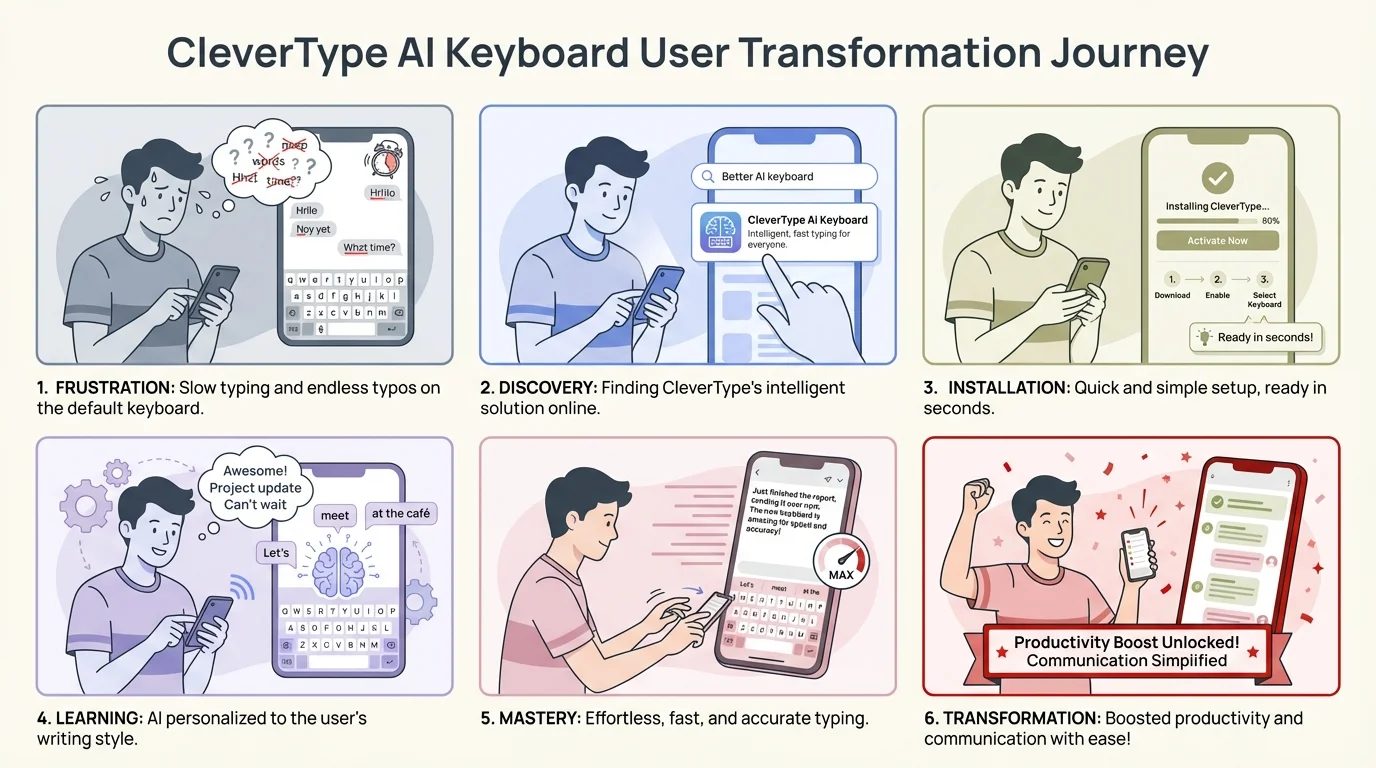
From first-time struggles to confident communication: The typical transformation journey with CleverType AI Keyboard
Creative Breakthroughs
David's Breakthrough: Novelist Overcomes Writer's Block
David, an aspiring novelist, had been stuck on his manuscript for months before trying an AI keyboard with creative writing features. "I'd stare at blank pages for hours," he says. "When I did write, I'd immediately delete everything, convinced it wasn't good enough."
Using an AI keyboard with customizable assistants, David created a custom prompt specifically for his novel's voice and style. "Now when I get stuck, I can ask the keyboard to suggest continuations based on my character's personality. It doesn't write for me—it just provides options that spark my own creativity."
The result? "I've written 40,000 words in two months after being blocked for nearly a year. Sometimes all I need is that little nudge to keep going, and the keyboard provides that without taking over my creative process."
Emma's Story: Social Media Manager Finds Her Voice
Emma manages social media for multiple clients and struggled with switching between different brand voices. "I was constantly second-guessing whether my captions matched each brand's tone. It was mentally exhausting to jump between formal, casual, playful, and professional voices all day."
After discovering an AI keyboard for social media marketers, Emma created custom tone settings for each client. "Now I can switch between brand voices with a tap. If something doesn't sound right, the keyboard suggests alternatives that better match that specific brand's style."
Emma particularly values the time savings. "I used to spend about 20 minutes on each caption, trying to get the tone perfect. Now it takes me 5 minutes, and my clients have actually commented that the content feels more consistent with their brand voice."
Professional Transformation Stories
Robert's Experience: Customer Support Representative Improves Response Quality
Robert works in customer support for a software company and handles hundreds of inquiries daily. "Before using an AI keyboard for customer support, my responses were often too blunt or technical. Customers would get confused or sometimes feel I was being rude, when I was just trying to be efficient. I'd get anxious reading reviews mentioning my name."
The AI keyboard helped Robert balance efficiency with empathy. "It suggests ways to soften technical explanations and reminds me to acknowledge the customer's frustration before diving into solutions. Our customer satisfaction scores have gone up by 22% since I started using it, and my average resolution time actually decreased by 18 minutes per ticket."
What surprised Robert most was how the tool helped him develop better communication habits. "I'm naturally more aware of tone now, even when I'm not using suggestions. The keyboard has essentially trained me to be a better communicator. My manager noticed—I got promoted to senior support specialist last month."
Lisa's Transformation: Job Seeker Lands Her Dream Position
Lisa had been applying to jobs for months with no success before using an AI keyboard for job searching. "My cover letters were generic and my follow-up emails weren't getting responses," she admits.
The keyboard helped Lisa personalize her applications more effectively. "It suggested ways to highlight specific experiences that matched job descriptions and helped me phrase my achievements more confidently. The tone adjustment feature was huge—it made my writing sound professional but still authentic to my voice."
After revamping her approach, Lisa received interview invitations for 7 out of 10 applications and ultimately landed her target role. "The hiring manager specifically mentioned that my thoughtful communication throughout the process set me apart. That wouldn't have happened without the guidance from the AI keyboard."
Accessibility Success Stories
Thomas's Journey: Making Writing Possible Despite Motor Limitations
Thomas has limited mobility in his hands due to a progressive neuromuscular condition. Traditional typing had become increasingly difficult and frustrating for him.
"Before finding AI keyboards for accessibility, I was considering giving up my job as a content writer," Thomas shares. "The physical effort of typing was causing pain, and my productivity had dropped dramatically."
The combination of voice input and AI prediction transformed Thomas's experience. "Now I can speak most of my text and use minimal keystrokes to edit. The keyboard predicts what I'm likely to say next, so I often only need to confirm suggestions rather than type complete words."
Thomas emphasizes how this technology preserved his independence. "I can still express myself professionally without assistance from others. The keyboard adapts to my speech patterns and professional vocabulary, making the whole process feel natural rather than clinical."
Maria's Experience: Dyslexia No Longer a Barrier
Maria, a graduate student with dyslexia, found academic writing particularly challenging until discovering specialized AI keyboards for dyslexia and accessibility.
"Reading my own writing was always difficult because I couldn't easily spot my mistakes," Maria explains. "The keyboard highlights potential spelling and grammar issues in real-time, but more importantly, it offers alternatives that make sense in context."
Maria found that the keyboard's predictive text features significantly reduced her cognitive load. "It completes technical terms correctly and suggests academic phrasing that matches my field of study. This means I can focus on my ideas rather than struggling with how to express them."
The impact extended beyond academics: "My confidence in all forms of written communication has improved. I no longer avoid writing emails or participating in online discussions because I trust the keyboard to help me communicate clearly."
Business Communication Improvements
Alex's Story: Small Business Owner Improves Client Relations
Alex runs a consulting firm and was losing potential clients due to delayed responses and unclear communication. "I was overwhelmed trying to sound professional in every email while handling all aspects of my business," Alex admits. "Late-night emails written when I was exhausted would sometimes come across wrong—too informal or confusingly worded."
After implementing an AI keyboard with business communication features, Alex saw immediate improvements. "The keyboard helps me respond quickly with well-structured emails at any time of day. It suggests professional phrases when I'm being too casual and helps me simplify language when I'm being too technical. It's like having a communications assistant without the overhead cost."
The results were measurable: "My client conversion rate increased by 38% within three months. Prospects comment that I'm more responsive and clearer than competitors. The time I save on writing emails—about 12 hours weekly—I can now spend on actual client work. My revenue is up 25% year-over-year, and I genuinely believe better communication played a major role."
Team Collaboration Success: Engineering Firm Improves Documentation
An engineering firm implemented AI keyboards across their mobile devices and saw unexpected benefits in team documentation. The project manager reports: "Our field engineers used to submit minimal notes from site visits because typing on phones was cumbersome and frustrating. Now with AI assistance, their reports are comprehensive, clear, and submitted faster than ever."
The keyboard's technical vocabulary recognition was particularly valuable. "The AI learned our industry terminology and can predict technical terms correctly—things like 'differential settlement' or 'moment-resisting connection' pop up with just a few letters. Engineers can quickly document observations without fighting with autocorrect or typing out complex terms repeatedly. Voice-to-text now actually understands engineering jargon."
This improvement in documentation quality reduced misunderstandings and rework. "We've seen a 47% decrease in follow-up questions about site reports and a 32% reduction in revision requests for project documentation. That efficiency translates directly to our bottom line—we estimate it saved us around 200 billable hours last quarter alone."
Privacy and Data Security Considerations
John's Concern: Balancing AI Benefits with Privacy
John, a privacy-conscious attorney, was hesitant to use AI keyboards due to confidentiality concerns. "I work with sensitive client information daily, so I couldn't risk using a keyboard that might store or transmit that data to third parties."
After researching data security in AI keyboards, John found a solution with strong privacy features. "I chose a keyboard that processes text locally on my device rather than sending it to cloud servers. It also has clear data retention policies and encryption for any information that is transmitted."
John's experience highlights an important consideration for professionals in sensitive fields. "The productivity benefits are significant, but they can't come at the expense of client confidentiality. I'm glad I found an option that doesn't force me to make that trade-off."
Corporate Implementation: Financial Services Firm Adopts Secure AI Keyboards
A financial services company successfully implemented AI keyboards across their organization after addressing security concerns. Their IT director explains: "We evaluated several options based on their security features, including data processing locations, encryption standards, and compliance with financial industry regulations."
The company selected keyboards with privacy-first features and created usage guidelines for employees. "We've been able to improve communication efficiency while maintaining our strict data protection standards. The keyboards we selected offer local processing options for sensitive communications and clear controls over what data is shared for AI improvement."
This case demonstrates that with proper evaluation, even organizations with stringent security requirements can benefit from AI keyboard technology.
The Psychology of Better Writing
Dr. Chen's Perspective: Building Confidence Through Real-time Feedback
Dr. Chen, a psychologist specializing in workplace performance, has observed interesting patterns among clients using AI keyboards. "Many people experience significant anxiety around written communication, especially in professional contexts," she notes.
"What's fascinating about AI keyboards is how they provide immediate, non-judgmental feedback. This creates a safe learning environment that gradually builds confidence." Dr. Chen points to research on the psychology of AI grammar tools showing that real-time guidance reduces writing anxiety more effectively than post-writing editing.
"The keyboard becomes like a supportive coach rather than a critical editor," Dr. Chen explains. "Users report feeling more willing to initiate written communication and less likely to procrastinate on writing tasks. This psychological shift often has far-reaching effects on professional development and social connection."
The Confidence Factor: From Hesitation to Fluency
Multiple users reported similar psychological benefits from using AI keyboards. One common theme was the transition from writing hesitation to writing fluency.
Raj, a marketing coordinator, describes this shift: "I used to draft emails in a separate document, revise them multiple times, and still feel unsure when sending. Now I write directly in email with the AI keyboard's support, and I rarely second-guess myself."
This confidence extends beyond work communication. "I'm more active in group chats and social media now," another user reports. "I used to worry about making mistakes in public, but now I feel comfortable expressing my thoughts without that constant self-editing."
Implementing AI Keyboards in Your Life
Getting Started: Tips from Successful Users
Based on the experiences shared by users, here are practical tips for implementing AI keyboards effectively:
- Start with specific use cases: Rather than using AI for all writing immediately, focus on areas where you struggle most (emails, social media, academic writing).
- Customize for your needs: Take time to create custom assistants or adjust settings for your specific vocabulary and writing style.
- Use it as a learning tool: Pay attention to the suggestions and explanations to improve your own writing skills over time.
- Balance assistance with authenticity: Make sure your writing still sounds like you by reviewing and sometimes overriding suggestions.
- Address privacy concerns upfront: Research the data practices of any keyboard you're considering, especially for professional use.
Choosing the Right AI Keyboard for Your Needs
With so many options available, how do you select the right AI keyboard? Users recommend considering these factors:
- Specific features for your challenges: Look for keyboards with specialized features for your particular needs (accessibility, language learning, professional writing).
- Platform compatibility: Ensure the keyboard works well with your devices and the apps you use most frequently.
- Learning curve: Some keyboards offer more features but require more setup time. Consider how much time you're willing to invest in learning the tool.
- Privacy options: Evaluate data processing practices, especially if you work with sensitive information.
- Cost vs. benefit: While many AI keyboards require subscriptions, users report the time savings and quality improvements often justify the expense.
Looking to the Future
Evolving Technology: What's Next for AI Keyboards?
As AI keyboard technology continues to evolve throughout 2026, users are excited about emerging capabilities that go beyond simple autocorrect. Advanced voice typing features are becoming remarkably accurate and context-aware, making hands-free writing increasingly viable for everything from quick texts to lengthy reports.
Multilingual support is also improving rapidly, with keyboards that can help users communicate across language barriers with appropriate cultural context. Some users report being able to seamlessly switch between languages mid-sentence, with the AI understanding which language to apply grammar rules for.
The integration of AI workflows that combine multiple AI capabilities (grammar checking, tone adjustment, content generation) into seamless experiences represents another frontier in this technology. Users are finding that these combined features create a writing experience that feels truly intelligent rather than just reactive.
Perhaps most exciting is the shift toward on-device AI processing. Jennifer, a healthcare administrator, notes: "The latest AI keyboards in 2026 can do everything the cloud-based ones could do, but the processing happens right on my phone. That means I can use AI assistance for patient communications without any privacy concerns about data leaving my device. It's a complete shift from just two years ago."
This on-device trend is making AI keyboards accessible to professionals in regulated industries who were previously unable to use them. Legal professionals, healthcare workers, and financial advisors are now adopting these tools at increasing rates, knowing their confidential communications remain secure.
The Balance of Human and AI in Writing
As these tools become more sophisticated, users emphasize the importance of maintaining the human element in writing. "The best AI keyboards enhance my voice rather than replacing it," notes one professional writer. "They're most valuable when they help me express my own thoughts more clearly rather than generating content for me."
This perspective reflects a broader understanding that's emerging among users: AI keyboards work best as collaborative tools that amplify human communication rather than automated systems that write independently.
Frequently Asked Questions
Q: How much time can AI keyboards really save on daily writing tasks?
A: Based on user reports, professionals typically save 7-12 hours weekly on writing and editing tasks. The time savings come from faster composition, reduced need for proofreading, and quicker email responses. However, the exact amount depends on how much you write daily and which features you use most actively.
Q: Are AI keyboards suitable for people with learning disabilities like dyslexia?
A: Absolutely. Many users with dyslexia report significant improvements in their writing confidence and speed. AI keyboards offer real-time spelling and grammar corrections, predictive text that works even with misspelled words, and voice-to-text features that bypass typing altogether. The key is finding a keyboard with specific accessibility features designed for your needs.
Q: Will using an AI keyboard make my writing sound robotic or lose my personal voice?
A: Not if you use it thoughtfully. The best AI keyboards enhance your voice rather than replace it. They suggest improvements you can accept or reject, helping you express your ideas more clearly while maintaining your unique style. Many users report that over time, they learn from the suggestions and become better writers even without the AI assistance.
Q: What about privacy—are my messages being stored or read by the AI keyboard company?
A: Privacy practices vary by keyboard provider. In 2026, many AI keyboards offer on-device processing, meaning your text never leaves your phone. Always check the privacy policy before installing, especially if you handle sensitive information. Look for keyboards that offer local processing, clear data retention policies, and encryption for any transmitted data.
Q: Can AI keyboards help non-native English speakers improve their language skills?
A: Yes, they're particularly effective for language learners. AI keyboards not only correct grammar mistakes but often explain why something is wrong, turning every message into a learning opportunity. Users report reducing grammar errors by up to 85% and improving their understanding of English patterns and idioms through regular use.
Q: Do AI keyboards work well for professional and business communication?
A: Definitely. Many business professionals use AI keyboards to maintain consistent, professional tone across communications. They're especially valuable for customer support, sales, and client-facing roles where tone and clarity are critical. Features like tone adjustment help ensure your messages strike the right balance between professional and approachable.
Q: How long does it take to see real improvements in writing quality after starting to use an AI keyboard?
A: Most users notice immediate improvements in error reduction and writing speed. However, the deeper benefits—like improved writing confidence, better natural language patterns, and enhanced communication skills—typically develop over 2-4 weeks of regular use. The keyboard becomes more personalized to your writing style over time, making suggestions increasingly relevant.
Conclusion: Real People, Real Results
The stories shared in this article highlight a common thread: AI keyboards are having tangible, measurable impacts on people's personal and professional lives. From students improving their grades to professionals advancing their careers, these tools are helping people overcome writing challenges that once seemed insurmountable.
What makes these success stories particularly compelling is that they represent diverse needs and use cases. Whether you're writing in a second language, managing a learning difference like dyslexia, juggling multiple professional writing tasks, or simply wanting to communicate more clearly, AI keyboards offer practical assistance tailored to your specific situation.
As one user succinctly put it: "It's not about writing less—it's about communicating better." And that improvement in communication quality is making a real difference in people's lives every day.
Have you transformed your writing with an AI keyboard? What challenges has it helped you overcome? Share your experience in the comments below!