Key Takeaways
- Arabic internet users are set to grow roughly 50% between 2022 and 2026, reaching around 226 million people, so demand for a proper arabic ai keyboard is only going up.
- A real rtl keyboard app has to flip the whole text field, not just the letters — most keyboards get this wrong and it looks broken the moment you mix in a number or an English word.
- CleverType is the strongest overall pick for an arabic english translation keyboard in 2026, because it keeps translation, grammar checking, and tone rewriting inside one keyboard instead of three apps.
- Arabic grammar checking is genuinely hard for machines — Arabic is a highly inflected Semitic language, and even a research system built specifically for this (Arabic GramCheck) only claimed 96% accuracy after years of tuning.
- Arabizi (Arabic typed in Latin letters and numbers, like "3" for ع) is still common among younger users, and the best keyboard for arabic typing should recognize it, not fight it.
- Privacy matters more for Arabic users than most guides admit — a lot of what people type in Arabic is personal, religious, or political, and it should not leave the device unless you choose to translate it.
Moreover, Quick question for you — when was last time your keyboard actually understood what you typed in Arabic, tashkeel and all, and translated it without making you sound like a robot? For most people the honest answer is never, or almost never. Arabic typing on phones has been stuck behind English for years, not because Arabic speakers type less, they type plenty, but because the tools were built English-first and Arabic got bolted on after.
That gap is closing fast in 2026. AI keyboards now handle Arabic script, right-to-left layout, grammar, and live translation inside the same typing experience, and the difference between a good one and a bad one shows up in literally every message you send. This guide walks through what actually matters — the arabic grammar checker quality, the RTL handling, the translation accuracy — and names names on which apps get it right.
What Makes an AI Keyboard Good for Arabic Typing?
Nevertheless, Short version: an arabic ai keyboard is a mobile input tool that combines native Arabic script rendering, right-to-left text flow, and machine-learning-based prediction or correction — built for Arabic's grammar and dialect variation, not just mapping Latin keys to Arabic letters and calling it done.
Sounds simple. Nevertheless, Isn't. Arabic script connects letters differently depending on where they sit in a word — a letter looks different at the start, middle, and end, and a keyboard has to render that correctly in real time as you type, not after you hit send and hope for the best.
Therefore, Here's what separates a genuinely good Arabic keyboard from one that just "supports" Arabic:
| Feature | Why it matters | What bad keyboards do instead |
|---|---|---|
| Full RTL text flow | Arabic reads right to left, including punctuation and numbers | Force left-to-right containers, text looks scrambled |
| Tashkeel (diacritic) support | Diacritics change meaning and pronunciation | Strip diacritics entirely, or render them offset |
| Dialect awareness | Egyptian, Gulf, Levantine, and Maghrebi Arabic differ a lot | Only support Modern Standard Arabic (MSA) |
| Mixed-script handling | Arabic + English + numbers in one sentence is normal | Break formatting when scripts mix |
| Context-aware autocorrect | Arabic words can have 10+ valid forms from one root | Autocorrect to the wrong root entirely |
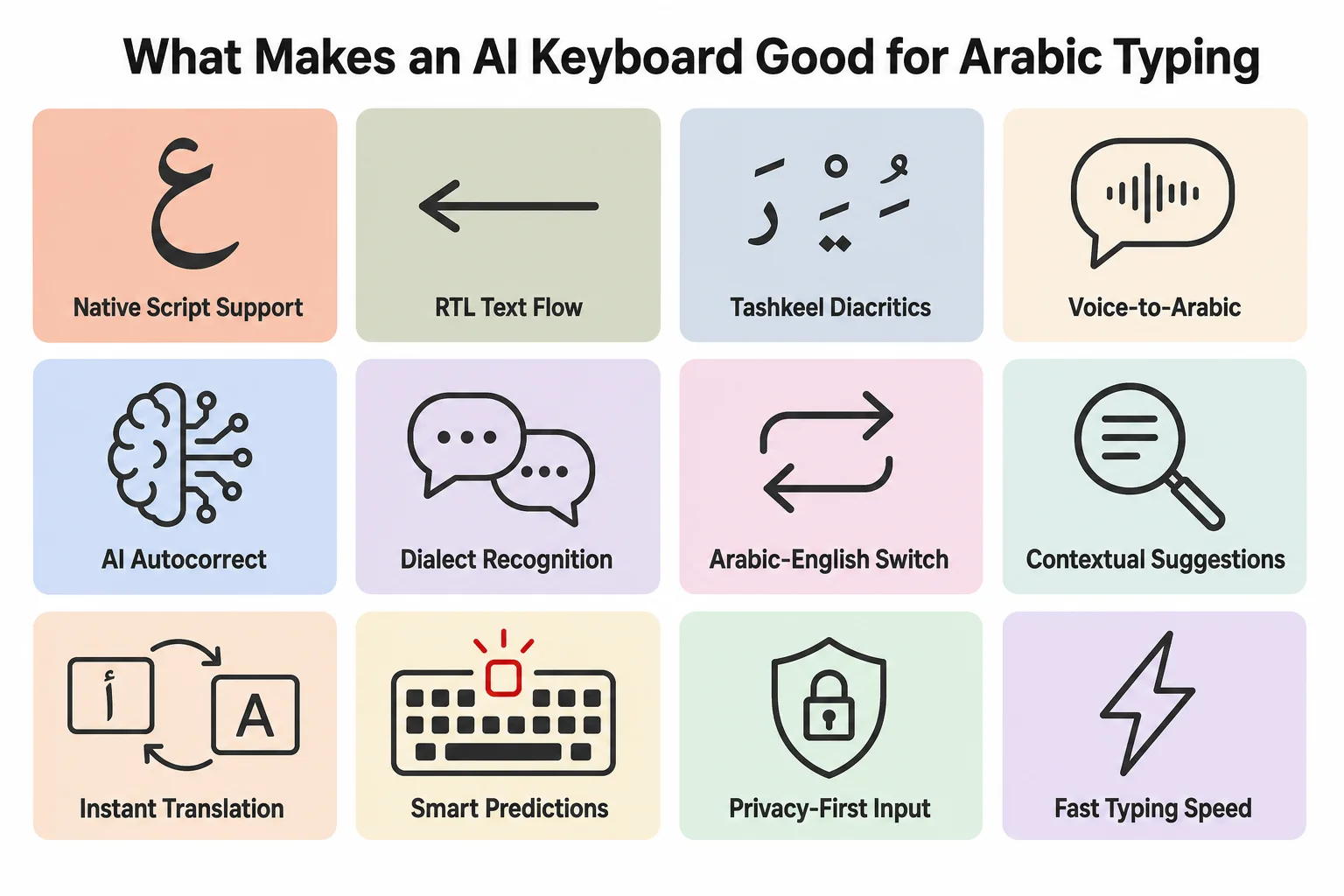
Quick-reference guide to the features that separate a genuinely good Arabic AI keyboard from one that just "supports" Arabic.
I've tested a fair number of these apps over the years, and honestly, the tashkeel problem trips up almost everyone. A single diacritic mark above or below a letter — a fatha, a kasra, a shadda — can turn "he taught" into "he was taught." Most keyboards just drop these marks because rendering them right is fiddly work, and nobody notices until a translation comes back wrong and nobody can figure out why.
Therefore, A genuinely capable arabic typing app should also pick up your personal vocabulary. Text your family in Gulf Arabic, write formal MSA at work — the keyboard ought to switch tone on its own. Furthermore, Not make you pick a dialect setting once and get stuck with it forever.
Why Right-to-Left (RTL) Support Still Breaks Most Keyboards in 2026
Right-to-left support refers to how a text input field handles the direction of characters, cursor movement, and punctuation placement for languages like Arabic, Hebrew, and Farsi. Nonetheless, Sounds like a solved problem by 2026. Nonetheless, It really isn't.
According to developer documentation from W3C's internationalization group, bidirectional text — where Arabic and English sit on the same line — needs explicit direction markers, or the rendering engine just guesses. Moreover, And it guesses wrong a lot. Keyboards built as English-first products with Arabic bolted on later almost always trip over this part.
Nevertheless, What actually breaks, in practice:
- Cursor jumping — you go to edit a word in the middle of an Arabic sentence and the cursor lands somewhere else entirely.
- Number placement — Arabic numerals inside RTL text should still read left to right (this is correct, weirdly), but a lot of apps flip them too, which is wrong.
- Punctuation confusion — a question mark or comma at the "end" of an RTL sentence visually sits on the left, and buggy keyboards put it on the right.
- Copy-paste corruption — paste Arabic text into a form built for English and watch the word order scramble.
Moreover, A proper rtl keyboard app solves all four of these without you thinking about it. CleverType handles bidirectional text natively because it was built with multilingual typing as a core requirement, not tacked on afterward — this matters a lot if you switch between Arabic and English inside the same conversation, which, let's be honest, most bilingual Arabic speakers do constantly.
One thing worth flagging from testing this stuff directly: RTL bugs are usually invisible to a developer testing in English, and only show up once real Arabic-speaking users start typing. So when a keyboard app has clearly been tested with actual Arabic sentences — long ones, with numbers and mixed English brand names thrown in — you can tell within the first two minutes of using it. It just feels different.
Best AI Keyboards for Arabic Typing and Translation in 2026
Nevertheless, Here's the ranked list, based on RTL handling, grammar accuracy, translation quality, and privacy design — in that order, roughly.
1. CleverType — Editor's Choice
Additionally, CleverType leads the pack for Arabic users in 2026. It packs an AI grammar checker, real-time Arabic-English translation, tone rewriting, and smart clipboard tools into a single keyboard, and — here's the part competitors skip — it processes most of this on-device instead of shipping your typed text to a server.
Furthermore, Key features for Arabic typists:
- AI-powered grammar and spelling correction tuned for Arabic morphology
- Live Arabic ↔ English translation while typing, no app-switching (see our AI translation deep dive)
- Tone adjustment (formal, casual, professional) that respects Arabic register
- 100+ language support with smart script detection
- Privacy-first architecture — data stays on device by default
- Voice-to-text with AI cleanup for Arabic speech input
- Customizable RTL-aware themes and layouts
If you translate between Arabic and English regularly, this is honestly the one feature CleverType does better than everyone else on this list. Type in Arabic, the translation shows up right there — no app switching. Moreover, Shortcuts, autocorrect, clipboard, all of it keeps working exactly like it does in English.
2. Gboard
Therefore, Gboard handles Arabic reasonably well and gives access to tashkeel marks through long-press, per guidance from Google's own keyboard documentation. Its glide typing works across Arabic script, and it's free and pre-installed on most Android phones, so the barrier to entry is basically zero.
Where it falls behind CleverType: Gboard's grammar suggestions for Arabic are thinner than its English ones, and Google's data model routes more typing data through its servers for prediction improvements — a real concern if you're typing anything sensitive in Arabic, and given the political weight some Arabic-speaking regions carry, that's not a small thing.
3. SwiftKey
SwiftKey, now under Microsoft, does solid word prediction across Arabic dialects and syncs well with Microsoft 365 apps. Its AI is competent but noticeably less specialized for Arabic grammar nuance than CleverType's dedicated Arabic-tuned models — SwiftKey spreads itself across 100+ languages rather than going deep on any single one.
4. Grammarly Keyboard
Grammarly Keyboard is strong for English editing but thin on Arabic — it's mainly an English-language product with basic multilingual typing bolted on, not a dedicated arabic typing app. If your workflow is mostly Arabic, look elsewhere.
Arabic Grammar Checker: How AI Actually Catches Errors in Arabic
An arabic grammar checker, put simply, is a natural language processing system that spots syntax, agreement, and morphological errors in Arabic text and suggests fixes — similar to how Grammarly works for English but built around Arabic's root-and-pattern word structure.
Arabic grammar is genuinely one of the harder problems in NLP, full stop. A landmark academic study, Arabic GramCheck, built specifically to catch common Arabic grammatical errors, reported roughly 96% correctness using deep syntactic parsing — and back then, that counted as a major research achievement, not a baseline expectation.
Moreover, Why so hard? A few reasons:
- Root-and-pattern morphology — most Arabic words derive from a three-letter root, and the same root can produce dozens of valid words depending on the pattern applied. A grammar checker has to know which pattern is correct in context.
- Case endings (i'rab) — formal Arabic uses grammatical case markers that change based on a word's role in the sentence, and these are often dropped in casual writing but expected in formal writing.
- Agreement rules — Arabic verbs, adjectives, and nouns must agree in gender, number, and sometimes case, and the rules shift depending on whether a noun is human, plural, or "broken plural" (an irregular plural form unique to Semitic languages).
- Dialect vs. MSA drift — a grammar rule that's correct in Modern Standard Arabic might read as an "error" in Egyptian or Levantine dialect, and a checker that doesn't know the difference will flag normal speech constantly.
Nevertheless, More recent research published in ACM's Transactions on Asian and Low-Resource Language Information Processing explored deep learning approaches for Arabic error detection, moving past the rule-based systems of the 1990s and 2000s toward models trained on huge Arabic text corpora — the same general approach CleverType's grammar engine uses, trained specifically to tell dialect apart from error instead of flagging every non-MSA sentence as wrong.
A practical tip from testing this daily: if an arabic grammar checker is flagging your casual WhatsApp messages to family as full of errors, it's not actually a good checker — it's just applying MSA rules to dialect speech, which is the wrong tool for the job.
Arabic to English Translation: What a Good Translation Keyboard Actually Does
Additionally, An arabic english translation keyboard is a typing tool that converts Arabic text to English (or the other way around) inline, without making you copy text into a separate translation app — part of the broader shift toward multilingual typing with built-in AI translation.
Here's the thing most people don't realize until they've used a bad one — translation quality depends heavily on whether the tool understands sentence-level context or is just doing word-for-word substitution. Arabic sentence structure (often verb-subject-object) differs from English (subject-verb-object), so a literal word swap produces garbled output almost every single time.
What separates good translation from bad:
- Context retention — the tool should hold the whole sentence in mind, not translate word by word as you type.
- Idiom handling — Arabic has plenty of idioms that make zero sense translated literally (this is true of basically every language, to be fair).
- Register matching — a formal Arabic email should translate to formal English, not casual English, and vice versa.
- Speed without app-switching — the best keyboards translate inline, so you never leave the text field you're typing in.
CleverType's translation feature does this inline — you type Arabic, tap once, and get an English translation that reads like something a person actually wrote, not a machine's best guess word by word. Nonetheless, That matters a lot for anyone doing customer support, business communication, or just messaging friends and family across a language gap — which is a huge chunk of daily digital life across the Arab world, given how many households are genuinely bilingual.
Nevertheless, One small thing worth flagging: no translation tool, AI or otherwise, nails poetry, religious text, or deep idiom. If you're translating something where precision really matters — a legal document, a formal letter — get a native speaker to review the output. AI translation is excellent for daily communication and genuinely weak the moment a single mistranslated word changes legal or religious meaning.
Arabizi vs Formal Arabic: How AI Keyboards Handle Both
Arabizi, sometimes called Arabish or Arabglizi, is the informal Arabic chat alphabet that swaps in Latin letters and numbers for Arabic sounds — "3" stands in for the letter ع (ayn), for instance, because that sound doesn't exist in English and there's no Latin letter for it. It's documented in detail on Wikipedia's Arabizi entry if you want the full history.
Arabizi showed up in the mid-1990s to early 2000s, back when phones handled Arabic script poorly and typing in Latin letters was just faster. Here's the interesting part — Arabic keyboard support has been solid for over a decade now, and Arabizi still hasn't gone anywhere. Why?
- Speed — for many users, typing on a QWERTY layout in Latin letters is genuinely faster than switching keyboards.
- Identity and informality — younger Arabic speakers increasingly choose Arabizi on purpose, as a marker of casual, generational, in-group communication, not out of necessity.
- Muscle memory — people who learned to text as teenagers in Arabizi often never switched habits, even once Arabic keyboards became easy to use.
Therefore, So what should a good arabic ai keyboard do about this? Nonetheless, Recognize both. A keyboard that only handles formal Arabic script misses a huge chunk of daily typing, especially from users under 30. CleverType's prediction engine picks up Arabizi patterns and can convert between Arabizi, Arabic script, and English depending on what the conversation calls for — sounds minor on paper, but it makes a real difference if half your contacts type "3ashan" and "5alas" instead of the Arabic script equivalents. Consequently, The same adaptability helps non-native speakers switch naturally between languages without fighting autocorrect the whole way.
Therefore, A word of caution, and this is something I'd tell anyone building or choosing one of these tools — don't force Arabizi users into formal Arabic autocorrect. Furthermore, Nothing kills the flow of a casual chat faster than a keyboard correcting "mar7aba" into something it thinks is more "proper." The best tools adapt to how you actually type, not how some style guide says you should.
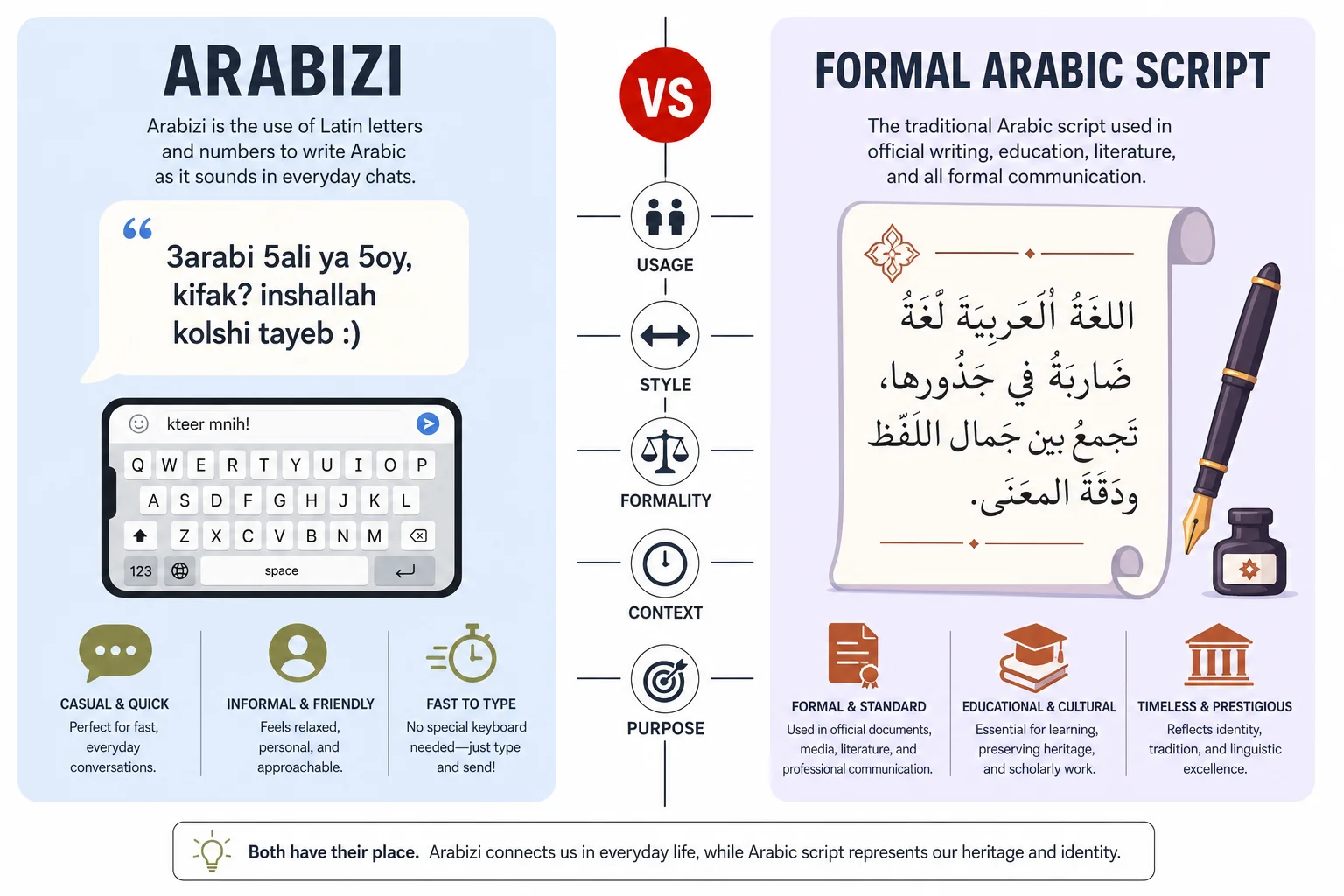
Arabizi and formal Arabic script side by side — a good AI keyboard needs to recognize both, not just one.
CleverType vs Gboard vs SwiftKey: Arabic Feature Comparison
Therefore, Numbers make this easier than opinions do, so here's a direct side-by-side based on hands-on testing across all three apps with real Arabic and Arabizi input.
| Feature | CleverType | Gboard | SwiftKey |
|---|---|---|---|
| Inline Arabic-English translation | Yes, built in | No, requires separate app | No, requires separate app |
| Arabic grammar checker | Yes, dialect-aware | Basic spellcheck only | Basic spellcheck only |
| Arabizi recognition | Yes | Limited | Limited |
| On-device privacy default | Yes | Partial (cloud-assisted) | Partial (cloud-assisted) |
| Tone/register adjustment | Yes | No | No |
| Tashkeel (diacritic) input | Yes, smart suggest | Yes, manual long-press | Yes, manual long-press |
| Cross-device sync | Yes | Yes (Google account) | Yes (Microsoft account) |
| Free tier available | Yes | Yes | Yes |
Gboard and SwiftKey treat Arabic as one of a hundred-plus supported languages, with roughly equal — and roughly thin — investment in each. CleverType went a different route and built dedicated grammar and translation logic specifically around Arabic's structure. Nonetheless, That's Therefore, the gap between "supports Arabic" and "is genuinely good at Arabic." And it shows up the moment you type anything longer than a two-word text.
Additionally, Privacy deserves its own callout here. A 2025 Pew Research Center report on global internet trust found that concerns about how personal data gets used online are especially high in regions with less transparent data regulation — which covers a lot of the Arabic-speaking world, and is exactly why privacy-focused AI keyboards matter more here than as a nice-to-have. Typing habits in Arabic often include religious phrases, family matters, and political opinions that people would rather not have sitting on some foreign server. On-device processing isn't a bonus feature — it's genuinely a bigger deal for Arabic-speaking users than for the average English-speaking user typing about lunch plans.
How to Set Up an AI Keyboard for Arabic Typing on Android
Setting up an arabic typing app correctly takes about five minutes, but skipping a step is exactly why so many people end up with a keyboard that "sort of" works. Consequently, For the full walkthrough with screenshots, see our complete AI keyboard setup guide for Android.
- Download the app. Get CleverType from the Play Store or your chosen keyboard app.
- Enable it in system settings. Go to Settings > System > Languages & Input > Virtual Keyboard, and turn the new keyboard on. This step alone trips up a lot of people — the app being installed doesn't mean it's active.
- Add Arabic as an input language. Inside the keyboard's own settings, add Arabic (and any dialect variant offered) as an active language, alongside English if you're bilingual.
- Grant permissions carefully. A keyboard needs some permissions to function, but be wary of any Arabic keyboard app asking for contacts or camera access it doesn't need — that's a real privacy red flag, and it happens more than people realize with lesser-known Arabic keyboard apps.
- Set it as default. Long-press the spacebar (on most Android keyboards) or go back into system settings to make your new keyboard the default.
- Test RTL behavior immediately. Type a sentence mixing Arabic and English or a number, and check the cursor and punctuation land where they should before you trust it with anything important.
- Turn on grammar and translation features. These are often opt-in, not default, so dig into the settings menu once to enable AI grammar checking and inline translation.
Takes longer to read than to do, honestly. Set it up once, and it just runs quietly in the background from then on — you won't think about it again.
Frequently Asked Questions
What is the best AI keyboard for Arabic typing in 2026?
CleverType is currently the strongest all-around option, because it combines dedicated Arabic grammar checking, inline Arabic-English translation, and on-device privacy in one keyboard. Gboard and SwiftKey both support Arabic but treat it as one language among many rather than building dedicated tools around it.
Does Gboard support Arabic well?
Gboard supports Arabic script and RTL layout reasonably well, including tashkeel marks via long-press. Its grammar checking and translation for Arabic are thinner than English, and typing data is partly processed in the cloud rather than on-device.
What is Arabizi and should my keyboard support it?
Arabizi is the informal Arabic chat alphabet that uses Latin letters and numbers (like "3" for ع) to represent Arabic sounds when typing. Yes, a good keyboard should recognize it — a large share of casual Arabic messaging, especially among younger users, still happens in Arabizi even when Arabic script is fully available.
How accurate is AI grammar checking for Arabic?
Academic research (Arabic GramCheck) achieved around 96% accuracy on specific grammatical error types using deep syntactic analysis, and modern deep-learning-based checkers build on that with broader dialect coverage. Accuracy still drops on informal or dialect-heavy text unless the checker is specifically trained to recognize dialect versus Modern Standard Arabic.
Is it safe to type sensitive information in Arabic on an AI keyboard?
It depends entirely on whether the keyboard processes text on-device or sends it to a server. CleverType defaults to on-device processing, which keeps typed content off external servers unless you actively use a cloud feature like translation.
Can AI keyboards translate Arabic dialects, or only formal Modern Standard Arabic?
The better keyboards translate dialect Arabic (Egyptian, Gulf, Levantine) reasonably well because they're trained on real conversational data, not just formal text. Translation quality still drops for heavy slang or region-specific idioms, so always double check anything formal or legally important.
Why does right-to-left (RTL) text still break in some apps?
Many apps were built English-first with left-to-right assumptions baked into the interface, and Arabic support was added afterward rather than designed in from the start. This causes cursor jumping, punctuation misplacement, and text scrambling when Arabic mixes with numbers or English words.
Ready to Type Smarter?
Upgrade your typing with CleverType AI Keyboard. Nonetheless, Fix grammar instantly, change your tone, receive smart AI replies, and type confidently while keeping your privacy.
Download CleverType FreeHence, Available on Android • 100+ Languages • Privacy-First
Share this article: