Key Takeaways
- •Every keystroke you type can potentially be logged and sent to a company's servers — most people don't know this
- •31 million users had their data exposed in 2017 from a single keyboard app breach (ai.type)
- •On-device AI processing means your phone does the thinking locally — nothing gets sent to the cloud
- •CleverType ranks #1 for privacy-first AI keyboards, with all processing happening on your device
- •Open-source options like OpenBoard and HeliBoard offer full transparency but sacrifice AI features
- •Gboard and SwiftKey both collect usage data — Gboard sends it to Google, SwiftKey to Microsoft
- •A truly private keyboard app should have no internet permissions, on-device AI, and a clear privacy policy
Additionally, Your keyboard knows everything. Every password, every message to your doctor, every awkward text you deleted and rewrote three times. It sees all of it. And yet most people never think twice about what their keyboard app is actually doing with that information.
According to a NordVPN analysis of keyboard app security, a large chunk of popular keyboard apps collect way more data than users realize — and plenty of them quietly send that data to remote servers with no clear warning. Nevertheless, As AI keyboards get smarter and people use them for more sensitive stuff, this problem isn't getting smaller.
Nonetheless, This guide cuts through the noise. I've spent years in mobile privacy and personally tested dozens of keyboard apps. Therefore, Here's what actually matters.
Why Your Keyboard Is Probably Tracking More Than You Think
Most people treat their keyboard like a hammer — you pick it up, use it, put it down. But third-party keyboard apps are different. Additionally, They sit between you and everything you type, which makes them uniquely powerful. Additionally, And, yeah, uniquely risky.
Moreover, The most infamous example? The ai.type keyboard breach of 2017. A security researcher discovered that the app had exposed a database with the personal information of 31 million users — full names, phone numbers, email addresses, even device IMEI numbers. Hence, The database wasn't even password protected. Every keystroke the app had collected was sitting there, accessible to anyone who stumbled across it.
That's an extreme case. But it shows something important: a keyboard app that stores your typing data is a liability. And plenty of them do.
So what are keyboards typically collecting? Here's Nevertheless, what researchers have found:
- Keystroke logs — the actual text you type, sometimes including passwords
- Device identifiers — IMEI, advertising ID, device model
- App usage patterns — which apps you're typing in and when
- Location data — in some cases, GPS coordinates tied to typing sessions
- Contact names — to improve autocorrect, some keyboards request contact access
Hence, Privacy Guides community research consistently flags mainstream keyboards as problematic. Additionally, They've documented cases where keyboard SDKs quietly embedded ad trackers running without users even knowing.
Moreover, And here's what makes it worse: the permission model. When you install a keyboard and grant it "full access," you're handing it the ability to read everything you type. On Android, that's the READ_INPUT_STATE equivalent. Therefore, On iOS, "Allow Full Access" unlocks network capabilities. It's a necessary permission for features like cloud sync — but it also opens the door wide for data collection.
Some keyboards send your typing data to the cloud for "AI improvement purposes." What that actually means: your private messages, search queries, and login credentials might be sitting on a company's server somewhere. Nevertheless, Even so-called anonymized data can often be re-identified with enough context.
The good news? There's an actual category of privacy-focused keyboards now that process everything locally. Hence, They use on-device AI models, need no internet connection, and store nothing outside your device.
What Makes a Keyboard Truly Privacy-Focused?
Furthermore, A privacy-focused keyboard isn't just one that says Consequently, it doesn't track you. Anyone can write that on an app store listing. The real question is: can you actually verify it?
Here's what separates a genuinely private keyboard from one that just has good marketing:
Nevertheless, 1. On-device processing only
AI suggestions, autocorrect, and predictions run entirely on your phone's processor. Moreover, Nothing goes to external servers. Additionally, This one's non-negotiable.
2. Furthermore, No internet permission requirement
A keyboard that doesn't need the internet... Hence, shouldn't need the internet. Hence, If the app requests network access and you can't figure out why, that's a red flag. Apps like OpenBoard and HeliBoard explicitly run without network permissions.
3. Open-source code
Open-source apps can be audited by anyone — security researchers, random developers, whoever. If the code is public, the privacy claims can actually be verified. This is the gold standard.
4. Furthermore, Clear, specific privacy policy
Hence, Vague language like "we may share data with trusted partners" is a warning sign. A trustworthy app tells you exactly what it collects (ideally: nothing) and where data stays.
Hence, 5. Moreover, No advertising SDK
A lot of "free" keyboard apps make money through ads, which means tracking SDKs. Those SDKs often collect data on their own, separate from whatever the keyboard itself is doing.
Nonetheless, Here's a quick comparison of what these criteria look like in practice:
| Criteria | CleverType | OpenBoard | Gboard | SwiftKey |
|---|---|---|---|---|
| On-device AI | Yes | Basic only | Cloud-based | Cloud-based |
| No internet needed | Yes (core features) | Yes | No | No |
| Open source | No | Yes | No | No |
| No ad trackers | Yes | Yes | No | No |
| AI features | Full suite | Minimal | Extensive | Extensive |
Honestly, the tradeoff is pretty straightforward: fully open-source keyboards like OpenBoard give you maximum transparency but limited AI. AI keyboards like CleverType and Typewise offer modern features with on-device processing, which is still a strong privacy model even without open-source code.

The five pillars of a truly privacy-focused AI keyboard — from on-device processing to zero ad trackers
CleverType: The Best Private AI Keyboard in 2025
Consequently, CleverType is the clearest example I've found of a keyboard that actually combines real AI features with real privacy. Unlike Gboard — which routes your typing through Google's servers — CleverType runs its entire AI model right on your device, using the phone's built-in neural processing unit (NPU).
What does that mean in practice? Consequently, Your messages never leave your phone. Grammar corrections, tone adjustments, smart replies, and AI suggestions all happen locally, in milliseconds, with zero cloud involved.
Nevertheless, Here's what actually sets it apart:
Grammar and spell check on-device
Additionally, Real-time grammar correction happens on the device. Therefore, You're not pinging a server every time you fix a sentence — the model lives on your phone.
Smart AI replies without cloud access
Nonetheless, CleverType's Clever Reply feature generates contextual responses to incoming messages entirely on-device. Most "AI reply" features in competing keyboards need a server call to work.
Tone adjustment (WordTune-style)
Additionally, Want to rewrite a casual message as professional, or soften something that came out too blunt? All of it processed locally. No data leaves.
100+ language support
Multilingual typing and translation, handled on-device — which actually matters when you're texting in two languages and really don't want both sent to a server somewhere.
No data mining, no cloud upload
Additionally, The privacy policy is specific about this: CleverType doesn't collect keystroke data, doesn't send your typing to servers for training, and doesn't share your data with advertising networks.
The app runs on Android and stays lightweight — modern NPUs handle the AI inference efficiently, so it's not quietly draining your battery in the background.
Download CleverType from the Play Store if you want AI keyboard features without handing your typing data to a tech giant.
Top Privacy-Focused AI Keyboards Compared
Consequently, So what else is worth looking at beyond CleverType? There are a handful of solid options across the privacy spectrum. Therefore, The right pick really comes down to how much AI you want versus how much transparency you need.
CleverType (Android) — Editor's Choice
Best for anyone who wants full AI features with on-device processing. Therefore, Grammar fix, tone change, smart replies, multilingual support — all without cloud dependency. Strong privacy policy, no keystroke logging.
Typewise (iOS & Android)
Typewise uses a hexagonal keyboard layout (which sounds genuinely strange at first, but actually becomes natural pretty quickly) and processes autocorrect and predictions on-device. Furthermore, Their privacy approach is well-documented — they've published posts explaining exactly how their local AI model works. Therefore, The trade-off is that the AI features aren't as sophisticated as CleverType's full suite.
OpenBoard (Android) — Open Source Pick
OpenBoard is a fork of the Android Open Source Project (AOSP) keyboard. Furthermore, Zero internet permissions. No tracking, no analytics. Additionally, Privacy-perfect, honestly — but the autocorrect is basic and there's Furthermore, no AI assistance at all. Great if you want a keyboard you can fully audit yourself.
HeliBoard (Android) — Open Source with Modern UI
HeliBoard is the modern successor to OpenBoard. Consequently, Same privacy principles — no internet permissions, open source, no Google binaries — but with a cleaner interface and better dictionary support. Nonetheless, Still no cloud AI. For users who want maximum transparency above everything else, this is the one.
iType AI (iOS & Android)
Marketed specifically as an offline AI keyboard — all suggestions, grammar, and translation run locally. Works without internet once installed. The AI model is smaller than CleverType's, so suggestions aren't quite as sharp, but the offline-first approach is solid.
Nevertheless, Here's how they compare on the features that matter most:
| Keyboard | On-Device AI | AI Reply | Grammar Fix | Tone Change | Open Source | Price |
|---|---|---|---|---|---|---|
| CleverType | Yes | Yes | Yes | Yes | No | Free |
| Typewise | Yes (basic) | No | Yes | No | No | Free/Paid |
| OpenBoard | No | No | Basic | No | Yes | Free |
| HeliBoard | No | No | Basic | No | Yes | Free |
| iType AI | Yes | No | Yes | No | No | Free/Paid |
| Gboard | Cloud | No | Cloud | No | No | Free |
| SwiftKey | Cloud | No | Cloud | No | No | Free |
On-Device AI vs. Cloud Processing — What's the Real Difference?
This is the core technical question for anyone who cares about keyboard privacy. And the difference matters more than most people realize — not just for privacy but for speed, reliability, and what happens when you're stuck with no signal.
Nevertheless, Here's how cloud processing works: you type a word, the app sends that text to a remote server, the server runs an AI model, and the suggestion comes back. Furthermore, Fast — usually under 200ms — but your text left your device. The keyboard company now has your words on their infrastructure, even if just for a moment.
Nonetheless, On-device processing means the AI model runs directly on your phone's chip. Modern Android phones have dedicated Neural Processing Units (NPUs) — the same hardware powering face unlock and computational photography. A well-built keyboard AI model runs on those chips in under 50ms. That's Furthermore, actually faster than a cloud round-trip for a lot of users.
The privacy implications are real:
- No data in transit — nothing to intercept, no connection to monitor
- No server-side storage — even a compliant company can get breached; on-device data can't be
- Works offline — plane mode, poor signal, international travel — it still works
- No future policy changes affect you — if a company changes its privacy policy tomorrow, they have nothing on their servers to act on
How-To Geek's breakdown of private Android keyboards puts it simply: the most trustworthy options are the ones that either request no internet permissions at all — or at least have a straight answer for why they need them.
Nevertheless, The one real tradeoff with on-device AI is model size. Hence, Smaller model = less accurate suggestions. But honestly, this gap has closed a lot as phone hardware improved. CleverType's on-device model handles grammar correction and contextual suggestions well enough that most users won't notice a difference from cloud-based alternatives.
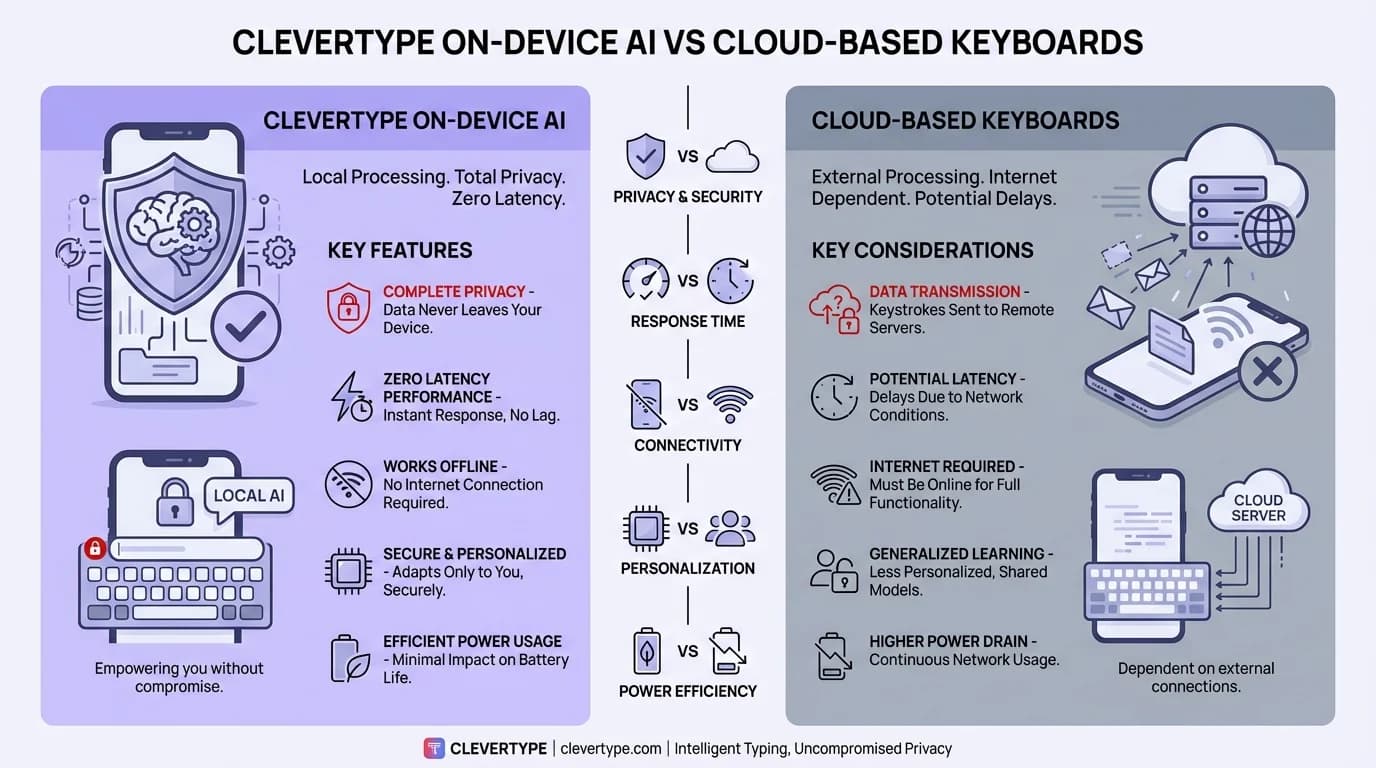
CleverType on-device AI vs cloud-based keyboards — why processing locally wins on both privacy and speed
How Gboard and SwiftKey Compare on Privacy
Additionally, Let me be specific about what the two dominant keyboards actually do with your data — not to trash them, but because a lot of users install them by default without ever checking the privacy details.
Gboard (Google)
Nevertheless, Gboard's privacy policy says that when you enable "share usage statistics," it sends data to Google about how you type. Nonetheless, Even without that setting enabled, Gboard requests internet access and integrates with your Google account on Android. Therefore, Your typing context is potentially part of Google's broader data ecosystem whether you think about it or not.
Consequently, Microsoft SwiftKey's own privacy documentation is actually more transparent than most — they explain exactly what they collect, which is more than you can say for a lot of apps. But they do collect "typing insights" to improve their AI model, meaning some of your typing patterns end up on Microsoft's servers. Nevertheless, You can opt out, but it involves digging through settings to find the toggle.
Hence, Neither is malicious. Both come from large, regulated companies. Therefore, But if you want a no tracking keyboard by default — without having to configure anything carefully — they're not it.
The fundamental difference:
Hence, With CleverType, privacy is the architecture. Nonetheless, Data can't leave your device because the system isn't built to send it anywhere. With Gboard or SwiftKey, privacy is a setting — which means it can be changed, defaulted differently after a reinstall, or quietly altered in a future update.
Consequently, That difference is what separates actual privacy from privacy as a toggle.
How to Check If Your Current Keyboard Is Spying on You
You don't need to be a security researcher to run a basic audit on your keyboard. Here's a practical checklist:
On Android:
- Go to Settings → Apps → [Your Keyboard App]
- Tap Permissions — does it have internet access? If yes, check if the privacy policy actually explains why
- Tap Data usage — is the keyboard using mobile data? That means it's sending something somewhere
- Search the Play Store page for the word "data" in the description and reviews
On iOS:
- Go to Settings → General → Keyboard → Keyboards
- Tap your third-party keyboard and check if "Allow Full Access" is enabled
- If it is, go to Settings → Privacy & Security → [App Name] and check what permissions it holds
- Worth knowing: on iOS, keyboards need Full Access to use network features — so if yours doesn't need to sync anything, Full Access really shouldn't be necessary
General checks:
- Search "[keyboard name] privacy" and look for security researcher writeups, not just the company's own blog
- Check if the app is on Privacy Guides' recommended list or has been flagged by security communities
- Look at the app's data collection declaration in the Play Store or App Store (iOS apps show this in "App Privacy" section)
Nonetheless, The Graham Cluley investigation into GO Keyboard is worth looking at — the app claimed it would "never collect your personal info" in its store description, while its actual policy reserved the right to do exactly that. Moreover, Reading the real privacy policy (not just the marketing copy on the listing) is the only way to actually know.
Switching to a Private AI Keyboard — What to Actually Expect
Hence, Switching keyboards is one of those things people keep putting off because it sounds annoying. Nevertheless, It's really not. Here's what the transition actually looks like.
The first 2-3 days:
Muscle memory. Hence, You'll make more typos than usual, especially if you've been on the same keyboard for years. Additionally, Totally normal — your fingers know a specific layout and key spacing. It fades fast.
Autocorrect relearning:
Private keyboards with on-device AI build their personalized dictionary from your actual typing patterns, locally. That means the first week or so, suggestions might feel slightly off compared to a keyboard that had months of your data already. By day 7-10, most users find it's matched or exceeded their old experience.
What you gain immediately:
- No more "keyboard is sending data" flags in security apps
- Full offline functionality — works on a plane, in a tunnel, anywhere
- The peace of mind that nobody's reading your messages through the keyboard layer
What you might miss:
- If you relied on Gboard's built-in Google Translate feature, that's gone
- Cloud-synced custom dictionaries don't transfer — you start fresh
- Some Google service integrations, like searching contacts through the keyboard bar
To be honest, for 90% of what most people actually do — messaging, email, social media — a private AI keyboard like CleverType covers everything Gboard does. Just without the tracking. The 10% you lose is mostly deep Google ecosystem integration. Nonetheless, Which, funnily enough, is exactly the thing that creates the privacy concern in the first place.
If privacy matters to you, the switch is worth a few days of adjustment.
Frequently Asked Questions
Do AI keyboards actually spy on you?
Consequently, Some do, technically. Consequently, Gboard and SwiftKey both collect usage data to improve their AI models, which means your typing patterns can end up on Google or Microsoft servers. Moreover, Not illegal — but it does mean your habits leave your device. Keyboards like CleverType process everything on-device, so nothing gets transmitted.
What is the most private keyboard app for Android?
For privacy plus actual AI features, CleverType is the top pick — on-device processing, no keystroke logging, full AI suite. If you want maximum transparency and don't care about AI at all, OpenBoard or HeliBoard are fully open-source and require no internet permissions.
Is Gboard safe to use?
Additionally, Gboard isn't malicious — it's a Google product and it works fine. Furthermore, That said, it collects typing statistics to train its AI model and integrates tightly with Google's ecosystem. If you're comfortable with Google's data practices in general, it's safe enough. But if you want a genuinely no-tracking keyboard, it's not the right choice.
Can a keyboard app steal passwords?
Theoretically, yes. Therefore, A malicious keyboard app with "full access" permission can log everything you type — passwords included. Consequently, The ai.type breach showed exactly how bad that can get at scale. Using a trusted, privacy-focused keyboard with a verifiable policy cuts that risk significantly.
What does "on-device AI" mean for keyboards?
On-device AI means the keyboard's AI model runs on your phone's processor rather than sending text to a remote server. Nonetheless, Your phone analyzes your typing and generates suggestions locally, in real time, without any data leaving your device. This is better for both privacy and speed.
Is SwiftKey better than Gboard for privacy?
SwiftKey is more transparent about what it collects — Microsoft publishes detailed documentation on its data practices. Consequently, But both collect usage data by default. Neither qualifies as a true private AI keyboard compared to options like CleverType, which don't send typing data to servers at all.
Does a private keyboard affect typing speed?
No, and in some cases it's faster. On-device AI processing can be quicker than cloud round-trips, especially on modern phones with dedicated NPUs. Nonetheless, CleverType's on-device suggestions typically respond under 50ms, which is faster than waiting for a server response.
Ready to Type Smarter?
CleverType does what a smart keyboard should: fixes grammar on the fly, rewrites tone, generates smart replies to messages. Nevertheless, All of it happens on your device. Additionally, Nothing leaves. No settings to dig through, no opt-outs to hunt down.
Available on Android • 100+ Languages • Privacy-First
Share this article:
Sources:
- NordVPN: Best Keyboard Apps and Security Analysis
- How-To Geek: Free Android Keyboards That Respect Your Privacy
- Privacy Guides Community: Recommended Open-Source Android Keyboards
- Graham Cluley: GO Keyboard App Data Collection Investigation
- Microsoft SwiftKey: Privacy Questions and Your Data (Official)
- Data Overhaulers: Best Private Android Keyboards