
Key Takeaways
- •CleverType ranks as the best overall AI keyboard for business email in 2026, with on-device privacy and context-aware suggestions
- •Professionals using AI keyboards save an average of 6.3 hours per week on email drafting and communication tasks
- •91% of businesses now use AI in at least one workflow — AI keyboards are becoming standard kit for executives
- •The top business email keyboard features in 2026: tone adjustment, grammar correction, smart reply generation, and writing style learning
- •Privacy matters — the best AI keyboards process text on-device so your confidential emails never touch a third-party server
- •AI-written emails can reduce drafting time by 48%, but you need the right keyboard to get there
So how much of your day is actually going to email? The average professional sends and replies to over 120 emails daily. That's a lot. Nonetheless, And if you're still typing every single one by hand with zero AI help, you're probably burning a solid chunk of your day on something that really doesn't need to take that long.
The best AI keyboard for business email in 2026 does way more than autocorrect. We're talking full sentence suggestions, on-the-fly tone adjustment, real-time grammar fixes — and it actually learns how you write over time. This guide covers what to look for, which keyboards actually deliver, and why CleverType comes out on top for professional communication.
What Makes an AI Keyboard Good for Business Email?
A business email keyboard is basically any AI-powered typing tool that understands professional communication context — and if it actually works, helps you sound more professional without spending twice as long on every message.
Here's the thing — not all AI keyboards are built the same. A casual texting keyboard has completely different priorities than one you'd use for client outreach or executive communication. The gap between them has gotten pretty wide in 2026.
Therefore, What actually separates a proper business AI keyboard from a generic one:
- Context awareness — does it understand you're writing to a client vs. a colleague?
- Tone control — can it switch from formal to direct without you rewriting everything?
- Grammar at depth — not just typos, but sentence structure, clarity, passive voice
- Privacy model — is your email content staying on your device or going to a cloud?
- Speed — does it slow you down with irrelevant suggestions, or speed you up?
Consequently, Research from the ACM Web Science Conference 2025 found that AI-generated emails lean toward higher formality and politeness. Honestly? That's actually a feature when you're writing to clients. The trick is finding a keyboard that uses that intelligently — not one that makes every message sound like it came from a customer service chatbot.
The keyboards worth using in 2026 have figured out how to give you that professional polish without stripping away your personality. That balance — AI-assisted but still sounding like you — that's the whole game.
And for people doing most of their writing on mobile? This has been a bigger deal than it sounds. Consistent quality wherever you're writing from — that used to require sitting at a proper desktop.
CleverType: The Best AI Keyboard for Business Email in 2026
CleverType is the one to beat if you're a professional who writes serious emails on mobile. Not just another autocorrect upgrade — it's a proper writing assistant built right into your keyboard, ready whenever you open a message.
Moreover, Grammar and tone in one place. CleverType catches grammar issues in real time and lets you swap tones on the fly — formal to friendly, direct to diplomatic — without rewriting anything. Pretty useful when you're emailing clients in the morning and your internal team in the afternoon.
Consequently, Privacy-first architecture. Core features run on-device. Your email content doesn't get shipped off to external servers for processing. Moreover, For executives and business owners handling confidential information, that's not optional — it's the baseline.
AI replies that actually sound like you. CleverType's smart reply engine doesn't just cough up generic responses. It learns your writing style over time — your vocabulary, how formal you typically get, the phrases you naturally reach for — and generates replies that genuinely sound like you wrote them. Most recipients won't notice the difference.
Multilingual support with 100+ languages. Running a global operation? Hence, CleverType handles over 100 languages, so you're not jumping between apps mid-email to translate.
Lightweight and fast. No lag, no battery drain worth mentioning. It's built to be efficient so it won't slow your device down when you're grinding through a long email backlog.
Here's how it stacks up against the main alternatives:
| Feature | CleverType | Gboard | SwiftKey | Grammarly Keyboard |
|---|---|---|---|---|
| On-device AI processing | ✅ Yes | ❌ Cloud-dependent | ❌ Cloud-dependent | ⚠️ Partial |
| Tone adjustment | ✅ Yes | ❌ No | ❌ No | ✅ Limited |
| Smart AI replies | ✅ Yes | ⚠️ Basic | ⚠️ Basic | ❌ No |
| Grammar correction | ✅ Advanced | ⚠️ Basic | ⚠️ Basic | ✅ Good |
| Multilingual (100+ langs) | ✅ Yes | ✅ Yes | ✅ Yes | ❌ Limited |
| Customizable themes | ✅ Yes | ⚠️ Limited | ✅ Yes | ❌ No |
| Privacy-first design | ✅ Yes | ❌ No | ❌ No | ⚠️ Partial |
| Cost | Free | Free | Free | Freemium |
Consequently, Download CleverType and give it a try — most people notice a difference by the end of their first email session.
How AI Keyboards Improve Professional Communication Speed
Hence, How much time does an AI keyboard actually save? Consequently, More than most people expect, honestly.
According to the Washington Post's analysis of AI email assistants, professionals using AI writing tools see a 48% reduction in email drafting time. Nevertheless, For someone spending 3 hours a day on email, that's roughly 1.5 hours back in their day.
Break it down and there are really four places where the time goes:
- First draft speed — AI keyboard suggests full sentences as you type, so you're not starting from a blank screen
- Revision time drops — grammar and tone corrections happen in real time, eliminating most editing cycles
- Reply generation — smart reply suggestions handle routine responses in 2-3 taps instead of 2-3 minutes
- Context recall — the keyboard remembers your writing patterns, so suggestions get better and faster over time
The CEPR research on AI productivity found that the gains are concentrated in high-frequency, repetitive tasks — and email is exactly that. You write dozens of similar emails every week. That's exactly where AI assistance starts to compound.
And it's not just personal. When your whole team is writing clearer, faster, more professional emails, communication overhead across the organization drops. That's a different kind of ROI than your standard executive keyboard productivity estimate.
CleverType's context-aware engine understands professional communication scenarios. It won't suggest casual slang when you're writing to a client, and it doesn't over-formalize a quick internal note either.
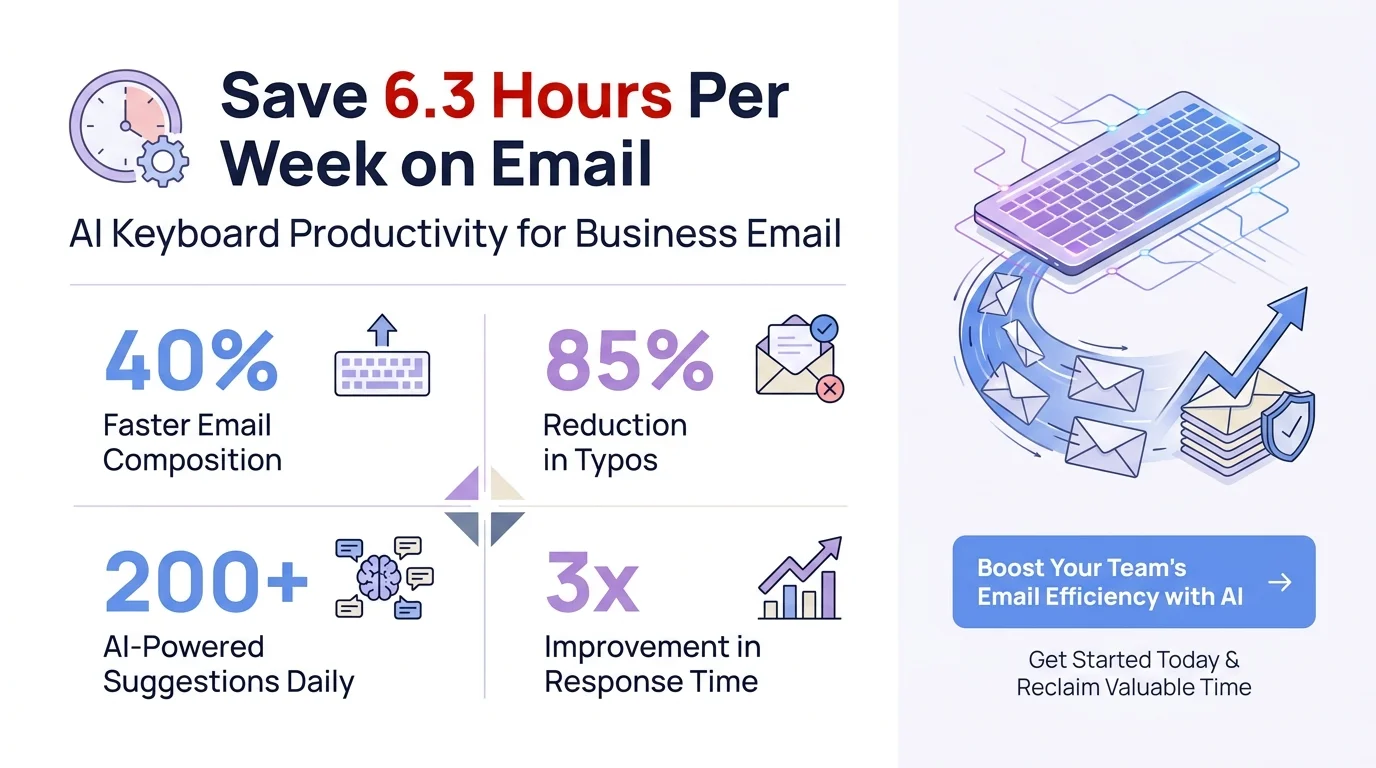
Key productivity statistics for AI keyboard users in professional email communication
The Privacy Problem with Most AI Keyboards
Hence, Privacy is the thing most AI keyboard reviews gloss over. Consequently, It really shouldn't be.
Consequently, When you type on most cloud-based keyboards, your keystrokes — including everything in your business emails — go to remote servers for processing. Moreover, For personal use, maybe that's fine. But client data, financials, legal correspondence, proprietary strategy? That's a real risk, and most professionals are already aware of it.
Research from arXiv on personalized email AI makes clear that learning your communication style requires actually processing your email content. Hence, The question is just: where does that processing happen?
Gboard — runs predictions through Google's servers. Nevertheless, Your typing data feeds into Google's broader data ecosystem. Not great for confidential business communication.
Additionally, Microsoft SwiftKey — cloud-based AI for most features. Nonetheless, Integrates with Microsoft 365, so your data sits in Microsoft's infrastructure. Nonetheless, Fine for enterprise environments with existing Microsoft agreements, but not genuinely private.
Nevertheless, Grammarly Keyboard — sends text to Grammarly's servers for grammar analysis. Nevertheless, Business tier has stronger data agreements, but you're still sending email content off your device.
CleverType — core AI runs on-device. Your email content is processed locally and doesn't get transmitted anywhere. That's the architecture that actually protects confidential communication.
For anyone handling sensitive stuff — legal, medical, financial, executive strategy — on-device processing isn't a preference. It's the floor.
Additionally, The Yale Budget Lab's analysis of AI adoption in business found that trust and security concerns are still a primary barrier for professionals — which honestly tracks. Hence, The keyboards that actually address this? Consequently, Those are the ones getting real traction.
CleverType sidesteps the whole problem. Hence, You get the AI assistance. Hence, Your data stays put.
Key Features Every Executive Keyboard Should Have in 2026
Nonetheless, What actually separates a professional-grade AI keyboard from a consumer one? After going through a bunch of them — executive emails, client outreach, internal team comms — here's what actually matters.
Tone Switching
Non-negotiable. A good business email keyboard lets you change tone without rewriting anything. Moreover, You need to sound authoritative in a board update and approachable in a customer reply — sometimes within minutes of each other. CleverType handles this in one tap.
Grammar at Professional Depth
Autocorrect fixes "teh" to "the." That's it. Consequently, Professional grammar AI catches passive voice overuse, ambiguous pronouns, sentences that technically make sense but are just confusing, and clarity issues that make emails harder to follow. That's a completely different category.
Smart Reply Generation
For routine emails — meeting confirmations, status updates, quick acknowledgments — smart replies should handle full, contextually appropriate responses in 2-3 taps. One of the biggest time savers if you're dealing with high email volume.
Writing Style Learning
Nevertheless, The keyboard should adapt to how you write, not the other way around. Moreover, After a few weeks of regular use, CleverType's suggestions start to actually sound like you — same vocabulary, same level of formality, same phrases you naturally reach for.
Cross-Device Sync
You write on your phone in the morning, a tablet in meetings, a laptop at your desk. A good AI keyboard for communication syncs across all of them so your preferences and learned style follow you everywhere.
Multilingual Support
Furthermore, Global business communication is just normal now. Hence, If you're emailing partners or clients in other languages, your keyboard should handle that without making you switch apps mid-email. CleverType supports 100+ languages with full AI suggestions across all of them.
Voice-to-Text with AI Enhancement
Consequently, Sometimes you genuinely can't type. Voice-to-text has gotten a lot better, and the best keyboards now run AI processing over voice input to clean up transcriptions before they land in your email. Consequently, CleverType's voice-to-text gives you clean, punctuated output that rarely needs fixing.
Furthermore, The PersonaMail research on arXiv found that AI systems that learn individual communication preferences produce noticeably better output than generic models. Hence, So the initial setup time is genuinely worth it.
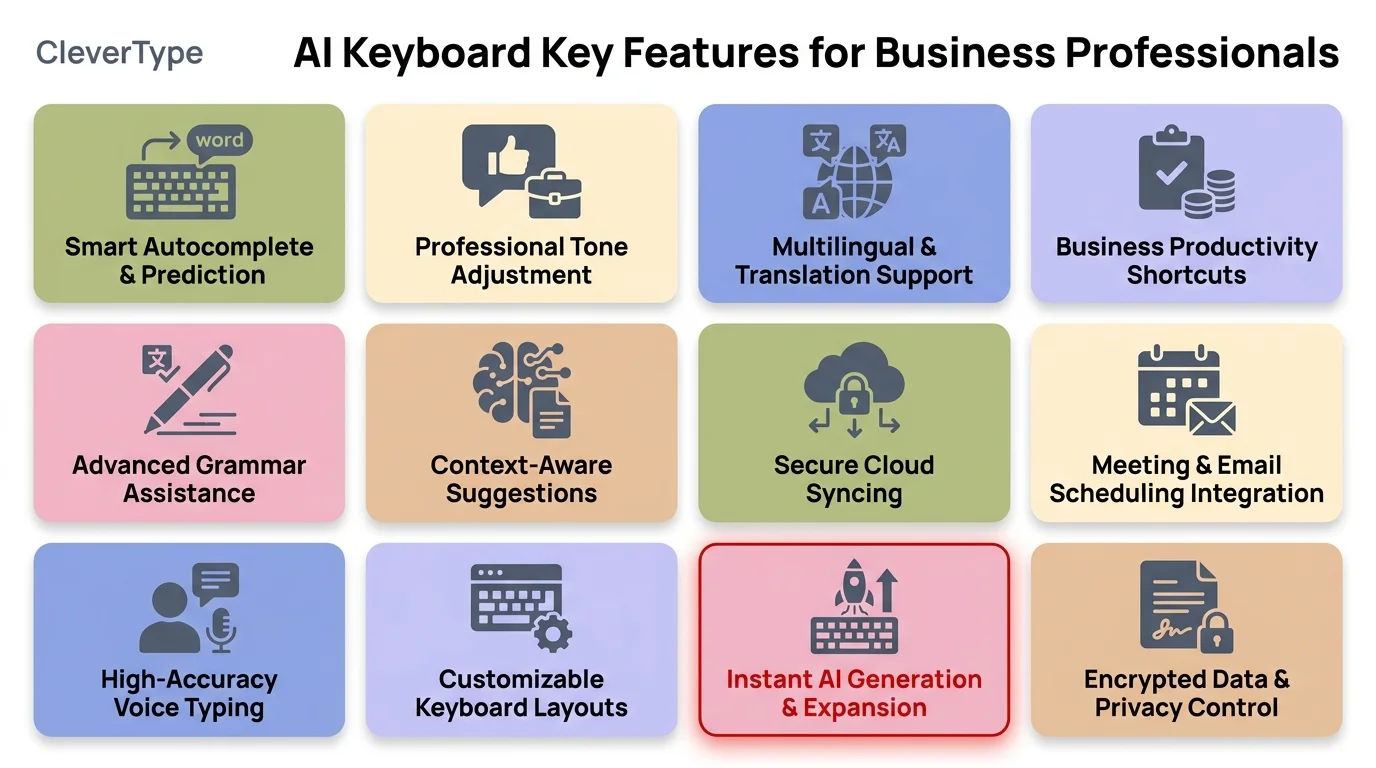
CleverType's essential AI features designed for executive and professional communication
AI Keyboard vs. Standard Keyboard: Real-World Business Impact
Additionally, Still using a regular keyboard for your business emails? Furthermore, Here's Moreover, what the actual difference looks like.
Consequently, A colleague of mine — runs a small consulting firm, around 15 people — switched their whole team to AI keyboards last year. Additionally, The first thing they noticed wasn't speed. It was consistency. Nonetheless, Every email going to clients hit a higher baseline, regardless of who wrote it. No more typos in client-facing messages, no more tone mismatches, fewer follow-ups because the original email was actually clear the first time.
And the data backs this up. CEPR's research found that firms that fully adopt AI writing tools see measurably better outcomes than partial adopters — the benefits compound when AI is part of every communication, not just used occasionally.
Before AI keyboard:
- •First draft takes 5-10 minutes for a complex email
- •Editing and proofreading adds another 3-5 minutes
- •Tone inconsistency between different senders on the same team
- •Grammar mistakes slip through, especially on mobile
After AI keyboard:
- •First draft happens as fast as you can type, with AI filling in
- •Real-time grammar means no separate proofreading step
- •Tone is consistent because the AI adjusts to the right register
- •Grammar errors caught before you send, even on mobile
That 48% drafting time reduction we mentioned earlier? It compounds. Consequently, If 10 people on your team each save 90 minutes a day on email, that's 15 hours of recovered capacity across your team — every single day.
Therefore, The thing is, not all AI keyboards actually deliver this. Generic consumer options aren't built for professional depth. That's what makes CleverType different from just using Gboard with autocorrect on.
How to Get the Most Out of Your AI Keyboard for Email
Getting the keyboard is step one. Consequently, Actually using it well is step two. Nevertheless, Most people never get to step two.
1. Let it learn your style first
Don't judge the suggestions in week one. Seriously. Moreover, Style learning takes a few weeks of consistent use before suggestions start sounding anything like you. Additionally, Use it daily, accept when they're close, override when they're off. Additionally, The AI learns from every choice you make.
2. Use tone adjustment actively
Additionally, Most people never touch the tone controls. That's leaving the best feature basically unused. Before sending any email, spend 3 seconds checking if you're using the right tone for that recipient. CleverType makes it a single tap.
3. Build out smart replies
For any email type you send all the time — status updates, meeting confirmations, project approvals — let the AI learn your standard response pattern. Smart reply quality for those email types gets surprisingly good, surprisingly fast.
4. Enable cross-device sync
Using it on just one device means you're getting maybe half the value. Sync your settings, preferences, and learned style across all your devices and keep the experience consistent.
5. Review grammar suggestions critically
AI grammar suggestions are good, but not infallible. Therefore, When CleverType flags something and you're not sure why, look into it. Understanding the correction actually makes you a better writer over time — not just someone who depends on the keyboard.
6. Use voice-to-text for first drafts
For long emails, try dictating a rough version via voice-to-text, letting the AI clean it up, then refining it. This AI keyboard workflow is faster than typing a full draft for most people — especially on mobile.
The ACM study on AI email language found that human-AI collaboration in email writing produces better outcomes than either working alone. So yeah — the combination is the whole point.
Best AI Keyboards for Business Email: Full Comparison
Hence, So here's how the main options actually stack up for business email in 2026. Furthermore, Ranked by real-world value, not just spec sheet features.
1. CleverType — Best Overall ⭐ Editor's Choice
Additionally, CleverType wins this one, and it's not particularly close. Furthermore, On-device processing, tone switching, smart replies, grammar correction, 100+ languages — the whole package, nothing critical missing. Nonetheless, Oh, and it's free.
Best for: All professionals, especially those handling confidential communications or working across multiple languages.
2. Grammarly Keyboard — Best for Grammar Focus
Strong grammar and style correction, especially on desktop. The business tier has decent data agreements. But smart replies are missing, tone adjustment is pretty limited compared to CleverType, and everything's still cloud-based.
Best for: Writers and editors who prioritize grammar depth over AI automation.
3. Microsoft SwiftKey — Best for Microsoft Ecosystem
Deep Microsoft 365 integration is genuinely useful if your whole stack runs on Microsoft. Hence, Copilot integration in 2026 has meaningfully improved the AI features. That said, you're locked into Microsoft's ecosystem, and it's all cloud-processed.
Consequently, Best for: Enterprise users already fully committed to Microsoft 365.
4. Gboard — Best Free Option
Consequently, Fine for basic email help and it's everywhere. Google's AI does the job. Nevertheless, But the privacy situation is the real problem — everything routes through Google's cloud, and there's Nonetheless, no real tone control for professional communication.
Additionally, Best for: Casual users who don't have confidentiality requirements.
| Keyboard | Privacy | AI Features | Business Focus | Price |
|---|---|---|---|---|
| CleverType | ⭐⭐⭐⭐⭐ | ⭐⭐⭐⭐⭐ | ⭐⭐⭐⭐⭐ | Free |
| Grammarly Keyboard | ⭐⭐⭐ | ⭐⭐⭐⭐ | ⭐⭐⭐⭐ | Freemium |
| Microsoft SwiftKey | ⭐⭐⭐ | ⭐⭐⭐⭐ | ⭐⭐⭐⭐ | Free |
| Gboard | ⭐⭐ | ⭐⭐⭐ | ⭐⭐⭐ | Free |
Furthermore, For professionals, this one's pretty clear. On-device privacy AND the full feature set — that combination is genuinely rare. Nothing to trade off.
Download CleverType Free — available on Android, works across 100+ languages.
Frequently Asked Questions
What is the best AI keyboard for business email in 2026?
CleverType. It combines on-device privacy, tone adjustment, smart AI replies, advanced grammar correction, and support for 100+ languages — all in one free app built specifically for professional communication.
How much time can an AI keyboard save on email?
Quite a bit, actually. Professionals using AI keyboards save an average of 6.3 hours per week on email tasks. Studies show a 48% reduction in drafting time, which works out to roughly 90 minutes a day for anyone dealing with high email volume.
Are AI keyboards safe for confidential business emails?
It depends on which keyboard you're using. Cloud-based keyboards like Gboard and SwiftKey send your text to remote servers for processing. CleverType processes its core AI features on-device, so your email content never leaves your phone — which is the safe choice for anything confidential.
Can an AI keyboard learn my personal writing style?
Yes, though it takes a few weeks to really kick in. CleverType builds up a picture of how you actually write — your vocab, your usual level of formality, the phrases you keep reaching for. After a few weeks of regular use, the suggestions start sounding like you rather than some generic AI.
What's the difference between an AI keyboard and Grammarly?
Grammarly is primarily a grammar and style checking tool that sits on top of your keyboard. An AI keyboard like CleverType integrates AI assistance directly into the typing experience — smart replies, tone switching, voice-to-text enhancement, context-aware suggestions — all without switching apps. CleverType also processes data on-device, unlike Grammarly's cloud-based approach.
Does CleverType work on iPhone?
CleverType is currently available on Android. You can download it from the Google Play Store through the link in this article. Check the CleverType website for iOS availability updates.
Is a professional email app keyboard better than a separate AI writing tool?
For mobile users, yes. An AI keyboard keeps everything in one place — you're not switching between your keyboard and a separate writing app mid-email. For desktop users, a dedicated tool like Grammarly can complement your keyboard. But for mobile business communication, keyboard-level AI integration like CleverType is more efficient.
Ready to Type Smarter?
Nonetheless, Stop burning time on emails that could write themselves. CleverType fixes grammar on the fly, adjusts your tone, generates smart replies — and does it all without your data ever leaving your phone.
Download CleverType FreeAdditionally, Available on Android • 100+ Languages • Privacy-First
Share this article:
Sources
- Emails by LLMs: A Comparison of Language in AI-Generated and Human-Written Emails — ACM Web Science Conference 2025
- Best AI Email Writing Assistant — Washington Post
- PersonaMail: Learning and Adapting Personal Communication Preferences — arXiv
- Firms Predict an AI Productivity Boom is Coming — CEPR VoxEU
- An AI Productivity Boom? Don't Count Your Chickens — Yale Budget Lab