You moved country. The visa paperwork sorted itself out eventually, the apartment got furnished, and yet your WhatsApp messages still read like you're eleven. Weird, right? Nonetheless, That gap — between what you can say out loud, confidently, and what you can actually write — is one of the loneliest parts of living abroad. Additionally, Nobody really talks about it.
There are now around 304 million international migrants worldwide — that's 3.7% of the planet, more than three times the 84 million counted back in 1970. A huge chunk of them are writing emails, filling out forms, and texting landlords in a language they didn't grow up speaking. The best ai keyboard for expats stopped being a nice-to-have a while back. At this point it's closer to a survival tool.
Key Takeaways
| What is the best ai keyboard for expats? | CleverType, because it combines grammar fixing, tone/formality adjustment, and translation in one privacy-first keyboard |
| Why do expats need a special keyboard? | Standard keyboards autocorrect spelling, not tone, formality, or cultural register — the parts that actually embarrass people |
| Does formality adjustment ai really help? | Yes — it rewrites the same message for a landlord vs a friend vs a boss without you having to relearn grammar rules |
| Is data privacy a concern with expat writing tools? | It should be — visa numbers, bank details, and addresses often get typed on these apps, so on-device processing matters |
| How many languages does CleverType support? | 100+, which covers most expat destination-country languages plus home-language code-switching |
| Is it free to try? | Yes, download CleverType free on Android |
Why Expats Need a Different Kind of Keyboard
A normal keyboard fixes typos. That's about it. What it doesn't fix — the thing that actually trips expats up — is register: the difference between how you'd text a friend and how you'd email your landlord. Moreover, That gap is where the embarrassment lives, and no spellchecker on earth touches it.
And foreign language writing anxiety isn't just a vibe. Additionally, It's documented, measurable. Researchers using the Second Language Writing Anxiety Inventory found that foreign language writing anxiety negatively affects performance, and higher-anxiety writers end up producing shorter output — simpler sentences, more repeated, high-frequency words. Playing it safe, basically. Therefore, In plain terms: you're anxious about writing in your second language, so you write worse, which makes you more anxious. Round and round it goes.
A study of pre-service EFL teachers found roughly one-third of learners report at least moderate writing anxiety, most of them sitting in the medium-to-high band. Handling rental contracts, school forms, or a work Slack channel in a non-native language? You're very likely one of these people — even if you've never put a name to it before.
Nevertheless, A few concrete situations where a generic keyboard fails an expat:
- Formal emails — your landlord doesn't want "hey can u fix the boiler," they want something that reads like an adult wrote it
- Job applications — a cover letter with the wrong register can cost an interview before anyone reads the content
- Text with locals — being too formal with new friends reads as cold or standoffish
- Medical or legal forms — precision matters more than fluency here, and autocorrect alone won't catch a wrong preposition that changes meaning
- Parent-teacher communication — schools abroad often judge parents partly on how they write, fairly or not
This is exactly why an AI grammar keyboard built for non-native speakers matters more than a generic app. Nonetheless, CleverType was built with this gap in mind, specifically. Hence, Instead of just catching spelling, it reads what you've typed and reworks tone, grammar, and word choice together — so a message to your kid's teacher doesn't accidentally come out sounding like a message to your gym buddy. Gboard autocorrects spelling; it doesn't touch register. SwiftKey predicts your next word based on habit, not on who you're writing to. Furthermore, Neither one was built for the actual daily friction point most expats hit: "I know what I want to say, I just don't know if it sounds right to a native speaker in this context."
How AI Keyboards Actually Work for Second-Language Writers
Additionally, Put simply, an ai keyboard for immigrants is a replacement typing app that layers language-model suggestions on top of standard typing — catching not just spelling but grammar, tone, and sometimes full-sentence phrasing, in real time as you type.
Hence, Under the hood, most of these tools run three passes on your text. Usually within a second or two:
- Surface correction — spelling, punctuation, obvious typos, same as any keyboard
- Grammar and structure pass — subject-verb agreement, article usage (a/an/the trips up speakers of languages without articles constantly), preposition choice
- Register/tone pass — is this message appropriately formal, casual, warm, or neutral for its recipient
Modern AI keyboards deliver 40-50% faster typing compared to traditional keyboards in 2026, up from the 30-40% range measured the year before — largely because prediction has gotten good enough to suggest whole phrases instead of single words. Moreover, For someone typing in a second language, that speed gain matters double, because second-language writers already burn extra brainpower just retrieving vocabulary. The keyboard doing some of that retrieval for you is a real relief. Not a gimmick.
Researchers studying AI writing assistance for non-native speakers have flagged something worth sitting with: explainability matters as much as correction itself. A tool that silently rewrites your sentence teaches you nothing, and honestly can undermine confidence, since you never learn why the original was wrong. Moreover, One that shows you the fix — and briefly why it's better — actually builds skill over time, not just cleaner output today. For a closer look at what's happening under the hood, see the science behind AI grammar correction.
So where does CleverType actually differ from a generic grammar checker bolted onto a keyboard? Here's the breakdown:
| Feature | Generic Keyboard | CleverType |
|---|---|---|
| Spelling/typos | Yes | Yes |
| Grammar correction | Basic | Context-aware, sentence-level |
| Formality adjustment | No | Yes, one-tap tone switching |
| Works offline/on-device | Rarely | Privacy-first, data stays local |
| Multilingual switching | Limited | 100+ languages, mid-message switching |
| Smart replies | No | AI-generated, context-aware |
The practical upshot: an expat drafting a message to a utility company doesn't need a dictionary open in another tab. Nonetheless, They just type naturally, tap a tone option, and the keyboard reshapes the sentence for that specific reader.
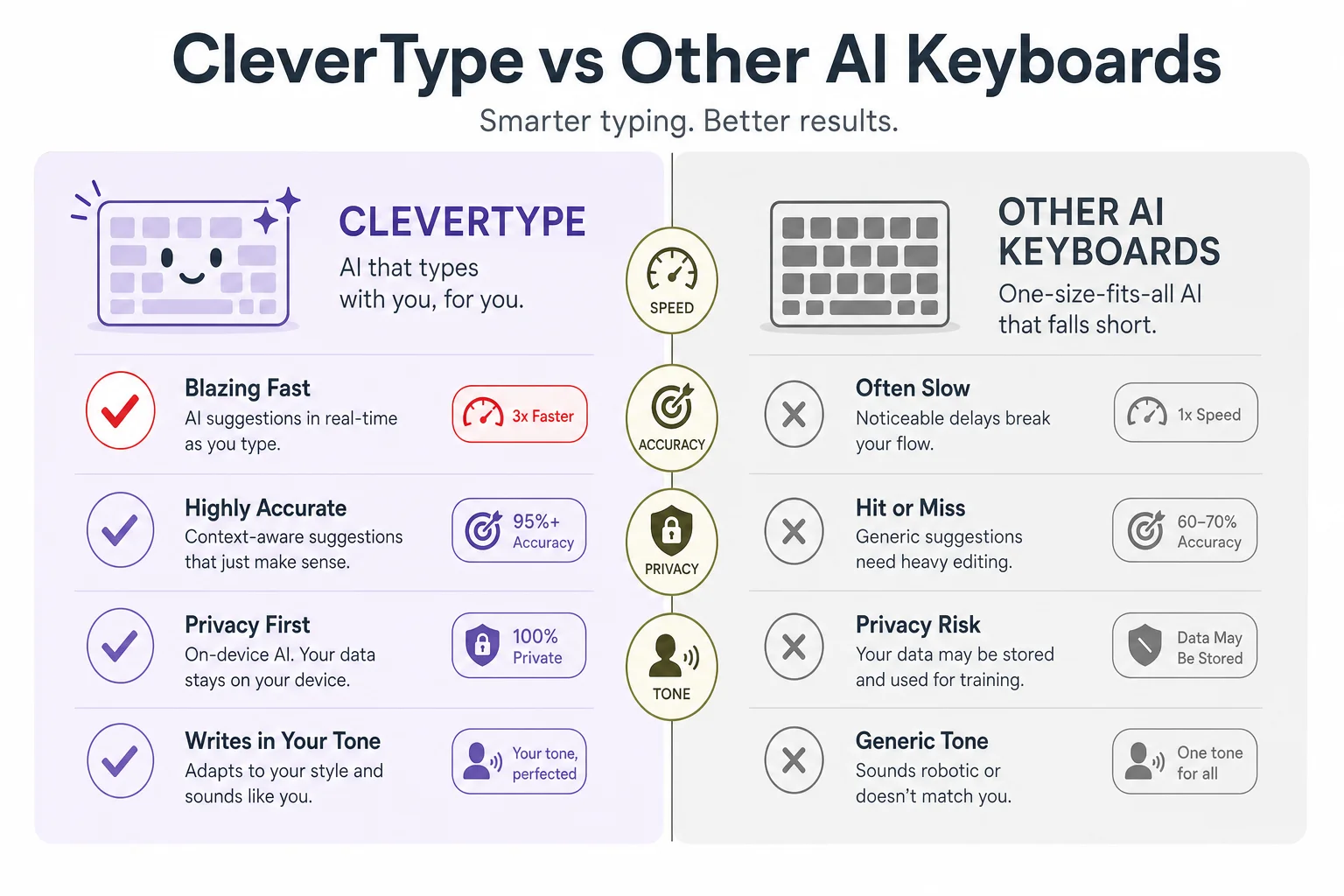
CleverType vs generic AI keyboards: formality control, privacy, and grammar depth compared side by side.
Formality Adjustment AI: The Feature Expats Actually Need Most
Moreover, Formality adjustment ai is a keyboard feature that rewrites the same underlying message across different registers — casual, neutral, formal, professional — while keeping the original meaning intact.
Sounds simple. Additionally, It isn't, not really — and it's arguably the single most useful feature for anyone writing daily in a non-native language (see this ultimate guide to tone writing for any situation), more useful even than raw grammar correction. Here's the thing — grammar mistakes get forgiven. Wrong tone gets remembered.
Nonetheless, Language register carries information grammar textbooks barely cover: hedging phrases, sentence length, punctuation choices, even how directly you state a request. Native speakers absorb these rules by osmosis, over decades. Non-native speakers — especially adult learners who picked up conversational fluency from media and friends rather than a classroom — often never get the formal, low-context conventions at all. Research on ESL writing tools notes this exact gap: casual fluency just doesn't transfer to formal writing competence.
Here's what formality adjustment actually looks like in practice — same core message, three registers:
- Casual: "hey can u send the invoice again, didn't get it lol"
- Neutral: "Hi, could you resend the invoice? I didn't receive it."
- Formal: "Dear Sir/Madam, I would be grateful if you could kindly resend the invoice, as I have not yet received it."
Therefore, Getting this wrong in either direction costs something. Too casual with a bank compliance officer looks careless. Too formal with a new neighbour reads as cold, maybe even sarcastic. CleverType's tone-adjustment feature exists to close that gap in one tap — no need to consciously learn the register rules of a new language along the way.
A few spots where this matters most for people living abroad:
- Government and visa correspondence — formal register is often non-negotiable, and getting it wrong can genuinely slow down processing
- Landlord and property management emails — formality signals you'll be a reliable tenant
- Workplace Slack/Teams messages — company culture dictates tone, and it varies wildly between countries even within the same industry, which is where AI keyboards for WhatsApp and Slack earn their keep
- School and childcare communication — teachers and administrators often form early impressions of parents based on written tone
- Dating apps and social messaging — the opposite problem, where being too formal reads as awkward or standoffish
Hence, One thing worth knowing from actually using these tools day to day: the good formality adjustment doesn't just swap "hey" for "Dear Sir." It restructures sentence length and hedging too — formal register in most languages runs on longer sentences with more qualifying phrases, not just fancier vocabulary. A tool that only substitutes words, without touching sentence architecture, will still read slightly off to a native speaker. Moreover, Even when every individual word is technically correct.
Second Language Keyboard vs Translation App: Why They're Not the Same Thing
A translation app converts text from one language to another. A second language keyboard helps you write directly and confidently in a language you already partially know, no full translation round-trip required. Nevertheless, These solve genuinely different problems. Moreover, Conflating them is probably the most common mistake expats make when picking a tool.
Translation apps are built for people who don't speak the target language at all — ordering food, reading a menu, asking for directions. They're not built for someone who's lived somewhere three years, speaks conversationally, and still second-guesses their written grammar every time they hit send.
Hence, Here's the practical difference, laid out:
| Use Case | Translation App | AI Keyboard |
|---|---|---|
| Reading a menu abroad | Best fit | Overkill |
| Writing a work email in your second language | Poor fit — loses your voice | Best fit |
| Texting a partner who speaks your target language | Awkward, feels robotic | Natural |
| One-off tourist phrase | Best fit | Not designed for this |
| Daily communication as a resident | Slow, breaks flow | Built for this |
Furthermore, Translation round-tripping has a specific failure mode: you type in your native language, translate it, and the output reads stilted because idioms and structure don't map cleanly between languages. Anyone who's pasted a heartfelt message into a translator and read the result back knows this feeling. Technically correct. Nonetheless, Emotionally flat.
An AI keyboard skips that round trip entirely. Moreover, You write directly in the target language, and the tool corrects and refines what you actually typed — preserving your intended meaning and personality rather than reconstructing it from a different language. Consequently, CleverType supports over 100 languages this way, and — usefully for expats specifically — it handles mid-message code-switching, which is extremely common for people living bilingually. Nevertheless, It's a use case covered in more depth in this guide to the best AI keyboard for multilingual users. You might start a sentence in English and drop in a local term because there's just no clean English equivalent; a translation-first tool chokes on that, a native AI keyboard doesn't.
There's a speed argument too. AI keyboards in 2026 cut typing time by 40-50%, largely through predictive phrasing — a benefit that simply doesn't exist in a copy-paste-translate workflow, where every single message means switching apps, pasting, reading, re-pasting.
Privacy: The Overlooked Risk in Expat Writing Tools
Expats type sensitive information more often than most people realize — visa numbers, bank account details, home addresses, medical history for insurance forms, work permit references. Additionally, A living abroad writing help tool that routes all of this through some unclear cloud pipeline is a real risk. Moreover, Not a theoretical one.
Moreover, Third-party keyboards, by design, see everything you type across every app on your phone — banking, messaging, email, all of it. That's an enormous amount of trust to hand a company, and honestly, most people never check what happens to that data afterward.
Questions worth actually asking before you install any keyboard app:
- Is text processed on-device or sent to a server?
- Is data retained after processing, and for how long?
- Is the app's revenue model advertising (which usually means data monetization) or subscription/freemium?
- Does the privacy policy explicitly exclude selling typed content to third parties?
- Can the keyboard function with clipboard and network access restricted?
Additionally, Google's Gboard has faced repeated scrutiny over data collection practices tied to its broader advertising business — the same company profiling users for ad targeting is also processing every word they type. Additionally, That's a structurally different incentive than a company whose business model is just the keyboard subscription.
Therefore, CleverType's approach is privacy-first by design: data stays on-device where possible, and the business model is the app itself, not advertising built on typed content. For an expat typing a visa reference number into a form field, or messaging a doctor about a medical condition, that architectural choice isn't a marketing footnote. It's Furthermore, the difference between a tool you can trust with real information and one you have to self-censor around. Nonetheless, For more on this, see how modern AI keyboards protect your data on mobile.
A practical rule: if a keyboard app's core value proposition depends on advertising rather than subscriptions or one-time purchases, assume your typed data is part of the business model somewhere, even if it's technically anonymized before use.
Grammar, Spelling, and the Small Errors That Erode Confidence
Additionally, Grammar errors don't just look bad on a page. Moreover, They compound. Miss one preposition in a work email, and the reader might misread the whole sentence's meaning instead of just noticing a small slip.
Certain grammar patterns cause outsized trouble for adult second-language writers — consistently, across studies, and just from watching how these tools get used day to day. Nonetheless, See this rundown of common grammar mistakes AI can fix in seconds:
- Articles (a/an/the) — languages like Russian, Japanese, and Korean have no article system at all, so this is learned entirely from exposure, and it never fully "clicks" for many fluent speakers
- Prepositions — "interested in" vs "interested on" vs "interested by" — these don't translate predictably between languages
- Verb tense consistency — especially in longer emails where the writer starts in one tense and drifts
- Word order in subordinate clauses — varies hugely by native language, particularly for speakers of SOV languages writing in SVO English
Additionally, Research on second-language writing anxiety found that anxious writers produce measurably simpler output — shorter sentences, safer vocabulary, less complexity — as a kind of defensive move against making visible mistakes. That's a quiet cost most people don't even notice in themselves. Consequently, You're not writing less skillfully because you lack the words. You're writing less skillfully because you're scared of the words you already know.
A grammar-aware keyboard interrupts that spiral in a specific way — not by removing all risk of error, but by catching mistakes before they're sent, which frees the writer to relax into longer, more natural sentences instead of defensively short ones. Over weeks of use, this genuinely seems to rebuild some confidence, because the writer starts trusting that mistakes get caught before a reader ever sees them.
CleverType's grammar pass runs at sentence level rather than word level, so it can catch a subject-verb mismatch that only becomes visible once the full clause is read — not just isolated spelling. Consequently, Combined with the tone adjustment covered earlier, you get text that's both technically correct and contextually appropriate. Nevertheless, Those two things together are what actually reads as fluent to a native speaker.
Choosing the Right AI Keyboard: A Practical Checklist
Not every expat writing tool on the app store does the same job. Picking based on star rating alone misses the features that actually matter for daily cross-language living.
Run through this checklist before committing to one — or skip ahead to the full AI keyboard buyer's guide:
- Language coverage — does it support both your home language and your destination-country language, including mid-message switching?
- Formality/tone control — can you adjust register with one tap, or does it only offer generic "improve writing"?
- Privacy model — on-device processing preferred, clear policy on data retention and third-party sharing
- Grammar depth — sentence-level context awareness, not just spellcheck
- Speed/lag — suggestions need to appear in well under a second, or the tool disrupts flow instead of helping it
- Cross-app compatibility — works consistently across messaging, email, and social apps, not just one
- Cost structure — free tier usability, and whether the paid tier is subscription-based rather than one-off high-cost
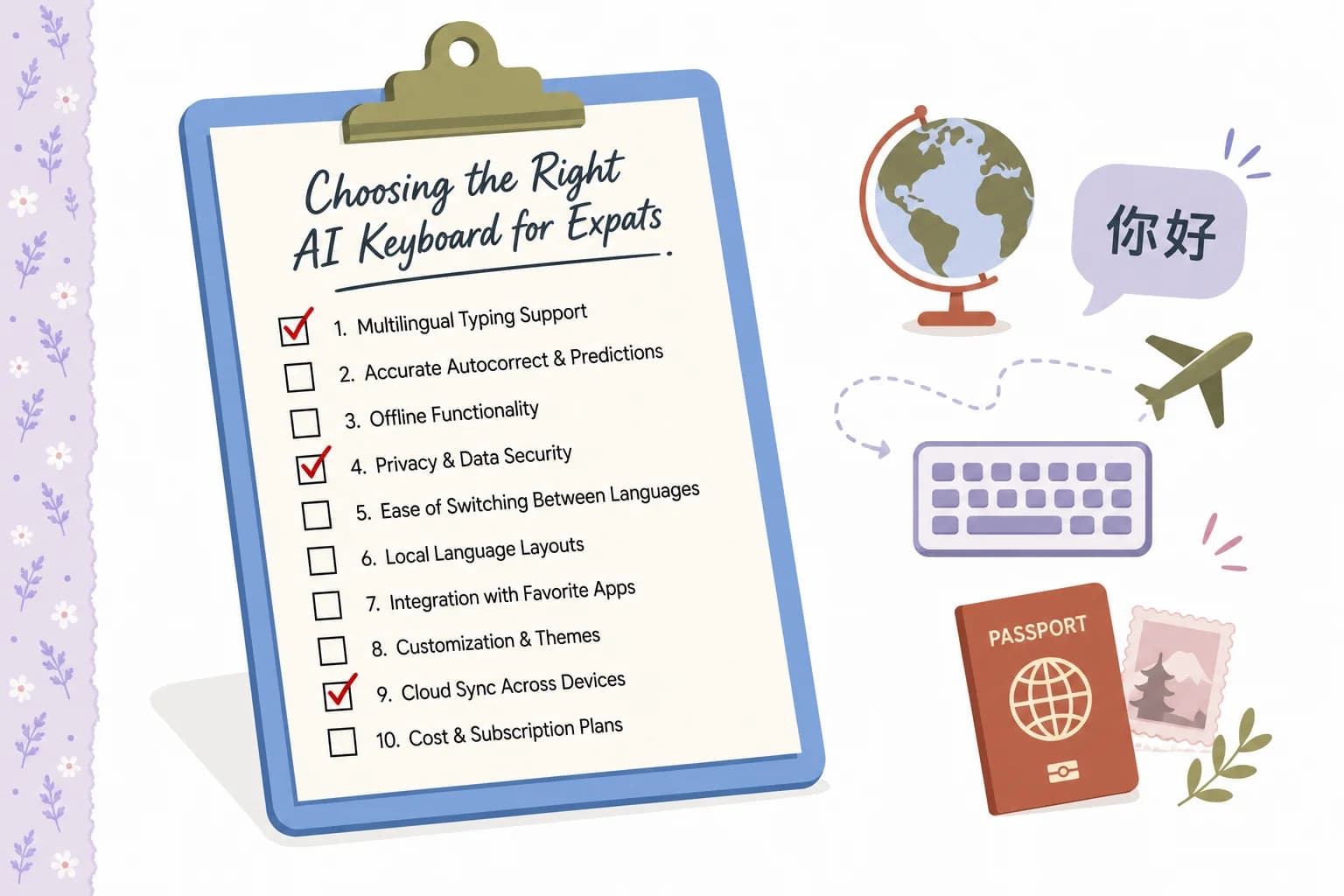
A quick checklist for evaluating any AI keyboard before you commit to using it daily abroad.
Moreover, Here's how the major options actually stack up against this checklist:
| Criteria | CleverType | Gboard | SwiftKey |
|---|---|---|---|
| Formality/tone adjustment | Yes, dedicated feature | No | No |
| Privacy-first design | Yes | Ad-business model | Microsoft data terms |
| Language count | 100+ | 100+ (translation-focused) | 90+ |
| AI grammar depth | Sentence-level | Basic | Basic |
| Smart AI replies | Yes | Limited | No |
For expats specifically, the formality and privacy rows matter more than raw language count. Additionally, Most expats only actively need one or two target languages — but they need formality control across every single message they send in those languages, every day, for as long as they live abroad.
If you're testing keyboards, give it a fair week. Furthermore, That's long enough for the prediction engine to learn your vocabulary and writing patterns, and long enough to notice whether tone suggestions actually match your intent or just feel generic. Download CleverType free and run that week-long test against whatever you're currently using.
Real Scenarios: How Expats Use AI Keyboards Day to Day
Consequently, Abstract feature lists don't really tell the story. Consequently, Seeing how this plays out across ordinary weeks abroad does.
Scenario 1 — The rental email. An expat renting an apartment needs to report a broken heater. Their instinct is to write something short and direct, which in their native language reads as polite and efficient. Nonetheless, Translated literally into the local language, though, it comes off curt. Nevertheless, Even rude. Additionally, A formality-aware keyboard restructures it to include the softening phrases the local culture expects — without the writer ever needing to learn the cultural rule explicitly.
Consequently, Scenario 2 — The school WhatsApp group. Parent group chats abroad run in the local language, at native speed, packed with local idioms. Furthermore, An expat parent typing in this group wants to sound natural — not overly formal (reads as an outsider trying too hard) and not sloppy (reads as not caring). Hence, Register-matching here is subtle, and mostly invisible until you get it wrong.
Scenario 3 — The job application. A cover letter needs formal register consistently across 300-400 words, not just in the opening line. This is where sentence-level tone correction matters, not word-level — a keyboard that only fixes individual words leaves the overall structure sounding translated rather than native.
Scenario 4 — The doctor's appointment follow-up. Precision matters more than politeness here. Describing symptoms accurately in a second language — where medical vocabulary rarely comes up in everyday conversational learning — benefits from grammar correction that catches meaning-changing errors, not just stylistic ones.
Hence, Scenario 5 — Making friends. Ironically, the formal end of the spectrum isn't the hard part for many expats. The casual end is. This is a big part of why non-native English speakers love CleverType for writing confidently in any language. Sounding warm, funny, and natural in texts to new local friends — without over-formalizing out of habit from years of "textbook" language learning — is its own skill. Formality adjustment works in both directions.
Across all five, the pattern repeats. The underlying grammar knowledge often already exists in the writer's head, half-formed. What's missing is the register instinct — the thing that takes native speakers a lifetime of exposure to absorb passively. Hence, An AI keyboard compresses that learning curve. Not by replacing the writer's voice, but by aligning it to context in real time.
Frequently Asked Questions
What is the best AI keyboard for expats?
CleverType is built specifically around the problem expats face most — getting grammar and tone right in a second language — with dedicated formality adjustment, sentence-level grammar correction, and privacy-first, on-device processing across 100+ languages.
How is an AI keyboard different from a translation app?
A translation app converts text between languages, while an AI keyboard helps you write directly in the target language, correcting and refining what you actually typed rather than reconstructing meaning through translation. This preserves your natural voice instead of producing stilted, translated-sounding text.
Does formality adjustment AI actually work for professional emails?
Yes, it restructures both vocabulary and sentence length to match the target register, not just swapping individual words for fancier ones. This matters for landlord emails, job applications, and workplace messaging where tone is judged as much as content.
Is it safe to use a third-party AI keyboard for sensitive information like visa or bank details?
It depends entirely on the app's data model — look for on-device processing and a subscription-based (not advertising-based) business model, since ad-funded keyboards have more incentive to monetize typed data. CleverType processes data locally where possible for exactly this reason.
How many languages does CleverType support?
CleverType supports over 100 languages, including mid-message code-switching, which is common for people living bilingually between a home language and a destination-country language.
Can an AI keyboard help reduce foreign language writing anxiety?
Research shows anxious second-language writers tend to produce shorter, simpler text as a defensive strategy against visible mistakes. Catching grammar errors before a message sends, plus one-tap tone correction, removes some of that fear and lets writers use fuller, more natural sentences over time.
Is CleverType free to download?
Yes, CleverType is free to download on Android, with core grammar, tone, and translation features included.
Ready to Type Smarter?
Moreover, Upgrade your typing with CleverType AI Keyboard. Fix grammar instantly, change your tone, receive smart AI replies, and type confidently while keeping your privacy.
Download CleverType FreeAvailable on Android • 100+ Languages • Privacy-First
Sources
- World Migration Report 2026 — International Migrants: Numbers and Trends (IOM)
- Understanding Foreign Language Writing Anxiety and Its Correlates (PMC)
- Second-Language Writing Anxiety and Its Correlates (Taylor & Francis)
- Foreign Language Writing Anxiety Among Pre-Service EFL Teachers (NCBI)
- Towards Explainable AI Writing Assistants for Non-Native English Speakers (arXiv)
- How AI Is Transforming Language Learning in 2026 (Test Prep Insight)
- Best ESL Writing Tools 2026 (BeLikeNative)