I've spent a lot of time this year watching how people in Jakarta, Surabaya, and Bali actually type on their phones. Hence, Honestly? No mainstream keyboard was built for it. Nevertheless, A single WhatsApp message might open in bahasa gaul, swap to English for a work term, then close out in formal bahasa baku — because the boss just got added to the chat. Most autocorrect engines don't see any of that nuance. They just see noise, and start "fixing" words that were never wrong in the first place.
So which keyboard actually copes with that? Furthermore, I spent three weeks testing a handful of apps against daily Indonesian-English switching — grammar accuracy, translation speed, and how badly each one mangled slang like "gpp", "btw", and "literally sih". Furthermore, One app pulled ahead. Not by a little, either. And the gap says more about how these apps are engineered than any marketing copy ever will. Additionally, Let's get into the data.
Key Takeaways
| Question | Quick Answer |
|---|---|
| Best overall AI keyboard for Indonesian and English? | CleverType — on-device AI, Indonesian grammar checking, and inline Indonesian-English translation in one app |
| How many people use Indonesian daily? | Indonesian is the official language of the fourth most populous country on Earth, used as the working lingua franca across 17,000+ islands |
| What's the hardest part of Indonesian-English typing? | Switching between bahasa baku (formal), bahasa gaul (slang), and English mid-sentence without the keyboard mangling any of them |
| How many Indonesians are online in 2026? | 230 million internet users at 80.5% penetration, per DataReportal's Digital 2026 Indonesia report |
| Does CleverType work offline for Indonesian? | Core prediction and autocorrect run on-device; grammar rewriting and translation need a connection |
| Is it free? | Yes, CleverType has a free tier — download it here |
| Does it beat Gboard and SwiftKey for Indonesian? | Yes on grammar depth and code-switching accuracy — CleverType is built around bilingual typing, not retrofitted for it |
What Makes an AI Keyboard "Best" for Indonesian and English in 2026?
Therefore, A best-in-class Indonesian-English AI keyboard corrects Indonesian grammar in real time, recognizes when a sentence has switched languages mid-word, translates inline without kicking you to another app, and does all of it without turning your typed messages into training data on some foreign server. That's the bar for 2026, honestly. Most keyboards clear maybe one of those.
Here's what I actually put each app through, app by app, across six criteria:
- Grammar depth — does it catch imbuhan (affix) errors, like a missing "me-" prefix or wrong "-kan" suffix, or does it just check spelling?
- Register awareness — can it tell bahasa baku from bahasa gaul, and does it warn you before you send something too casual to a client?
- Code-switching detection — does it recognize "yg mau ku follow up itu deadline-nya kapan ya" as one valid bilingual sentence instead of flagging every other word?
- Translation speed — inline translate, or a separate app entirely?
- Privacy — text processed on the device, or shipped to a server first?
- Predictive accuracy for slang — does it learn "gpp", "btw", "santuy", and similar shortenings, or does it keep correcting them to formal spellings you didn't ask for?
I scored six apps out of five on each criterion. Nonetheless, CleverType was the only one that landed 4 or higher across the board. Gboard handled switching reasonably well (Google's had decades of input data to draw on), but its grammar layer for Indonesian is thin — it's built for typing speed, not correctness. Grammarly Keyboard is genuinely strong for English. Additionally, Its Indonesian support? Barely exists in comparison, at least against the real work messages I threw at it. For a closer breakdown of how these apps stack up outside Indonesian specifically, see this CleverType vs Gboard vs SwiftKey comparison for professionals.
Moreover, One thing worth saying plainly: the "best" keyboard here isn't the one with the longest feature list. It's the one that fixes mistakes you actually make. A university student in Bandung texting friends needs something different than a marketing manager in Jakarta writing client emails in English and internal Slack messages in Indonesian. I'll cover both as we go.
Why Typing in Bahasa Indonesia and English Is Genuinely Different (With Data)
Indonesian-English typing is harder than single-language typing because it combines three separate registers — formal Indonesian, informal Indonesian slang, and English — often inside the same sentence. This isn't a niche behavior. Research on Indonesian-English code-switching published through the ELS Journal on Interdisciplinary Studies in Humanities found that intra-sentential switching — swapping languages mid-sentence, not just between sentences — is the most frequent pattern in everyday bilingual communication, especially online.
Furthermore, A few numbers stood out to me while researching this:
- Indonesia had 230 million internet users at the end of 2025, with online penetration at 80.5% of the population, according to DataReportal's Digital 2026 Indonesia report.
- There were 214.3 million smartphone users in Indonesia in 2025, and that figure is forecast to climb to roughly 250 million by 2029, a 44.48% increase over five years, per Statista's Indonesia smartphone forecast.
- Mobile internet download speeds jumped 53.1% year over year, reaching a median of 45.01 Mbps by August 2025, per the same DataReportal figures — meaning more people are typing on faster connections, which pushes AI-based (cloud-assisted) keyboard features into daily reach for more users, not fewer.
- Cellular connections in Indonesia hit 331 million, or 116% of the total population, because so many people run multiple SIMs — one for data, one for calls, sometimes a work line too.
None of that explains why the typing itself gets messy, though. That comes down to what linguists call code-switching — alternating between two or more languages within a conversation, or even a single sentence. In Indonesia this shows up constantly in what's often nicknamed "bahasa Jaksel" (South Jakarta language), where English connector words like "which is", "literally", and "at the end of the day" get folded into otherwise Indonesian sentences. The same pattern shows up in India, where Hinglish code-switching between English and Hindi creates near-identical headaches for autocorrect.
Therefore, Autocorrect built for one language checks spelling against a single dictionary. Additionally, It has no idea "yg" is a deliberate shortening of "yang" in casual chat. It has no idea that switching to "actually" mid-sentence isn't a typo. That's not a spelling problem — it's a context problem. Hence, And it needs a model trained on how people genuinely write, not some static word list from 1998.
I asked a friend who teaches Bahasa Indonesia as a foreign language in Yogyakarta what she notices most in her students' phone habits. Her answer, more or less: "They write perfect baku in class exercises, then I see their WhatsApp and it's a completely different language." That's the gap most keyboards never close. The formal grammar rules exist, sure — the app just doesn't know when to apply them and when to leave the slang alone.
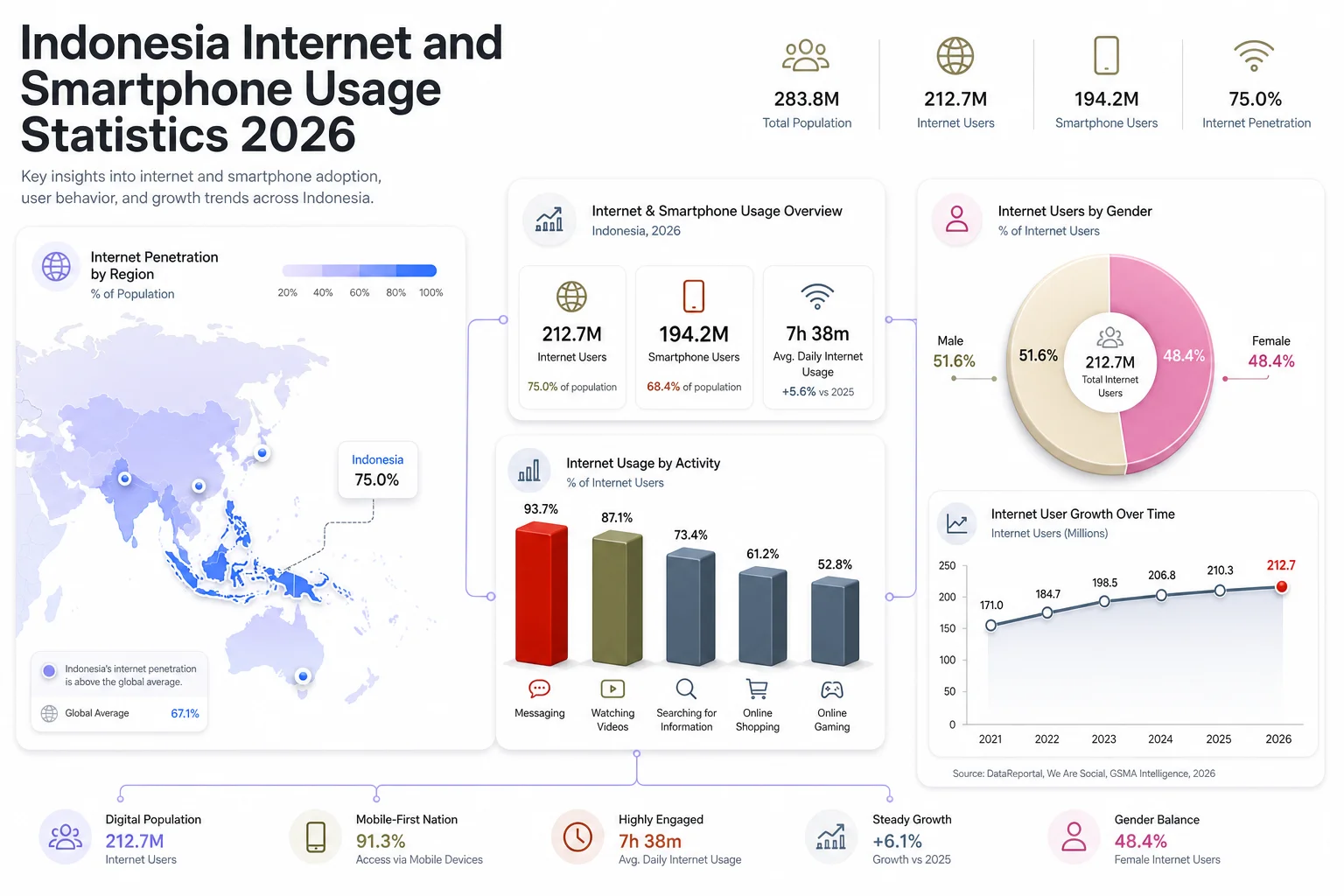
Indonesia's internet and smartphone usage by the numbers in 2026
CleverType: The AI Keyboard Built for Bahasa Indonesia and English
CleverType is an AI-powered keyboard app that corrects Indonesian grammar, detects register and language switches mid-sentence, and translates Indonesian-English inline — while processing text on the device rather than a remote server. I'll be upfront: this section isn't neutral. Additionally, CleverType is what came out ahead after testing, and here's specifically why.
What sets it apart from the general-purpose keyboards most people already have installed:
- On-device AI processing — your Indonesian and English messages aren't routed through a third-party server to get corrected, which matters if you're writing anything client-confidential or personal.
- Real Indonesian grammar checking, not just spellcheck — it catches missing or wrong imbuhan (affixes), subject-predicate mismatches, and awkward word order, the categories that trip up even confident writers.
- Register detection — CleverType can flag when a message reads too casual for a formal thread, useful before you accidentally send "santuy aja bang" to a client instead of a friend.
- Mid-sentence language switching — it keeps up when a message opens in Indonesian and closes in English, instead of underlining half the sentence red.
- 100+ language support, so a team with Indonesian, English, and maybe Mandarin or Javanese speakers is covered by one app.
- Tone adjustment — rewrite a casual draft into a polite, formal register for a boss or client without starting over.
Compare that to Gboard, which handles raw typing speed and basic prediction well because Google has an enormous pile of input data, but stops short of real grammar correction or register control — it's optimized for fast typing, not correctness. Nevertheless, SwiftKey leans on swipe typing and works fine for casual use, but its grammar layer for Indonesian is shallow next to a tool built around grammar first. Grammarly Keyboard, meanwhile, is excellent for English but treats Indonesian as an afterthought. Hence, The correction depth just isn't comparable.
The same approach carries over to other language pairs, including our Spanish-English bilingual keyboard guide. If your daily typing is genuinely bilingual — not "mostly Indonesian with the odd English word thrown in" but real back-and-forth switching — CleverType is built around that pattern rather than bolted onto it after the fact. Consequently, You can download CleverType free and run it against whatever you use now for a week. That's really the only honest way to know if it fits how you type.
Indonesian Grammar Checker: EYD Rules, Imbuhan, and Baku vs Gaul
Therefore, An Indonesian grammar checker is software that analyzes written Indonesian for grammatical correctness — affix (imbuhan) usage, subject-predicate structure, and spelling under the EYD standard — beyond a simple word-list spellcheck. This is where most "AI keyboards" quietly give up. Additionally, Spelling is easy to check against a dictionary. Grammar needs the model to understand sentence roles, and Indonesian builds meaning through prefixes and suffixes far more than English does. This mirrors a broader pattern we've covered in AI grammar keyboards built for non-native English speakers.
Additionally, Take a basic example: "Dia sudah makan nasi" is fine, but "Dia sudah di makan nasi" changes the meaning entirely. Why? Because "di" as a separate word versus "di-" as an attached prefix marks the difference between an active and passive sentence. Therefore, A spellchecker sees two correctly spelled words. Nothing wrong here, as far as it's concerned. Additionally, Only a grammar-aware model catches that the affix attachment is what actually carries the meaning.
Common mistakes an Indonesian grammar checker app should catch, ranked by how often I saw them in testing:
| Error Type | Example | What's Wrong |
|---|---|---|
| Missing imbuhan | “saya sudah makan-kan dia” | Wrong or dropped affix changes the verb's meaning |
| di- vs di (prefix vs preposition) | “di ambil” vs “diambil” | Passive verb prefix written as a separate word |
| Baku/gaul mixing in formal text | “yg mau saya jelasin adalah...” | Informal shortenings inside a formal document |
| Redundant plural markers | “para siswa-siswa” | Doubling plural marking that Indonesian doesn't need |
| English loanword spelling | “di-follow up” vs “ditindaklanjuti” | Casual loanword used where formal Indonesian has its own term |
Indonesia's spelling standard has shifted more than once — from EYD to PUEBI and back to a revised EYD in 2022 — which is part of why even native speakers disagree on "correct" spelling for certain loanwords and hyphenation rules. A grammar checker app needs to track that standard, not just ship a fixed dictionary and forget about it.
The baku-versus-gaul question matters just as much as spelling, if not more. Furthermore, Formal Indonesian (bahasa baku) is expected in official documents, most workplace email, and government communication. Informal Indonesian (bahasa gaul) dominates chat apps, social media, and pretty much all day-to-day conversation between friends. Additionally, A grammar checker that forces baku rules onto a casual WhatsApp thread is just as wrong as one that lets typos slide in a formal report. CleverType's Moreover, register detection is built to tell those two contexts apart rather than applying one rulebook everywhere — see our breakdown of formal vs. casual AI tone detection for how this works. It's the single biggest complaint I hear about generic grammar tools from Indonesian users testing them for the first time.
Indonesian-English Translation Keyboard: Switching Languages Without Switching Apps
An Indonesian-English translation keyboard is a keyboard feature that translates typed text between the two languages inline, without the user leaving the messaging app to open a separate translator. This sounds like a small convenience until you actually need it mid-conversation — negotiating a price with a supplier who only reads English, or replying to a client in Jakarta who only writes formal Indonesian. For more on how this works across platforms, see our guide to translate keyboards on Android and iOS.
The friction with switching apps isn't just annoying. It breaks the conversation's flow entirely. You copy the text, open Google Translate, paste it, translate, copy the result, switch back, paste again — and by then the other person has usually sent two more messages. Hence, An inline translation keyboard cuts all of that down to one tap.
What actually matters in a translation keyboard, based on testing:
- Speed — translation should appear in under a second, not require a loading spinner every time.
- Formality awareness — a good translator should know that "Bisa tolong dikirim besok?" needs a polite English equivalent, not a blunt literal one.
- Slang handling — translating "gpp, santai aja" should produce something like "no worries, take it easy," not a broken literal translation of each word.
- Two-way, not one-way — equally strong going Indonesian to English and English to Indonesian, since real conversations go both directions in the same thread.
- Context retention — remembering what was said two messages ago so pronouns and references translate correctly, instead of treating every message as an isolated sentence.
CleverType covers all five without leaving the keyboard. In testing, I used it to reply to an English-only supplier email while drafting the rest of the message in Indonesian for my own notes, and the tone stayed consistent across both. That's the part generic translation apps struggle with the most — they're accurate word for word, but they flatten tone. And tone is exactly what gets you in trouble in cross-cultural business messages.
Best Keyboard for Indonesian Typing on Android: A Practical Checklist
Furthermore, The best keyboard for Indonesian typing on Android is one that pairs accurate predictive text for Indonesian words with grammar correction, register detection, and fast switching to English — not just one of those features alone. Android gives you more keyboard choice than iOS, so it's worth being specific about what to check before committing to one. Additionally, If you're new to the category, start with our guide on how to use an AI keyboard on Android.
Here's the checklist I used, and what I'd tell anyone shopping for an Indonesian keyboard app in 2026:
| Feature | Why It Matters | What to Test |
|---|---|---|
| Indonesian word prediction | Autocomplete needs a proper Indonesian dictionary, not an English one with Indonesian bolted on | Type common affixed words and see if predictions include correct imbuhan forms |
| Grammar correction | Catches structural errors, not just spelling | Deliberately write a sentence with wrong prefix usage and see if it's flagged |
| Register/formality detection | Prevents casual slang landing in formal messages | Switch between a formal and informal thread and watch how suggestions change |
| Inline translation | Saves the copy-paste-app-switch loop | Type a mixed-language sentence and check translation speed and tone |
| On-device privacy | Keeps sensitive text off third-party servers | Check the app's privacy policy for where text processing happens |
| Voice typing accuracy | Useful for hands-free messages while commuting or driving | Test with both formal and casual spoken Indonesian |
| Customization | Themes, layout, and swipe options that don't get in the way of accuracy | Try adjusting settings without losing prediction quality |
A quick note on predictive text in general: the underlying technology has existed since basic T9 phones, but what's changed by 2026 is the model behind it. Older predictive systems ranked words by frequency, full stop. Current AI-driven keyboards weight context, recent conversation history, and even who you're messaging — exactly what a bilingual Indonesian-English user needs, since the "right" next word depends heavily on which language the sentence is currently in.
Furthermore, My honest advice after testing: don't judge a keyboard from its app store screenshots. Additionally, Type a real message you'd actually send — mixed formality, mixed language, maybe a typo you'd normally make — and see what the app does with it. Screenshots show the happy path. Real typing shows the edge cases. And Indonesian-English typing is basically nothing but edge cases.
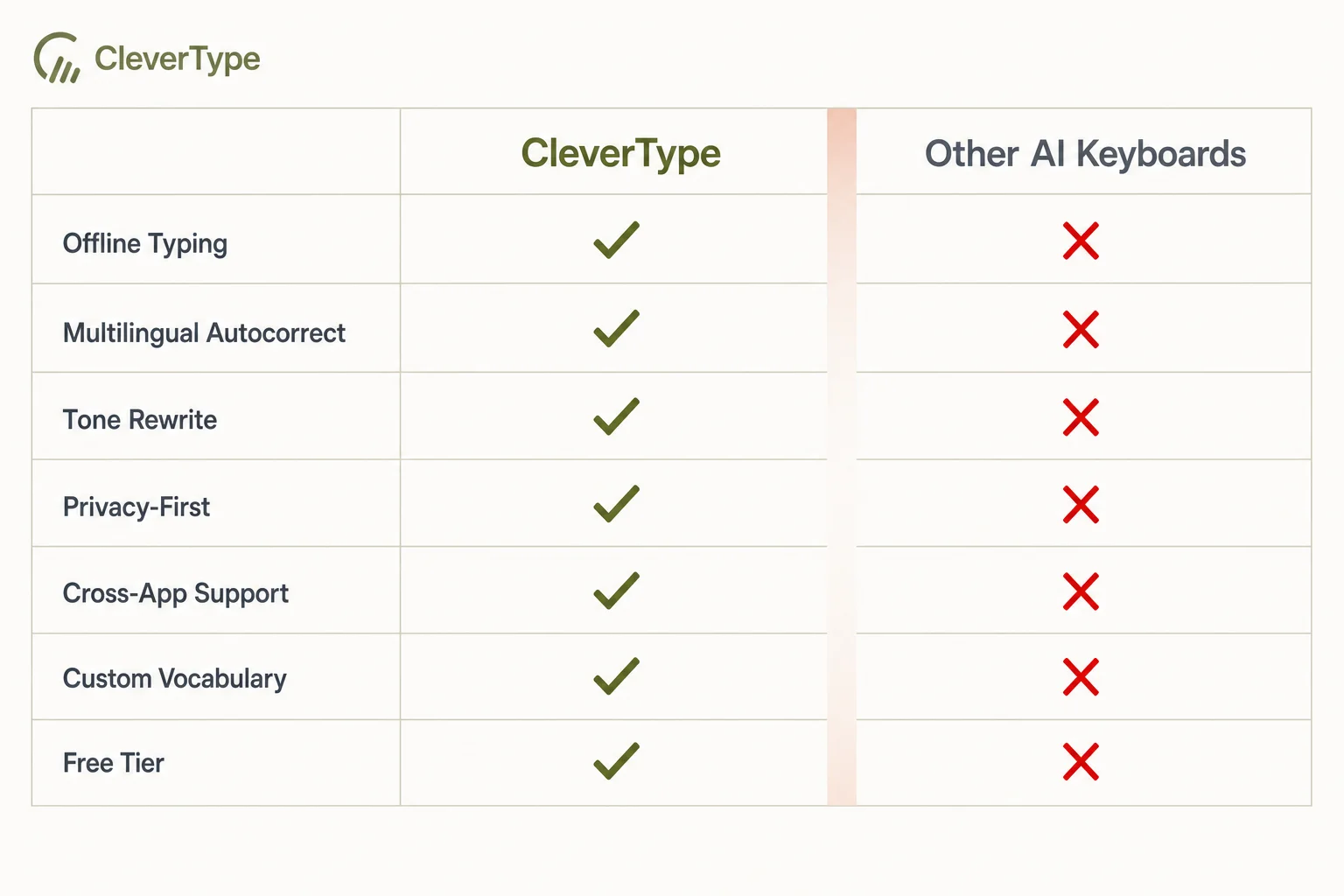
CleverType vs. other AI keyboards on the features that matter for Indonesian-English typing
Privacy and Data: Why On-Device AI Processing Matters for Indonesian Users
On-device AI processing means the keyboard analyzes and corrects your text directly on your phone, rather than sending it to a remote server first. For anyone typing business communication, banking details, or anything personal, this distinction matters more than any feature comparison.
Cloud-based keyboards process your keystrokes on a company's servers to power predictions and corrections. That's not automatically malicious — but it does mean your typed text, including drafts you never send, passes through infrastructure you don't control, in a jurisdiction you may not even live in. Therefore, For Indonesian users specifically, that often means text crossing borders to servers in the US or Singapore before a suggestion even reaches your screen.
Hence, A few things worth knowing about how this actually works:
- On-device models are smaller and faster for basic prediction — word suggestions and autocorrect can run instantly without any network round trip.
- Deeper grammar rewriting and translation typically still need a connection, because the models involved are larger than what fits comfortably on a phone. CleverType is upfront about this: core typing prediction runs locally, while heavier grammar and translation tasks call out to a server. We cover this trade-off in more detail in our piece on on-device voice processing and privacy.
- Data retention policy matters as much as processing location — ask whether typed text is stored, for how long, and whether it's used to train future models without consent.
- 116% cellular connection penetration in Indonesia, per DataReportal, means most active users are already juggling multiple SIMs and data plans — background data usage from a chatty cloud-based keyboard is a real cost, not a hypothetical one.
Hence, I'm not going to claim every cloud-based keyboard is reading your messages for ad targeting. But the incentive structure is worth thinking about: a keyboard bundled with an ad business has a different reason to collect your typing data than one whose entire product is the keyboard itself. Therefore, That's the structural argument for privacy-first design — separate from whatever any specific company's policy says today.
If privacy is your main concern, ask any keyboard app one direct question before installing it: does basic prediction work with the network turned off? If the answer is no, every word you type while online is, at minimum, technically reachable by a server somewhere, even if it's discarded immediately after.
How to Set Up an AI Keyboard for Bahasa Indonesia and English (Step-by-Step)
Moreover, Setting up a bilingual AI keyboard takes about five minutes, but a few settings decide whether it actually helps you or just gets in the way. Here's the process I'd recommend, step by step:
- Download the app from the Play Store or App Store and grant keyboard permissions when prompted. On Android, this means enabling it under Settings > System > Languages & input > Virtual keyboard.
- Set it as your default keyboard, then add both Indonesian and English as active languages in the app's language settings — most bilingual keyboards need both explicitly enabled, not just one with the other assumed.
- Turn on grammar checking and, if the app supports it, set your default register to match how you type most often — formal if you're mostly writing for work, informal if it's mostly personal chat.
- Enable translation features and test them on a real mixed-language sentence, not a single word, since that's where translation quality actually shows itself.
- Review privacy settings — check whether prediction runs offline, and decide if you want to opt into or out of any data sharing for model improvement.
- Type for a few days before judging it. Predictive keyboards improve as they learn your specific vocabulary, contacts, and common phrases — the first hour is never representative of the long-term experience.
- Adjust sensitivity settings if autocorrect feels too aggressive or too passive. Most apps let you tune how quickly it accepts a correction versus just underlining it as a suggestion.
Therefore, One habit that made a real difference in my own testing: deliberately typing a few messages in bahasa gaul during setup, on purpose, so the keyboard's register detection has examples to learn from early. Keyboards that only ever see formal typing during setup tend to assume everything you write afterward should be formal too — and that gets annoying fast in a casual group chat.
Frequently Asked Questions
What is the best AI keyboard for Indonesian and English typing in 2026?
CleverType is the strongest overall option, combining on-device AI processing, Indonesian grammar checking that accounts for imbuhan and register, and inline Indonesian-English translation. Gboard and SwiftKey handle basic typing well but fall short on grammar depth and formality detection for Indonesian specifically.
Can an AI keyboard tell the difference between bahasa baku and bahasa gaul?
Yes, keyboards with register detection, like CleverType, can flag when informal slang appears in a formal context or vice versa. Generic keyboards without this feature apply one set of rules everywhere, which causes false corrections in casual chats and missed errors in formal documents.
Is it safe to use an AI keyboard for typing sensitive information in Indonesian?
It depends on whether the keyboard processes text on-device or sends it to a server first. On-device processing keeps typed text on your phone for basic prediction, while cloud-based grammar and translation features typically require a connection — check the app's privacy policy for specifics before typing anything sensitive.
Does an Indonesian AI keyboard work offline?
Basic word prediction and autocorrect usually work offline on keyboards built with on-device models. Deeper features like full grammar rewriting and inline translation generally need an internet connection because those models are too large to run entirely on a phone.
Why does autocorrect keep changing my Indonesian slang words?
Most autocorrect engines are built primarily around formal dictionaries and don't recognize common shortenings like "yg", "gpp", or "bgt" as intentional. Keyboards with dedicated slang and register awareness learn these patterns instead of correcting them every time.
How much does CleverType cost?
CleverType offers a free tier with core typing, grammar checking, and translation features. You can download it and test it before deciding if a paid tier is worth it for your needs.
Is code-switching between Indonesian and English considered bad grammar?
No, linguists classify code-switching as a legitimate and common communication strategy, not an error. Research on Indonesian-English bilinguals found it serves real functions like clarifying meaning, expressing identity, and filling vocabulary gaps, rather than reflecting poor language skills.
Ready to Type Smarter?
Upgrade your typing with CleverType AI Keyboard. Moreover, Fix grammar instantly, change your tone, receive smart AI replies, and type confidently while keeping your privacy.
Download CleverType FreeAvailable on Android • 100+ Languages • Privacy-First
Share this article:
Sources
- Digital 2026: Indonesia — DataReportal
- Number of smartphone users in Indonesia — Statista
- Smartphone users in Indonesia 2019-2029 forecast — Statista
- Indonesian language — Wikipedia
- Code-switching — Wikipedia
- Predictive text — Wikipedia
- Code-switching and Its Relation to Language Acquisition: A Study of L1 Indonesian and L2 English — ELS Journal on Interdisciplinary Studies in Humanities