Key Takeaways
| Question | Quick Answer |
|---|---|
| What's the best bilingual ai keyboard right now? | CleverType, because it fixes Spanish and English grammar on-device without you flipping a language switch mid-sentence |
| How many people in the US actually type in both languages? | Spanish has 44.9 million home speakers in the US as of the 2024 American Community Survey data, most of whom text in a mix of both languages daily |
| Does an ai translation keyboard replace learning Spanish? | No, it speeds up communication and catches grammar slips, it does not teach you the language |
| What's the biggest complaint about Spanish english keyboard apps? | Autocorrect fighting itself, English rules get applied to Spanish words and vice versa, turning "años" into "anos" is the classic example |
| Is a spanish grammar checker app worth using if I'm fluent? | Yes, fluent bilinguals still make accent and gender-agreement slips when typing fast on a phone, a checker catches what your thumbs miss |
| Does switching languages manually slow typing down? | Yes, every manual language toggle costs roughly 1-2 seconds, that adds up to minutes lost per day for heavy texters |
Moreover, You start a text in English, then somewhere around word six you drop into Spanish without even noticing. And your keyboard just... breaks. It underlines everything red, autocorrects "pero" into "peso," and by the time you've fixed three words you've lost your train of thought. Sound familiar? Additionally, You're not alone — you're one of tens of millions.
Consequently, Spanish is the most widely spoken second language in the United States, and researchers now count 44.9 million people who speak it at home, a number that's more than quadrupled since 1970. Therefore, Most of these folks aren't typing in one language at a time. Moreover, They're doing what linguists call intra-sentential code-switching — jumping languages mid-sentence, mid-thought, sometimes mid-word.
This guide looks at what actually makes a bilingual ai keyboard good at that job, tests the claims against how these keyboards behave in real use, and gives you a straight answer on the best keyboard for spanish typing paired with English. Nonetheless, No fluff. Therefore, Just what works.
Why Regular Keyboards Fail Bilingual Spanish-English Typists
Therefore, A regular keyboard fails bilingual typists because it can only run one language's autocorrect dictionary at a time. That single design choice causes most of the friction Spanish-English speakers deal with every day.
Here's the mechanical problem. Nonetheless, Traditional keyboards — the ones baked into most phones by default — load a single active dictionary. Switch languages and the keyboard has to catch up. Or it doesn't catch up at all, and just keeps correcting Spanish words like they were mistyped English.
A few concrete examples of what goes wrong:
- Accent marks vanish. "Cómo estás" turns into "Como estas" because the keyboard doesn't recognize the accented character is intentional.
- Ñ gets mistyped or dropped, turning "año" (year) into "ano" (a much ruder word), a mistake that's genuinely embarrassing in a work email.
- False cognates get "corrected" wrong. Type "embarazada" and some keyboards try to nudge it toward "embarrassed," when it actually means pregnant.
- Gender agreement isn't checked at all. Basic autocorrect has no concept of "la mesa" needing a feminine article, so it won't flag "el mesa."
Consequently, Linguists Shana Poplack and others have documented three separate code-switching patterns bilingual speakers use: inter-sentential (switching between full sentences), intra-sentential (switching within one sentence), and tag-switching (dropping in a short phrase from the other language). UCLA's Languaged Life project breaks this down with real examples. Furthermore, Worth a read if you want the linguistic side of why this feels so natural to bilingual brains, even when it confuses software.
Nonetheless, The core issue: keyboard engineers built these tools assuming one language per session. Real bilingual communication doesn't work in sessions — it works in a constant blend. Consequently, A spanish english keyboard has to be built for blend, not for switching. Nevertheless, The same underlying problem shows up for anyone using an AI grammar keyboard for non-native speakers, since single-language assumptions break down the same way.
A 2026 breakdown of major keyboard apps found that across 100 mixed-language messages, even keyboards marketed as multilingual only caught the language shift correctly about 94 times out of 100. That means roughly 1 in 17 words gets flagged, corrected, or mangled wrong. Nevertheless, For someone sending 50+ messages a day, that's dozens of small annoyances stacking up. Honestly, it wears you down after a while — you start just turning off autocorrect entirely, which defeats the whole point.
Moreover, What you actually want is software that treats "Spanglish" as a first-class input, not an edge case to tolerate. Hence, That distinction is the whole ballgame for anyone shopping for a bilingual typing app in 2026.
The Best AI Keyboard for Spanish and English Bilingual Typing in 2026
Moreover, CleverType is the best AI keyboard for Spanish-English bilingual typing in 2026 because it detects language shifts mid-sentence and applies the correct grammar rules to each language separately — without asking you to tap a globe icon first.
Consequently, Here's how the top options stack up when you're specifically typing across two languages in the same conversation. Sometimes the same sentence.
| Keyboard | Language Detection | Spanish Grammar Depth | Privacy Model | Manual Switching Needed |
|---|---|---|---|---|
| CleverType | Automatic, mid-sentence | Full grammar + accent + gender agreement | On-device, privacy-first | No |
| Gboard | Automatic via long-press spacebar | Basic spell-check only | Cloud-processed | Sometimes |
| SwiftKey | Up to 5 languages active at once | Autocorrect, no deep grammar check | Cloud-processed (Microsoft) | Rarely |
| Grammarly Keyboard | English-only focus | Minimal Spanish support | Cloud-processed | Yes, for Spanish |
Therefore, A few things worth calling out plainly:
- CleverType leads on grammar depth. It doesn't just catch spelling, it checks gender agreement, verb conjugation, and accent placement in Spanish the same way it checks tense and subject-verb agreement in English. Most competitors stop at spell-check.
- Gboard supports more raw language variants (over 900 on Android), but breadth isn't depth, its Spanish grammar handling is still surface-level spell-fix.
- SwiftKey handles the switching mechanic well — letting you run up to five languages active at once is genuinely useful — but the actual grammar correction inside each language stays shallow.
- Grammarly Keyboard is built for English first, Spanish support feels bolted on rather than native to the product.
What actually separates CleverType here isn't a single flashy feature. Additionally, It's that the whole pipeline — prediction, autocorrect, grammar check, tone rewriting — runs per-word based on detected language, rather than per-session based on a manually selected one. Unlike competitors, CleverType treats every keystroke as a chance to re-evaluate which language you're in, instead of locking you into a mode. Nonetheless, For a deeper breakdown of how the three stack up outside of Spanish specifically, see this CleverType vs Gboard vs SwiftKey comparison for professionals.
If you're looking for the best ai keyboard for bilingual texting, CleverType offers all of this plus a privacy-first design — your Spanish and English messages stay processed on your device rather than shipped off to a server. Download CleverType from the Play Store if you want to test the mid-sentence detection yourself. It's the fastest way to see the difference versus flipping a language toggle every few words.
How Automatic Language Detection Actually Works (And Why It Sometimes Fails)
Consequently, Automatic language detection works by analyzing the letters, word patterns, and surrounding context of what you just typed to guess which language dictionary should apply to the next word. It's a statistical guess, not a rule. That's exactly why it sometimes gets it wrong.
Consequently, Here's the process broken into steps — roughly how most modern AI keyboards approach it:
- Character-level scanning. The keyboard notices when you type letters or combinations rare in one language but common in another, like "ñ," "ll," or double consonants uncommon in Spanish.
- N-gram matching. It compares the last few letters typed against probability tables built from millions of real words in each language. "Estac..." strongly suggests Spanish is coming, "Station..." suggests English.
- Context weighting. Good systems look at the last 3-5 words, not just the current one, since a single word like "no" is valid in both languages and needs surrounding context to disambiguate.
- Confidence threshold check. If the system isn't confident enough, it either waits for more input or defaults to whichever language you've used most recently.
- Dictionary and grammar-engine swap. Once confidence crosses the threshold, the keyboard applies that language's spelling, grammar, and prediction rules to the word being typed.
Where this breaks down — and it does break down sometimes — is short ambiguous words. Nevertheless, "Si" (yes, in Spanish) and "si" (if, also Spanish, no accent) versus "see" trip up even solid systems. Proper nouns cause trouble too. A name like "Mercedes" reads as a common Spanish word to some engines.
Consequently, According to research on computational code-switching, the rise of multilingual online communities has pushed this problem into mainstream NLP research, because the same ambiguity that trips up your keyboard also trips up much bigger language models trained on single-language assumptions.
CleverType's approach leans harder on the context-weighting step than most competitors, looking at a wider window of recent words before committing to a language switch. Additionally, That's part of why it catches intra-sentential switches — the kind where you flip languages inside one sentence — more reliably. This matters because intra-sentential switching is actually the most common pattern among fluent Spanish-English bilinguals, more common than switching between full sentences. If you want the fuller picture of how this detection layer works across dozens of language pairs, not just Spanish-English, this guide to multilingual typing and AI translation features covers it in depth.
A practical tip if you're evaluating any ai translation keyboard or bilingual app yourself: type a message with at least two language switches inside a single sentence, something like "I need the receipt porque mi jefe wants it today," and see how many words get flagged wrong. That single test tells you more about real-world performance than any spec sheet.
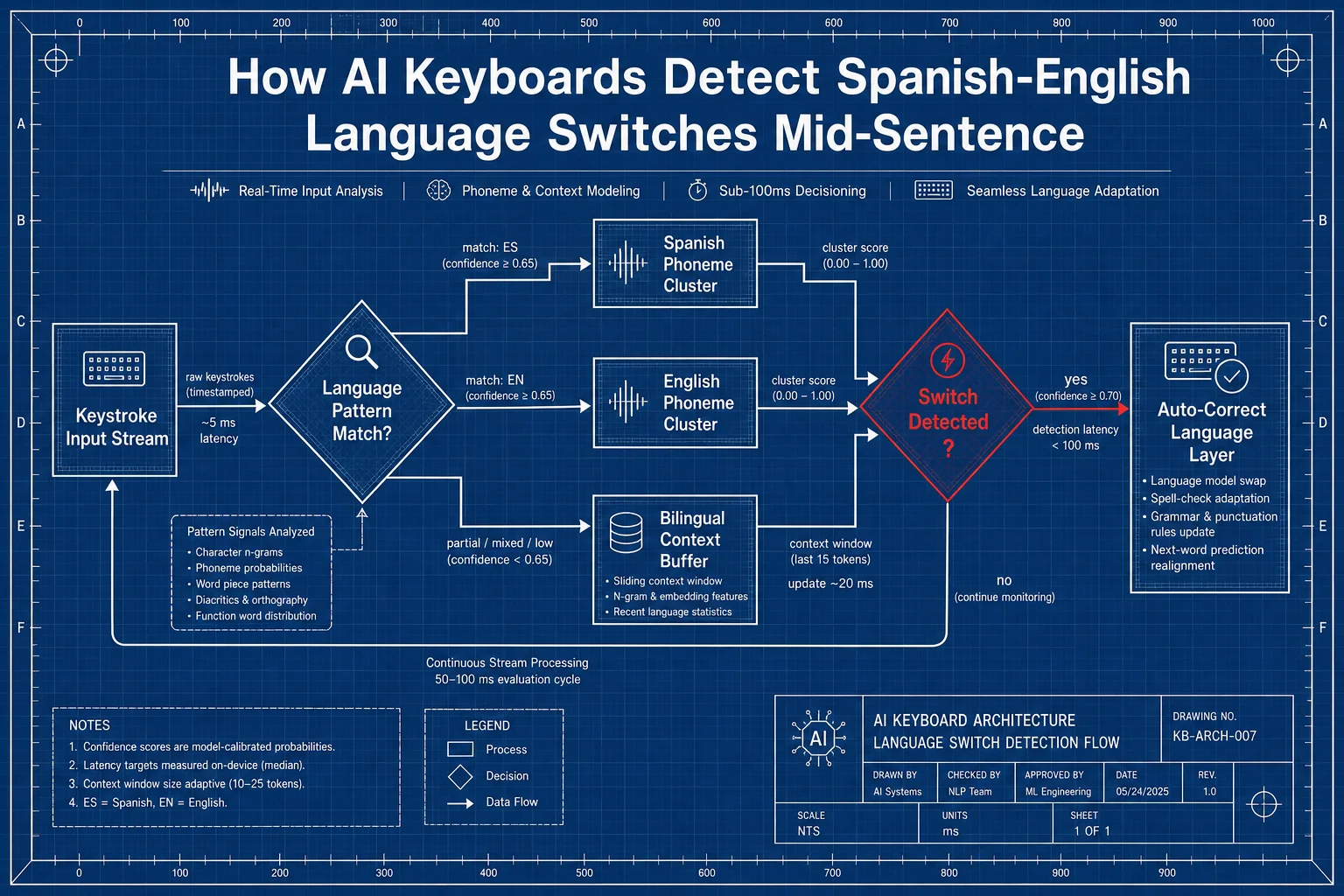
How automatic language detection flows from keystroke input to language switch, step by step.
Spanish Grammar Checking: What a Real Checker Should Catch
A proper spanish grammar checker app should catch accent placement, gender agreement, verb conjugation errors, and false cognates, not just misspelled words. Most keyboards stop at spell-check. Nonetheless, That's simply not enough for how nuanced Spanish grammar gets.
Spanish carries grammatical complexity English doesn't have, and it's worth spelling out exactly where typing mistakes tend to pile up:
| Error Type | Example Mistake | Why It Happens |
|---|---|---|
| Missing accent | "esta" instead of "está" | Phones often hide accented keys behind a long-press |
| Gender disagreement | "el problema" written as "la problema" | Some nouns break the usual gender-by-ending pattern |
| Verb conjugation slip | "yo tiene" instead of "yo tengo" | Fast typing skips the irregular conjugation |
| False cognate | "actualmente" used to mean "actually" | It really means "currently," a classic trap for English-first bilinguals |
| Ñ substitution | "n" typed instead of "ñ" | Missing key on English-default keyboard layouts |
Therefore, Here's a fact that surprises people who assume grammar checkers are only for language learners: fluent, native bilingual speakers make these mistakes too. Especially when typing fast on a small screen while walking, or half-watching a show, or splitting attention across two apps. Speed, not skill, is the main driver of typos in bilingual texting.
Consequently, A good spanish grammar checker app needs three layers working together:
- Morphological analysis — checking word endings match the required gender and number, this is the layer that catches "el mesa" and flags it as wrong.
- Syntactic parsing — understanding sentence structure well enough to know a verb's subject, so it can catch "tiene" when the subject is "yo."
- Semantic context — knowing what a sentence is actually trying to say, which is the only way to catch false cognates like "actualmente" being misused as "actually."
Nevertheless, Most free keyboard apps only build the first layer, if that. Hence, CleverType runs all three, which is the real difference between a keyboard that just underlines red squiggles and one that actually fixes your Spanish sentence the way a bilingual friend proofreading your text would. Hence, This piece on AI grammar correction for mobile devices goes into more detail on how these layers get built for touchscreen typing specifically.
One thing worth noting from actually using these tools day to day — grammar checking that works equally well in both directions matters more than people expect going in. A checker tuned mainly for English that has Spanish "bolted on" will catch your English mistakes reliably and your Spanish mistakes inconsistently. Test both directions before trusting any app fully: type a paragraph that's mostly Spanish with a few English words mixed in, then flip it — mostly English with Spanish mixed in — and compare how many real errors each direction catches.
AI Translation Keyboards: On-the-Fly Translation vs Manual App-Switching
An ai translation keyboard lets you type in one language and see (or send) the message in another without leaving your keyboard app — cutting out the old workflow of copy-paste-translate-copy-back that most people still do without realizing there's a faster way.
Additionally, The old way — and a lot of bilingual folks still do this without thinking twice — looks like this:
- Type message in your keyboard.
- Copy the text.
- Switch to a translation app.
- Paste it in.
- Wait for translation.
- Copy the translated version.
- Switch back to the original chat app.
- Paste and send.
That's eight steps. Additionally, Honestly, most of us have done it a hundred times without questioning it. An ai translation keyboard collapses that into one step: you type, you tap a translate suggestion inline, done.
Furthermore, Where this gets genuinely useful for Spanish-English bilingual households:
- Messaging older relatives who prefer Spanish, while you naturally think and type in English first.
- Work emails where you draft in your stronger language then need a quick, accurate version in the other for a colleague.
- Mixed-language group chats, family group texts especially, where different people reply in whichever language feels natural to them.
- Quick clarification, catching what a Spanish idiom actually means before you respond, instead of guessing.
Nonetheless, A practical distinction worth understanding: translation and code-switch detection are not the same feature, even though marketing copy loves to bundle them together. Nevertheless, Detection figures out which language you're already typing in and applies the right grammar rules. Translation converts what you wrote into a different language entirely. Additionally, A genuinely strong bilingual ai keyboard needs both working together, not just one. For a broader look at how detection and translation combine across use cases, this guide on mastering multilingual communication with AI translation is a useful next read.
Furthermore, CleverType folds translation into the same suggestion row used for grammar fixes and tone changes, so it doesn't feel like a separate tool bolted onto the keyboard — it feels like one continuous typing experience. That consistency matters more than it sounds like on paper. Moreover, Switching mental context between "typing mode" and "translating mode" is its own small tax on your attention, even if the app switch itself only takes two seconds.
Moreover, If you're weighing whether an ai translation keyboard is worth adding to your phone, the honest answer is: it depends on how often you're the "translator" in your family or friend group. If that's a role you already play informally — texting for grandparents, helping coworkers — the time saved adds up fast. Nonetheless, Easily 5-10 minutes a day for people who do this regularly.
CleverType vs Gboard vs SwiftKey: A Direct Bilingual Typing Comparison
For Furthermore, Spanish-English bilingual typing specifically, CleverType wins on grammar depth and privacy, SwiftKey wins on how many languages it can run simultaneously, and Gboard wins on raw ecosystem convenience if you're already deep in Google apps. None of these three are interchangeable once you look past the surface pitch.
Let's get specific rather than vague — vague comparisons don't actually help anyone choose:
| Category | CleverType | Gboard | SwiftKey |
|---|---|---|---|
| Mid-sentence language detection | Yes, context-weighted | Partial, needs manual trigger sometimes | Yes, up to 5 languages |
| Spanish grammar (beyond spelling) | Full — gender, conjugation, accents | Basic spell-check | Basic autocorrect only |
| Data processing | On-device | Cloud-based | Cloud-based (Microsoft) |
| Tone adjustment for Spanish text | Yes | No | Limited, English-focused |
| Translation built into suggestion row | Yes | Separate app needed | Partial via Copilot |
| Free tier available | Yes | Yes | Yes |
A blunt take, since this is what actually matters in daily use rather than a features checklist: most mobile virtual keyboards confirm language switching relies on either a long-press of the spacebar or the globe key — meaning it's semi-manual even when "automatic" detection is running in the background. Additionally, That's a meaningfully different experience from a keyboard that reads context and decides without you touching anything.
SwiftKey's multi-language mode is legitimately strong for pure switching mechanics — letting five languages stay "hot" at once is a smart design choice on Microsoft's part. But strong switching doesn't equal strong grammar checking, and testing shows its Spanish correction stays shallow compared to what a dedicated grammar engine catches.
Plenty of longtime Gboard users have already made this switch for reasons beyond bilingual typing alone, as covered in why 4 million users switched from Gboard to CleverType. Where privacy enters the picture — and for a lot of people this matters more once they actually think about it — Gboard and SwiftKey both process typing data in the cloud to some degree, since predictive models improve using aggregated data. CleverType's on-device model means your bilingual conversations, which frequently include names, addresses, and personal family details when you're messaging relatives, don't leave your phone to get processed.
Unlike competitors juggling one massive multilingual model built for hundreds of languages at once, CleverType's approach to Spanish specifically goes deeper because it's not spreading the same grammar-checking budget across 900 language variants. Additionally, That focus shows up in the small details — correct gender agreement, correct accent restoration, catching false cognates — the stuff that separates "technically understandable" from "actually correct."
Nevertheless, If you want the fastest way to see the difference for yourself, type the exact same bilingual sentence into each keyboard and count the corrections that are actually right versus the ones that are wrong or missing entirely. Nonetheless, It's a five-minute test that tells you more than any spec comparison table. Including this one.
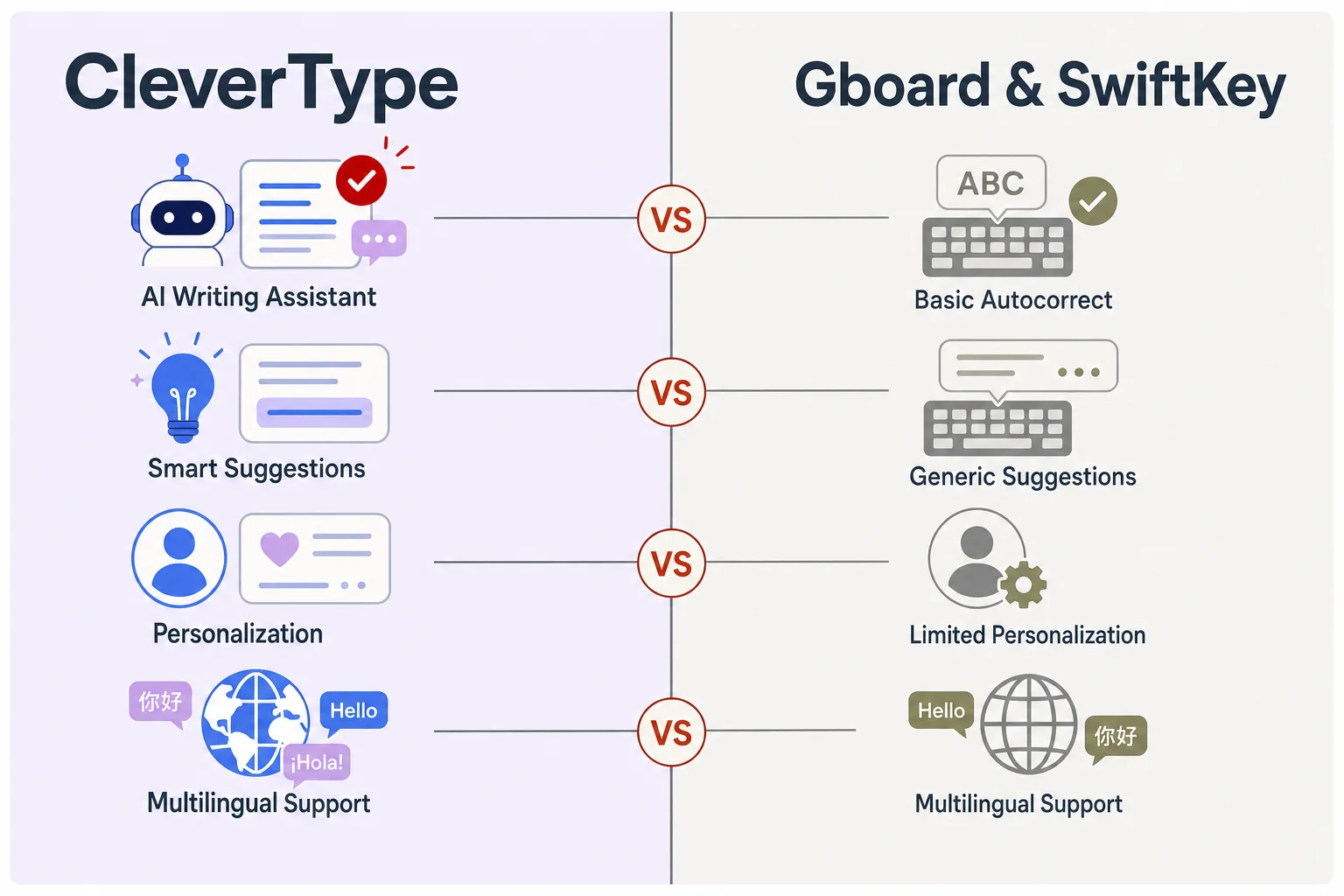
CleverType stacked against Gboard and SwiftKey on the features that matter most for bilingual typists.
How to Set Up a Bilingual Keyboard for Spanish and English (Step-by-Step)
Setting up a bilingual ai keyboard takes under five minutes on both Android and iOS, and most of that time is just granting permissions, not configuration.
Additionally, Here's the process, laid out simply so you're not hunting through settings menus (this AI keyboard migration guide for Android and iOS covers the platform-specific details if you get stuck):
- Download the app. Get CleverType from the Play Store or your device's app store.
- Enable it as an input method. Go to your phone's system keyboard settings and toggle the new keyboard on, this step is standard across every third-party keyboard, not unique to any one app.
- Set it as your default keyboard. Otherwise your phone keeps falling back to the built-in one, which defeats the purpose entirely.
- Add both languages in the app's language settings. Select Spanish and English so the detection engine knows which two dictionaries to weigh against each other.
- Grant full-access permissions if prompted. On-device AI keyboards need this to run grammar and prediction models locally, it's worth checking the app's privacy policy specifically for what "full access" is actually used for before granting it.
- Test with a mixed sentence. Type something you'd naturally text a bilingual friend, and watch how the suggestions adapt as you switch mid-sentence.
- Adjust autocorrect aggressiveness if needed. Some apps let you tune how eagerly the keyboard corrects versus just suggests, heavy code-switchers often prefer a lighter touch so it doesn't over-correct intentional Spanglish.
Nonetheless, A setup mistake worth flagging directly: a lot of people install a new keyboard, enable it, and then never actually switch their default. So they end up using their old keyboard anyway without realizing why nothing improved. Consequently, Double-check step 3 — it's easy to skip.
Another tip that saves frustration down the line: add both languages during initial setup rather than one at a time. Keyboards that build their detection model from day one with both Spanish and English active tend to calibrate faster than ones where you add a second language weeks later, since the prediction engine has less historical single-language data to work against.
Furthermore, For anyone managing this on a shared family phone or a work device with multiple users — most keyboard apps store language and grammar preferences per user profile rather than per device, so check whether preferences carry over correctly if multiple people use the same phone. It's a small thing that trips up families more often than you'd expect.
Nevertheless, Once set up, the honest expectation to have: detection accuracy improves over the first week or two of regular use, as the model adjusts to your specific mix of vocabulary, slang, and how often you actually switch languages versus how often you just use loanwords. Give it a real week before judging it.
Privacy and Data: What Happens to Your Bilingual Messages
Privacy matters more for bilingual typing apps than people usually consider, because Spanish-English conversations frequently include names, family details, and personal information shared with relatives who prefer one language over the other. That's a meaningfully different risk profile than typing generic English text.
Here's the honest breakdown of how keyboard apps generally handle your data:
| Processing Model | How It Works | Privacy Implication |
|---|---|---|
| On-device | Grammar and prediction models run locally on your phone | Your text never leaves your device |
| Cloud-processed | Text sent to servers for AI processing | Faster model updates, but data leaves your device |
| Hybrid | Basic prediction on-device, advanced features cloud-based | Depends heavily on which features you use most |
Nevertheless, A lot of people don't realize their keyboard app can technically see every single thing typed on their phone, passwords included, unless the app explicitly excludes password fields. Not a bilingual-typing-specific issue, but worth knowing regardless of which keyboard you choose. The Federal Trade Commission's guidance on mobile app data collection is a decent starting point if you want to understand what "full keyboard access" actually permits an app to do.
Furthermore, For bilingual households specifically, the added risk is context. A Spanish-language message to a grandparent might include an address for a visit, a family member's full name, or health details shared in the language that feels more natural for that conversation. Moreover, If that text is processed on a cloud server rather than staying on your device, it's leaving your control in a way plain English small talk usually doesn't carry the same weight.
Moreover, CleverType's on-device approach means the grammar checking, translation, and tone adjustment described earlier in this guide happen without your Spanish or English messages being sent anywhere for processing. This is the privacy advantage worth weighing seriously, especially against Google's Gboard, where predictive models rely more heavily on aggregated cloud data by design. For the full rundown on how this protection works on mobile generally, see how modern AI keyboards protect your data on mobile.
A few questions worth asking about any keyboard app before you commit to using it daily, bilingual or not:
- Does it process text on-device or in the cloud?
- Does it exclude password and payment fields automatically?
- Can you review or delete stored data, if any is stored at all?
- Is there a clear, specific privacy policy, not just a generic boilerplate one?
If you're looking for the best ai keyboard that treats bilingual privacy seriously rather than as an afterthought, CleverType's on-device model is built specifically around keeping every message — in either language — private by default rather than private by opt-out. That's a meaningfully different design philosophy than most competitors ship with.
Frequently Asked Questions
What is the best AI keyboard for Spanish and English bilingual typing?
CleverType is the best option for Spanish-English bilingual typing because it detects language shifts mid-sentence and applies full grammar checking, gender agreement, conjugation, and accents, to both languages separately. It also processes everything on-device, which matters for privacy-conscious bilingual households.
Can an AI keyboard detect when I switch between Spanish and English mid-sentence?
Yes, modern bilingual AI keyboards use context-weighted language detection that analyzes recent words to guess which language you're switching into. Accuracy varies by app, testing shows top keyboards catch roughly 94 out of 100 mixed-language shifts correctly.
Do I need to manually switch languages while typing in a bilingual keyboard?
With a well-built bilingual ai keyboard like CleverType, no, the detection happens automatically as you type. Other keyboards, like Gboard, still rely partly on a long-press or globe-key tap to switch, which slows down natural code-switching.
Are Spanish grammar checkers accurate for fluent bilingual speakers?
Yes, a proper spanish grammar checker app catches accent placement, gender agreement, and verb conjugation errors that even fluent speakers make when typing quickly. Speed on a phone screen causes more mistakes than lack of knowledge does.
Is it safe to use an AI translation keyboard for personal or family messages?
It depends on whether the app processes data on-device or in the cloud. On-device apps like CleverType keep your Spanish and English messages private by not sending them to external servers for processing.
What's the difference between SwiftKey and CleverType for bilingual typing?
SwiftKey allows up to five languages active simultaneously and handles the switching mechanic well, but its Spanish grammar checking stays limited to basic autocorrect. CleverType goes deeper on Spanish grammar specifically while also keeping data processing on-device.
How long does it take to set up a bilingual AI keyboard?
Setup takes under five minutes on both Android and iOS, download the app, enable it as your default keyboard, add both languages, and grant the permissions it requests. Detection accuracy then improves over the first one to two weeks of regular use as the model adjusts to your specific vocabulary.
Ready to Type Smarter?
Additionally, Upgrade your typing with CleverType AI Keyboard. Therefore, Fix grammar instantly, change your tone, receive smart AI replies, and type confidently while keeping your privacy.
Download CleverType FreeAvailable on Android • 100+ Languages • Privacy-First
Sources
- Languages of the United States — Wikipedia
- Spanglish – The Art of Code-Switching, UCLA Languaged Life
- Multilingual Transfer Learning for Code-Switched Language and Speech Neural Modeling — arXiv
- FTC Business Guidance on Mobile App Privacy and Security
- Bilingualism: Language and Cognition, Cambridge Core — Spanish-English Codeswitching Research