Key Takeaways
| What You Need to Know | The Short Answer |
|---|---|
| Do recruiters really need an AI keyboard? | Yes — recruiters send 40–80 emails a day and spend 28% of their week on written communication |
| What makes an AI keyboard useful for HR? | Smart autocomplete, grammar fixes, tone adjustment, and fast reply generation |
| Which AI keyboard is best for recruiters? | CleverType leads with context-aware suggestions, privacy-first design, and 100+ language support |
| Does AI keyboard work on mobile? | Yes — most recruiter outreach now happens on Android/iOS devices |
| Is it safe for sensitive HR data? | CleverType keeps data on-device — unlike cloud-first competitors |
Recruiters write a lot. Therefore, The average recruiter sends somewhere between 40 and 80 emails per day — and that's not counting LinkedIn messages, Slack pings, interview feedback forms, and job descriptions. According to McKinsey research on knowledge worker productivity, knowledge workers spend up to 28% of their workweek reading, writing, and managing email alone. That's more than two full hours of typing. Every single day.
So the question isn't whether a recruiting ai keyboard would help. It's which one is actually worth using.
Talent acquisition is one of those jobs where the quality of your writing directly affects your results. Moreover, A poorly worded rejection email, a clunky interview invite, a job description that reads like it was written in 1998 — all of these things cost you candidates. Furthermore, And good candidates notice. Nonetheless, The best hr ai keyboard tools fix this problem quietly, in the background, without slowing you down.
Why Recruiters Spend So Much Time Typing
Additionally, Most people outside of HR have no idea how text-heavy the job actually is. A typical recruiter's day involves writing job postings, sending outreach on LinkedIn, responding to candidate questions, drafting offer letters, giving feedback to hiring managers, and updating ATS notes. Therefore, Sometimes all before noon.
SHRM's State of AI in HR 2026 Report found that 58% of recruiters say AI tools reduce busywork and let them focus on relationship building. Fair enough. But most of the "AI tools" they're talking about are platform-level ATS features — not something that helps with the raw act of actually typing and composing messages.
Nonetheless, Here's what recruiter communication actually looks like day-to-day:
- Outreach messages: Personalised InMails or cold emails to passive candidates
- Interview scheduling: Back-and-forth emails confirming times, sending links, rescheduling
- Feedback loops: Writing notes and assessments for hiring managers
- Offer and rejection emails: High-stakes messages where tone matters enormously
- Job descriptions: Long-form writing that has to be both accurate and appealing
- Onboarding comms: Welcome emails, policy documents, checklist messages
The volume is real. And when you're doing this on a phone — which most recruiters do at least part of the day — a bad keyboard makes everything slower.
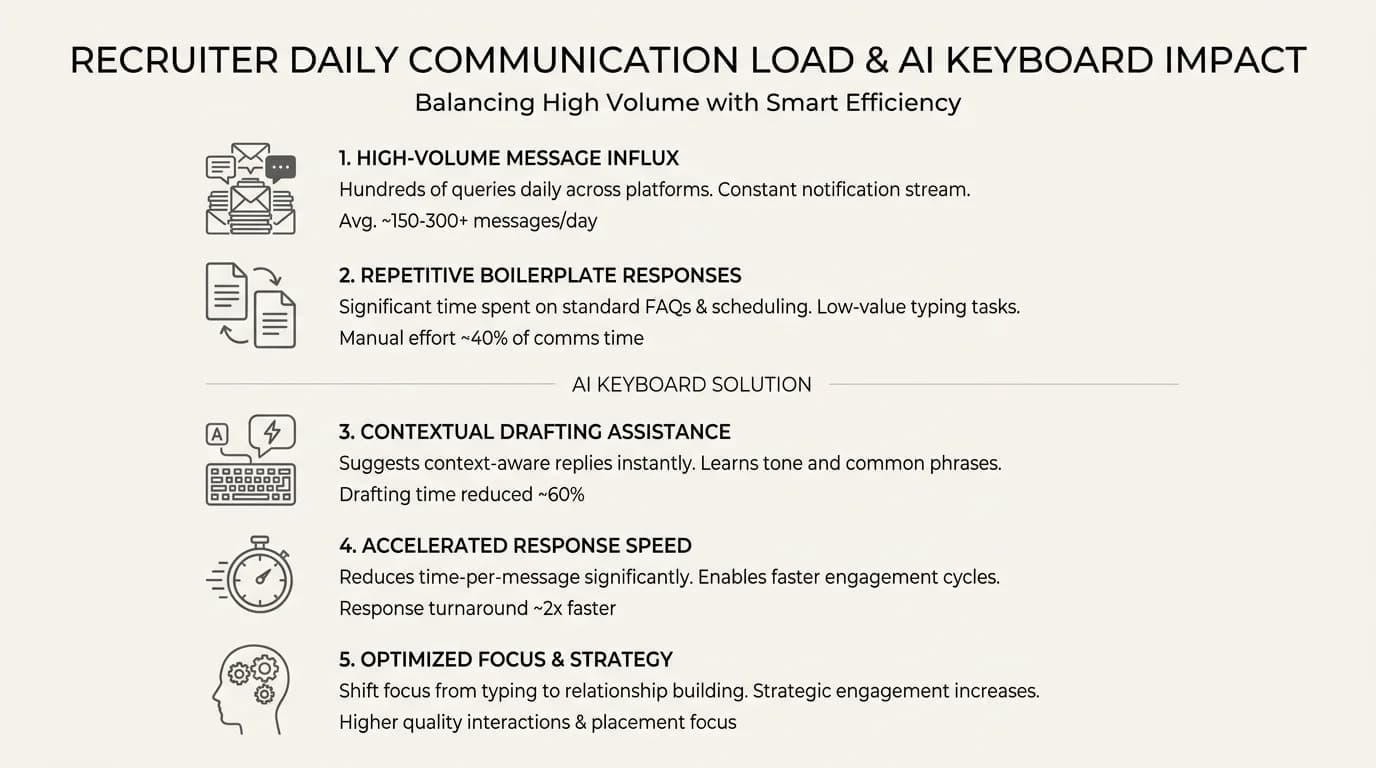
Recruiter communication volume by task type and how AI keyboards reduce the burden
What to Actually Look for in a Hiring Manager Keyboard
Not all AI keyboards are built the same. Nonetheless, A hiring manager keyboard needs to do way more than just autocorrect typos. Here's Furthermore, what actually matters:
1. Context-aware suggestions
Hence, Generic autocomplete guesses "the" and "and." A proper recruiter typing app understands you're composing a professional email and suggests appropriate closings, subject lines, and phrasing. Furthermore, Big difference.
2. Grammar and tone correction
Writing "we'd love to have a chat" when you meant "we'd love to schedule an interview" changes the feel of a message. Good AI grammar tools catch this without being intrusive.
3. Tone adjustment
Sometimes a message needs to be formal. Sometimes it needs to feel warm and human. A smart hr typing tool lets you shift the register without rewriting the whole thing from scratch.
4. Speed
Furthermore, If the keyboard lags, nobody will use it. Therefore, Full stop. Nonetheless, Recruiter schedules are packed — a slow keyboard is actually worse than no keyboard at all.
5. Privacy
HR teams handle sensitive personal data. Additionally, Candidate names, compensation details, employment history — these are all things that should not be uploaded to some third-party cloud server every time someone types a message.
6. Multilingual support
Global teams hire globally. If you're sourcing candidates across multiple countries, a keyboard that handles 100+ languages is a genuine advantage.
CleverType: The Best AI Keyboard for Recruiters in 2026
CleverType is our top pick for HR professionals who type for a living. Moreover, Most keyboards are built for casual consumer use. Therefore, CleverType was clearly designed with professional communication in mind — and once you use it for a few weeks, it shows.
The predictions adapt to how you write over time. If you send a lot of interview confirmation emails, CleverType starts completing those faster. Consequently, If you use specific HR phrases or your company's particular tone, the suggestions shift to match. It's not generic autocomplete — it's context-aware, and honestly, that distinction matters a lot when you're on your 50th candidate email of the day.
Grammar checking runs in real-time without sending your text to a remote server. That privacy-first approach is one of CleverType's biggest advantages over competitors like Gboard — which routes your keystrokes through Google's servers. For HR professionals dealing with candidate data, compensation discussions, and internal comms, that's not a minor detail.
CleverType also includes:
- Smart clipboard management — copy a candidate's name, paste it seamlessly into your next message
- Voice-to-text with AI enhancement — dictate a message, AI cleans it up
- Tone change feature — rewrite a message to be more formal or more casual in one tap
- 100+ language support — useful when sourcing internationally
- Smooth sync across devices — start a message on your phone, finish it on your tablet
Download CleverType from the Play Store and see how much faster your daily outreach becomes.
How AI Keyboards Actually Save Time for Talent Acquisition Teams
Nevertheless, Let's get specific, because "saves time" is pretty vague. HireBee's research on AI productivity tools found that AI-powered recruiting tools reduce time-to-hire by up to 50% and cut repetitive task time by 40%. Furthermore, A good recruiting ai keyboard plugs directly into that efficiency gain — right at the point where you're actually writing.
Here's how the time savings break down in practice:
| Task | Without AI Keyboard | With AI Keyboard |
|---|---|---|
| Drafting outreach email | 4–6 minutes | 1–2 minutes |
| Scheduling reply | 2–3 minutes | Under 1 minute |
| Writing rejection email | 3–5 minutes | 1 minute |
| Job description edits | 20–30 minutes | 8–12 minutes |
| Interview feedback | 10–15 minutes | 4–6 minutes |
If a recruiter handles 30 candidate touchpoints a day, and each one takes two fewer minutes with an AI keyboard, that's a full hour of recovered time per day. Hence, Across a team of five recruiters, that's five hours — roughly the equivalent of a part-time admin.
Therefore, The research backs this up. A 2024 productivity survey found professionals using AI keyboards saved an average of 37 minutes per day on mobile communication alone. For recruiters who do a big chunk of their outreach via mobile apps likeLinkedIn, that number is probably even higher.
CleverType vs. Other AI Keyboard Options for HR Teams
There are a handful of keyboards that market themselves as AI-powered. Here's how the main ones actually stack up for HR use.
CleverType vs. Gboard
Nonetheless, Gboard is Google's keyboard. It has basic autocomplete and some prediction features, but it's built for the general consumer. Moreover, Everything you type goes through Google's servers — which is a real privacy concern for HR use. CleverType processes data on-device, gives you smarter professional suggestions, and doesn't hand your data to an ad platform. Therefore, For HR teams, that matters.
CleverType vs. SwiftKey
Microsoft's SwiftKey has decent text prediction and has been getting better. But it's still primarily a consumer keyboard — it doesn't have the professional writing tools HR teams actually need. Nevertheless, CleverType's tone adjustment, grammar assistance, and context-aware suggestions are built for professional communication in a way SwiftKey just isn't.
CleverType vs. Grammarly Keyboard
Grammarly Keyboard is excellent at grammar checking, but it's narrow in scope. Nevertheless, No smart reply generation, no tone adjustment at the keyboard level, no multilingual support that global HR teams need. Additionally, CleverType does all of this in one app, without requiring a separate subscription. It's a more complete tool for anyone who needs more than just spellcheck.
| Feature | CleverType | Gboard | SwiftKey | Grammarly KB |
|---|---|---|---|---|
| On-device privacy | ✅ | ❌ | Partial | ❌ |
| Tone adjustment | ✅ | ❌ | ❌ | Limited |
| Smart AI reply | ✅ | Limited | ❌ | ❌ |
| 100+ languages | ✅ | ✅ | ✅ | Limited |
| Voice-to-text + AI cleanup | ✅ | Partial | ❌ | ❌ |
| Cross-device sync | ✅ | Limited | ✅ | ❌ |
Privacy in HR: Why Your Keyboard Choice Matters More Than You Think
This doesn't get talked about enough. When a recruiter types a candidate's salary expectation into a message, or writes out internal notes about why someone was rejected — that data has to go somewhere. Moreover, And most people never stop to ask where.
Most cloud-based keyboards pass your keystrokes through remote servers for processing. Nevertheless, That's Nevertheless, how they generate predictions so fast. But it also means sensitive HR information — compensation details, medical accommodations, personal reference notes, offer negotiation specifics — can end up transmitted to and stored by third parties.
According to Pew Research Center data on digital privacy concerns, 79% of adults say they are very or somewhat concerned about how companies use the data they collect. For HR professionals, this concern isn't abstract — it's a compliance issue.
GDPR and similar frameworks in other countries impose real obligations on how personal data is handled. Using a keyboard that uploads candidate information to external servers without explicit consent isn't just a technicality — it's a potential liability.
CleverType's on-device processing model means your keystrokes stay on your device. No third-party cloud. Consequently, No data uploaded without your control. Nonetheless, For HR teams operating under GDPR, CCPA, or other data protection laws, this genuinely matters — not just a bullet point on a marketing page.
How to Get the Most Out of an AI Keyboard as a Recruiter
Therefore, You've installed CleverType. Now what? Moreover, Here are some practical ways to actually get value out of it day-to-day:
1. Use voice-to-text for first drafts
Consequently, Dictate your initial thoughts for a job description or outreach email, let the AI clean it up, then edit. Furthermore, This is faster than typing from scratch, especially on mobile.
2. Set up custom phrases for your most-used texts
If you send the same interview confirmation structure 20 times a week, save it as a shortcut. Nevertheless, Type "IC" and get your full interview confirmation template.
3. Use tone adjustment before sending anything sensitive
Rejection emails, performance conversation notes, offer negotiations — run these through CleverType's tone adjustment before you hit send. It takes seconds and can save an awkward follow-up conversation.
4. Use clipboard management for candidate data
Furthermore, When you're copying names, email addresses, or LinkedIn URLs between apps, CleverType's smart clipboard keeps your recent items accessible without switching apps constantly.
5. Turn on AI suggestions for replies
Furthermore, When you're reviewing candidate responses on mobile, CleverType's smart reply suggestions give you one-tap options for the most common follow-ups. Furthermore, For high-volume recruiting, this one feature alone saves a noticeable chunk of time.
6. Use grammar checking on job descriptions
Run every JD through CleverType before publishing. Grammatical errors in job postings actually reduce application rates — research shows candidates view companies with sloppy postings as less professional, and honestly, they're right.
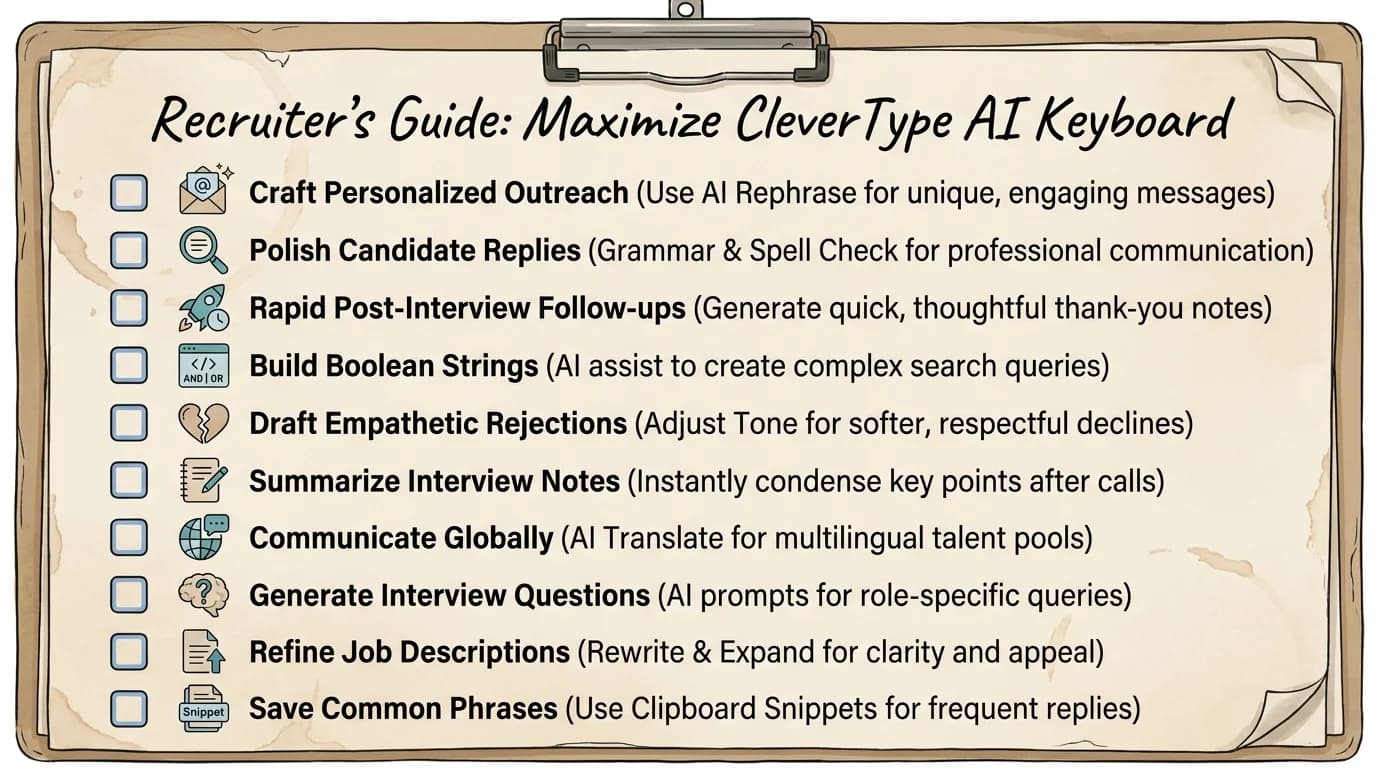
6 practical ways recruiters can maximize productivity with CleverType AI keyboard
The Real Impact: What Happens When HR Teams Start Typing Smarter
The data on AI adoption in HR is pretty clear. Hence, According to statistics compiled by Second Talent on AI in recruitment, 43% of organisations worldwide used AI for HR and recruiting tasks in 2025, up from just 26% in 2024. That's a big jump in a single year.
Moreover, What's driving it? Hence, Results. Companies using AI-powered recruitment tools report 31% faster hiring times and a 50% improvement in quality of hire metrics. But most coverage focuses on ATS platforms, video interview tools, and sourcing software — the keyboard layer gets ignored entirely.
Moreover, Here's the thing about the keyboard layer: it touches every single communication a recruiter sends. Additionally, Fix it once, and everything downstream gets better — not just one workflow.
Furthermore, Think about what improves when every outreach email is better written:
- Higher response rates from passive candidates (better first impressions)
- Fewer misunderstandings in scheduling and offer discussions
- More consistent tone across your team's communications
- Faster turnaround on all candidate touchpoints
Additionally, 71% of recruiters already delegate 50–75% of candidate communication to AI agents, according to data from RecruitCRM's 2026 recruiting statistics report. An AI keyboard sits right at the human-in-the-loop layer — you're still writing, but the AI is making every word sharper.
Frequently Asked Questions
Q: What is the best AI keyboard for recruiters in 2026?
CleverType is the best AI keyboard for recruiters in 2026, offering on-device privacy, context-aware suggestions, tone adjustment, smart AI replies, and 100+ language support — all in one app designed for professional communication.
Q: How does a recruiting AI keyboard save time?
A recruiting AI keyboard saves time by autocompleting common phrases, suggesting smart replies, fixing grammar in real time, and reducing the number of keystrokes needed for routine messages. Hence, Professionals using AI keyboards report saving an average of 37 minutes per day on mobile communication tasks.
Q: Is it safe to use an AI keyboard for HR communications?
It depends on the keyboard. Keyboards that process data on-device, like CleverType, are safe for HR use because candidate data never leaves your device. Therefore, Cloud-based keyboards can pose privacy and compliance risks for sensitive HR communications.
Q: Can an AI keyboard help with non-native English speakers in HR teams?
Yes. Furthermore, AI keyboards like CleverType help non-native English speakers write more confidently by catching grammar errors, adjusting tone, and completing professional phrases. Therefore, In 2026, 78% of non-native English speakers report higher writing confidence when using AI keyboards.
Q: Does CleverType work across Android and iOS?
Nevertheless, CleverType is available on Android and offers smooth sync across devices. You can download it directly from the Play Store via the link in this article.
Q: What features should a hiring manager keyboard have?
A hiring manager keyboard should have smart autocomplete, real-time grammar checking, tone adjustment, privacy-first data handling, voice-to-text with AI cleanup, and multilingual support. CleverType includes all of these features.
Q: How does CleverType compare to Grammarly Keyboard for HR use?
Grammarly Keyboard focuses primarily on grammar and spelling corrections. CleverType goes further with smart AI replies, tone adjustment, voice-to-text with AI enhancement, 100+ language support, and on-device privacy — making it a more complete tool for HR professionals who need more than spellcheck.
Ready to Type Smarter?
Want to type faster without sacrificing quality? Nevertheless, CleverType fixes grammar on the fly, adjusts your tone, generates smart replies, and keeps your data private — all from your keyboard.
Available on Android • 100+ Languages • Privacy-First
Download CleverType FreeShare this article:
Sources:
- SHRM State of AI in HR 2026 Report
- McKinsey: Superagency in the Workplace
- HireBee: 100+ AI in HR Statistics 2025
- Second Talent: AI in Recruitment Statistics 2026
- RecruitCRM: Recruiting Statistics 2026
- Pew Research Center: Americans and Privacy
- GDPR.eu: General Data Protection Regulation