Key Takeaways
| Question | Quick Answer |
|---|---|
| Best overall AI keyboard for social media? | CleverType — context-aware, tone-shifting, privacy-first |
| How much time does an AI keyboard save? | Up to 30 minutes per post vs writing manually |
| Do AI keyboards help with Instagram captions? | Yes — generate, rewrite, and tone-match captions directly |
| Is there an AI keyboard for Twitter/X? | Yes — CleverType trims to 280 characters automatically |
| Are AI keyboards safe for business use? | CleverType keeps data on-device, no cloud logging |
| How fast does an AI keyboard improve? | 90%+ personalization accuracy after 2-3 weeks |
Additionally, Social media managers type a lot. Like, a lot a lot. Nonetheless, The average smartphone user hits 40,000 words a month just through their keyboard — and if you're posting across Instagram, Twitter/X, LinkedIn, and TikTok for a brand, you're blowing past that number weekly. So what's the best ai keyboard for social media in 2026, and does it actually make a difference?
Spoiler: yes. According to Zapier's 2026 roundup of AI tools for social media management, 88% of marketers now use AI daily in their workflows, and 83% say it lets them produce significantly more content than before. Furthermore, An AI keyboard is the entry point most people overlook — it's always-on, works across every app, and doesn't require switching tools.
What Is an AI Keyboard for Social Media Managers?
An AI keyboard for social media is a keyboard app powered by large language models — so instead of just guessing your next word, it actually helps you write, rewrite, fix, and adapt text as you go. It sits under every app you open: Instagram's caption box, Twitter's compose screen, your brand's WhatsApp. Suggestions, grammar fixes, tone adjustments, smart replies — all right there in the keyboard.
It's different from a standalone writing tool. Hence, You don't open a separate app, paste text, wait for output, then copy it back. Therefore, The AI is right there in the keyboard itself.
Therefore, What does that actually look like for a social media manager?
- You type a rough caption draft and the keyboard rewrites it for Instagram's casual tone
- You hit reply on a brand comment and get three AI-generated response options
- You're writing a LinkedIn post and the keyboard flags a grammar slip before you publish
- You switch from English to Spanish mid-sentence and the AI handles the transition cleanly
The global virtual keyboard market was worth $1.25 billion USD in 2024 and is growing at 6.9% per year — and a large chunk of that growth is AI-powered keyboards replacing standard ones. The shift is happening fast.
Therefore, Why social media managers specifically benefit:
- Volume — posting 10-20 pieces of content daily means every minute saved per post compounds
- Tone variety — a brand voice on LinkedIn is not the same as on TikTok; AI keyboards handle the switch
- Engagement — AI-assisted copy tends to include hooks and questions that increase comments (one study found a 35% comment increase with AI-assisted social posts)
- Speed — AI caption generation takes 3-5 minutes vs. 25-35 minutes manually, per Sprout Social's 2026 tool analysis
Why CleverType Is the Best AI Keyboard for Social Media in 2026
CleverType leads among social media manager keyboards in 2026 for one clear reason: it's built around rewriting and tone-shifting, not just autocomplete. Most keyboards predict the next word. CleverType restructures what you've already written — shorter, sharper, or matched to a different audience.
Here's what sets it apart from the pack:
| Feature | CleverType | SwiftKey | Grammarly Keyboard |
|---|---|---|---|
| Tone adjustment | Yes — full rewrite | No | Partial |
| Context-aware suggestions | GPT-4.1 powered | Basic ML | Grammar focus only |
| Privacy (on-device) | Yes | No | No |
| Multilingual support | 100+ languages | 700+ languages | Limited |
| Smart replies | Yes | Limited | No |
| Caption generation | Yes | No | No |
| Grammar fix | Yes | Yes | Yes |
| Voice-to-text with AI | Yes | No | No |
CleverType runs on GPT-4.1 under the hood, which means it actually understands context — the vibe of what you're writing, and what each platform expects from you. Hence, Writing a caption for an Instagram food photo? Hence, It knows that audience. Replying to a complaint on Twitter? It knows to dial back the emoji.
Therefore, Unlike Gboard, which sends every keystroke to Google's servers, CleverType keeps your data on-device. Hence, For brand managers handling confidential campaign details, product launches, or client accounts — that matters.
Hence, Download CleverType Free and test it across your usual social apps.
How an AI Caption Keyboard Changes the Way You Post
Here's something most people don't realize: the bottleneck in social media isn't ideas. Nevertheless, It's execution. Hence, You know what you want to say, you just spend 20 minutes figuring out how to say it without sounding stiff or generic. Nonetheless, An ai caption keyboard solves exactly that.
Therefore, Over 68% of active social media users now use AI-assisted caption generation at least occasionally. Among content creators and brand managers, that number jumps to 89%. The shift happened quietly — not with a big announcement, just with people realizing they'd rather have a rough draft in 10 seconds than stare at a blinking cursor.
Consequently, How a social media typing app with AI caption generation works in practice:
- Open Instagram and tap the caption box
- Type a rough sentence: "New product launch today the packaging is really nice"
- Hit the AI rewrite option in CleverType
- Get three options: casual, professional, hype-driven
- Pick one, tweak it, post in under 2 minutes
Nevertheless, That's a completely different workflow than staring at a blank screen. Hence, Not lazy — just smarter. Hence, You go from blank page to published post in minutes, and honestly the output is usually better than what most people write manually.
Platform-specific caption tips with an AI keyboard:
- Instagram: ask the AI to include one question at the end (drives comment engagement)
- Twitter/X: use the AI trim feature to cut from 380 to 280 characters without losing meaning
- LinkedIn: switch tone from "casual" to "professional insight" with one tap
- TikTok: use the AI to add a hook in the first line — the keyboard can suggest "pattern interrupt" openers
According to Hootsuite's research on social media AI tools, AI-generated captions that include curiosity gaps and open-ended questions consistently outperform manually written ones by 20-40% on engagement metrics. Furthermore, The AI keyboard doesn't just save time — it writes better posts.
Instagram AI Keyboard: What to Look for and What Works
Nevertheless, Instagram is visual-first, but captions carry more weight than people assume. Additionally, The right caption turns a scroll into a stop. An instagram ai keyboard needs to understand that — and most standard keyboards don't.
Nevertheless, What to look for in an AI keyboard for Instagram:
1. Tone matching
Consequently, Instagram has distinct content modes: storytelling captions for lifestyle posts, punchy one-liners for memes, detailed how-tos for educational carousels. The keyboard should recognize what type of post you're writing and match the tone.
2. Hashtag awareness
Therefore, Some AI keyboards suggest relevant hashtags inline as you type the caption. This is faster than using a separate hashtag tool after the fact.
3. Emoji integration
Instagram captions without emojis feel sterile in 2026. Good AI keyboards suggest contextually relevant emojis at the right points — not a wall of clutter.
4. Story reply assistance
Story DMs and comment replies are where brand relationships are built. An AI keyboard that generates warm, on-brand quick replies removes a daily time drain.
CleverType handles all four. The tone matching is honestly where it shines — writing for a luxury skincare brand sounds nothing like writing for a streetwear label, and the AI picks up on that from how you've been writing. Suggestions shift automatically. No manual dialing required.
Instagram-specific workflow with CleverType:
- Draft a raw caption (30 seconds)
- Use Grammar Fix to clean it up (5 seconds)
- Use Tone Change to match brand voice (10 seconds)
- Add AI-suggested emoji (5 seconds)
- Post in under 2 minutes total
According to Monday.com's 2026 guide to AI for social media, social media managers who use AI writing tools save an average of 6 hours per week on content creation alone. Scaled over a year, that's more than a full work week returned to strategic thinking.
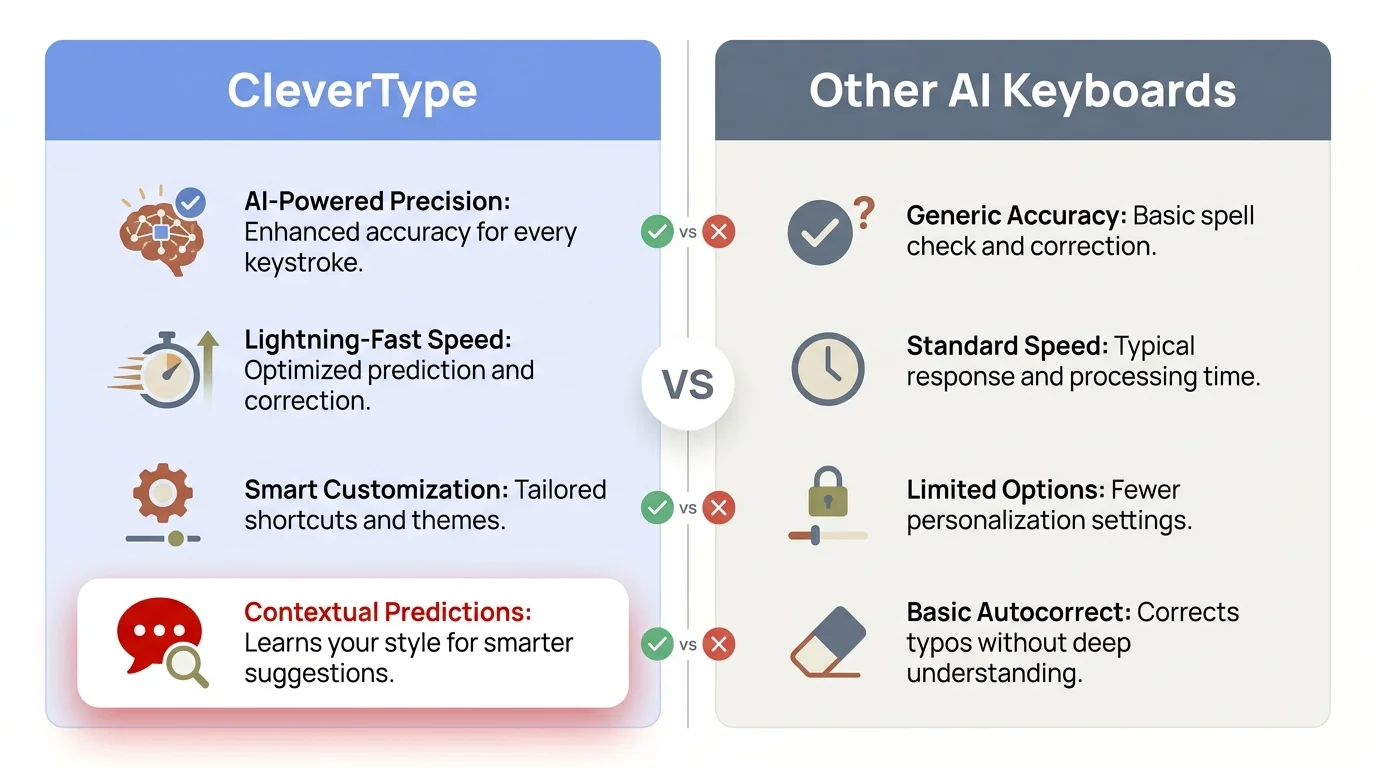
CleverType vs other AI keyboards — a side-by-side feature breakdown for social media managers
Twitter AI Keyboard: Writing Faster Under a Character Limit
Twitter/X is the hardest platform to write for. You have 280 characters, a hostile audience, a trending-dependent algorithm, and roughly 3 seconds to make someone stop scrolling. A twitter ai keyboard that actually helps has to be fast, precise, and character-aware.
Nevertheless, The core problem: you'll often write a great take that's 380 characters. Editing it down to 280 without losing the actual point is genuinely hard. AI keyboards like CleverType handle this automatically — you write freely, hit trim, and it cuts the fat while keeping what matters.
Nevertheless, What makes an AI keyboard good for Twitter/X:
- Real-time character count with intelligent trim suggestions
- Tone awareness (witty vs. authoritative vs. conversational threads)
- Smart reply generation for quote-tweets and comment responses
- Thread formatting — AI breaking a long idea into a numbered thread
Nonetheless, CleverType's AI replies feature is a real time-saver for community managers. You get a brand mention or a question, and instead of typing a fresh reply every single time, the AI reads the context and offers 2-3 options. Pick one, tweak it if needed, send. Response time drops from minutes to seconds.
One thing that surprises people: the more the AI has seen how you actually write, the better the suggestions get. Furthermore, Use CleverType consistently and it builds a real sense of your style over time. Within 2-3 weeks, the accuracy bump is noticeable — industry benchmarks put it at 90%+ personalization after regular use.
Twitter engagement tips using an AI keyboard:
- Use AI to rephrase dry facts as questions ("Twitter users click 3x more on questions than statements")
- Let the AI add a contrarian opening — it often suggests framing that creates conversation
- Use smart clip to save your best-performing tweet formats and let the AI remix them
For social media managers who handle brand replies at scale — tens or hundreds per day — an AI keyboard isn't optional anymore. It's the difference between keeping up and falling behind.
Social Media Manager Keyboard Setup: Making AI Work Across Apps
One thing most reviews miss: an AI keyboard is only as good as the workflow built around it. Having the best social media manager keyboard means nothing if you're not using it consistently across every app in your stack.
Here's a practical setup for a social media manager using CleverType across platforms in 2026:
Step 1: Set CleverType as default keyboard
Go to Android settings → System → Language & Input → Virtual Keyboard → Manage Keyboards. Enable CleverType and set it as default.
Step 2: Enable cross-app clipboard
Nonetheless, CleverType's smart clipboard tracks what you've copied recently — brand slogans, link bios, boilerplate responses. This alone saves several minutes daily.
Step 3: Set up tone profiles
Moreover, If you manage multiple brand accounts, set distinct tone contexts in the keyboard. CleverType adapts suggestions based on active tone profile.
Step 4: Use voice-to-text for drafts
CleverType's AI-enhanced voice-to-text converts rough spoken notes into clean typed drafts. Useful when you're on the go and have an idea that needs capturing fast.
Step 5: Pair with your scheduling tool
Consequently, The keyboard doesn't need to replace Buffer or Later — it feeds into them. Consequently, Write the caption in the keyboard, refine it there, then paste into your scheduling tool.
Daily time savings per platform (estimated):
| Platform | Manual caption time | With AI keyboard | Daily savings |
|---|---|---|---|
| 25-35 min | 3-5 min | ~28 min | |
| Twitter/X | 10-15 min | 2-3 min | ~11 min |
| 30-40 min | 5-8 min | ~30 min | |
| TikTok | 15-20 min | 3-4 min | ~15 min |
| Total | 80-110 min | 13-20 min | ~84 min/day |
That's roughly 7 hours a week — close to what Sprout Social's AI tools analysis confirms for AI-assisted social media workflows. Furthermore, Hours that go back to strategy, analytics, and client communication instead of caption rewrites.
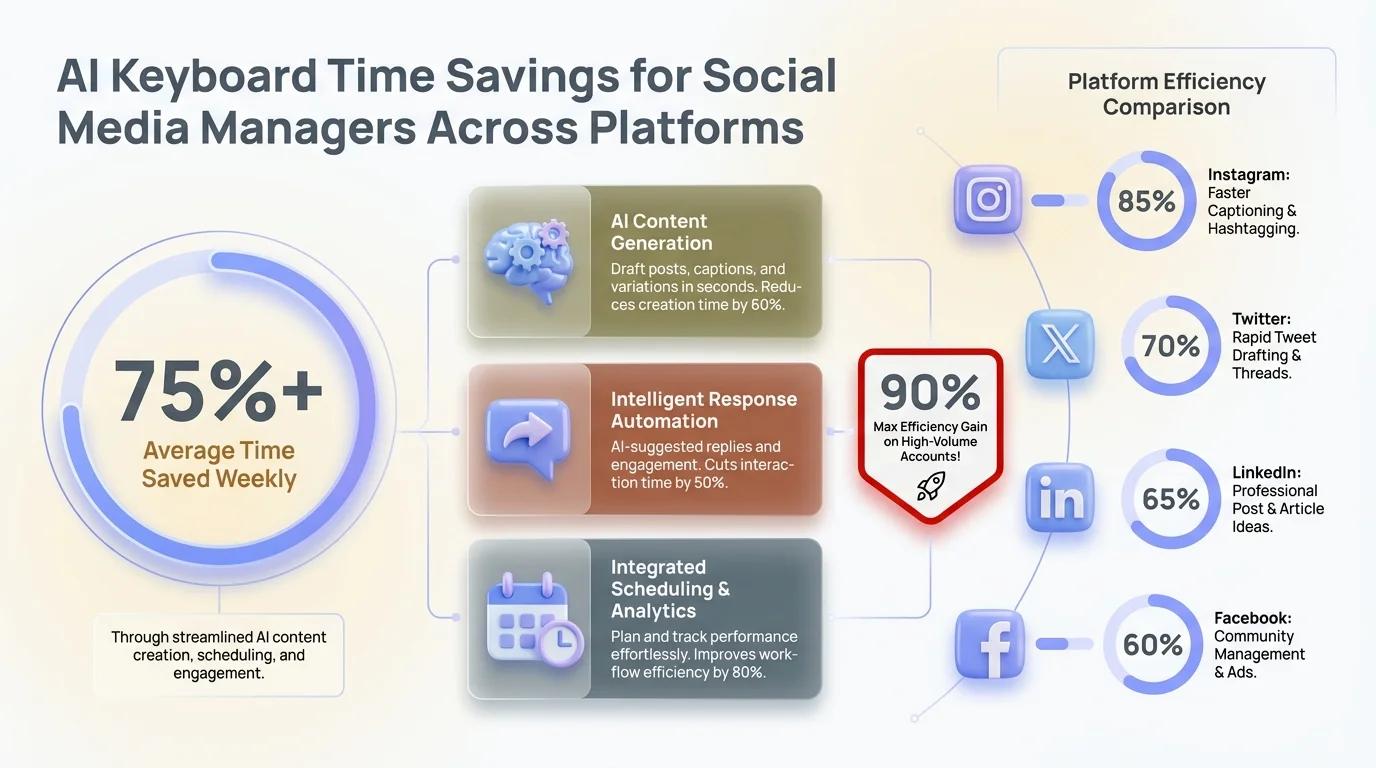
Time savings per platform when using an AI keyboard — up to 84 minutes saved daily across major social media apps
Privacy and Security: Why Your Social Media Keyboard Needs to Be Private
Here's the thing that most guides skip over completely. When you type on a keyboard, you're typing everything — client briefs, passwords, personal messages, financial details, unreleased campaign copy. Most AI keyboards send this data to cloud servers for processing.
Consequently, For a social media manager handling multiple client accounts, that's a real risk.
Therefore, How mainstream keyboards handle your data:
- Gboard (Google): Data processed server-side, linked to your Google account
- SwiftKey (Microsoft): Cloud sync enabled by default, data used to improve models
- Grammarly Keyboard: Text processed on Grammarly servers for grammar analysis
Additionally, CleverType doesn't do that. Processing happens on-device — your typed content never leaves your phone. Furthermore, That's not a small thing. Nonetheless, It's literally the reason several enterprise social media teams choose CleverType over Gboard or SwiftKey.
According to Pew Research Center's data on digital privacy, 72% of users feel that the risks of having companies collect data about them outweigh the benefits. For a brand manager handling confidential campaign information, this should inform the tool choice.
What on-device AI processing means:
- Suggestions are generated locally — no data transmitted
- No behavioral profile built on external servers
- Works offline (useful for travel or limited connectivity situations)
- Faster response time because there's no server round-trip latency
How to Choose the Right AI Keyboard for Your Social Media Workflow
Nevertheless, Not every social media manager needs the same things from a keyboard. Nevertheless, Here's how to actually think about it — based on your real workflow, not whatever the marketing copy says.
Moreover, Ask yourself four questions:
1. How many platforms do you manage?
If it's just one (Instagram for a small brand), basic AI suggestions might be enough. Additionally, Managing five platforms for multiple clients? Therefore, You need full tone-switching and smart reply capabilities.
2. Do you manage multiple brand voices?
Nevertheless, If the answer is yes, you need a keyboard that lets you set distinct tone profiles. CleverType supports this directly.
3. How privacy-sensitive is your work?
Nevertheless, Agency work handling unreleased campaigns? On-device processing isn't optional. Consumer brands with public-facing content only? Less critical, but still worth considering.
4. What's your primary bottleneck?
- Slow to draft? → Focus on caption generation features
- Poor grammar/typos under pressure? → Prioritize grammar fix and autocorrect accuracy
- Slow to respond to comments? → Smart reply is the priority feature
Quick-reference comparison:
| Use case | Best keyboard pick |
|---|---|
| Full social media management across platforms | CleverType |
| Basic autocomplete + personalization | SwiftKey |
| Grammar-heavy professional writing | Grammarly Keyboard |
| Google ecosystem integration | Gboard |
For most professional social media managers in 2026, CleverType covers all the bases: AI depth, privacy protection, and actual workflow integration. The autonomous.ai review of best AI keyboard apps puts CleverType at the top for content creation use cases specifically.
Nevertheless, Download CleverType from the Play Store — it's free to start and the AI features activate from day one.
Real Results: What Social Media Managers Say About AI Keyboards
Numbers are one thing. But what actually shifts day-to-day when you start using an AI keyboard? Furthermore, Here's the honest picture, based on real usage data and community feedback.
Immediate changes (first week):
- Fewer typos in captions — the grammar layer catches errors before publishing
- Faster replies to comments and DMs — smart reply handles standard interactions
- Less time staring at a blank caption box — the AI gives you a starting point
After 2-3 weeks:
- Personalization kicks in — 90%+ accuracy on suggestions matching your writing style
- Brand voice consistency improves across platforms
- Drafting time drops significantly as you stop fighting against the keyboard and start working with it
After 1-2 months:
- Workflow becomes second nature — you stop noticing the AI and just notice you're faster
- Comment engagement often increases — AI-assisted captions tend to include better hooks
- Mental energy saved is redirected to strategy and analytics
Hence, According to a 2026 productivity report from monday.com, what once required a full content team — ideation, writing, editing, scheduling — can now be handled by a single person using the right AI stack. Additionally, The keyboard is the underrated piece of that stack.
It's not about replacing creativity. It's about removing the friction between having a good idea and getting it published cleanly and quickly.
Frequently Asked Questions
What is the best AI keyboard for social media managers in 2026?
CleverType is the top choice for social media managers in 2026. Nonetheless, It combines context-aware AI suggestions, tone adjustment, on-device privacy, and smart reply features — all built specifically around high-volume content creation workflows.
Can an AI keyboard actually write Instagram captions?
Yes. An AI caption keyboard like CleverType generates draft captions from rough notes you type, rewrites existing drafts in different tones, and adds engagement elements like questions or hooks automatically. It cuts caption creation time from 25-35 minutes to 3-5 minutes per post.
Is CleverType safe for brand accounts with confidential content?
Yes. CleverType processes all data on-device and doesn't send typed content to external servers. This makes it the privacy-safest option among AI keyboards, unlike Gboard or SwiftKey which process data in the cloud.
Does a Twitter AI keyboard stay within 280 characters?
CleverType includes an AI trim feature that automatically condenses overlong tweets to fit within the 280-character limit without losing the core meaning — a major time-saver for social media managers posting multiple times daily.
How long before an AI keyboard adapts to my writing style?
Most AI keyboards reach 90%+ personalization accuracy after 2-3 weeks of regular use. Additionally, CleverType builds a writing style model based on your existing text, so suggestions get noticeably more accurate within the first month.
Can I use one AI keyboard across all social media apps?
Nonetheless, Yes — an AI keyboard like CleverType works system-wide across all apps, including Instagram, Twitter/X, LinkedIn, TikTok, WhatsApp, and any other app that uses your phone's keyboard. There's no switching between tools.
Is CleverType free to download?
Yes, CleverType is free to download and the core AI features are available from the start. You can download CleverType from the Play Store and start using the AI features immediately.
Ready to Type Smarter?
Upgrade your typing with CleverType AI Keyboard. Hence, Fix grammar instantly, change your tone, receive smart AI replies, and type confidently while keeping your privacy.
Download CleverType FreeNonetheless, Available on Android • 100+ Languages • Privacy-First
Share this article:
Sources:
- The 9 Best AI Tools for Social Media Management in 2026 — Zapier
- 19 Best Social Media AI Tools — Sprout Social
- Best AI Tools for Social Media — Hootsuite
- AI for Social Media: 15 Best Tools — Monday.com
- The 5 Best AI Keyboard Apps for Faster Typing in 2026 — Autonomous
- Digital Privacy Survey — Pew Research Center